
What an "AI release notes generator" actually means
I ship integrations at eesel, the GitHub, Jira, and Confluence connectors that pull a team's work into one place. So I've watched the failure mode up close: a perfectly good engineering team ships great work, then dumps a wall of fix: null check and merge branch main into a "release notes" page and wonders why nobody reads it.
There are really two different jobs hiding under one phrase, and confusing them is where most release notes go wrong.
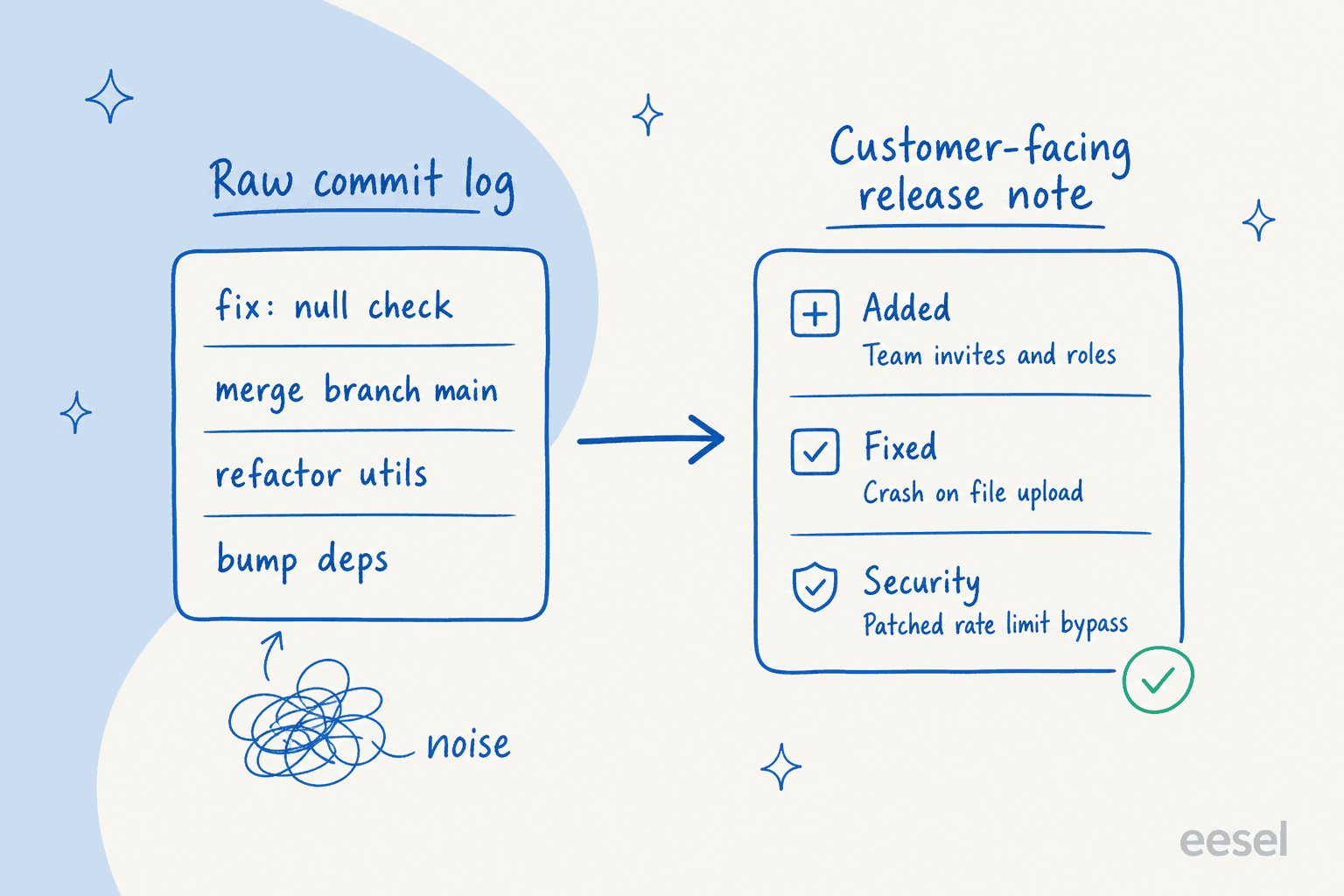
An internal changelog documents the evolution of the source code, step by step, and lives close to git. Keep a Changelog, the closest thing the industry has to a spec, frames a commit's whole purpose as "to document a step in the evolution of the source code."
A customer-facing release note is benefit-led. It tells a user why and how the software changed so they can decide whether to upgrade. As Keep a Changelog puts it, a changelog entry exists "to document the noteworthy difference, often across multiple commits, to communicate them clearly to end users," and the line that should be tattooed on every release page: "Changelogs are for humans, not machines."
That distinction is exactly why feeding commits to an AI rarely works. One change a user cares about might span ten commits; one commit might mean nothing to any user. An AI release notes generator's job is to bridge that gap, and the good ones do it by reading the curated signal (a pull request, a linked issue) rather than the noisy one (the raw diff).
How AI release-notes generation works
Strip away the branding and almost every tool follows the same pipeline.
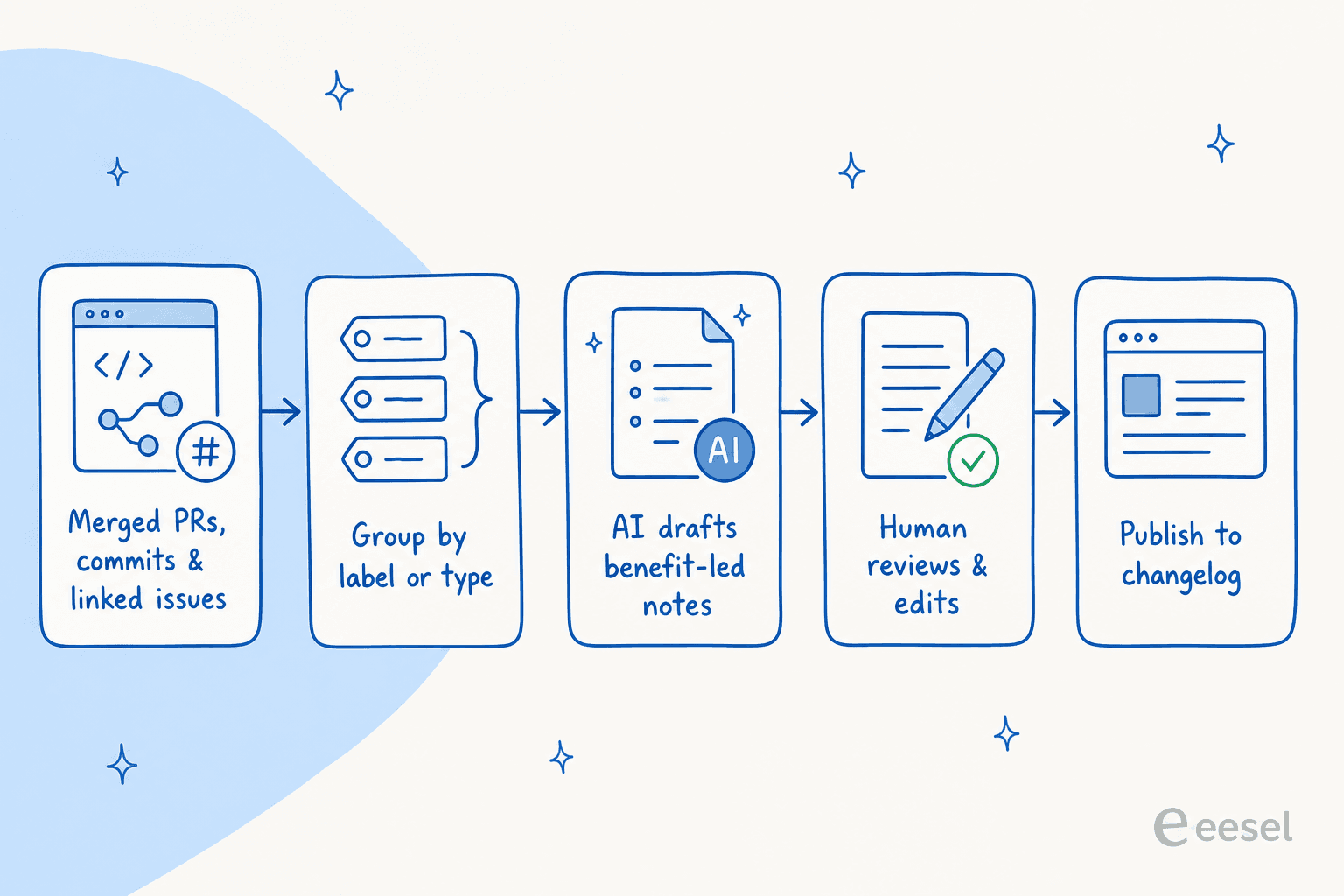
- Collect the work. The tool gathers everything in a release window: merged PRs, commits with a specific marker, or issues tagged to a version.
- Group it. Changes get sorted into categories, usually by a PR label, a commit trailer, or issue type.
- Draft it. Either rules stitch the titles into a list (no LLM), or a model rewrites them into prose. This is the step people mean when they say "AI changelog."
- Review it. A human edits, cuts the internal noise, and fixes tone.
- Publish it. The notes go to a changelog page, a GitHub release, or a knowledge base doc.
The interesting design choice is at step 1. The teams who get this right pull from issues or PRs, not commits. One engineer who built an automated release-notes pipeline across more than 100 repos explained why he refused to source from commit messages:
"We could inspect Git commit messages. But adding rich text into commit messages isn't ideal. Could we instead make use of rich text capabilities in Jira issues and keep Git commit messages simple?"
That's the whole game in one quote. The richer your input, the less the AI has to guess.
The tools that already generate release notes
You probably don't need to buy a new tool. Here's what the four most common stacks actually do today.
| Tool | Approach | Source signal | Grouping | Hard limit | Human review |
|---|---|---|---|---|---|
| GitHub auto-notes | Rules-based, no LLM | Merged PR titles | PR labels via .github/release.yml | List of PR titles only, no rewriting | Assumed ("check the generated notes") |
| GitLab changelog | Rules-based, no LLM | Commits with a Changelog: trailer | 8 trailer values | Commits with no trailer are invisible | Template-based |
| Linear Releases | LLM agent | Linked issues in a release | Template field | Up to 15 pipelines on Business | Write-or-generate |
| Jira Rovo | LLM agent | Jira work items | Themes | 20 work items per draft | "Review the draft, then publish" |
A few things worth pulling out.
GitHub is the one most people already use. Clicking Generate release notes when drafting a release produces, per GitHub's docs, "a list of merged pull requests, a list of contributors to the release, and a link to a full changelog." You shape it with a .github/release.yml file that maps PR labels to section titles and lets you exclude PRs by label or author. It does not rewrite anything, so the output is exactly as good as your PR titles and label hygiene. That exclude setting matters more than it looks, and we'll come back to it.
GitLab takes the opt-in route: per GitLab's docs it builds changelogs "based on commit titles and Git trailers," and a commit only shows up if it carries a trailer like Changelog: feature. The accepted values (added, fixed, changed, deprecated, removed, security, performance, other) map almost one-to-one onto the Keep a Changelog categories. The trade-off is discipline at commit time, and the upside is a clean, portable changelog you control.
Linear is where the LLM shows up. Its Releases feature lets you "write release notes yourself, or generate them with Linear," and the generated path uses a Linear agent to "analyze the set of issues included in a particular release." Note the source again: issues, not commits, the same architectural call that engineer made by hand. If you're weighing the two trackers, our Linear vs Jira breakdown goes deeper.
Jira uses Rovo's Release Notes Drafter, which creates notes "from a set of up to 20 Jira work items at a time" and "groups them into themes." The flow ends, as it should, with "review the draft and follow the prompts to publish." It's one of a growing set of Jira AI automation features, and worth checking against Jira pricing since Rovo needs Confluence active.
And if you live in your terminal, the upstream lever is your commit messages themselves. A coding agent like Claude Code can "generate descriptive commit messages by analyzing git diffs" and summarize changes into a couple of bullet points. Better commit messages mean better raw material for whatever runs downstream.
Why raw commit dumps make terrible release notes
This is the hill Keep a Changelog is willing to die on. Its actual tagline is "Don't let your friends dump git logs into changelogs," and the reasoning is blunt:
"Using commit log diffs as changelogs is a bad idea: they're full of noise. Things like merge commits, commits with obscure titles, documentation changes, etc."
There's a subtler trap too. Keep a Changelog warns that a changelog mentioning only some of the changes "can be as dangerous as not having a changelog," because users treat it as the single source of truth. An AI that silently drops a change is worse than no AI at all, because it looks complete while being wrong. That's the same trust problem we obsess over on the support side, where a confident wrong answer does more damage than no answer.
Best practices for AI-assisted release notes
After enough releases, the same handful of rules separate notes people read from notes people skip.
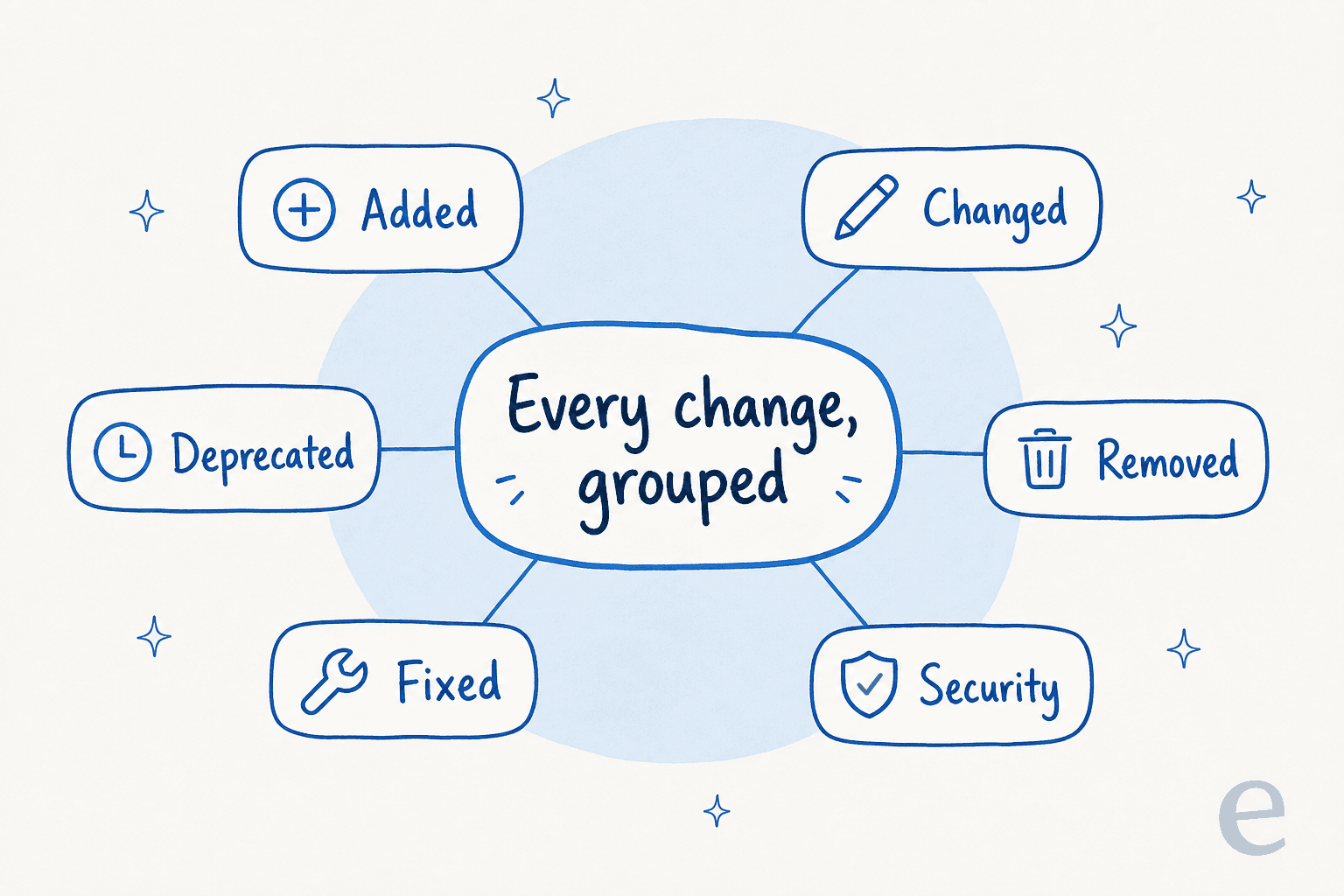
Group every change into stable categories. The canonical six from Keep a Changelog are Added, Changed, Deprecated, Removed, Fixed, and Security. GitLab's trailers and Jira's "themes" both echo them, so it's a safe default everywhere.
Feed the model structure, not prose. Conventional Commits is a lightweight format (<type>[scope]: <description>) whose explicitly listed use is "automatically generating CHANGELOGs," with fix: mapping to a patch release, feat: to a minor, and a BREAKING CHANGE: footer to a major. Conventional commits, GitLab trailers, and PR labels are all the same idea: give the generator a clean classification signal so it doesn't have to guess.
Always keep a human in the loop. I said it above and the tools agree, GitHub, Linear, and Jira all bake in a review step. Treat the AI as a first draft, never the final word.
Write for the reader, not the repo. This is the same skill that separates a good technical blog writer from a spec sheet: knowing what the reader actually needs. One product manager put the audience rule plainly on LinkedIn:
"When it comes to software release notes, aim to impact your end-user. There is no point in getting too technical when your audience will not be able to understand the terms or will end up frustrated."
Keep an Unreleased section at the top to accumulate changes between releases, link each version, and use ISO dates (2026-06-22) so nobody has to guess whether that's a month or a day. This is the same hygiene that makes SEO content and any other scaled content maintainable: predictable structure beats clever one-offs.
Where AI gets release notes wrong
The failure modes are predictable, which is good news, because predictable means preventable.
- Generic benefit-washing. Fed only terse PR titles, a model pads them into vague marketing prose ("improved performance and reliability") that says nothing. The fix is richer input, not a fancier prompt.
- Leaking internal or security detail. Raw commits and diffs carry internal context and unannounced work. GitHub's
release.ymlexcluderules exist precisely so internal or bot PRs (think Dependabot) stay out of the published notes. An AI generating straight from commits has no such guardrail unless you build one. - Burying the breaking change. Keep a Changelog's advice is "if you do nothing else, list deprecations, removals, and any breaking changes." An AI optimising for an upbeat "what's new" tone will under-weight exactly the changes users most need to see.
- Hallucinated features. Ask a model to "make this sound exciting" from thin input and it will invent capabilities. Structured input plus mandatory review is the only real mitigation, and it's the same discipline that keeps an AI agent from confidently making things up in front of a customer.
Notice the through-line: every one of these is solved by controlling what the model sees and reviewing what it writes. There's no magic prompt that substitutes for either.
Try eesel for release notes that become answers
Here's the part most release-notes guides miss. Writing the notes is half the job; the other half is making sure that when a customer asks "wait, did you change how exports work?", they get the right answer without waiting on a human.
That's the seam eesel sits in. The same AI writer that produces our own content at scale (one customer publishes 360 posts a month through it, and a typical long-form post lands in 12 to 20 minutes) can draft a changelog from your shipped work in your brand voice, with a human review pass built in. Because eesel also connects to GitHub, Jira, Confluence, Slack and your help center, those release notes don't just get published, they become a knowledge source your AI support agent answers from instantly.

So instead of release notes that sit on a page nobody visits, you get notes that ship and deflect the "what changed?" tickets that always follow a release. You can try eesel free and point it at your own docs to see what it drafts.
Frequently Asked Questions
What is an AI release notes generator?
Can AI write release notes from GitHub commits?
How do I stop AI release notes from sounding generic or leaking internal details?
What is the difference between a changelog and release notes?
Do I still need to review AI-generated release notes?


Article by
Rama Adi Nugraha
Rama is a software engineer at eesel AI with two years of experience writing about B2B SaaS, AI tools, and customer support technology. Based in Bali, Indonesia, he brings a developer's perspective to product comparisons — cutting through marketing copy to what the integrations and APIs actually do.