What an AI webinar script generator actually is
I write for a living, and I've spent the last couple of years watching how "AI [content type] generator" keywords map to what people actually want. Webinar scripts hide a specific trap. People type the keyword expecting a single button inside their webinar tool that spits out a script, and that button does not exist. The ones who get good results treat AI as a structuring engine they feed, run inside a general chat model, against a structure they already understand.
So let me start with the reframe, because it's the whole game. A webinar script isn't a blog post read aloud. It's a 30-to-60-minute run of show with a shape: housekeeping, a hook, an agenda promise, two or three content segments, usually a demo, then Q&A and a call to action. A blog has none of those beats. The single biggest lever on AI output quality is telling the model which structure to follow and how long each beat runs, not just handing it the topic.
This matters more for webinars than for almost any other format, because the stakes are live. A marketer who reviews webinars every day put it bluntly on LinkedIn:
"Webinars require a planned script... I review webinars every single day and one thing I can say with certainty is that the scripting is becoming more robotic. You could say, 'it's quietly crushing your conversion.' AI can be useful, but please, please, please - don't rely on it to write your webinar script. Use it. But then re-write it in your own tone and pattern."
Josh Kinghorn, LinkedIn

That's the bar. AI gets you a strong skeleton fast; the conversion lives in the rewrite. The rest of this guide is how to get the skeleton right and where the rewrite has to happen.
How AI webinar script generation works
Strip the branding off any approach and the workflow is the same five steps.
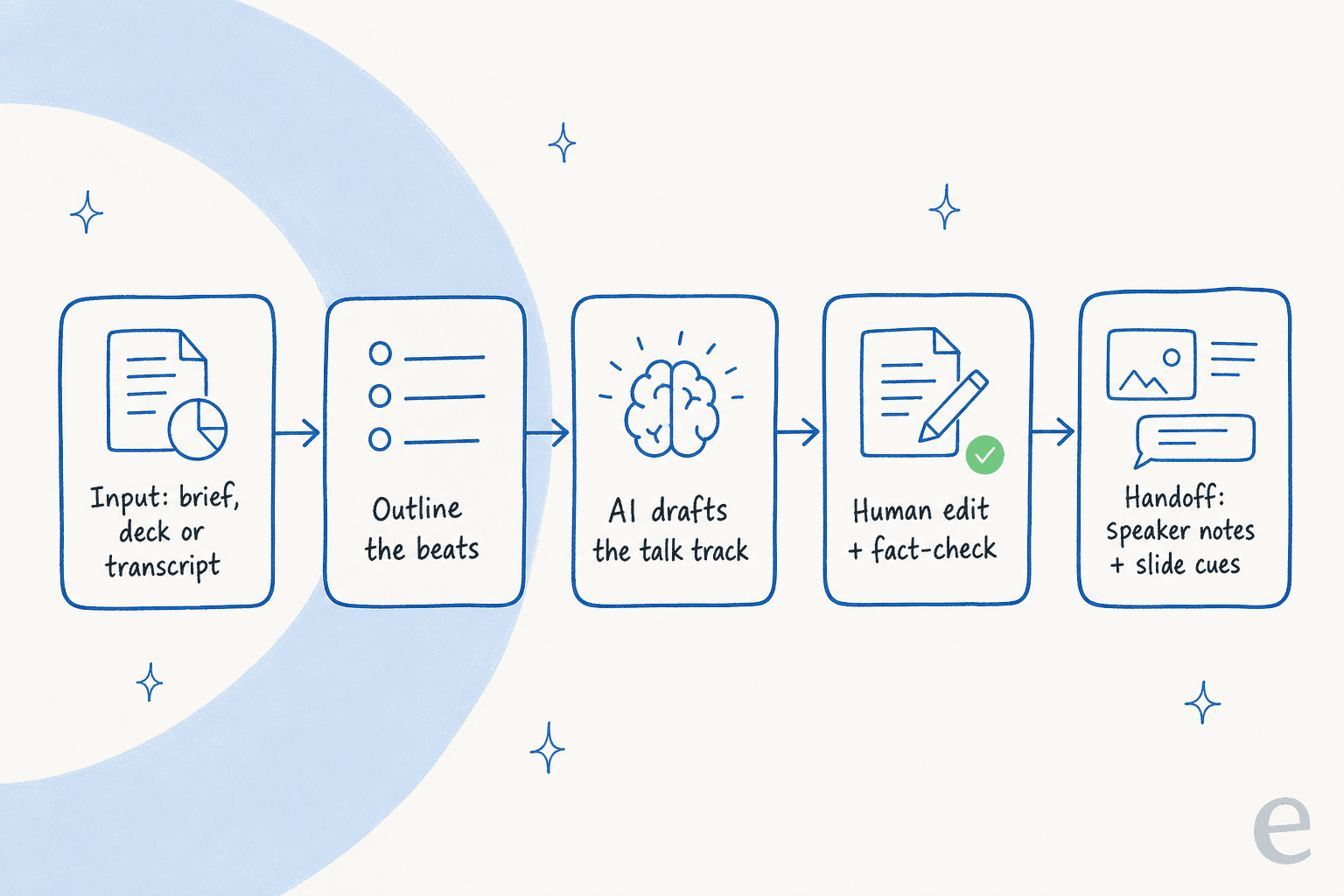
- Input. Give it source material: a brief, the slide deck, a past webinar transcript, or your product docs. The thinner the input, the more generic the output.
- Outline. Get the beats right first, matched to the webinar arc and the time budget for each segment.
- Draft. The model expands each beat into spoken prose.
- Edit. A human cuts, fixes the tone, and fact-checks. This step is not optional, and for webinars it's where conversion is won.
- Handoff. The script becomes something a presenter can perform: speaker notes per slide, a marked-up run of show, cue points for the demo.
The interesting design choice is step 1, and the people who get this right almost never start from a bare topic. A creator who scripts long-form content for a living laid out the loop plainly on Reddit:
"Ok, now you have the idea but never ask an AI to 'write a full script.' It comes out sounding robotic, with no personality... Create a 5-minute video script outline... Include a strong hook, three main talking points with sub-bullets, and a call-to-action. This gives me the 'skeleton,' and I just have to add the 'skin' (my voice, my stories, my jokes)."
u/Deep-Ad1034, r/NewTubers

Skeleton from the AI, skin from you. That framing maps onto webinar prep almost perfectly, because the skeleton (the arc and the timings) is exactly the part AI can do reliably.
The webinar arc most scripts follow
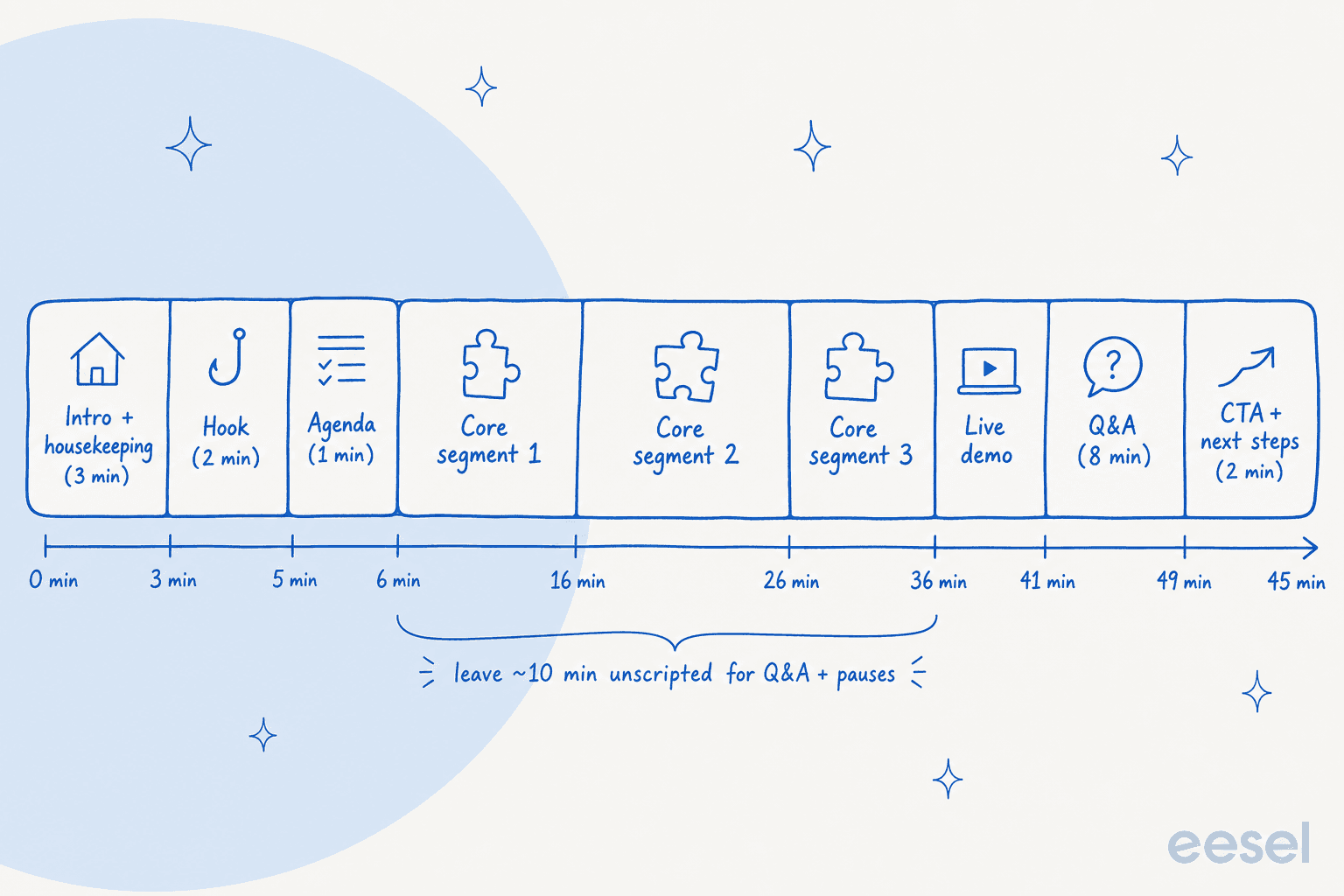
Before you prompt anything, you need the structure in your head, because that's what you're going to hand the model. A standard single-session webinar runs through these beats:
| Segment | Rough time (45-min webinar) | What the script does here |
|---|---|---|
| Intro + housekeeping | 2-3 min | Welcome, "we'll send the recording," how to ask questions. Keep it short. |
| Hook | 2 min | The reason to stay. A stat, a pain, a promise of the payoff. |
| Agenda | 1 min | Three things they'll walk away with. Sets expectations. |
| Core segments (x3) | 20-25 min | The actual teaching. One idea per segment, each with a proof point. |
| Live demo | 5-8 min | Show, don't tell. Scripted setup, looser middle. |
| Q&A | 8 min | Mostly unscripted, but prep answers to the obvious questions. |
| CTA + next steps | 2 min | One clear ask. The whole webinar pointed here. |
The reason this matters for an AI script generator: you prompt segment by segment, with a word budget for each, instead of asking for "a webinar script about X." Webinars are also the rare format where you genuinely shouldn't script every word. Script the intro, the hook, the segment transitions, the demo setup, and the CTA tightly; keep the segment middles and the Q&A as beat notes, because reading those verbatim is exactly what makes a presenter sound robotic.
The tools (and why none of them writes your script)
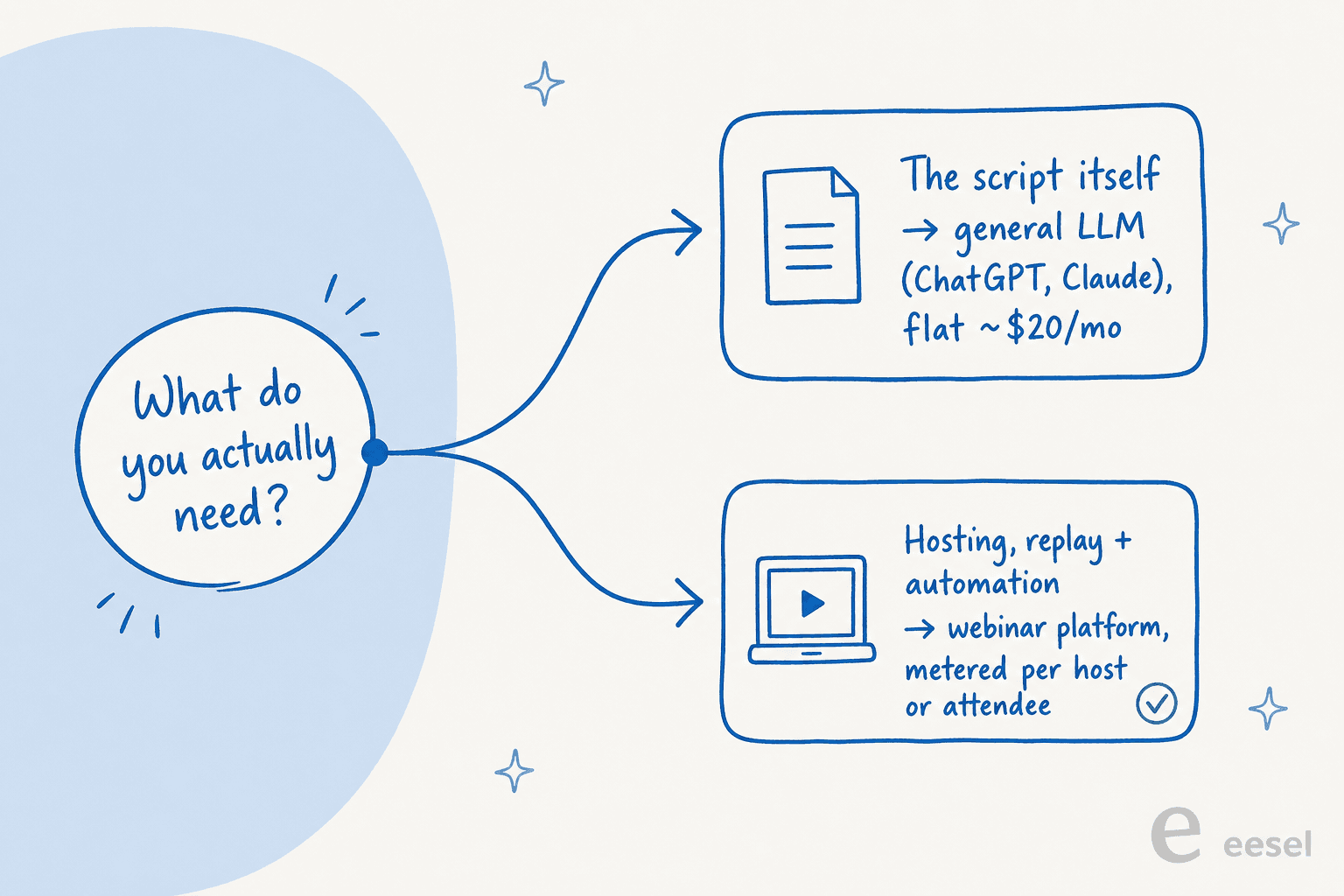
Here's the split that surprises people. The tool that writes your webinar script and the tool that hosts your webinar are two different products, and the hosting platforms have quietly added AI that does everything except the writing.
| Tool | What it's for | What its AI actually does | Entry paid price | Billable unit |
|---|---|---|---|---|
| ChatGPT | Drafting the script | Writes and restructures from your prompt | $20/mo (Plus) | Flat seat, usage-limited |
| Claude | Drafting the script, long inputs | Same, with a large context window for decks/transcripts | $20/mo (Pro) | Flat seat, session-limited |
| Demio | Hosting live webinars | "Demio AI" (Premium-only): engagement, not scripting | $45/mo (Starter, annual) | Per host |
| Livestorm | Hosting live webinars | AI Studio: turns replays into clips | $3 per attendee credit | Per attendee credit |
| Zoom Webinars | Hosting at scale | AI Companion: summaries + follow-ups | Add-on to paid Zoom | Per attendee capacity |
| eWebinar | Automated/evergreen webinars | Automated chat + scheduling, not scripting | $99/mo (Level 1) | Per active eWebinar |
A few things worth pulling out.
The general LLMs are where webinar scripts actually get written. There's no dedicated "webinar script" product inside ChatGPT or Claude; you prompt the chat with the arc, the per-segment word budget, the tone, and the audience, then iterate. For a flat $20/mo neither charges you per draft, and Claude in particular will hold a full hour-long deck or a past transcript in one prompt without losing the thread. The limitation is obvious: they stop at text. You take the script into your webinar platform to actually run the session.
The webinar platforms host, they don't write. Demio's "Demio AI" sits on the $196/mo Premium tier and is aimed at the live experience; Livestorm's AI Studio finds "the moments worth sharing in your webinar replays and turn[s] them into weeks of clips"; Zoom's AI Companion writes the recap, not the run of show; and eWebinar is built entirely around playing a pre-recorded session on a schedule with live-feeling automated chat. eWebinar leans hard into that automation, reporting 3x attendance and 90% watch times for evergreen sessions. All useful. None of it is your script.
That gap is the whole reason "AI webinar script generator" maps to "use an LLM with a good prompt." The platform decides where the webinar runs; the model decides what you say.
Do the runtime math (about 130 words per minute)
This is the cheapest guardrail there is, and it's the one AI skips by default. Your script length is a function of your runtime, not a vibe. Teleprompter.com's timing guide puts conversational pace at 125-150 words per minute and recommends planning webinars at about 130 WPM specifically, slower, so every viewer can follow, with explicit pauses for slides and questions. Their worked example: a 15-minute talk is roughly a 2,000-2,300 word script, and you should add 10-15% for pauses and breaths.
The trap is treating the slot as the script length. A 60-minute webinar is not a 7,800-word script. Budget the housekeeping, the pauses, and a real Q&A block, and you're scripting closer to 50 minutes of talk. Plug your own number into the calculator below before you tell the model anything:
The practical move is to hand the model the spoken-word target, not the slot. "Write 33 minutes of talk, about 4,300 words at 130 words per minute" produces something you can deliver. "Write a 45-minute webinar" produces a wall of text that either overruns or gets read at a panicked clip. The same length discipline shows up everywhere good content does; it's why an AI content scaling tool bakes word targets in rather than leaving them to chance.
How to make an AI webinar script not sound like AI
The arc and the runtime get you a usable skeleton. These are the moves that make it convert instead of reading like every other AI script.
Start with a brief, not a topic. This is the single biggest failure point, and it bites before you've typed a prompt. A marketer described being handed a webinar-script mandate with nothing defined:
"I once got asked to write a webinar script with AI. What was the topic? Who the speaker? Who the webinar was for? That wasn't defined... You cannot AI your way out of having not knowing what to say."
Defne Gencler, LinkedIn
Nail down the audience, the speaker, the one goal, and where the insights come from before you prompt. Garbage in, AI slop out.
Direct behavior, not words. The most useful prompting insight I found was that you teach the model how to think, not what to say. A commenter helping someone write a natural presentation talk track put it well:
"You don't need a huge 'mega-prompt' for this - you just need a structure that teaches the model how to think, not what to say... 'Write this as if you're giving a live presentation. Keep the tone relaxed and human... Use short transitions like "So let's talk about..." Add occasional rhetorical questions... Your job is to sound like a real presenter, not a narrator.'"
u/Suvianna, r/ChatGPTPromptGenius
Write for the ear, not the eye. Read the draft out loud. If you run out of breath or stumble, the sentence is too long for speech. Contractions, short sentences, and varied rhythm are what make spoken words sound spoken instead of like a read-aloud essay.
Feed the model your real voice. This is the strongest lever, and the reason most AI scripts fall flat: the model knows your topic but nothing about you. Paste a past webinar transcript, a recording of how your best presenter talks, or your messaging guidelines. This is exactly what an AI writer with brand-voice training does under the hood, and you can do a lighter version by hand in any chat. We've written a whole guide on maintaining brand voice with AI if you want the long version.
Keep editorial control. Use the AI to find your own rambling, not to replace your judgment. As one writer put it, "the key is to exercise editorial discretion instead of just taking all of its suggestions." Two passes (outline, then expand) beat one, the same discipline that separates a real technical blog writer from a spec sheet.
Where AI gets webinar scripts wrong
The failure modes are predictable, which is good news, because predictable means preventable.
- The AI house style. Fed a bare topic, the model defaults to its tells: the "it's not just X, it's Y" construction, the shiny adjectives, the throat-clearing intro. In a live webinar, attendees feel it instantly. The fix is richer input and an edit pass, not a fancier prompt. (Our own list of AI tells covers the same family of giveaways.)
- Scripting the whole slot. Covered above, and worth repeating because it's the most common mistake. A 60-minute webinar isn't a 60-minute script.
- Reading it verbatim. The segment middles and Q&A should be beat notes, not a teleprompter. Reading every word is what makes presenters sound robotic, the exact thing practitioners warn is killing conversion.
- Hallucinated facts. For an informational webinar, the model will confidently invent a stat or a feature detail. Ground it in real source material and verify every claim, the same way you'd keep an AI support agent from making things up in front of a customer. A confident wrong line in a live webinar is worse than no line.
- Treating AI as the author. The recurring verdict across every practitioner I read is that AI is an assistant for the first draft, never the final word. The human rewrite is where the script becomes yours, and where it converts.
The through-line: every one of these is solved by controlling what the model sees and reviewing what it writes. There's no magic prompt that substitutes for either, which is the same lesson teams learn building any AI content pipeline.
Try eesel for webinar scripts that become answers
Here's the part most "AI webinar script" guides miss, and it only matters if you're running webinars to explain your own product, a product demo, a customer onboarding session, a feature deep-dive.
Writing the script is half the job. The other half is that the moment your webinar says "here's how exports work," an attendee, or a customer the next day, is going to ask your support team the exact same question, and the answer needs to match. That's the seam eesel sits in.
The same AI writer that produces our own content at scale (it reads your real docs, cites primary sources, and matches your voice from day one) can draft a webinar script from your knowledge base, in your brand voice, with the human review pass built in. Because eesel also connects to your help center, Slack, and the rest of your knowledge base, that script isn't a one-off file: the underlying knowledge becomes something your knowledge base chatbot answers from instantly.
So instead of a script that's accurate the day you present and stale next quarter, you get webinar content and support answers drawn from one source of truth. You can try eesel free and point it at your own docs to see what it drafts.
Frequently Asked Questions
What is an AI webinar script generator?
What is the best AI to write a webinar script?
How long should a webinar script be?
How do I stop an AI webinar script from sounding robotic?


Article by
Kurnia Kharisma Agung Samiadjie
Kurnia is a software engineer and writer at eesel AI with two years of SEO experience, writing about AI tools, helpdesk software, and customer support. He pairs a developer's understanding of how these products are built with search-driven research into what actually ranks and resonates with the people searching for them.