What Meta Muse actually does when you ask it to research
I build integrations at eesel, and research pipelines are part of my day job. Our AI blog writer runs a research step before every draft, and one team using it runs a keyword-to-publish pipeline at 360+ posts a month. The lesson that taught me is simple: a research agent fails quietly. It rarely crashes. It hands you a confident paragraph with one number nobody can trace. So I read Muse through that lens: how it finds things, and how you check what it found.
Meta Muse is Meta's personal AI agent, launched on September 8, 2026 and powered by Muse Spark. For research, three parts matter.
A named research skill. Meta's skills help page lists "compiling research" next to drafting documents, creating dashboards and browsing the web. These skills are built in, and you can see which ones Muse used in its Activity log. Meta's own FAQ names "researching topics" as an everyday use.
Its own browser. Muse gets a full browser inside its isolated virtual machine. Per the web browsing help article, you can open a viewing window to watch it, take control, or stop the task.
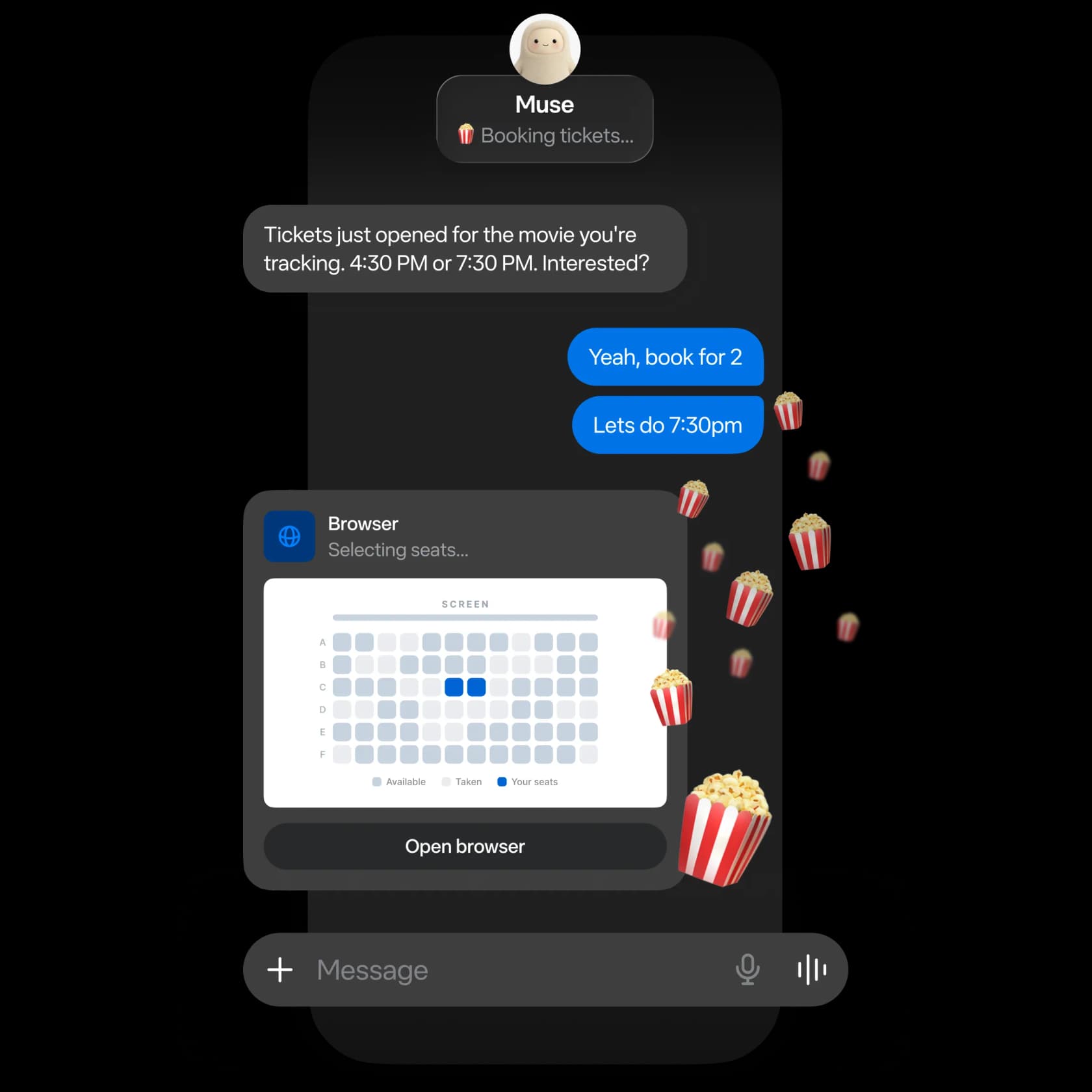
Background time. Muse keeps working after you close the app, and it can run recurring tasks on a schedule, "like daily check-ins or weekly summaries." That is the feature that makes it different from a chat window.
Meta describes the model's research habit in its Muse Spark 1.3 post: it "uses tools to generate its own context across messy and conflicting sources" and "keeps track of what it has learned to produce a final deliverable." That matches what I'd want from a junior researcher. Whether it holds up depends on what you feed it.
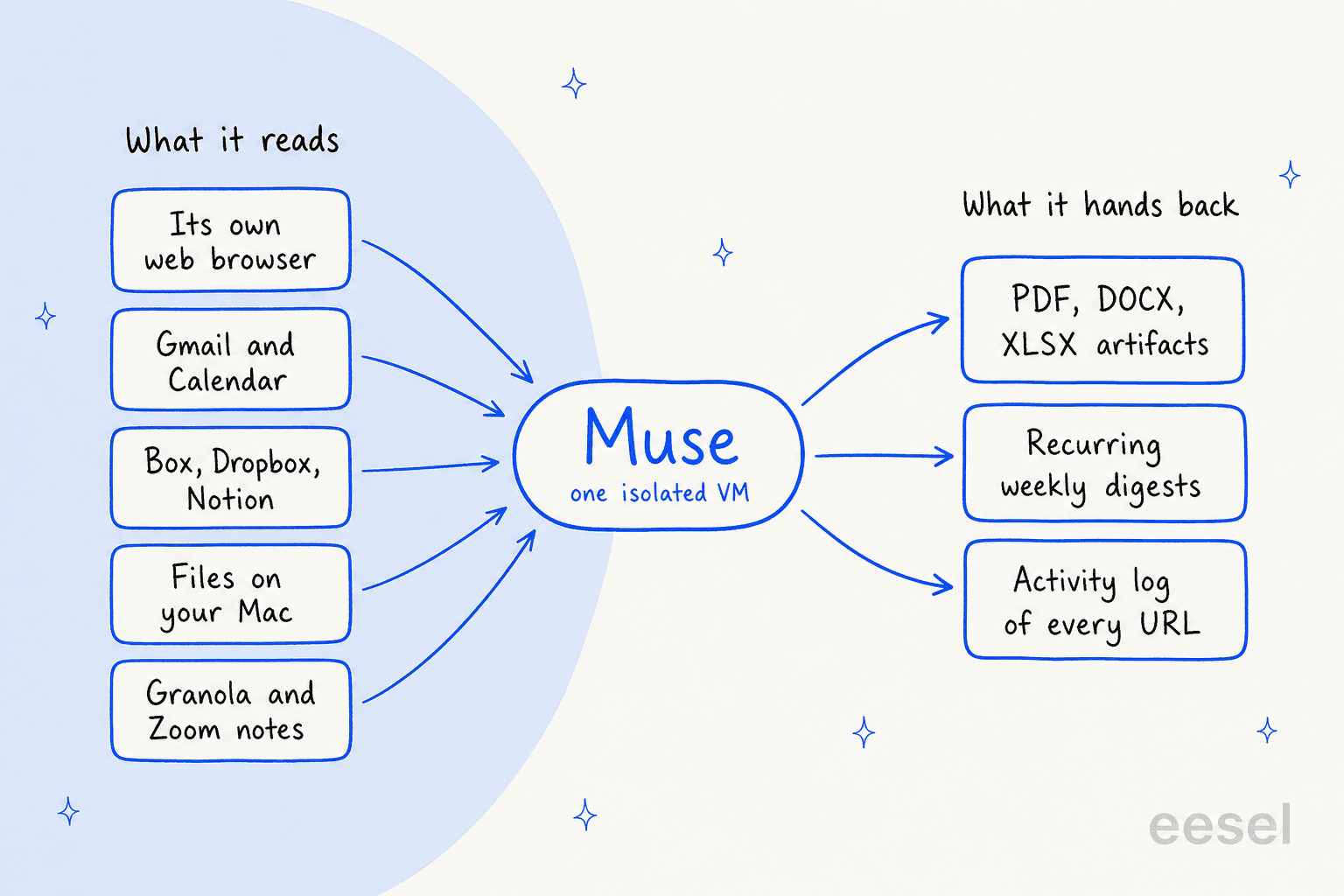
The inputs are wider than most research tools. Muse connects to Box, Dropbox and Notion (added with Muse for Small Business, per muse.ai/business), reads local files on a Mac with your permission, and pulls meeting notes from Granola or Zoom. My Muse for sales post lists the full connector set. What you won't find: Google Scholar, PubMed, Zotero or any academic database connector. For literature reviews, that's a real gap.
Where are the sources?
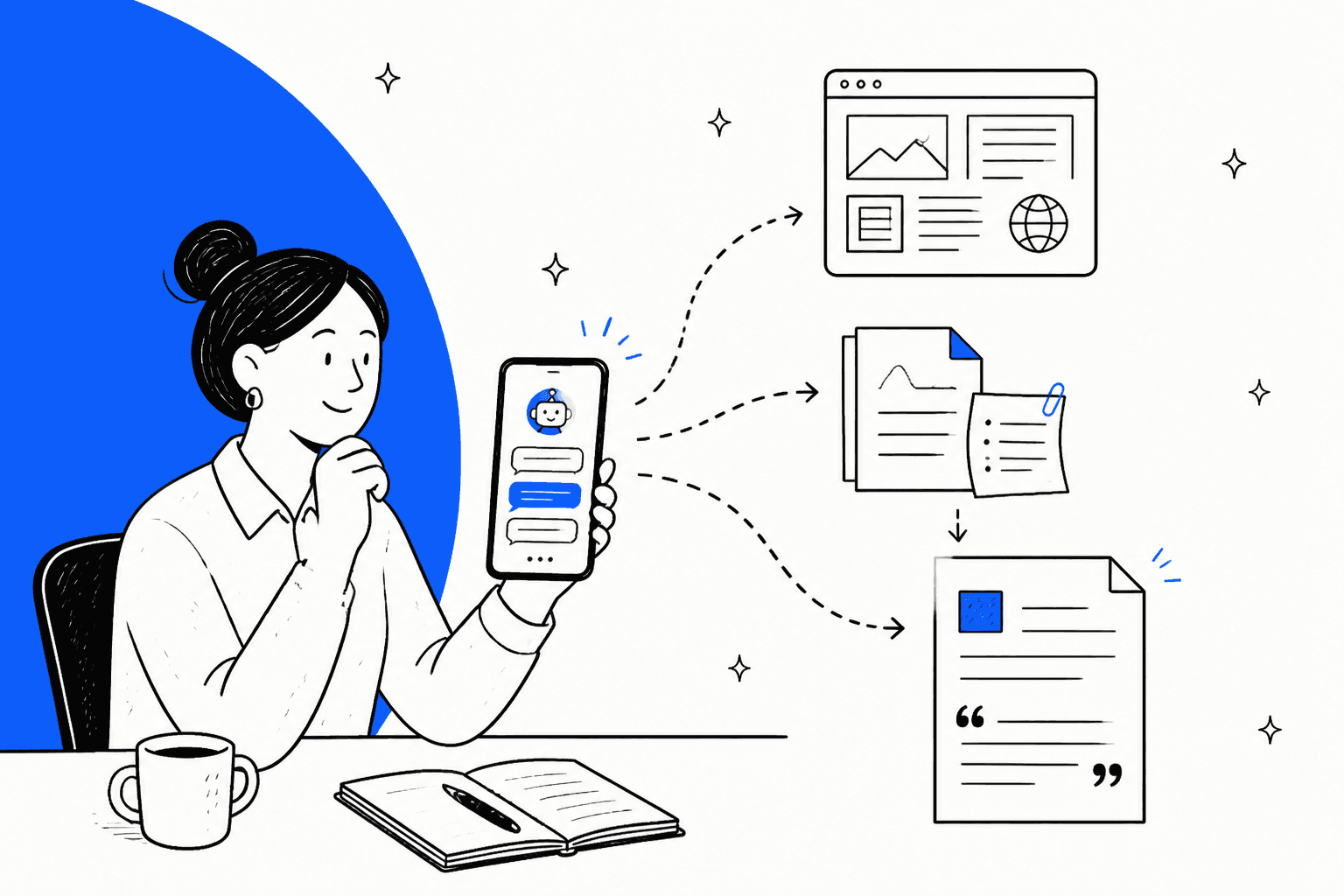
This is the part that surprised me most. Muse doesn't put citations in its answers by default. Meta's approval help article puts it as an option: "You can also ask your Muse to provide the sources it based its response on."
You can also ask for its browsing history. The browsing article gives the exact prompt: "Show all URLs you have visited in the last week." That's a useful audit trail. It's not the same as a footnote next to each claim.
I checked every Muse page Meta publishes (muse.ai, the 13 help center articles, the launch post, introducing.muse.ai). None describes a deep research mode or default inline citations. Compare that with ChatGPT deep research or Perplexity, where the citation list is the product.
Muse can still produce footnotes when the output is a document. One Reddit user asked Muse to research a beard problem and got a full web guide with "Ten footnotes." The trouble showed up somewhere else:
"the chat gave me a $53 buy list with three products, and the website it built recommends five completely different ones. The website even calls the products on my buy list "unverified" and "not presented as recommendations here." Same session, same AI."

That's the failure mode I'd plan for. The chat answer and the finished artifact can disagree, and only one of them carried sources. When Muse gives you a summary in chat, ask which document or URL each number came from before you reuse it.
The independent numbers back up the caution. On Artificial Analysis, Muse Spark 1.3 (Max) gets 43.6% accuracy on the AA-Omniscience knowledge test with a 32.9% hallucination rate. That test punishes wrong answers and doesn't punish "I don't know." In plain terms: when the model doesn't know a fact, it still sometimes answers anyway.
How good is Muse at research, by the numbers?
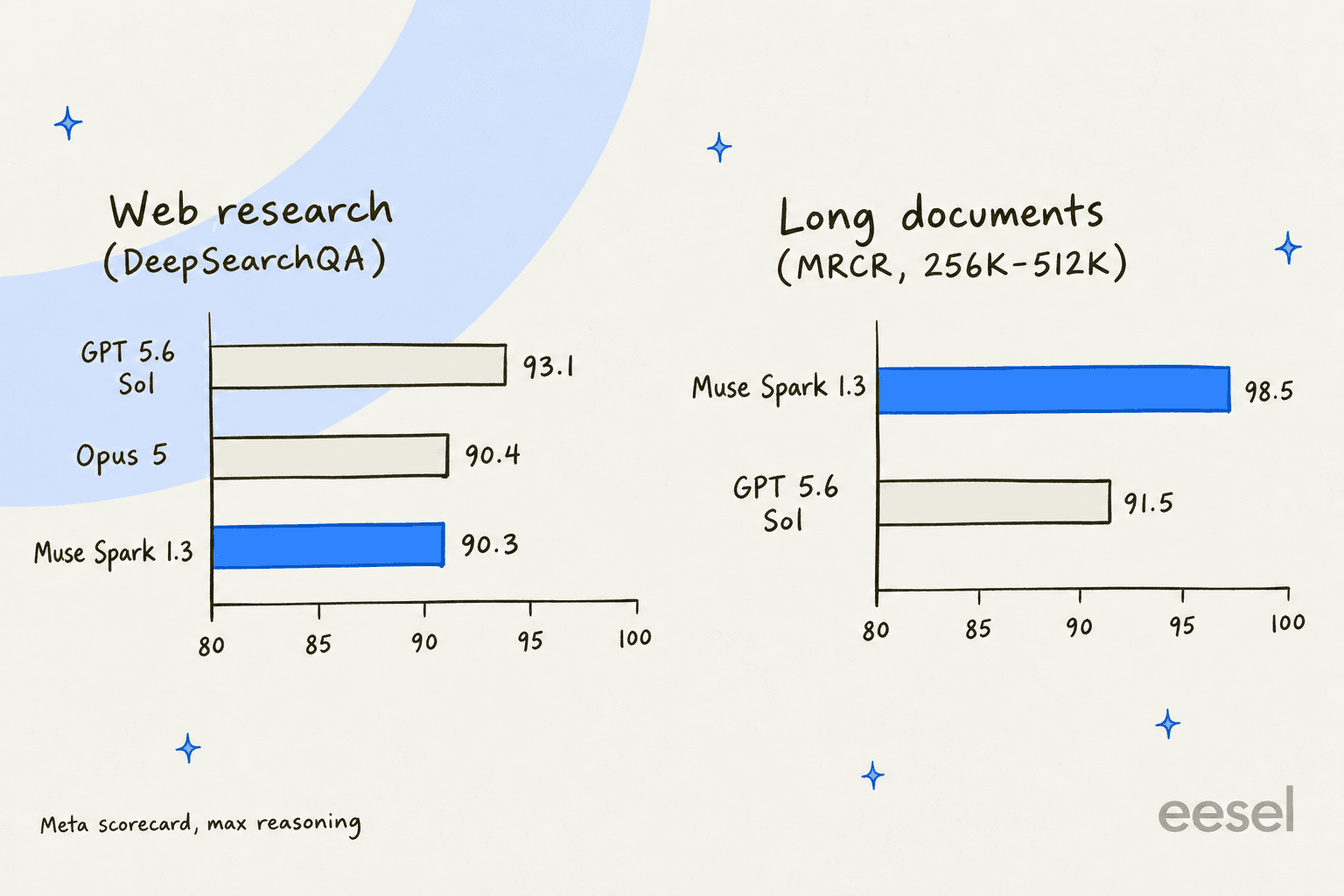
Meta published a benchmark scorecard with the Muse Spark 1.3 launch. Two rows matter for research: one for browsing the web, one for reading long documents.
| Benchmark (from Meta's scorecard) | What it tests | Muse Spark 1.3 | GPT 5.6 Sol | Opus 5 |
|---|---|---|---|---|
| DeepSearchQA (F1) | 900 browsing questions with list answers | 90.3 | 93.1 | 90.4 |
| GDPval-AA v2 (Elo) | 220 professional tasks with reports and spreadsheets | 1754 | 1710 | 1824 |
| MRCR 256K-512K | Finding facts in very long inputs | 98.5 | 91.5 | Not reported |
| MRCR 512K-1M | Same, at up to 1M tokens | 98.1 | 73.8 | Not reported |
Two caveats. These are Meta's numbers at max reasoning, and Meta's methodology report says each model gets its best comparable result. They also test the model, not the Muse app with its connectors and approvals.
Still, the shape is clear. On web research, Muse is level with Opus 5 and a step behind GPT 5.6 Sol. On long documents, it's the best of the three by a wide margin. If your research is "read these five 200-page PDFs and find every mention of X," that's Muse's best case. My Muse Spark 1.3 deep dive has the full model picture.
Five research jobs Muse does well
Here's where I'd actually put Muse to work, ordered by how much I'd trust the output.
1. Monitoring a topic for weeks
This is the job Muse does that a chat tool can't. Set it once and it checks back on its own. One Hacker News user describes exactly this:
"Muse I use for general research and monitoring my Ig/Facebook/Threads conversations and posts. Research here meaning stuff I need a browser for, like the other day I asked Muse to monitor the Apple website every few hours to tell me when iPhones in my area are back in stock."

For work, swap the iPhone for a competitor's pricing page, a regulator's notice board, or a changelog. Muse tells you when something changes, and you read the change yourself.
2. Reading long files you already have
Muse reads PDF, DOCX, plain text, Markdown, XLSX and CSV, per the artifacts help page. You can ask follow-ups like "What's on page 3?" and ask it to read a document and write a separate summary "all in one request." Meta publishes no file size limit, only a note that "Large or complex files may take a moment to process." PowerPoint isn't on the supported list, so export decks to PDF first.
3. Weekly research digests
Recurring tasks keep running until you cancel them. One early user set these up on launch day:
"I asked Muse to schedule repeating tasks that only involve web search e.g., every other morning find sci-fi movies playing in my city, 3pm EST stock market summary, etc."
A Friday digest of "what changed in my market this week" is the work version. It's the same idea as the proactive research in OpenAI's dots, with Muse's connectors behind it.
4. Researching what's already in your inbox and notes
Connect Gmail, Notion or Box, and Muse can search them without downloading everything ("it won't download your whole inbox (unless you tell it to)," per the connectors help). "Pull every customer email that mentions pricing this quarter and group the complaints" is a research task most people never get around to. It's the same job I covered in Muse for customer feedback analysis.
5. Packaging findings as a document
Muse turns research into PDFs, Word files, spreadsheets, and single-page web tools. Meta's design post shows examples, including "an interactive study guide."

Artifacts stay private until you approve sharing. One tip from the artifacts page I'd follow: "If you need a PDF instead of a word document file, say so."
One habit to watch across all five jobs. Muse is built to act, and it shows when research touches anything you could buy:
"it still consistently wants to spend money; research a trip? as soon as it has any results it prompts to start booking stuff."
Purchases always need your approval, so nothing gets bought without you. But if you only want the research, say so in the first message.
What Muse's terms say about research
Muse's Supplemental Terms, updated September 8, 2026, have four lines anyone doing research should know. Business use is allowed. These are the edges.
| Clause | What it says | What it means for research |
|---|---|---|
| Section 4, item 06 | You may not "circumvent any third party's terms of service... including but not limited to circumventing any paywalls or CAPTCHAs" | No paywall workarounds, and no scraping a site whose terms forbid bots |
| Section 11, Accuracy Warning | Outputs "may be inaccurate, incomplete, or contain material errors even when they appear accurate" | Check every figure before it leaves your desk |
| Section 12, No Professional Advice | Muse "does not provide, and should not be relied upon for, legal, financial, investment, medical, tax, or other professional advice" | Medical, legal and investment research is background only |
| Meta AI Terms | You may not "Deceive or mislead others, including but not limited to activity related to plagiarism" | Don't hand in Muse's report as your own original work |
The accuracy clause is the one I'd tape to the wall. The full line says outputs can contain errors "even when they appear accurate due to their level of detail or specificity." That's exactly the trap with research. A detailed answer feels checked. It isn't.
You keep ownership of what you create with Muse (Section 2.1), and you can opt out of AI training under Data Controls. The Meta AI Terms go further on regulated topics: "IT IS YOUR SOLE RESPONSIBILITY TO VERIFY OUTPUTS."
Hand it, check it, keep it
Put the benchmarks, the source behavior and the terms together and the split falls out on its own.
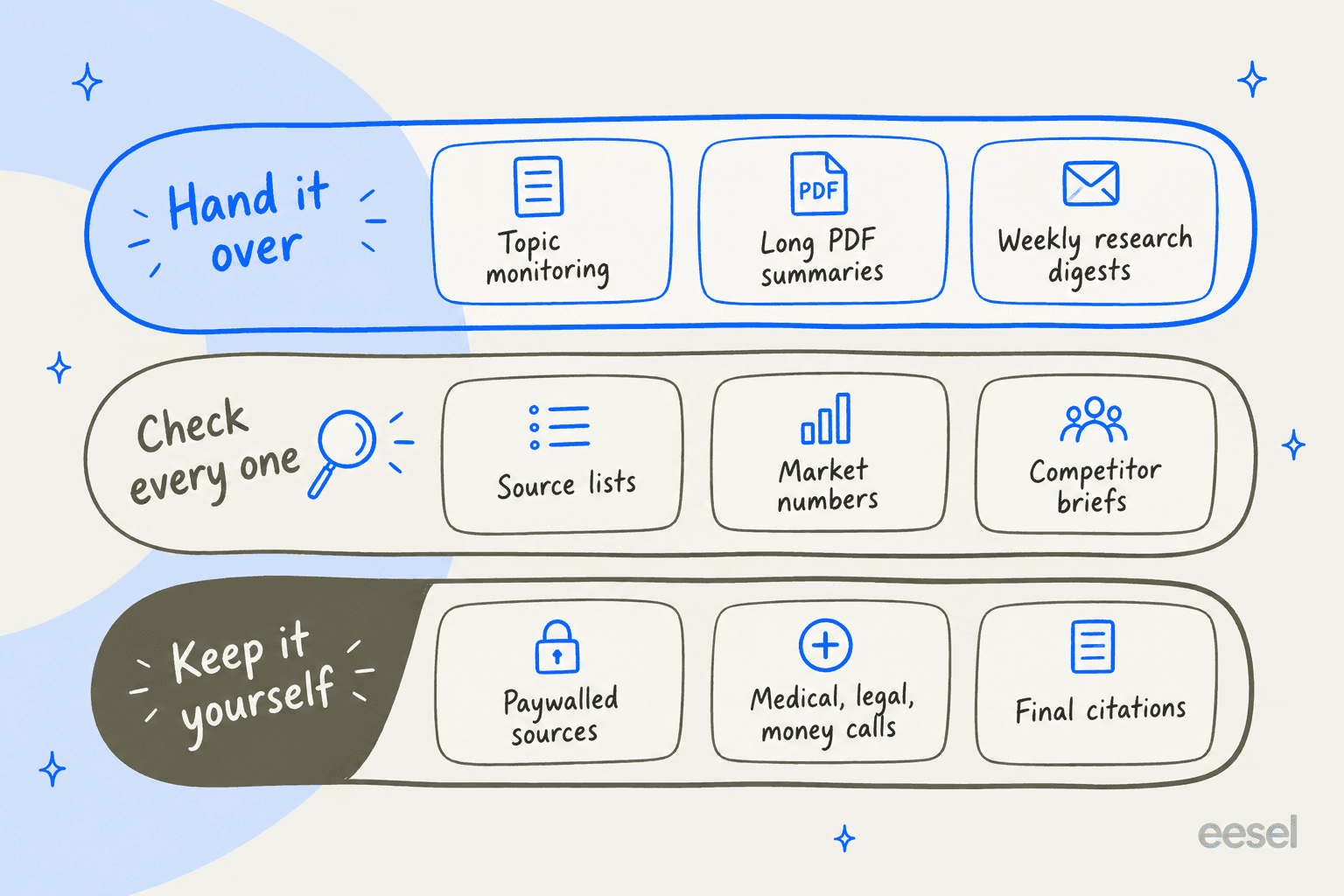
Hand it over: jobs where the input is fixed and you can spot a bad answer fast. Monitoring, summarizing your own files, weekly digests.
Check every one: jobs where Muse finds the facts on the open web. Source lists, market sizing, competitor briefs. Ask for sources every time, then open at least the ones your conclusion depends on.
Keep it yourself: anything behind a paywall, anything regulated, and the final citation list in anything you publish.
These are the prompts I'd start with:
| Research job | Prompt to try | Follow-up check |
|---|---|---|
| Competitor watch | "Every Monday, check these three pricing pages and tell me what changed since last week." | Open the page for any change it reports |
| Long PDF review | "Read these two reports and list every figure on churn, with the page number." | Spot-check three page numbers |
| Market scan | "Find the five most-cited sources on this market and summarize each in two lines." | "Show me the sources you based this on" |
| Inbox research | "Group every customer email about refunds this quarter by reason." | Read five emails from the biggest group |
| Final brief | "Turn this into a two-page PDF with a source list at the end." | Click every link in the source list |
The Activity log helps with the checking. It shows a timeline of every action and skill Muse used, so you can see whether it actually opened the pages it summarized.
When another research tool fits better
Muse isn't the only agent that researches, and for some jobs I'd pick something else.
- You need a cited report today. ChatGPT deep research builds a plan, reads widely and returns a report with sources attached. Perplexity answers with citations by default.
- Your research lives in a team workspace. Notion research mode works inside the shared pages your team already writes in. Muse has no team plan, shared memory or admin console.
- You want a different kind of agent. My Claude Cowork review covers a desktop work agent. For other personal agents, see Instinct AI vs Meta Muse.
Muse wins when the research is ongoing, personal, and spread across your own inbox, files and the web. The full field is in my Meta Muse alternatives roundup.
What Muse costs for research
Muse is metered in "Muse tokens" per week. These are the plans on Meta's subscriptions page:
| Plan | Price | Weekly usage | Good for |
|---|---|---|---|
| Free | $0 | 100M Muse tokens, per Mark Zuckerberg at launch | Light monitoring, a few file summaries |
| Power | $20/month | 500M Muse tokens | Weekly digests plus regular long-file reading |
| Maximum | $100/month | 3B Muse tokens | Daily research runs across many sources |
Research is a heavy use. Long documents fill the context window, and the model is talkative: on the Artificial Analysis index run, Muse Spark 1.3 generated 170M tokens against a median of 81M. Expect research to hit the free limit before chat does. There's no team or annual plan, so each researcher pays on their own Meta account. The Meta Muse pricing post has the details, and the model's API rates are in Muse Spark 1.3 pricing.
From research to a published post: eesel's AI blog writer
If your research ends as a blog post, the hard part starts after Muse stops. Every number needs a source link, every quote needs a permalink, and the draft needs to read like a person wrote it. That's the job eesel's AI blog writer was hired for.
It's one of eesel's AI teammates: a ready-to-work hire for one job, not a general agent you have to steer. It researches primary sources for a topic, keeps the source link on every claim, and drafts a long-form post with infographics, product screenshots and FAQs. One German ecommerce brand runs it on a keyword and gets a 2,000 to 2,900 word post back in about 12 to 20 minutes. The blog writer workflow shows each step, and my guide on researching blog topics covers the part before it. If you'd rather brief from Muse, see Muse for SEO briefs.

Use Muse to watch your market and read your files. When it's time to publish, try eesel and get a cited draft you can edit, not a summary you have to re-check line by line.
Frequently Asked Questions
Can Meta Muse do research?
Does Meta Muse cite its sources?
Does Meta Muse have a deep research mode?
How accurate is Meta Muse for research?
Can Meta Muse read PDFs and research papers?
Can Meta Muse get past paywalls for research?
How much does Meta Muse cost for research?


Article by
Rama Adi
Rama is a software engineer at eesel AI with two years of experience writing about B2B SaaS, AI tools, and customer support technology. Based in Bali, Indonesia, he brings a developer's perspective to product comparisons — cutting through marketing copy to what the integrations and APIs actually do.