Meta Muse for SEO content briefs: what it can research, and what you still bring

Kurnia Kharisma

Katelin Teen
Last edited September 29, 2026

What an SEO content brief actually needs
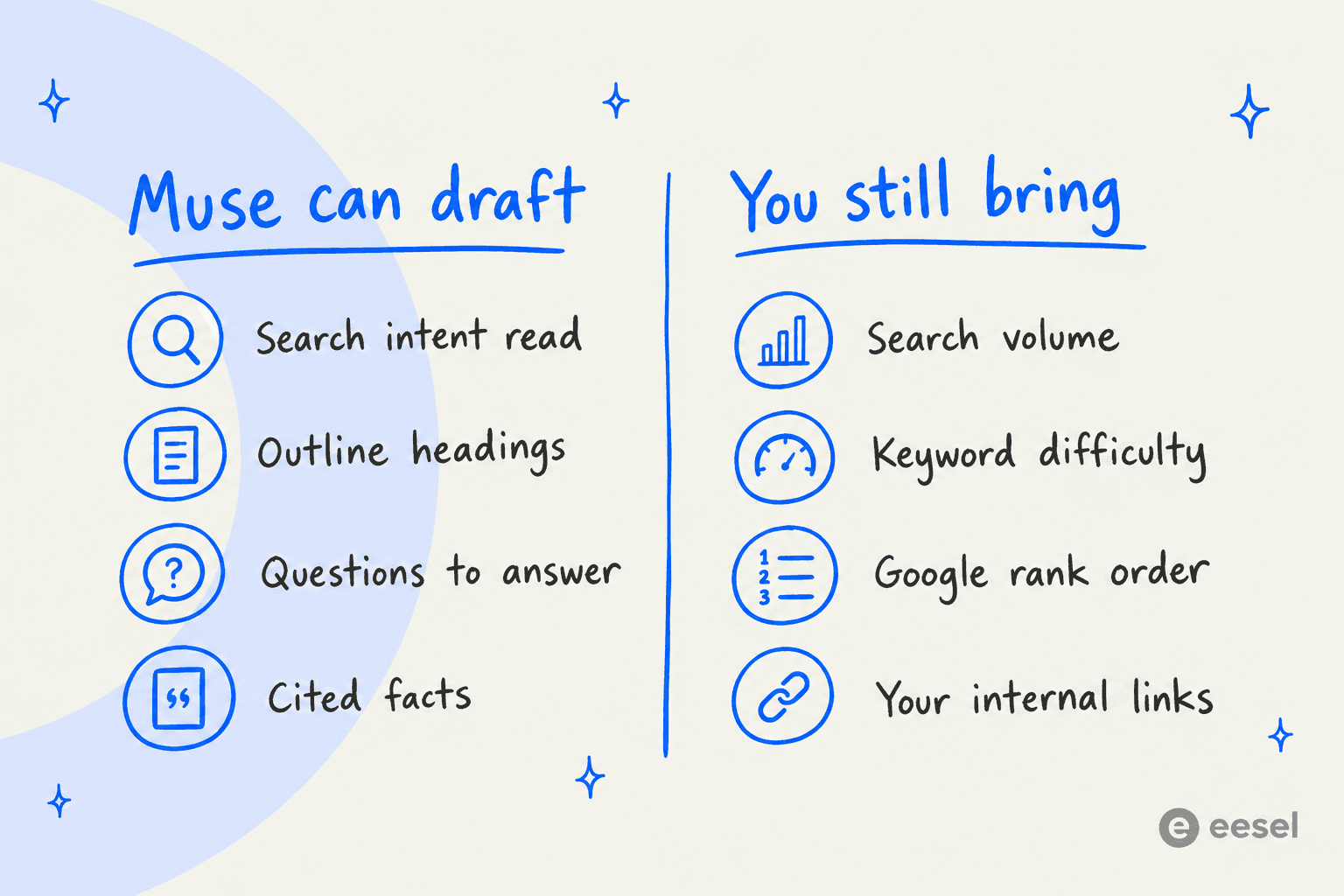
Before judging any AI on briefs, it's worth being clear about what's in one. A good content brief answers two different kinds of question.
The first kind is research: what's the search intent, what do the pages that rank already cover, which questions should the post answer, and which facts need a source. Language models are decent at this, because it's reading and summarizing, which is why an AI blog outline generator is usually the first brief tool people try.
The second kind is data: how many people search this, how hard it is to rank, which pages Google actually puts in positions 1 to 10, and which of your own pages should link in. None of that is on a web page for a model to read. It lives in a keyword research tool, in Search Console, and in your own sitemap.
Here's why I split it that way. Across the posts in that queue, the brief that went wrong was almost never the one with a weak outline. It was the one aimed at a keyword eesel couldn't win. eesel's domain rating is 71, and on a few high-difficulty head terms eesel's page beat a much bigger vendor's page on every content measure and still ranked below it, because those terms needed a couple of hundred referring domains to the page itself. A brief that skips the keyword difficulty call can be well written and still pointless. The long-tail and low-difficulty terms are where content alone wins, and a brief should say which kind of keyword it's for.
So the useful test for Muse isn't "can it write an outline." It's "which half of the brief can it do, and how do I get the other half in."
Which Muse you'd use for briefs
"Muse" covers three Meta products, and for briefs two of them matter.
| Product | What it is | How it helps with briefs | Price |
|---|---|---|---|
| Muse agent | Personal AI agent with its own cloud browser and connectors | Researches, reads files you upload, writes the brief into Notion or a document | Free to 100M tokens/week, then $20 or $100/month |
| Muse Spark 1.3 API | Meta's frontier model, sold per token | Powers a brief generator you script yourself | $1.25 in / $4.25 out per 1M tokens |
| Muse Code | Terminal coding agent | Useful only if your briefs live as files in a repo | Subscription |
The agent's plan prices come from Meta's subscription help page, which says the paid tiers are still "in limited testing," and my Muse agent pricing post has the detail.
If you're past the brief and into the writing, Meta Muse for blog writing covers that step, and Meta Muse for content refresh covers updating old posts.
Route 1: the Muse agent
This is the "just ask it" route. You give Muse a keyword, it researches, and it hands back a brief.
What it does well
The research loop is the strong part. Muse browses the web, can show the sources behind an answer when you ask, and reads and edits PDF, DOCX, Markdown, XLSX and CSV files that stay in its Library. It also keeps editable memory files, so a house brief template can live there instead of being pasted into every chat.
That file handling is the most useful thing for briefs. Search Console has no Muse connector, but its own export gives you up to 1,000 rows of queries, clicks and impressions as a CSV. Upload that and ask Muse which queries you already get impressions for without a page targeting them. That's a real brief input, and it's yours, not the model's guess.
Where the brief ends up is covered too. Notion is on Meta's named list of work connectors from Connect 2026, and plenty of SEO content teams keep their brief database there. One caveat: Meta doesn't document whether the Notion connector can create database rows or only pages. Its connector help says only that many connectors can be limited to reading. Test one brief before you plan a whole calendar around it.
The SEO data gap
This is where it gets narrower. I checked every connector list Meta has published: the September 8 launch, Connect 2026, and today's Muse for Small Business post with its 15 named connectors. None of them names Semrush, Ahrefs, Google Search Console or Google Analytics. The small-business content features are aimed at social posts and ads ("helps you improve your ads and content"), not search.
That leaves two ways to get keyword data in.
- Upload an export. A CSV from your keyword tool or Search Console works today with no setup. It's also a snapshot, so it goes stale.
- Build a custom connector. Muse can write its own connector against a service's API and keep the keys in its credential store. Meta adds that it "doesn't review custom connectors or how they use your information." Its safety write-up describes connectors as built for services with "APIs or CLIs," and no Meta page mentions MCP support for the Muse agent.
That last point matters more than it sounds, because MCP is how the SEO tools themselves want agents to connect. Semrush runs an official MCP server, lists Claude, ChatGPT, Cursor and others as clients, and reviews any other agent "individually." Ahrefs has a hosted MCP server from the Lite plan up, with Muse not on its client list either. Ahrefs also says that using its MCP endpoint "via custom scripts, bridges, or standalone HTTP/JSON-RPC clients is unsupported and not permitted." So a Muse connector to Ahrefs has to use the regular REST API.
For a terminal agent with internet access, some developers think that's fine anyway:
"Sure, there's almost no reason to use MCPs if you are running a full-blown terminal agent (Claude Code, Codex, Meta Muse, OpenClaw etc) with unfettered internet access - just let it call APIs directly."

The same thread has the counterpoint that matters for a content team: once you need to manage access and audit usage across people, "right now there is no alternative to MCP." Muse is a one-person agent with no team seats, so that's a real limit for an agency or in-house team sharing a keyword budget.
What the keyword data costs
If you go the connector route, the keyword data is billed by the SEO vendor, not Meta. Here's what each vendor's own docs say.
| Semrush | Ahrefs | |
|---|---|---|
| Monthly plans | SEO $139, Starter $199, Pro+ $299, Advanced $549 (pricing) | Lite $129, Standard $249, Advanced $449, Enterprise $1,499 (pricing) |
| MCP included on | One Starter, One Pro+, SEO Classic Pro and Guru, with 50,000 API units | Lite and up |
| Direct REST API | SEO Business plan, units bought separately (starts at zero) | Lite and up, 200,000 units/month on Lite |
| How units are spent | 10 units per line for live keyword rows | 50 units base cost per request, plus per-field costs |
| Rows per request | Not stated | 100 on Lite, 250 Standard, 500 Advanced |
| Muse listed as a client | No | No |
The Semrush unit math comes from its API access page, and the Ahrefs math from its limits page. Semrush's 50,000 included units work out to roughly 5,000 live keyword rows. For a team writing a few briefs a week, that's plenty.
If you're weighing the two tools on more than API access, my Ahrefs vs Semrush comparison and Semrush pricing breakdown go deeper.
The browser is the other fallback, and I wouldn't lean on it for SERP research. Some sites push back on the agent's cloud browser:
"My Amazon will not allow Muse to do any kind of research there, and most websites are giving Captchas."

Muse's terms also ban getting around CAPTCHAs, so scraping a keyword tool's web interface through the browser isn't a plan to build on.
Route 2: a brief generator on the Muse Spark API
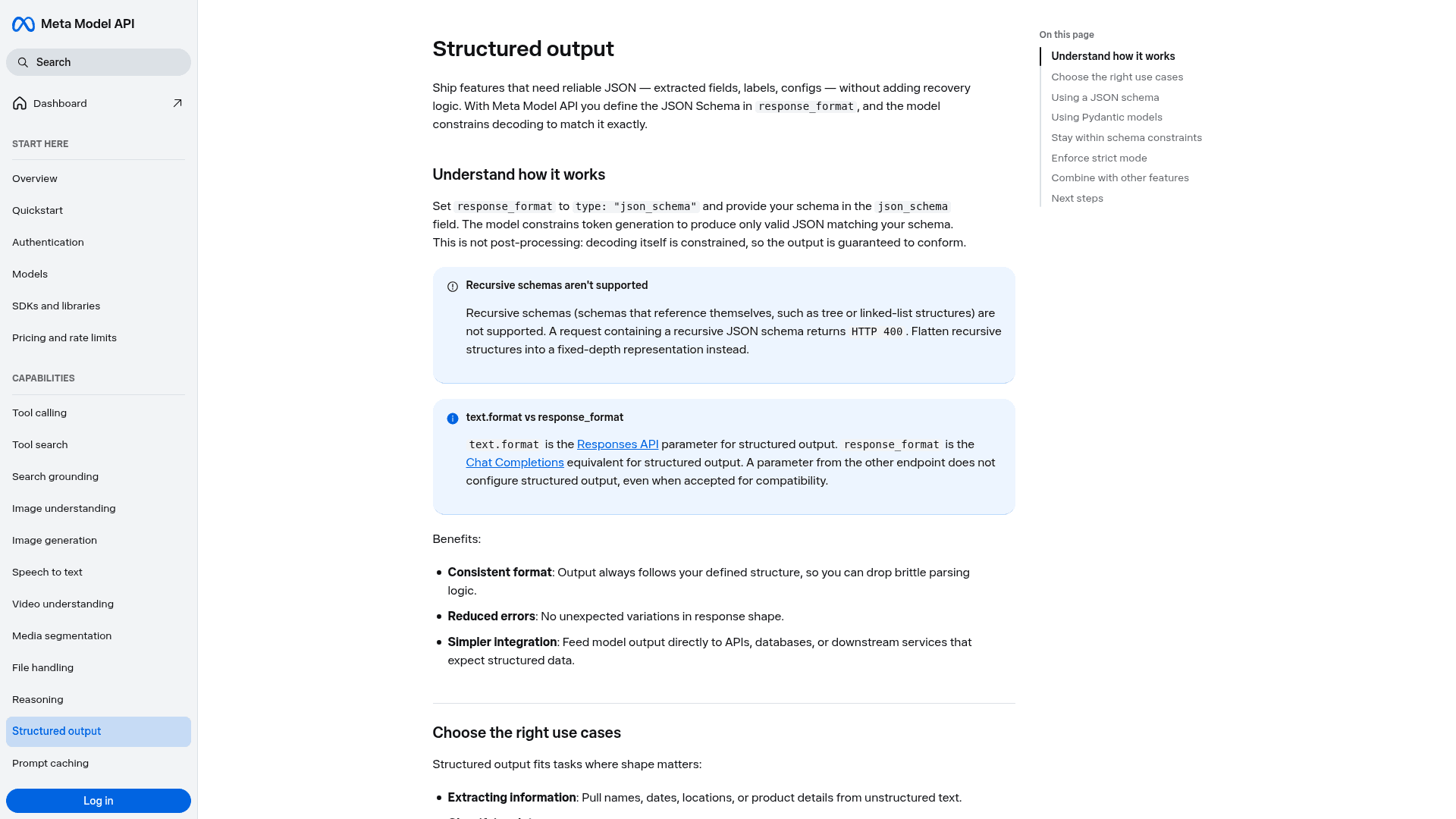
If you'd rather script it, the Muse Spark 1.3 API is a cleaner fit for briefs than the agent. You send a keyword plus your own data, the model searches and reads, and you get back a brief in a fixed shape. It's the same idea as any AI content pipeline, with Meta's model doing the research step.
What the web search returns, and what it doesn't
The Responses API has a built-in web search tool. Add include: ["web_search_call.results"] and each result comes back with a title, URL and snippet. The API schema also logs the queries the model ran and the pages it opened, which is handy for a brief: you can show a writer exactly what was read.
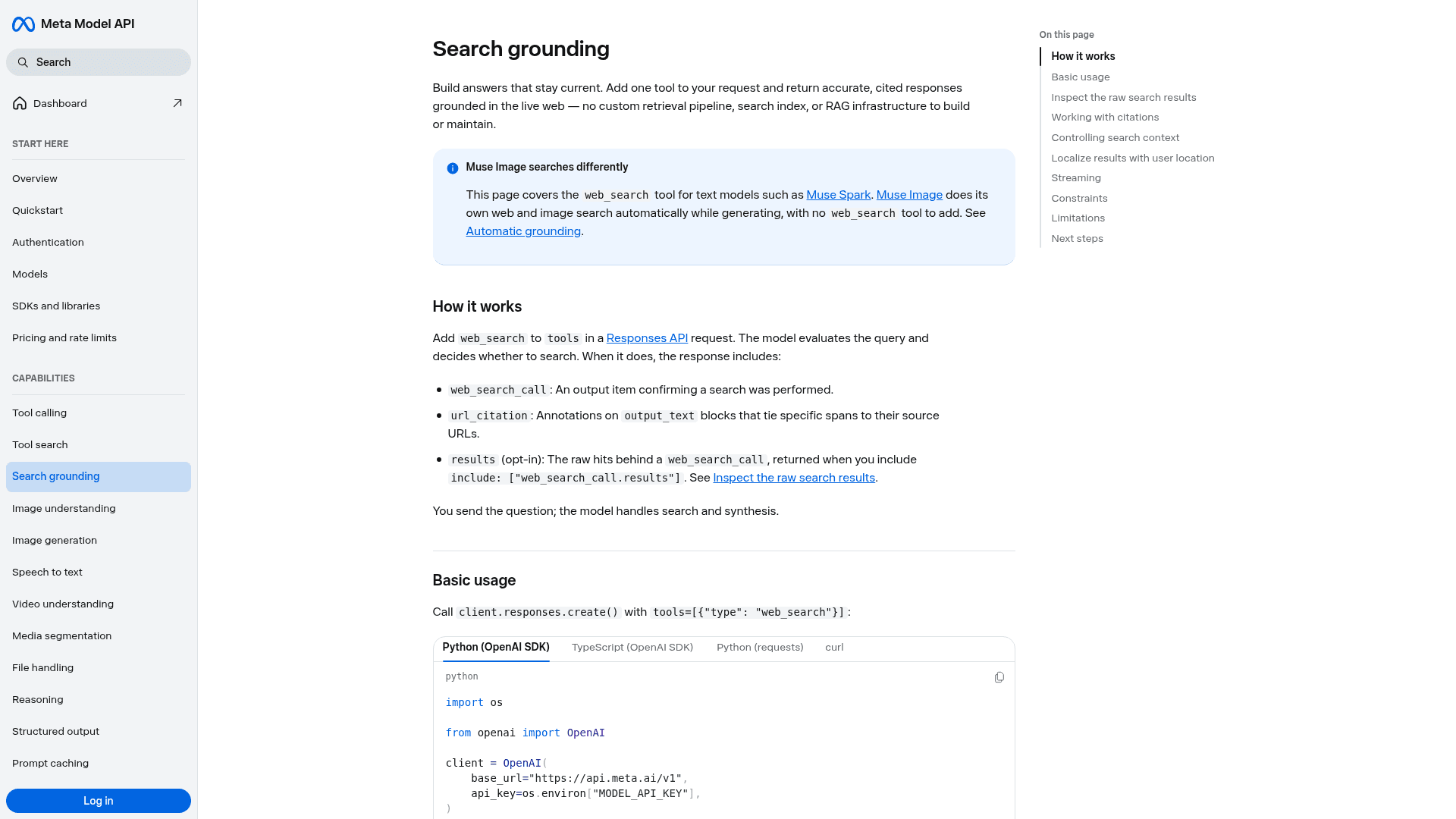
Here's what it doesn't return. There's no rank position, no search volume and no SERP features in any result field. Meta doesn't say which search engine powers it, and it describes the results as every source the model "considered," not a ranked list. So "the pages Muse read" and "the pages that rank on Google" aren't the same list, and a brief built only on the first can copy the wrong competitors.
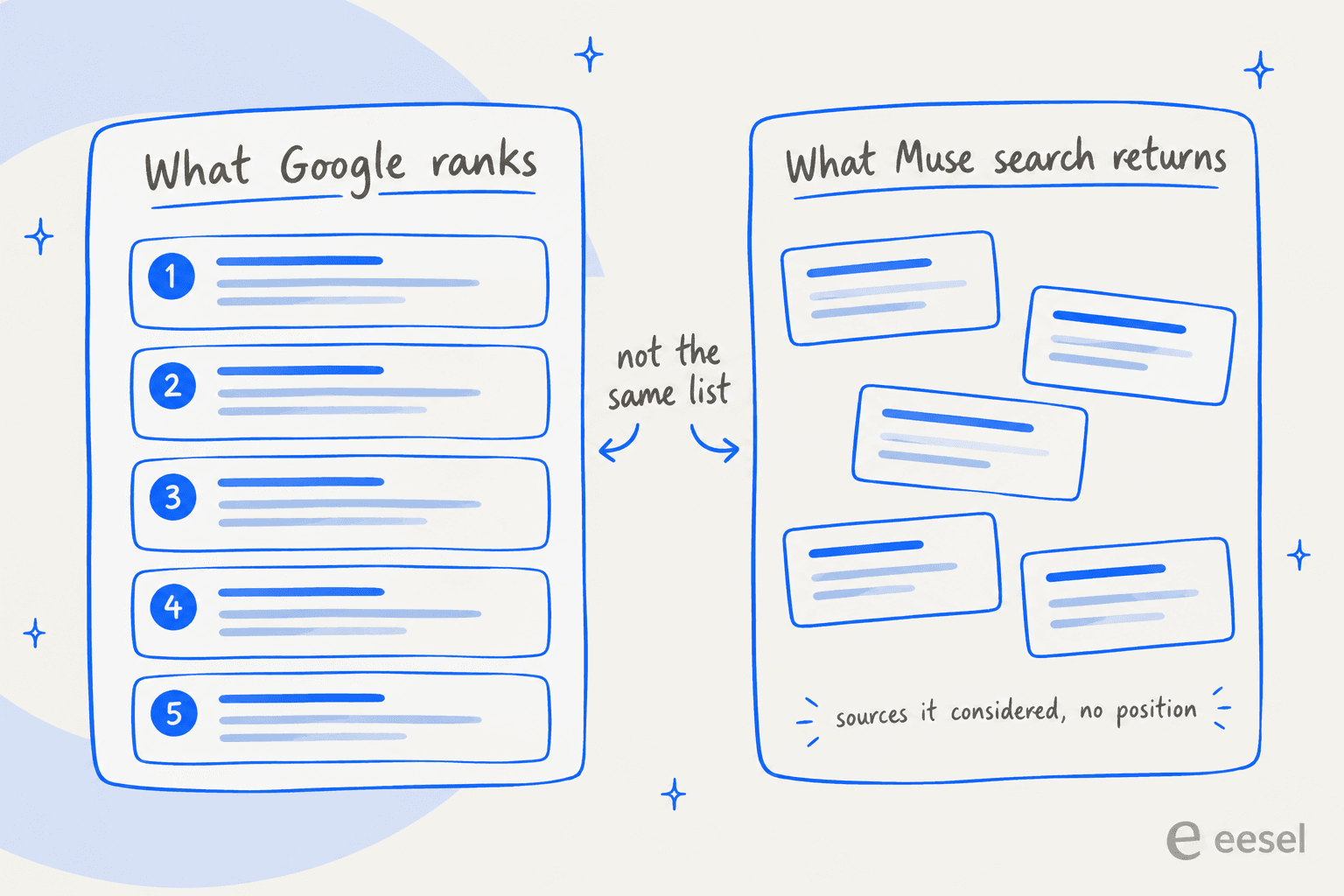
My fix is simple: pass in the actual top 10 URLs from a SERP analysis tool or your keyword export, and let Muse read those. Use the web search for facts and questions, not for deciding who the competition is. If you group keywords first with a keyword clustering tool, one brief can cover the whole cluster.
Three more search details that shape a brief:
- You can't force a search. The model "skips the search when it can answer confidently from its training data," and Meta's docs say enabling the tool "does not guarantee a search on every request." A brief with zero citations is a valid response.
- Narrow questions work best. Meta says multi-hop research "is less dependable today" and suggests breaking it into narrower requests. For briefs, that means one call for intent, one for the question list, and one per fact, rather than one giant "write me a brief."
- Location helps a little. An approximate
user_locationwith country, region or city biases search toward a locale. It's useful for a local-SEO brief, though it isn't the same as a geo-targeted SERP.
Shaping the brief as JSON
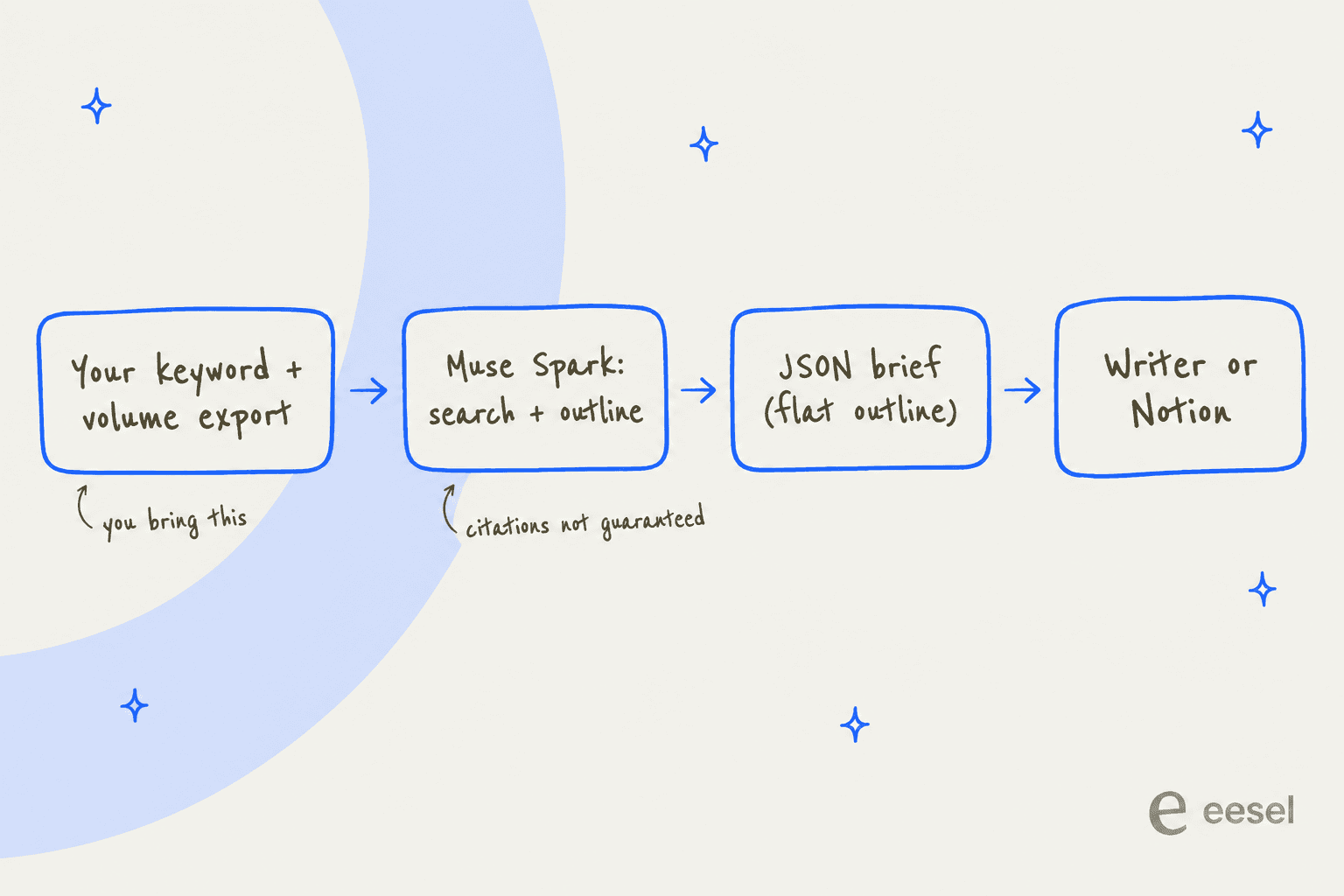
The part of the API I like most for briefs is structured output. You define a JSON schema, and the model is constrained at decode time to match it, so every brief comes back with the same fields: target keyword, intent, H2s, questions, sources.
One gotcha specific to outlines: recursive schemas aren't supported. A schema where a heading contains child headings of the same type returns HTTP 400, and Meta tells you to flatten it into a fixed depth. For a brief, that means an array of H2 objects, each with its own array of H3 strings, two levels and no deeper. That's how I'd structure a brief anyway, so it's more a heads-up than a limit.
What one brief costs
| Line item | Standard tier | Contributor tier |
|---|---|---|
| Input, per 1M tokens | $1.25 | $0.10 |
| Output, per 1M tokens | $4.25 | $0.20 |
| Web search | $2.50 per 1,000 searches | Not documented by Meta |
| Rate limit | 3,000 requests/min | 100 requests/min |
| Meta trains on your data | No | Yes |
Prices are from Meta's pricing page, and my Muse Spark 1.3 pricing post has the full rate card. My estimate for one standard-tier brief assumes 30,000 input tokens (your prompt plus search snippets), 14,000 output tokens including reasoning, and 15 searches. That's about $0.04 for input, $0.06 for output and $0.04 for search, so roughly $0.13 per brief. Even at ten times that, the model is the cheap part; the keyword data is where the money goes.
The contributor tier looks like a bargain, but Meta's terms say you must not send "sensitive, confidential, or personal information" to it. A public keyword is fine. A client's Search Console export or an unreleased product brief isn't, so keep those on the standard tier.
On the writing side, early reads of the model are mixed but interesting:
"Even Muse Spark has style much less "sloppy" than Claude et al, let alone Chinese LLMs. I mean yes, they have their own tics, but if you don know them you won't even notice."
What still needs a human in the brief
Whichever route you pick, three parts of a brief stay with you.
- The difficulty call. Neither Muse route knows your domain's strength or the referring domains a term needs. Check average keyword difficulty against your own site before a brief goes to a writer.
- Internal links. Muse doesn't know your sitemap unless you upload it, which is the job an internal linking tool does. A brief should name the 5 to 10 pages the new post links to, and how many internal links is a question with a real answer.
- The angle. An outline stitched from the top 10 pages is an average of the top 10 pages. The brief needs the one thing your post says that they don't, which is a judgement call, and it's what E-E-A-T rewards.
The customers I see get the most out of AI briefs usually settle on a template and hold every post to it. One peptide and wellness retailer using eesel's blog writer picked their best post and told the AI:
"That is the North Star. Update this accordingly."
That's the right instinct, and it works with Muse too: save the template in Muse's memory files or your JSON schema, and judge every brief against it.
Which setup fits which team
| If you... | Best Muse route | What you'll still do |
|---|---|---|
| Write a few posts a month and already use Search Console | Muse agent, CSV upload | Check difficulty, pick internal links, set the angle |
| Keep briefs in a Notion database | Muse agent with the Notion connector | Test the connector on one brief, keep approvals on |
| Pay for Semrush or Ahrefs already | Muse agent with a custom connector, or your own script | Budget API units, own the connector's security |
| Want a repeatable brief generator | Muse Spark API with structured output | Feed in the real top 10 URLs, verify citations |
| Produce briefs for a team or several clients | Probably not Muse | See below |
The pattern across both routes: Muse is good at the reading and the formatting, and the SEO judgement is still yours to supply. That's a fine trade for a solo marketer who already has the data. It's a bigger ask for a team.
For comparison, I ran xAI's agent through the same test in my Grok Bot briefs post, and other general agents are in my Muse agent alternatives roundup.
If you'd rather use a tool built for briefs, see my guide to AI content brief generators or tools that turn keywords into outlines.
Where eesel fits for SEO content briefs
Here's how I'd put the difference. Muse is a capable generalist and a model you can build on; eesel is the employee. eesel is an AI teammate platform where you hire ready-to-work teammates for specific jobs, and for content that's the AI blog writer. It does keyword research and competitor gap analysis, already knows your site and past posts, and carries the brief straight into a researched draft in your voice. You review a draft, not a brief you still have to hand to someone.

The brief eesel's customers give it is often tiny. One German baby-textile brand ran it around 15 times with a prompt that was just the site and the keyword, "DOMAIN: ... KEYWORD: Wie man Badeponchos richtig pflegt," and got back full SEO posts with FAQs, internal links and infographics. On the results side, Amaresh Ray, co-founder of Rallied, says on eesel's blog writer page that they "went from 488 to 6,600 impressions in just three months" targeting comparison and pricing keywords.
If Route 2 appealed because you want briefs to be scriptable, eesel has that too. The eesel CLI runs the same teammate from a terminal. eesel files upload ./gsc-queries.csv hands it your Search Console export, eesel chat "brief and draft a post for each query with impressions but no page" asks for the work, and eesel approvals lists what's waiting on a human. Every command prints JSON, headless runs authenticate with EESEL_API_URL and EESEL_API_TOKEN, and every workspace is also an MCP server. So a script, a CI job, or a coding agent like Claude Code, Codex or Cursor can drive it, the same idea as an AI blog writer API. It's the same agent as the dashboard, so the approval rules you set there hold in the terminal.
Try eesel for SEO content briefs
If you're tired of stitching keyword exports into outlines by hand, try eesel's AI blog writer on three keywords from your backlog. It checks what ranks, finds the gap, and hands back a researched draft in your voice to approve, with no connector to build and no API units to budget. It's free to start, and one keyword is enough to see whether its brief beats the one you'd have written.
Frequently Asked Questions
Can Meta Muse write SEO content briefs?
Does Meta Muse connect to Semrush or Ahrefs?
Can Muse use my Google Search Console data for a content brief?
How much does a Meta Muse SEO content brief cost?
Does Muse Spark's web search show what ranks on Google?
Can Muse save content briefs to Notion?
What's the best AI tool for SEO content briefs at scale?


Article by
Kurnia Kharisma
Kurnia is a software engineer and writer at eesel AI with two years of SEO experience, writing about AI tools, helpdesk software, and customer support. He pairs a developer's understanding of how these products are built with search-driven research into what actually ranks and resonates with the people searching for them.