Meta Muse for content refresh: what it can update, and where it stops

Kurnia Kharisma

Katelin Teen
Last edited September 29, 2026

What "Meta Muse" means when you point it at a blog
"Muse" is a family name at Meta, and three different products answer to it. Which one you mean decides almost everything about how a content refresh would work.
| Product | What it is | How it touches your posts | Price |
|---|---|---|---|
| Muse agent | Consumer personal AI agent with its own cloud browser, launched 2026-09-08 | Connectors, its browser, or files you upload | Free to 100M tokens/week, then $20 or $100/month |
| Muse Spark 1.3 API | Meta's frontier model, sold per token | Whatever pipeline you build around it | $1.25 in / $4.25 out per 1M tokens |
| Muse Code | Terminal coding agent running on Muse Spark | Edits Markdown files in a repo | Subscription |
The Muse agent is the one most people picture, and my Muse agent review goes deep on it. It runs tasks in its own cloud browser, and since today it has a small-business push too. Muse for Small Business launched on 2026-09-29 with 15 named connectors and the line "nothing publishes, sends, or spends without your approval." It's available to people in the US and Canada who are 18 and over, and the Muse agent pricing post breaks down the token plans.

The API and Muse Code are developer products. If your blog lives as Markdown in a Git repo, those two are closer to what a content team actually needs than the consumer app. I'll cover all three below. If you're writing new posts rather than updating old ones, Meta Muse for blog writing covers that side.
Content refresh is a fact problem before it's a writing problem
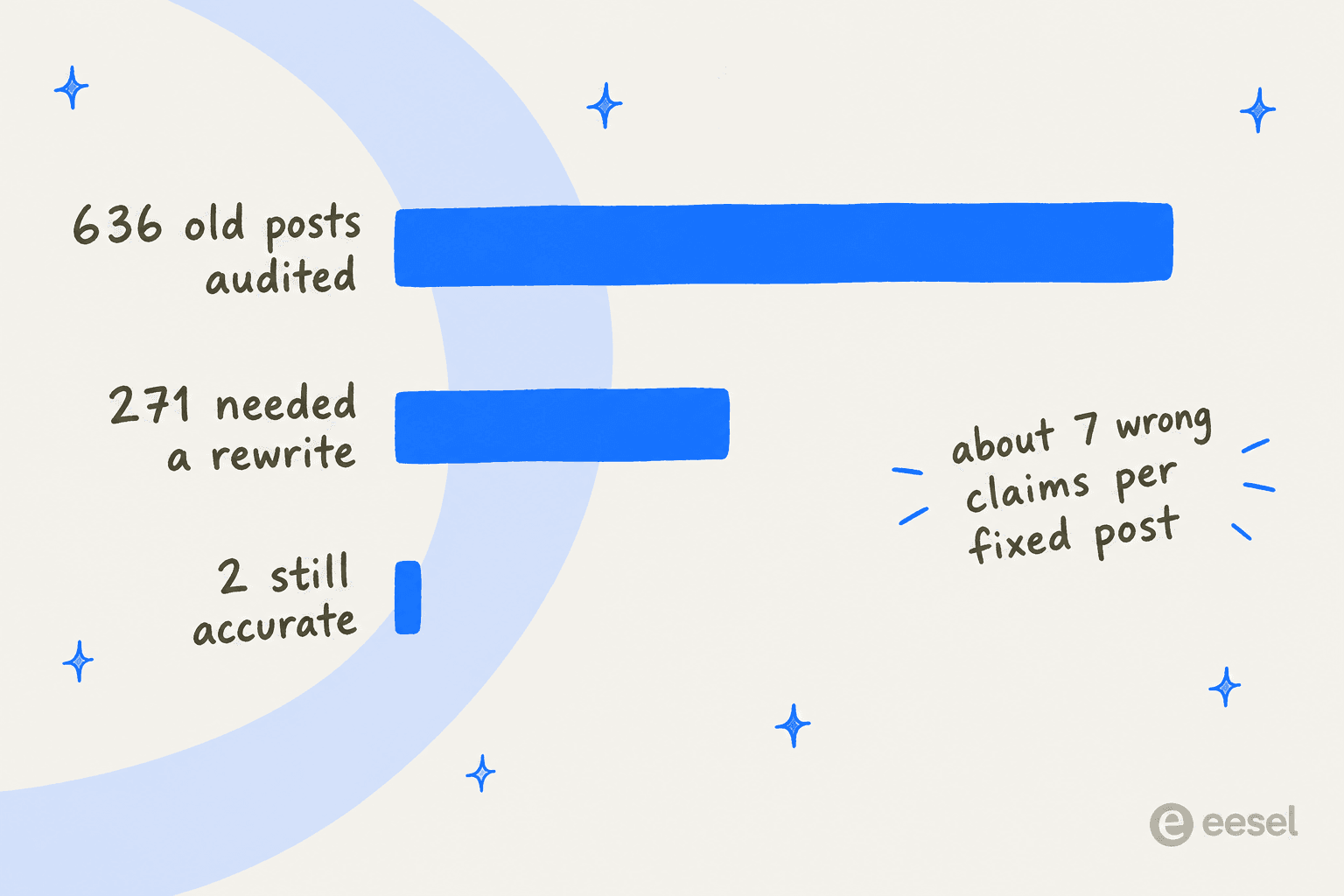
Here's what changed my mind about which tools are good at this. At eesel I work through a fact-refresh queue of 822 older English posts on the eesel blog. So far I've reviewed 636 of them. 271 needed a full rewrite, because a product had pivoted, been renamed, or shut down. Only 2 came back verified with no changes. Across the posts I patched instead of rewriting, I corrected about 7 claims each.
None of those fixes were about prose quality, and none would have been caught by an SEO content optimization score. They were prices that had moved, plans that had been renamed, and features that shipped or disappeared. So the test I'd put any AI through for content refresh isn't "can it write a nicer intro." It's three narrower questions:
- Does it actually go and check current facts, or does it answer from memory?
- Can it get the change into the place your post lives?
- Can a human see exactly what changed before it's live?
Muse does well on some of these and poorly on others, and the three routes split them differently. If you haven't picked which posts to refresh yet, start with how to prioritize SEO content.
Route 1: the Muse agent
This is the "just ask it" route. You tell Muse which posts to look at, it researches, rewrites, and tries to put the new version where it belongs.
What it's good at
The research-and-rewrite loop is solid on paper. Muse reads and edits PDF, DOCX, plain text, Markdown, XLSX and CSV files, and Meta's own example edit is "Rewrite the intro paragraph." That means you can upload a Google Search Console export as a CSV and ask Muse which pages lost the most clicks, then hand it the posts. There's no Search Console connector, so the export is the way in.
It also runs recurring tasks on daily, weekly or custom schedules, and those "continue until you cancel them." A weekly "check these 20 posts for stale pricing" job is supported in principle. It keeps editable memory files, so a style guide or house rules can live there (the same idea behind brand voice training), and you can ask it to show the sources behind an answer.

The closest real proof of a refresh-style job comes from Meta's own small-business launch, where a tester says Muse audited her email automations, shut down duplicate flows, and rebuilt the templates in Klaviyo. That's audit-then-rebuild work in a connected tool, which is exactly the shape of a content refresh.
Where your CMS fits
This is where it gets narrower. Meta's named connectors for work include Notion, Granola, GitHub and Box, and the small-business set adds Shopify, Canva, Slack and others. No Meta page names a WordPress, Webflow, Ghost or Google Docs connector. Meta also doesn't publish a full list; it says the complete set is in the app's settings. That's the same CMS integration gap most general agents have.
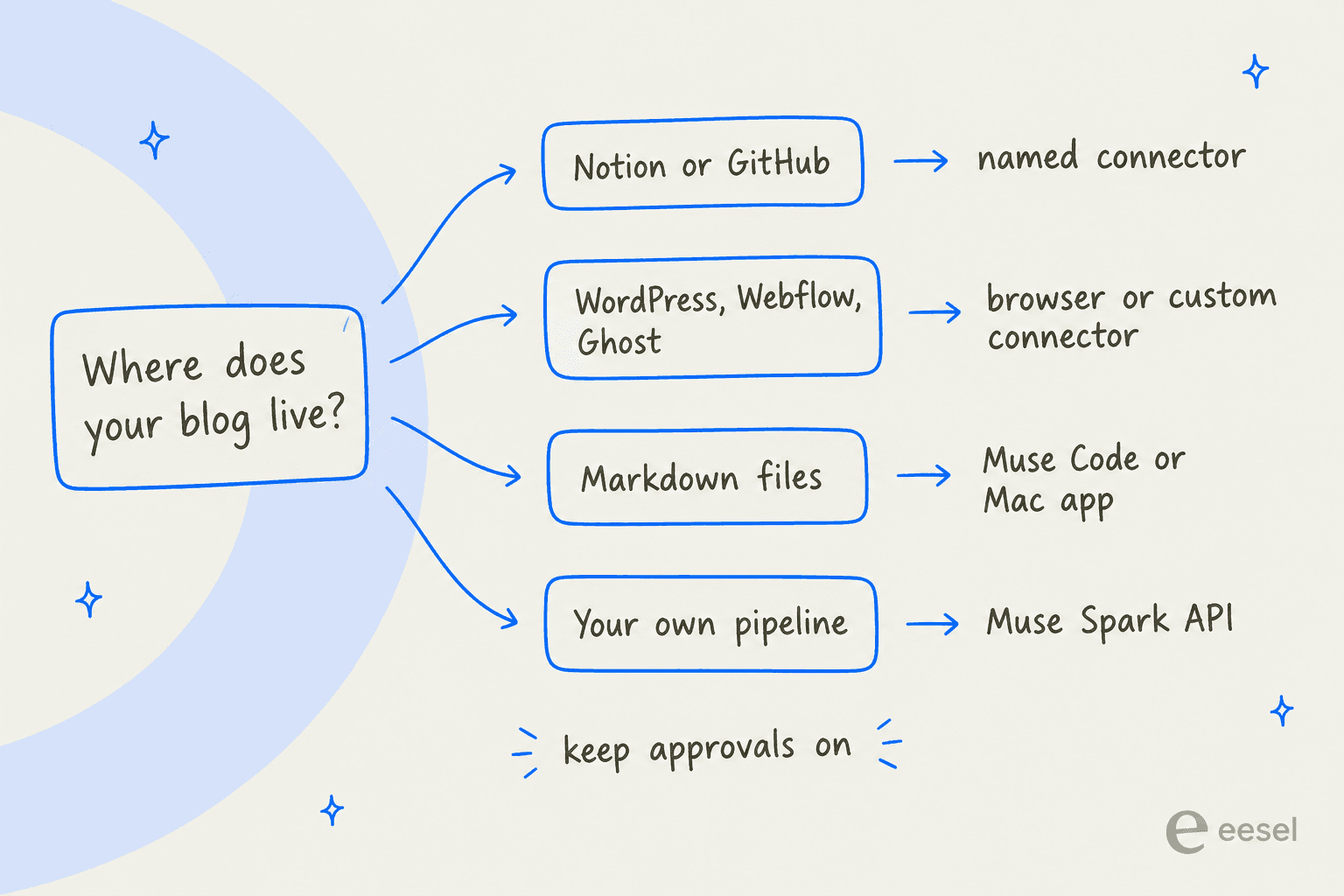
For the big CMSes you have two workarounds, plus a third if your posts are local files. The new Mac app can find, read and update files on your machine once you grant Full Disk Access, which covers a local Markdown repo.
- Custom connector. You can ask Muse to build a connector for a service with an API. It stores the keys in its credential store, but "Meta doesn't review custom connectors or how they use your information, so grant access with caution."
- The browser. Muse logs into your CMS through its own browser using the stored-credentials vault, and "filling out online forms" is a listed job. The catch is how it drives pages. Per Meta's safety write-up, the browser sub-agent sees an accessibility-tree snapshot, can't run JavaScript in the page, and has devtools disabled. Block editors like Gutenberg, the Webflow Designer and Ghost's editor are JavaScript-heavy, and Meta publishes no reliability data for them.
The community reports match that picture. Logging in usually works; what happens after login is less predictable:
"It almost worked with MyChart, but hit a snag navigating the website after logging in."

Some sites also push back on the agent itself. One Reddit user put it this way:
"My Amazon will not allow Muse to do any kind of research there, and most websites are giving Captchas."

If your CMS sits behind bot protection, test a login before you plan a whole refresh around it. For WordPress specifically, compare this with the standard ways to publish AI content there.
Approvals and who's responsible
Muse's approval design is careful, and it's the part I'd lean on hardest. By default it asks before every write action, and the approval dialog renders outside the chat so an injected prompt can't fake your consent. Grants come in five scopes: allow once, for this task, for this site, always, or deny.

For a batch refresh, "Allow for this site" on your CMS domain is tempting, because it stops the prompts. It also removes your safety net. And the terms don't give you one back. The Muse terms make you "solely responsible" for anything Muse "publishes, or hosts at your direction... whether or not you reviewed" it. They disclaim any guarantee that actions can be undone, and they warn that outputs "may not reflect correct, current or complete information." That last line is the exact risk in a stats refresh.
The clearest cautionary tale so far isn't about a blog, but it's about an agent acting on a public account without checking in:
"So muse handled my Facebook marketplace today. Just found out it told people my address and agreed a lowball price and then they showed up without it even telling me until late tonight that it messed up."
Muse is also one person per account, which matters for any real content ops workflow. Nothing in the help center or terms describes team seats, roles, or an editorial review queue. Meta announced an enterprise platform on 2026-09-28 that will bring the Muse agent to businesses, but no seats or pricing are published yet.
Route 2: build a refresh pipeline on the Muse Spark API
If you're comfortable writing code, the Muse Spark 1.3 API gets you closer to a controlled refresh. You feed in the old post plus any source pages, and get back edits you can diff. It's the same shape as any AI content pipeline, with Meta's model in the middle.
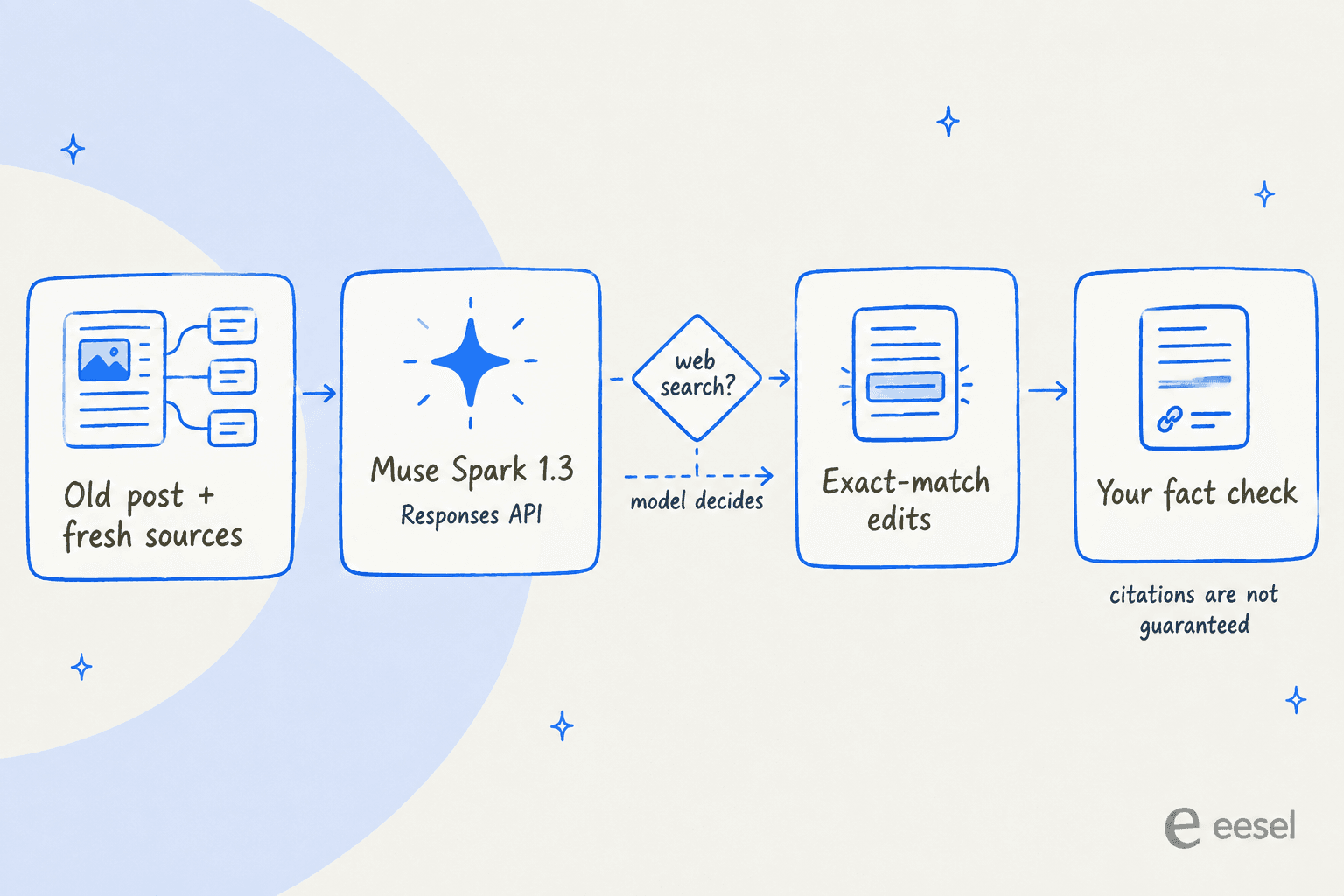
The good parts first. The Responses API has a built-in web search tool that returns url_citation annotations, with the URL, title and character offsets of each cited span. That's enough to turn citations into markdown links automatically. The context window is 1,048,576 tokens with no long-context surcharge, so an old post plus 20 source pages fits easily. And structured output is constrained at decode time, so a {title, body, changed_claims[]} schema parses on the first try.
The best piece for refresh work is Meta's own search-and-replace edits cookbook. The model returns the exact old text plus its replacement, and the edit is rejected unless the old text matches exactly once. Meta's reasoning: zero matches means the model hallucinated the original. For a refresh, that turns "rewrite this post" into a reviewable list of changes, which is what you want when the post already ranks.
Now the three gaps that matter for a refresh:
- You can't force a search. The model "skips the search when it can answer confidently from its training data," and
tool_choiceonly accepts"auto". Anything else returns HTTP 400, per the tool calling docs. Meta's cookbook says outright that a reply with no citations is a valid answer. In a refresh, that's how a stale price gets "confirmed." - No published knowledge cutoff. Meta's help center says each model has one and points to the Models page, which doesn't list a date for 1.3 or 1.2. So you can't reason about what the model "should" know. That's a problem for E-E-A-T, where a wrong current figure costs you trust.
- Search is for narrow questions. Meta says multi-hop research "is less dependable today" and suggests breaking it into narrower requests. In practice that's one call per claim, not one call per post.
What it costs
| Line item | Standard tier | Contributor tier |
|---|---|---|
| Input, per 1M tokens | $1.25 | $0.10 |
| Cached input, per 1M tokens | $0.15 | $0.002 |
| Output, per 1M tokens | $4.25 | $0.20 |
| Web search | $2.50 per 1,000 searches | Not documented by Meta |
| Rate limit | 3,000 requests/min | 100 requests/min |
| Meta trains on your data | No | Yes |
Prices are from Meta's pricing page, and my Muse Spark 1.3 pricing post covers the rest of the rate card. My back-of-envelope estimate for one standard-tier refresh assumes 40,000 input tokens, 5,000 visible output tokens, an assumed 10,000 reasoning tokens, and 10 searches. That comes to about $0.14 per post. Treat the reasoning figure as a floor: Artificial Analysis measured 1.3 using 120M output tokens to finish its index against a 72M median, so it runs long.
The contributor tier looks like a 10x discount, but read the terms first. Section 6.2 says: "You must not submit sensitive, confidential, or personal information to the Discounted Services." An already-published post is public, so it fits. An unpublished draft, a customer quote from your sales calls, or client work under NDA doesn't. Put those on the standard tier, where "your prompts and completions are not used to train Meta models."
Early community read on the writing itself is thin but interesting. One Hacker News commenter found the style cleaner than rivals:
"Even Muse Spark has style much less "sloppy" than Claude et al, let alone Chinese LLMs. I mean yes, they have their own tics, but if you don know them you won't even notice."
Route 3: Muse Code over a folder of Markdown posts
If your blog is a static site with posts as Markdown files in a repo, Muse Code is the most natural fit of the three. muse exec "<prompt>" runs headless with JSON output. It fans out to eight subagents by default, configurable from 1 to 64, and edits files with the same exactly-once search-and-replace contract. My Muse Code pricing breakdown covers the plans.
Two caveats from Meta's own automation docs. The exit code "reflects how the run ended, not whether the work is correct." So you need your own checks: a link checker, a frontmatter lint, and a human reading the diff. And the docs don't say whether web search inside exec runs returns citations. If you already script content with Claude Code automation, the setup will feel familiar. This is the route I'd trust most for mechanical fixes like a renamed product or a moved URL across 200 posts, and least for "go find this year's numbers."
Which route fits which team
| If you... | Best Muse route | What you'll still do by hand |
|---|---|---|
| Blog in Notion or on GitHub, a few posts a month | Muse agent, named connector | Approve each publish, check each changed fact |
| Run WordPress, Webflow or Ghost | Muse agent, browser or custom connector | Test the editor first, keep approvals on, back up posts |
| Keep posts as Markdown in a repo | Muse Code | Review the diff, run your own link and frontmatter checks |
| Want a repeatable, scripted refresh | Muse Spark API | Build the pipeline, verify citations, route drafts to the standard tier |
| Refresh a large back catalogue every quarter | Probably not Muse | See below |
The pattern across all three routes is the same: Muse is a general agent and a general model, and the refresh-specific parts are yours to build. That's a fine trade for a curious solo blogger. It's a bigger ask for a content team with a few hundred posts to keep current. For comparison, I looked at xAI's agent the same way in Grok Bot for content refresh, and the trade-off came out much the same. Other general agents are in my Muse agent alternatives roundup.
Where eesel fits for content refresh
Here's how I'd frame the choice. Muse is infrastructure plus a generalist; eesel is the employee. eesel is an AI teammate platform where you hire ready-to-work teammates for specific jobs. For content, that's the AI blog writer. It already knows your site and past posts, researches current facts for each claim it touches, and rewrites in your brand voice. It then returns the refresh as a draft you approve, rather than a live edit you have to supervise. It's the same workflow I use on the eesel blog, which is where the 636-post audit above came from.
The requests I see from blog-writer customers usually look like refresh work, too. One marketer at a tour-operator booking software company asked, word for word:
"If I upload it, can you ingest that and write to it, making any improvements you deem necessary?"
That's the job: take what exists, keep what's right, fix what isn't. If you're weighing tools for it, my roundup of AI content refresh tools and my guide to refreshing SEO content automatically go deeper on the process.
If you're drawn to Routes 2 or 3 because you want refreshes to be scriptable, eesel has that too. The eesel CLI runs the same teammate from a terminal. eesel files upload ./old-post.md hands it a post, eesel chat "refresh the pricing section with current numbers" asks for the work, and eesel approvals lists anything waiting on a human. Every command prints JSON, headless runs authenticate with EESEL_API_URL and EESEL_API_TOKEN, and every workspace is also an MCP server. That's the same idea as an AI blog writer API: a script, a CI job, or a coding agent like Claude Code, Codex or Cursor can drive a refresh across a whole folder of posts. It's the same agent you see in the dashboard, not a separate API product, so the approval rules you set there hold in the terminal too.
Try eesel for content refresh
If your back catalogue is quietly going stale, try eesel's AI blog writer on your three oldest ranking posts. It researches what changed, rewrites the sections that need it in your voice, and hands back drafts to approve, so there's no browser session to babysit and no live page edited behind your back. It's free to start, and you'll see within one post whether it catches the facts your last refresh missed.

Frequently Asked Questions
Can Meta Muse refresh old blog posts?
Does Meta Muse connect to WordPress for content refresh?
How much does Meta Muse cost for content refresh work?
Can I use the cheap Muse Spark contributor tier to refresh content?
Will Muse Spark look up current facts during a content refresh?
tool_choice only accepts "auto", so an answer with no citations is valid output. Check every changed claim, the same way you would in any AI content editing process.Is Meta Muse safe to let publish changes to a live post?
What's the best AI tool for content refresh at scale?


Article by
Kurnia Kharisma
Kurnia is a software engineer and writer at eesel AI with two years of SEO experience, writing about AI tools, helpdesk software, and customer support. He pairs a developer's understanding of how these products are built with search-driven research into what actually ranks and resonates with the people searching for them.