Meta Muse for blog writing: what Meta's AI can (and can't) do for your blog in 2026

Kurnia Kharisma

Katelin Teen
Last edited September 29, 2026

What "Meta Muse" actually means for a blog writer
I've spent two years on SEO content, and the first thing I do with any new "AI for writing" pitch is work out what I'd actually be buying. With Meta, that takes a minute, because "Muse" is a family name on several products.
The Meta Muse agent is the consumer app Meta launched on September 8, 2026. It runs on Muse Spark 1.3, the model Meta sells separately to developers through the Meta Model API.
Then there's Muse Image, a separate image model, and Muse Code, a coding harness that doesn't matter much for a blog.
For writing, the three that matter are these:
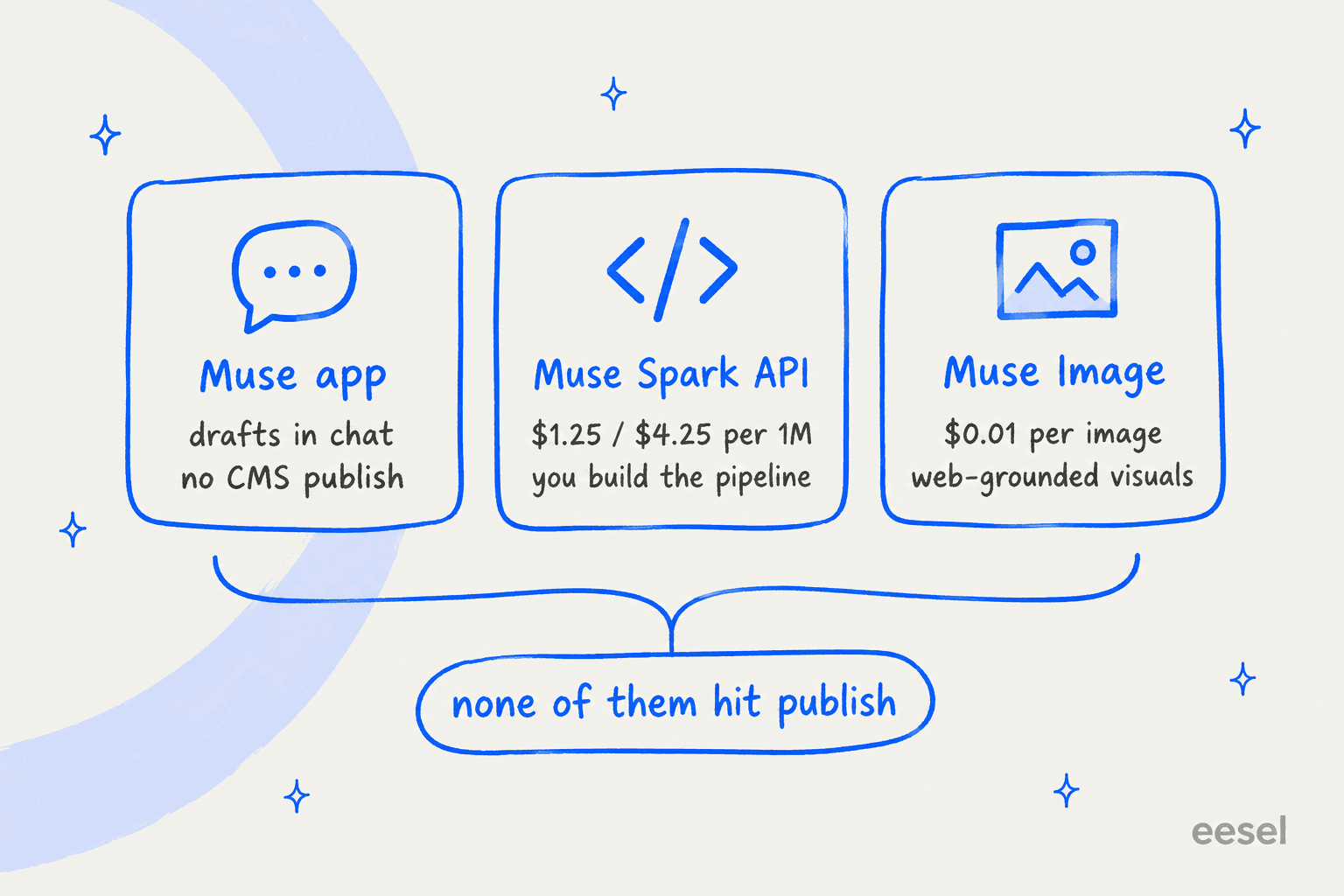
| Muse app | Muse Spark API | Muse Image | |
|---|---|---|---|
| What it is | Consumer AI agent (iOS, Android, muse.ai, WhatsApp) | Text model for developers | Image generation and editing model |
| Who it's for | One person drafting in chat | Teams building their own pipeline | Anyone who needs post visuals |
| Price | Free up to 100M tokens/week, paid plans above | $1.25 input / $4.25 output per 1M tokens | $0.01 per image |
| Web research | Has its own browser | web_search tool, $2.50 per 1,000 searches | Built-in search, included in price |
| Publishes to your CMS | No | Only if you code it | No |
| Availability | US only at launch | API access via dev.meta.ai | Same API |
That last row is the one to hold onto. Every Muse surface stops at the draft or the image. What happens between "draft" and "live on my site, ranking" is still yours.
Using the Muse app to draft a blog post
The Muse app is the easiest way in. You message it like a person, and it can produce what Meta calls Artifacts: documents, PDFs, web pages and other rich outputs that live outside the chat.

The examples Meta shows are trip plans and checklists, not blog posts, but a long-form document is the same shape of output. Ask for a 2,000-word draft on a topic, and Muse can research it with its own browser and hand you a formatted document back.
Three things make the app more interesting than a plain chatbot for writing:
- It keeps working in the background. Muse runs in its own isolated virtual machine with a browser and file system, so it can keep researching after you close the app and come back when it's done.
- It can build its own connectors. Meta says Muse can write custom connectors for services that expose an API or CLI. In theory that includes your WordPress REST API. In practice, handing a consumer agent write access to your company CMS is a decision your security team will want to be in on.
- It's generous on free usage. Mark Zuckerberg's launch thread says Muse is "free to use for up to 100M tokens per week," with subscription plans above that.
Where the app falls short for a blog is everything that makes a blog a program rather than a pile of documents. It doesn't know your site's existing posts, so it can't interlink them. It isn't trained on your past articles, so there's no brand voice training. It has no keyword data. And it's a personal agent tied to one person's account, US-only at launch, which makes it awkward to share across a content team.
My take: the Muse app is a good research-and-draft buddy for a solo writer in the US. It's not a content operation.
Building a blog pipeline on the Muse Spark API
If you're technical (or have a developer), the Muse Spark API is where Muse gets serious for content. Muse Spark 1.3 has a 1,048,576-token context window, accepts text, images, video and PDFs, and speaks the OpenAI SDK format, so most existing writing scripts can point at it by changing the base URL.
The feature that matters most for blog writing is search grounding. Add one web_search tool to a Responses API call, and Muse Spark searches the live web and returns text with url_citation annotations that tie specific spans to their sources.
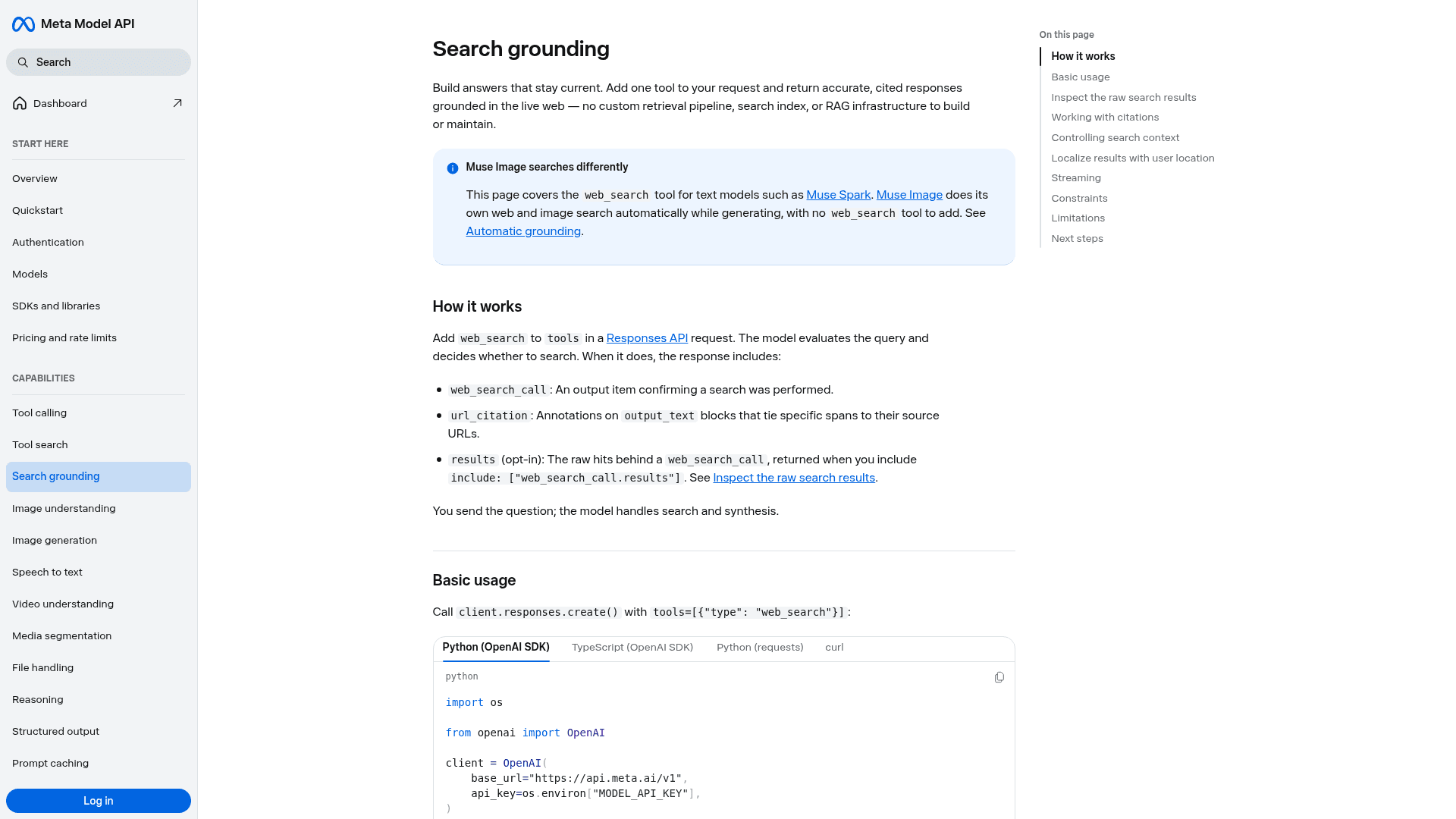
That's the right building block for a post that cites its claims. You also get a search_context_size dial (low, medium, high) and an opt-in results field showing every page the model looked at, not just the ones it cited. For an editor, that second list is gold: it shows you what the model saw and chose to ignore.
Now the part Meta is refreshingly honest about. The Limitations section of its own docs says "Complex, multi-hop research that chains many sources into one answer is less dependable today" and recommends breaking it into narrower requests. It also notes the model decides whether to search at all, so enabling the tool doesn't guarantee a lookup. And search grounding works on the Responses API only, not Chat Completions.
A researched blog post is almost the definition of multi-hop research. So the pipeline that works is the one Meta hints at:
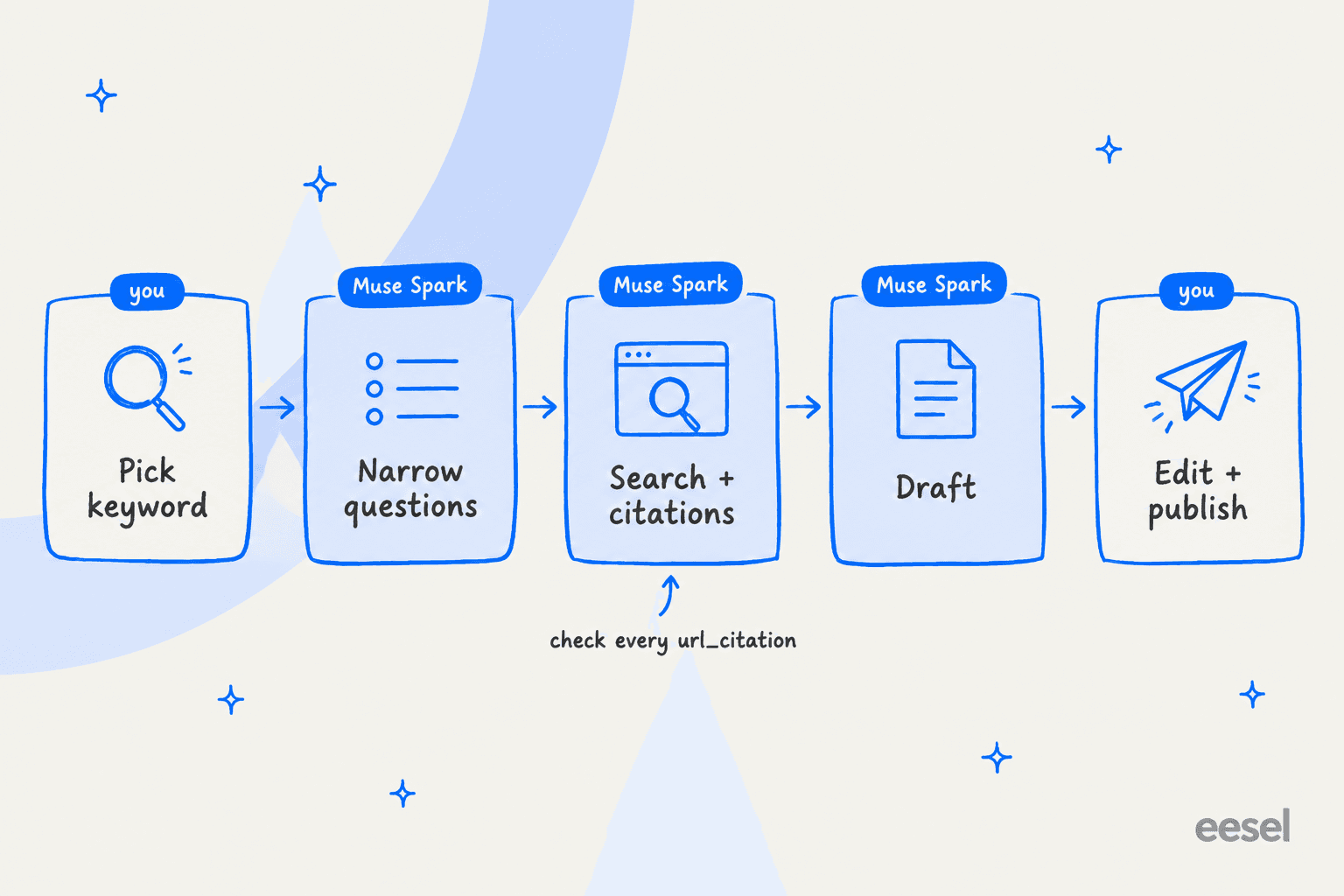
- You pick the keyword. Muse Spark has no search volume or difficulty data. Use a keyword research tool first.
- Split the topic into narrow questions. One call per sub-question ("What does X's pricing page list for the Pro plan?") rather than one giant "research this topic" call.
- Search and collect citations. Run each question with
web_search, keep theurl_citationlist, and throw away any claim without one. - Draft from the collected facts. Feed the cited facts back in and ask for the post. With a 1M-token context, you can include your style guide and a few sample posts.
- Edit and publish. A human checks every citation and pushes the post to your CMS, because nothing in the API does that.
I'd add one step Meta doesn't mention. The docs don't describe a way to restrict searches to specific domains, so you can't tell it "only vendor sites and Reddit." If your editorial standards care where a fact came from (mine do), filtering sources is on you after the fact. We cover the wider version of this process in our AI blog writing workflow guide.
The contributor tier trap for content teams
Meta sells Muse Spark at two price points, and for blog writing the difference is more than cost.
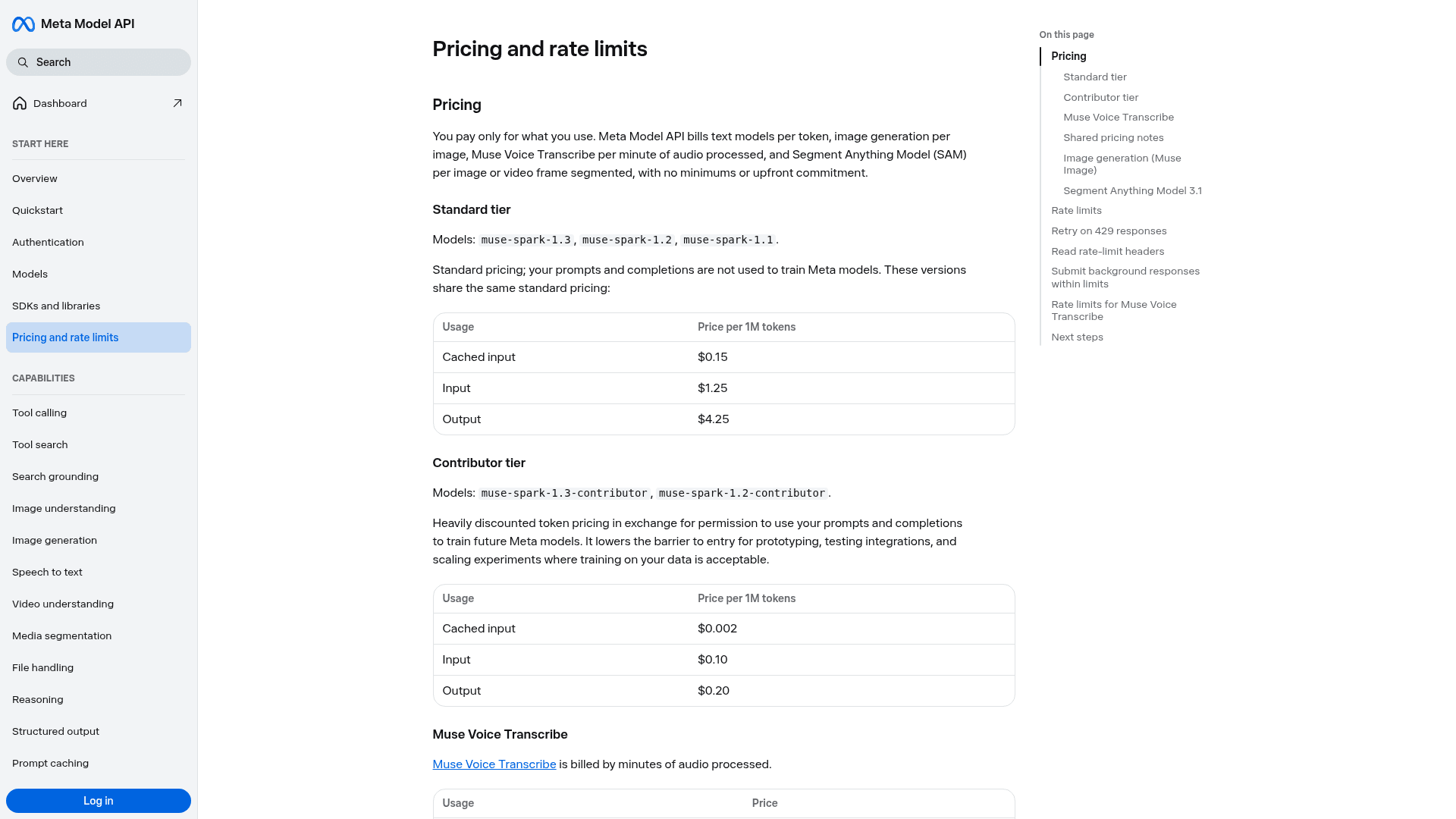
| Tier | Models | Cached input | Input | Output | Rate limit | Trains on your data? |
|---|---|---|---|---|---|---|
| Standard | muse-spark-1.3, 1.2, 1.1 | $0.15 | $1.25 | $4.25 | 3,000 RPM, 4M TPM | No |
| Contributor | muse-spark-1.3-contributor, 1.2-contributor | $0.002 | $0.10 | $0.20 | 100 RPM, 3M TPM | Yes |
Prices per 1M tokens, from Meta's pricing page.
The contributor tier is 12.5x cheaper on input and about 21x cheaper on output, and Meta's own description is plain about the deal: discounted pricing "in exchange for permission to use your prompts and completions to train future Meta models."
For a blog, think about what's in those prompts. Unpublished drafts. Content briefs that reveal your keyword strategy. Client material if you're an agency. Embargoed product launches. Once a post is live, it's public anyway, but everything before that isn't. The HN crowd summed up the pricing split bluntly when Muse Spark 1.3 launched:
"It is dirt cheap, but only if you are willing to share your data with meta and allow them to use it for improving their models and products."

Not everyone minds. Another developer was happy with the trade for the right workload:
"I'm glad they train on my stuff if it improves the model. Hell, I've been using tons of muse-spark-1.3-contributor for this very reason (and because it's a decent model for a bargain basement price)"
My rule: contributor tier for testing prompts on public topics, standard tier for anything a competitor would like to read before it ships. The 100 requests per minute cap on contributor also rules it out for batch runs, where standard gives you 3,000.
Muse Image for blog visuals
This is the Muse product I'd point a content team at first. Muse Image costs a flat $0.01 per generated image, regardless of prompt length or how hard it thinks, and you're not billed for images that fail or get filtered.
What makes it useful for blogs specifically is that it's agentic. Per Meta's image generation guide, before it renders it can:
- Pull visual references for real products, places, logos and styles from the web.
- Look up current facts so any numbers or dates inside the image are right.
- Run code to lay out charts and infographics before rendering them.
All of that search is included in the per-image price, not billed like the text model's $2.50 per 1,000 searches. You can switch each tool off (enable_web_search, enable_image_search, enable_shell), set an aspect ratio with size, and pick reasoning_strength "low" for a single fast pass.
Two cautions from running image generation for our own blog. First, "can pull logos from the web" means it can also put a real company's logo somewhere you didn't intend, so review every render. Second, a model that looks up facts for an infographic can still get one wrong, and a wrong number inside an image is harder for a reader to fact-check than a wrong number in text. Treat the image like a claim and check it. If you're comparing options, our Muse Image alternatives roundup and guide to an AI blog writer with images cover the field.
What one blog post actually costs with Muse
Here's a worked example for one researched 2,000-word post on the standard tier. The token counts are my assumptions for a post with real research, not Meta's figures; the rates are Meta's published prices.
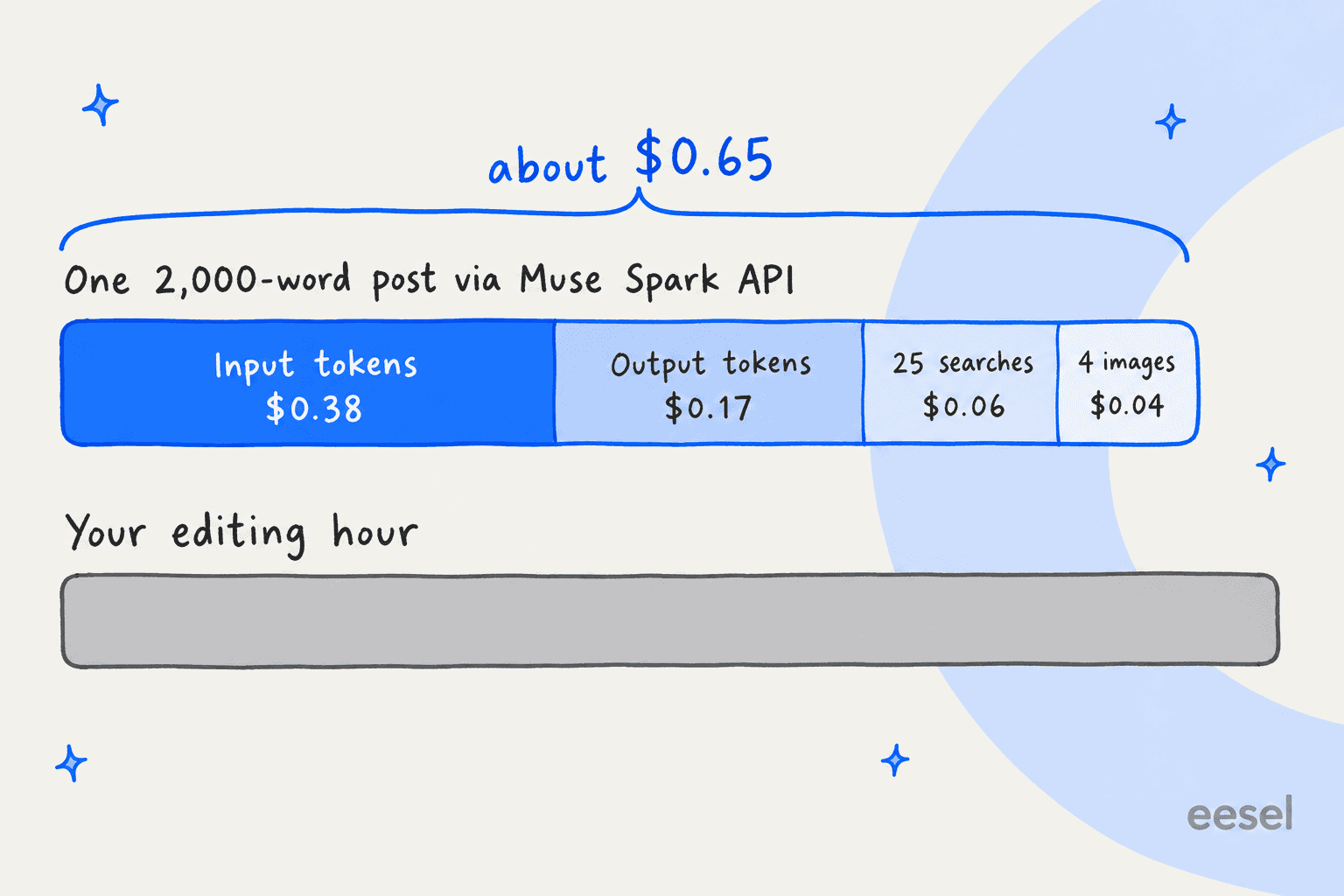
| Line item | Assumption | Rate | Cost |
|---|---|---|---|
| Input tokens | 300,000 (sources, style guide, re-reads across calls) | $1.25 / 1M | $0.38 |
| Output tokens | 40,000 (reasoning plus draft and revisions) | $4.25 / 1M | $0.17 |
| Web searches | 25 narrow queries | $2.50 / 1,000 | $0.06 |
| Images | 4 in-body visuals | $0.01 each | $0.04 |
| Total | about $0.65 |
Even if you double every number, you're under $1.50 a post. The model is not the expensive part.
One thing that can push output costs up: Muse Spark 1.3 is wordy. Independent benchmarkers found it emitted 120M output tokens to finish the Artificial Analysis Intelligence Index, against a field median of 72M, and one HN commenter pegged it at "3X token use vs. 1.2." For code that's a token bill. For prose, it's also an editing bill, because longer drafts take longer to cut back.
The real cost sits in the second bar: the editing hour. Checking every citation, cutting filler, adding the first-hand experience that makes a post worth ranking, sourcing screenshots, formatting, interlinking and publishing. That's where most of the time goes whether the draft came from Muse, ChatGPT or Claude Opus 5. Our AI blog writer cost breakdown runs the same math across dedicated tools.
How good is Muse Spark as a writer?
Meta positions Muse Spark 1.3 for "agentic workflows" and coding, and its benchmark scorecard backs that: its clearest wins are on long-context retrieval and coding tests. Meta doesn't publish a writing-quality benchmark, and neither do most model makers, so the honest answer is that you have to test it on your own topics.
The small amount of first-hand talk about its prose is warm. One long-time user of Meta's chat said:
"Its writing style feels "unique", and I find it pleasant to read for science-based topics. I never ask ONLY Meta AI, but the answer it gives is almost always in a distinctly different style than other frontier LLM's."
That "distinctly different style" is useful if every AI draft in your niche sounds the same. But there's a structural reason not to expect benchmark jumps to show up in your blog intros. As one commenter put it in the Muse Spark 1.3 launch thread, models have improved most on work that can be checked automatically:
"This is exactly what RLVR is, and the reason that models have improved so much at verifiable domains like coding and math while not so much on unverifiable ones like writing and UI design."
What I'd test before committing: give it three of your best existing posts as style references, ask for a draft on a topic you've already covered, and compare. Watch for three things. Does it keep your voice past the intro? Does it pad (see the verbosity point above)? And does every factual claim trace to a url_citation? A model can score well on hard benchmarks and still write a flat blog intro.
Also worth knowing if you care about AI-detection scores: tools like Pangram score the text, not the model that wrote it. No model gets you a "human" score by default. Editing does. Our guide to the AI content editing process covers what that pass should include.
Where Meta Muse falls short for a real blog program
Put it all together, and the gaps are consistent across every Muse surface. None of them is a flaw in the model. They're just jobs a model (or a personal agent) doesn't do.
| Blog job | Muse app | Muse Spark API | Dedicated AI blog writer |
|---|---|---|---|
| Keyword and topic research | No keyword data | No keyword data | Built in |
| Research with citations | Yes, own browser | Yes, web_search + url_citation | Yes |
| Your brand voice | Only what you paste in | Only what you send per call | Trained on your past posts |
| Visuals | Artifacts, limited | Via Muse Image | Diagrams, headers, screenshots |
| Internal links to your site | No | Only if you code it | Built in |
| SEO metadata | Ask for it | Ask for it | Built in |
| Publish to your CMS | No | Only if you code it | WordPress, Webflow, Ghost, Notion |
| Team use | One personal account | Shared API team | Shared workspace |
What I see from eesel's own blog writer customers backs up the bottom half of that table. A solo SEO operation running 12 posts a day on our blog writer told us their blocker wasn't drafting at all, it was getting posts to auto-publish into Webflow. A US wellness retailer uses it mainly to hold a fixed house style across 4,600-word posts with citations. The drafting is table stakes. The program around it is the work.
If you're weighing the build route, our guides on an AI blog writer API and AI blog writer automation walk through what you'd be building. If you'd rather skip it, an AI blog writer with auto-publishing covers those steps out of the box.
The reason the program matters more than the draft is the reader. Here's a developer describing what searching for help felt like in 2026:
"all Google searches either led me to kernel commit messages or nearly 100% AI generated blog posts. When I read these blog posts, they didn't make sense, and I couldn't find examples of failures someone ran into, or an explanation of why doing it a certain way led to failure"
That's the bar. A Muse draft with no real experience, no failures and no specifics is exactly that post. Whatever tool you use, the human editing pass is what separates a post that ranks from one that reads like everyone else's.
When Meta Muse is the right call for blog writing
To be fair to Meta, there are clear cases where Muse is the right pick:
- You're a developer building your own content tooling. Muse Spark's price, 1M context and cited search make it a strong engine. Pair it with Muse Image at a cent a picture and you have cheap raw materials.
- You write occasionally and live in the US. The Muse app's free 100M tokens a week is more than enough for drafting and research.
- You need lots of images. Muse Image at $0.01 is hard to beat for header images and simple diagrams, as long as you review each one.
And clear cases where I'd look elsewhere: a team publishing weekly or more, anyone outside the US wanting the app, agencies with client confidentiality to protect (at least on the contributor tier), and anyone who wants the post live without writing glue code. For a wider look, see our best AI blog writer roundup for SEO or Meta Muse agent alternatives.
Try eesel for blog writing
Muse gives you a capable model and cheap images. The eesel AI blog writer is the teammate that does the rest of the job: it finds what to write from keyword and competitor gaps, researches with every claim cited, writes in your voice, adds diagrams and header images, interlinks your existing posts and publishes to WordPress, Webflow, Ghost or Notion on a schedule. You steer it by chat ("make the intro punchier") in the dashboard, Slack or Teams.

It's the same writer behind eesel's own blog, which draws 750k+ monthly impressions. If you've been eyeing Muse because you want more posts without hiring, start with the part that's actually slow. Try eesel free and have it draft, illustrate and publish your next post.
Frequently Asked Questions
Can I use Meta Muse for blog writing?
How much does it cost to write a blog post with Muse Spark?
Is the Muse app free for writing blog posts?
Should I use the Muse Spark contributor tier for blog content?
Does Muse Spark cite its sources when writing?
Will Google penalize a blog post written with Meta Muse?
What is the best Meta Muse alternative for blog writing?


Article by
Kurnia Kharisma
Kurnia is a software engineer and writer at eesel AI with two years of SEO experience, writing about AI tools, helpdesk software, and customer support. He pairs a developer's understanding of how these products are built with search-driven research into what actually ranks and resonates with the people searching for them.