I'll admit, I use Perplexity AI pretty much every day. It's fantastic for getting a quick, sourced answer about almost anything on the internet. But a while back, I tried to use it for a work-related question, and it completely fell flat.
The problem? The answer I needed wasn't on the public web.
Your company's most important information, the kind that actually helps solve customer problems and guide business decisions, isn't out there for a public search engine to find. It's tucked away in Slack threads, Confluence pages, Google Docs, and thousands of old support tickets. A general AI search engine is completely blind to all of it.
That realization sent me down a rabbit hole of finding the best Perplexity alternatives designed specifically for business and support teams. I needed something that could tap into our internal knowledge, help automate parts of our workflow, and give us the kind of instant, accurate support we were aiming for.
This post breaks down the top 5 tools I found on my quest.
What is Perplexity AI?
If you haven't used it, the easiest way to think about Perplexity AI is as a mix between a regular search engine and a chatbot like ChatGPT.
Instead of just spitting out a list of links, it actually reads the top results for you and summarizes them into a direct answer, complete with sources. It's brilliant for quickly getting the gist of a new topic or fact-checking something without having to open a dozen browser tabs. It’s a genuinely useful tool for students, writers, and anyone who does a lot of online research.
Why your business needs Perplexity alternatives
When I tried to use Perplexity for our team's daily grind, its limits became clear almost immediately. The tool is powerful for what it does, but it’s just not built for a business environment.
It can't see your internal knowledge The real source of truth for your business is a messy, beautiful combination of private documents, project boards, and internal chats. General search tools are completely locked out of this information, meaning they can't answer specific questions about your products, internal processes, or customer history.
Information without action is just trivia A public search tool can give you information, but it can't do anything with it. A real business tool needs to take the next step, like triaging a support ticket in your helpdesk, looking up a customer's order status, or escalating an issue to the right person.
You have no real control With a public tool, you can't customize the AI's tone to match your brand, limit its knowledge to a specific set of documents to keep it on-topic, or build custom actions for your unique workflows. For any customer-facing role, that lack of control is a non-starter.
And then there are the data privacy headaches Using a consumer-grade tool for sensitive internal questions is a security risk you probably don't want to take. You really need a solution built for businesses that can guarantee your data stays yours.
How I picked the best Perplexity alternatives
My search wasn't for just another search engine. I was looking for something that could actually be a partner in our day-to-day work. So, I put together a little mental checklist to judge each tool.
I looked at how well it connected to the places our team actually works, like our helpdesk and internal wikis. Then, I checked if it could do more than just answer questions, could it perform tasks like tagging tickets or updating customer records? I also wanted to see how much control we had over the AI's personality and what it was allowed to know. And honestly, I was looking for something we could get up and running quickly, without needing a developer or sitting through a month of sales calls. Finally, enterprise-grade security was a must-have.
Perplexity alternatives: A quick comparison
To give you a bird's-eye view, here's how the top contenders I found compare at a glance.
| Tool | Best For | Key Differentiator | Starting Price |
|---|---|---|---|
| eesel AI | Internal knowledge & support automation | Unifies all company knowledge for instant, actionable answers | From $299/mo (500 credits) |
| ChatGPT Team | Collaborative content creation & brainstorming | Access to advanced models (GPT-4o) in a team workspace | $30/user/mo |
| Microsoft Copilot | Productivity within the Microsoft 365 ecosystem | Deep integration with Word, Excel, Teams, and Outlook | $30/user/mo |
| Claude | Advanced reasoning and creative writing tasks | Large context window for analyzing long documents | $30/user/mo |
| You.com | Personalized general web search | Customizable search engine with different AI modes | $20/mo |
The 5 best Perplexity alternatives for your business
Some of the tools on this list are solid general AI assistants that can be bent to a business use case. Others, however, were built from the ground up to solve the exact problems teams like ours face every day.
1. eesel AI
This is the one that really clicked for me because it was designed to solve the exact problem I was having. eesel AI isn't trying to search the entire internet; it’s built to be your company's internal brain. It securely connects to all your knowledge sources, learns from them, and then helps automate frontline support and answer internal questions.
What makes it a top alternative?
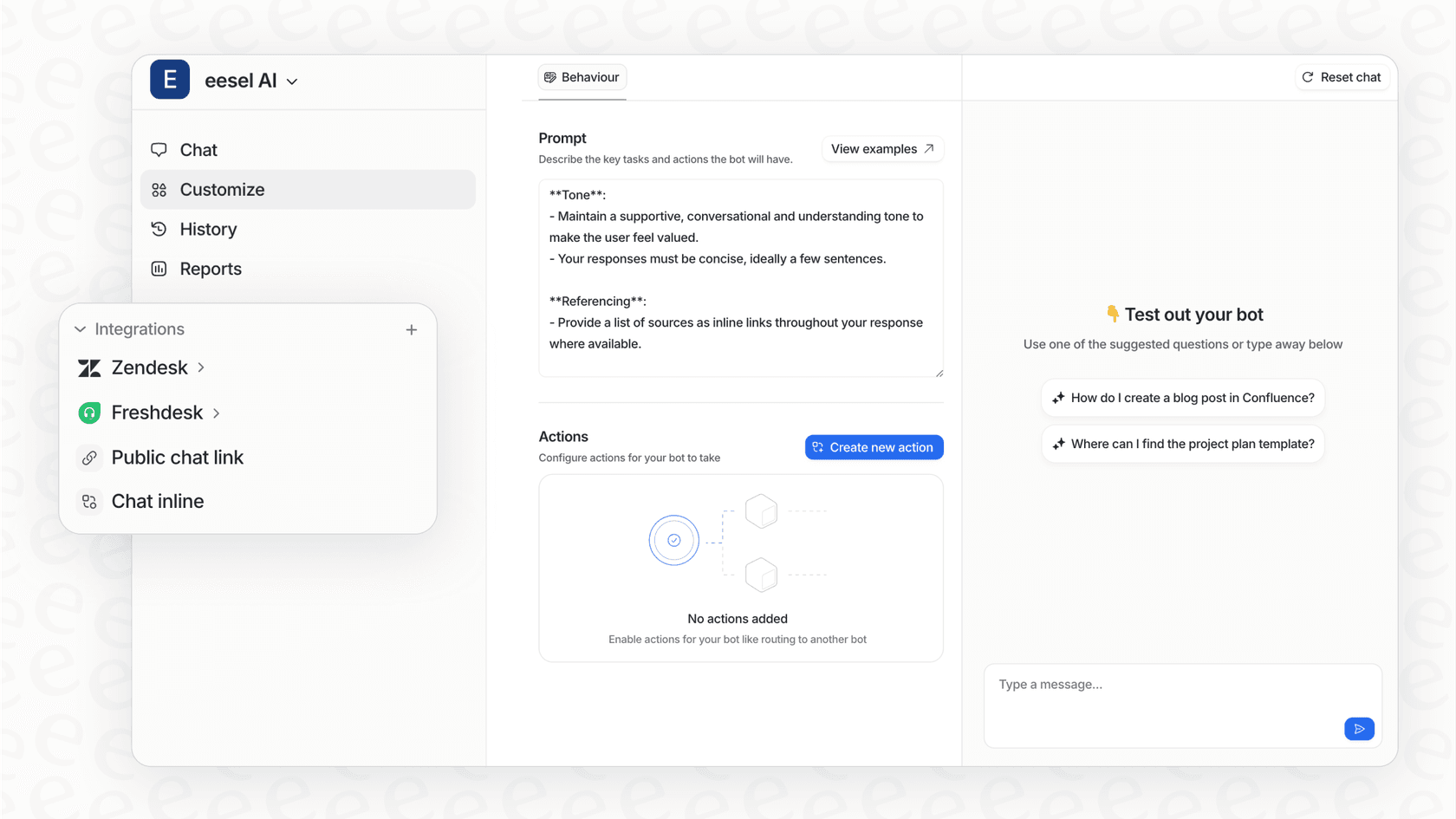
- A single source of truth: This is the core difference. Instead of the public web, eesel AI searches your actual business content. It has one-click integrations for over 100 sources, including Zendesk, Confluence, and Google Docs. This means its answers are always relevant and based on your company's reality.
-
You can get started in minutes: I was so tired of booking demos and talking to sales reps just to see if a tool worked. What I loved here is that you can connect your helpdesk and launch an AI agent in minutes, all on your own. It's refreshingly simple.
-
It takes action: eesel AI doesn't just find answers; it does things. You can build custom workflows to triage tickets, look up order details by calling an API, or escalate tricky issues to a human. This is what separates simple information lookup from real automation.
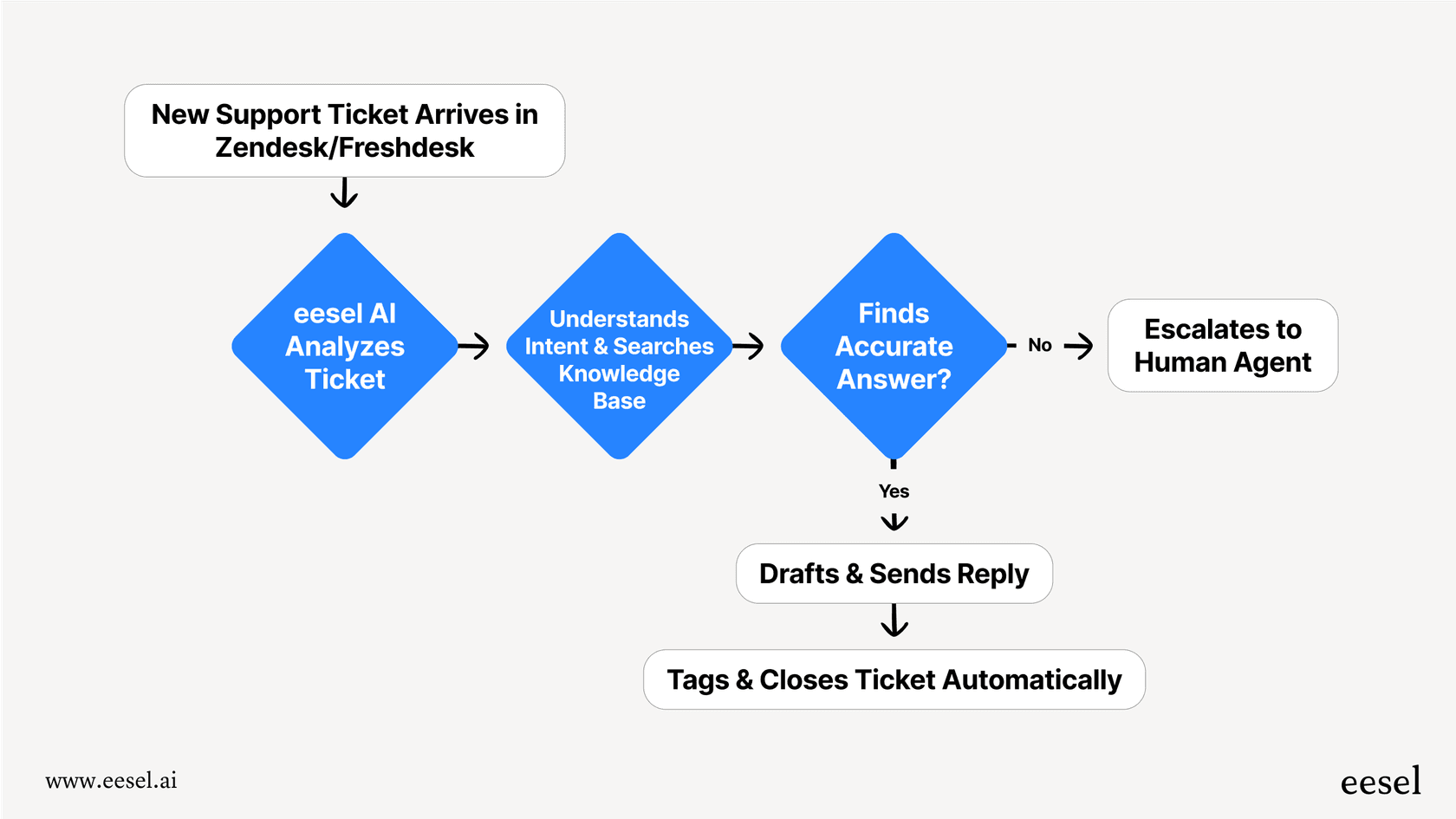
- You can test it risk-free: Before the AI ever talks to a customer, you can run a simulation on thousands of your past tickets. This shows you exactly how it will perform and how much it could save you. It’s a level of confidence you don't get with most other tools.

Pros & cons:
-
Pros: Super simple to set up, brings all your siloed knowledge together instantly, and gives you full control over actions and persona. The pricing is also transparent, with no sneaky per-resolution fees.
-
Cons: It's a specialized tool for support, IT, and internal knowledge. It's not trying to be a general-purpose web search tool like Perplexity.
Pricing:
The pricing is one fixed monthly price sized to your volume. 1 credit is one ticket or chat, however long it runs, and every plan includes the full AI Agent, the AI Copilot, Slack, every integration, unlimited agents and unlimited seats.
| Plan | Monthly credits | Price |
|---|---|---|
| Free | 100 | $0, no card |
| Teammate | 500 | $299/month |
| Teammate | 1,000 | $499/month |
| Teammate | 2,500 | $999/month |
| Teammate | 5,000 | $1,899/month |
More than 5,000 credits: talk to us. Pay a year upfront and get two months free.
2. ChatGPT Team
ChatGPT is the AI that kicked this whole thing off, and the "Team" plan is OpenAI's attempt to bring it into the workplace. Now that it can browse the web, it’s become a decent, if very general, alternative to Perplexity.
Its main strength is generating high-quality text, whether that's marketing copy, emails, or code snippets. For teams that just need a powerful creative assistant for drafting and brainstorming, it's a great option. The ability to create custom GPTs also lets you build specialized bots for certain tasks.
But it can't be deeply trained on your internal knowledge base like a purpose-built tool like eesel AI can. It's primarily for content creation, not integrated support automation, and it can't take actions in your other business tools.
Pricing:
- The Team plan is $30 per user/month, or $25 per user/month if you pay annually. You need at least two users to sign up.
3. Microsoft Copilot
Copilot is Microsoft's AI, and it's woven directly into the M365 suite: Word, Excel, PowerPoint, and Microsoft Teams. It uses Bing for real-time web info, making it a pretty handy research tool within its own world.
If your company runs on Microsoft, Copilot can feel like a superpower. It can summarize meetings, draft emails in Outlook, and analyze spreadsheet data, all by pulling from your company's data within the Microsoft Graph.
The catch is that its knowledge is mostly confined to that Microsoft ecosystem. It’s a fantastic productivity booster for your existing Microsoft workflows, but it’s not designed to be a central support hub that connects to external tools like Zendesk or Shopify.
Pricing:
- Copilot for Microsoft 365 is $30 per user/month. You'll also need a Microsoft 365 Business Standard or Business Premium license first.
4. Claude
Claude, from Anthropic, is known for its huge context window and impressive ability to reason. It's the tool I'd reach for if I needed to analyze... a very long, dense document.
If your team's "research" involves dissecting a 150-page technical paper or a complicated legal contract, Claude is a beast. It can pull out key points, summarize complex arguments, and answer nuanced questions about the text in a way that feels surprisingly human.
The trade-off is that it's not built for operational tasks. It doesn't connect to the internet for real-time info and doesn't integrate with business apps to automate workflows. It’s an exceptional analysis tool, but it's not going to manage your support queue.
Pricing:
- The Team plan costs $30 per user/month, with a minimum of 5 users.
5. You.com
You.com is probably the most direct competitor to Perplexity on this list. It’s another conversational AI search engine, but it offers a more personalized feel with different modes like "Smart," "Genius," and "Research" to adjust its responses.
It's a great example of what a modern, general AI search tool can do. The ability to create custom assistants gives it a slight edge over Perplexity if you want more control over your public web searches.
But just like Perplexity, it's a tool for searching the public web. It can’t get to your private company knowledge in Slack or your helpdesk, and it can't plug into your support workflows to automate tasks. It's a better window to the internet, not a key to your internal kingdom.
Pricing:
- The YouPro plan is $20/month for unlimited queries and access to all its advanced AI models.
A few tips for choosing the right alternative for your team
Switching software can be a pain, so it's worth taking a moment to think it through. Here's what I learned from my own search.
-
Define your main job-to-be-done. Are you mostly doing general web research for a blog post, or do you need to answer a customer's specific question using your internal knowledge base? The answer changes everything.
-
Look at your current tool stack. The right AI solution should fit in nicely with your current helpdesk, wiki, and chat platforms. Avoid anything that forces you to completely change how your team already works.
-
Find something you can try today. Look for a self-serve tool you can test and implement in an afternoon. A platform that requires months of onboarding and developer help is a huge, and often unnecessary, risk.
-
Think about action, not just answers. Do you just need information, or do you need the AI to actually do things? If you're looking for real workflow automation, make sure you choose a platform with a customizable action engine.
Perplexity alternatives: It's time to move from search to automation
Perplexity is an amazing tool for web research, but for businesses, the real challenge isn't finding information on the internet. It's unlocking the knowledge trapped inside your own company walls.
General tools like ChatGPT and Copilot are making us all more productive, but they often don't have the deep, cross-platform integrations needed to truly automate customer support.
The future of efficiency isn't just about finding answers faster. It's about connecting your internal information to automated actions that solve problems, help customers, and free up your team for more interesting work.
Ready to stop searching and start automating? eesel AI unifies your scattered company knowledge and puts it to work in your support channels. You can go live with your own AI agent in minutes.
Frequently asked questions
Why should I explore Perplexity alternatives when Perplexity AI is so good for general web searches?
While Perplexity AI excels at summarizing public web information, it cannot access your company's internal documents, helpdesk tickets, or private collaboration tools. Perplexity alternatives designed for business fill this gap by connecting to your internal knowledge base.
Which Perplexity alternatives are specifically designed to tap into a company's internal knowledge base?
Tools like eesel AI are built precisely for this. They securely integrate with your internal systems (e.g., Confluence, Google Docs, Zendesk) to provide answers based on your company's private data, unlike general web search tools.
Can Perplexity alternatives integrate with my existing business software like Slack or Zendesk?
Yes, many business-focused Perplexity alternatives offer deep integrations with common platforms. For example, eesel AI connects with over 100 sources including Zendesk and Slack, enabling it to act within your current workflows.
Are there Perplexity alternatives that can automate tasks, not just answer questions?
Absolutely. Solutions like eesel AI go beyond simple information retrieval; they allow you to build custom workflows to perform actions like triaging support tickets, looking up order details via APIs, or escalating issues to the right team members.
What are the key data privacy considerations when choosing Perplexity alternatives for sensitive company information?
Data privacy is crucial. When selecting Perplexity alternatives, prioritize solutions built for businesses that guarantee your data remains secure and private, ensuring compliance and preventing sensitive information from being exposed to public models.
How can I quickly get started with Perplexity alternatives without extensive setup or developer help?
Look for self-serve Perplexity alternatives that offer simple setup and integrations. Tools like eesel AI allow you to connect your helpdesk and launch an AI agent in minutes, often without needing developer intervention or lengthy sales processes.