


Yes, there is an official Klaviyo Claude connector: Klaviyo builds it on its own MCP server, you add it from Claude's directory under Settings > Connectors > Browse Connectors, and it lets Claude report on your campaigns, flows and metrics, look up profiles and segments, and create campaigns, templates and profiles in Klaviyo. You need a Claude plan and the Owner, Admin or Manager role in Klaviyo, and Klaviyo doesn't charge extra for it.
For a lifecycle marketer at a keyboard, it's excellent. The catch shows up on a Monday morning when "how did Friday's campaign do?" arrives from the founder, the designer, the CX lead and the agency, all at once. The connector works as whoever signed in, so each of them needs their own Klaviyo login with a manager-level role, and their own Claude chat.
That's the gap eesel fills: an AI teammate that connects to Klaviyo once and answers the whole team in Slack, Teams and email, where what it may do depends on who is asking. Your lifecycle lead can have it build a draft campaign, everyone else gets read-only reports, nothing goes to customers without a person's approval, and profile data never reaches a website visitor. If you live in Claude Code, the eesel CLI lets it connect your apps, load your brand guidelines and run test questions for you.
I work on how eesel's agents act inside other companies' tools, which mostly means deciding what an AI may do alone, what waits for a human, and what it must never hand a customer. An email platform is a sharp test of those rules, because one wrong action puts a promo in every subscriber's inbox.
What is the Klaviyo Claude connector?
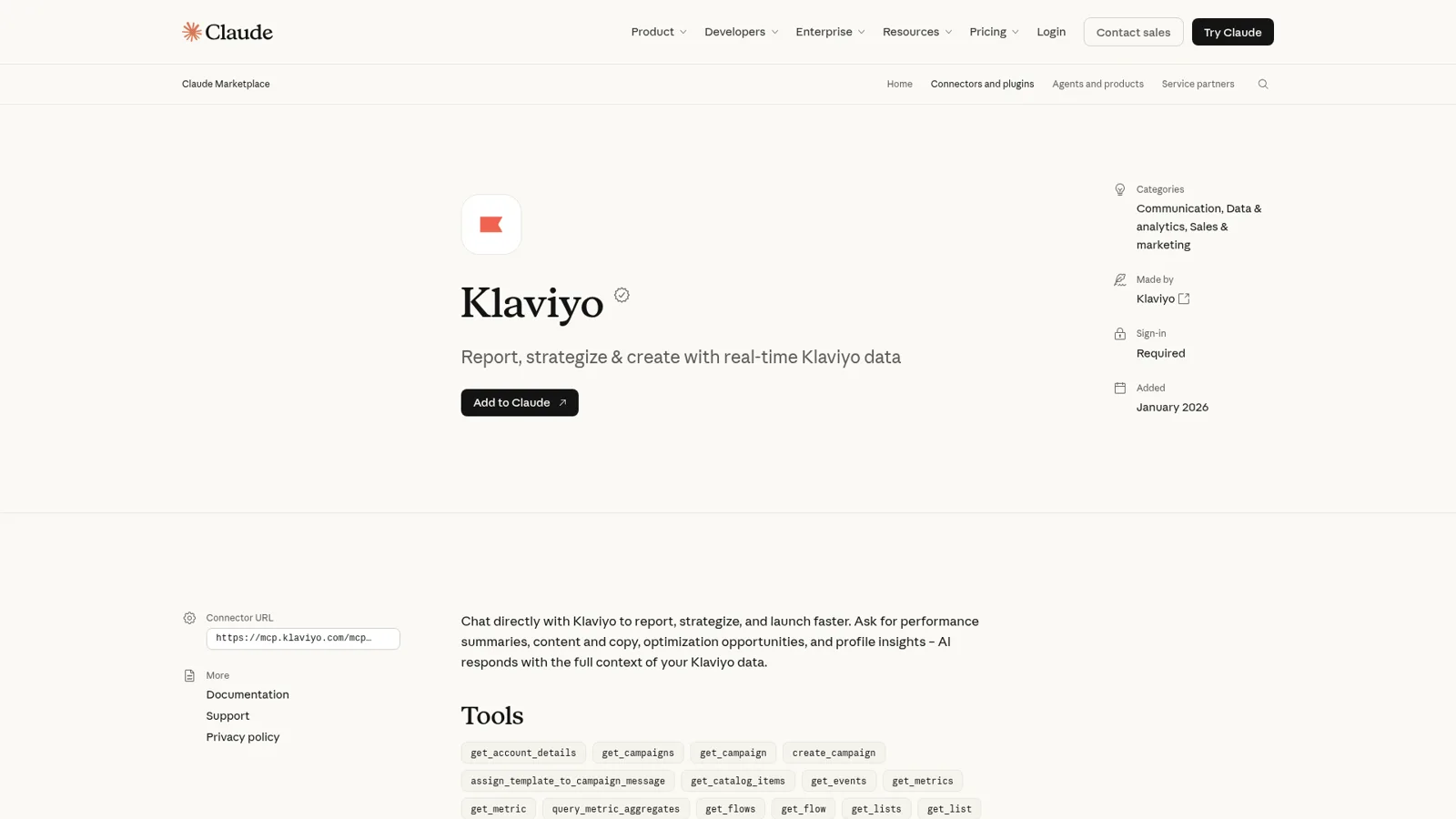
The Klaviyo Claude connector is Klaviyo's own MCP server, listed in Claude's directory, that lets Claude read and act on one Klaviyo account. The directory listing pitches it as "Chat directly with Klaviyo to report, strategize, and launch faster", was added in January 2026, and sits under Communication, Data and analytics, and Sales and marketing.
Klaviyo calls its approach "deliberately model-agnostic" on its community forum. The same server at https://mcp.klaviyo.com/mcp also powers its ChatGPT app and works in Cursor and VS Code, according to the developer docs. In Claude, you have three ways in:
| Route | Best for | How it signs in | What you can tune |
|---|---|---|---|
| Listed connector | One Klaviyo account | OAuth, a few clicks | Claude-side tool permissions |
| Custom connector | Several accounts, or a read-only setup | OAuth on a URL you paste | read-only, toolsets, core-tools-only and other URL parameters |
| Local server in Claude Desktop | The tightest scopes | A private API key you create | Exactly which scopes the key holds |
The server itself exposes "over 300 tools" across campaigns, flows, profiles, catalogs, coupons, reviews, webhooks, forms and Klaviyo's Customer Agent, per the available tools page. The listing in Claude shows 27 of them.
Klaviyo has been building on it fast. An expansion this year added query_metric_aggregates, which "exposes the same underlying data that powers Klaviyo's in-app Metric Reporting", plus MCP Apps support for inline charts and dashboards, per Klaviyo's announcement.
How do I connect Klaviyo to Claude?
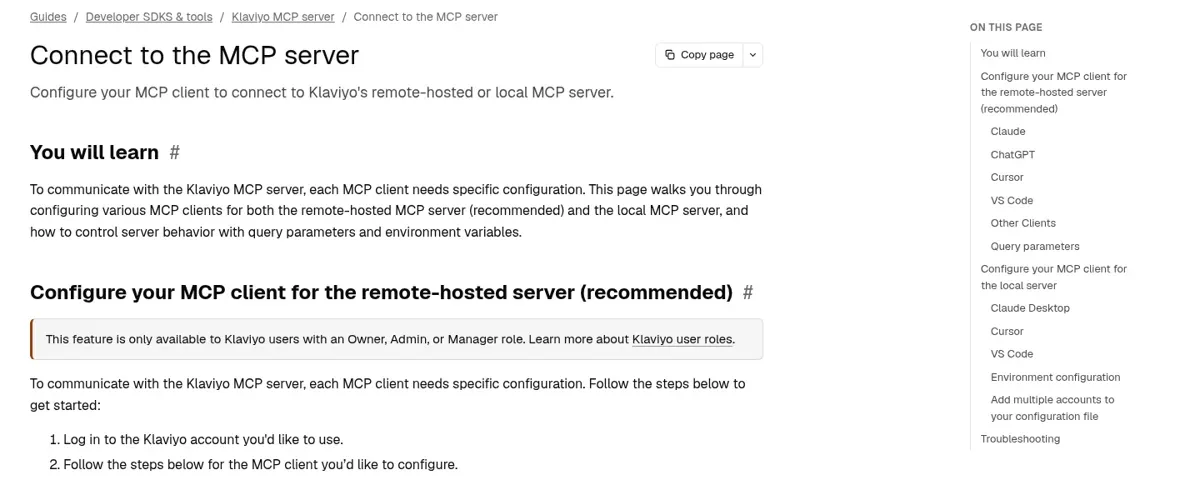
You connect Klaviyo to Claude in five steps, per Klaviyo's setup guide:
- Log in to the Klaviyo account you want to use.
- In Claude, open Settings > Connectors and click Browse Connectors.
- Search for Klaviyo and connect.
- Review Claude's access and click Approve.
- Review the Klaviyo permissions and click Allow.
Two things trip people up. First, the role: "Ensure you have the Owner, Admin, or Manager role on the Klaviyo account." Second, on a Claude Team or Enterprise plan, an Owner or Primary Owner has to enable connectors for the organization, and then "Each person still needs to authenticate individually before they can use it" (Claude Help Center).
If you run several Klaviyo accounts (an agency, or a group with one account per brand), use a custom connector per account instead. Klaviyo's agency guide suggests naming each one "Klaviyo - [Account Name]", adding ?company=example-company to the URL, and creating a Claude project per client so the right connector is always the one switched on. The same URL takes parameters that change what Claude can touch:
| Parameter | What it does |
|---|---|
read-only=true | "disables any tools which can perform write actions on your Klaviyo account" |
disable-tools-with-user-generated-content=true | Turns off tools that read profile properties, events and reviews an attacker could have written |
core-tools-only=true | Limits the server to roughly 30 core tools, which helps tool selection |
toolsets=profiles:read,campaigns:read | Only exposes tools whose scopes fall inside your list |
What can Claude do in Klaviyo?
Claude can do most of a lifecycle marketer's desk work in Klaviyo: report, audit, segment and draft. Klaviyo's Claude FAQ groups the main uses like this:
| Area | Example ask | Tools behind it |
|---|---|---|
| Campaign reporting | "How did revenue from email compare last month vs this month?" | get_campaign_report, query_metric_aggregates |
| Flow health | "Which step in the abandoned cart flow has the highest drop-off?" | get_flows, get_flow_report |
| Audiences | "What does my lapsed purchaser segment look like right now?" | get_segments, get_profiles |
| Campaign drafts | "Create an email campaign promoting our Memorial Day sale." | create_campaign, assign_template_to_campaign_message |
| Templates | Build an HTML template, clone one, manage translations | create_email_template, update_email_template |
| Profiles | Look up a customer, update a property, unsubscribe someone | get_profile, update_profile, unsubscribe_profile_from_marketing |
| Products | Pull catalog items for a product-led campaign | get_catalog_items, upload_image_from_url |
Sending is possible too. Klaviyo's agency guide says the assistant "can also schedule and send campaigns when the connector permits write actions", with one rule in bold: "Treat AI output as a strong first draft and keep a human in the loop, especially for anything customer-facing." Campaigns that use A/B tests or Smart Send Time have to be scheduled in Klaviyo itself.
Where Claude gets interesting is Cowork. Klaviyo's own launch suggests a weekly digest prompt: "Pull last week's campaign and flow performance from Klaviyo, write a plain-English summary with wins, underperformers, and recommended next steps, and save it as a formatted doc." With scheduled tasks on any paid plan, that can run every Monday on its own.
Reporting is also where the first real problems show up. Klaviyo counts revenue with its own attribution windows and dashboard fields, and the raw API doesn't always match. One marketer automating a Monday report hit exactly that:
"I still need to pull up Klaviyo every monday morning, go to the Business Review Dashboard, record the figure in Claude to kick the whole process off."
The cause turned out to be that query_metric_aggregates sums an order's $value (net of loyalty points) while the dashboard sums a subtotal field. The lesson is that the AI needs your account's reporting conventions written down, or every Monday starts with a discrepancy.
What does Claude get access to?
Claude gets broad read and write access to the connected Klaviyo account. Klaviyo's FAQ lists 29 OAuth scopes the connector asks for, from campaigns and flows to profiles, coupons, data privacy and webhooks, and nearly all of them are "read and write."
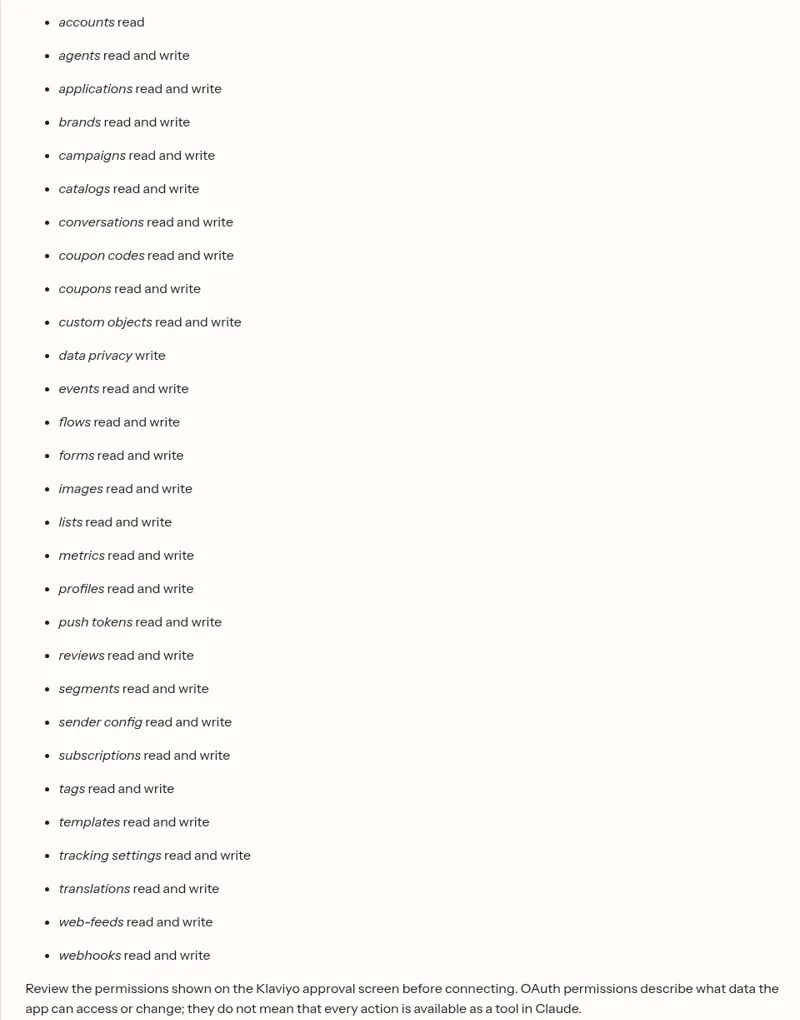
Klaviyo's FAQ is upfront about three things:
- Profile data goes to Claude. "Data accessible through the connector can include profile properties (such as email addresses, phone numbers, and custom attributes), list membership, and event history." From there, Anthropic's terms apply, not Klaviyo's.
- The audit trail is partial. API logs under Integrations > Developers > Developer tools show the calls, but "The logs also do not identify the user who authorized the connection."
- Klaviyo can't limit which AI clients connect. "MCP server is designed to be client-agnostic, so Klaviyo does not currently restrict which compatible AI clients can connect."
The approval screen itself is all or nothing, which surprised at least one Claude Team customer on Klaviyo's forum:
"We went to approve the MCP Connector through our Claude account and it's unclear how you restrict access for Claude. See image below - you can't untick options?"
Klaviyo's community team answered with the custom-connector URL and read-only=true, then added the honest part: "read-only helps prevent writes, but it does not fully prevent Claude from reading customer/profile data through read tools." Their advice for keeping profiles out entirely was the local server with a scoped private API key, set up "with a developer or a Klaviyo partner."
What does the Klaviyo Claude connector cost?
The connector has no price of its own. Klaviyo's MCP launch post says the server is "available to all Klaviyo customers," and Klaviyo's community launch post lists the Claude connector for "Claude Pro, Max, Team, and Enterprise users." You pay for the two plans underneath:
| Piece | List price (checked 17 Nov 2026) | Note |
|---|---|---|
| Claude Pro | $17/month billed annually, $20 monthly | One person (Claude pricing) |
| Claude Team, standard seat | $20/seat/month billed annually, $25 monthly | An Owner enables connectors for the org |
| Klaviyo Free | $0 | 250 active profiles, 500 emails a month (Klaviyo pricing) |
| Klaviyo Email | From $20/month | 500 active profiles, 5,000 emails a month |
| Klaviyo Marketing | From $25/month ($1 first month promo) | Adds social, reviews and more |
Whose Klaviyo access does Claude use?
Claude uses the Klaviyo access of the person who connected it. Anthropic's help center puts it plainly: "Claude inherits each person's permissions from the connected service." Because the Klaviyo connector needs an Owner, Admin or Manager to authorize it, that's usually broad access.
Claude does have real controls on top. Team and Enterprise Owners "can limit which actions a connected service can take across your organization", choosing Always allow, Needs approval or Blocked for each permission, and members can't override it (Claude Help Center). So an Owner can put create_campaign and update_profile on Needs approval for everyone and leave reporting open.
What those controls follow is the Claude user and their org. They don't change with who the request is for, and nothing in the setup puts the connector in front of the people who never open Claude. Picture a normal week at a 15-person Shopify brand on Klaviyo:
- The lifecycle lead wants a flow audit, a draft of next week's restock campaign, and the welcome series paused while the offer changes.
- The founder asks in Slack, "how did Friday's campaign do?"
- The designer wants to know which hero image won last month.
- The CX lead asks whether a customer who complained is still subscribed to SMS.
- A website visitor types "what's my discount code?" into the chat.
The lifecycle lead is well served. The founder, designer and CX lead each need a Claude seat plus a Klaviyo user with the Manager role or higher, which hands all three write access to campaigns and profiles unless an Owner restricts it in Claude. The visitor isn't a Claude user at all.
Anthropic does have a team route. Claude Tag, in public beta for Team and Enterprise in Slack, "acts with the connections an organization admin set for that channel", so a #marketing channel could share one Klaviyo connection (more in my Claude in Slack post). What it may do is then set per channel, the same for the founder and the intern who happen to be in it.
The same week with a Klaviyo teammate
eesel is built for that week. It's a general AI teammate that works in the apps your team already uses, takes requests from anyone who talks to it there, and does the work inside those tools. Klaviyo is one of 3,000+ apps it connects to: connect Klaviyo once, and it looks things up and takes actions there for whoever is allowed, with each action set to On, Ask first or Off.
| Who is asking | Where | What eesel does |
|---|---|---|
| Lifecycle lead | Dashboard or Slack | Reports, flow audits, a draft campaign built in Klaviyo; sending waits on Ask first |
| Founder, designer, CX lead | Slack, Microsoft Teams, email | Read-only answers: "Friday's campaign did X in revenue on Y recipients" |
| Verified customer | Email or chat | Their own subscription status if you allow it, nothing about anyone else |
| Anonymous visitor | Website chat | Nothing from Klaviyo profiles |
You can set those rules by saying them: "pull any report on your own, build drafts when Sam asks, and ask me before anything sends." Ask first shows the exact action with Approve and Deny, in the dashboard, as a card in the Slack thread the run started from, or by email, and only editors can approve. The per-person and per-audience settings are live too, so named people can get more than the rest of the team, and a verified customer is treated differently from an anonymous visitor. Actions tagged Team only never run for anyone outside your team.

Reports that show up before anyone asks
A Monday digest shouldn't need a person at a keyboard. eesel's automations start work on a schedule, on an event in a connected app, or from a webhook, so a 9am job can post last week's campaign and flow numbers to #marketing and flag anything that dropped. Corrections stick through instructions and memory: tell it once in Slack to "report revenue on Placed Order in our store's timezone" and the Jbriz problem above doesn't come back next week.
That's the pattern Cape Coffee Beans runs on its own stack. eesel ran about 160 scheduled checks across Zendesk and Google Drive in a month, on weekday and Saturday mornings, and emails the founder a short list of what slipped. Point the same habit at Klaviyo and the list becomes flows with falling click rates and campaigns that underperformed their segment. More stories like it are on the customers page.
Klaviyo Claude connector vs eesel, side by side
| Klaviyo Claude connector | eesel with Klaviyo | |
|---|---|---|
| Works for | The person who connected it | The whole team, from one connection |
| Who can ask it | Claude users with an Owner, Admin or Manager role in Klaviyo | Teammates in Slack, Teams, email and the dashboard; customers in your channels |
| What decides what it may do | That person's Klaviyo role, URL parameters, Claude Owner settings per tool | On, Ask first or Off per action, plus who is asking: team, named people, verified customer, visitor |
| Starts without a person typing | As your own scheduled task in Claude | Schedules, app events and webhooks |
| Where answers appear | Claude chat and Cowork files | Slack, Teams, Google Chat, email, website chat |
| Cost | Included with Claude and Klaviyo plans | From $299/month for 500 credits, unlimited seats (pricing) |
eesel has a free 7-day trial with 100 credits and no card, and unlimited agents and seats on every plan.
Can you use Claude and eesel together?
Yes, and it's what I'd do on most marketing teams. Keep the Klaviyo connector in Claude (or Cowork) for the lifecycle lead's deep work, like a 90-day flow audit or a segment strategy session, and give the rest of the team a teammate for the shared questions.
Your eesel workspace is itself an MCP server, so you can add it to Claude as a custom connector and ask "what did eesel post to #marketing this week?" or "have eesel draft the restock email" from any Claude chat. Editors can change things, viewers get the read side, and Ask first still asks. The pattern is the same one behind AI agent MCP servers.
If you're also weighing OpenAI's version, I compare it in Klaviyo ChatGPT integration.
Klaviyo's own AI, Composer and Customer Agent, gets a fair look in my Klaviyo AI review, and the wider picture is in Claude for e-commerce and Claude for work.
Which should you use?
- Use the Klaviyo Claude connector if you're the person who owns Klaviyo and the questions are yours. It's free with your plans, Klaviyo keeps adding tools, and for audits and campaign drafting it's one of the better AI tools for email marketing.
- Use a custom connector with
read-only=trueif you want Claude for reporting only, or you manage several Klaviyo accounts. - Add eesel, one of the best AI teammates for this, when the questions come from the whole team in Slack, when the Monday report should arrive without anyone opening a chat, or when the right answer depends on who is asking. For a Shopify brand, it sits well next to eesel's e-commerce agent on the storefront.
Try eesel as your team's Klaviyo teammate
If the Klaviyo Claude connector already saves your lifecycle lead hours, eesel gives the same help to everyone else: the founder in Slack, the CX lead in Teams, the agency over email. Connect Klaviyo once, keep sends on Ask first, and let it answer "how did last week's campaign do?" for whoever asks.
