

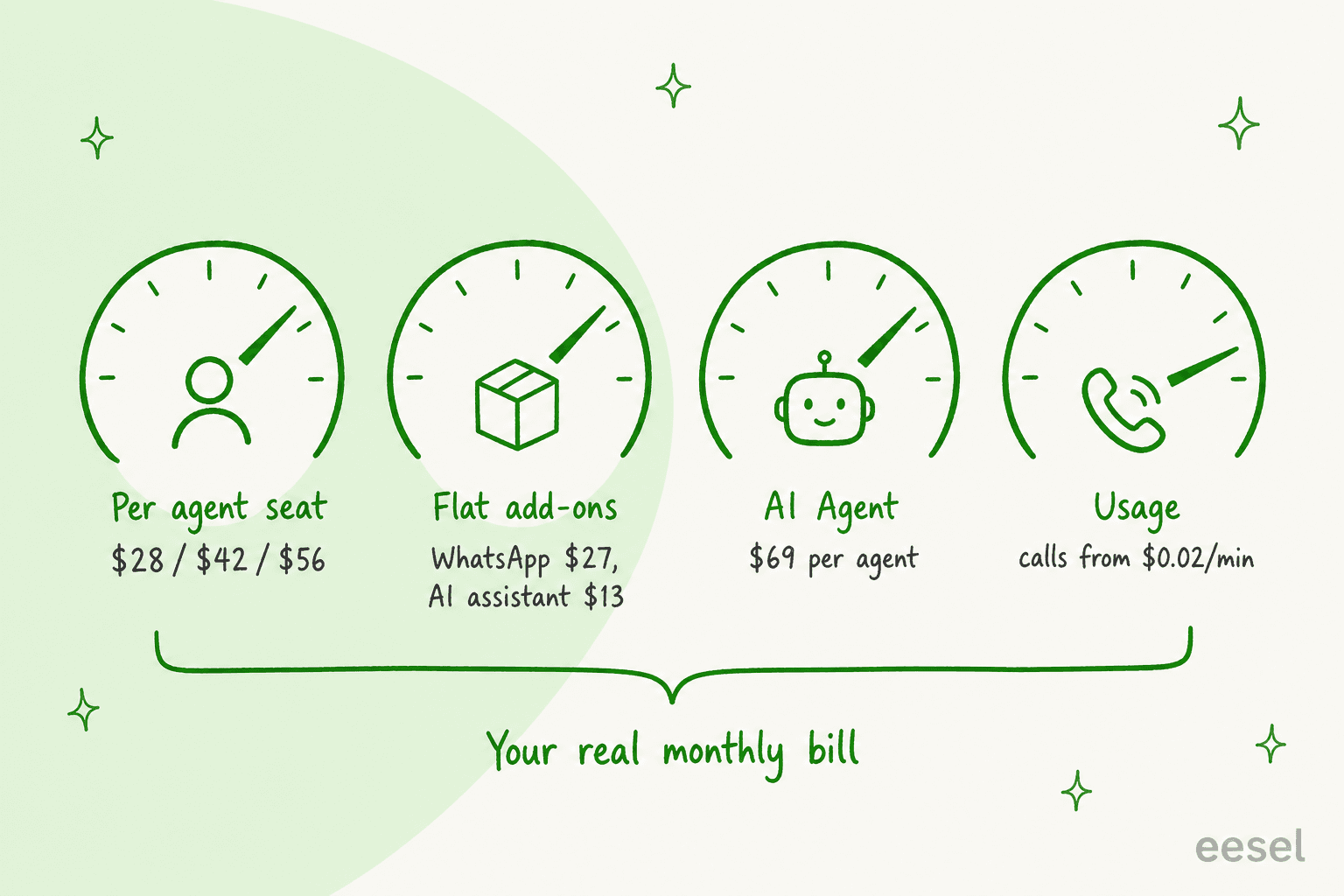
JivoChat pricing is $28, $42 or $56 per agent a month on annual billing for Basic, Professional and Enterprise, plus a free plan. Pay monthly and Professional is closer to $60 a seat. WhatsApp, AI and call minutes are all billed on top. One detail works in your favour: a licence covers an agent logged in at the same time, not a named person, so shift teams pay for peak headcount. If you mostly want repeat questions answered, eesel prices an AI teammate by conversation, not seat. With the eesel CLI, a coding agent can load your FAQs and test answers before launch.
Pick a plan, billing period and your peak number of online agents to see what JivoChat costs a month and over a year.
How much does JivoChat cost?
JivoChat costs $28 per agent a month for Basic, $42 for Professional and $56 for Enterprise, when you pay for a year upfront, according to JivoChat's pricing page. There's also a $0 Free plan. VAT isn't included and gets added at checkout based on your location.
I work the support queue at eesel every day, and when someone asks me what a chat tool costs, the honest answer is always "for which shift?". JivoChat is a good example. The headline numbers look like a classic per-seat price list, but the bill is shaped by three things the cards don't show: how many people are logged in at once, how long you commit for, and which channels you switch on.
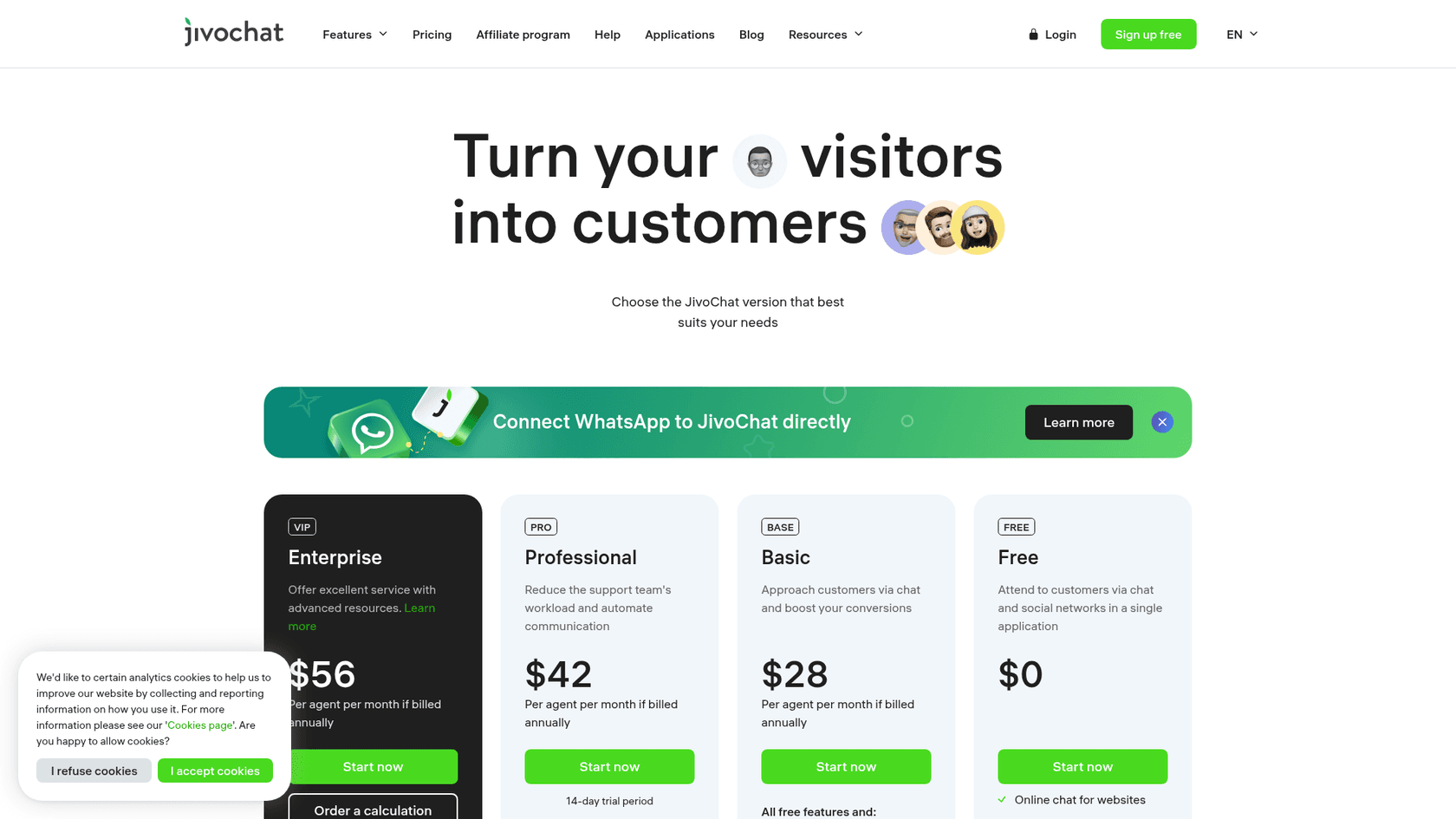
Here's the full plan grid with the limits that matter most when you're choosing between tiers.
| Plan | Price (per agent/month, annual) | Agents | Chat history | Notable inclusions | Trial |
|---|---|---|---|---|---|
| Free | $0 | "Includes 5 agents" (card), "up to 2" (table) | 2 months | Website chat, Telegram, Facebook, Instagram, Viber, callback, offline forms | n/a |
| Basic | $28 | Up to 100 | Unlimited | Proactive invitations, pre-chat buttons, visitor monitoring, canned responses, JivoChat CRM, anti-spam | None shown |
| Professional | $42 | Up to 100 | Unlimited | Telephony Plus, chatbot integration, chat rescue, voice messages, Apple Business Chat, campaigns, departments, webhooks | 14 days |
| Enterprise | $56 | Unlimited | Unlimited | Chat routing, Mobile SDK, Chat API | 14 days |
Two things in that table deserve a flag. First, the Free plan's agent count is listed two ways on the same page, so check inside the app before you plan around five free seats. Second, every plan gets unlimited conversations and unlimited websites for no extra fee, per the pricing FAQ. That's more generous than per-conversation chat tools like Tidio, where the AI side is metered.
What does each JivoChat plan add?
The tiers stack: Basic is "all free features and" more, Professional is all of Basic plus more, and so on. The jumps aren't evenly sized, though, so it's worth knowing which feature pushes you up a tier.
Free to Basic ($28) is the jump most small teams make first. It's where proactive chat starts. Smart triggers, pre-chat buttons and real-time visitor monitoring all switch on here, which is the stuff I cover in my live chat triggers guide and my list of live chat features worth paying for. Basic also unlocks canned responses, file sharing, chat transfer between agents, Excel report exports and the built-in CRM.
Basic to Professional ($42) is about automation and channels. You get chatbot integration, chat rescue, campaigns, Google Analytics, multiple departments, roles and permissions, and Telephony Plus with IVR included (it's a $4 add-on below this tier). Voice messages on Telegram, Instagram and Facebook and Apple Business Chat also start here.
Professional to Enterprise ($56) is a small, specific list: chat routing, the Mobile SDK for putting chat inside your own app, the Chat API and an unlimited agent count. If you don't need any of those four, Professional is the plan. Teams that want one inbox across many channels may also want to compare omnichannel customer service software. JivoChat has a separate Enterprise page and an "Order a calculation" button if you want a custom quote.
Which JivoChat costs sit outside the plan price?
Most of the interesting channels and all of the AI are modules you buy on top of the plan, at the same price on every tier. Here's how they're listed on the pricing page.
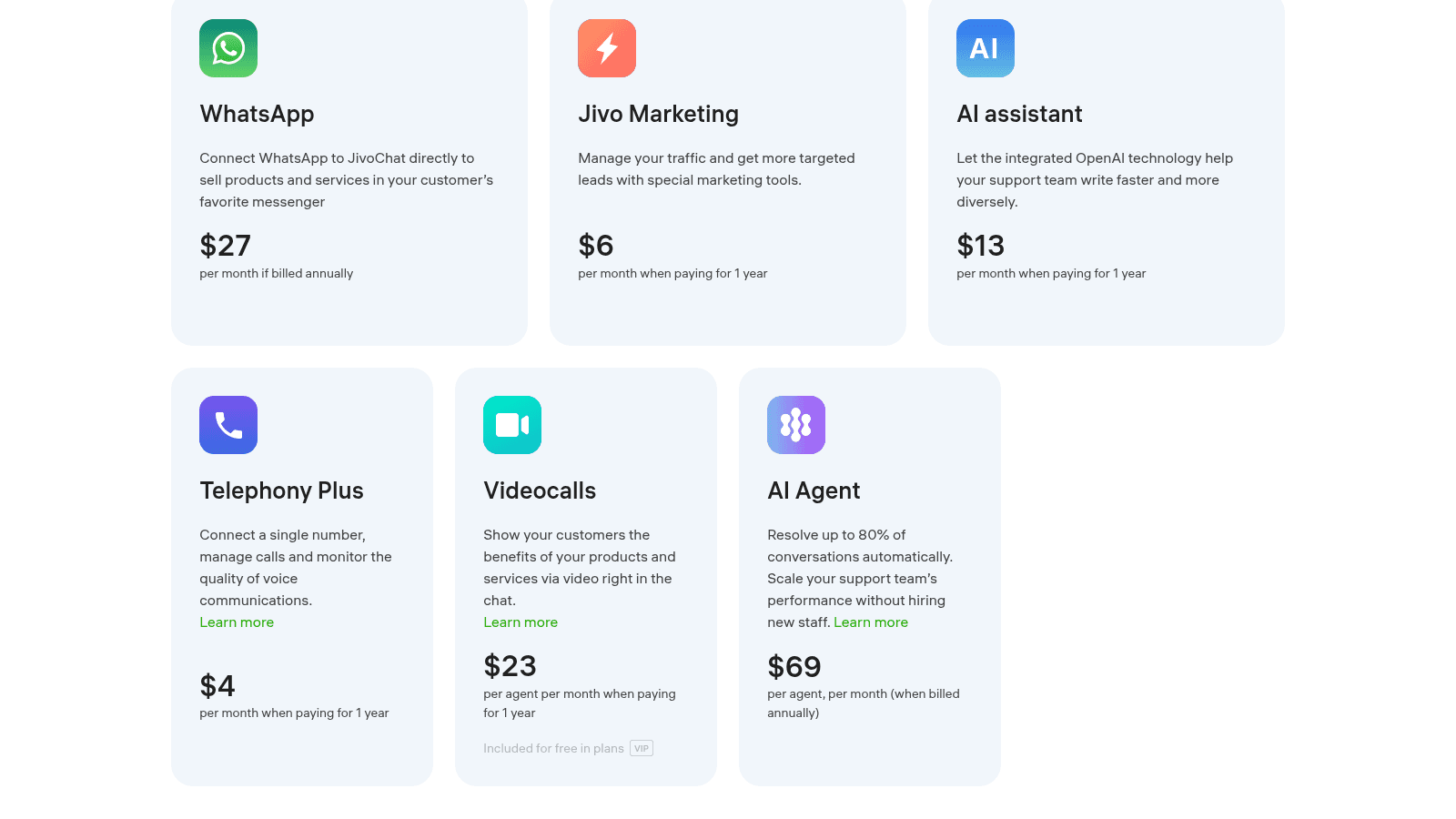
| Add-on | Price (annual billing) | Billed per | What it does |
|---|---|---|---|
| $27/month | Account | Connects WhatsApp directly to JivoChat | |
| AI assistant | $13/month | Account | OpenAI-based drafting help for human agents |
| AI Agent | $69/month | "Per agent" | AI that answers customers on its own |
| Videocalls | $23/month | Per agent | Video calls inside the chat |
| Jivo Marketing | $6/month | Account | Traffic and lead tools |
| Telephony Plus | $4/month (included on Pro and Enterprise) | Account | One number, call management, IVR |
| Phone numbers and calls | Numbers from $1/month, calls from $0.02/min | Usage | Telephony minutes and numbers, per the telephony page |
| Callback | US 2¢/min, UK and Canada 1¢/min, $10 top-up to start | Usage | Calls the visitor back from your site |
The WhatsApp line is the one that trips people up. The Professional plan card says "Integration with WhatsApp", but the comparison table charges the $27 module on every plan, Professional and Enterprise included. JivoChat's WhatsApp page says it doesn't charge for conversations the customer starts, and that business-started conversations carry Meta's own fees. My guide to WhatsApp Business API pricing walks through how Meta bills those, and the WhatsApp Business API explainer covers setup.
Video calls are listed with a small "Included for free in plans" tag next to a VIP badge, and the Enterprise card lists a "Video call module", but the table still shows $23 per agent in every column. If video matters to you, ask JivoChat which reading applies to your plan before you sign.
How much does JivoChat's AI cost?
JivoChat sells two different AI products, and they're priced very differently.
The AI assistant is $13 a month. It's a helper for your human agents: it adjusts tone, fixes spelling, summarises chats and drafts replies from the support content you give it, and an "Autopilot" mode pre-drafts the next answer. Your agent still reviews and sends every message, per JivoChat's help article. If you want the same idea inside a helpdesk, my post on AI live chat covers how drafting assistants compare, and HubSpot's chatbot pricing is a useful contrast.
The AI Agent is $69 per agent, per month on annual billing. This one talks to customers itself. The AI Agent page claims it can "Resolve up to 80% of conversations automatically", runs on OpenAI and works in 50+ languages.
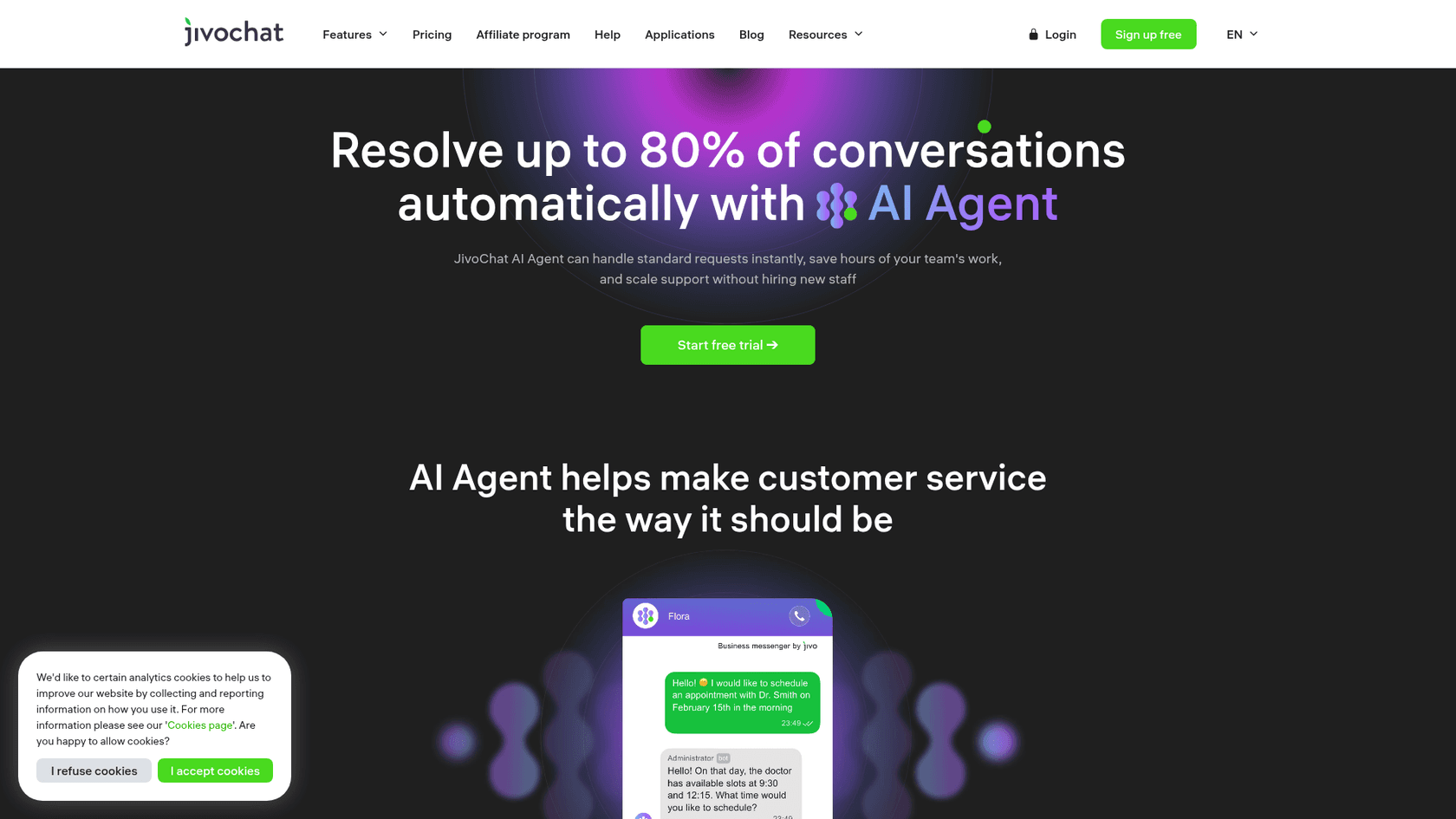
The setup is reasonably light. According to the AI Agent setup guide, you buy the module under Extensions, then the agent scans your website, and you can add up to 5 knowledge files of up to 30 MB each. You can create up to 15 AI operators, pick their channels, and have them hand a chat to a human with a summary when they get stuck.
The open question is the unit. "Per agent" on every other JivoChat line means a human seat. If that's the reading here too, a 10-seat Professional team adding AI would pay $690 a month for the AI on top of $420 for the seats. If it means one charge per AI operator, it's $69 for the first one. The page doesn't say, so get it in writing.
That pricing shape also has an odd incentive built in. The AI is sold as a way to "scale your support team's performance without hiring new staff", but if it's billed per human seat, the AI bill grows with your headcount instead of with the questions it actually answers. I've spent a lot of time on AI pricing models, and I'd rather pay for the thing the AI does than for the people sitting next to it.
Why does JivoChat's concurrent-seat rule matter?
This is the most useful detail on the whole price list, and it isn't on the pricing page. JivoChat's licence purchase guide says "each license is equivalent to one seat for an agent logged in at the same time in the JivoChat app". Each agent can be logged into one desktop or web app and one mobile app at once on the same login.
In practice, that means a team of 8 working two shifts of 4 needs 4 licences, not 8. At Professional on annual billing, that's $168 a month instead of $336. Before you compare it with LiveChat's pricing or Zendesk for small teams, check how each one defines a seat, because this rule is a real point in JivoChat's favour for shift-based support.
The flip side is the log-out habit. A seat stays taken as long as someone stays logged in, and one reviewer was blunt about it:
"they want 29$ per agent per month and if one doesnt logout then your screwed."

Adding seats mid-term is prorated. Per the add-licences guide, you pay only for the remaining days of the current term, and every licence is charged in full at the next renewal. The minimum you can move to is your current count plus one.
Is monthly or annual billing better on JivoChat?
The pricing calculator offers three periods: 1 month at 0% off, 3 months at 10% off, and 1 year at 30% off. The calculator's default example shows Professional at $54 a month on 3-month billing, which puts the monthly list price at about $60 per agent. By the same 30% maths, Basic is about $40 and Enterprise about $80 on monthly billing.
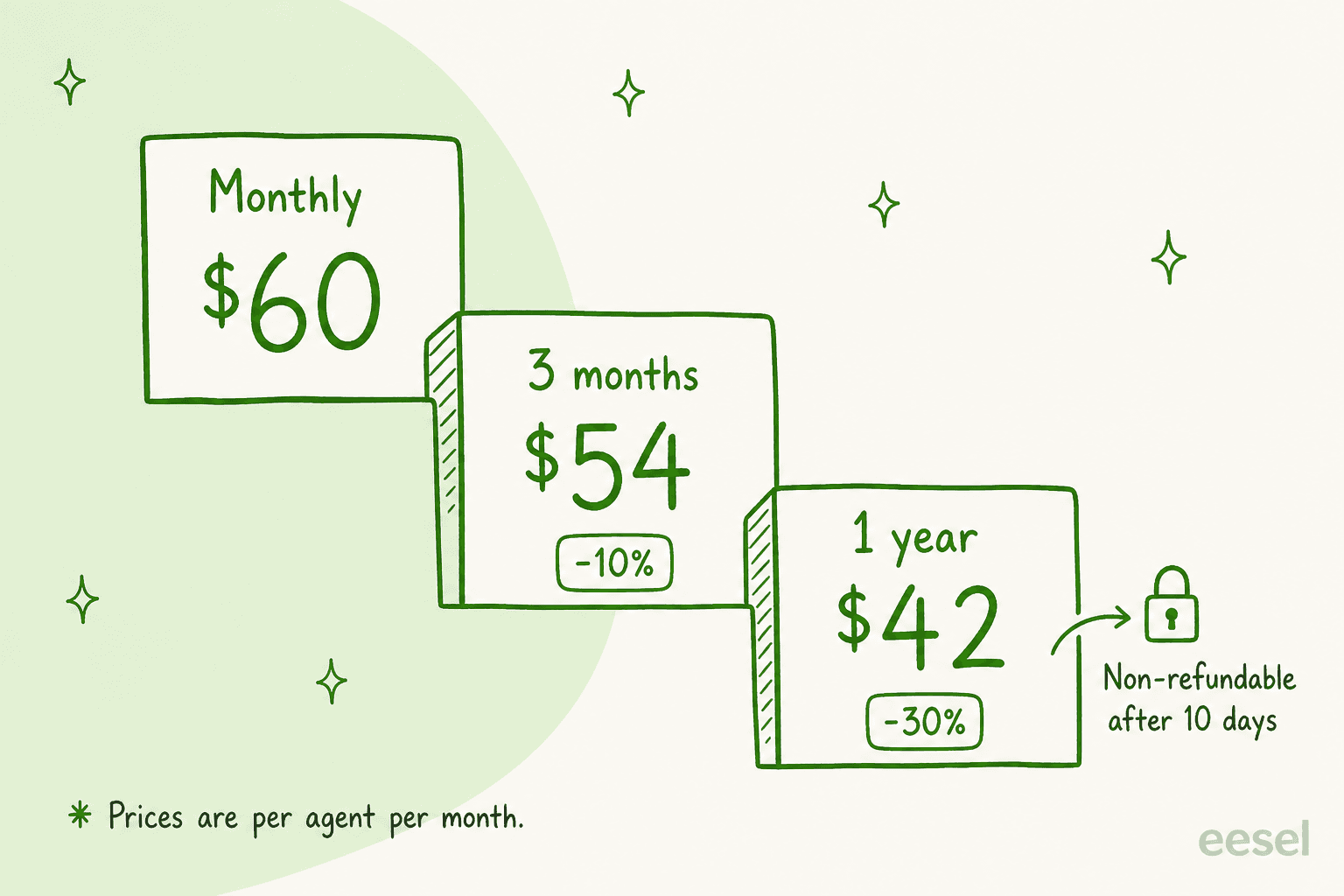
The 30% is a big discount, so it's tempting. Before you take it, read JivoChat's Terms of Service. They say all payments are non-refundable, with one exception: a full refund within 10 days of the first payment, if you haven't used the service beyond the trial. Cancelling takes effect immediately and doesn't refund the rest of the term. Subscriptions also auto-renew at the then-current price unless you cancel before the period ends.
My rule of thumb: run the 14-day trial on Professional, then pay monthly or quarterly for a cycle while your team gets used to it. Move to annual once you know your peak seat count. That way, the discount goes on a number you've actually measured.
One more thing worth knowing: the pricing page says "There are no contracts to sign so you can downgrade to the free version anytime." That's true for the plan, but a downgrade doesn't refund an annual payment you've already made.
What does JivoChat cost in year one?
Here are three common team shapes, priced on annual billing from the published list prices. They leave out VAT, phone numbers, call minutes and Meta's WhatsApp fees, which all depend on your usage.
| Team | Setup | Monthly | Year one |
|---|---|---|---|
| Solo shop, 2 agents | Basic | $56 | $672 |
| Small support team, 5 agents online | Professional + WhatsApp + AI assistant | $250 | $3,000 |
| Growing team, 10 agents online | Professional + WhatsApp + AI assistant + 1 AI Agent | $529 | $6,348 |
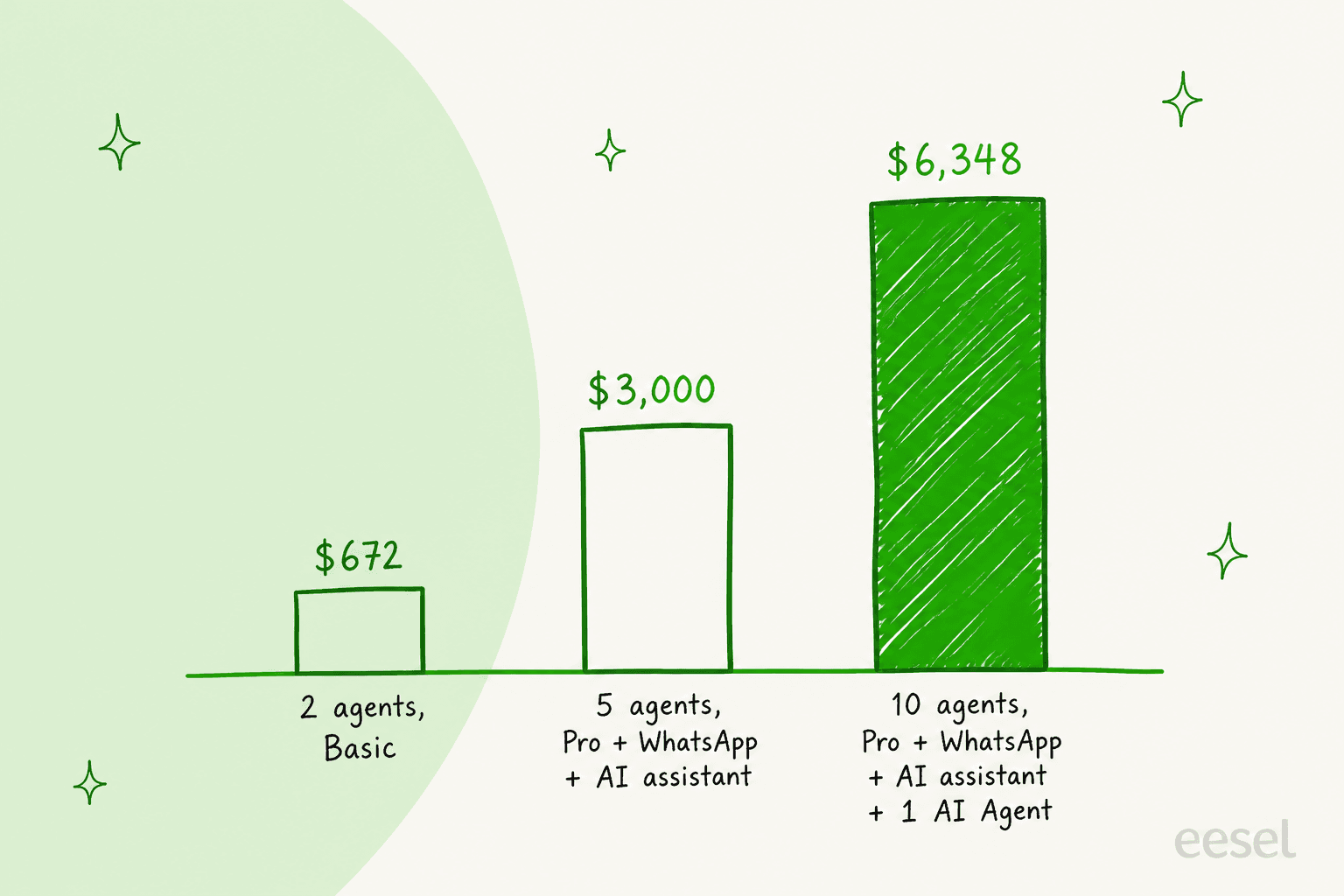
The third row assumes the AI Agent is a single $69 charge. If it turns out to be $69 per human seat, that team's AI line goes from $69 to $690 a month, and year one lands at $13,800 instead of $6,348. That's the single biggest swing in JivoChat's pricing, which is why I'd settle that question before anything else.
For comparison, the same 5-seat team pays different amounts on other chat tools. Crisp charges per workspace rather than per agent. Olark is per-seat like JivoChat, and Chatwoot can be self-hosted.
My website live chat roundup puts them side by side, and Freshchat's pricing is another per-agent model to check, as is Smartsupp's pricing.
What do JivoChat users say about the price?
Reviewers are mostly happy with what they get for the money. JivoChat scores 4.6 out of 5 from 51 reviews on G2 and 4.6 from 105 reviews on Capterra, and value comes up again and again.
"The tool was great and inexpensive for a team less than 5 people - it got the job done without a lot of the usual Saas BS."

Reviewers are honest about the ceiling too. One Capterra reviewer calls it "Great for a small team, not as scalable as other solutions", and one G2 reviewer switched to Tidio because they needed "an app that supports a wider range of platforms."
Trustpilot tells a different story, from a much smaller sample: a TrustScore of 2.2 from 34 reviews on Trustpilot. The sharpest complaints there are about price changes for existing customers.
"I went from paying $140 a year to now they are trying to charge me $450 a year."
A second reviewer described a 300% increase in July 2025. Those are individual accounts, and the Terms do say price increases are announced at least ten days ahead and apply at your next renewal. Still, the practical lesson is the same one I'd give for any tool: put your renewal date in the calendar and check the price a couple of weeks before it.
To be fair to JivoChat, this sits alongside plenty of positive reviews about support and value. One Trustpilot reviewer wrote that "no other app could offer what they offer at their price", mostly for the WhatsApp integration and chat stats. It's a cheap, broad tool, and it's easy to see why small teams pick it.
Is JivoChat worth the price?
For a small team that wants one app for website chat, Facebook, Instagram, Telegram, WhatsApp and phone, JivoChat is one of the cheapest ways to get all of it. Unlimited chats and websites on every plan, a usable free tier, and concurrent-seat licences make the base price hard to beat. If that's you, Professional on monthly billing for the first cycle is the safe starting point. Online stores can compare it against my ecommerce live chat list.
It gets harder to justify in two situations. The first is when you're adding seats because the same questions keep coming in. Every extra concurrent agent is another $42 a month, plus video and possibly AI on top. The second is when your real goal is AI that answers by itself, because the AI Agent's per-agent pricing doesn't shrink as the AI takes on more of the work. My breakdown of AI customer service cost shows how other pricing models handle that.
If you're still deciding whether you want people or a bot on the chat, my AI chatbot vs live chat post walks through that choice. If it's "both", my roundup of the customer service AI chatbots covers tools that sit in front of a human team.
When an AI teammate costs less than more seats
eesel doesn't integrate with JivoChat, and it isn't a live chat inbox. What it does is the job a lot of JivoChat buyers are really paying extra seats for: answering repeat questions on your website and on WhatsApp, day and night, from your own pages.
eesel is an AI helpdesk teammate. It runs as a chat bubble on your website, learns from your help pages and past replies, and hands a chat to a person by email or your helpdesk when it can't close it. If you'd rather add a chat to your site from scratch, my guide to adding live chat covers both routes. I've spent years watching AI on live support queues, and I've seen a confident-sounding bot give a customer the wrong answer. That's why every eesel rollout now gets tested against real past questions before it talks to a customer.
Norden-Frisia, a German ferry line to the North Sea islands, is a good example of why seat pricing can be the wrong fit. Its questions spike in summer and fade from October to March. Its bot, CaptAIn, answers from 346 knowledge items across the website chat bubble, a public chat link and Zendesk, and the plan was scaled to 10,000 interactions a month for high season, then back down for winter. Doing that with per-agent licences would mean hiring and paying for seats that sit empty half the year.
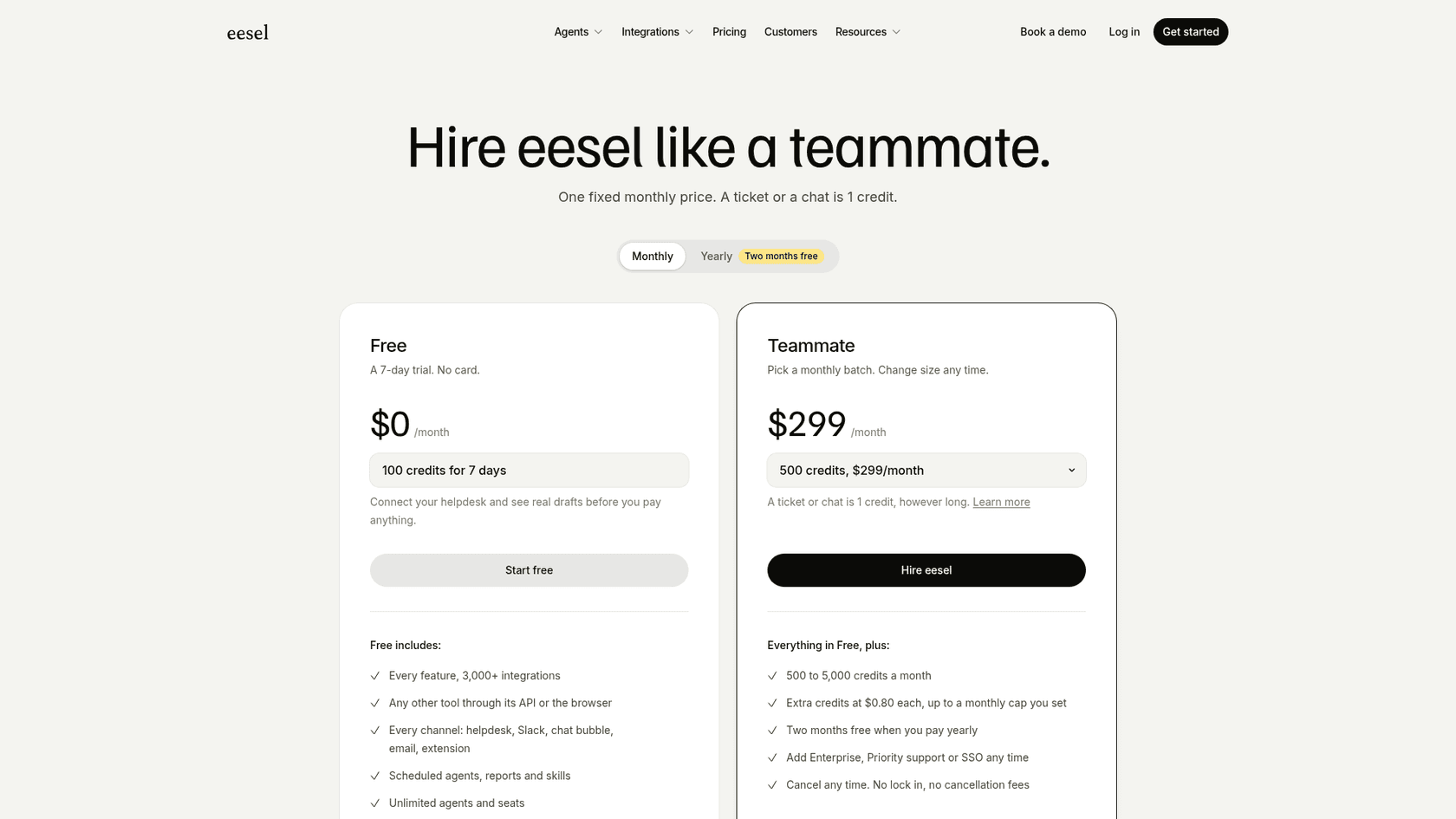
For a store, IC Intracom runs two website chats, one per brand, answering product, stock and compatibility questions from about 2,100 Shopify product records, and sends sales and technical questions to the right team with the transcript attached. On eesel's pricing page, the Teammate plan is $299 a month for 500 credits, where one chat or ticket is one credit however long it runs, with a 7-day free trial and no lock-in.
More options are in my AI for small businesses guide and my roundup of small business AI agents.
Try eesel
If you're pricing JivoChat because your chat is getting busier, try answering the busy part first. eesel joins your website chat and WhatsApp in a few minutes, already knows your help pages, and answers like a new hire who has read everything, with your team stepping in only when it hands over. You can test it on your real questions for a week before you pay, so you'll know whether you need more seats at all.