


Inkling-Small is Thinking Machines Lab's second open-weights model, out 30 July 2026, fifteen days after the first one. It's 276B total parameters with 12B active per token, Apache 2.0, and it takes text, image, and audio in. Output is $1.20 per 1M tokens against its parent's $4.05, and independent testing clocks it at 131.1 output tokens per second, faster than the model it shrank from.
Two things in the spec sheet are worth your attention before anything else. The model card claims a 1M-token context window, and OpenRouter serves it at 524,288, exactly half. And its factuality falls off hard: SimpleQA Verified drops to 20.6% from the parent's 43.9%, with an Omniscience score of -9.0, which is the polite way of saying it produces more confident wrong answers than right ones.
I build eesel's integrations, so I spend my weeks watching models meet real ticket queues rather than benchmarks. The pattern is boring and consistent: the cheap model is almost never the expensive part. A customer, Karel at GENERAL BYTES, put the whole build-versus-buy question better than I can: "We could try to write our own LLM application but we didn't want to invest our time into that." Free weights are an invitation to do exactly that. This post is about what you're actually being invited to.
What Inkling-Small actually is
Thinking Machines Lab is Mira Murati's outfit, and its business model is to give the weights away and sell the tooling around them. Inkling-Small is the second model out the door: Apache 2.0, published to Hugging Face as thinkingmachines/Inkling-Small, and downloaded around 15,500 times in its first month.
The vendor calls it "a quarter the size" of the original, and for once the marketing number checks out. The parent is 975B total / 41B active across 66 layers. This one is 276B total / 12B active across 42 layers. That really is close to a quarter on both counts.
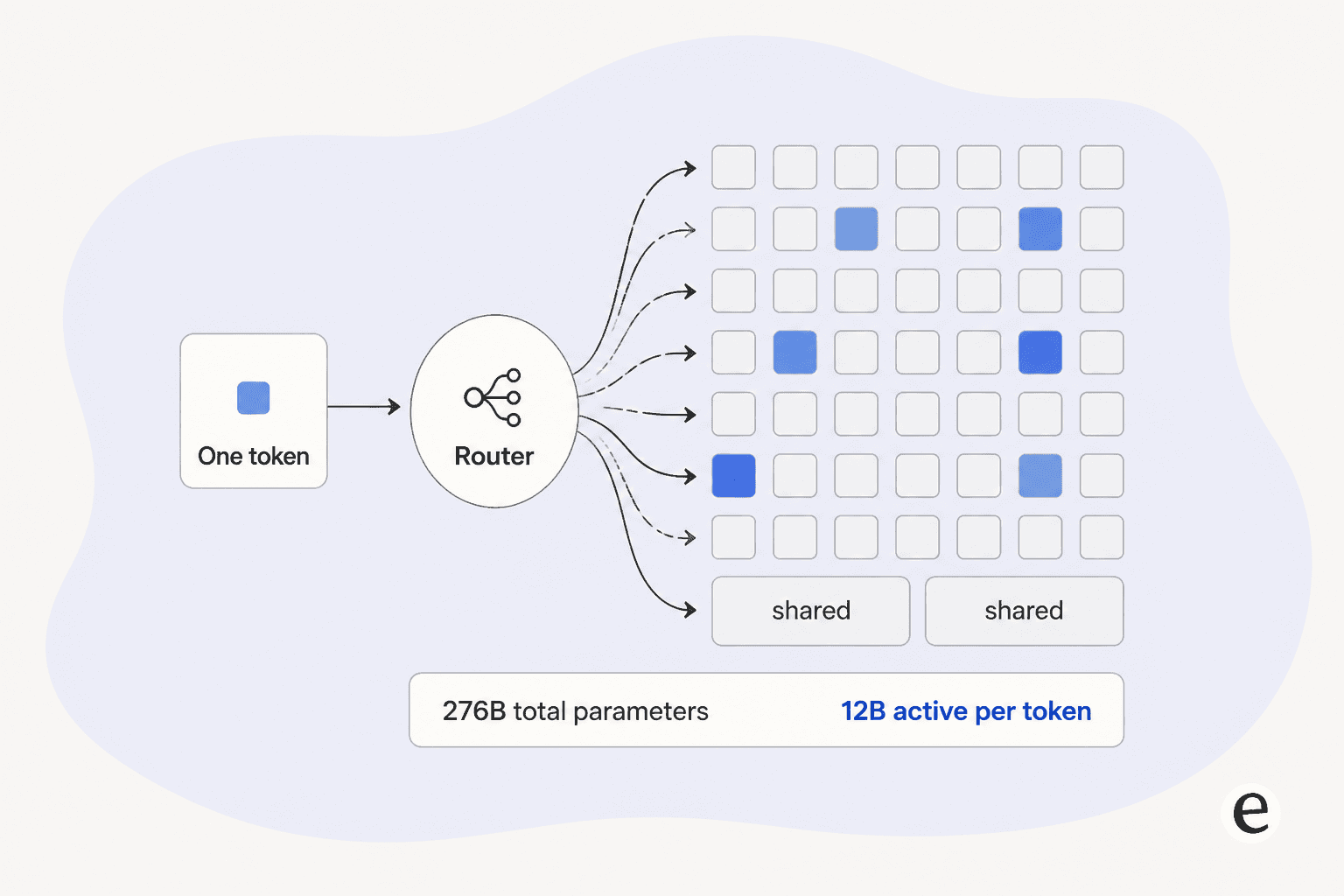
The architecture is a fairly aggressive Mixture-of-Experts. Every layer holds 256 experts, and the router picks 6 of them per token, plus 2 shared experts that are always on. Attention is hybrid, alternating local and global layers, and the weights ship in both BF16 and NVFP4. Training ran on NVIDIA GB300 NVL72 hardware.
The practical consequence of that shape: you pay 276B in memory and 12B in compute. That's the whole trick, and it's why a model with a quarter of a trillion parameters can serve faster than a dense model a tenth its size. If the MoE vocabulary is new, the mechanics generalize across most current open-source AI agents.
There's also a reasoning-effort dial that runs from 0 to 0.99, with the vendor's suggested stops at 0.2 for low, 0.7 for medium, and 0.99 for maximum. It's a knob on how long the model thinks before answering, and it moves your token bill more than any other setting you'll touch.
What goes in, and what comes out
This is the part people get wrong most often, so it's worth being blunt about it.
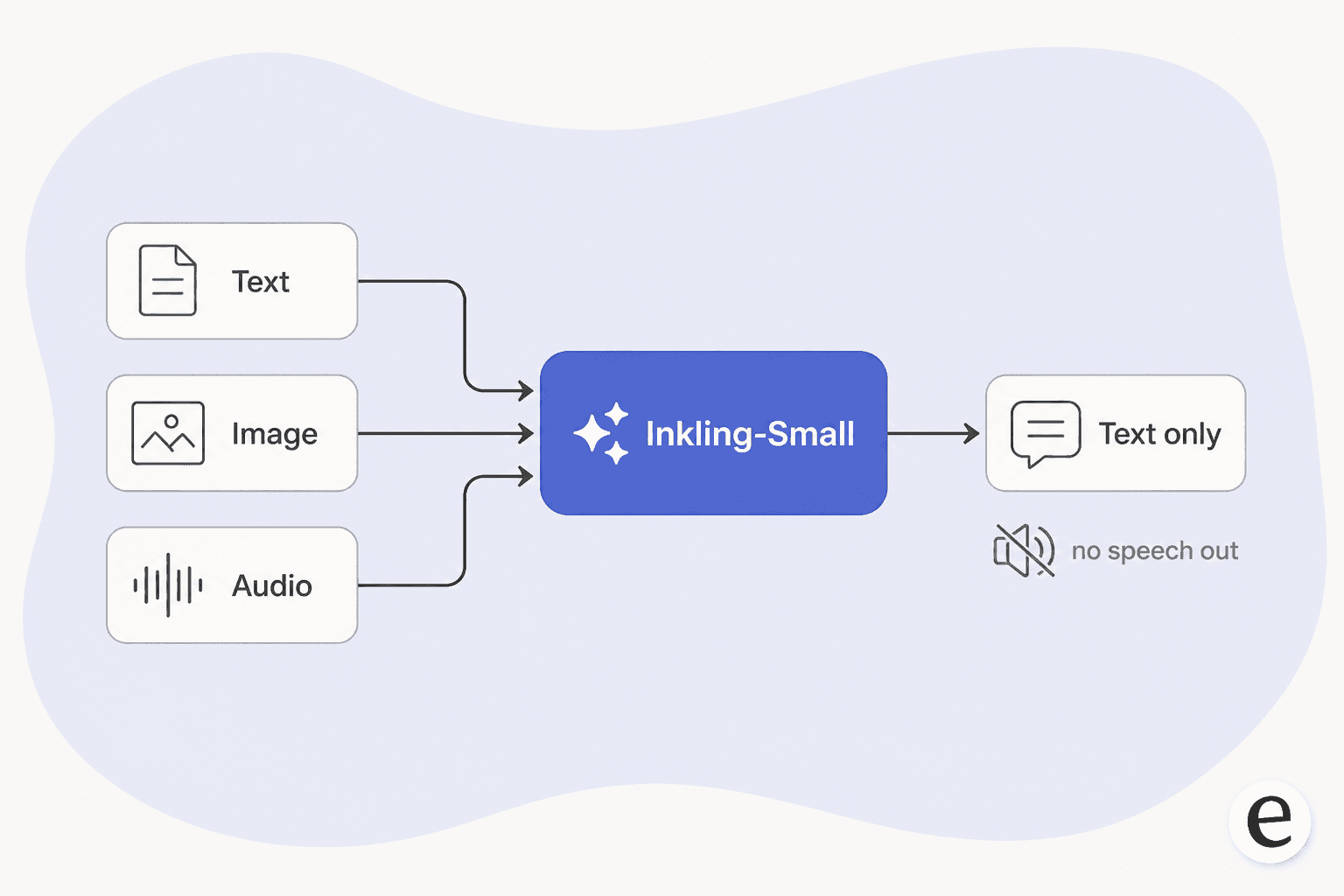
Inputs are text, images between 40 and 4096 pixels, and audio as 16kHz WAV under two minutes. Output is text only. There is no speech synthesis in this model.
That matters if you were planning a phone line. A model that hears audio but can't speak is one half of a voice pipeline, and you still need text-to-speech, telephony, barge-in handling, and turn detection on top. If that's the project, the vendor landscape in AI voice companies is a better starting point than a raw model.
Audio understanding is also the one capability where the small model lost ground to its parent across the board: VoiceBench 90.1 against 91.4, Audio MC 54.9 against 56.6, MMAU 77.0 against 77.2. The gaps are small, but they all point the same direction.
The context window nobody agrees on
Here's a checkable finding that took two minutes and saves an afternoon.
The model card says the context window is 1M tokens. OpenRouter, one of only two providers serving it, hosts it at 524,288 tokens. That is exactly half, which tells you it's a deliberate hosting decision rather than a typo.
Neither number is a lie. One describes what the architecture can address, the other describes what a specific endpoint will accept today. The failure mode is designing a document-stuffing pipeline against the card's figure and hitting a wall in production. If you're building anything that leans on a long window, read the ceiling off the endpoint you're actually calling. The same trap bites people using coding agents, which is why I wrote up context window size separately.
Provider count is the other thin spot: 2 providers, against 4 for the parent model. For a model five days into its second week that's expected, but it does mean less room to fail over.
What it costs
Output pricing is settled. $1.20 per 1M output tokens, confirmed by the vendor, Artificial Analysis, and OpenRouter. Against the parent's $4.05, that's the headline.
Input pricing is not settled, and I'd rather tell you that than pick a number and look confident:
| Source | Input per 1M | Output per 1M |
|---|---|---|
| Artificial Analysis | $0.30 | $1.20 |
| OpenRouter model page | $0.45 | $1.20 |
| OpenRouter API response | $0.50 | $1.20 |
| Parent model (Inkling) | reference | $4.05 |
Budget against $0.50 and nothing surprises you. On a blended basis, Artificial Analysis puts Inkling-Small at $0.22 per 1M against $0.72 for the parent, so roughly a third of the cost for the same intelligence tier.
Speed is the underrated half of the deal. 131.1 output tokens per second against the parent's 84.8, with time-to-first-token at 1.65s versus 1.82s. On its Intelligence Index the small model scores 40 and ranks 15th of 101, against 41 and 13th for the parent. Same tier, faster, cheaper. That's an unusual combination and the main reason to care about this release.
Fine-tuning runs through Thinking Machines' own Tinker platform, which supports the model. Per-token training rates aren't published anywhere I could find, and the pricing page at tinker-docs.thinkingmachines.ai/pricing currently 404s. Checkpoint storage is $0.10 per GB-month. If fine-tuning is the plan, the trade-off against retrieval is laid out in RAG versus fine-tuning.
Running it yourself
This is where the "free" in free weights gets tested. Unsloth's quantized builds put real numbers on it, and the 2-bit figure is the interesting one: 89 GB, which fits a 128 GB unified-memory box.
There's a nice detail in the launch discussion here. A Hacker News commenter, andy99, said they were hoping for something around 90 GB before any quants had shipped. Unsloth landed at 89.
Right at the edge: 3-bit (128 GB)
Too big: 4-bit (132-170 GB), NVFP4 (180 GB+), BF16 (543 GB)
Too big: 4-bit starts at 132 GB, NVFP4 (180 GB+), BF16 (543 GB)
Too big: BF16 (543 GB)
Card's suggestion: 4x B300 or 8x H200 for BF16
Input: $0.30 to $0.50 per 1M, depending on source
Providers: 2 today
Two housekeeping notes if you go local. Sampling should be temperature 1.0, top_p 1.0, min_p 0.0, which is unusual enough to be worth writing down. And llama.cpp support arrived via PR #25731, so check that your build includes it before debugging phantom problems.
Where it fits, and where it really doesn't
On its maker's own comparison table, the small model beats its 975B parent on most of what you'd call execution. SWEBench Verified 80.2 against 77.6, SWEBench Pro 55.9 against 54.3, Terminal Bench 2.1 at 64.7 against 63.8, Toolathlon 54.4 against 45.5, MCP Atlas 79.6 against 76.0, GPQA 89.5 against 87.2, IFBench 82.2 against 79.8.
Then there's the other column. AIME slips to 95.5 from 97.1. Global-MMLU-Lite drops to 86.7 from 88.7, which is worth flagging if you were planning a multilingual support agent on top of it. And Tau 3 Banking falls to 15.5 from 23.7, the sharpest single regression on the sheet, on a benchmark specifically about multi-turn tool use in a customer-facing setting.
The pair that matters most for anyone thinking about support work is SimpleQA Verified at 20.6% against the parent's 43.9%, alongside an Omniscience score of -9.0 against the parent's +2.1. A negative Omniscience score means the model is wrong more confidently than it's right. Nobody in the launch threads mentioned it, which is a shame, because it's the single most decision-relevant number in the release.
I want to be fair here, because this is a design choice rather than a defect. A 12B-active model has less room to memorize the world than a 41B-active one, and Thinking Machines clearly spent that room on reasoning and tool use instead. If your model is going to look things up anyway, memorized trivia is dead weight. That's the correct bet for an agent.
It's the wrong bet for a bot answering questions from memory. This is exactly the shape of failure I've watched happen live. A B2B technical support team I worked with found their bot confirming "yes, we support your car model" for vehicles that weren't in their database, because the help center said the company supported all models. The model wasn't broken. It was doing confident inference over a vague source, which is what a negative Omniscience score predicts. I wrote the full pattern up in preventing hallucinations.
So the honest read: use Inkling-Small where a retrieval layer supplies the facts and the model supplies the reasoning. Don't use it as the source of truth.
Which means the quality of your sources becomes the ceiling on the model's accuracy, and picking those well is a bigger lever than picking the checkpoint. My roundup of knowledge base tools is the practical starting point.
What this means if you're putting AI on a support queue
A model is an engine, not a car. That distinction is the whole of AI agents versus chatbots, and it's why a benchmark table tells you so little about a queue.
The gap between "this benchmarks well" and "this answers my customers" is the entire product, and it's mostly made of unglamorous parts:
- Grounding. The model needs to read your help center, your macros, and your solved tickets, not its training data. That's the job of an AI knowledge base chatbot layer.
- Confidence routing. Something has to decide when the model shouldn't answer at all, which is the core of AI escalation management.
- A dry run. You want to know the resolution rate before customers do, not after. Simulation against your own ticket history is the only honest way to get that number.
- Handoff. When the AI stops, a human picks up mid-conversation with full context, per handoff best practices. The softer version of this is an AI copilot, where the model drafts and a human sends.
- Measurement. Deflection rate is the number that decides whether any of this worked. Translate it into money with cost per resolution.
- Coverage. Knowing which topics the AI should own at all is its own exercise, laid out in this ticket deflection guide.
A DTC supplements CX lead I spoke with framed the requirement in one sentence: "I need an AI who is only handling the tickets that it's confident to handle and all the other ones, leave them alone." No model checkpoint gives you that. A confidence threshold and a routing rule do, sitting inside whatever AI ticketing system you already run.
The metrics side of that decision is worth reading separately, because "resolved" means different things to different teams. Start with support metrics, then first contact resolution.
That's also the answer to the build-versus-buy question that a free Apache 2.0 checkpoint naturally raises. The weights are the cheapest part of the project. The $0.50 per million input tokens is the cheapest part of the project. The expensive parts are the retrieval pipeline, the eval harness, the escalation logic, and the person who maintains all three next quarter.

Want to use a model like this on real tickets?
If Inkling-Small's price and speed are what caught your eye, the thing you actually want is that economics wrapped in guardrails. eesel plugs into Zendesk, Freshdesk, and the rest of your stack, trains on your past tickets and help center rather than a model's memory, and lets you simulate the whole thing against your ticket history before a single customer sees it. You set the confidence bar; anything under it goes to a human with context attached. Free to try, and you'll see your own resolution rate before you commit.
How it stacks up against the other open-weights options
The open-weights tier is crowded and the differences are narrower than the launch posts suggest.
| Inkling-Small | Inkling (parent) | DeepSeek V4 Flash | |
|---|---|---|---|
| Params | 276B / 12B active | 975B / 41B active | comparable size |
| Inputs | text, image, audio | text, image, audio | text only |
| Output per 1M | $1.20 | $4.05 | lower |
| Speed | 131.1 tok/s | 84.8 tok/s | very fast |
| AA Intelligence Index | 40 (#15) | 41 (#13) | see review |
The community read was short and reasonably accurate. The main Hacker News thread drew only 33 points and two comments, one of which noted it's "About the same size as DeepSeek Flash 4, but also supports audio and image input." That's the differentiator in one line: multimodal input at a small-model price.
The closest neighbour on price and shape is DeepSeek V4 Flash, which undercuts it per token but takes text only.
At the other end of the range, Kimi K3 charges frontier rates for open weights, which makes Inkling-Small's $1.20 look generous by comparison.
If you want the verdict-shaped version of this post rather than the explainer, that's the Inkling-Small review. The 975B parent has its own Inkling explainer too.
Two more worth a look before you commit: my Inkling review covers the parent's pricing problem, and Inkling alternatives maps the wider field.
Safety numbers, for completeness: StrongREJECT 98.4, FORTRESS 71.6 and 96.9, MMMU Pro 74.0, ARC-AGI-1 84.0, ARC-AGI-2 40.1, SciCode 48.7, CritPt 8.3, AA-Briefcase 917, GDPval-AA v2 1269 against the parent's 1238.
My take
Inkling-Small is the more interesting of the two Inkling releases, and I say that as someone who was underwhelmed by the first one's pricing. It's faster and about a third the cost of a model it mostly outperforms, it accepts audio and images, and at 89 GB quantized it's the first model of this class that a small team can own outright.
The caveats are specific rather than vague. Read your provider's real context ceiling instead of the card's. Budget input at $0.50. And do not treat it as a knowledge source, because a -9.0 Omniscience score is the model telling you, in advance, that it will be confidently wrong.
For anything customer-facing, the model is the easy decision. The automation layer around it is the one that determines whether it works, and that stays true whichever checkpoint wins next month.
If this post has you weighing a rollout rather than a download, start with tier-1 deflection. Then work out where the model shouldn't answer at all, which is the job of ticket triage.
Sources
- Thinking Machines Lab model card,
thinkingmachines/Inkling-Smallon Hugging Face (architecture, benchmark table, hardware guidance, sampling settings) - Artificial Analysis (Intelligence Index, throughput, TTFT, blended pricing, Omniscience)
- OpenRouter model page and API (served context window, input pricing, provider count)
- Unsloth quantized build sizes
- Hacker News launch thread
- eesel Customer Voice Dossier (GENERAL BYTES, permissioned; anonymized B2B technical support and DTC supplements extracts)