

Three lines. Install the plain OpenAI SDK, point base_url at https://api.deepseek.com, pass model="deepseek-v4-flash". That part takes about two minutes. As checked September 8, 2026, cache-miss input is $0.22 off-peak or $0.44 peak per million tokens; output is $0.66 or $1.32. A 1M context window, and 384K max output on top of that.
What costs people money is the quiet part. Thinking mode is on by default at high effort, and reasoning tokens bill at the output rate, so the hello-world you assumed was cheap has already been a reasoning request. In that default state temperature, top_p, frequency_penalty and presence_penalty all do nothing at all. None of them error either. Then on the Anthropic-format endpoint, a typo in the model name just silently becomes Flash, and over on the Responses API, store: true returns you an HTTP 200 and stores nothing.
I ship integrations for a living, so here is the honest version. The API itself is pleasant to work with. Several compatibility traps return HTTP 200. Below is the code that works, plus the things I would check before pointing this at anything a customer can see.
What you are actually calling
deepseek-v4-flash is the smaller of the two models on DeepSeek's price card: a 284B-total / 13B-active Mixture-of-Experts LLM with MIT-licensed open weights, and the successor to the generation I covered in DeepSeek V3.2.
The alias is a moving target rather than a pinned snapshot. DeepSeek's changelog note says the model "has been updated to DeepSeek-V4-Flash-0731. The calling method remains unchanged", so you always get the newest build and there is no published way to pin an older one.
Everything you need to configure lives on the one page, and it is worth a look before you write a line of code, because both base URLs and both prices sit in the same table.
The current price card lists 1M context and 384K maximum output for Flash and Pro. Both support the Responses API. Rates now depend on the time of the request:
| Per 1M tokens | Flash off-peak / peak | Pro off-peak / peak |
|---|---|---|
| Input, cache hit | $0.007 / $0.014 | $0.022 / $0.044 |
| Input, cache miss | $0.22 / $0.44 | $0.66 / $1.32 |
| Output | $0.66 / $1.32 | $1.98 / $3.96 |
Peak hours are Monday through Friday, 01:00–04:00 and 06:00–10:00 UTC; other times are off-peak. These are rates checked September 8, 2026, not a guarantee of future pricing. Flash’s listed cache-miss input and output rates are one-third of Pro’s at the same time band.
For how it lands against the rest of the field, there is Flash vs Kimi K3 and Flash vs GPT-5.6. The naming collision with Qwen 3.7 Flash is unfortunate and not my fault.
Before you start
Four prerequisites, and only one of them is an unusual one.
- An account and a key. Keys are created at platform.deepseek.com/api_keys. Read it from an environment variable and not inline, which is also how DeepSeek's own samples does it.
- The plain OpenAI SDK.
pip3 install openaiornpm install openai. There is no DeepSeek package to install anywhere, which is the whole point of the compatibility layer. - Money on the account, up front. DeepSeek is prepaid, and this is the prerequisite that bites. A
402 - Insufficient Balancedoes not arrive at setup time, when you would actually notice it. Auth succeeds, the first calls succeed, then the failure appears whenever the balance hits zero, which on a batch loop means partial completion with a payment error sitting at an arbitrary row index. - Knowing which model string you want. Every code sample in DeepSeek's docs hardcodes
deepseek-v4-pro. Copy one and expect Flash pricing, and you get billed at three times Flash’s listed input and output rates in the same time band.
There are three base URLs, and the docs spread them across different pages:
| Base URL | What it is for |
|---|---|
https://api.deepseek.com | OpenAI-compatible Chat Completions, plus the Responses API |
https://api.deepseek.com/anthropic | Anthropic message format, x-api-key auth |
https://api.deepseek.com/beta | Beta features: prefix completion and tool-calling strict mode |
There is no /v1 variant on the current docs. If you have seen that suffix in an older tutorial somewhere, it is simply not in the config table as it stands today.
Step 1: your first call
Here is the Python, with the model string swapped over to Flash and thinking left at DeepSeek's default, so that you can see what the default actually does to you:
# pip3 install openai
import os
from openai import OpenAI

client = OpenAI(
    api_key=os.environ.get('DEEPSEEK_API_KEY'),
    base_url="https://api.deepseek.com")

response = client.chat.completions.create(
    model="deepseek-v4-flash",
    messages=[
        {"role": "system", "content": "You are a helpful assistant"},
        {"role": "user", "content": "Hello"},
    ],
    stream=False,
)

print(response.choices[0].message.content)
print(response.usage)
The same thing as curl, if you would rather see the wire format:
curl https://api.deepseek.com/chat/completions \
  -H "Content-Type: application/json" \
  -H "Authorization: Bearer ${DEEPSEEK_API_KEY}" \
  -d '{
        "model": "deepseek-v4-flash",
        "messages": [
          {"role": "system", "content": "You are a helpful assistant."},
          {"role": "user", "content": "Hello!"}
        ],
        "stream": false
      }'
Print response.usage on that first call, not only the content. It is the one way to see the thing I am about to describe.
Step 2: turn thinking off, or know that you are paying for it
thinking.type accepts enabled or disabled, and the API reference gives the default as enabled. The native reasoning_effort levels are low, high and max; accepted aliases are mapped as shown below, and the same page says "the default effort is high". Nobody sets those on a first call, which means your hello-world ran at high reasoning effort and you were billed for the chain of thought at the output rate.
Turning it off is one argument, and it goes inside extra_body, because the OpenAI SDK has no native thinking field of its own:
response = client.chat.completions.create(
    model="deepseek-v4-flash",
    messages=[{"role": "user", "content": "Summarise this ticket in one line: ..."}],
    extra_body={"thinking": {"type": "disabled"}},
)
You can also reduce effort rather than disable thinking. The current effort mapping is the same for Flash and Pro:
| Requested effort | Actual effort |
|---|---|
low | low |
medium | high |
high | high |
xhigh | high |
max | max |
Choose the setting explicitly and evaluate it on your task. A lower effort may change both cost and answer quality.
Two side effects of leaving thinking on that catches people out. First, per the thinking mode guide, thinking mode does not support temperature, top_p, presence_penalty or frequency_penalty, and DeepSeek is explicit that "setting these parameters will not trigger an error but will also have no effect". Second, the chain of thought comes back on a separate field, reasoning_content, so a script printing only .message.content shows you the answer and none of the tokens that you paid for.
Estimate cost using the applicable time-band rates and actual usage, including reasoning output. Compare ordinary requests with long reasoning runs before extrapolating a monthly budget.
Step 3: stream it, and keep the token counts
Streaming is one argument. Getting usage data out of a stream is a second one that people forget, and then wonder why every chunk reports usage: null:
stream = client.chat.completions.create(
    model="deepseek-v4-flash",
    messages=[{"role": "user", "content": "Draft a refund reply."}],
    stream=True,
    stream_options={"include_usage": True},
    extra_body={"thinking": {"type": "disabled"}},
)

for chunk in stream:
    if chunk.choices and chunk.choices[0].delta.content:
        print(chunk.choices[0].delta.content, end="")
    if chunk.usage:
        print("\n", chunk.usage)
With include_usage on, one extra chunk arrives before data: [DONE], carrying the whole-request token counts with an empty choices array. The API reference says to only set it when stream is true.
If you are writing your own SSE parser instead of using the SDK, there is one more thing worth to flag. While a request waits for capacity, the connection gets padded. Per the rate limit page, non-streaming requests "continuously return empty lines" and streaming requests return : keep-alive SSE comments. A hand-rolled reader that treats a blank line as end-of-body, or that does not skip the lines starting with :, breaks right here. Also, if inference has not started after ten minutes, the server just closes the connection on you.
Step 4: multi-turn, because the API remembers nothing
DeepSeek is quite direct about this one. The multi-round guide calls /chat/completions a "stateless" API, "meaning the server does not record the context of the user's requests. Therefore, the user must concatenate all previous conversation history and pass it to the chat API with each request."
So the transcript is yours to own:
messages = [{"role": "user", "content": "What's the highest mountain in the world?"}]
response = client.chat.completions.create(model="deepseek-v4-flash", messages=messages)

messages.append(response.choices[0].message)          # round 1 answer
messages.append({"role": "user", "content": "What is the second?"})
response = client.chat.completions.create(model="deepseek-v4-flash", messages=messages)
Resending the entire history on every single turn sounds ruinous, and it would be, except this is exactly where the pricing gets interesting. Context caching on disk is enabled by default for all users, no code change needed, and the current cache-hit input rate is $0.007 off-peak or $0.014 peak, compared with $0.22 or $0.44 on a miss.
The caching is automatic, which means there is no knob to turn, and your prompt structure is the knob. A few mechanics decides which rate you end up paying:
- A request only bills at the hit rate if it fully matches a persisted cache prefix unit. Partial overlap of a unit does not count, which DeepSeek attributes to its Sliding Window Attention mechanism.
- Units get persisted, per the caching guide, at request boundaries, on common-prefix detection across requests, and at fixed token intervals for long inputs.
- You can audit the split per call:
usagecarriesprompt_cache_hit_tokensandprompt_cache_miss_tokens. - The cache is best-effort with no guaranteed hit rate, and unused entries clear "usually within a few hours to a few days".
Practically: keep the system prompt byte-identical, append to the history rather than rewriting it, and anything that varies per request goes at the end. Injecting a timestamp or a shuffled knowledge base snippet at the top of the prompt is one way teams lose cache savings, which makes cache behaviour a real prompt engineering concern rather than a billing footnote.
This bites hardest on RAG, where the retrieved chunks change on every call by design. If that is what you are building, then our support RAG pipeline walkthrough and the RAG vs raw LLM comparison are the two I would read next.
Step 5: tool calls, and the 400 that will confuse you
The tools shape is standard OpenAI, capped at 128 functions with function names limited to 64 characters:
tools = [
    {
        "type": "function",
        "function": {
            "name": "get_order_status",
            "description": "Look up an order's shipping status by order ID.",
            "parameters": {
                "type": "object",
                "properties": {
                    "order_id": {"type": "string", "description": "The order ID, e.g. A-10293"}
                },
                "required": ["order_id"]
            },
        }
    },
]
tool_calls comes back as an array on the assistant message, arguments arrives as a JSON string and not a dict, and the loop-termination signal in DeepSeek's agent loop sample is that tool_calls is None when the model is done. The tool-calls guide is also careful to state the obvious thing that people still get wrong: "The model itself does not execute specific functions."
Now the part that is worth tattooing somewhere. Thinking mode's normal rule is that intermediate reasoning_content "does not need to participate in the context concatenation", and gets ignored if you pass it anyway. Add tools, and that inverts:
Please note that for requests carrying the
toolsparameter, thereasoning_contentmust be fully passed back to the API in all subsequent requests. If your code does not correctly pass backreasoning_content, the API will return a 400 error.
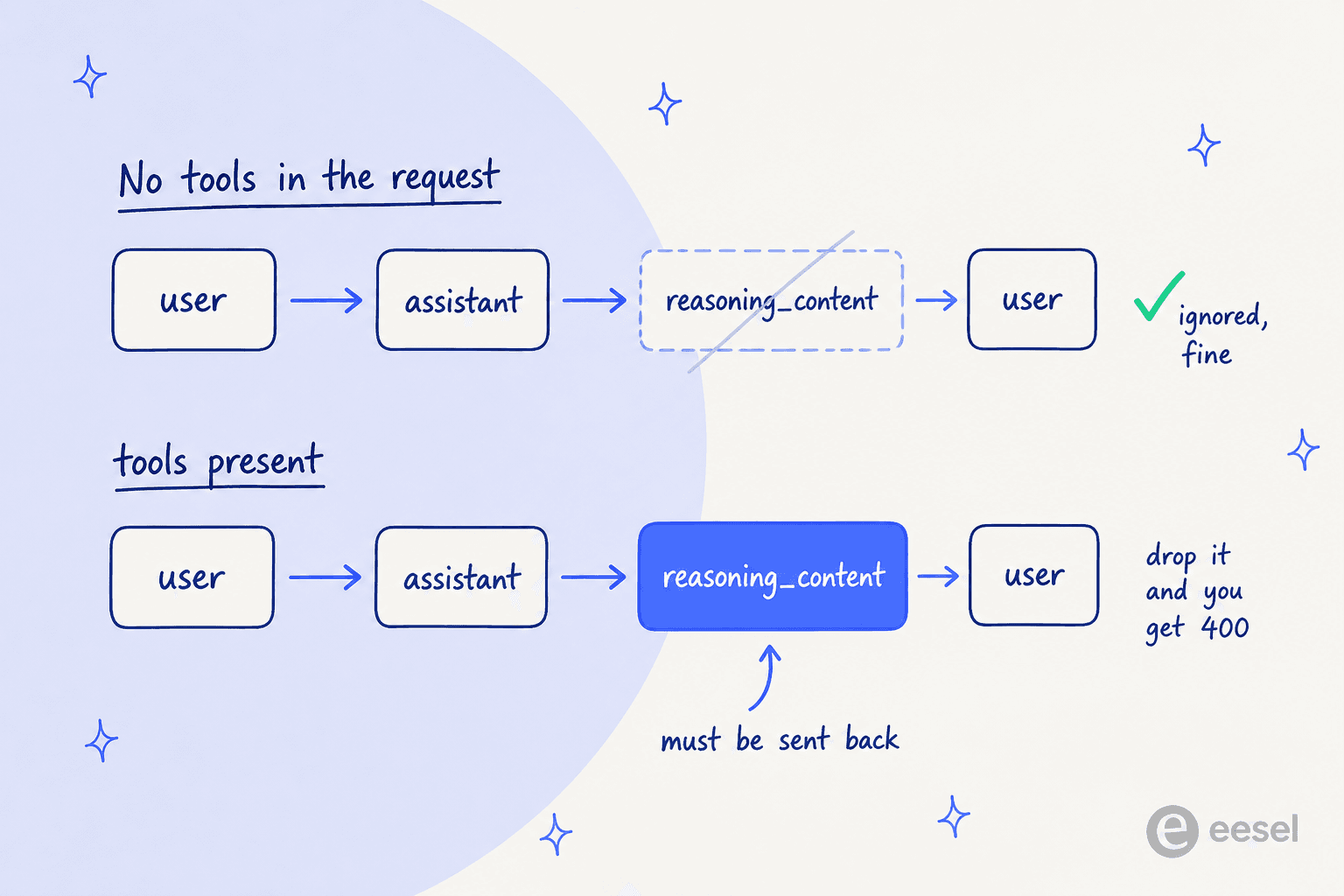
This is the trap because it is documented on a different page from the tool-calls guide that most people land on, and because the natural thing to write is a serializer which keeps role, content and tool_calls, then drops the field it does not recognise. Append the whole message object back instead:
messages.append(response.choices[0].message)   # keeps reasoning_content intact
for tool in response.choices[0].message.tool_calls:
    result = TOOL_MAP[tool.function.name](**json.loads(tool.function.arguments))
    messages.append({"role": "tool", "tool_call_id": tool.id, "content": result})
One more thing here: DeepSeek never uses the phrase "parallel tool calls" and there is no parallel_tool_calls parameter on the Chat Completions surface, though the official loop does iterate the array rather than taking [0]. So write the loop, do not assume the guarantee. This is the mechanism behind anything you would call an AI agent, so it is worth getting right before layering agentic behaviour on top.
If you need schema enforcement, strict mode does exist, but it lives over on the beta host. Three requirements: base_url="https://api.deepseek.com/beta", "strict": true inside each function, and additionalProperties: false on every object, with all properties marked required. minLength, maxLength, minItems and maxItems are not supported. It is worth knowing that DeepSeek's own example uses "$def" (singular) as the definitions container rather than JSON Schema's $defs, so copy their spelling.
Step 6: JSON output
response_format={'type': 'json_object'}, and there is no json_schema variant here. DeepSeek's four-point notice is short and every point is load-bearing: set the parameter, include the word "json" in a system or user prompt and provide an example of the shape you want, set max_tokens sensibly "to prevent the JSON string from being truncated midway", and know that "the API may occasionally return empty content".
That last one is an acknowledged open bug, in bold on DeepSeek's own page, and prompt changes are the only mitigation they offer. So parse defensively:
response = client.chat.completions.create(
    model="deepseek-v4-flash",
    messages=[
        {"role": "system", "content": 'Extract intent and urgency as json. Example: {"intent": "refund", "urgency": "high"}'},
        {"role": "user", "content": ticket_body},
    ],
    response_format={'type': 'json_object'},
    max_tokens=400,
    extra_body={"thinking": {"type": "disabled"}},
)

raw = response.choices[0].message.content
parsed = json.loads(raw) if raw and raw.strip() else None
Notice that DeepSeek's own JSON sample does not set max_tokens at all, despite their own requirement #3 saying to. Set it.
The Responses API, and what it does not do
DeepSeek’s Responses compatibility guide now lists Flash, Pro, and the separate experimental vision model. The Flash call below remains valid; compatibility does not mean every OpenAI feature is implemented.
response = client.responses.create(
    model="deepseek-v4-flash",
    instructions="You are a helpful assistant.",
    input="Hi, how are you?",
)
print(response.output_text)
Here is where the expectations break. If you know the Responses API from somewhere else, you know it for statefulness. DeepSeek's implementation is stateless. previous_response_id and conversation are "Not supported (stateless API)", store is "Not supported. The response always carries store: false", and background, metadata, include, prompt and stream_options are all unsupported too.
And they do not error. DeepSeek's own line in the compatibility table, verbatim: "Unsupported parameters are silently ignored and do not cause errors, so existing Responses API clients can connect without modification". Pass store: true, get a 200, store nothing.
What it does add over Chat Completions is worth knowing: typed semantic SSE events including a dedicated response.reasoning_text.delta channel for chain of thought, a server-side web_search built-in tool, and top_logprobs. The built-in tool shelf is exactly two items though, web_search and apply_patch; file_search, code_interpreter, computer_use and MCP are all listed as ignored.
Two migration gotchas: there is no data: [DONE] sentinel, so terminate on response.completed / response.incomplete / response.failed; and plain Flash replaces input_image parts with placeholder text. The separate deepseek-v4-flash-vision-exp model accepts image input; do not assume the plain Flash model does.
Handling the errors you will actually hit
Seven codes are documented, and no others. There is no Retry-After header, and no backoff schedule published anywhere either, so your wrapper is the one deciding.
| Code | What it means | What to do |
|---|---|---|
| 400 - Invalid Format | Malformed request body | Fix the code. Also the code you get for missing reasoning_content with tools |
| 401 - Authentication Fails | Wrong API key | Fix the key |
| 402 - Insufficient Balance | Prepaid balance is empty | Alert a human and stop. Do not retry |
| 422 - Invalid Parameters | Well-formed body, invalid values | Fix the code |
| 429 - Rate Limit Reached | Concurrency ceiling hit | Back off and retry |
| 500 - Server Error | DeepSeek-side issue | Retry after a brief wait |
| 503 - Server Overloaded | High traffic | Retry after a brief wait |
The 400-versus-422 split is real and useful. 400 is a malformed body; 422 is a well-formed body carrying bad parameter values. Two different debugging paths, and the error message is what tells you which one.
The 429 deserves a note, because DeepSeek's own documented fix is unusually candid: "Please pace your requests reasonably. We also advise users to temporarily switch to the APIs of alternative LLM service providers, like OpenAI." A vendor recommending a competitor inside it's own error docs is a real signal about peak-load capacity, and it is worth designing a fallback path for instead of treating as a joke.
On limits themselves: DeepSeek publishes no RPM or TPM figure at all. The only ceiling is concurrency, and the rate limit page counts it per account rather than per key, so minting extra keys buys nothing. "A request counts as one concurrent connection from the time it is sent until the model response is complete", which means a long reasoning call holds a slot for its full duration. Flash gets 2,500 slots against Pro's 500, and expansion is free but goes through a manual Feishu form.
If you are running multi-tenant traffic, set user_id (note: not OpenAI's user), passed as extra_body={"user_id": "..."}. It drives content-safety review, per-user scheduling isolation, and KV cache isolation for privacy. Format is [a-zA-Z0-9\-_], max 512 characters, and DeepSeek warns not to put user privacy information in it. This does not replace application authorization, tenant-specific retrieval, or safeguards against prompt injection.
The five things that fail silently
Several compatibility traps return HTTP 200. That is the through-line here, and it is worth one list that you can check a diff against.
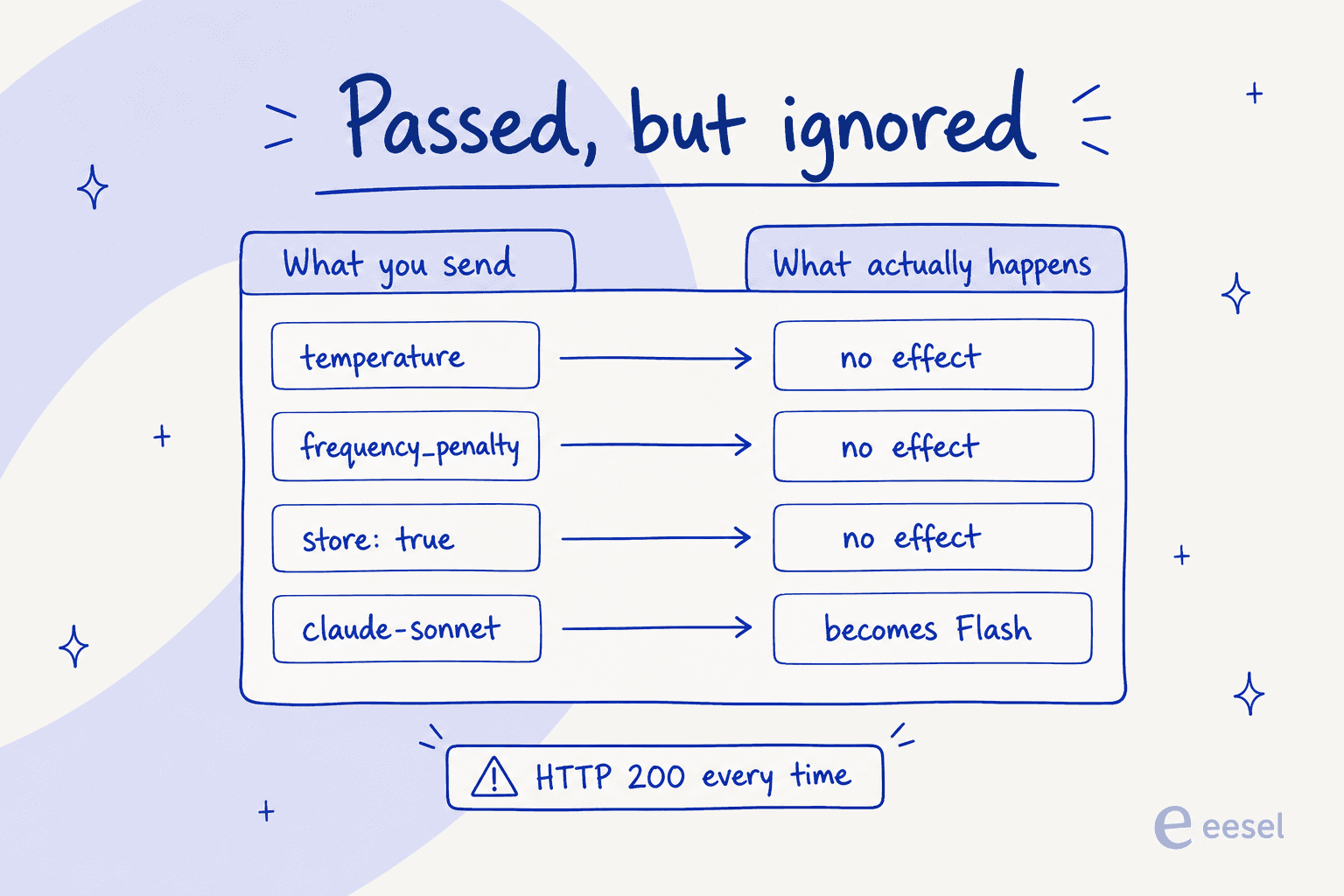
frequency_penaltyandpresence_penaltyare deprecated. Both carry the same line in the API reference: "This parameter is no longer supported. It will not take effect if you pass it to the API." Strip them when porting an OpenAI call.temperatureandtop_pare inert in thinking mode, which is the default. If you tuned a prompt attemperature=0.2and ported it over, you are running at whatever thinking mode does.- Unsupported Responses API fields are silently ignored.
store,previous_response_id,conversation,background. 200 every time. - An unrecognised model name on the Anthropic endpoint becomes Flash. Per the Anthropic API guide, any unsupported model name "will automatically map it to the
deepseek-v4-flashmodel".claude-opus*maps to Pro,claude-sonnet*andclaude-haiku*map to Flash. DeepSeek pitches this as a feature for pointing Claude clients at their API, and it is, right up until a typo silently changes which model your evals ran against. cache_controlis ignored on the Anthropic endpoint. Everywhere it appears: on tools, text blocks,tool_use,tool_result. DeepSeek's own disk cache runs instead, so there is nothing to declare, but code ported from Anthropic loses its explicit cache breakpoints without a word.
I would add on a sixth that is not really DeepSeek's fault. finish_reason carries a non-OpenAI value, insufficient_system_resource, returned when the request is interrupted by inference-system capacity. A handler that only knows stop / length / tool_calls is going to treat a truncated answer as a complete one.
Should this answer customer tickets?
A successful model call does not establish that an answer is correct, that the customer is authorized to receive it, or that a requested action happened. For a support application, review the sources, tool results, and escalation behavior as well as the generated text.
That means testing cases with incomplete information and conflicting policies, not only easy questions. A tool result should be checked before the application reports success. An order lookup needs authorization even if the model supplies a plausible order ID.
Review current data-processing terms and your own contractual requirements before sending customer information to any model service. Model availability, API compatibility, and a low token rate do not answer that security question.
Operate a support teammate through eesel CLI
If your reason for exploring Flash is to automate support, there is another implementation choice: configure an existing eesel helpdesk teammate rather than build the whole support application around a model endpoint.
eesel CLI makes that product accessible from a terminal. You can inspect connections, upload knowledge, review instructions, chat with the teammate, and inspect its activity. It operates the same agent and workspace as the dashboard. A support manager and a developer are not maintaining separate copies.
The CLI also prints JSON results, so coding agents such as Claude Code, Cursor, and Codex can use it to check setup and make specific changes. For example, ask a coding agent to check whether the selected teammate has the approved support documentation, report missing setup, and ask before changing anything.
For an existing workspace, start with login and identity checks. These commands require Node.js 18.17 or newer:
npx @eesel/cli login
npx @eesel/cli whoami
npx @eesel/cli agents
Replace AGENT_ID with the intended agent’s ID, then inspect its setup:
npx @eesel/cli status --agent AGENT_ID
npx @eesel/cli integrations --agent AGENT_ID
npx @eesel/cli instructions --agent AGENT_ID
status reports connections and whether connected content has downloaded. That is different from proving answer quality. instructions shows the standing rules you should review before testing customer scenarios.
If the task needs an approved troubleshooting document, upload it explicitly:
npx @eesel/cli files upload ./troubleshooting-guide.pdf --agent AGENT_ID
Uploading adds knowledge; it does not rewrite instructions. Separately check when the teammate should escalate, what actions it may take, and which require review. Then test representative questions with appropriate action restrictions and inspect the resulting activity. CLI chat can invoke actions, so it is not inherently a read-only test.
Keep model configuration separate from teammate operations
The DeepSeek examples above select deepseek-v4-flash for your application. The eesel commands operate an eesel workspace. They do not configure eesel to use DeepSeek or import your model application. Your DeepSeek API key and billing remain separate from eesel credentials and usage.
For scripts, eesel supports EESEL_API_URL and EESEL_API_TOKEN, with EESEL_AGENT_ID or an explicit agent flag for scope. Keep secrets out of source control. Use --help to inspect command options.
The CLI exposes activity, automations, and approvals for inspecting work and reviewing held teammate actions. A coding agent’s instruction to ask before changing setup is separate from that approval process. For writes, --dry-run prints the server request without sending it; it does not simulate an answer.
Choose what you want to maintain
Use the Flash API when you need control over the model calls and application behavior. Keep the compatibility checks, usage measurement, and error handling in this tutorial as part of that implementation.
Use eesel when the outcome is a support teammate working with your company’s knowledge and tools. The CLI lets you configure and inspect that teammate without moving every step into the dashboard.

Try eesel. Once your workspace and teammate are set up, use the CLI to review the teammate’s knowledge and instructions, then test one support scenario before expanding its responsibilities. Check current eesel pricing separately from DeepSeek’s token rates.
Frequently Asked Questions
How do I use the DeepSeek V4 Flash API for the first time?
How much does the DeepSeek V4 Flash API cost?
Does the DeepSeek V4 Flash API support tool calling and JSON output?
tools for function calls and response_format={'type': 'json_object'} for JSON. The trap is that with tools present you must resend reasoning_content in later turns or the API returns a 400. If you are wiring this into a helpdesk, our support chatbot build guide covers the layer above the model.