The 9 best Dashly alternatives for support teams in 2026

Riellvriany Indriawan

Katelin Teen
Last edited August 20, 2026

Why support teams are leaving Dashly
Fairness first, because Dashly is a well-liked product. On G2 it sits at 4.7 out of 5 across 67 reviews, 88% of those at five stars. The reviews are warm, and specific with it: how fast you can get a bot live, how much easier one inbox is than five. Real product, real fans.
Three specific things push support teams to look elsewhere though, and every one of them is checkable on Dashly's own pages.
The company told you the roadmap changed
Dashly is a Y Combinator '19 company and it has repositioned. Today the homepage sells a "Multichannel AI SDR for inbound": three AI agents, Qualifier, Support and Booking, plus two scenarios, all aimed at turning website traffic into booked meetings. The line under it reads "Trusted by 70+ inbound-first teams."
That is a sales product. Founder Dmitrii Serg was unusually direct about what it meant for everything else:
"We bet on Dashly 1.0 sales, didn't work out. Dashly 1.0 is the old version of the product with conversational marketing tools. In the first half of the year, we spent a ton of time and resources there, but didn't grow. We changed strategy: now we try not to decline in MRR on the old product, but we don't set growth goals there. Focus is on the new."

Respect to any founder who writes that down in public, honestly. It is also the most useful sentence you'll read this year if you happen to run a support queue on Dashly's live chat and knowledge base. "Not decline in MRR" is a maintenance commitment. A roadmap is something else.
The meter has nothing to do with support
This is the part that surprises people. Nearly every tool in this category bills on something you can tie back to support work, whether that's agent seats or conversations, tickets, resolutions. Dashly bills on unique monthly website visitors.
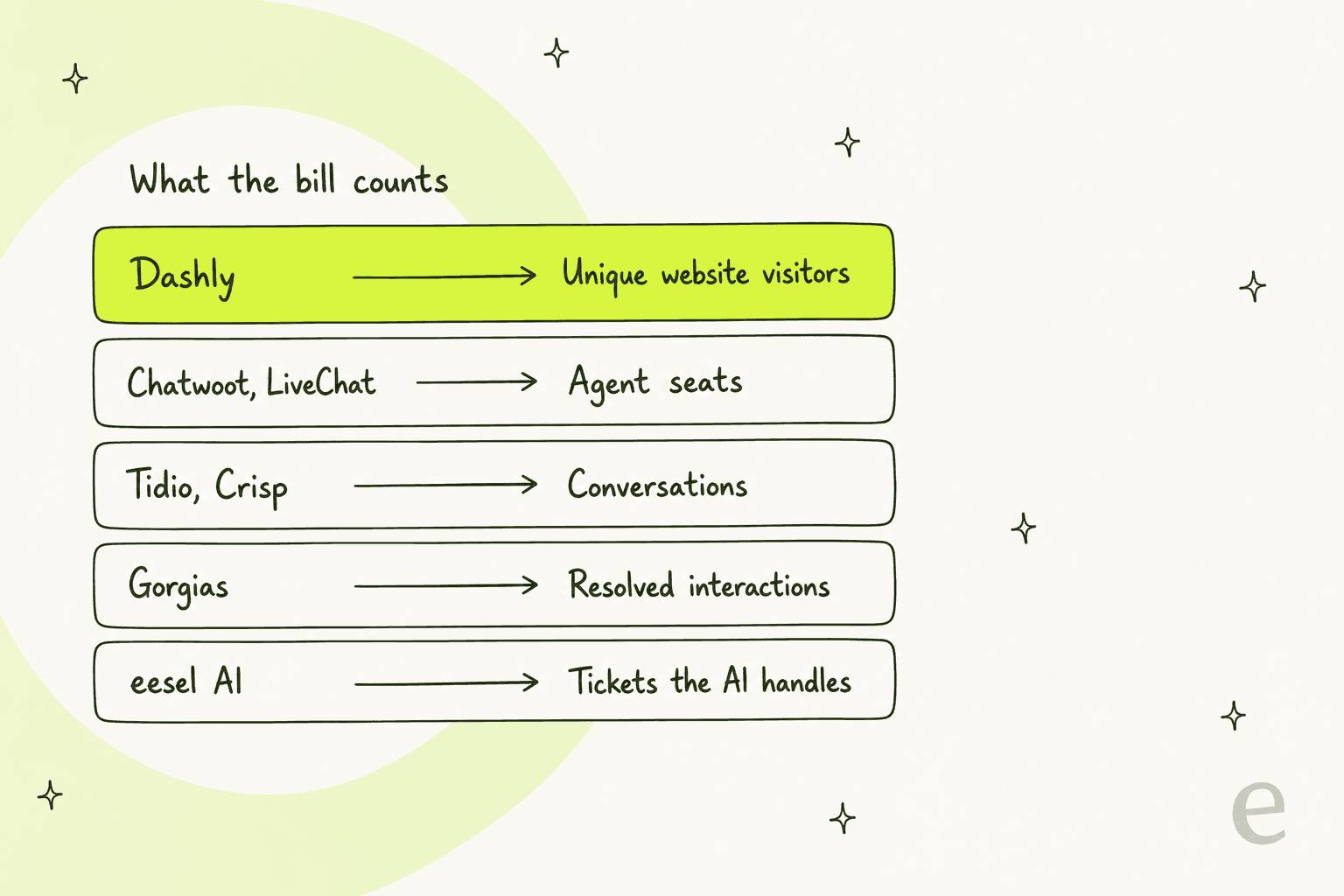
The practical effect is that your support tooling cost becomes a function of how well marketing is doing. Launch a campaign. Get picked up on Hacker News, run a Black Friday push. The bill goes up and your ticket count sits exactly where it always was. I've yet to see a version of that budget conversation which is easy to explain.
The AI is gated, and it's a separate line
Dashly's AI Support Agent is a real product, to be clear about it. It trains on help centre articles, on product docs, and on internal support instructions. It answers on website chat plus WhatsApp, Telegram, Instagram and Facebook. Escalation fires on three triggers: it doesn't know the answer, or a trigger word like "payment", "bug" or "refund" turns up, or the customer just asks for a human.
Two things worth flagging about how it's sold. On the pricing page the AI bot reads "Unavailable for this plan" against the entry Conversation tier, then "From $60/mo, price depends on the number of user queries" on Support and Marketing. Then help article 97 adds that "the cost of all add-ons except 'E-mail Builder' depends on the site traffic" -- meaning the AI line scales with your visitor tier as well, on top of scaling with query volume.
Which puts the honest floor for a support team that wants AI on Dashly at the Support plan plus the AI add-on. At 10,000 visitors: $149, plus at least $60. And that $60 is a floor, not a rate.
How I picked these nine
I run eesel's support queue, so I read vendor pages the way a support lead reads them. What is the meter. What's gated. And can I find out whether the AI is any good before a customer does.
Four bars, and everything here had to clear all of them. It has to hold a real support conversation rather than only capturing leads. It has to publish a price, or publish enough that I can compute one (Gorgias is the only one with a quote-only tier as well, though its self-serve ladder is public). There has to be an AI answering layer, because that's what people are shopping for in 2026. Last one: it has to bill on something a support team can forecast.
Each is priced against the same worked scenario throughout: a team with 50,000 monthly website visitors, 5 agents, roughly 800 support conversations a month. Mid-market SaaS shape. It's also the size where the meter differences stop being academic.
What I won't do is pretend any of these is a drop-in replacement for all of Dashly. Dashly does live chat, leadbots, triggered messages, pop-ups, email campaigns, funnels and A/B testing, all in one box. Use all of that and you're replacing it with two tools, which is fine. Most support teams I speak to use maybe a third of it. A five-star G2 reviewer put it exactly that way:
"I think there are too many features. Out of the whole set, I only use a few."

The 9 best Dashly alternatives at a glance
| Tool | Best for | Billing meter | Entry price | AI answering layer | AI gated behind | Free tier | Self-host | Test on your own past tickets |
|---|---|---|---|---|---|---|---|---|
| Dashly (baseline) | Inbound lead capture | Unique website visitors | $39/mo at 1k visitors | AI Support Agent | Support plan + $60/mo add-on | No, 7-day trial | No | No, test link and written scenarios |
| eesel AI | Support teams who want a fixed price sized to ticket volume | Credits (1 per ticket or chat the AI handles) | From $299/mo (500 credits), no platform fee | AI Agent and Copilot | Nothing, included | 100 free credits | No | Yes, replays your ticket history |
| Tidio | Live chat plus AI from one vendor | Conversations, AI billed separately | $0/mo free, $24.17/mo Starter | Lyro | Paid Lyro quota, $0.50/conversation | Yes | No | No |
| HelpCrunch | Small teams wanting chat, KB and email | Seats plus email volume | $12/seat/mo annual | AI Agents | Pro plan and above | No, trial only | No | No |
| Crisp | Flat, predictable pricing | Flat per workspace | $0 free, $45/mo Mini | AI agent on credits | Paid plan, AI credit pool | Yes, 2 seats | No | No |
| Chatwoot | Open source and self-hosting | Agent seats | $0 free, $19/agent/mo | Captain AI | Paid plan | Yes, 2 agents | Yes | No |
| Gorgias | Ecommerce on Shopify | Tickets and resolved interactions | $40/mo bundled | AI Agent | Included in every plan | No, trial only | No | No |
| Freshdesk | Teams needing a full helpdesk | Agent seats plus AI sessions | $19/agent/mo annual | Freddy AI Agent | Growth plan, $49 per 100 sessions | No | No | No |
| Chatbase | Website AI without a helpdesk | Message credits | $0 free, $32/mo Hobby | Core product | Nothing, it is the product | Yes, 50 credits | No | No |
| LiveChat | Pure human live chat at scale | Agent seats | $19/agent/mo | Add-on products | Separate purchase | No, trial only | No | No |
Prices here are the ones published on each vendor's own page as of 20 August 2026. Where a vendor shows annual-billing rates by default, that is what's in the table.
Work out what you'd actually pay
The table above tells you the meter. This one tells you the bill. Put your own numbers in, then watch what happens when traffic moves and ticket volume doesn't -- that's the whole argument, in one slider.
1. eesel AI
Best for: support teams who want to pay for tickets their AI actually handles, and want to know the error rate before customers do.
Obvious interest declared: I work on eesel's support team. Take the enthusiasm with a pinch of salt and go check the numbers, which is what I'd want you doing with any vendor on this list anyway.
The design difference from Dashly sits in the meter. eesel sells a fixed monthly Teammate plan sized to volume. 1 credit covers one ticket or chat the AI handles. Not per seat. Not per visitor or per reply either. One ticket, or one chat session, counts as a single credit however many messages go back and forth, and no platform fee or per-seat fee sits underneath that. Route 200 of your 1,000 monthly tickets to the AI while you build confidence and you only use 200 credits, so the 500-credit plan at $299/month covers it.
What it does: eesel drops onto the helpdesk you already run instead of replacing it, so tickets carry on living in Zendesk, Freshdesk, Gorgias or Jira Service Management.
It trains on your help centre, on past tickets, on internal docs, and then runs either as an AI agent that resolves or a copilot that drafts for a human. A chat widget is there too, if you want back the front-of-site surface Dashly gave you.
Pros: billing that tracks the work; you keep your helpdesk; simulation mode replays your real ticket history before go-live; one fixed monthly price, and if you run out of credits agents pause unless you turn on optional overage with a cap you set, so no surprise invoice.
Cons: it is not a marketing automation suite. No leadbots, no email campaign builder, no pop-up funnels, nothing for A/B testing triggered messages. If those made up half your reason for buying Dashly, eesel replaces the support half and that's it. The free plan is 100 credits to start, and paid plans begin at $299/month.
Pricing: free plan with 100 credits and no card, then one fixed monthly price by volume: 500 credits $299, 1,000 credits $499, 2,500 credits $999, 5,000 credits $1,899. Add-ons are priority support from $299/month and SSO and MFA from $199/month. Run our 800-conversation scenario and that's the $499/month plan if the AI handles every one of them. If the AI handles fewer, the 500-credit plan at $299 could be enough.
My take: pick it when the thing that annoyed you about Dashly was paying for people who never once opened the chat widget. Skip it if the lead-gen and email side has to live in the same tool, since you'd end up buying two products.
2. Tidio
Best for: teams who want live chat and an AI agent from one vendor, with the AI priced per conversation.
Structurally, Tidio is the closest analogue to what Dashly used to be. Chat widget, shared inbox, no-code Flows for lead capture, an AI agent called Lyro layered over the lot. What differs is that everything meters on conversations instead of traffic.
What it does: Lyro answers from your knowledge base and hands off to a human, and it can be bought standalone then bolted onto Zendesk or Salesforce when you'd rather keep the helpdesk you have. Tidio's own claim is that it solves "up to 67%" of customer problems. The leadbot-shaped job Dashly does is covered by Flows.
Pros: the per-conversation rate is published, and easy to model; Lyro counts one conversation even across multiple AI replies, or a customer leaving and coming back; the free tier is a real one; Premium offers pay-per-resolution billing with a guaranteed 50% resolution rate.
Cons: the two meters stack, which leaves you forecasting billable conversations and Lyro conversations as separate lines. Plus jumps to $300/month before usage. And, as with most tools here, no way to replay your ticket history before going live.
Pricing: Free at $0, Starter $24.17/mo, Growth from $49.17/mo, Plus from $300/mo plus usage, then Premium on request. Lyro opens at $32.50/mo for 50 conversations, with a headline rate of $0.50 per conversation. Take 800 AI conversations and you land around $449/month all in.
My take: the natural landing spot when you liked Dashly's shape and only want a meter you can defend in a budget meeting. Skip it at high volume, since $0.50 a conversation gets expensive faster than a seat-based plan does at scale. Where Lyro holds up is covered in more depth in our Tidio review.
3. HelpCrunch
Best for: small teams who want chat, a knowledge base and email marketing without a per-visitor meter.
For the price, HelpCrunch covers more of Dashly's surface area than anything else on this list. Live chat, a shared inbox, a knowledge base, pop-ups, auto messages, email campaigns. That's roughly Dashly's Marketing plan feature set, only on a seat-based meter.
What it does: the AI Agents feature trains on your content, then handles common questions across channels and in multiple languages. Chatbot flows take the leadbot job; auto messages and popups take triggered messaging.
Pros: cheap to start, at $12 per seat per month on annual billing; the feature overlap with Dashly is the closest of anything here; one widget runs across multiple domains.
Cons: the AI is gated at Pro and above, and the included allowance is thin. Pro includes 50 AI conversations a month, Unlimited includes 100, which on a real support queue is a rounding error before you're buying more. WhatsApp and chatbots sit Pro-and-up as well. And the jump from Pro to Unlimited is steep at $495/month.
Pricing: Basic is $12/mo per seat annual (about $15 monthly), Pro $20/mo per seat annual (about $25 monthly), and Unlimited $495/mo annual with unlimited seats plus 50,000 emails. Five seats on Pro works out at roughly $100/month, before any AI conversations.
My take: the best value for a small team replacing Dashly's whole footprint, provided your AI volume really is low. Skip it when AI deflection is the entire point, because 50 conversations a month will not move your queue.
4. Crisp
Best for: teams who want one flat number on the invoice regardless of how the month goes.
Crisp went the opposite way from almost everyone here, with a flat rate per workspace rather than per seat. The pricing page puts it plainly -- "a flat rate per workspace. This means you pay a single, consistent price regardless of the number of conversations you have each month."
What it does: shared inbox, chat widget, campaigns, a help centre, plus an AI agent running on a pool of AI credits that comes included with each plan. Higher tiers add omnichannel (WhatsApp, Instagram DMs, SMS, Line, Viber), and routing rules, analytics, a ticketing system.
Pros: billing you can predict; seats come bundled instead of charged (4 on Mini, 10 on Essentials, 20+ on Plus); a free plan exists for 2 seats; the AI credit allowance is stated in plain conversation counts, right on each card.
Cons: the AI credits are a pool, so a heavy month still costs more once you've drained them. Stepping from Essentials at $95 to Plus at $295 is a big move when you're only just past the automated-conversation allowance. And the flat-rate promise reads, in practice, as "flat within your tier."
Pricing: Free with 2 seats. Mini is $45/mo with around 90 automated conversations and $5 of AI credits; Essentials $95/mo with around 450 automated conversations and $25 of credits; Plus $295/mo with around 1,350 and $75 of credits. Enterprise on request.
My take: the right call when your finance team's real complaint about Dashly was volatility rather than the absolute number. Skip it where your automated volume sits awkwardly just over a tier boundary, because that is exactly where the flat model bites. There's a fuller comparison in our Crisp AI alternatives roundup.
5. Chatwoot
Best for: teams who want to self-host, or who want a real free tier that isn't a trial.
Chatwoot is the open source answer here, and it says it supports 15,000+ organisations. Part of why you're leaving Dashly might be that your data lives on someone else's infrastructure, at a price you don't control. This is the escape hatch for that.
What it does: omnichannel shared inbox, live chat widget, help centre, automation rules, a voice channel on Business and up, with Captain AI sitting in as the AI answering layer. The self-hosted edition runs on a separate plan track.
Pros: a free tier for 2 agents and 500 conversations a month, and it doesn't expire; $19 per agent is the cheapest real paid tier on this list; self-hosting lets you put it wherever your compliance team wants it; conversations go unlimited on paid tiers.
Cons: self-hosting is a real engineering commitment and not a checkbox. SSO and audit logs sit up on Enterprise at $99 per agent. The marketing automation side of Dashly, meaning email campaigns and funnels and A/B testing, simply isn't here.
Pricing: Hacker is $0 for 2 agents and 500 conversations/mo, then Startups $19/agent/mo, Business $39/agent/mo, Enterprise $99/agent/mo. Five agents on Business comes to $195/month. Full breakdown lives in our Chatwoot pricing guide.
My take: the best pick when you have an engineer who would actually enjoy owning this, or a compliance requirement that makes hosting non-negotiable. Skip it if nobody on the team wants to be on call for the inbox itself.
6. Gorgias
Best for: ecommerce teams on Shopify who want AI billed on outcomes.
Does your Dashly widget mostly answer "where's my order"? Then Gorgias is the specialist. Built for ecommerce, and the AI prices on resolved interactions rather than on attempts.
What it does: helpdesk plus AI Agent, wired deep into Shopify order data, with a shopping assistant variant for pre-sales. Every plan card bundles a helpdesk component and an AI Agent component into a single headline price, then breaks the two of them out underneath.
Pros: the AI comes included in every tier instead of being sold as an add-on; outcome-based pricing means interactions that went nowhere don't cost you; the Shopify integration is the deepest here by some way.
Cons: the price ladder is steep, and the overage cliff is real. Included interactions run $0.90 to $1.00; anything past your allowance is $1.50 per interaction -- a 50 to 67% step-up right at the boundary. Not on ecommerce? Then most of what you're paying for is irrelevant.
Pricing: Starter $40/mo (monthly billing only), Basic $90/mo or $77/mo annual, Pro $550/mo or $471/mo annual, Advanced $1,430/mo or $1,227/mo annual, and Enterprise on request. Extra tickets cost $0.36 to $0.40 each.
My take: the obvious move for a Shopify store. A poor one for anybody else. How it stacks against us is written up in eesel vs Gorgias AI, if you want that comparison directly.
7. Freshdesk
Best for: teams who've outgrown a chat widget and need a full ticketing system.
Dashly's team inbox is a chat inbox, and nothing beyond that. If what you actually needed was SLAs, escalation paths, custom fields, reporting, then Freshdesk is the grown-up version of it.
What it does: a full ticketing system with automations, a knowledge base and live chat, plus Freddy split across two AI products: Freddy AI Agent (customer-facing, billed per session) and Freddy AI Copilot (agent-facing, billed per seat).
Pros: by some distance the deepest workflow tooling here; Freddy AI Agent is available from the entry Growth plan; Copilot can be assigned to specific agents instead of every seat.
Cons: the AI meter is a session, and Freshworks defines a session as "a unique interaction between an end-user and an AI Agent" -- which for email means a 72-hour window from the customer's first message. It counts whether or not the AI resolved a thing. Those 500 included sessions are a one-time trial grant rather than a monthly allowance. Copilot is Pro-and-up too, at $29 per agent on top of the seat price.
Pricing: Growth $19/agent/mo annual, Pro $55/agent/mo annual, Enterprise $89/agent/mo annual. Freddy AI Agent sessions come at $49 per 100, so $0.49 a session. Put 5 Pro seats against 800 sessions and it's $275 plus $392. $667/month.
My take: worth it when you need real ticketing and not only chat. Skip it as a small team, because paying per session for conversations that never resolved is the least forgiving meter on this list. Ways around that are covered in our best Freshdesk alternatives piece.
8. Chatbase
Best for: replacing just the website AI answering layer, without adopting a helpdesk.
Some teams use Dashly for exactly one thing, which is an AI on the site answering questions out of the docs. If that's you: Chatbase does that one thing and nothing else, and staying narrow is what keeps it cheap.
What it does: you point it at your content, it builds an AI chatbot for your website, then it answers on message credits. Enterprise piles on SSO, white-labelling, audit logs, HIPAA eligibility and zero data retention.
Pros: nothing gates the AI, because the AI is the product; the free tier is a permanent one, at 50 message credits a month; for a tool at this price the Enterprise compliance list is unusually strong.
Cons: there is no shared inbox, so a human handoff means routing off into a different tool. No live chat, at least not the way Dashly means live chat. Credits are messages rather than conversations too, so one chatty exchange burns several.
Pricing: Free $0 with 50 credits/mo, Hobby $32/mo with 700 credits, Standard $120/mo, Pro $400/mo, Enterprise on request. Those are annual-equivalent rates, the ones shown by default -- our Chatbase pricing breakdown has the monthly view.
My take: the cheapest honest answer when all you want back is the deflection layer. Skip it the moment a human needs to pick the conversation up in the same place.
9. LiveChat
Best for: teams whose Dashly usage is overwhelmingly human, not automated.
Not everyone shopping for live chat software actually wants an AI. LiveChat is the veteran on this list and it is very good at the thing it does, which is putting humans in front of visitors fast, with the routing and canned responses and reporting you need to run a real chat team.
What it does: chat widget, agent workspace, ticketing, reporting, and then on Business and up, SMS plus Apple Messages for Business. AI capabilities get bought as separate products inside the same family, not bundled in.
Pros: mature, and stable with it; reporting that beats most tools at this price; per-seat pricing you can forecast without thinking about it.
Cons: the AI story is the weakest on this list, and in 2026 that matters. $79 per agent on Business is also the highest seat rate here, which puts a 10-person team at nearly $800/month for chat alone.
Pricing: Starter $19/mo, Team $49/mo, Business $79/mo, and Enterprise on request. All per agent.
My take: only when your Dashly bot was decorative and the humans did all the work. Want deflection? Look at AI live chat options instead.
The visitor meter, in actual money
Here is the arithmetic that sent me down this road in the first place.
Take a team on Dashly's Support plan. January: 25,000 unique visitors, they pay $239. Then in February marketing lands a good campaign and traffic hits 50,000. Ticket volume identical -- same product, same customers, the same queue. Bill is $349 now. That's $110 a month more for zero additional support work, and it repeats for every month the traffic stays up.
Push it further out. At 200,000 visitors the Support plan is $729/month, Marketing $999/month, per Dashly's own plan tables. Add the AI bot from $60 and up, which scales with traffic as well, and a team whose support load never changed ends up paying real money for marketing's success.
And then there's the definition of "unique."
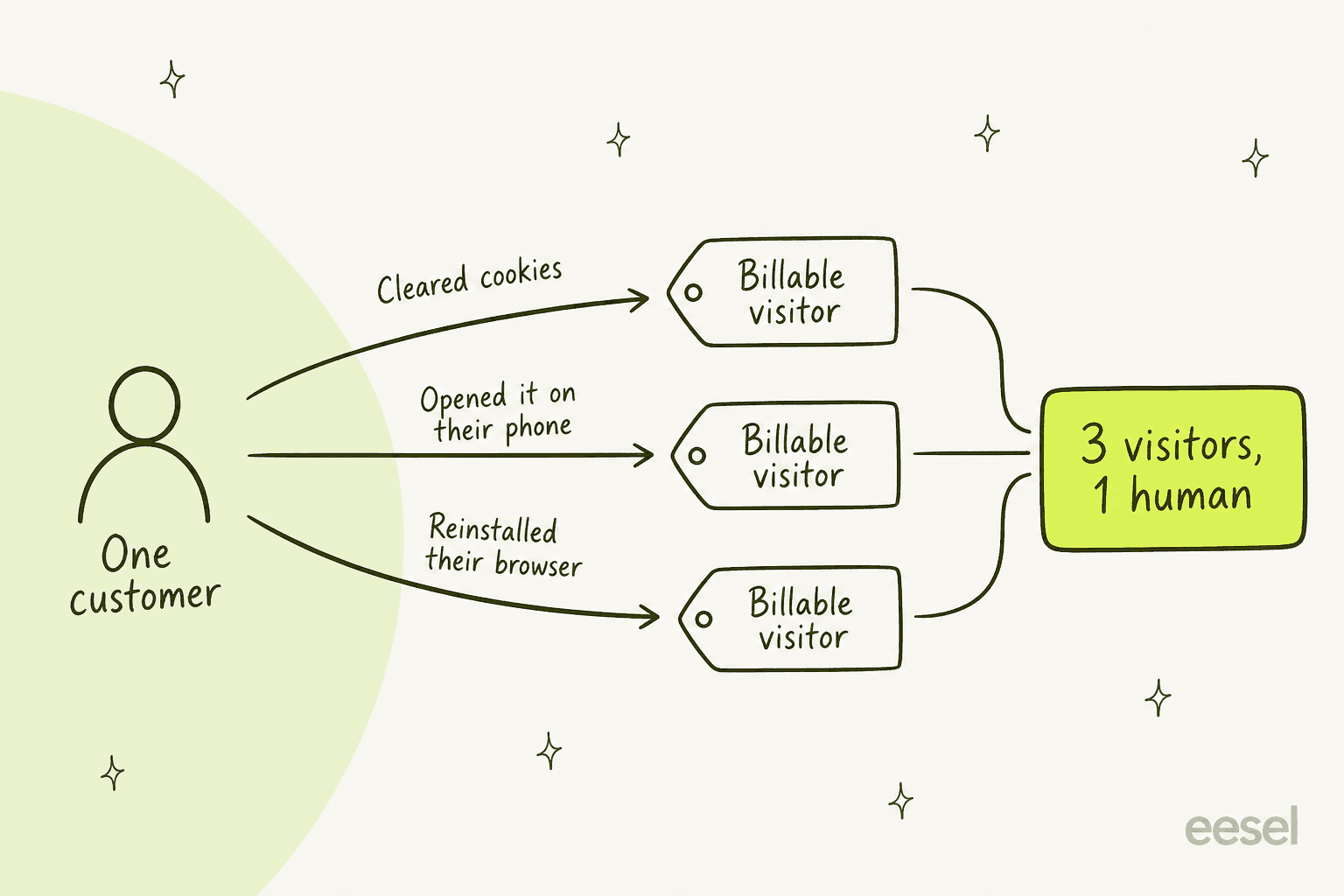
That isn't me being uncharitable. It comes straight from help article 97, which lists three ways the same person gets counted a second time: cleared cookies, arrived on another device, reinstalled the browser or the OS. For a B2B product, where the same buyer researches on a laptop at work and then a phone at home, that is not an edge case.
To be completely fair to Dashly, going over quota doesn't switch anything off. The overrun gets invoiced instead, and the rates are published, which is more transparency than several vendors on this list bother with. On the Support plan at the 1,000-visitor tier that overrun is $0.0909 per extra visitor; by the 200,000 tier it's down to $0.0042. Every paid plan also includes unlimited seats, a generous choice most of the alternatives here don't match.
The meter isn't wrong. It's aimed at a marketing buyer, which given where the company has pointed the product is at least consistent. It only becomes a problem when you're a support team.
The thing almost nobody lets you test
I saved the part I care about most for here, because it's the one that decides whether any of this works at all.
Every vendor on this page will quote you a resolution rate. Dashly says its AI Support Agent resolves 40-90% of support tickets. Tidio says Lyro solves up to 67%. Directionally honest numbers, all of them, and all useless for your queue, because the only number that matters is what happens on your tickets, with your docs, in your customers' words.
Dashly is more candid about this than most, actually. Its own page says "Expect 1-2 rounds of tuning" and that "Complex products (like BotHelp) took about 2 months to reach 40% resolution rate." A real answer, that. But look at how you're meant to find out: a shareable test link, plus scenarios your own team writes. So you're grading the AI on the questions you already thought of.
And then there's the founder's own post-mortem, which I keep coming back to:
"We didn't set up an evaluation and testing system To quickly and clearly catch bugs and assess AI agent performance. This cost us conversation quality and missed inquiries."
He also says they're rolling out Evals now to fix it, which is the right response. Still, it names the gap precisely. Without an evaluation harness, you find out about conversation quality from the inquiries you missed.
I know exactly what that feels like from the other side. Last spring we ran a cross-validation for a German jewellery retailer, about 1,000 tickets a month across Zendesk and Shopify, replaying 284 chats plus a 100-ticket sample of their real history before one single customer saw the AI. The headline numbers looked good. 93% triage accuracy. 100% spam detection with zero false positives, on the 22% of their inbox that turned out to be spam. Returns and refunds drafted usefully 93.8% of the time, warranty claims 96.4%.
The number that actually mattered was the ugly one. 7% of drafts contained a factual error, and only 12% came out clean enough to send as-is. That got caught in a dry run. Caught in production instead, it's roughly seventy wrong answers a month going out under their brand before anybody spots a pattern.
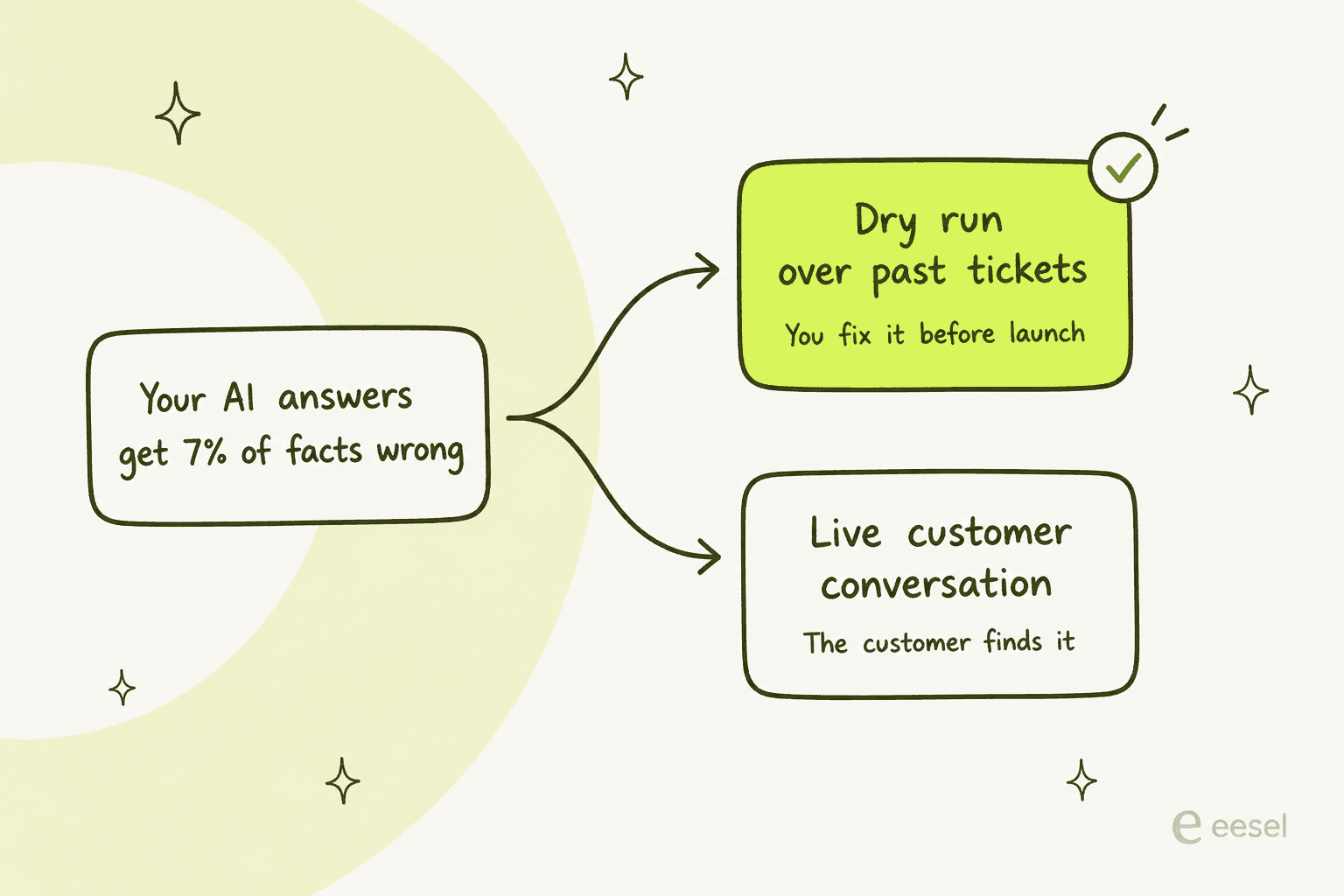
So that's the question I'd put to every tool on this list before signing anything. Can I run this over the last thousand tickets we handled, and read what it would have said? Of the nine here, right now, eesel is the only one answering yes. Not a permanent moat -- Dashly is building it and others will follow -- but true today, and it is the difference between a two-month tuning cycle and a two-day one.
Try eesel
You went to Dashly because you needed a support tool, and then watched the bill track your traffic instead of your queue. That specific thing is what eesel fixes. It uses 1 credit per ticket your AI actually handles on one fixed monthly price, plugs into the helpdesk you already run rather than replacing it, and simulates against your real ticket history, so the error rate shows up before a customer finds it and not after.
There are 100 free credits, no credit card, everything unlocked. Run it over last month's tickets and read back what it would have said. Try eesel to find out on your own data, or book a demo if you'd rather we walk it through with you.
Frequently Asked Questions
What are the best Dashly alternatives for a support team?
How much does Dashly cost?
Is there a free Dashly alternative?
Why do teams switch away from Dashly?
Can I test an AI support agent before it talks to customers?


Article by
Riellvriany Indriawan
Riell is a designer and writer at eesel AI with about two years of experience researching CX platforms, AI chatbots, and helpdesk software. She combines her design background with a sharp eye for how these tools actually look and feel in practice — making her comparisons unusually visual and user-focused.