The 8 best Inkeep alternatives in 2026

Kurnia Kharisma Agung Samiadjie

Katelin Teen
Last edited September 22, 2026

Why teams look past Inkeep
I want to be fair here, because Inkeep earned its reputation. It raised a $13M seed in September 2025 led by Khosla Ventures and GreatPoint Ventures, it's a Y Combinator W23 company, and its founders Nick Gomez and Robert Tran came out of MIT and Microsoft. The RAG on developer docs is legitimately strong. As one operator put it on Hacker News:
"I'm not sure how they do it but the answer quality and the UI is meaningfully better than all the other 'chat with your docs'-type products I've tried."

So the reasons to leave aren't about quality. They're about fit and friction, and there are four that come up again and again.
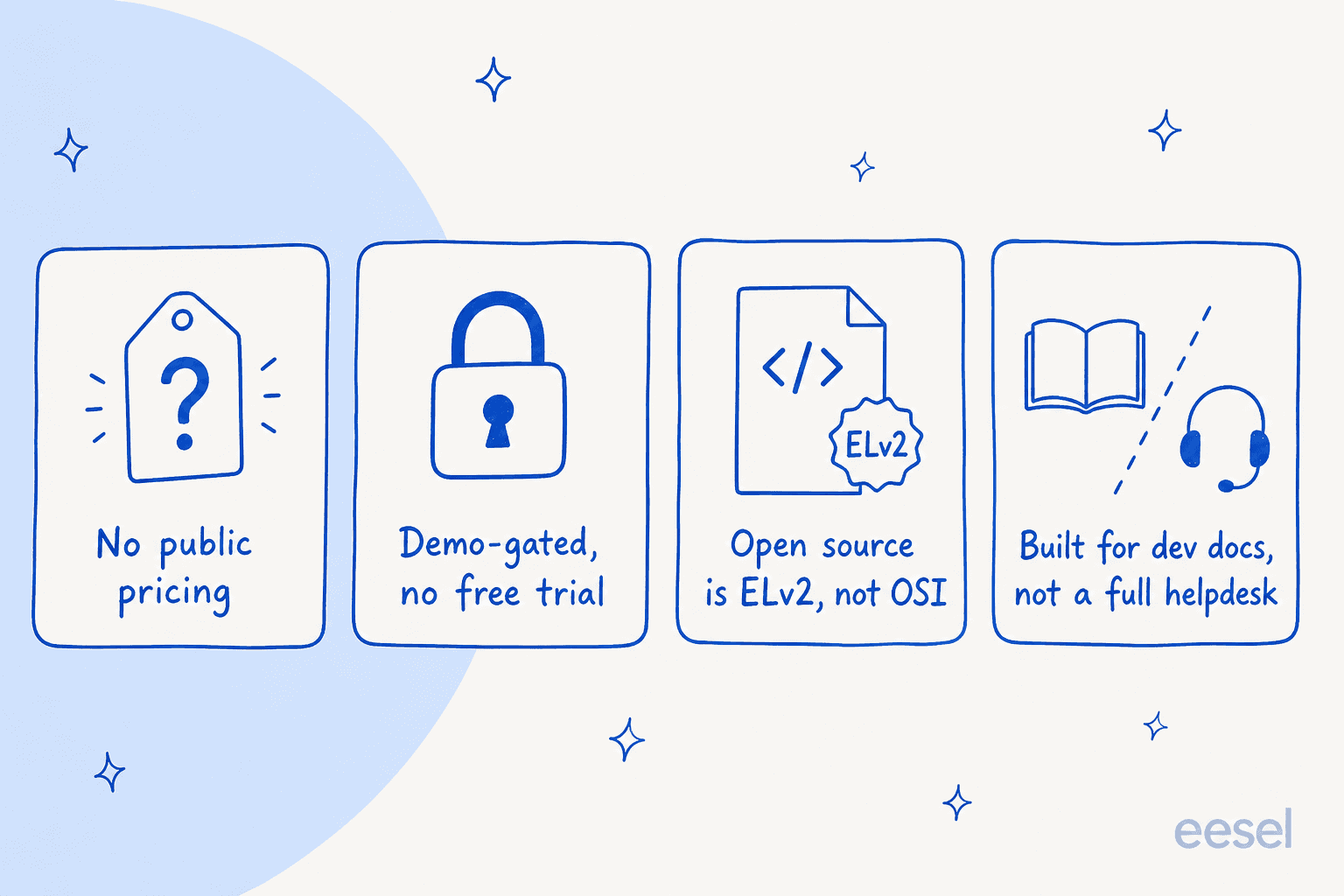
First, there's no public price. inkeep.com/pricing returns a 404, and the docs pricing page only lists "Open Source" versus "Enterprise" with a "Contact Us." You can't budget a rollout you can't price.
Second, the managed product is demo-gated with no free trial. The cloud pricing FAQ says it plainly: "While we don't have a free tier, we do offer a free demo on your own content." You book a call, you get a 30-day sandbox, and full access needs an account and a card on file.
Third, the "open source" tier is ELv2, not an OSI license. When Inkeep launched its agent builder, the loudest thread on Hacker News was about exactly this:
"Fake 'Open source' all over again.. why do we repeatedly have to do this?... I was excited with the pitch. And then had this completely ruin your image."
That matters because the free path is "run it yourself," and self-hosting an agent platform is real engineering time, not a checkbox.
Fourth, Inkeep is built for developer docs, not a full helpdesk. It shines at deflecting community and documentation questions. If your reality is a shared inbox full of order, billing and account tickets, you're buying a docs-answer engine and then wiring it into your support stack yourself.
None of that makes Inkeep bad. It makes it a specific tool for a specific shape of problem. The alternatives below split into two camps: docs-answer engines that do Inkeep's original job (sometimes cheaper, sometimes with a public price), and support platforms that resolve whole tickets inside your queue.
How I picked these
I run this comparison the way a buyer actually shops. I read every vendor's own pricing and docs pages, I looked at what the tool does out of the box versus what you have to build, and I weighted three things a search for "Inkeep alternatives" is really asking about:
- Is the price knowable? A public number, or at least an honest billing unit, beats "book a demo."
- How much do you have to build? Docs-answer engine you assemble, or an agent that works on day one.
- Does it stop at answers, or resolve the ticket? Answering a question and closing a ticket (tagging, looking up an order, issuing a refund) are different jobs.
Here's the whole field before we go tool by tool.
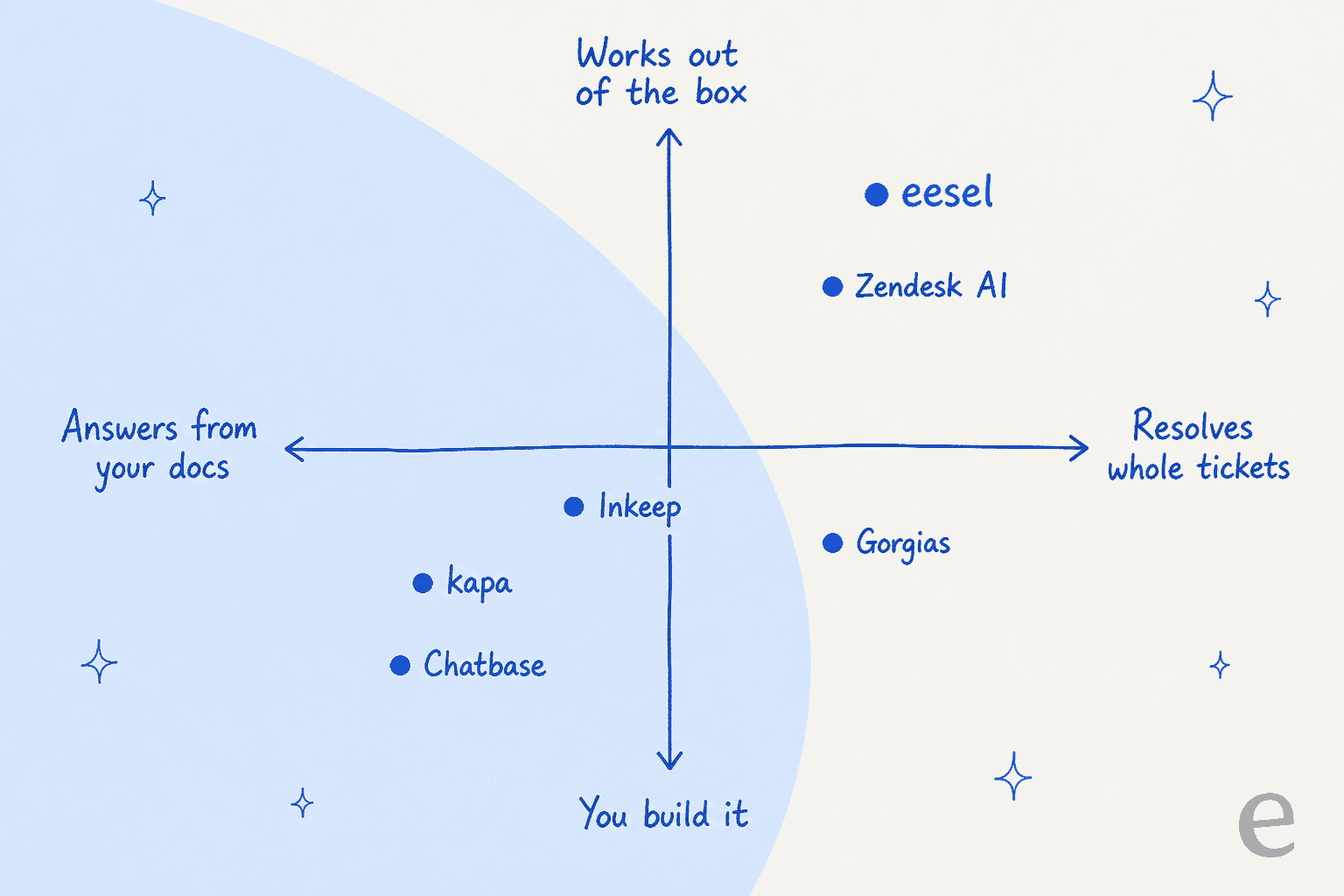
The alternatives at a glance
| Tool | Best for | Public price? | Free tier / trial | Billing unit | Resolves whole tickets? |
|---|---|---|---|---|---|
| eesel AI | AI agent live over your helpdesk + docs | Yes | $50 free usage, no card | $0.40 per ticket handled | Yes |
| kapa | Dev-docs retrieval as infrastructure | No (quote-only) | 14-day free trial | Queries + answers (quote) | No (answer layer) |
| Chatbase | No-code custom chatbots | Yes | Free plan (50 credits) | Message credits | Partial |
| DocsBot | Cheap docs + support bots | Yes | Free plan (100 credits) | AI credits | Partial |
| SiteGPT | Website chatbots on a budget | Yes (in the bundle) | 7-day trial | Message quota | Partial |
| Mintlify | AI-native docs platform | Yes | Free Starter (no AI) | AI credits (Pro+) | No (answer layer) |
| Gorgias | Shopify / ecommerce support | Yes | 30-day trial | ~$0.90 per resolution | Yes |
| Zendesk AI | Enterprise helpdesk teams | Yes | Trial | $1.50-$2.00 per resolution | Yes |
1. eesel AI
Best for: teams that want an AI agent answering and resolving tickets across their existing helpdesk and docs, live in minutes, with a price they can read off a page.
I'll be upfront that this is our product, so read the rest of the list to keep me honest. But eesel exists to solve the exact gap that sends people looking past Inkeep. We've spent years putting AI on live support queues, and we've watched confident-sounding bots quietly give wrong answers, which is why every rollout gets simulated against your own history before it touches a customer.
Where Inkeep is a docs-answer engine you assemble, eesel is an AI teammate that already knows how to work. It connects to helpdesks like Zendesk, Freshdesk, Gorgias, Front, Help Scout and HubSpot, and to your knowledge in Confluence, Google Docs, Notion and past tickets, then answers and resolves inside the queue you already use.
The thing I'd point an Inkeep evaluator to is the simulation. Inkeep's demo runs on your content in a sandbox; eesel replays hundreds of your real historical tickets and scores its answers against what your team actually sent, so you see coverage and gaps before go-live rather than hoping. That "test on reality first" step is the whole point, and it's why teams that were burned by an over-eager bot come to us. One customer summed up the build-versus-buy call this way:
"We could try to write our own LLM application but we didn't want to invest our time into that. We wanted something that we would not have to maintain."
Karel, GENERAL BYTES (eesel case study)
There's a real developer surface too, which matters if you were drawn to Inkeep's SDK and MCP story. eesel ships a CLI (@eesel/cli), an MCP server per workspace, webhooks and network access, so a person can drive it from a terminal, scripts can automate it, and coding agents like Claude Code or Cursor can operate the same agent. The docs literally say everything on the site can be done from the terminal.
Pros:
- Plugs into your existing helpdesk and docs, no rip-and-replace.
- Simulation over your real past tickets before going live.
- Public, usage-based pricing with a hard spend cap.
Cons:
- HIPAA and a BAA are Enterprise-only, so regulated teams pay the platform fee.
- SOC 2 Type II is underway rather than certified as I write this.
- If you truly only need a docs widget and nothing else, a lighter tool may be enough.
Pricing: usage-based at $0.40 per ticket or chat handled, with light dashboard lookups free and a $50 free-usage trial (no card). A 25% discount applies if you commit annually, and Enterprise is a $1,000/mo platform fee that adds SSO, HIPAA and a BAA. Crucially, the unit is a ticket handled, not a "resolution," so a spike in volume doesn't produce a mystery bill.
Our take: if the reason you're leaving Inkeep is "I don't want to host it and I want it working on my helpdesk this week," this is the one I'd trial first. If you genuinely only need cited answers on public docs, one of the next two will feel closer to Inkeep.
2. kapa.ai
Best for: developer-tool and SaaS companies that want a docs-grounded retrieval layer they build agents on, and don't mind talking to sales.
kapa is the closest philosophical match to Inkeep, and probably its most direct competitor. It's also a YC company from 2023, with roughly $3.7M raised, and it sells the same core idea: turn your unstructured knowledge into cited, real-time context for AI. Where it leans harder than Inkeep is on being infrastructure. kapa exposes a retrieval API and a hosted MCP server, so you can hand your knowledge to an agent your users already work in, like Claude Code, in a single call.
It ingests from 20+ sources (websites, Confluence, Notion, Zendesk help center and tickets, Slack, Discord, GitHub code and issues), serves answers with citations, and reports back on what users ask and where your knowledge has gaps. The enterprise governance story is real: SSO, SCIM, RBAC, EU hosting, zero data retention and PII masking.
Pros:
- Strong developer-docs retrieval with an API plus hosted MCP.
- Serious governance for regulated, global deployments.
- Knowledge-gap analytics that tell you what to write next.
Cons:
- No public price; both paid tiers are quote-only.
- It's a retrieval layer, not a full helpdesk agent, so ticket actions are on you.
- Overkill (and likely pricey) for a small team that just wants a widget.
Pricing: a 14-day free trial ($0, no card, capped at 1 index, 5,000 pages, 5,000 retrieval queries and 1,000 answers), then Growth and Enterprise are both "Contact us." The metered dimensions kapa tracks are queries and answers (counted separately), pages crawled and index count, but no dollar figure is published anywhere on the vendor site.
Our take: if you liked Inkeep specifically as dev-docs infrastructure and you have an engineering team to build on the API, kapa is the natural swap. If "quote-only" was one of your reasons for leaving Inkeep, note that you're trading one demo-gated product for another.
3. Chatbase
Best for: teams that want to spin up a custom, no-code AI chatbot fast, with a clear public price.
Chatbase comes at the problem from the SMB, self-serve end. You point it at your files, website, Q&A pairs and Notion, and you get an agent you can embed. It's grown into more than a docs bot: on the Pro plan you can train it on past support tickets via a Zendesk or Salesforce integration, it has AI Actions, and it ships a playground for manual testing plus a shareable preview. If you're weighing it seriously, we go deep in our Chatbase alternatives writeup.
Two honest corrections, because older roundups get these wrong: Chatbase can use past tickets (it's a Pro-gated feature that needs the OAuth integration), and it does have testing. What it lacks is a batch simulation that replays your whole historical ticket archive and scores it, which is the difference between "I tried a few messages" and "I know my coverage."
Pros:
- Fast, genuinely no-code setup with a free plan to start.
- Public pricing you can read off the page.
- 20+ integrations and a wide model choice.
Cons:
- Every paid plan up to Pro includes only one agent.
- Training is capped by megabytes per agent, which bites on large knowledge bases.
- Credit consumption per message depends on the model, so cost is harder to predict.
Pricing: Free $0 (50 credits), Hobby $40 (700), Standard $150 (4,000), Pro $500 (15,000), and Enterprise on request; annual billing knocks 20% off. Training limits run 1 MB (Free) up to 40 MB per agent (Pro), and extra agents are $25/month each. See our best AI chatbot builder guide for how it stacks up.
Our take: a solid pick if you want one embedded bot and a public price, and a real step up from Inkeep on "can I just start." If you need it working across a busy support queue rather than as a website widget, it starts to feel narrow.
4. DocsBot AI
Best for: teams that want the cheapest credible route to a docs-and-support bot, with a genuine free plan.
DocsBot is the value play in this group, and it's more capable than its price suggests. It's been around about four years, claims 75,000+ users and 3,000+ businesses, and pulls from roughly 38 content sources (website crawl, sitemaps, YouTube transcripts, Notion, Confluence, and ticket sources like Help Scout, Freshdesk and Zendesk on Standard+). It also does more than answer: AI Actions, an MCP server, realtime voice agents and a Deep Research mode all ship, and it carries SOC 2, GDPR and HIPAA (Enterprise) with client-side PII redaction on Business.
Like most tools here, DocsBot bills in AI credits, where a standard message on a 1x model costs one credit and a heavier model like GPT-5.6 Sol costs 20x. That's flexible, but it means "messages per month" isn't a fixed number, so watch the model you pick.
Pros:
- A real free plan and low entry price ($49/mo Personal).
- Wide content sources plus AI Actions and MCP.
- Strong compliance for the price bracket.
Cons:
- Credit multipliers make heavy-model usage add up quietly.
- Skills, web search and ticket sources are gated to Standard+.
- It's a bot builder, not a helpdesk, so ticket workflows live elsewhere.
Pricing: Free $0 (1 bot, 50 pages, 100 credits), Personal $49 (5k pages, 5k credits), Standard $149 (3 bots, 15k/15k, "most popular"), Business $499 (10 bots, 100k pages, 60k credits), Enterprise custom. Annual billing gives two months free, and there's a 14-day money-back guarantee.
Our take: the best budget option for a docs bot, and a very reasonable Inkeep alternative if your job really is documentation Q&A. If you want it resolving billing and order tickets inside a queue, that's not what it's built for.
5. SiteGPT
Best for: website chatbots where you want a low real-world running cost and don't need enterprise plumbing.
SiteGPT trains a chatbot on your site and content and embeds it, in the same no-code lane as Chatbase and DocsBot. Its quirk is worth knowing before you compare prices: the pricing page defaults to the yearly toggle, so the numbers most roundups quote ($39/$79/$259) are the annual monthly-equivalents. The real month-to-month rates are $59, $129 and $429.
The interesting part is the math underneath. Its message quotas count exchanges, and a high share of small "mini" model messages stretches them a long way. At a heavy all-mini deployment you can land around nine cents a conversation, which is genuinely cheap. Push toward larger models and you climb the tiers fast, so your effective price swings on model mix more than on the sticker.
Pros:
- Can be very cheap at scale on light models.
- Straightforward website chatbot setup.
- Public pricing (once you find the monthly figures).
Cons:
- The rendered price hides the true monthly rate, so it's easy to misread.
- Zendesk integration is Scale-only, a $129 to $429 jump if you need it.
- Add-ons ($59/mo each for branding removal and extra messages) stack up.
Pricing: Starter $59/mo, Growth $129/mo, Scale $429/mo (monthly billing), each cheaper annually. Message quotas are 400/1,000/4,000 on the all-GPT case and up to 4k/10k/40k on all-mini. Our best AI chatbot for customer service piece has more head-to-heads.
Our take: a smart budget pick if you're comfortable reading the fine print and your traffic is mostly simple questions. If you need Zendesk or predictable pricing, the jumps and add-ons erode the savings.
6. Mintlify
Best for: teams that want a beautiful docs platform first, with an "Ask AI" answer engine built into it.
Mintlify approaches Inkeep's territory from the other direction. It's an AI-native documentation platform (think docs hosting, editor, custom domain) that ships an Assistant answering questions from your docs with citations, plus a writing agent and automations. It runs the Assistant on Claude and exposes an MCP server on every plan, including the free tier. Its customer wall includes Anthropic, Coinbase and HubSpot.
The catch, and the reason it's an alternative rather than a twin, is that Mintlify is docs-platform-first. If you already want a docs site and answers on it, that bundling is a strength. If you just want the answer engine to sit on docs you host elsewhere, you're buying more than you need.
Pros:
- Polished docs platform with AI answers built in.
- MCP server on all plans, including free.
- Deflection isn't billed: the Assistant answer is free when it can't answer.
Cons:
- AI features aren't on the free Starter plan; they start at Pro.
- Pro is a firm $450/mo, and community sentiment consistently flags cost.
- It's an answer layer on your docs, not a ticket-resolving helpdesk agent.
Pricing: Starter $0/mo (5 seats, full platform, but no AI), Pro $450/mo annual (unlimited seats, 10,000 shared AI credits/mo, $0.01 per credit overage), Enterprise custom. The Assistant costs 25 credits per answer and automations 250 credits per update, both free when there's nothing to do.
Our take: the right call if a great docs experience is the goal and AI answers are the bonus. If you already have docs and only want Inkeep's answer capability, the platform overhead and $450 floor make it a heavy way to get there.
7. Gorgias
Best for: Shopify and ecommerce teams that want AI resolving order, return and WISMO tickets, not just answering docs.
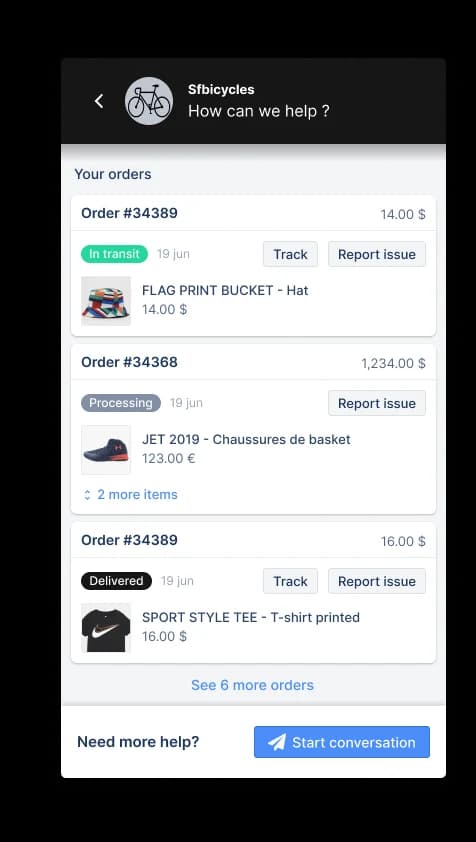
If your version of "Inkeep alternative" is really "I need AI on my actual support tickets," Gorgias is a different and useful answer. It's a full ecommerce helpdesk with an AI Agent that can look up orders, take actions and resolve conversations end to end, which docs-answer engines can't. Its knowledge sources are a closed list (guidance written in Gorgias, help center articles, a public website crawl and uploaded docs), and its own claim is automating around 60% of email and chat.
Two things to plan for. The AI Agent requires Shopify and is unsupported on BigCommerce, Magento and WooCommerce, and a fully-automated ticket is billed twice on newer accounts (the ticket fee plus the automated-interaction fee). We cover the switching triggers in best Gorgias alternatives.
Pros:
- Actually resolves ecommerce tickets, with order actions.
- Deep Shopify integration and helpdesk workflows.
- Public, if intricate, pricing.
Cons:
- The AI Agent needs Shopify; non-Shopify merchants are out.
- Billing stacks a ticket fee and an automation fee on the same resolved ticket.
- Knowledge is limited to publicly accessible pages, so gated wikis don't connect.
Pricing: plans run Starter $40, Basic $90, Pro $550 and Advanced $1,430 per month (annual is cheaper), each with a bundled AI-interaction allowance. The effective AI rate lands around $0.90 per resolved interaction, stepping up to a $1.50 overage past your allowance.
Our take: the strongest pick here if you're on Shopify and want resolutions rather than answers. The double-billing and the Shopify requirement are the two things to price out before you commit.
8. Zendesk AI
Best for: larger teams already standardized on Zendesk who want AI resolutions inside that ecosystem.

Zendesk is the enterprise incumbent, and its AI Agents plus Copilot resolve and assist inside the helpdesk millions of teams already run. If you're a bigger support org, the pull isn't the AI being uniquely clever, it's that everything lives in one place. Zendesk even ships a first-party Claude connector now. Our complete Zendesk AI guide walks through setup and costs.
The thing that surprises people is the resolution pricing, which Zendesk does publish, just buried in the plan-comparison table rather than on the cards. It's real money on top of per-agent seats.
Pros:
- Mature, full-featured helpdesk with AI built in.
- Resolutions happen where your agents already work.
- Published per-resolution rates (once you find the table).
Cons:
- You pay per-agent seats and per resolution.
- It's a heavier, pricier commitment than a docs bot.
- Best value only if you're already committed to Zendesk.
Pricing: Suite plans run roughly $55 (Team), $115 (Professional) per agent/month annually, with a small bundle of included automated resolutions, then $1.50 per committed resolution or $2.00 pay-as-you-go beyond that. Suite Enterprise with Copilot stays quote-only.
Our take: the safe enterprise choice if you're already on Zendesk. If you want AI on Zendesk without paying Zendesk's per-resolution rate, an answer layer like eesel that plugs into the same helpdesk at a flat $0.40 per ticket is the cost angle worth running.
What it actually costs
The sticker price isn't the number that matters here. The billing unit is, because these tools charge on completely different meters, and that's where the surprises live. A "credit" isn't a message, a "resolution" isn't a "ticket handled," and "quote-only" means you can't compare at all until you've sat through a call.
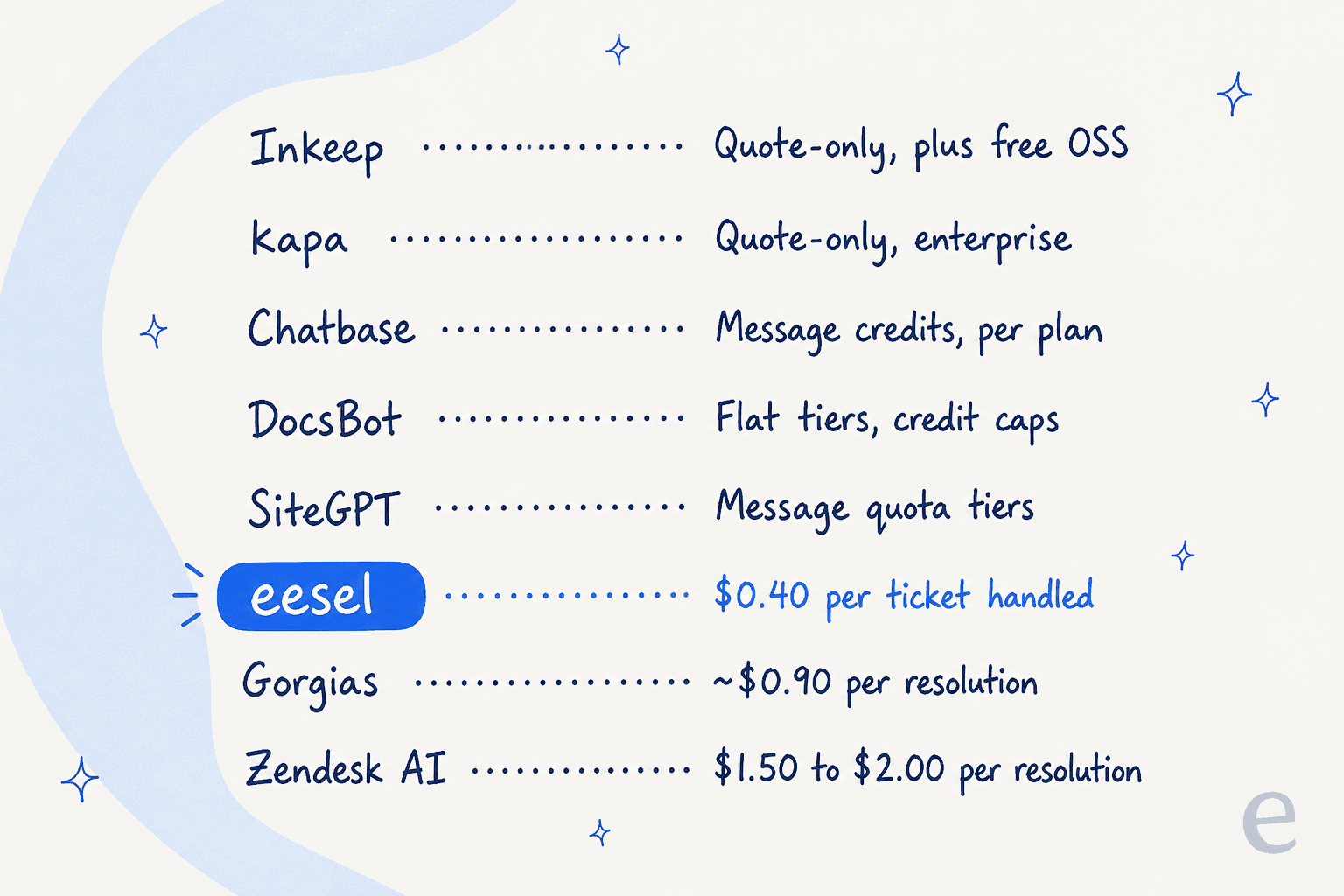
If predictability is what you're after, the flat per-ticket unit is the easiest to model against real volume, which is a big part of why we built eesel that way. Credit meters reward light models and punish heavy ones; per-resolution meters can stack fees; quote-only means budgeting after the fact. Whichever you pick, price it against a real month of your own ticket volume, not the headline number.
Try eesel
If the reason you started reading was "Inkeep looks great but I can't price it and I don't want to host it," that's the exact problem eesel AI was built for. It goes live on your existing helpdesk and your docs together, resolves tickets inside the queue your team already uses, and, unlike a sandbox demo, simulates on hundreds of your real past tickets so you know your coverage before a customer ever sees it.

The price is on the page, not behind a call: $0.40 per ticket handled, $50 of free usage to start, no card required, and a hard spend cap so a busy month can't blow the budget. You can be running in about the time it took to read this. Try eesel or see the pricing.
Frequently Asked Questions
What is the best Inkeep alternative in 2026?
How much does Inkeep cost, and why do people compare it?
Are there any free Inkeep alternatives?
What is the difference between Inkeep and a full helpdesk AI?
Can I test an Inkeep alternative before going live?


Article by
Kurnia Kharisma Agung Samiadjie
Kurnia is a software engineer and writer at eesel AI with two years of SEO experience, writing about AI tools, helpdesk software, and customer support. He pairs a developer's understanding of how these products are built with search-driven research into what actually ranks and resonates with the people searching for them.