ChatGPT for Gorgias: 4 ways to connect them, and what each costs

Rama Adi

Katelin Teen
Last edited October 14, 2026
What people actually mean by "ChatGPT for Gorgias"
When someone searches "ChatGPT for Gorgias," they usually mean one of two things: I want the AI everyone's talking about answering my Shopify support tickets, or I already pay for ChatGPT and I want it to see my Gorgias data. Both are reasonable. The confusing part is that Gorgias doesn't sell a "ChatGPT integration" you can click install on.
Here's the thing worth knowing before you pick a path: there is no ChatGPT, OpenAI, or Anthropic app in the Gorgias App Store. The slugs gorgias.com/apps/openai and /apps/anthropic both 404. But that doesn't mean OpenAI isn't in Gorgias. It's baked into the product. Gorgias's own AI Agent page says "Gorgias partners with OpenAI," and its security FAQ goes further: the AI Agent "uses a combination of multiple secure LLM providers, including OpenAI, Anthropic, and internally fine-tuned LLMs." You don't get to see or pick the model, but ChatGPT-class reasoning is already doing the work.
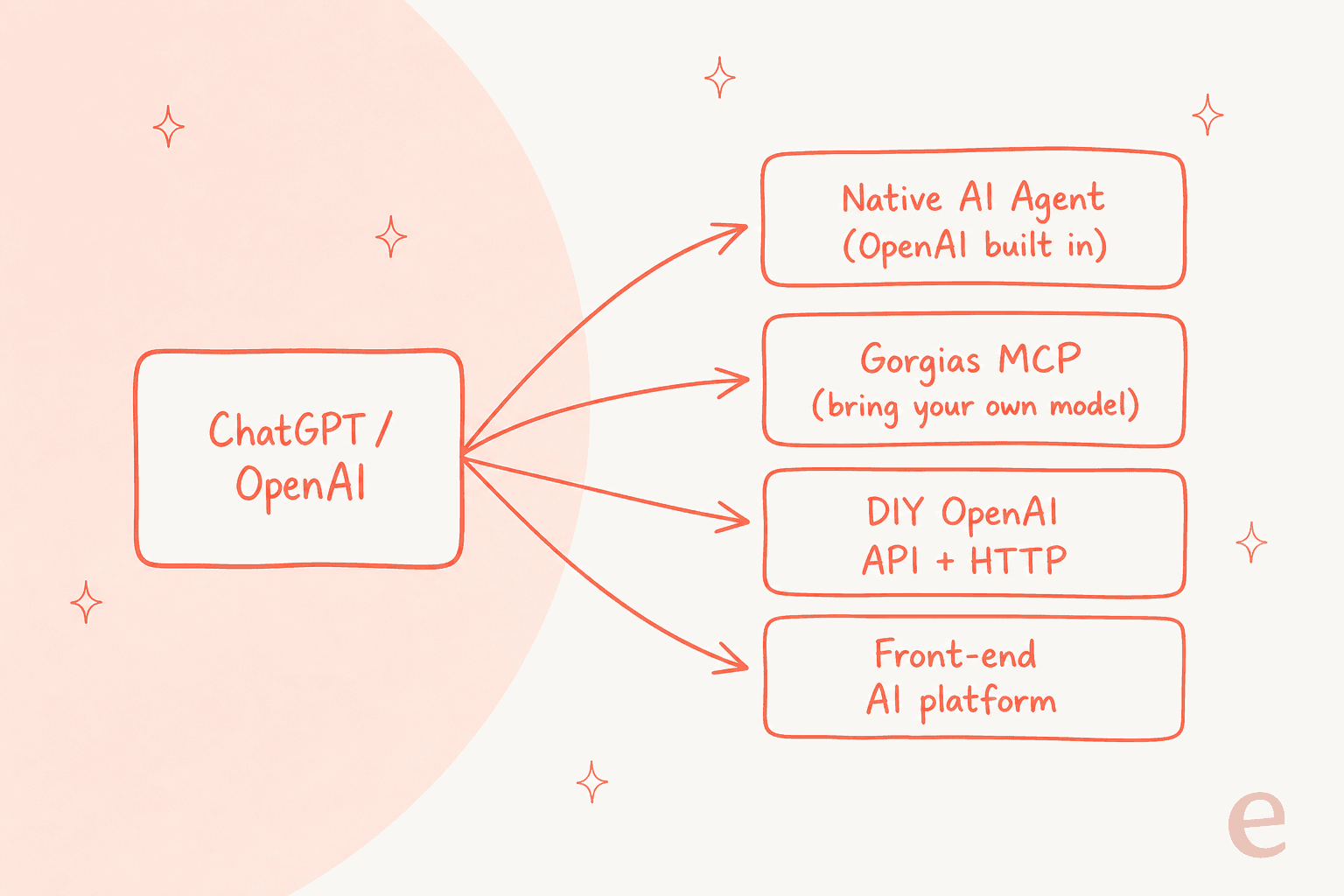
So the real question isn't "can I use ChatGPT in Gorgias?" It's "which of these four routes fits my team?" Let's walk each one.
Route 1: turn on the AI Agent that already runs on OpenAI
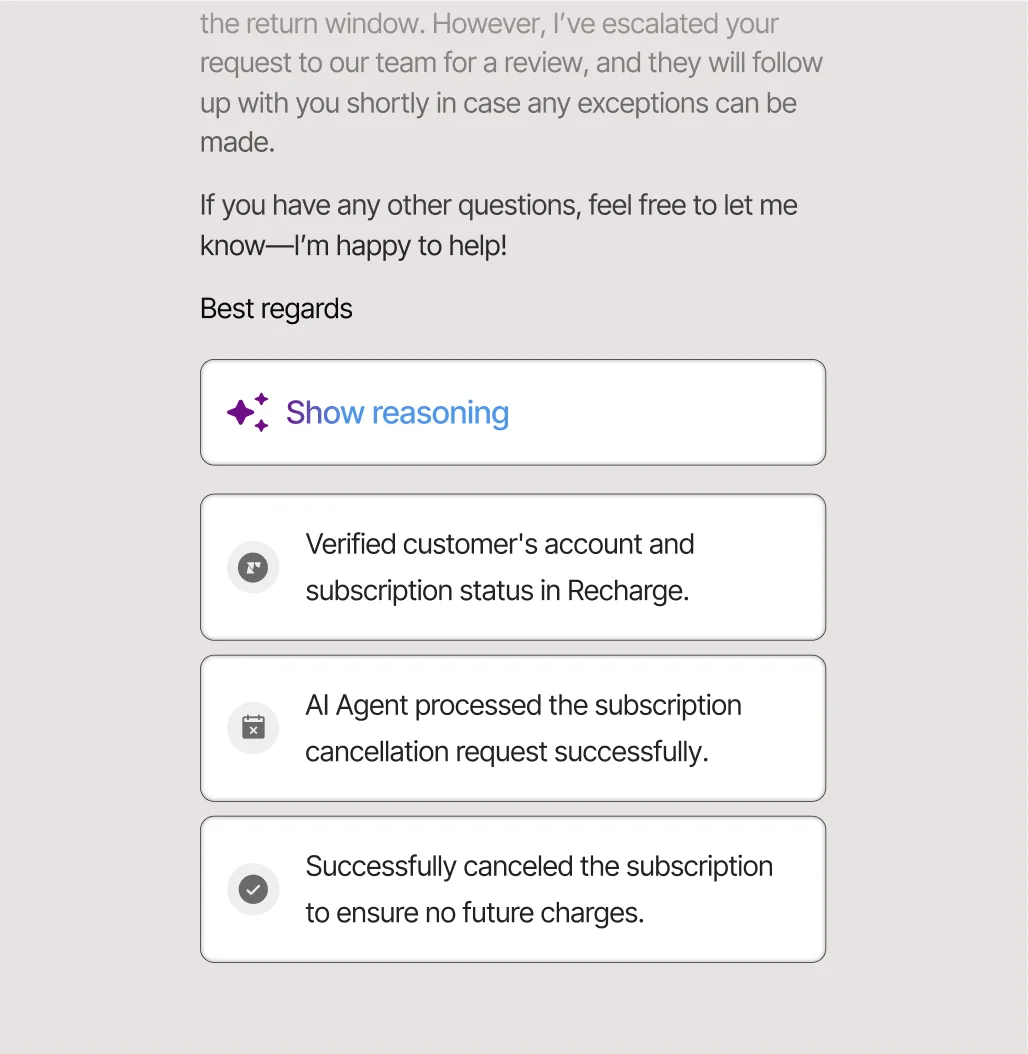
This is the path Gorgias wants you on, and honestly for a lot of stores it's the sensible default. The Gorgias AI Agent is pre-trained on over a billion ecommerce conversations, and it doesn't just answer FAQs. It verifies a customer's account, checks subscription status in Recharge, processes a cancellation, and shows its reasoning as it goes.
Because it lives natively inside Gorgias, it can take real Shopify actions in the ticket, editing orders, generating dynamic discounts, recommending products, and handing off to a human with full context when it's out of its depth. That native wiring is the genuine strength here, and it's why Gorgias fans keep coming back to the same line: nothing pulls Shopify order data into a support reply as cleanly.
Setup is a configuration job, not an engineering one. You set the tone, load your policies and SOPs, define guardrails, and switch it on for email and chat. No API keys, no model choice. That simplicity is the pitch.
The catch is you can't test it against your own history before it goes live. Gorgias's simulation runs against scenarios you write, not a dry run over your real past tickets, so the first time the AI Agent meets your actual ticket mix is in production. For a brand where a wrong answer means a wrong refund, that's a real consideration.
What Route 1 actually costs
This is the part that surprises people. The AI Agent is included on every plan and charged per resolved conversation: $0.90 each on annual plans, $1.00 on monthly. Fair enough. But there's a second meter.
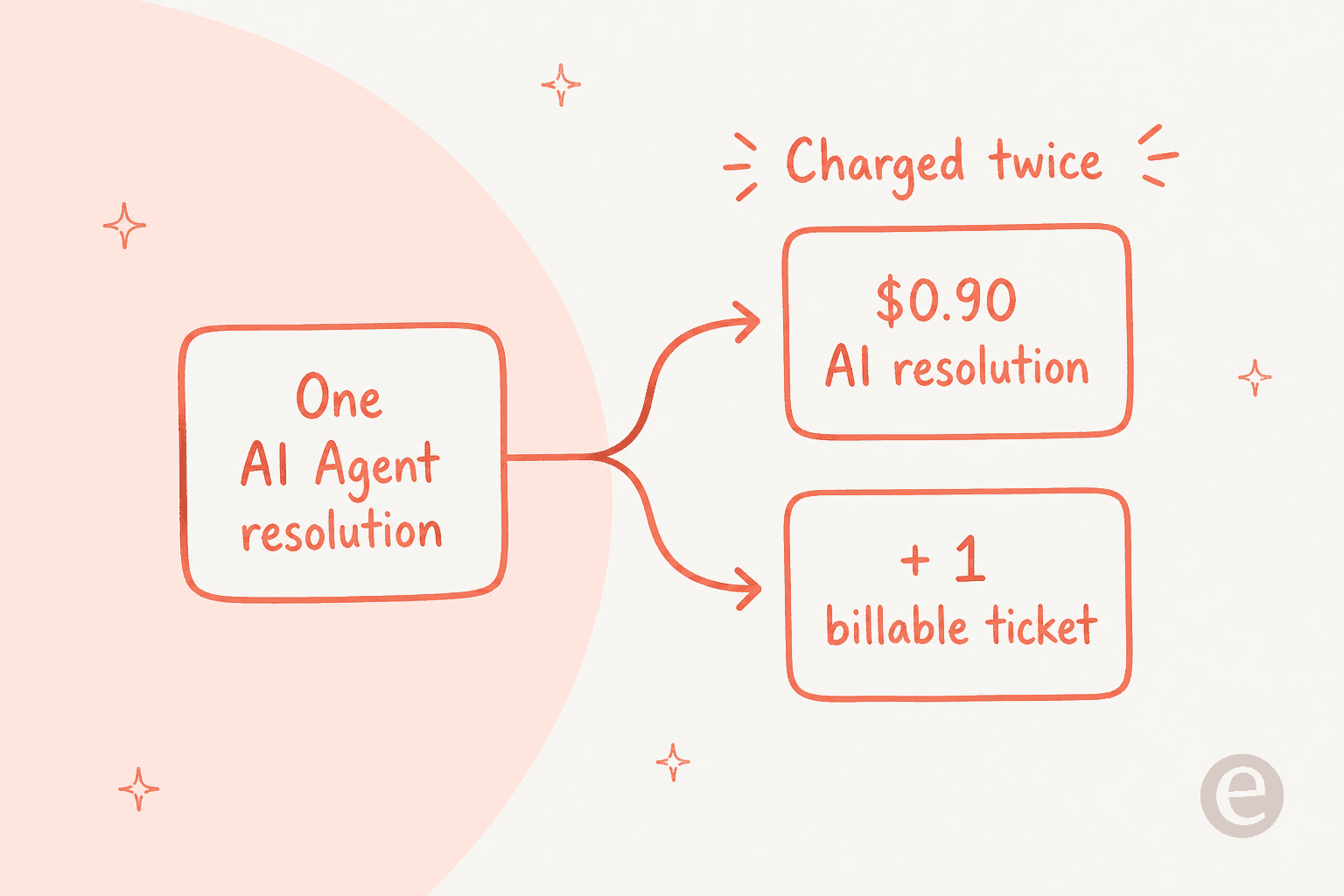
Per Gorgias's own billing docs, each AI Agent interaction also counts as a billable helpdesk ticket and is billed against your plan's ticket allowance. So one automated resolution touches two meters: the per-resolution AI charge and your ticket count. There's a fair-use wrinkle in your favour: if a shopper reaches a human within 72 hours of an automated resolution, that interaction is billed as a helpdesk ticket only, not as an AI resolution.
None of this is hidden, but it's easy to under-budget. At scale, model the resolution charge and the ticket consumption together, not just the sticker price.
Route 2: connect ChatGPT over Gorgias's MCP server
If you're the "I already have my own model and I want it to reach into Gorgias" type, this is your route. Gorgias ships a first-party MCP server at mcp.gorgias.com/mcp. It's free on every Helpdesk plan, doesn't require the AI Agent, and the model is yours to bring.
Two honest caveats. First, Gorgias's setup walkthrough uses Claude Desktop and Claude Code as the primary example, so while a public MCP cookbook exists, ChatGPT isn't the documented client. You'd be adapting the connection to whichever MCP-capable ChatGPT surface you run.
Second, and more important, MCP is a different job than the AI Agent. Gorgias draws the line itself: the AI Agent "replies to customers on your behalf," while MCP "lets you operate your Gorgias account from an external AI tool." In practice that means MCP is brilliant for an ops person asking "how many WISMO tickets did we get last week?" from their own chat window, and not built for autonomously answering shoppers. Reads are live, but macro edits and AI Agent config writes are gated during the open beta. Great for internal analysis and triage, not a customer-facing bot.
Route 3: build it yourself with the OpenAI API
You can wire the OpenAI API directly into Gorgias using HTTP Integrations and have a macro or rule call out to ChatGPT. On paper it's the cheapest route, you pay OpenAI token prices and nothing else. In practice, the platform limits bite fast.
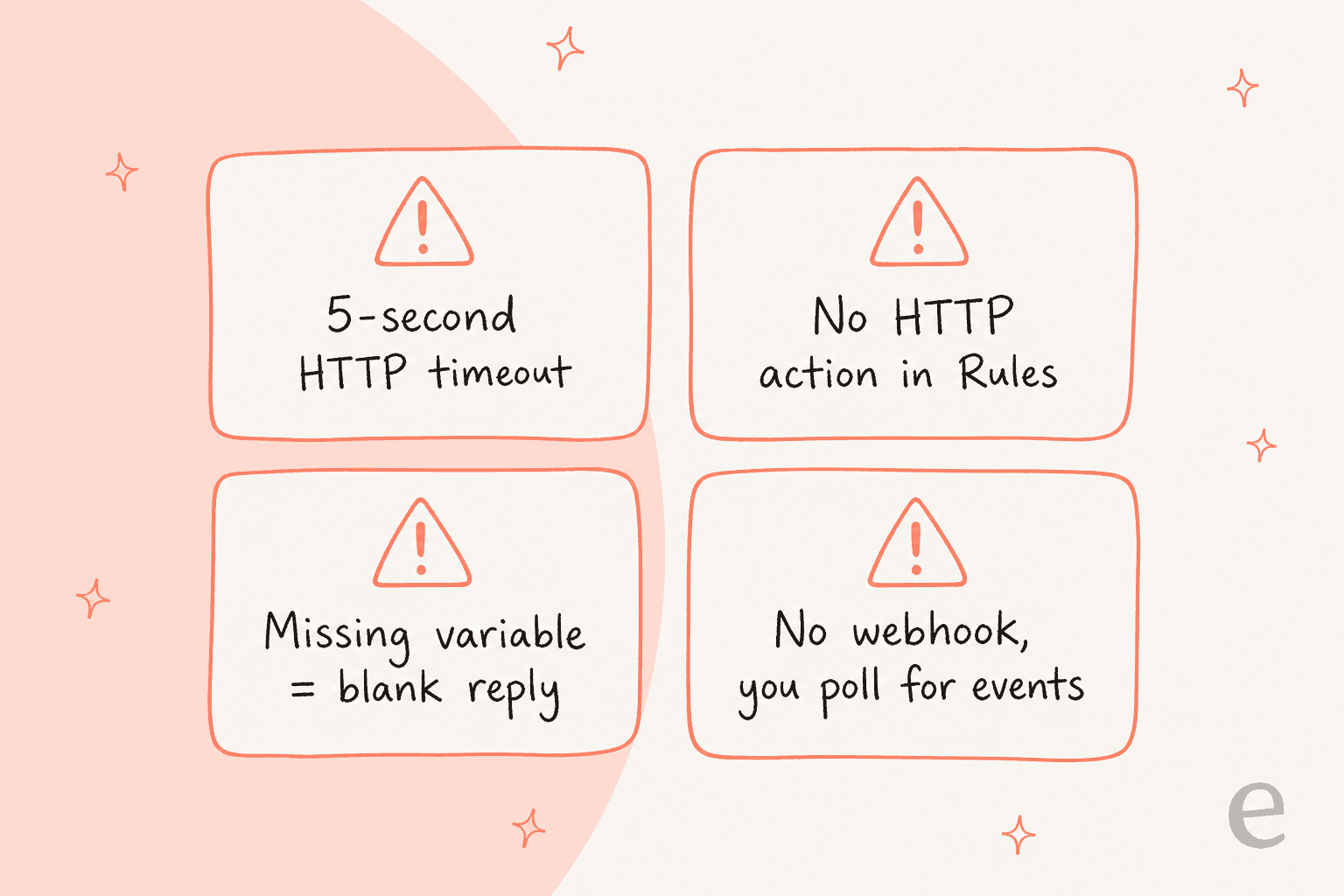
Four constraints I'd want you to know before you sink a sprint into this:
- HTTP Integrations have a 5-second timeout. A reasoning model call can easily run longer, and the request is retried only for OAuth2 auth, never on error codes. After 500 consecutive failures the integration auto-disables.
- The Rules builder has no HTTP action. Among its 21 possible "THEN" actions, calling an external API isn't one, so you can't trigger your OpenAI call from a rule the clean way.
- A missing macro variable renders as blank space, not an error. So a broken template path ships a reply to a customer with a hole in it, silently.
- There's no webhook subscription API. To react to new tickets you poll
GET /api/events(retained 12 months), which adds latency and moving parts.
This route can work for a narrow, non-time-sensitive automation if you have engineering time to spend. For a customer-facing agent that has to answer in seconds and never send a half-rendered reply, the ceiling is low. It's the option I'd reach for last.
Route 4: put an AI platform in front of Gorgias
The fourth route splits the difference: a dedicated AI layer that connects to Gorgias, does the ChatGPT-grade reasoning, and hands you the controls the native AI Agent hides. This is where eesel sits, and it's worth being upfront that eesel is our product, so read the next bit with that in mind.
The eesel AI Agent joins as a real agent inside Gorgias rather than a separate widget or inbox. It reads tickets, drafts and sends replies, adds internal notes, updates tags and status, and pulls Shopify order data into every reply. Setup is a one-click OAuth connect, and it auto-imports your help center articles, past Gorgias tickets, and macros, no manual training. Gorgias's own page puts the setup at under 30 minutes.
Two differences matter most against Route 1. eesel simulates on your real historical tickets before it answers a single customer, so you see the resolution rate and the exact replies it would have sent, and you can start in draft-only mode and flip on autonomy ticket-type by ticket-type. And the pricing is one fixed monthly price, from $299 a month for 500 credits (1 credit per ticket), with no per-seat fee and no separate per-resolution charge stacked on top, which sidesteps the double-billing from Route 1.
It's not magic. eesel is a layer on your existing helpdesk, so you still run Gorgias underneath and pay for it. But if the thing keeping you up is "will the bot get it right, and can I predict the bill," this is the route built for those two questions.
What real Gorgias teams say about the AI
The consistent theme across communities is that the Shopify-native depth is real, and the cost is the thing people wrestle with. On a Zendesk vs Gorgias thread, one ecommerce veteran laid out the decision cleanly:
"I've been around ecommerce for 10+ years and this is honestly how I'd choose: 40%+ tickets need Shopify actions → I'd lean Gorgias. Mostly conversational support → Zendesk is fine."

That "does the AI need to take Shopify actions" test is the right one, and it's exactly what pushes people toward the native AI Agent or a layer that can act in-ticket, rather than a generic bot. But the same threads keep flagging the bill as volume climbs:
"The downside is that costs can rise as you scale even if many enquiries are simple or repetitive. For a small team it might feel like you are paying too much for features you don't use."
That is the tension in one sentence. The AI is genuinely good at ecommerce actions, and the per-resolution-plus-ticket billing is what makes finance nervous. Both things are true.
All four routes, side by side
| Route | What it is | Model control | Customer-facing? | Cost | Best for |
|---|---|---|---|---|---|
| 1. Native AI Agent | OpenAI-powered bot built into Gorgias | None (model hidden) | Yes | $0.90/$1.00 per resolution + 1 billable ticket | Fastest start, Shopify-native actions |
| 2. Gorgias MCP | Bring-your-own-model server to operate your account | Full (you bring it) | No, ops/analysis | Free on any plan | Internal triage and reporting from your own chat |
| 3. DIY OpenAI API | HTTP Integrations calling OpenAI yourself | Full | Technically, with limits | OpenAI token cost | A narrow, non-urgent automation with dev time |
| 4. Front-end platform | An AI layer like eesel inside Gorgias | Managed, configurable | Yes | From $299/mo (500 credits) | Cost control + simulate before go-live |
What I'd actually do
If you just want AI answering tickets this week and your volume is modest, turn on the native AI Agent, load your policies carefully, and set a monthly cap so the double-billing doesn't run away from you. It's the least work and the Shopify actions are the real deal.
If you're bigger, cost-sensitive, or the idea of shipping a bot you've never tested on your own tickets makes you flinch, put a layer in front. You get the same OpenAI-grade reasoning, a dry run on your real history first, and a single predictable per-ticket price. If you're evaluating that path across other helpdesks too, our ChatGPT for Zendesk and ChatGPT for Freshdesk breakdowns walk the same four routes, and Claude for Gorgias covers the MCP path in more depth.
What I'd avoid is the DIY API build for anything customer-facing. The 5-second timeout and the silent blank-variable replies are exactly the kind of thing that looks fine in a demo and embarrasses you in production.
Try eesel for Gorgias
If Route 4 is where you landed, eesel for Gorgias is the fastest way to test it. It connects to Gorgias in one OAuth click, trains itself on your past tickets, macros, and Shopify orders, and works as a real agent inside your existing inbox, no new widget for customers to learn. The differentiator worth trying: you can simulate it on thousands of your real historical tickets and see the exact resolution rate before it ever replies to a live shopper, then roll it out one ticket type at a time. It's free to start with 100 free credits and no credit card, and paid plans start at $299 a month for 500 credits (1 credit per ticket) with no per-seat or per-resolution surprises.