ChatGPT for ServiceNow: the real ways to connect them in 2026

Rama Adi

Katelin Teen
Last edited September 4, 2026
Why "ChatGPT for ServiceNow" is a real question
I ship integrations for a living, so I read a lot of "connect X to Y" threads, and ServiceNow is the one where the gap between the demo and the day-two reality is widest. ServiceNow ITSM is the market-leading enterprise service management platform, and its data model for incident, change, problem, and request is solid. Nobody in the community argues it is badly built. What they argue about is what it costs to make it do anything new, and that is exactly the friction that sends people searching for a way to bolt ChatGPT onto it.
The instinct makes sense. Your team already lives in ChatGPT. It writes clean summaries, drafts replies, and reasons over messy text. So the question becomes: can that same intelligence read a ServiceNow incident, summarize it, and maybe act on it? The answer is yes, several ways, and the differences between those ways are mostly about money, permissions, and how much you want to build.
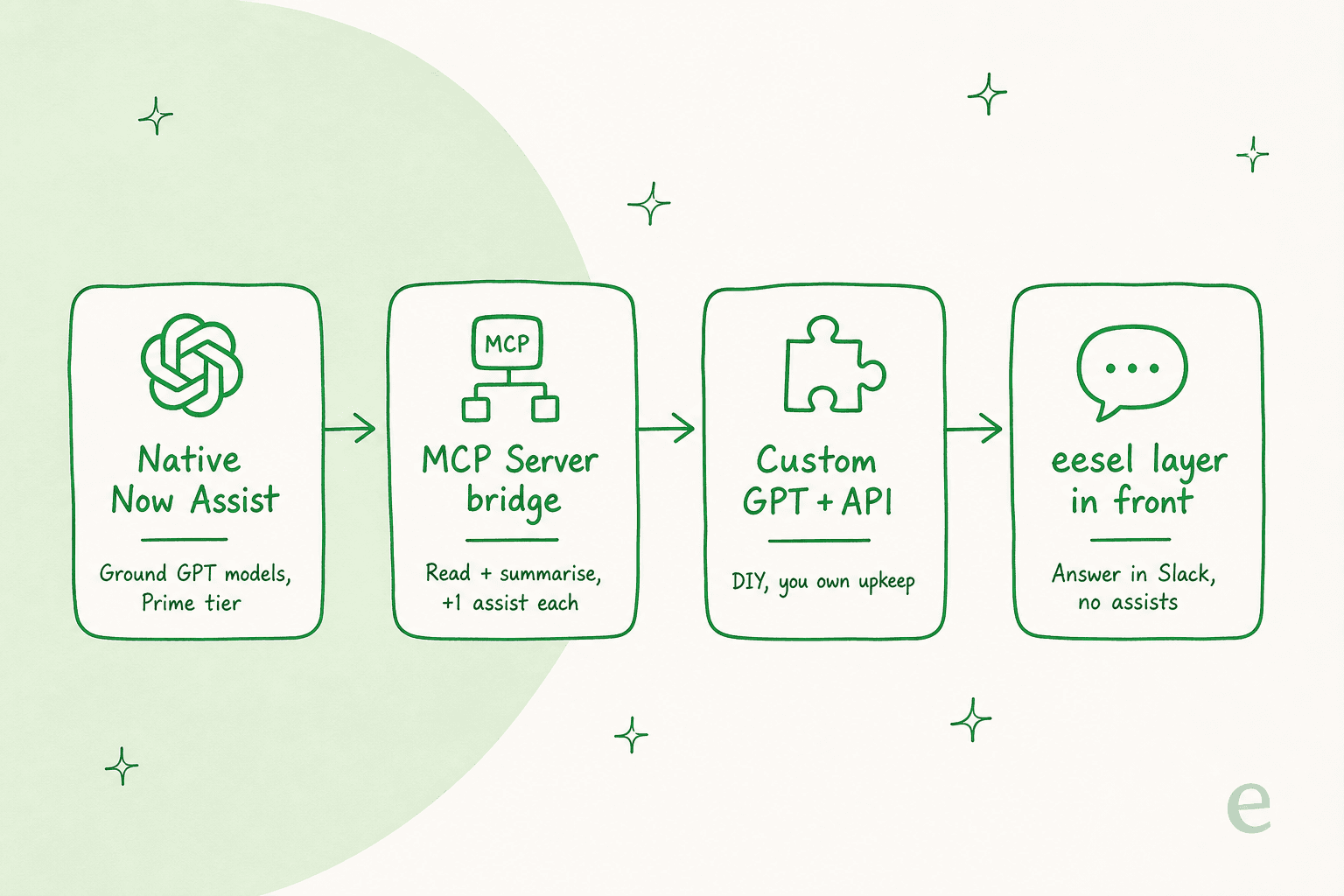
One thing to clear up first, because it trips people up: ServiceNow's own AI is not locked to a single model. The ServiceNow AI Platform says it can "ground any LLM, from OpenAI and Anthropic or your own models." So "ChatGPT for ServiceNow" can mean GPT powering ServiceNow's native AI, or it can mean your ChatGPT reaching into ServiceNow from the outside. Those are different projects. Let us walk all four routes.
Route 1: native Now Assist, grounded on GPT
This is the most "inside ServiceNow" option. Now Assist is ServiceNow's generative-AI layer, embedded directly into the ITSM workflow rather than bolted on as a separate chatbot. It summarizes incidents, drafts responses, powers the virtual agent, and, on the higher tiers, runs autonomous AI Agents that resolve routine requests end to end. Because the platform is model-agnostic, GPT can be the engine under those skills.
The upside is real: the AI sits where the work already happens, with native access to your records, workflows, and 20-plus years of deterministic automation. If you are already deep in ServiceNow, this is the tightest coupling you can get.
The catch is the commercial model, and it is a big one. ServiceNow retired its old Standard/Pro/Enterprise SKUs on 1 July 2026, and the ITSM pricing page now shows three packages, Foundation, Advanced, and Prime, with zero dollar figures anywhere, just a "Get Custom Quote" button. The AI you actually want, the L1 Service Desk AI Specialist and AI Agents for ITSM, is Prime-only. Foundation and Advanced get assistive AI, not the autonomous kind.
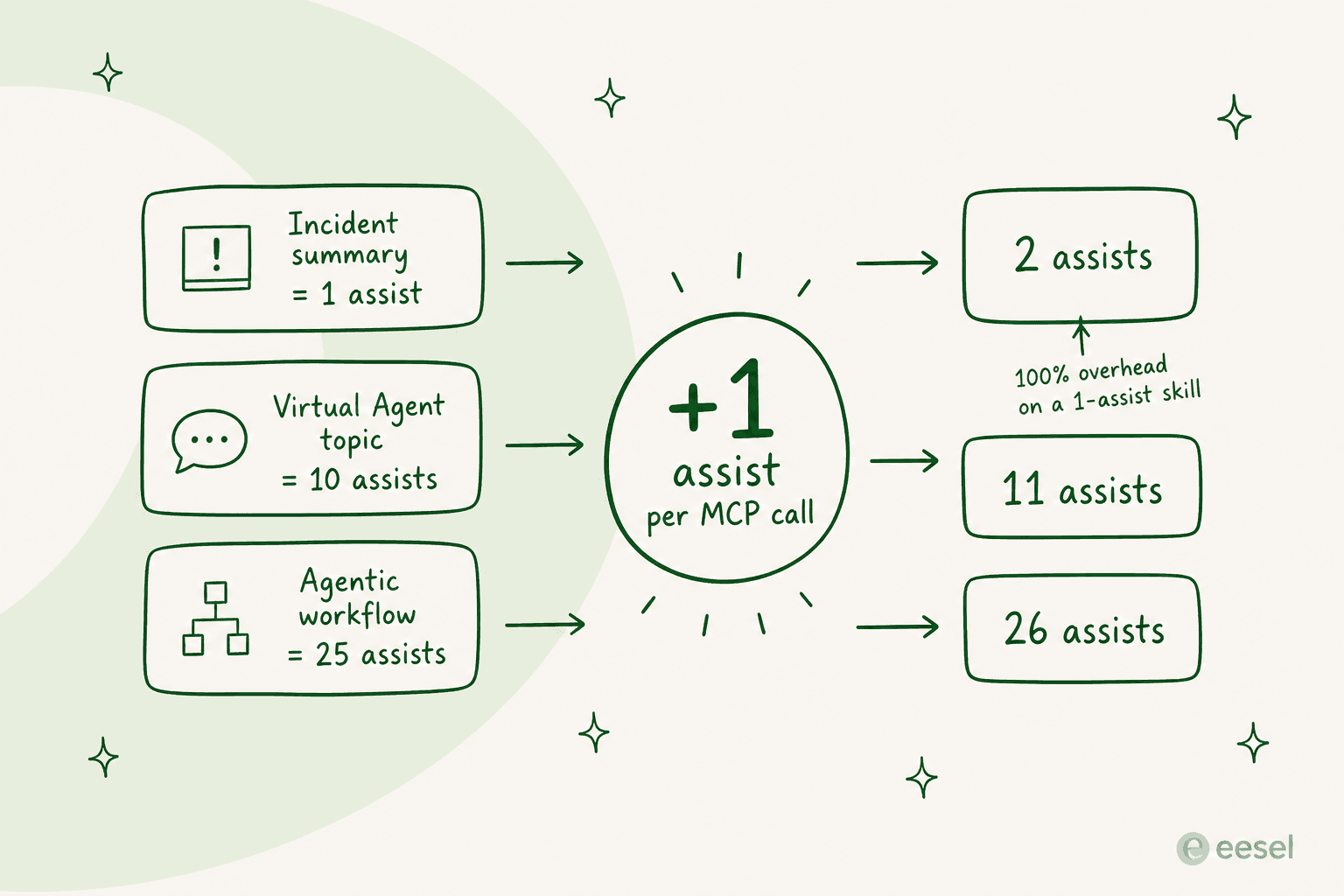
Then there is the assist meter. Every Now Assist action burns "assists" from a negotiated pool: an incident summary is 1 assist, a virtual-agent topic is 10, an agentic workflow is 25 to 150 depending on tool count, and app generation is 2,500. ServiceNow finally published the rate card as a public legal PDF in July 2026, which helps, but the practical read from the community is that heavy work drains the pool fast and buyers still cannot forecast spend from the page alone.
"None of my customers want to use it because licensing model it's too complicated to understand or too expensive and looking to do some way around it even if that means having 2 platforms for the same thing"

To be fair, this is not a knock on the model quality. GPT under Now Assist reasons fine. The friction is entirely about tiering and metering, which is a very ServiceNow kind of friction.
Route 2: the MCP Server bridge
This is the route most people mean when they say "connect ChatGPT to ServiceNow." ServiceNow now ships an official MCP Server, and it is generally available and, per the Action Fabric announcement, "included in every Now Assist and AI Native SKU." Model Context Protocol is the open standard for letting an AI client call external tools, and ChatGPT's developer mode is a full MCP client, so the two speak the same language.
Here is the shape of it. The Quickstart server lives at a URL like https://<instance>.service-now.com/sncapps/mcp-server/mcp/sn_mcp_server_default, authenticates with OAuth 2.0, and exposes exactly four tools: look up incident records, look up case records, incident summarization, and case summarization. ServiceNow's own docs name Claude and Microsoft Copilot as supported clients; ChatGPT slots in the same way, because ChatGPT's developer mode "provides full Model Context Protocol (MCP) client support for all tools, both read and write."
Two things to internalize before you get excited.
First, the Quickstart tools are read-and-summarize only. There is no write-or-act tool out of the box. So ChatGPT can pull an incident and summarize it, but it cannot close the ticket, reassign it, or update a field until someone builds those tools (ServiceNow supports five tool categories, from REST API to Now Assist skill, but that is a build project with its own admin roles).
Second, the cost has a quiet surcharge. A ServiceNow employee spelled it out in the community MCP FAQ: skills exposed as tools via the MCP server "will consume their usual number of assists when invoked plus 1 assist." That flat +1 is noise on a 250-assist skill and 100% overhead on a 1-assist incident summarization. If your plan is "ChatGPT summarizes 500 incidents a night," you are now paying 1,000 assists for what the native summary would have cost 500.
A few more limits worth knowing so you scope this correctly: the server is streamable-HTTP and SSE only (no stdio or local servers), it needs a Now Assist or AI SKU plus recent patch levels, and the MCP Server Console docs note that data is transferred out of the instance to a centralized ServiceNow environment, possibly a different region or a third-party cloud, with inputs feeding model development unless you opt out. For a regulated internal-IT buyer, that data-residency line is a real review item, not a footnote.
On the ChatGPT side, write actions via custom MCP are still in beta and limited to Business, Enterprise, and Edu plans; Pro gets read/fetch-only, and it is web-only. So for most teams, the honest capability of this route today is: ChatGPT reads and summarizes ServiceNow records, for a per-call premium. That is useful for a service-desk analyst who wants a fast brief, and it is a long way from "the AI runs my queue."
Route 3: a custom GPT on the Table API
If you do not want to license Now Assist at all, you can skip ServiceNow's AI entirely and let ChatGPT talk to ServiceNow's REST Table API directly. You build a custom GPT with OpenAPI "actions," wire up an OAuth inbound integration on the ServiceNow side, and now ChatGPT can query and, with the right scopes, update records.
This is the builder's route, and it has a clear appeal: no assist meter, no Prime tier, and you control exactly which tables and fields the GPT can touch. If you already have a developer who knows ServiceNow's ACLs, it is the cheapest to run.
The honest downside is that you own everything. You maintain the action schema, the auth, the error handling, and the guardrails. There is no built-in simulation to tell you whether the GPT answers your real tickets well, and a custom GPT lives inside one person's ChatGPT unless you promote it through your workspace. There is also a healthy open-source ecosystem here if you would rather not start from scratch, like the MIT-licensed echelon-ai-labs/servicenow-mcp project (incidents, change, catalog, KB, users, workflows), which the community reaches for specifically to avoid Now Assist licensing.
For a proof of concept, this route is great. For a production tier-1 agent that a whole team relies on, "one clever engineer's custom GPT" tends to become a maintenance liability the day that engineer takes a holiday.
Route 4: put a Slack-first layer in front of ServiceNow
Now the reframe, because there is a route the other three miss. Most of the reason people want "ChatGPT in ServiceNow" is deflection: they want the AI to answer the repetitive tier-1 questions so those tickets never eat an analyst's day. And a huge share of those questions never needed to become a formal ServiceNow ticket in the first place. They started as someone DMing IT on Slack.
Listen to what actually happens when teams try to solve this natively:
"We run ServiceNow for everything, ticketing, CMDB, change management, SLAs. That part is solid and I have no plans to rip it out. But we bought Now Assist expecting it to actually handle the tier 1 stuff that eats our team alive... What we got instead is a slightly smarter virtual agent that still kicks most things to a human. The knowledge base answers are either too generic or flat out wrong. Our people tried it for two weeks, gave up, and went back to DMing us in Slack."
That last line is the whole opportunity. If your people are going to ask in Slack anyway, put a good AI in Slack and answer them there. That is the model behind eesel: an AI helpdesk teammate that trains on your existing knowledge, Confluence, Google Docs, the help center, and past tickets, and answers questions inside Slack or Teams. The routine stuff gets resolved on the spot, and only the real issues escalate into a ServiceNow ticket.
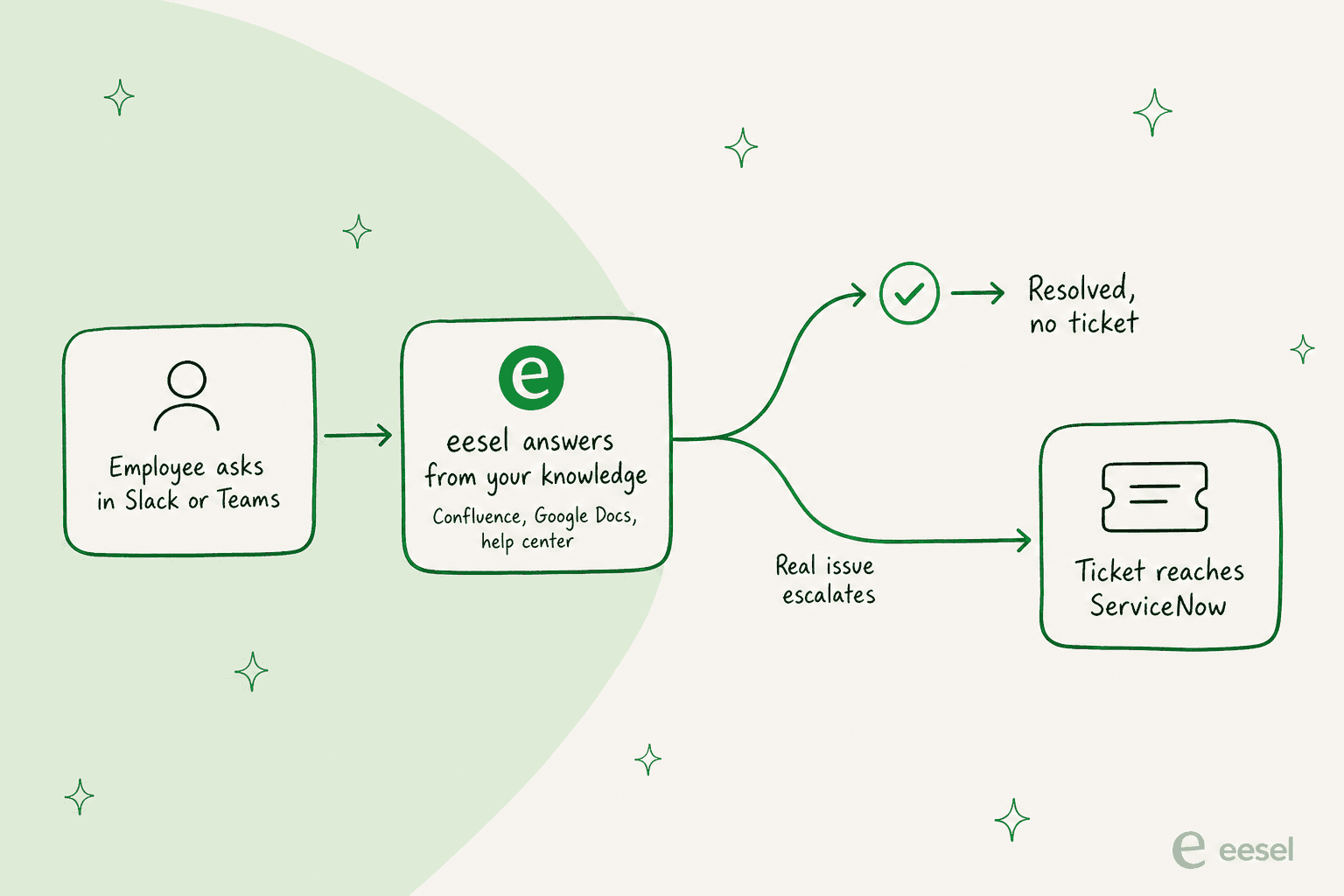
I want to be straight about the trade-off, because it is the load-bearing honesty of this whole post. eesel does not natively plug into the Now Platform. Its only native ITSM connector is Jira Service Management, not ServiceNow, Freshservice, or Ivanti. So eesel is not going to reach into a ServiceNow incident and update the state field for you. If your top requirement is "the bot writes back into ServiceNow records," Route 1 or a built-out Route 2 is your answer, not this.
What eesel is good at is the layer before the ticket: sitting in the chat surface where employees actually ask, answering from your knowledge, and cutting the volume that ever reaches the service desk. And it does that without an assist meter. eesel is one fixed monthly price, from $299 a month for 500 credits where one ticket or chat session is one credit no matter how many messages, with 100 free credits to start and no platform or per-seat fee. You are never charged for the tickets your humans handle.
The other practical difference is that you can prove it before you commit. eesel's simulation skill "replays your real past tickets and compares its answers to what your team actually sent," then hands back the specific gaps and instruction changes. That is the opposite of the two-weeks-then-gave-up experience above: you see where it is strong and weak on your data before a single employee touches it.
So which route should you pick?
Here is how I would decide, having wired up more than one of these.
| Your goal | Best route | The real cost |
|---|---|---|
| AI acting inside ServiceNow records, autonomously | Route 1: native Now Assist (Prime) | Prime tier, quote-only, assist meter |
| ChatGPT reading and summarizing ServiceNow records | Route 2: MCP Server bridge | Now Assist/AI SKU + ChatGPT Business seat, +1 assist per call |
| A cheap, controllable proof of concept | Route 3: custom GPT on the Table API | Low license cost, high build-and-maintain cost |
| Fewer tier-1 tickets, fast, in Slack/Teams | Route 4: a knowledge layer in front | From $299/mo (500 credits), no assist meter, no native SN write-back |
The mistake I see most often is treating this as a single technical decision when it is really two separate jobs. "Automate work deep inside ServiceNow" and "stop tier-1 questions from becoming tickets" are different problems, and the best answer to the first is rarely the best answer to the second. Plenty of teams end up running both: Now Assist and MCP for the in-platform automation their analysts need, and a Slack-first deflection layer for the flood of easy questions that never should have hit the queue.
Whichever way you go, the thing to check before you sign anything is the total cost of the AI, not the sticker price of the platform. ServiceNow is famously expensive to expand, and the AI add-ons are exactly where the meter runs fastest.
"Another area for improvement is pricing. ITSM platforms can become expensive as the organization grows, especially when adding more users, advanced modules, integrations, automation, or AI capabilities."

Try eesel for the tier-1 layer
If the reason you searched "ChatGPT for ServiceNow" is that routine questions are burying your service desk, that is the exact problem eesel is built for. It works like a new hire that joins your Slack or Teams, learns your help center and docs on day one, and starts answering the easy questions so they never become ServiceNow tickets.
The honest fit: eesel does not write into ServiceNow records, so it complements a ServiceNow shop rather than replacing the Now Platform. But you can run it against your real past tickets in simulation, see the deflection you would actually get, and roll it out only when you are confident, all before you spend a cent. It is free to try, live in minutes, and sold as a fixed monthly plan with no assist meter to forecast.