ChatGPT for HubSpot Service Hub: the real routes in 2026

Kira

Katelin Teen
Last edited September 4, 2026

What "ChatGPT for HubSpot Service Hub" actually means
Let me untangle the phrase first, because it hides two different questions.
The first is literal: can I get ChatGPT, the chat product from OpenAI, to read and answer my HubSpot tickets? The second is the one most support leads actually mean: can I get a strong language model working my Service Hub queue, drafting and resolving tickets the way ChatGPT feels like it should?
Those aren't the same thing, and mixing them up is where a lot of wasted setup time comes from. HubSpot already ships its own AI, Breeze, and it turns out Breeze runs on the same OpenAI models behind ChatGPT. So "ChatGPT for Service Hub" can mean the OpenAI app bolted on the side, the OpenAI model powering HubSpot's own agent, or a third tool that uses top models to work your tickets directly.
I'll be upfront about where I'm coming from. I work on eesel, where I spend my days on how AI actually attaches to a helpdesk ticket, and we've spent years putting AI agents on live support queues. That history taught us one thing the hard way: a confident-sounding bot will quietly give wrong answers, which is why we now simulate every rollout against a team's real past tickets before it ever answers a live customer. That lens is what this post is written through: not "which logo do I bolt on," but "what's actually reasoning over my tickets, and can I trust it."
The four real routes to connect ChatGPT to Service Hub
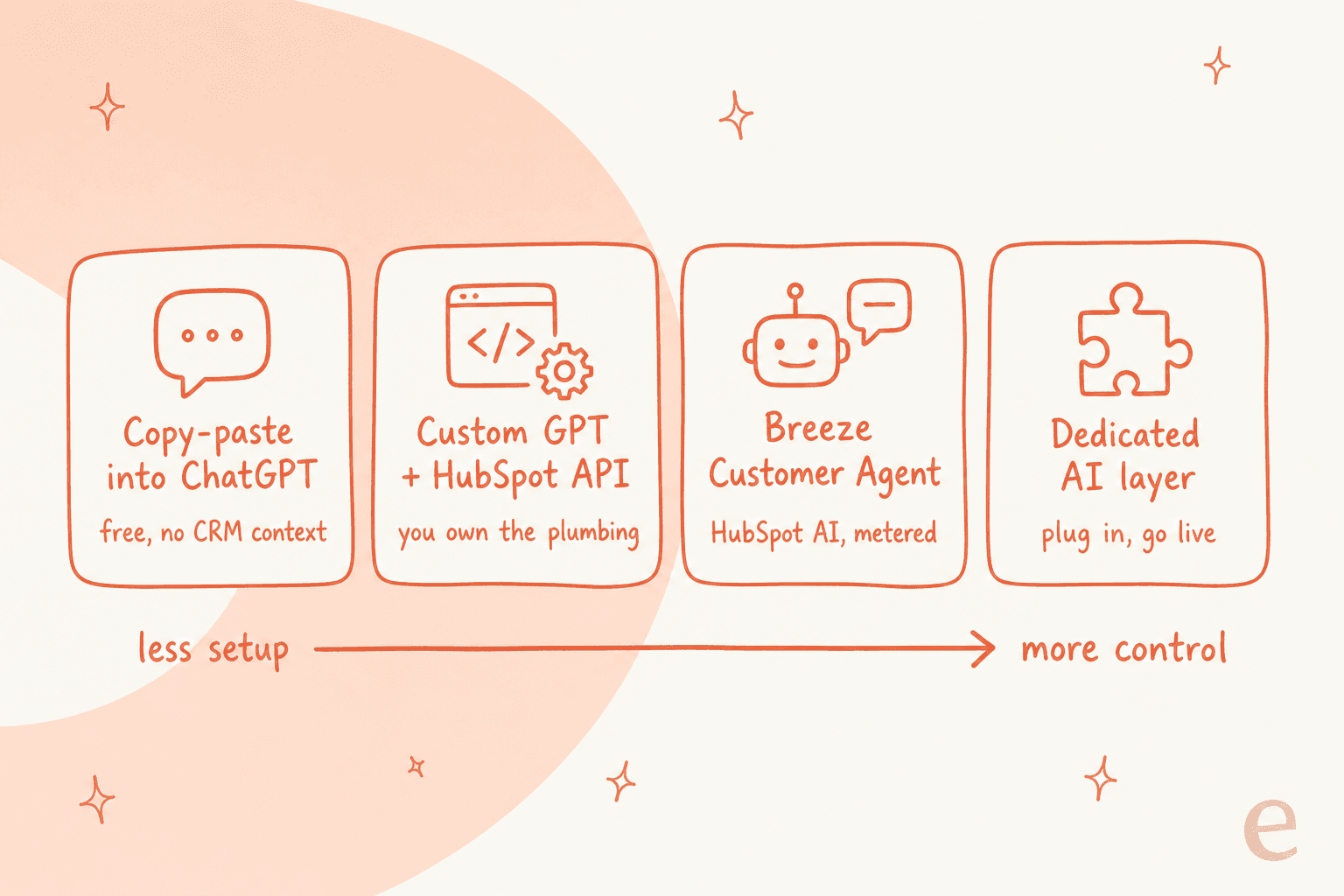
Here's the whole landscape on one page. Each route trades effort against control, and the right pick depends on how much plumbing you want to own.
Route 1: Copy-paste into ChatGPT (the zero-setup baseline)
The route nobody advertises but everybody tries first. An agent reads a ticket in the help desk, pastes the customer's message into chatgpt.com, gets a draft, and pastes it back. It costs nothing, needs no admin, and works today.
It also breaks the moment you care about scale or safety. ChatGPT has no access to your CRM record, so it can't see the deal stage, the prior tickets, or the marketing history that HubSpot keeps on the same contact. It doesn't know your macros or your tone. And pasting customer data into a personal ChatGPT account is a real data-governance problem. Fine as a personal crutch, not a support strategy.
There's a slightly cleaner version of this: HubSpot also ships a CRM deep-research connector for ChatGPT, which lets ChatGPT read your HubSpot data with permission. Useful for asking questions about your CRM, but note the direction of travel: it pulls HubSpot context into ChatGPT, it doesn't put ChatGPT to work resolving tickets inside HubSpot.
Route 2: Build a Custom GPT that calls the HubSpot API
The next step up is to build a Custom GPT with Actions that hit HubSpot's REST APIs, so it can pull a ticket, read the full conversation thread, and post a reply back. This is a legitimate route, and HubSpot's APIs genuinely support it: the Tickets API reads and writes the ticket record, and the Conversations API handles the thread and the outbound reply. HubSpot even ships an official remote MCP server at mcp.hubspot.com so an MCP-compatible client can reach your CRM with OAuth.
The honest tradeoff is ownership. You're now maintaining OAuth 2.1 with PKCE, field mappings, internal numeric status IDs instead of readable names, and burst rate limits low enough that a naive per-ticket fan-out hits 429s. When you build your own LLM app on top of a CRM, you inherit every future change to that CRM's schema. One of our customers put the build-versus-buy calculation better than I can:
"We could try to write our own LLM application but we didn't want to invest our time into that. We wanted something that we would not have to maintain."
Karel, GENERAL BYTES
That's the quiet cost of Route 2. It works until the person who built it leaves.
Route 3: You're already running ChatGPT, it's called Breeze
Here's the route that surprises people. HubSpot's flagship support AI, the Breeze Customer Agent, already runs on OpenAI. HubSpot publishes a genuinely detailed per-feature model disclosure in its AI Model Cards, and the Customer Agent, the one that "automates ticket resolution," is documented as OpenAI-served: GPT-4.1, GPT-4.1 mini, GPT-5.1, GPT-4o, and GPT-4o mini. So if you turn on Breeze, ChatGPT's underlying models are already reasoning over your tickets, inside HubSpot, with full CRM context.
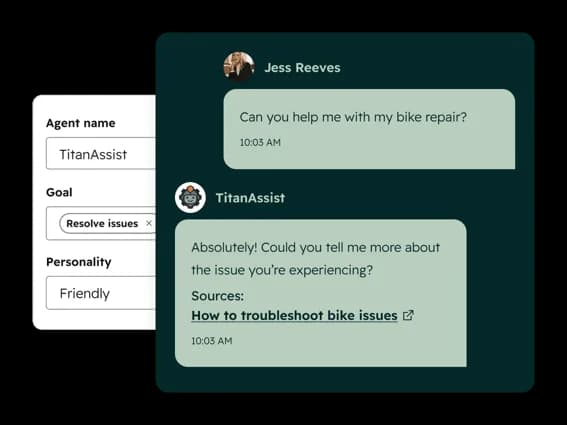
Setup is genuinely no-code. You point the agent at approved content (your website, knowledge base, uploaded PDFs and docs), it answers using only that content and cites its sources, and you can preview responses before going live and scale from a small percentage of conversations upward.
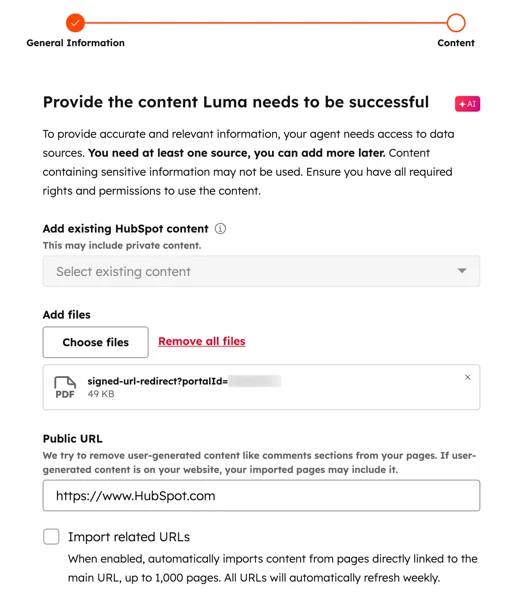
The thing to understand is that you're not really adding ChatGPT here, you're switching on HubSpot's agent that happens to be powered by OpenAI. The model choice is made for you, the pricing is HubSpot's, and (as I'll get to) it only lives on the Professional and Enterprise tiers. It's the most native route, and for teams already deep in HubSpot it's often the sensible one. It's just not the "bring ChatGPT" toggle people picture.
Route 4: A dedicated AI layer that plugs into your tickets
The fourth route skips the "which model" question entirely, because a good AI support layer already runs top models under the hood and handles the plumbing for you. Instead of building an agent or wiring an API, you connect the tool to HubSpot, point it at your knowledge, and it works the tickets.

This is where eesel sits. It works inside your HubSpot help desk, trains on your past tickets and knowledge base rather than making you author content sources from scratch, and, crucially, lets you dry-run against your own history before it answers a real customer. More on that in the eesel section, because the "test before you trust it" part is what separates a demo from a rollout.
Wait, so which model actually runs Breeze?
If you're going the HubSpot-native way, it's worth knowing exactly what's under the hood, because it's more specific than "AI." HubSpot names exactly two third-party model vendors across its entire disclosure: OpenAI and Anthropic. OpenAI appears on every single product card. And the Customer Agent, specifically, is documented as 100% OpenAI-served, with no Claude model in its data flow.
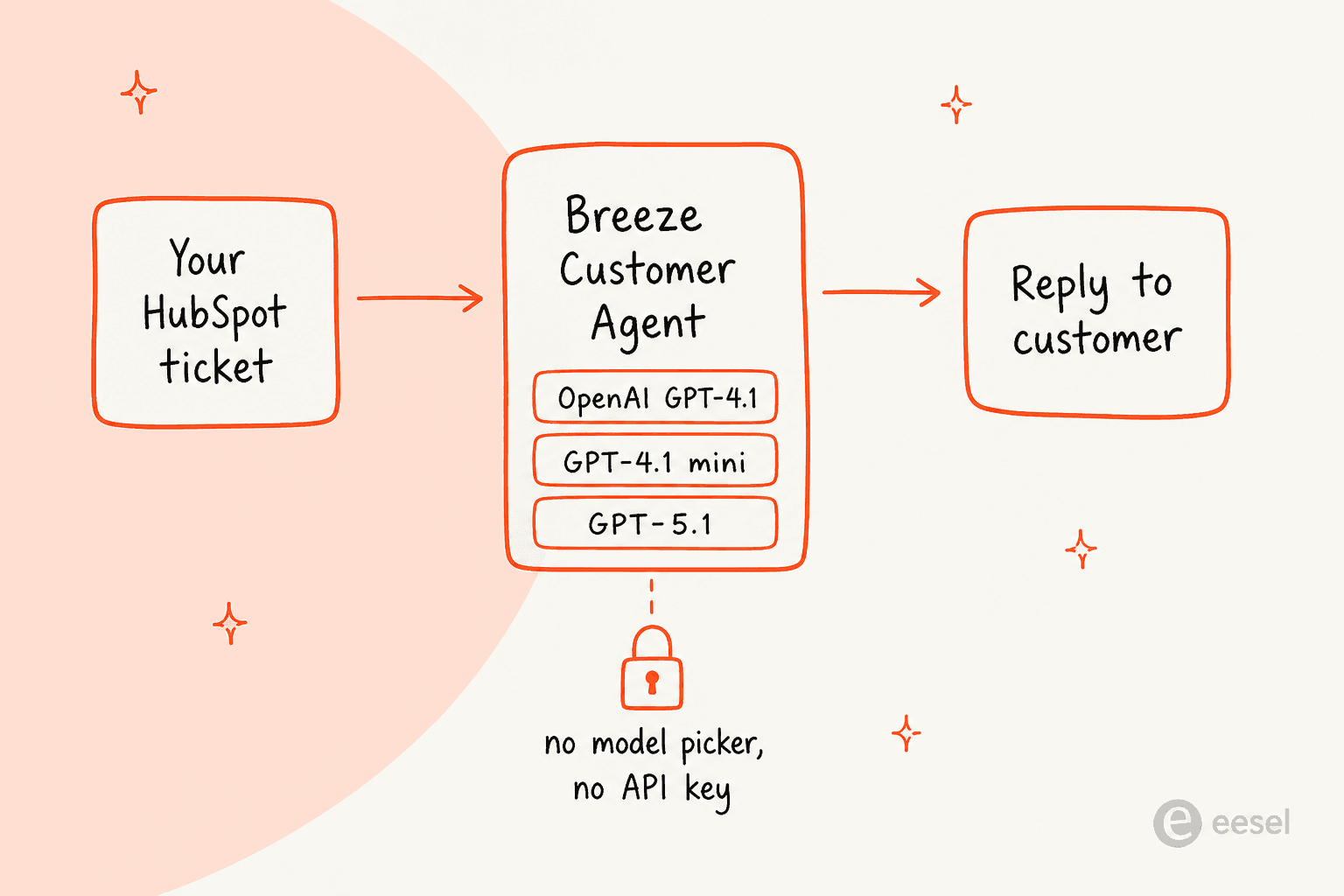
Two nuances a careful buyer should hold onto. First, Claude is inside Service Hub, as Claude Sonnet 4 powering the embedded AI features (summaries, drafting), but not on the Customer Agent, and it's a 2025-era model you can't upgrade. Second, there is no model picker and no bring-your-own-key field anywhere in HubSpot AI. HubSpot's AI settings are six on/off toggles; even the custom agent builder lets you write instructions and pick tools, but never the model. HubSpot picks the model, per feature, and pins the version.
There's an asymmetry here worth naming, because it trips people up. HubSpot shipped a connector for Claude and a research connector for ChatGPT, and both are real. But they run the opposite direction: they bring your HubSpot data into your own Claude or ChatGPT subscription so you can ask questions about your CRM. They don't change which model runs Breeze or the Customer Agent inside HubSpot. So "I want to use my own ChatGPT on my tickets" and "I want to use HubSpot's AI on my tickets" stay two different purchases.
What Breeze actually costs on top of Service Hub
This is the part that reshapes the decision, so let's be precise. Your Service Hub seat price does not include unlimited AI. The Customer Agent is metered on top, and it only exists on two of the four tiers.
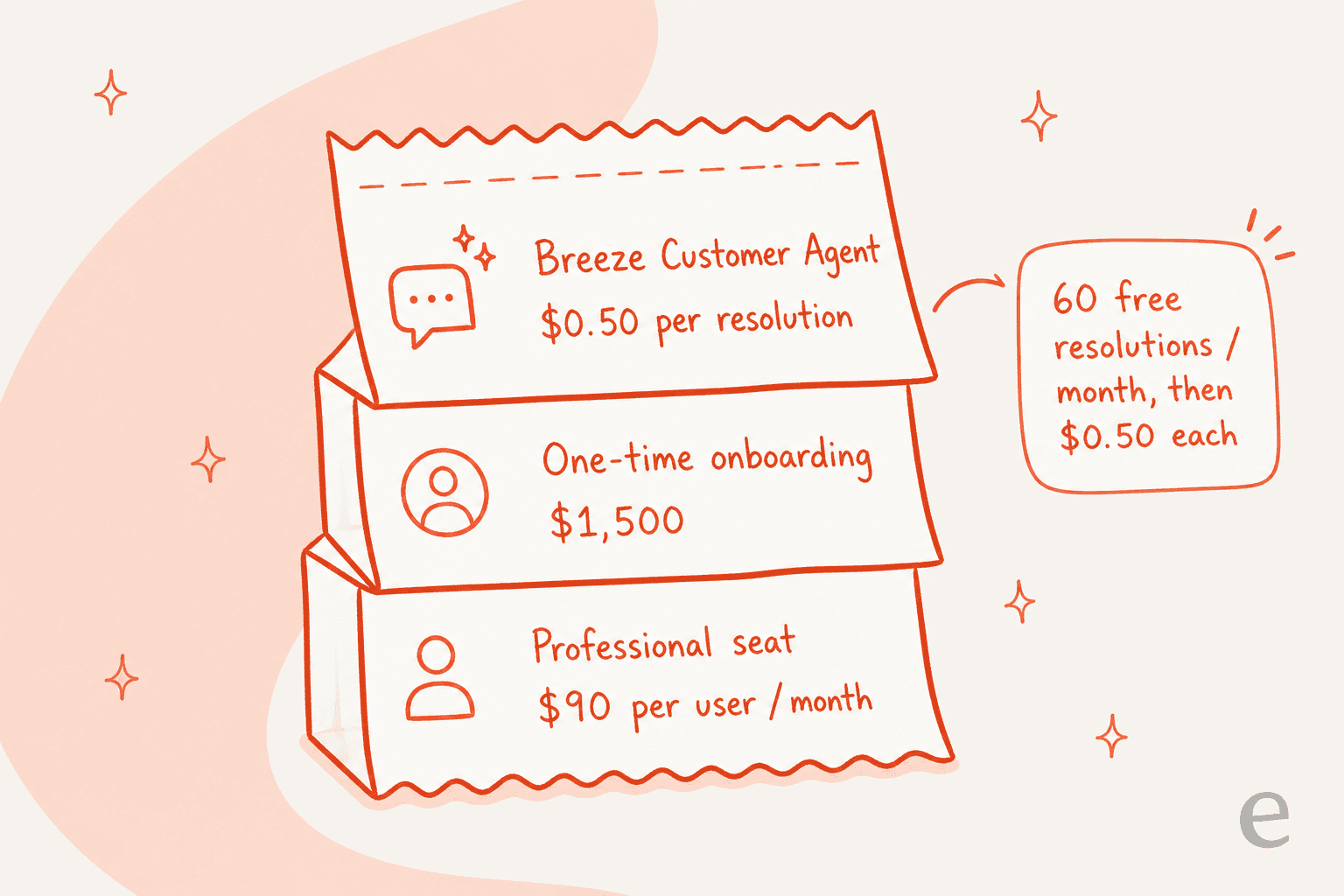
Here's the full Service Hub ladder, from the Service Hub pricing page. The Customer Agent needs Professional or above.
| Tier | Price (USD/seat/mo) | Included credits/mo | AI support agent |
|---|---|---|---|
| Free | $0 (max 2 users) | - | No |
| Starter | $7 (commit) / $20 monthly | 500 | No |
| Professional | $90 (annual) + $1,500 onboarding | 3,000 | Yes (Breeze Customer Agent) |
| Enterprise | $150 + $3,500 onboarding | 5,000 | Yes |
The Breeze Customer Agent itself is billed per conversation resolved: 50 HubSpot Credits, or $0.50, per resolution. HubSpot's definition of a "resolution" is worth reading closely: support was provided and the conversation wasn't handed to a human for 72 hours, or a lead was qualified. A conversation the agent partly handles but escalates at hour 70 doesn't bill, which cuts both ways.
Working the included credits back into resolutions makes the ceiling concrete:
| Tier | Included credits | Free resolutions/mo | Cost per extra resolution |
|---|---|---|---|
| Professional | 3,000 | ~60 | $0.50 |
| Enterprise | 5,000 | ~100 | $0.50 |
So a Professional account burns its whole monthly credit pool on about 60 resolved conversations, roughly two a day, and that same pool also funds other Breeze actions, so real headroom is lower. None of this is hidden or unfair, it's just per-seat SaaS plus metered AI, and HubSpot customers feel the stack of it as they scale:
"Additionally, pricing has become difficult to justify compared to alternative solutions in the market. The Knowledge Base page customization options are also quite limited, especially for companies that want more flexibility in branding and user experience."

You can preview the full pricing and credit estimator on HubSpot's own page:
For comparison, a fixed-price layer like eesel sells monthly credit plans (1 credit per ticket or chat, however long), with no platform fee, no per-seat fee, and no onboarding fee. At 1,000 tickets a month that's $499, and only the tickets the AI actually works on count. The point isn't that HubSpot is expensive for the sake of it, it's that the billable unit and the seat-plus-onboarding floor are very different, and worth modeling before you sign.
So which route actually fits you?
The right route depends less on budget and more on how much you want to build. Pick the situation that sounds most like yours.
Try eesel on your HubSpot tickets
If you landed here wanting AI on your HubSpot queue without a long build, this is the route I'd actually reach for, and yes, I'm biased, so here's the concrete version rather than a pitch.
eesel is an AI teammate for the helpdesk. It plugs into your HubSpot Service Hub tickets, and instead of authoring content sources one by one it trains on your past tickets, knowledge base, and docs. The differentiator I'd point a HubSpot team to is Simulation: before it answers a single live customer, it replays your past tickets and scores its answers against what your team actually sent, then shows you the exact gaps by theme so you can fix them and re-run. That's the "test before you trust it" step that native rollouts usually skip, and it's the reason I keep coming back to it.

It also rolls out the way a cautious support lead wants: every action starts as a draft for review, and you hand over more autonomy as it earns it, pulling anything back at any time. One customer described the payoff after starting on their own historical tickets:
"In the first month, eesel is resolving 73% of our tier-1 requests... we saw results quickly during our 7-day trial."
Kim Simpson, Gridwise
You can connect it, simulate on your real tickets, and see what it drafts before committing to anything, and it starts free with 100 credits. If you also run Zendesk, Freshdesk, Gorgias, Help Scout, or Jira Service Management alongside HubSpot, the same teammate works across all of them under one account.