LivePro pricing 2026: plans, tiers, and the real cost explained

Kurnia Kharisma

Katelin Teen
Last edited August 27, 2026

How much does LivePro cost?
Here is the short version: LivePro publishes no prices at all. I went through the entire pricing page expecting a "starting at" number somewhere, and there isn't one. Every plan ends in a "Get a quote" or "Contact us" call to action. That is a deliberate, sales-led model, and it is common among premium contact-center software, but it does mean you cannot budget for LivePro from the website alone.
One third-party number is worth naming just so you can discount it. The G2 pricing listing shows a single edition at "$0 / 50 seats per month," which reads like a directory placeholder rather than a real free plan, since LivePro's own page shows nothing of the sort. Any per-user figure you see on software directories is a third-party guess, not a vendor rate, so I would not plan around it. The only defensible statement is the one LivePro makes itself: the price comes from a conversation. That puts LivePro in the same quote-only camp as most AI customer service software built for the enterprise, where published rates are still the exception.
What LivePro does tell you is the shape of the pricing: three tiers, sized by your contact center, billed annually, with a separate discount for non-profits. Let's break those down.
The three LivePro plans, and what actually separates them
LivePro splits into Flex, Premium, and Enterprise, and the tiers are framed by team size rather than a per-seat rate. Flex is pitched at "small and growing" contact centers, Premium at "medium to large" teams of 50+ agents, and Enterprise at large, multi-channel operations.
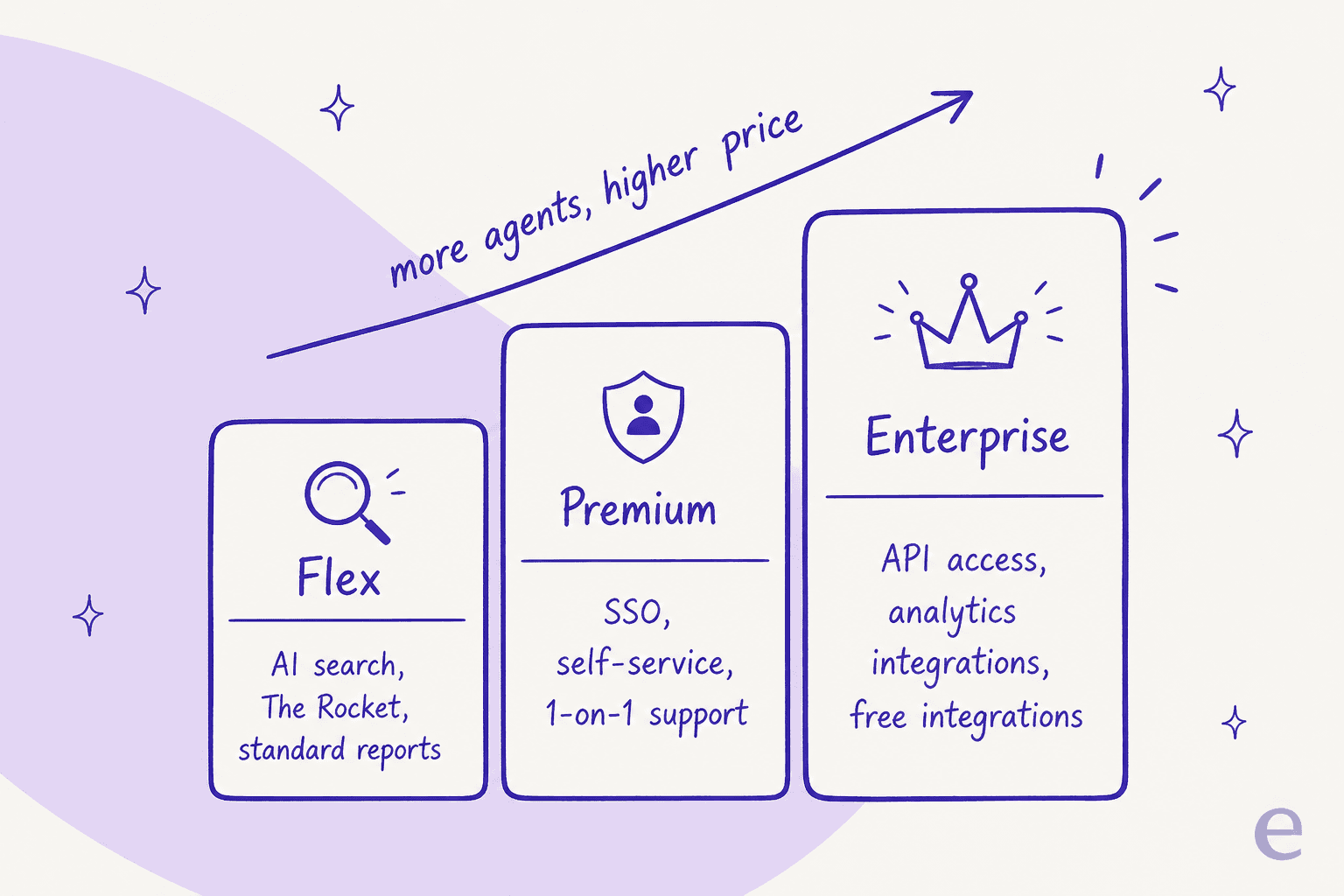
The interesting part isn't the marketing labels, it's the feature gating, because that is what actually decides which plan you land on. Here is what the comparison matrix on the pricing page lays out.
| Capability | Flex | Premium | Enterprise |
|---|---|---|---|
| Positioned for | Small / growing | 50+ agents | Large, multi-channel |
| Billing | Monthly, paid annually | Monthly, paid annually | Monthly or quarterly |
| The Rocket, Work Instructions, AI-assisted search | Included | Included | Included |
| Version control, review workflow, analytics | Included | Included | Included |
| Single sign-on (Okta, SAML, Azure, ADFS) | No | Yes | Yes |
| Customer self-service | No | Yes | Yes |
| One-on-one support from Knowledge Experts | Help articles, webinars, forums | Yes | Yes |
| Customizable workflow & permissions | Standard | Customizable | Customizable |
| Storage | Limited | Unlimited | Unlimited |
| API access | No | No | Yes |
| Third-party analytics integration | No | No | Yes |
| Multichannel authoring & custom dashboards | No | No | Yes |
| Implementation package | Extra charge | Extra charge | Included |
| Compliance (SOC 2, HIPAA, data sovereignty) | Included | Included | Included |
Two lines in that table do most of the work. Single sign-on and customer self-service start at Premium, so if you need either (and most teams past a certain size do), Flex is off the table. And API access and third-party analytics are Enterprise-only, which matters if you want LivePro's knowledge feeding into your own reporting stack or a custom integration. If those are must-haves, you are on the top tier regardless of how many agents you have.
The good news is that the core product is available on every tier. The Rocket (LivePro's decision-tree tool), Work Instructions, version control, the standard reporting suite, and the AI-assisted search all sit in Flex. You are not buying a hollowed-out entry plan; you are paying up mainly for scale, governance, and integrations. If you want to compare that model against a KM tool that does publish flat rates, our Document360 pricing breakdown is a useful reference point.
What the quote doesn't show
A quote-only price has a habit of looking like the whole cost when it isn't. With LivePro specifically, there are a few line items sitting underneath the number your sales rep gives you, and they are worth pricing in before you compare it against anything else.

The big one is the implementation package, which covers author training, site configuration, and engagement strategies. It is an additional charge on both Flex and Premium and only bundled into Enterprise. For a knowledge base, implementation is not optional fluff; getting your content structured well is most of what makes the tool work, so budget for it as a real cost on the two lower tiers.
Then there is the annual commitment. Flex and Premium are billed monthly but paid annually, so you are signing up for a year, not testing month to month. G2's own data puts the average time to implement at four months, which tells you this is a considered rollout, not a plug-and-play switch you can reverse in a week.
Finally, watch the storage cap on Flex (it is limited, versus unlimited on Premium and Enterprise) and the fact that any move to unlock API access or SSO is a full tier jump, not an add-on you can bolt onto a cheaper plan. None of this is unusual for enterprise KM, but it is the difference between the headline quote and what you actually pay in year one.
What you're actually paying for
The reason LivePro can hold a premium, quote-only line is that the product is purpose-built for contact centers, and it has been since 2001. This isn't a general wiki with a support skin on top. It stores knowledge as short, structured Answer Articles rather than long policy PDFs, and it wraps everything in the governance (version control, review workflows, role-based permissions) that regulated industries need. That structured approach is exactly what makes AI knowledge management for support teams work, clean source content is the raw material for any AI knowledge base chatbot too.
The standout feature that reviewers keep naming is The Rocket, an interactive decision tree that walks an agent through a complex enquiry step by step. On top of the structured core, LivePro has layered an AI suite: Lightspeed Search (a hybrid keyword-plus-vector engine), an AI Overview that answers plain-language questions with source citations, an AI authoring suite that turns raw uploads into formatted articles, and Luna, a customer-facing AI voice agent. It is a serious knowledge management platform, and the compliance posture (SOC 2 Type II, HIPAA, data sovereignty) is baked into every tier.
That said, the most common complaint in reviews is worth flagging because it is directly tied to what you are paying for. LivePro's AI-generated cons tags on G2 are dominated by search: "Inefficient Search" and "Poor Search Functionality" show up more than any other criticism. For a tool whose whole job is helping agents find an answer fast, that is the friction point to test hard in a demo.
What users actually say about the value
LivePro's ratings are unusually strong and consistent: 4.8/5 across 168 reviews on G2 (89% five-star) and 4.8/5 across 182 reviews on Capterra, with customer service scoring 4.9. That is a lot of goodwill for a tool nobody can price from the website, so the value is clearly landing for the teams that buy it.
The praise clusters around it being a real single source of truth:
"Livepro serves as our single source of truth... Adoption is very strong, with roughly 80% of the business using it month over month... it supports governance, version control, and consistency, which are essential in a regulated environment."

Buyers in regulated sectors describe long, formal evaluations before landing on it, which is exactly the profile of a team that will happily go through a quote process:
"A comparison with over 20 KM platforms was conducted with livepro recognised as the most robust and comprehensive, being most suitable for our large workforce and compatible with the sensitive nature of our knowledge."

The recurring knock, alongside search, is that the guided structure can feel rigid when an agent just wants a quick lookup:
"...at times, it can feel overly structured and a bit rigid, especially when agents just need a quick answer and don't want to click through multiple steps or flows to get there."
Reviewers also note the UI feels dated next to newer platforms. None of these are dealbreakers, but they are the trade-offs you are accepting when you sign a premium contract for structure and governance.
Is LivePro worth the price?
Here is where I land after going through the whole thing. If you run a regulated, high-volume contact center, LivePro is a defensible buy, and the review scores back that up. The structured-answers model, the governance layer, and the compliance accreditations are exactly what a bank, insurer, or government agency needs, and the strong support reputation means the quote-only, sales-led motion is less of a gamble than it sounds.
Where I would pause is on two fronts. First, the quote-only pricing makes it hard to compare LivePro against tools that publish their rates, and the total cost (implementation, annual commitment, tier jumps for SSO and API) adds up beyond the headline number. Second, and more fundamentally, LivePro is a knowledge base that helps agents answer faster. It is not designed to resolve tickets on its own. If your actual goal is to reduce how many tickets reach a human at all, you are looking at a different category of tool.
Where an AI teammate changes the math
This is the distinction I would keep front of mind. A knowledge management platform makes your agents faster and more consistent; an AI support agent removes work from the queue entirely by answering the customer directly. Both are valid, they just solve different problems.
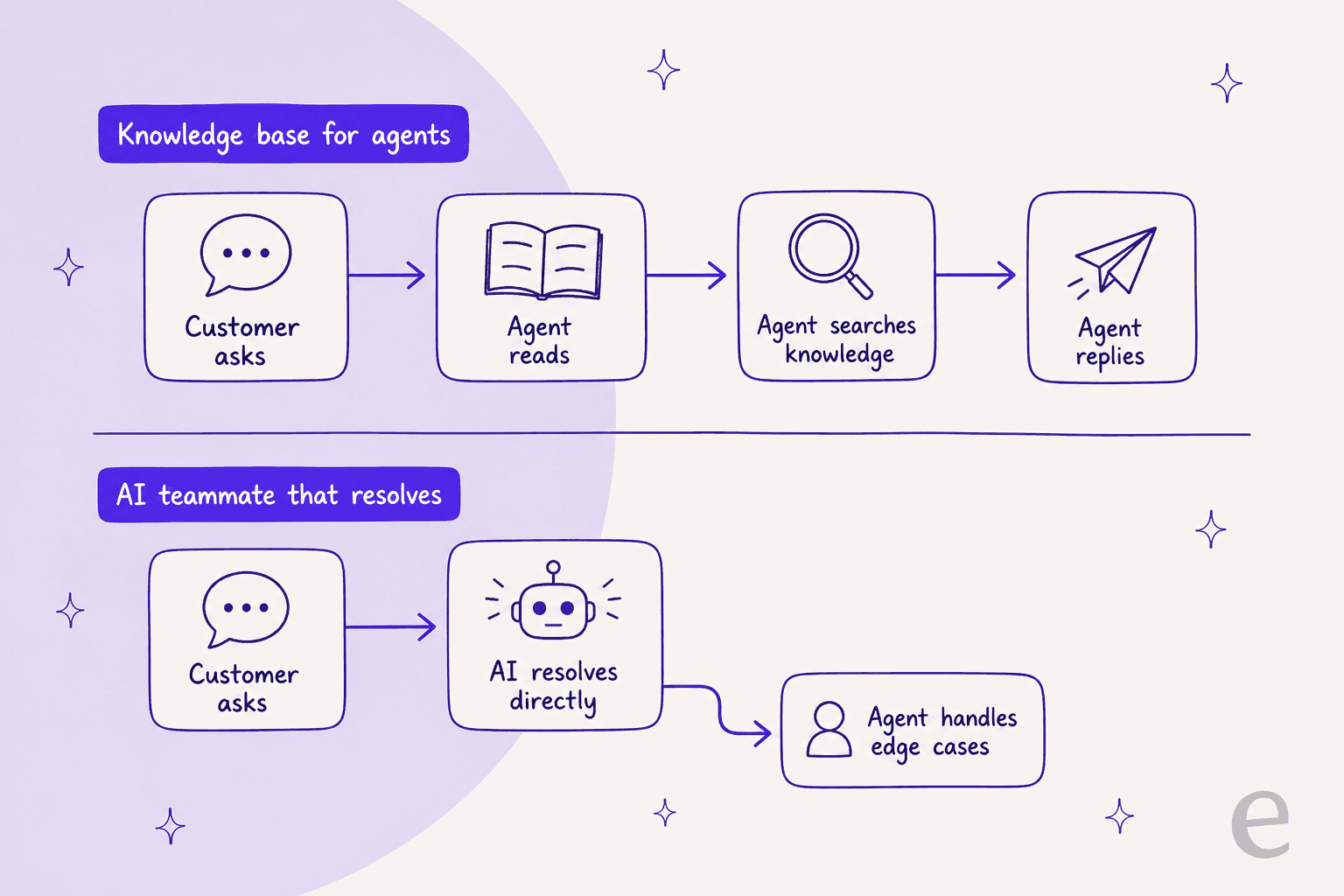
I've spent the last three-plus years putting AI on live support queues, and the lesson that keeps repeating is that the value shows up when the AI can deflect tier-1 tickets before an agent touches them, not just when it surfaces a cleaner article for the agent to read. The same logic applies to live chat deflection, and it is a real efficiency gain you can measure against the cost of a human agent handling the same ticket. There is a middle ground too, an AI copilot for customer service that drafts replies for agents rather than replacing them. LivePro's own Luna voice agent is a step in this direction, which tells you even LivePro sees where the category is heading.
The pricing model matters here too. A quote-only, per-seat KM contract charges you the same whether your agents look up one article a day or a hundred. An AI agent that saves on support cost by resolving conversations is usually priced per resolution or per interaction, which ties what you pay to the work actually done. Neither model is automatically cheaper, but they answer very different budgeting questions.
Try eesel
If your reason for looking at LivePro is "I want to spend less time and money answering repetitive tickets," it is worth seeing what an AI teammate does before you commit to an annual KM contract. eesel is an AI support agent that plugs into your helpdesk, learns from your existing knowledge base and past tickets, and resolves the front-line questions on its own, so your agents only handle what actually needs a human.

Two things stand out against a quote-only tool. eesel publishes its pricing with fixed monthly plans from $299/month for 500 credits, so you can see the cost without a sales call, and you can simulate the AI on your own historical tickets before going live, so you know your real resolution rate up front instead of hoping the rollout works. There is a free plan with 100 credits, and setup is minutes rather than the four-month average a KM implementation runs.
Frequently Asked Questions
How much does LivePro cost?
Does LivePro have a free plan or free trial?
Is LivePro pricing worth it for a small contact center?
What does LivePro pricing not include?


Article by
Kurnia Kharisma
Kurnia is a software engineer and writer at eesel AI with two years of SEO experience, writing about AI tools, helpdesk software, and customer support. He pairs a developer's understanding of how these products are built with search-driven research into what actually ranks and resonates with the people searching for them.