Freshdesk AI and Document360 integration: how to actually connect them in 2026

eesel Team
Last edited October 14, 2026
If you searched for a "Freshdesk AI and Document360 integration," here is the honest answer: there is no one-click connector that points Freshdesk's own Freddy AI at your Document360 knowledge base. The integration that ships runs the other way. Document360's Eddy AI chatbot can open a new ticket in Freshdesk when it gets stuck, and it can read your Freshdesk tickets as a daily-synced training source. Neither lets Freddy answer from Document360.
To get Document360 content into Freddy, you feed it in manually: crawl up to 10 public help-center URLs, upload exported files, or copy articles into Freshdesk's native knowledge base. Each has a real ceiling, and none is a live two-way sync.
If what you actually want is an AI that reads both your Document360 docs and your Freshdesk history and works inside Freshdesk, that is a job for a layer that connects to both. That is where eesel AI fits: it joins Freshdesk as an AI agent, learns from your Document360 help center and past tickets, drafts replies for review, and lets you simulate on real tickets before going live. It is one fixed monthly price from $299 for 500 credits (1 credit per ticket), no per-seat fee.
What "Freshdesk AI and Document360" actually means
Two products, two very different jobs, and it is worth separating them before we talk wiring.
Freshdesk is Freshworks' help desk. Its AI layer is Freddy AI, split into three pieces: the customer-facing Freddy AI Agent that resolves queries end to end, Freddy AI Copilot that assists your human agents, and Freddy AI Insights for leaders. When people say "Freshdesk AI," they almost always mean the Agent, and reviews of Freddy are mostly about it.
Document360 is a knowledge base platform by Kovai. It is where your help articles, SOPs, and product docs live, with an AI layer called Eddy AI on top for search, writing, and a chatbot. It is a strong, well-reviewed knowledge base, used by teams at HP, Gong, and others, and it holds up in a Document360 vs Helpjuice comparison.
So the reader's instinct is reasonable: I keep my docs in Document360, my tickets in Freshdesk, and I want the AI in Freshdesk to answer customers using the docs in Document360. The catch is that the two products connect, just not in that direction.
The integration that actually ships
Document360 has a real, documented Freshdesk integration. It lives inside the Eddy AI chatbot, and it does two specific things.
First, Freshdesk tickets become a training source. The Document360 chatbot can ingest your Freshdesk tickets alongside your articles, files, and FAQs. Per the manage chatbot docs, Freshdesk tickets "sync daily automatically," with a manual resync up to twice a day.
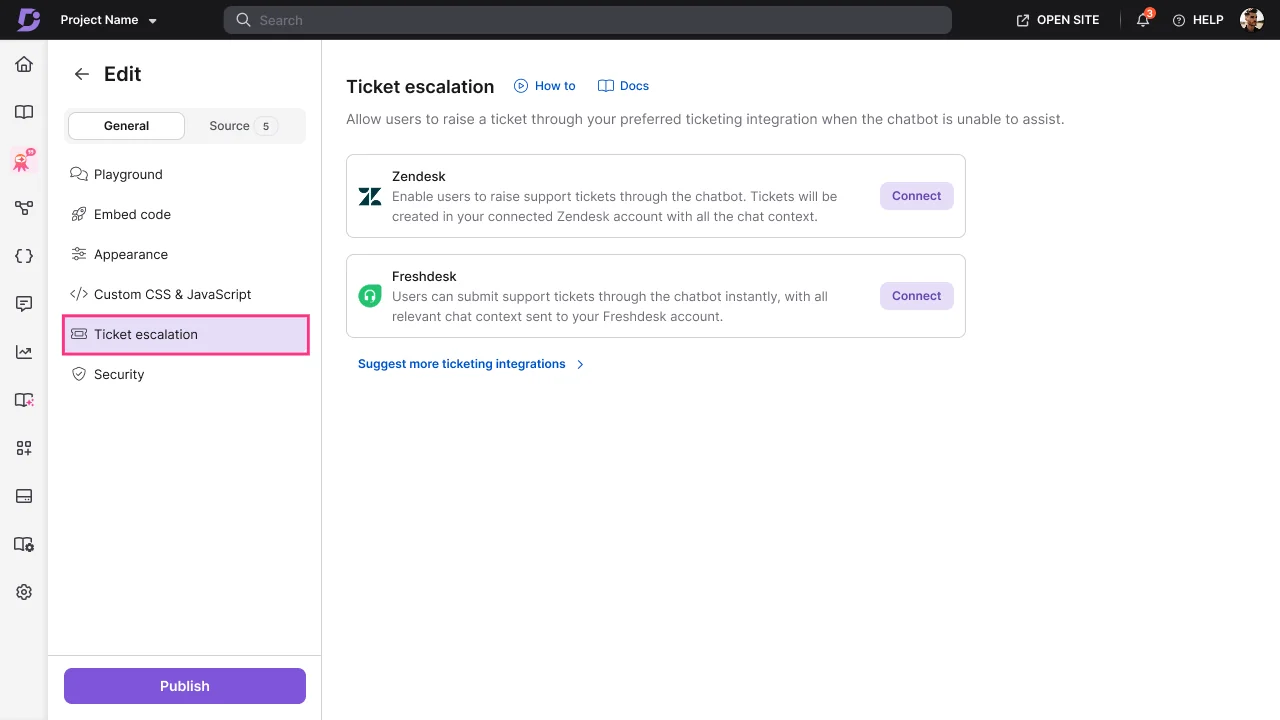
Second, the chatbot opens tickets in Freshdesk. This is the ticket escalation feature. When the chatbot cannot help, it prompts the user to raise a ticket, and that ticket lands in Freshdesk.
Here is the important part, and the thing most articles on this topic gloss over. The direction of travel is fixed.
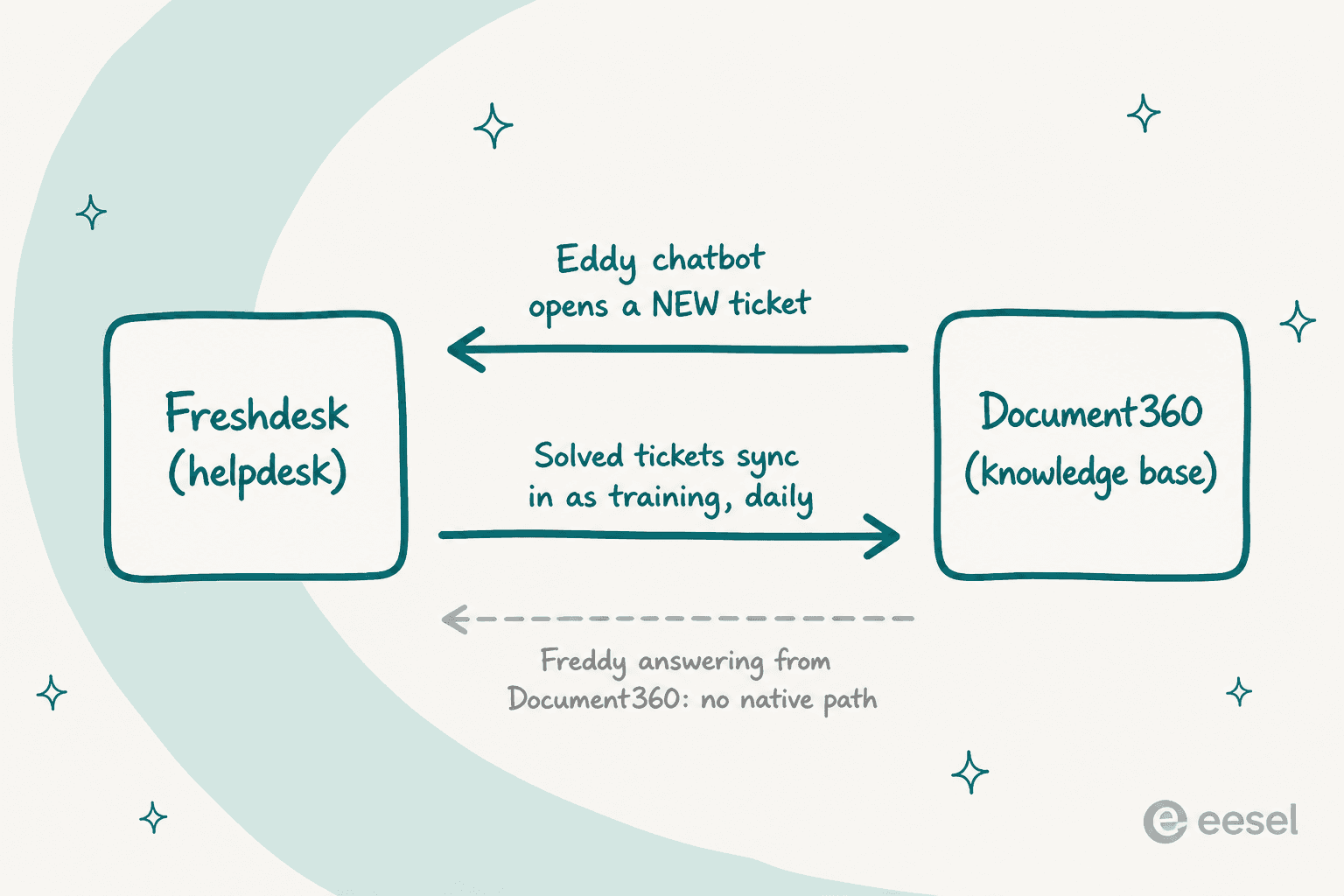
Document360's docs are unambiguous about what escalation does. When the chatbot detects that a user needs a human, it prompts them to submit a ticket "pre-filled with the chat transcript, an AI-generated subject line, and an AI-generated issue description." Once submitted, per the escalation docs, "it appears in Zendesk or Freshdesk as a standard ticket, created via API," which the agent then finds in the Unassigned or New view.
What it never does: read your existing Freshdesk queue, draft a reply on an open ticket, send a response as an agent, or auto-triage inbound tickets. Freshdesk tickets are used in exactly two ways here, a read-only training corpus and an API target for creating new tickets. Escalation currently supports Zendesk and Freshdesk only.
So if your goal is "the Document360 chatbot answers on my docs site and hands off cleanly to Freshdesk," this integration is genuinely good, and you should turn it on.
What Document360's chatbot does well
Credit where it is due. Document360's Eddy AI is grounded in your content, which is the right design. Its own framing is "most chatbots guess, ours only speaks when it knows," and answers come with the source articles cited underneath.
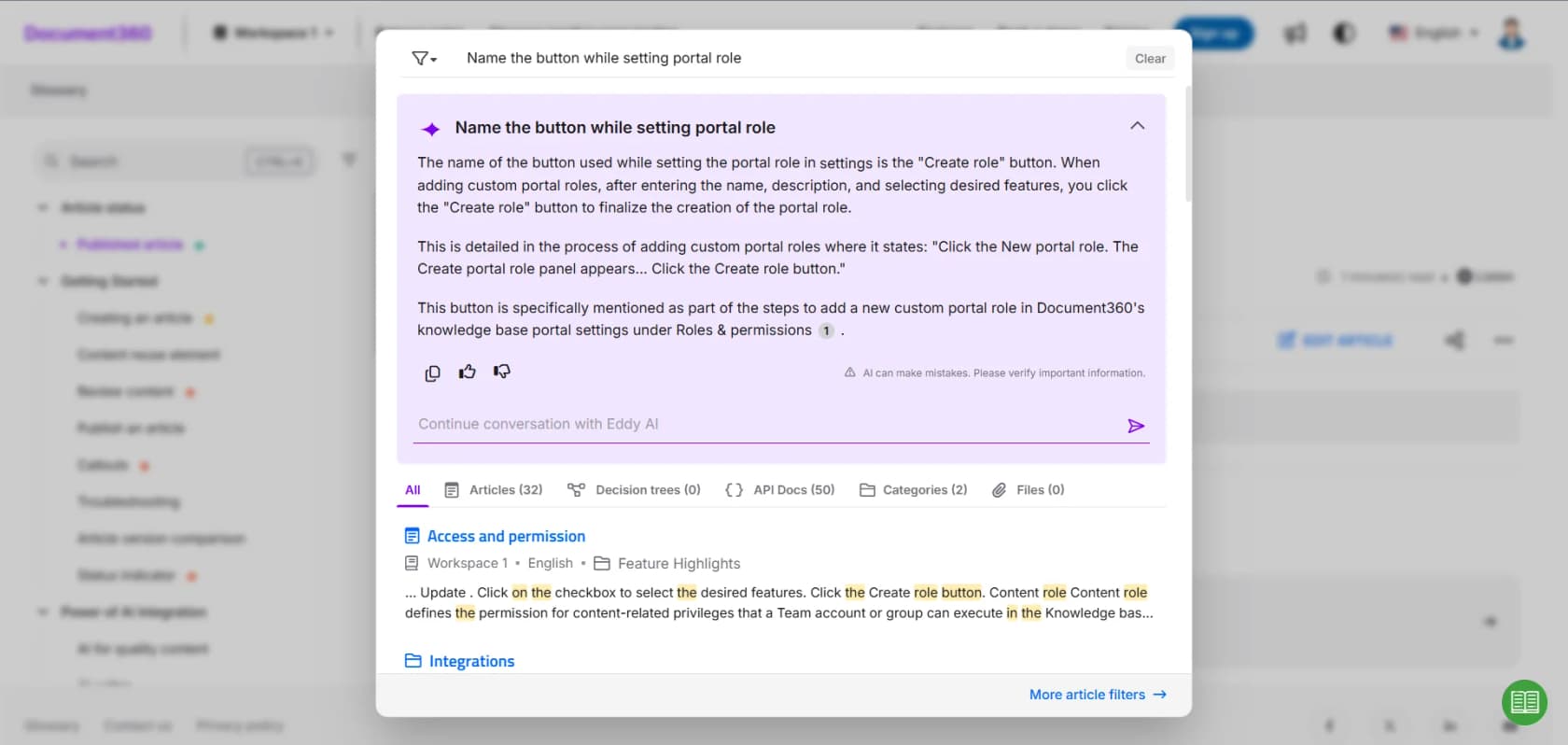
For a self-service help center, that is a solid setup: the chatbot deflects the easy questions on your docs site, and only the ones it cannot answer become Freshdesk tickets. It is essentially a conversational knowledge base bolted onto your docs. If your support model is mostly "customers read the docs first," this covers a real chunk of volume.
The limits are worth knowing before you lean on it. Each chatbot has a 40 MB source-data cap by default, applied across all connected sources combined, and going past it means a call to your customer success manager. The playground tests prompts you type by hand, not a replay of your real ticket history. And the ticket description field in the escalation dialog is capped at 250 characters. None of these is a dealbreaker for a docs chatbot. They just tell you this is a self-service tool, not a queue-working one.
Getting Document360 content into Freddy
Now the harder direction, and the one most people actually came here for: making Freshdesk's Freddy AI Agent answer using your Document360 articles.
There is no native connector. Freddy AI Agent learns from a fixed set of source types, per the Freshdesk setup docs: solution articles, files, web links, and custom Q&As. Document360 is not on that list, so you bridge the gap yourself. You have four options, and each has a ceiling.
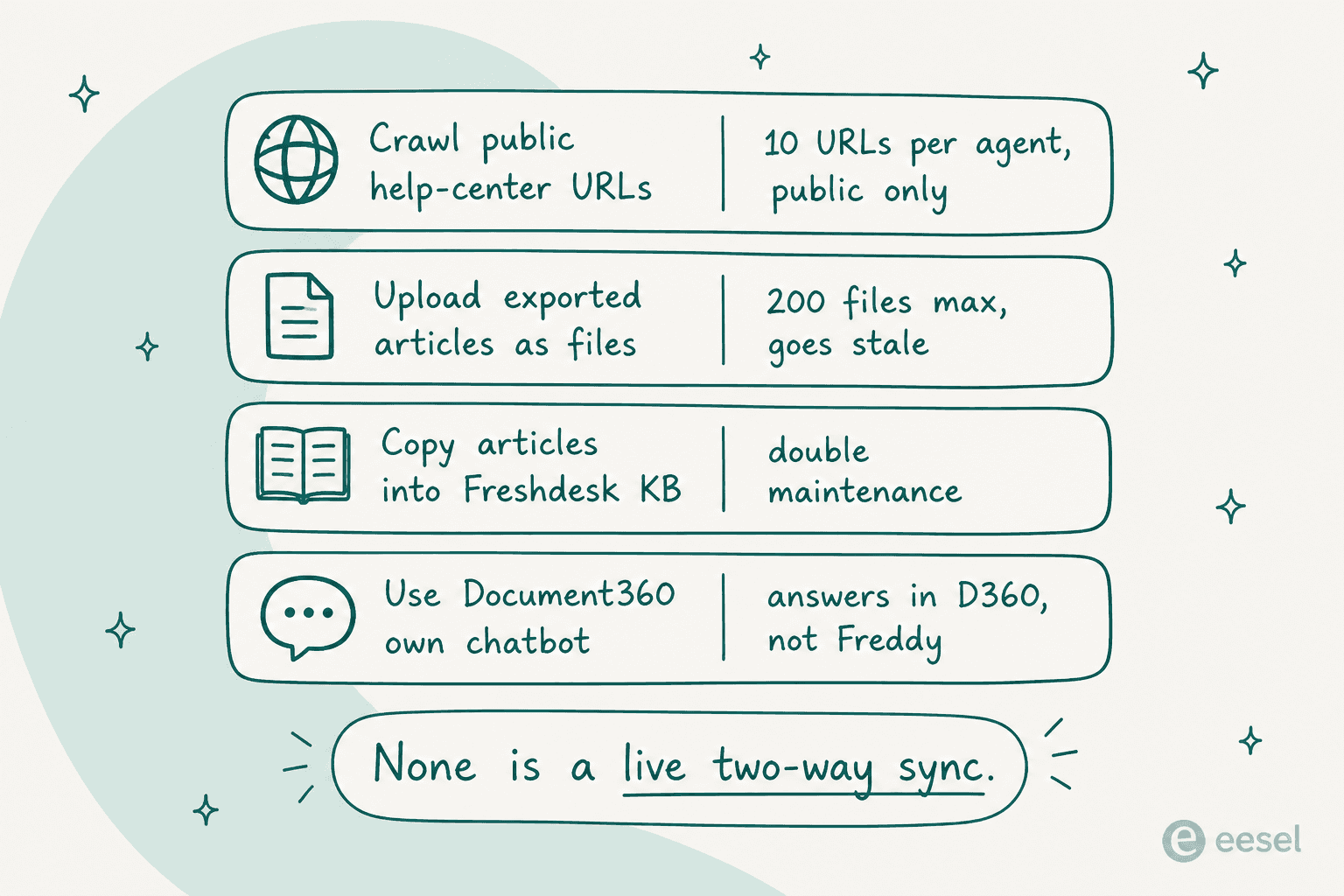
Option 1: crawl your public help-center URLs. Freddy can learn from web links, but the knowledge limits are tight: only 10 URLs per AI agent and 25 per account, publicly available pages only, and static text only, so no video or images. A website source can learn up to 3,000 pages via crawl. This works if your Document360 site is public and you point Freddy at the right index pages, but a private or partially gated knowledge base is out.
Option 2: export articles and upload them as files. Freddy accepts .txt, .docx, and .pdf files, up to 35 MB each, capped at 200 files per bot and 200 per account. Document360 can export articles to PDF, so you can bulk-export and upload. The problem is that this is a snapshot. Update an article in Document360 and your uploaded copy in Freshdesk is now stale until you re-export and re-upload.
Option 3: copy the articles into Freshdesk's native knowledge base. Freddy reads Freshdesk solution articles natively, so if you maintain the same content in both places, Freddy stays current. This is double maintenance forever, and it defeats the point of having a single source of truth in Document360.
Option 4: keep Document360's chatbot for docs, Freshdesk's Freddy for tickets. Run them as two separate systems, each on its own knowledge. This is the least effort, but you are running two AI bots trained on two content sets, and customers get a different answer depending on where they ask.
The through-line: none of these is a live sync. They are all a copy, a crawl, or a duplicate, and every one of them drifts out of date the moment someone edits an article. If your Document360 docs change often, that drift is the whole problem.
"We tested an ai integration in freshdesk and had almost the exact same experience. it worked for very simple tickets but anything slightly complex got misclassified. agents ended up spending more time fixing errors than before, so we had to rethink our approach."

That Reddit experience tracks with what I hear from teams: native helpdesk AI tends to do well on the simple tickets and struggle where the knowledge is fragmented across tools. If that is where you land, it is worth scanning the free Freshdesk AI alternatives too. Fragmented knowledge is exactly the situation you are in when your docs live in Document360 and your AI lives in Freshdesk.
What this costs
Before you commit to a manual bridge, it helps to see the full bill, because you are paying two vendors and the AI is metered on both sides.
| Cost line | What you pay | Notes |
|---|---|---|
| Freshdesk Omni seats | $29 / $79 / $119 per agent/mo | Growth / Pro / Enterprise, billed annually |
| Freddy AI Agent | $49 per 100 sessions | First 500 free on Growth, Pro and Enterprise, once per account |
| Freddy AI Copilot | $29 per agent/mo | Agent-assist add-on, Pro and Enterprise only |
| Document360 | Quote-only | No public tiers; priced on workspaces, languages, seats, AI usage |
| Document360 Eddy AI | Credit-based add-on | 1 credit per query, plus per-chatbot purchase; part of the AI Premium Suite |
| eesel AI | From $299/mo for 500 credits | 1 credit per ticket or chat; no per-seat fee, no platform fee |
A worked example. Say you run a 10-agent team on Freshdesk Omni Pro. That is $790 a month in seats before any AI, and if cost is the driver you may want the wider cheapest AI helpdesk apps roundup. Add Copilot for the team and it is another $290. Now switch on Freddy AI Agent for email deflection, burn through the free 500 sessions, and you are at $49 per 100 sessions after that. On the Document360 side, Eddy AI is a separate credit-based line inside a custom quote you cannot see until you talk to sales. None of this is unreasonable for what each tool does, but "just connect my docs to my AI" turns into two metered AI products plus the labour of keeping content in sync.
The cleaner path: one AI that reads both
The reason this integration is awkward is structural. Freshdesk's AI reads Freshdesk's knowledge. Document360's AI reads Document360's knowledge. Neither was built to be the brain that sits across both. As the eesel docs put it, "native AI tools usually only read from your help center or website. eesel AI agents learn from your actual solved tickets, and across any of your platforms."
That is the gap eesel is built for.
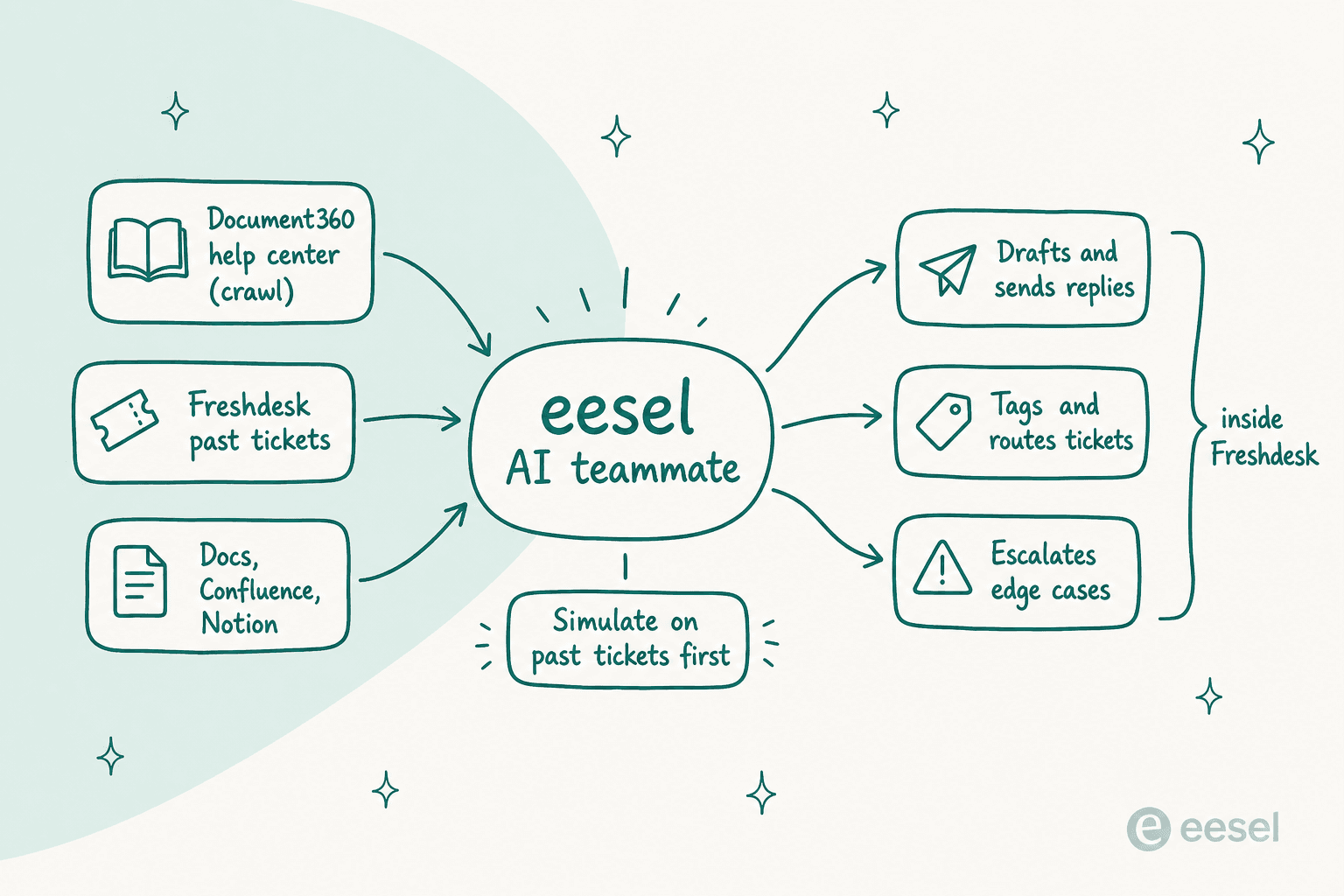
eesel joins Freshdesk as an AI agent, not a second widget or a separate inbox. It reads tickets, drafts and sends replies, adds private notes, updates fields, and routes to groups, the same actions a human agent takes. On the knowledge side, it learns from your Document360 help center by crawling it as a source, alongside your Freshdesk solution articles, your past solved tickets, and other sources like Confluence, Notion, and Google Docs. One AI, both content sets, working where your agents already work.
Two things make this different from the manual bridge:
- Simulation on your real tickets. Before it touches a customer, eesel runs over your historical Freshdesk tickets, scores how it would have answered against what your team actually sent, and reports the gaps, for example "23 tickets last week asked about pro-rated refunds, but your docs only cover full cancellations." That is a real dry run over your own queue, not a handful of prompts you typed. Freshdesk's studio and Document360's playground both test scenarios you write by hand.
- You configure it in plain language. Instead of building rules, you tell eesel which tickets to handle, how to write, and when to escalate by describing it. And it starts in draft mode, so every reply waits for human approval until you trust it.
To be fair about fit: if your entire support model is a public docs site where customers self-serve and rarely open tickets, Document360's own chatbot plus its Freshdesk escalation is a perfectly good, cheaper answer, and you may not need a third tool. If you are rethinking the whole stack, the best Freshdesk alternatives are worth a look. eesel earns its place when the work is in the Freshdesk queue and the knowledge is scattered across Document360 and everywhere else.
Try eesel for Freshdesk and Document360
If you want your AI to answer Freshdesk tickets using your Document360 docs, without exporting PDFs every week or maintaining the same articles in two places, that is exactly what eesel AI for Freshdesk does. It connects to Freshdesk in under 30 minutes, learns from your Document360 help center and your past tickets automatically, and lets you simulate on real tickets before it goes live.
It is free to start with 100 credits and no credit card, then from $299 per month for 500 credits with no per-seat fee. You can try eesel and run a simulation on your own Freshdesk history to see the resolution rate before you commit.