8 best Document360 Eddy AI alternatives in 2026

Rama Adi

Katelin Teen
Last edited September 7, 2026
Document360 is a solid knowledge base, and its Eddy AI can write articles and answer questions with cited, access-aware responses. The reasons people go looking for alternatives are almost always the same three: the pricing is quote-only (there is no public Eddy AI number anymore), Eddy is credit-metered so every answer spends an allotment you negotiated in a sales call, and by default it only answers from your own Document360 content, with a 40 MB source cap per chatbot.
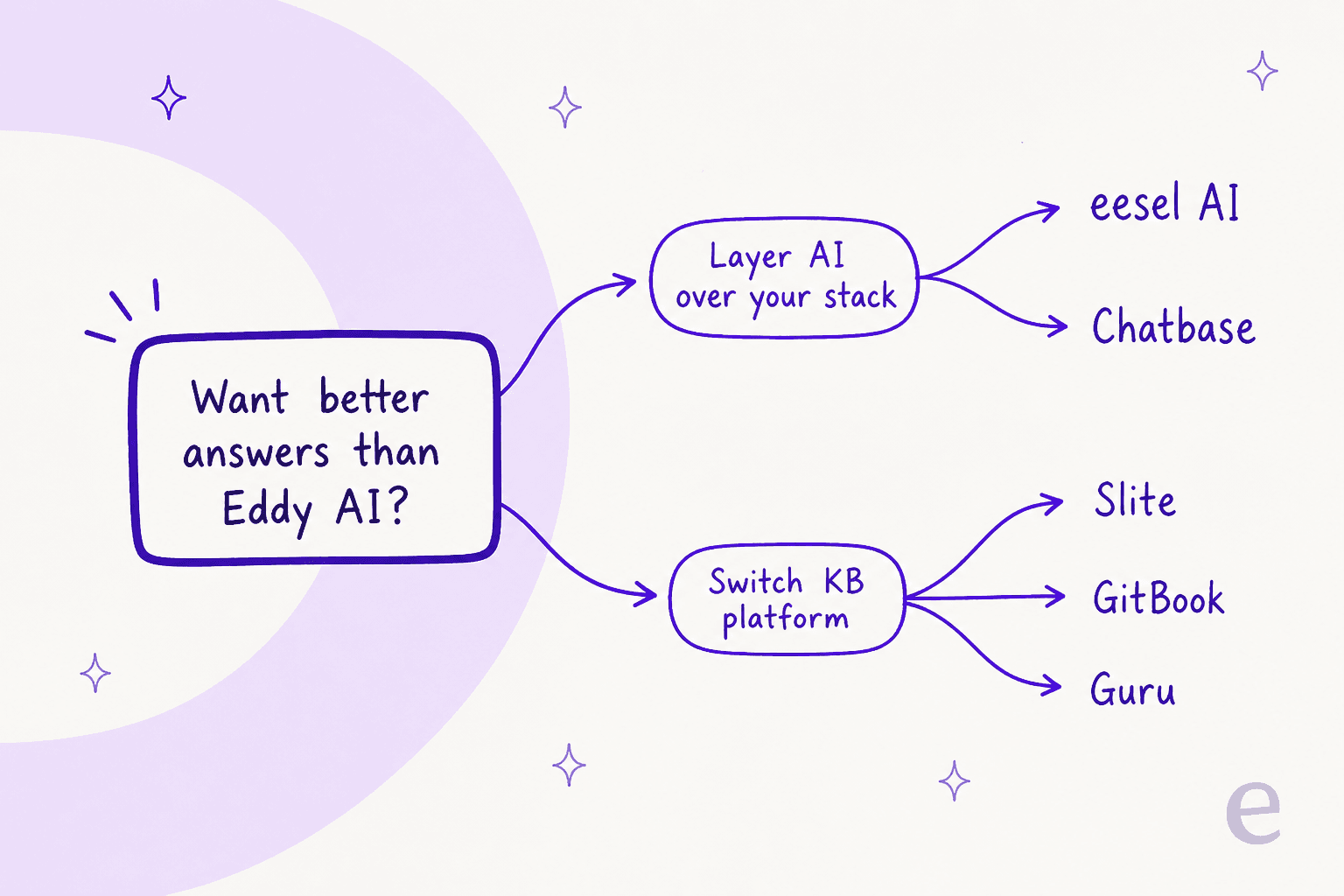
There are two ways out, and picking the right one saves you a migration you may not need:
- Layer AI over your existing stack. Keep Document360 (or whatever help center you run) and point a purpose-built answer engine at it. eesel AI is my pick here: it trains on your help center, past tickets, and docs, works inside your current helpdesk, and is from $299/month for 500 credits, at 1 credit per ticket. Chatbase is the lighter, standalone version of the same idea.
- Switch knowledge base platforms. If the editor, hosting, or price are also the problem, move. Guru (governed enterprise search), Slite (AI-first wiki from $10/member), GitBook (dev docs), Tettra (Slack-native, $8/user), Help Scout (KB plus a customer-facing agent), and Zendesk (enterprise) all answer questions from your docs, and most publish a real price.
If you only came for better answers, layer first. If the whole platform is dragging, switch. The rest of this post is the eight options in detail.
Why people look past Eddy AI
I want to be fair to Document360, because it is genuinely good at the thing it was built for. Kovai's platform is one of the cleaner ways to run both customer-facing and internal documentation from one portal, the editor is pleasant, the analytics are deep, and Eddy AI's assistive search returns cited answers that respect your access controls and speak 20+ languages. If your writers love the authoring experience, none of that changes below.
The friction shows up around the AI, and around what it costs. Three things send people to this page:
- You cannot see a price. Document360 removed its public tiers and now runs a quote-only configurator. Your bill is scoped across six factors, and one of them is literally "AI Premium Suite usage." That is fine for a procurement team with time; it is painful when you just want to know if Eddy fits the budget.
- Eddy is metered in credits. Each assistive-search or chatbot query spends one AI credit against an account-wide allotment set in your quote. If self-service takes off, usage (and the next renewal) climbs, and you do not always see it coming.
- The answers stay inside your own walls. Eddy's search answers from your Document360 KB and API docs. The separate Eddy AI Chatbot add-on can ingest a website crawl, files, FAQs, and even Zendesk or Freshdesk ticket text, but each bot is capped at 40 MB of sources, there is one bot per domain, and extra bots are a per-unit purchase through your CSM.
None of that makes Eddy bad. It makes it a specific shape: great authoring, opaque AI pricing, answers bounded to what you have loaded into Document360. Once you see it that way, the decision gets simple, so let me show you how I'd frame it.
How I picked these alternatives
I build integrations for a living, so I read these tools the way an engineer reads a spec sheet: not "does it have AI" (everything has AI now) but how is the AI billed, and where is it actually allowed to look for an answer? Those two questions separate the eight tools below more than any feature list.
The first question is billing. Eddy's credits are one model, but they are not the only one, and the units are not interchangeable. A "resolution" is not a "conversation" is not a "ticket" is not a "seat." Here is how the field actually meters AI answering:
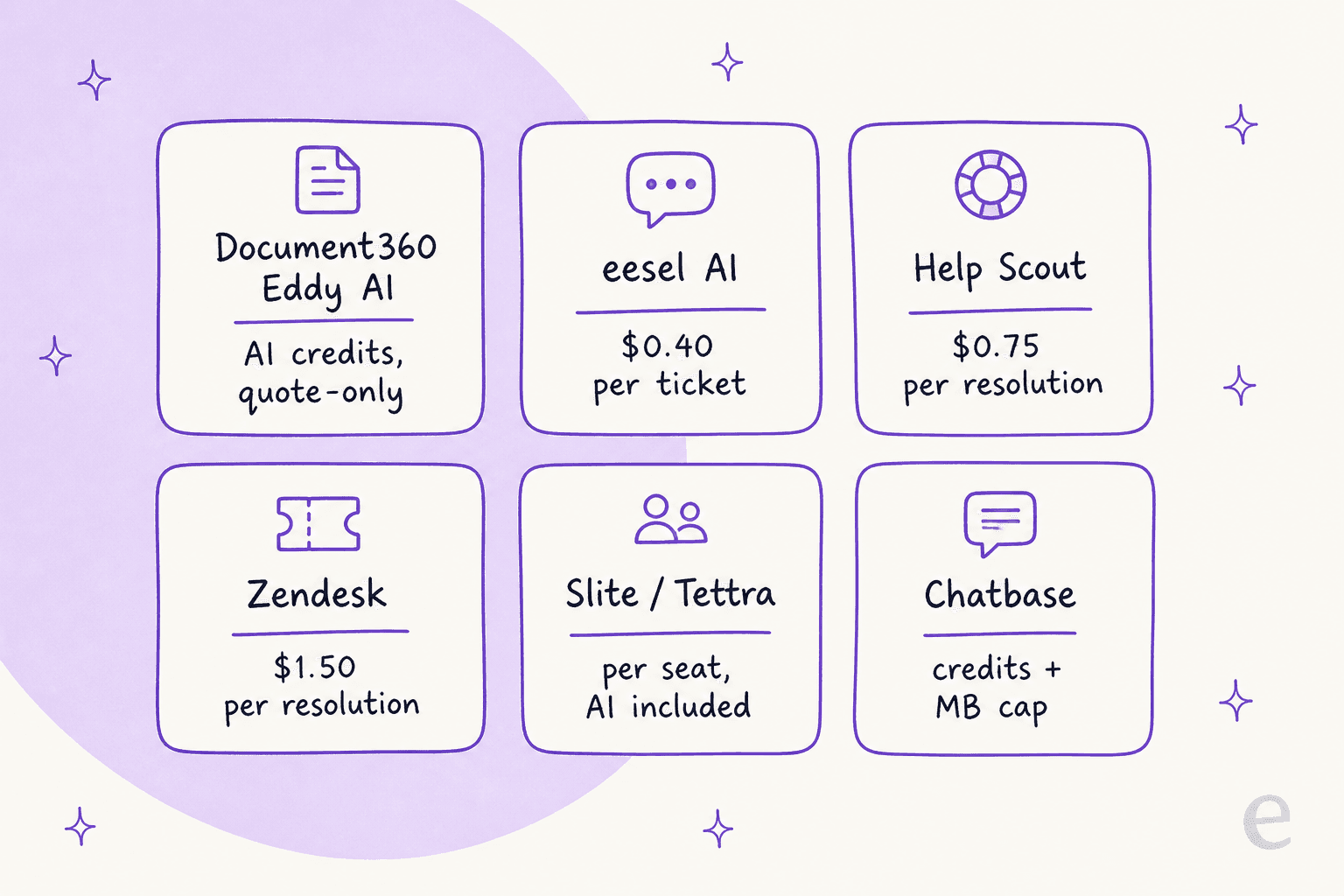
The second question is source scope, which is where Eddy's walls really matter. A KB-locked bot answers only from what you have loaded into it. A layered bot reads across your tickets, macros, help center, internal docs, and public site, and returns one answer. For support especially, that difference is the whole ballgame.
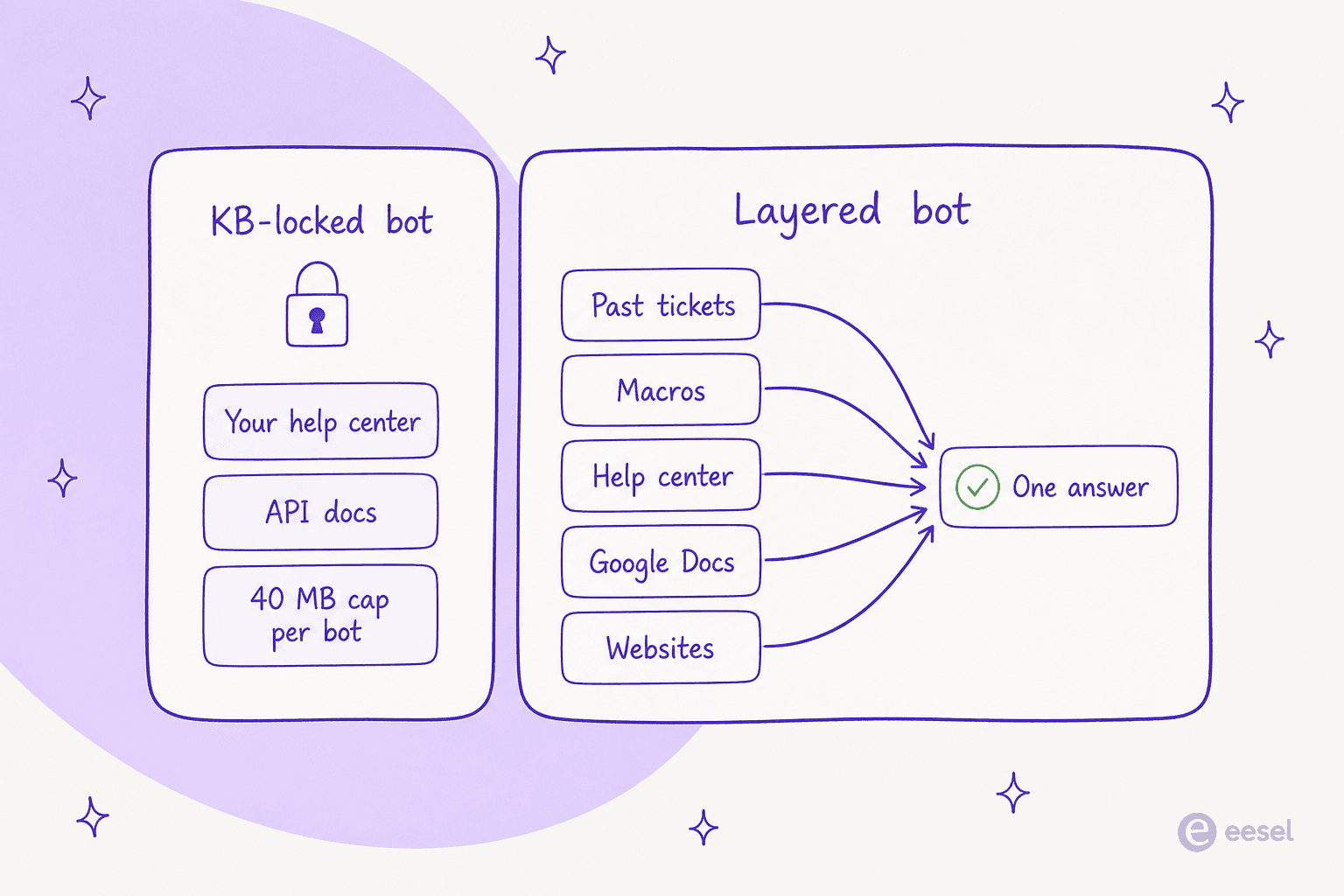
So my two-branch rule is this: if your content and workflow are fine and only the answers disappoint, layer. If the platform itself is the drag, switch.
The 8 alternatives at a glance
Here is the whole field in one table before I go deep on each. Prices are the lowest paid entry that includes AI answering, and "answers from tickets?" is the tell for anyone doing customer support rather than pure documentation.
| Tool | Best for | AI answering | Billing unit | Starting price (AI included) | Answers from tickets? | Path |
|---|---|---|---|---|---|---|
| eesel AI | Layering AI over your current KB and helpdesk | Trains on tickets, help center, docs, sites | 1 credit per ticket or chat | From $299/mo (500 credits), self-serve | Yes, natively | Layer |
| Guru | Governed enterprise knowledge and AI search | Cited, permission-aware agents across 100+ apps | Quote-only | Custom quote | Via connectors | Switch |
| Slite | AI-first wiki for small internal teams | "Ask" search with citations | Per seat | $10 / member / mo | No | Switch |
| GitBook | Product and API documentation for dev teams | Reader "ask your docs" assistant | Per site + per user | $65 / site / mo (Premium); bot at $249 (Ultimate) | No | Switch |
| Tettra | Slack-native internal knowledge | Kai AI assistant, no cap | Per seat | $8 / user / mo (10-user min) | No | Switch |
| Help Scout | KB plus a customer-facing agent in one inbox | AI Answers agent, 73% avg resolution | Per resolution | $0.75 / resolution add-on | Trains on KB + web | Switch |
| Zendesk | Enterprises standardised on Zendesk | AI agents on a unified knowledge graph | Per resolution | $1.50 / automated resolution | Yes, in-platform | Switch |
| Chatbase | Spinning up a doc-trained bot fast | Bot trained on files, sites, tickets | Message credits | $40 / mo (Hobby) | Pro only, via Zendesk/SF | Layer |
Now the detail.
1. eesel AI
Best for: teams who like their current knowledge base but want AI answers that actually read everything, without a migration or a sales call.
This is the "layer, don't switch" option, and it is why I'd start here. eesel AI is an AI teammate platform: you hire ready-to-work teammates for specific jobs, and each one shows up already knowing your company. The two that matter for this post are the AI helpdesk teammate, which joins your support queue and answers or drafts replies, and the AI blog writer for teams whose knowledge base is really a content operation.
The reason it beats Eddy on answers is source scope. Instead of loading a 40 MB slice into a walled bot, eesel trains on your existing help center, your past tickets, your macros, and connected docs across 1000+ integrations. It plugs into the helpdesk you already run, so you are not replacing Document360, Zendesk, or anything else, you are pointing a better answer engine at what you already have. If you want the AI knowledge base chatbot on your public docs, it does that too.
Two things I'd flag as genuinely different. First, you can simulate the AI against your historical tickets before it ever replies to a customer, so you see the resolution rate and the exact answers on real past questions instead of flipping a switch and hoping. Second, the price is public and fixed per month, from $299 for 500 credits (1 credit per ticket or chat) with no per-seat fee, which is the opposite of a quote-only credit pool. One customer, Global Pay, reported up to 80% time savings finding answers this way.
Where eesel is not the answer: if what you actually need is a publishing platform, a branded help center with an editor and article workflow, eesel is the answer layer, not the CMS. You still author somewhere, then let eesel do the answering.
Verdict: the first thing I'd try, because it fixes the Eddy complaints (opaque pricing, credit metering, walled answers) without asking you to move a single article. Pick it if the content is fine and the AI is the problem. Skip it if you need the authoring tool itself replaced.
2. Guru
Best for: larger organisations that want one governed, verified knowledge layer feeding both people and their other AI tools.
Guru has moved a long way from the browser-extension wiki it used to be. It now pitches itself as the "one governed knowledge layer" for a company, and its homepage opens with a sharp line: half of AI responses contain inaccuracies without verified knowledge behind them. Its Knowledge Agents give cited, permission-aware answers, its AI search spans 100+ connected apps, and it exposes all of that to ChatGPT, Claude, and Cursor through an MCP server rather than trying to be the only chat box you use.
That is a real answer to one of Eddy's limits: Guru is built to search across your tools, not just its own content. The catch is symmetrical with Document360's biggest one, though: Guru's pricing is fully quote-only. There are no per-seat numbers on the site, just one scoped "platform plus expertise" engagement priced by scale, knowledge complexity, and AI maturity. So you trade Eddy's sales call for Guru's sales call.
Verdict: a strong pick if your problem is enterprise-wide knowledge governance, not just help-center answers, and you like that it powers your other AI tools instead of competing with them. If you were leaving Document360 partly to escape quote-only pricing, note that Guru will not fix that. See how it stacks up in the Guru alternatives roundup and against Confluence.
3. Slite
Best for: small and mid-size teams that want an AI-first internal wiki with a price on the page.
Slite is the cleanest "switch" option if your Document360 use is really internal knowledge rather than a public help center. Its "Ask" feature does AI search and answers with citations, and the part I like is that Ask is included on every paid plan, starting at Basic for $10/member/month, where it answers from your Slite docs. Step up to Pro at $20/member/month and you get cross-tool search plus the autonomous Slite Agent, metered at 50 credits per seat per month, with Enterprise adding custom agent sources and SSO/SCIM.
Compared to Eddy, the appeal is transparency: a published per-seat price, AI on the cheapest paid tier, and no negotiated credit pool. The trade-off is that Slite is built for teams to find answers internally. It is a lovely wiki, but it is not a branded, customer-facing help center with the SEO and self-service tooling Document360 gives you.
Verdict: great value for an internal knowledge base with AI baked in, especially for a team under 50 people. Choose Slite over Document360 when your readers are employees, not customers. If they are customers, keep looking down this list.
4. GitBook
Best for: engineering and product teams whose knowledge base is really developer and API documentation.
GitBook is the docs-for-technical-teams pick, and it is the most Document360-like tool here in that it is a real publishing platform. It leans into keeping docs accurate for "both people and AI," with Git Sync so writers edit docs like code and stale-content detection to flag drift. Handy detail for the AI era: an auto-generated MCP server and llms.txt ship on every tier, including Free.
Read the AI gating carefully, because it is where the price lives. The reader-facing "ask your docs" chatbot, GitBook's answer to Eddy's assistive search, is Ultimate-only at $249/site/month with a 500-successful-answers/month soft limit. Lighter AI search and AI writing start on Premium at $65/site/month plus $12/user/month. So GitBook publishes its prices (a win over Eddy), but the customer-facing answer bot sits at the top of the stack, and the per-site-plus-per-user model can add up for a big docs estate.
Verdict: the best fit for dev and API docs specifically, and the transparency is refreshing after Document360's configurator. Just budget for Ultimate if the public answer bot is the whole reason you are switching. Compare it against Notion and Confluence if you are undecided, or browse the wider GitBook alternatives.
5. Tettra
Best for: small support and ops teams that live in Slack and want AI knowledge with the least fuss.
Tettra is the simplest, cheapest way to get AI answers over a team knowledge base, as long as that base is internal. It is Slack-native, so people ask questions where they already work, and its Kai AI knowledge assistant answers from your Tettra content. The pricing is refreshingly blunt after Document360: Kai AI is included on both plans with no separate AI fee and no published question cap. Scaling is $8/user/month with a 10-user minimum (so about an $80/month floor), and Enterprise is a custom quote.
The honest limit is the same one that applies to Slite: Tettra is an internal wiki. There is no branded public help center, no customer-facing self-service site, and the content model is lighter than Document360's. It answers your team's "where's the refund SOP?" questions well; it is not where you publish a polished product help center for customers.
Verdict: the value pick for internal knowledge, especially for a Slack-first team under a couple of hundred people. Bundling AI into a low per-seat price is exactly the clarity people leave Eddy for. Just do not expect it to replace a customer-facing docs platform.
6. Help Scout
Best for: support teams that want the knowledge base and a customer-facing AI agent living in the same tool as their inbox.
If you are on Document360 for a customer help center, Help Scout is the most natural "switch" because it gives you the KB (called Docs) and the helpdesk and the AI agent in one place. Docs is bundled into every plan, and the customer-facing agent, AI Answers, is an add-on at $0.75 per resolution, where a resolution only counts if the customer gets an AI reply and does not escalate or ask for more help. Help Scout publishes a 73.19% average resolution rate, gives new accounts three months of free unlimited resolutions, and lets you set a monthly spend cap.
Two fair caveats. AI Answers trains on your knowledge base and web sources, not your historical ticket transcripts, so it improves through a review loop rather than by learning from past resolutions the way a ticket-trained layer does. And its pre-launch testing is a private scenario runner, meaning you script test conversations rather than replay your real ticket archive. Both are reasonable; they are just narrower than a full dry run.
Verdict: the best all-in-one if you want to consolidate KB, inbox, and AI agent, with a genuinely transparent per-resolution price. If you want to keep your current helpdesk and only add the AI, that is the layer approach from item 1 instead. Details in the Help Scout pricing guide and the Help Scout alternatives roundup.
7. Zendesk
Best for: enterprises already standardised on Zendesk who want the KB and AI in the same suite.
Zendesk is the heavyweight. Its help center (long known as Guide) can pull knowledge from multiple sources into a unified knowledge graph, including external stores like Confluence and Google Drive, and its AI agents answer customers across channels. The knowledge base is bundled starting on the Suite Team plan at $55/agent/month billed yearly, and AI answering is billed separately at $1.50 to $2.00 per automated resolution.
For a Document360 refugee, Zendesk is the option that scales furthest and, honestly, costs the most: you are buying seats plus resolutions plus the KB, and the total for a mid-size team runs well past anything on this list. The upside is depth, the deepest enterprise KB-plus-AI combination here. It is worth noting you do not have to buy Zendesk's AI to run AI on Zendesk: an AI layer like eesel plugs into the same platform and often prices lower per unit.
Verdict: the right call only if you are going enterprise and want everything under one vendor. For most teams leaving Document360 it is more platform (and more cost) than the problem requires. Read the honest Zendesk AI review before you commit.
8. Chatbase
Best for: teams that want a doc-trained chatbot spun up in an afternoon, with no knowledge base platform to adopt.
Chatbase is the other "layer" option, and it is the closest structural match to Eddy's chatbot: you point it at your content and it answers. You feed it files, a website crawl, plain text, Q&A pairs, Notion pages, and, on the top plan, support tickets, then embed the bot. Pricing is public and tiered: Free, Hobby at $40/month, Standard at $150/month, and Pro at $500/month (a bit cheaper billed annually).
Two things to weigh against Document360. On the plus side, Chatbase has a real published price and a free tier, so you can test before you talk to anyone. On the limits side, it is not a publishing platform (there is no branded help center to author), and its knowledge is metered as training content size, from 1 MB on Free up to 40 MB on Pro, the same order of magnitude as Eddy's per-bot cap. Training on your own ticket history is possible, but only on the $500 Pro plan and only if that history lives in Salesforce or Zendesk.
Verdict: a fast, cheap way to get a doc-trained bot live, and a fine choice if you just need answers on a website. For support at scale, the small training caps and the ticket-source gating make a ticket-native layer the stronger long-term pick. The best Chatbase alternatives post covers where it runs out of room.
So which one should you pick?
Strip it back to the two questions from the top:
- Keep your content, fix the answers? Layer. eesel AI is my default because it reads your tickets and docs, works on your current helpdesk, simulates before it goes live, and starts at $299/month for 500 credits. Chatbase is the lighter website-only version.
- Replace the whole platform? Match it to your reader. Internal team wiki, go Slite or Tettra. Developer docs, go GitBook. Enterprise governance across every app, go Guru. Customer support with the KB, inbox, and agent together, go Help Scout or, at the top end, Zendesk.
The mistake I'd avoid is switching platforms when you only needed to switch answer engines. A migration is weeks of work; a layer is live the same day.
Try eesel on the knowledge base you already have
If the honest problem with Eddy AI is the answers and the pricing, not the articles, eesel AI is the shortest path to better answers. It connects to your existing help center, past tickets, and docs, runs inside the helpdesk you already use across 1000+ integrations, and lets you simulate against your tickets so you know the resolution rate before a single customer sees it. No migration, no quote-only credit pool, just a fixed monthly price from $299 and a free plan with 100 credits and no sales call.
You can try eesel free and point it at your current knowledge base in a few minutes.