

Claude for Slack today means Claude Tag: one shared @Claude per workspace, Team and Enterprise plans only, billed by usage instead of seats, with spend caps starting at a $500 monthly preset. For a support team it is a strong first responder in an internal #help or triage channel. It is a weaker fit for customer-facing Slack: it stays silent in Slack Connect channels by default, runs without memory when you switch it on there, and has no ready-made helpdesk connector.
If the questions come from customers or need ticket actions with sign-off, eesel joins Slack as a support teammate that answers from your docs and helpdesk and asks for approval before it acts. With the eesel CLI, a coding agent like Claude Code can connect Slack, upload your help articles and test the answers, while a Slack admin still approves the install.
What does "Claude for Slack" mean in 2026?
It means something different from a year ago. The original Claude in Slack app was single-player: each person linked their own claude.ai account and chatted with Claude in DMs, the assistant panel or threads. On August 3, 2026, that app switched over to Claude Tag, and since October 5, 2026 the earlier version no longer answers in channels of any workspace paired with a Claude organization.
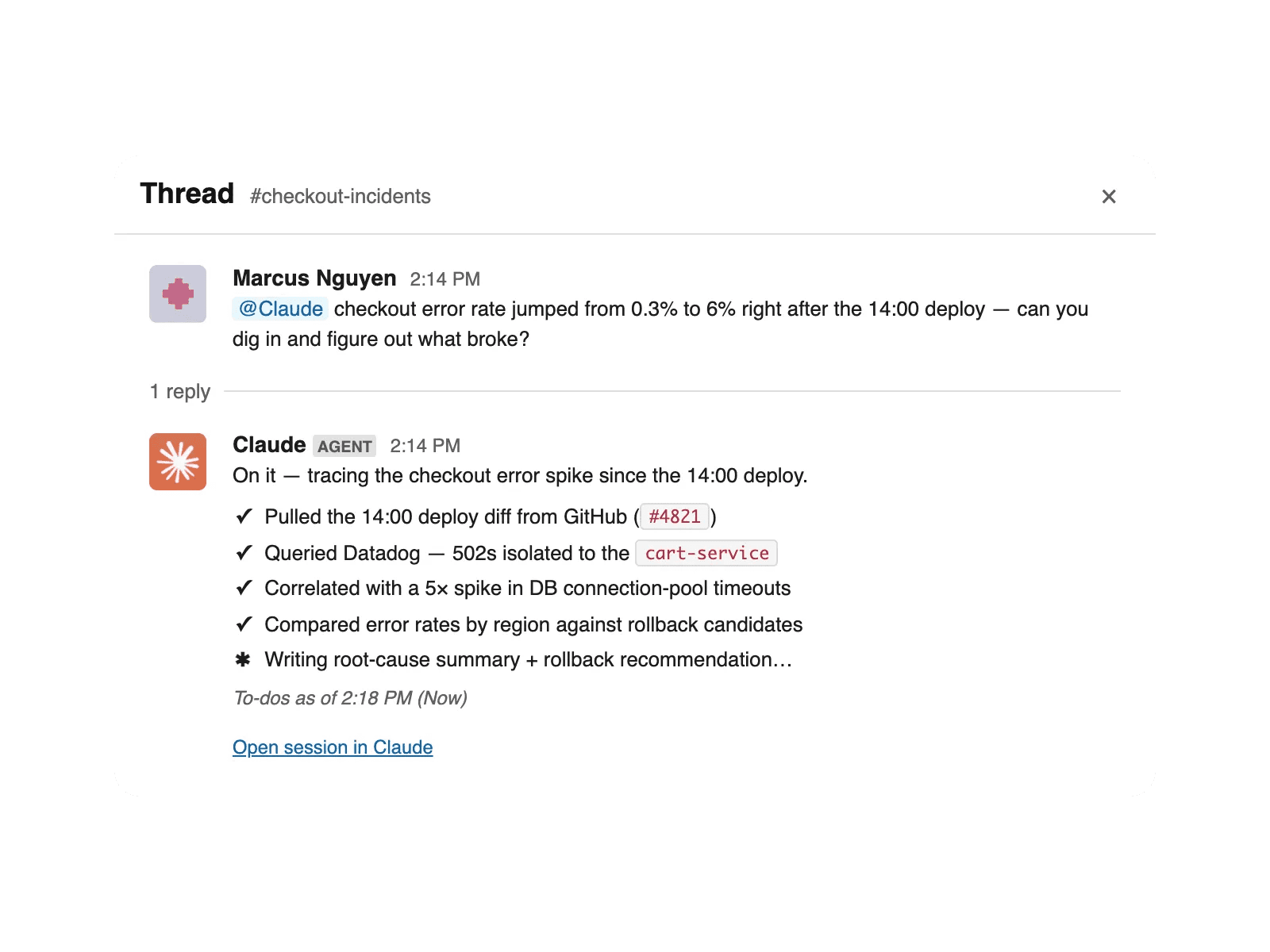
I build agents at eesel, and the migration table Anthropic published is the clearest summary of the change I have seen. The old app used each person's account and kept no memory. Claude Tag runs under one agent identity with organization-level service credentials, keeps one persistent session per thread, remembers things per channel, and is set up once by an Owner. Anthropic calls them "two versions of the same @Claude Slack app, not two apps," but for anyone budgeting or doing security review, they behave like two different products.
There is one more twist that most coverage skips. Slack's own Slackbot is "powered by Claude," according to Slack's Dreamforce 2026 post, and it has crossed one million monthly active users. So plenty of teams already use Claude in Slack without installing anything from Anthropic. They just don't see the name.
The four ways to run Claude in Slack
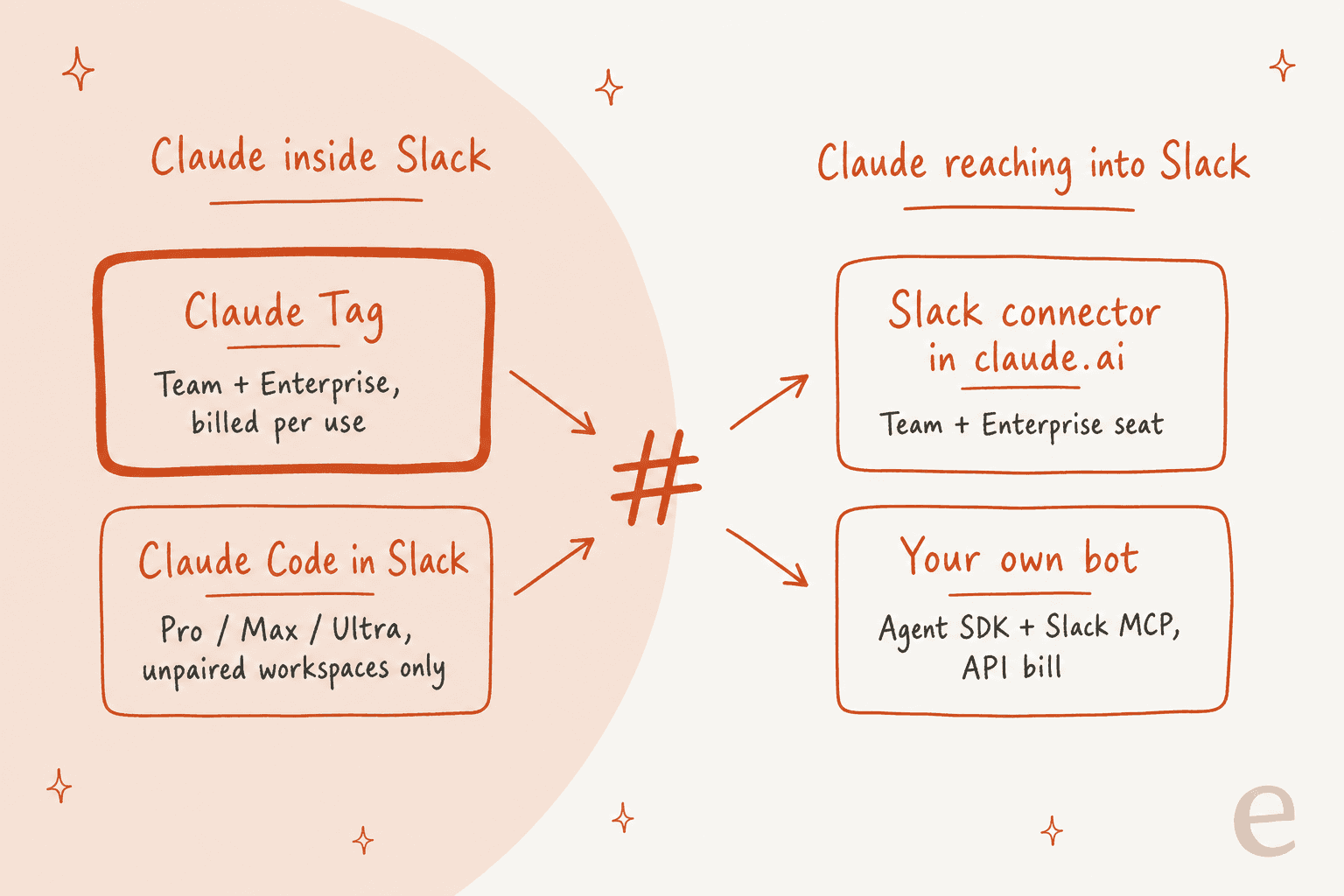
There are four routes, and they split along one question: does Claude live inside Slack, or does Claude reach into Slack from somewhere else?
| Route | Where Claude runs | Plans | How it bills | Best for |
|---|---|---|---|---|
| Claude Tag | Inside Slack channels, DMs and the assistant panel | Claude Team or Enterprise (public beta) | Org usage balance at list price, no per-seat charge | Shared team channels: triage, incidents, internal questions |
| Slack connector in claude.ai | In claude.ai, reading your Slack | Claude Team or Enterprise, app installed first | Your Claude seat | One person researching Slack history |
| Claude Code in Slack | Inside Slack channels, coding tasks only | Pro, Max or Ultra, workspaces not paired with Claude Tag | Your own plan limits | A developer turning a thread into a PR |
| Your own bot (Slack quickstart) | Your hosted app, using the Claude Agent SDK | Anthropic API key | API tokens plus hosting | Teams with engineers who want full control |
Most support teams will only seriously look at the first row. The other three matter mostly as escape hatches when Claude Tag doesn't fit, so I'll cover Claude Tag in depth first.
How do you set up Claude Tag?
Setup takes two people: an Owner in your Claude organization and a Slack workspace admin. Per Anthropic's setup guide, the prerequisites are stricter than most app installs.
- A Team or Enterprise plan. Free, Pro, Max, Ultra and third-party deployments are out.
- No zero data retention, customer-managed keys or HIPAA setup. Claude Tag "stores channel memory and session transcripts, which ZDR doesn't permit."
- Routines switched on in your Claude organization settings, or Claude just replies that it's unavailable.
- Usage credits loaded on a Team plan, because "nothing runs until credits are loaded."
- At least one public channel to launch in.
The steps themselves are short:
- A Slack admin adds the Claude app from the Slack Marketplace.
- In a channel, run
/invite @Claude, then send@Claude connectwith no other text. Claude replies with a pairing code that works once and expires in 15 minutes. - The Claude Owner pastes the code at
claude.ai/admin-settings/claude-tagand clicks Pair workspace. - Optionally connect GitHub through the Claude GitHub App.
- Pick a monthly spend limit (
$500,$1,000,$2,500,$5,000, Unlimited or a custom figure up to$1,000,000;$2,500is preselected), choose channels, and launch.
The part that takes real thought comes after launch. Claude Tag "starts with no access of its own to your external systems," so every tool you want it to use needs a credential. Anthropic's advice is to create a dedicated account for Claude, give it "the narrowest role that covers the work, read-only where the tool offers it," and add that key under Claude's access > Connectors. Their own suggested test for a support tool is to ask for the newest open tickets and confirm the request shows up in that tool's audit log under Claude's account. That is a sensible pattern, and it's the same least-privilege thinking you would want from any AI agent near customer data.
What does Claude Tag cost?
There is no seat price. Channel, thread and group-DM work draws from an Owner-funded usage balance, counted at list API rates, and capped by the spend limits you set. Anthropic is upfront that "there's no published per-task cost guidance", and its advice is to run a pilot with a cap and watch the per-channel breakdown.
Here is how the spend-limit docs split the bill:
| Work | Bills to | Capped by |
|---|---|---|
| Channel work | Org usage balance | Org spend limit plus per-channel limits |
| Group DM work | Org usage balance | Spend limit plus a default per group DM |
| Reading a channel, deciding whether to reply, short replies from memory | Nothing | Not counted |
| 1:1 DM from someone with a Claude account | That person's seat | Their seat limits |
| 1:1 DM from someone without a Claude account | Org usage balance | 7 days, $50 or 50 sessions per member, then they must connect an account |
Three details matter for budgeting a support channel:
- Team plans prepay, Enterprise doesn't stop. On Team, Claude won't answer in channels until the balance is funded. On an invoiced Enterprise plan, usage "bills to your invoice with no upper bound until you set a spend limit."
- Limits are per channel, not per person. Anthropic lists "per-user spend caps on channel work" as a control that isn't available. A busy #help channel is one bucket.
- The launch credit is gone. Anthropic's one-time credit of
$25,000per Enterprise org and$2,500per Team org expired on October 1, 2026, so a new rollout pays list usage from day one.
For a sense of what "list price" means, Anthropic's current API rates run from $0.10/$0.50 per million input/output tokens on Haiku 5.5 to $4/$20 on Opus 5.5, and admins can now pick the model per channel. A routing channel probably doesn't need the largest model. The Anthropic API pricing guide has the full model table, and the Claude Tag pricing post goes deeper on modeling spend.
Where Claude Tag works well for support teams
The strongest support use is the one Anthropic documents itself: triaging an intake channel. Think #it-help, #ask-billing, #support-escalations, or any channel "where people post questions and someone has to route or answer each one." It works on Slack content alone, and you can add docs (Drive, Notion) and an issue tracker (Linear, Jira) when you're ready.
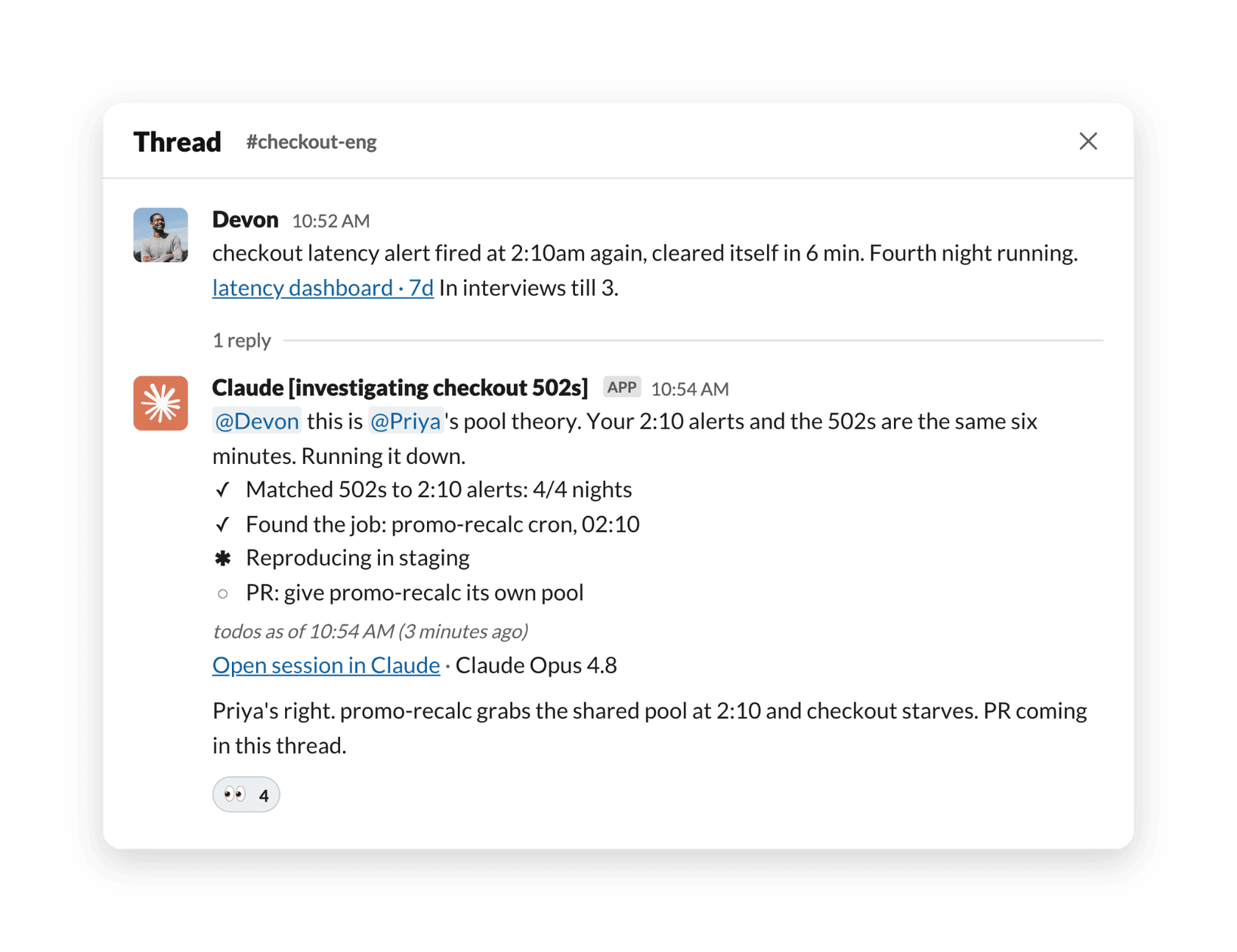
The setup is mostly one standing instruction. Anthropic's example tells Claude to "check whether it duplicates something already reported, answer it directly if the answer exists, and otherwise route it to the right owner with a one-line summary." Standing answers can live in Channel instructions or a connected doc, so you're building a small knowledge base for the channel as you go.
A few things make this better than older Slack bots I've worked with:
- It reads the room before speaking. A post-launch update says Claude now uses context from across the channel and is "roughly 30% better" at deciding when to reply, and that extra context doesn't count toward spend.
- Memory is per channel and editable. Anyone in the channel can read and correct what Claude remembers, and Owners can edit or delete it.
- Real teams are using it this way. In Anthropic's startup guide, fintech Kikoff runs it as first responder across triage channels, including
#support, where "Claude takes the first pass on support tickets." Anthropic's own data channel saw Claude answer "more than 75% of questions people posted, typically within a minute or two" over a month.
That matches what I see at eesel. Slack is often a bigger support channel than people admit: one martech team eesel works with handles around 1,200 Zendesk tickets a month and roughly 2,800 more through Slack. When that much support runs through Slack, a triage teammate in the channel stops being a side project. If internal questions are your main load, the guide to AI for internal support teams covers the wider field.
Where Claude Tag stops for customer support
The limits show up when the person asking isn't on your team, or when the answer has to land in a helpdesk.
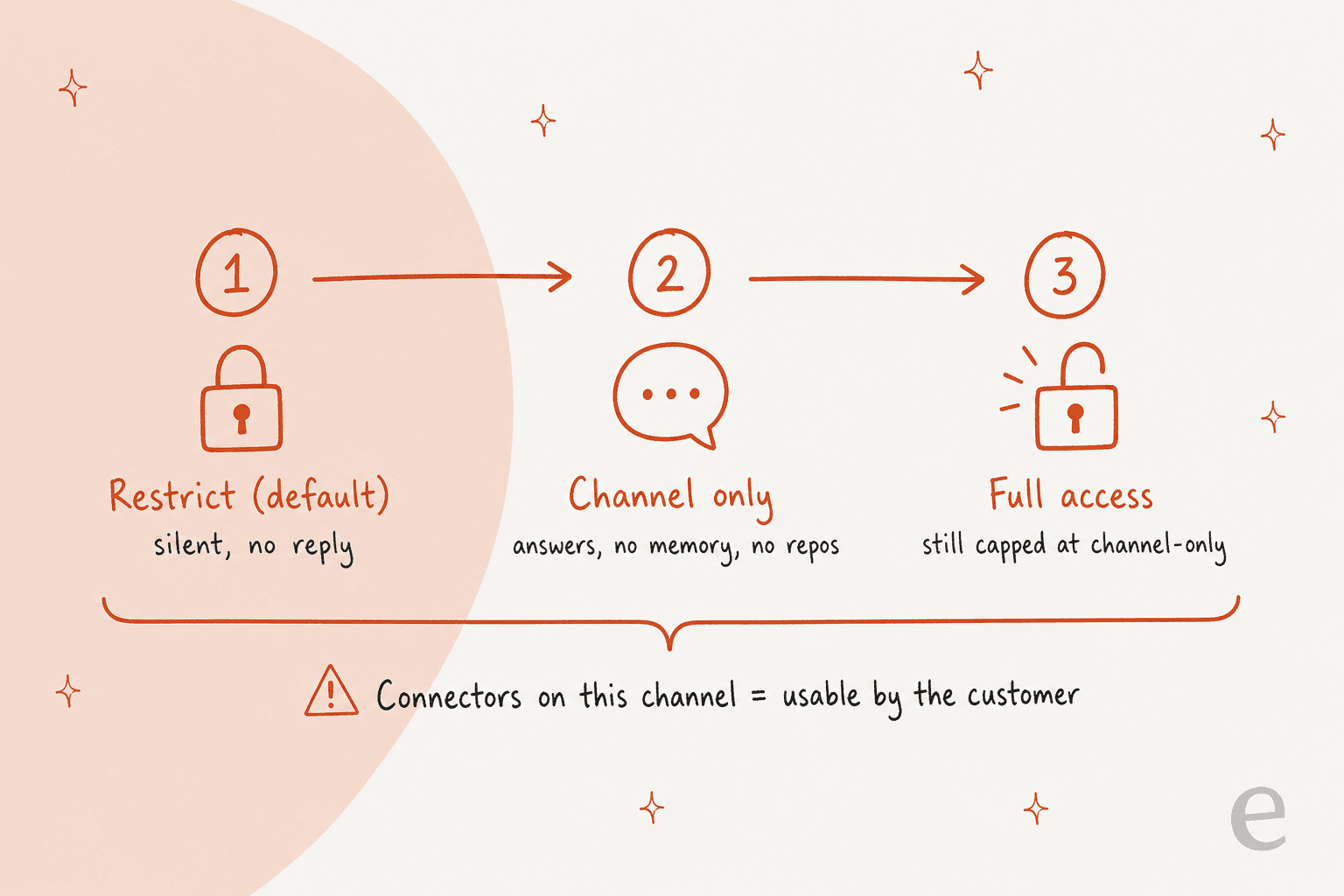
Customer channels are off by default. In a Slack Connect channel shared with another company, the default Restrict setting means Claude doesn't answer and gives no notice. Switch it to Channel only or Full access and Claude will answer, but per Anthropic's access docs it runs with "no memory, including this channel's own, and no skills," no repos, no workspace search and no routines. That's a fair safety default. It also means the shared channel with your biggest customer gets the least capable version of Claude.
Connectors become the customer's connectors. This is the line I'd want every support lead to read twice. Anthropic says "Claude can use the bundle's connectors for anyone it answers in the channel, including the other company's people," and that you should treat a channel's instructions and connectors "as available to the other company." If you attach a CRM or billing connector to a customer channel, the customer can ask Claude to use it.
Claude can't post into shared channels from elsewhere. The how-it-works page is direct: "Claude can't post into a Slack Connect channel or a channel shared across workspaces, wherever you ask from." You can't ask it in #support-internal to go update the customer.
Guests are blocked. Slack's own help center says guests can't use AI apps or agents, and Claude Tag blocks channels with a guest present unless you change the setting.
There's no helpdesk connector yet. Anthropic's connection guides cover Datadog, Sentry, PagerDuty, Linear, Asana, Jira and Confluence, Notion, Google, HubSpot, Salesforce, Gong, GitLab, BigQuery, Snowflake, Amplitude, Stripe and Vercel. There's no guide for Zendesk, Freshdesk, Gorgias or Help Scout, so wiring one up means a custom connector or MCP server and a service account you manage.
Review is thin for regulated teams. "No page in Slack or in your organization's Claude Tag admin settings shows admins the individual messages people send Claude." Enterprise orgs can read transcripts through the Compliance API. Teams on zero data retention or HIPAA setups can't use Claude Tag at all.
None of this makes Claude Tag a bad product. It's an agent built around engineering and internal operations, and its defaults reflect that. It just means "Claude for Slack" and "AI for customer support in Slack" are two different jobs. The Slack AI for support teams guide covers the same gap on Slack's side.
Using the Slack connector from claude.ai instead
The second route flips the direction. Instead of Claude living in Slack, the Slack connector lets Claude in claude.ai search your channels, DMs and files for context. It needs a Team or Enterprise plan, the Claude app installed in Slack first, an Owner to switch it on, and then each member connects their own account.
Anthropic's docs describe it as search, but the connector directory listing shows 11 tools, including slack_send_message, channel and thread reads, and canvas tools. That's handy for a support lead who wants to ask "what did we tell this customer last month?" from one chat window. It's still one person's research tool, not a teammate in the channel, and every answer goes back to the person asking.
The same plumbing is available outside Claude. Slack runs its own MCP server at mcp.slack.com/mcp, with tools for search, sending and scheduling messages, reading full channel history and threads, canvases, lists and file upload. It runs on each user's own OAuth token, and "only directory-published apps or internal apps may use MCP."
Building your own Claude bot for Slack
If Claude Tag's defaults don't fit and you have engineers, you can build your own. Slack's agent quickstart walks through a support agent called Casey, with the Claude Agent SDK as one of three framework options: slack create agent, pick the claude-agent-sdk/ folder, add an ANTHROPIC_API_KEY, and run it.
Two catches matter more than the code.
- Casey runs on mocked data. Slack says plainly that "you'll want to add your own tools to fetch accurate data." Knowledge retrieval, ticket actions, approvals and hosting are all yours to build.
- Slack tightened its API for AI apps. Since May 29, 2025, commercially distributed apps outside the Marketplace get 1 request per minute and 15 objects, per Slack's rate limit changelog, on
conversations.historyandconversations.replies. Internal apps you build for your own workspace keep the higher limits. Slack's API terms also bar third-party apps from using Slack data to train a model or bulk-exporting messages.
I see this path from the other side at eesel. A few teams have left eesel to build on the Claude API directly, and it can work when you have the engineers to keep it running. One customer who chose to buy instead put the trade-off plainly:
"We could try to write our own LLM application but we didn't want to invest our time into that. We wanted something that we would not have to maintain."
Karel, GENERAL BYTES
The step-by-step on building a Slack AI chatbot covers the DIY route in more detail.
What are people saying about Claude in Slack?
The loudest reaction to Claude Tag's launch, in a 184-comment Hacker News thread, wasn't about answer quality. It was about shared access. One person who had tried it put the worry plainly:
"From what I've seen trying to play around with Claude Tag, it uses shared credentials. You set it up with Github org access, add it to public channel, and all random people in that channel can now ask it to do stuff with code..."

That's the trade-off Anthropic designed for on purpose: one agent identity per channel instead of each person's own login. It's workable when channels map neatly to teams, and harder when one channel mixes people who shouldn't see the same data. An admin setting it up with a dedicated Google account read the docs the same way: anyone who can tag Claude can ask about anything that account can open.
The second theme was spend. Claude Tag is billed by usage on top of existing Claude seats, and a Team admin flagged the default:
"So if I activate something (Claude Code, Claude Tag) and don't actively go to the usage page to set a spending limit, there is no limit."
Anthropic's setup flow now asks for a spend limit at launch, with $2,500 preselected, and Team plans have to prepay, so that edge is softer than it was in June. Builders who had made their own Claude bots were calmer about cost. One described their approach as "a deterministic filter and then a haiku pass for messages that pass the filter," with "negligible token cost," and another builder called it "very useful to delegate things like create a ticket based on a discussion." That's a decent hint for anyone tuning Claude Tag too: a smaller model per channel for routing, and the larger one only where the work needs it.
Which route should a support team pick?
The question to start with isn't "which Claude," it's "who is asking, and where?"
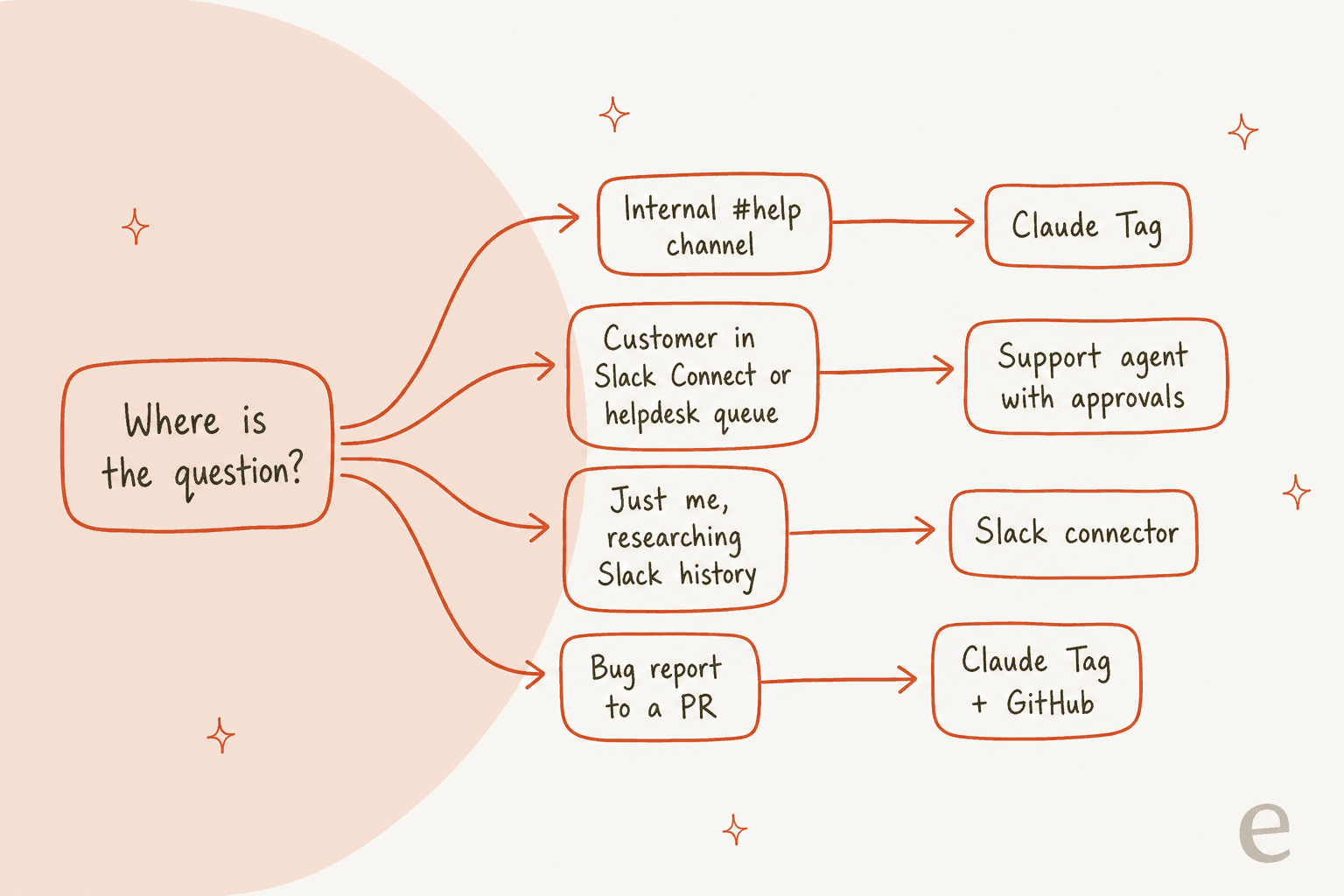
- Internal #help or triage channel. Claude Tag is the strongest pick if you're already on Claude Team or Enterprise. Start in one channel, set a per-channel cap, write the standing triage instruction, and connect read-only docs before anything that writes.
- Customers in Slack Connect, or a helpdesk queue. Use a support agent built for that job, with helpdesk actions and an approval step, rather than turning Claude Tag's guest setting up and hoping the connector scoping holds.
- One person digging through Slack history. The Slack connector in claude.ai is enough.
- Bug reports that should become pull requests. Claude Tag with the Claude GitHub App, or Claude Code in Slack if you're on Pro or Max in an unpaired workspace.
If you're not on a Claude business plan at all, compare against the field before upgrading just for Slack. The list of AI tools for Slack support and the Claude Tag alternatives roundup are good starting points, and if you also use ChatGPT, the ChatGPT for Slack guide covers OpenAI's side.
How eesel handles support work in Slack
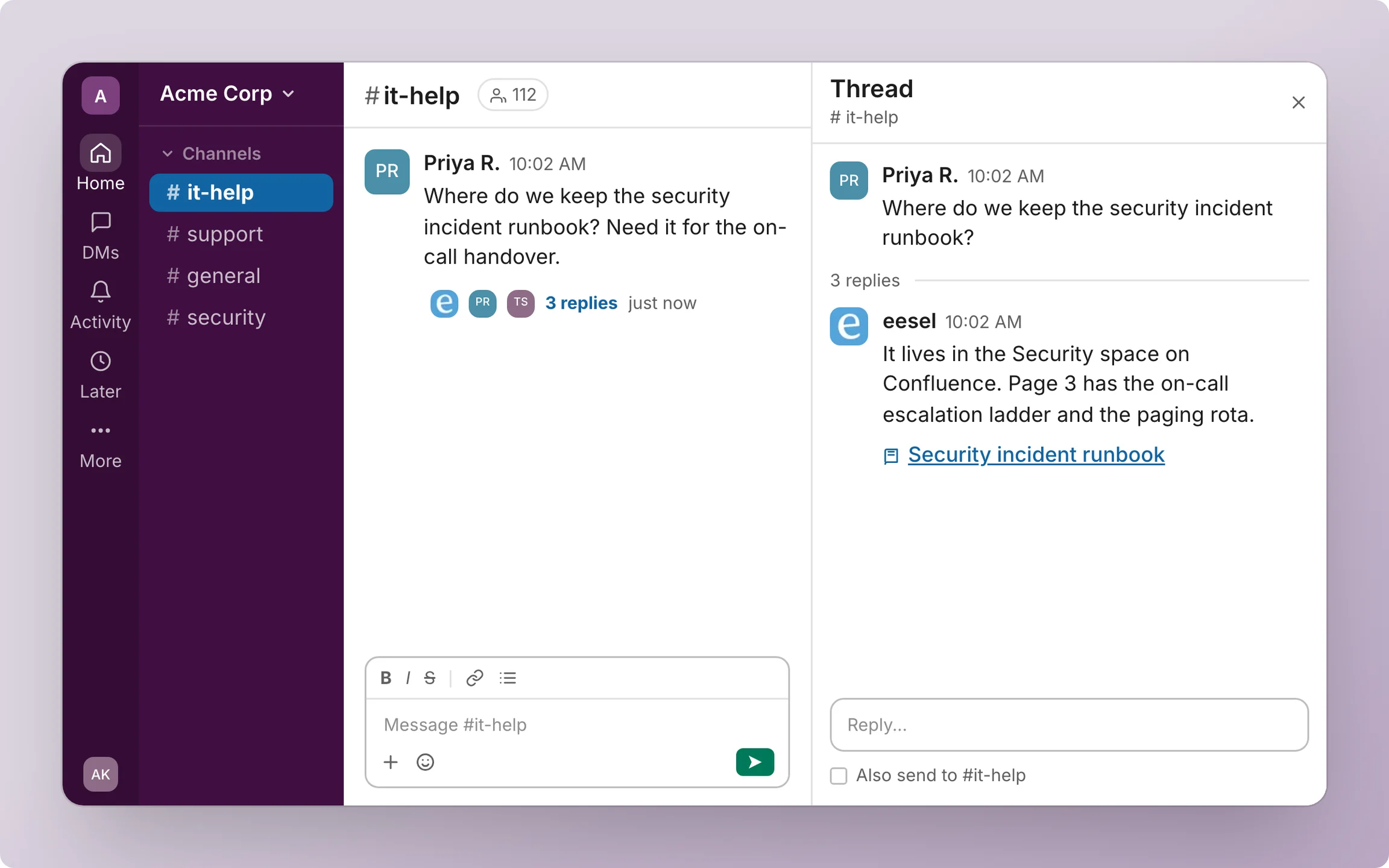
This is the gap eesel was built for. eesel is an AI teammate platform, and the AI helpdesk teammate joins your Slack the way a new support hire would: people @mention it or DM it, and it answers in the thread with a link to its source. It reads Slack history live rather than copying your workspace into a store, and it learns from your Confluence, Notion, Google Drive, help center and past tickets.
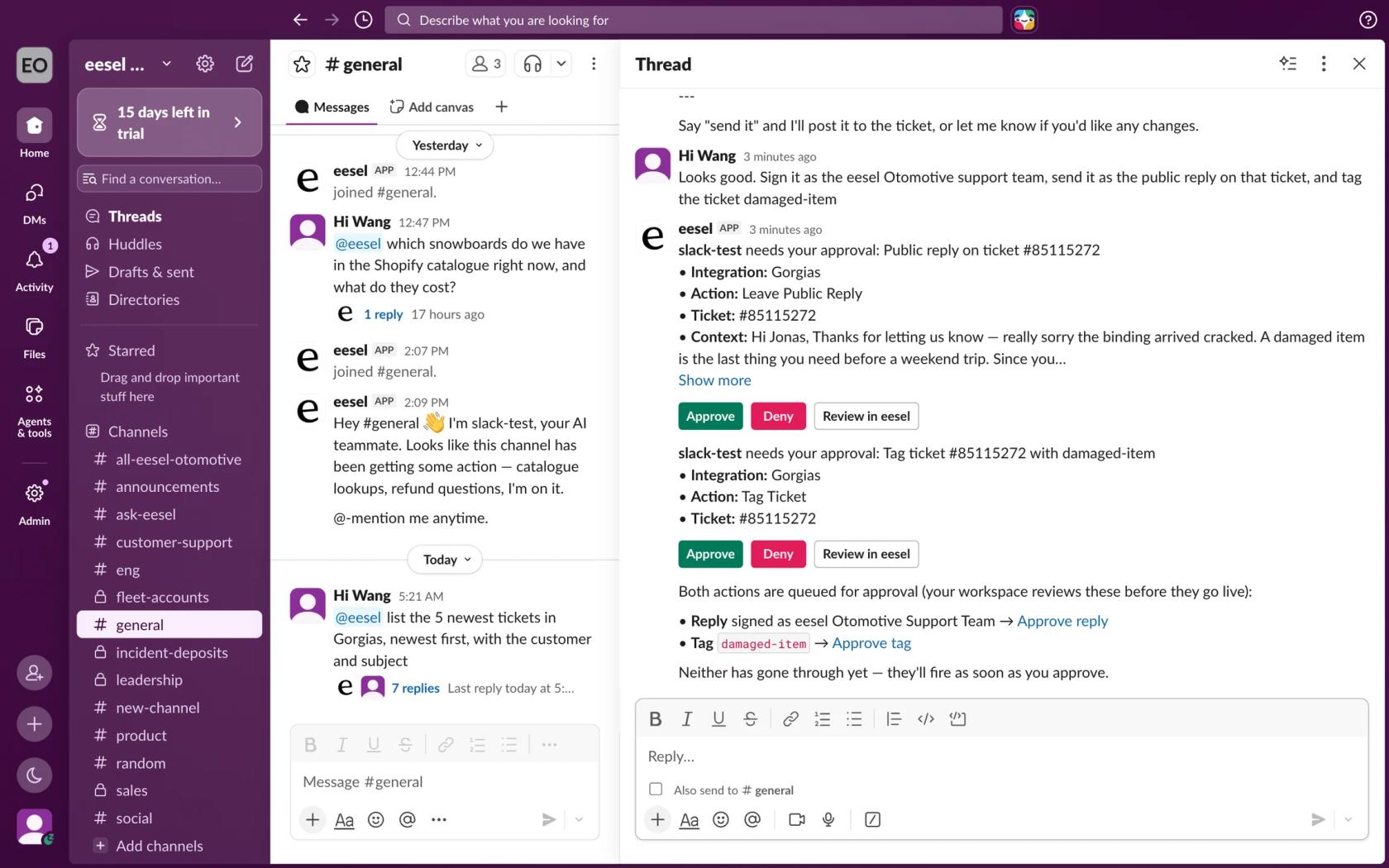
The part that matters for support is what happens when the answer needs an action. From a thread, eesel can look up a ticket in a connected helpdesk like Zendesk or Freshdesk, draft a customer reply, or create and route a ticket, for example in Jira. Anything that writes shows up as an approval card with Approve and Deny, and only people with edit access to the eesel workspace can decide.
Here is how that looks with real customers:
- Swiftreg runs eesel on Zendesk, where it handled
2,100tickets and sent1,500public replies in a month. Slack is connected too, so the team can ask eesel a question there as well as in Zendesk. - Lesson Pro works across two Zendesk accounts, about
1,900tickets a month, and every Monday a scheduled run posts each booking agent's plan for the week into a Slack channel. - InDebted uses eesel as the first responder on its IT helpdesk in Jira, with a Slack bot alongside it, and handles
15%of incoming issues with a goal of55%.
Pricing is per credit rather than per seat: eesel plans start at $299 a month for 500 credits, and a Slack question uses a credit the same way a ticket does. There's a 7-day free trial with 100 credits.
And if your team already lives in Claude, the two aren't either/or. Every eesel workspace is also an MCP server, so you can add it to claude.ai as a custom connector and talk to the same Slack agent from Claude. With the eesel CLI, Claude Code can run eesel integrations connect slack, upload your handbook or exported help articles, set up the mention automation, and run a simulation on past tickets to check the answers before anyone relies on them. A Slack admin still approves the install and invites the bot to channels.
Try eesel in your Slack
If your Slack questions come from customers, or the answer needs to touch a ticket, eesel is the shorter path than wiring a helpdesk into Claude Tag yourself. It joins Slack in a few minutes, answers from your docs and helpdesk with sources linked, and waits for your approval before it acts. Try eesel free for 7 days.