


ChatGPT for Salesforce is now an official product, and it is built for sellers. The Salesforce plugin in ChatGPT, part of ChatGPT for Sales since November 17, reads and writes your CRM records, but it needs two paid licences: ChatGPT Business or Enterprise, and the Agentforce for Sales add-on at $125 per user per month, or an edition that includes it. Admins can reach any object through a custom MCP connector.
None of these routes replies to customers on a Case. For that, eesel works inside your Salesforce org as a support teammate that drafts replies for your team to approve, and with the eesel CLI, Codex can set it up and test its answers before anything goes live.
What does "ChatGPT for Salesforce" mean in 2026?
It means three different products, and most guides still describe a fourth that's on its way out. I write a lot about what people actually mean when they search a phrase like this one, and "ChatGPT for Salesforce" hides at least three buyers: a seller who wants ChatGPT to know their pipeline, an admin who wants it to query any object, and a support lead who wants it to clear cases.
The official piece has been building for a year. In October 2025, Salesforce and OpenAI announced their partnership, and Marc Benioff posted about it the same day:
"Salesforce + @OpenAI partnership unleashed! 🤖 New Agentforce 360 apps now LIVE in ChatGPT — query CRM, build Tableau dashboards, analyze conversations, even close deals with Agentforce Commerce."
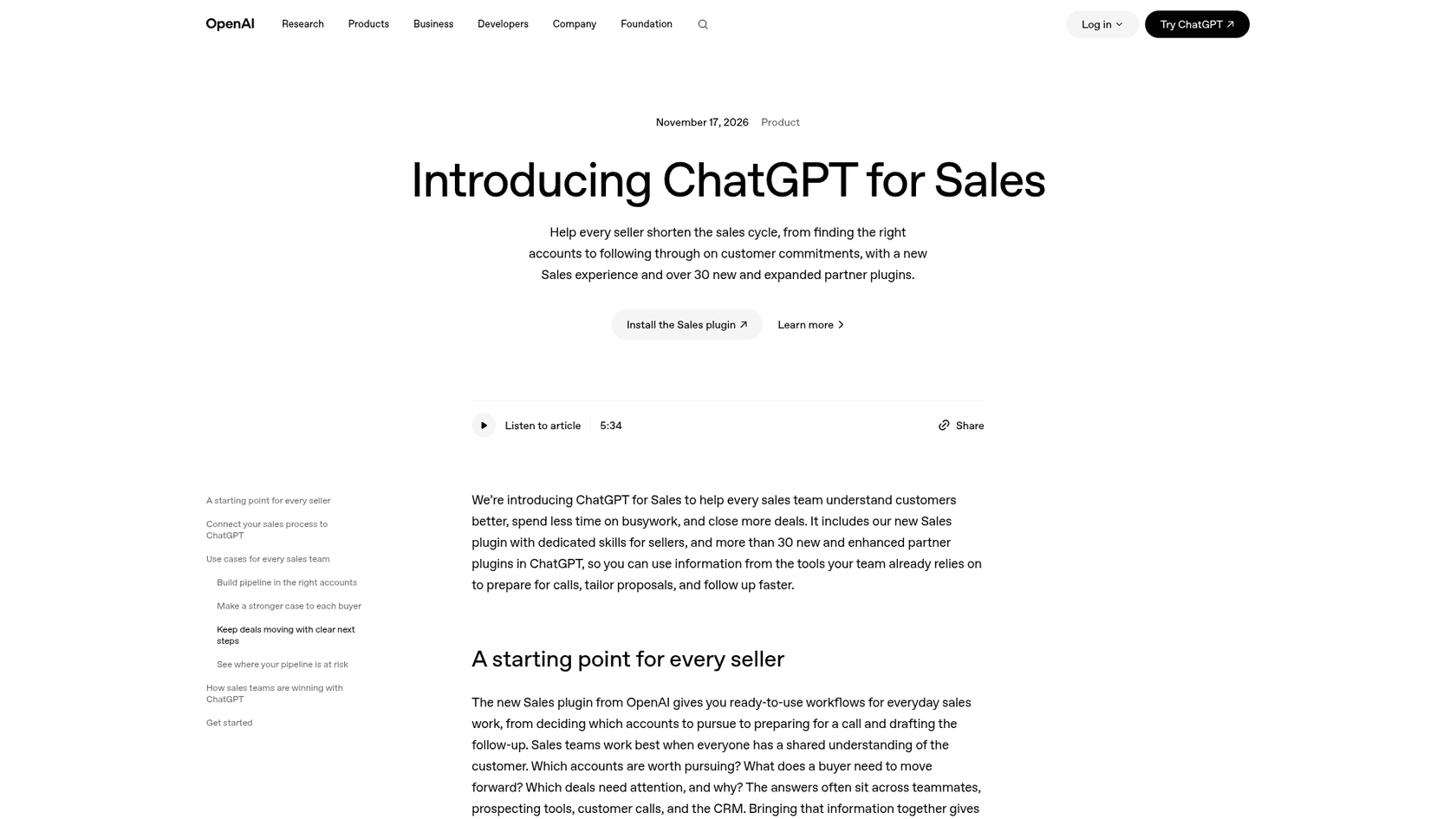
The app that stuck is the sales one. On December 17, 2025, Salesforce launched the Agentforce Sales app in ChatGPT as an open beta, and by September 2026 Salesforce said hundreds of organizations use Agentforce Sales in ChatGPT Work (Salesforce blog). Yesterday, OpenAI made it one of the partner plugins in a new Sales experience with "more than 30 new and enhanced partner plugins." That's the hub of the story, and it's worth knowing exactly what it does and doesn't cover before you buy anything.
The five ways to use ChatGPT with Salesforce
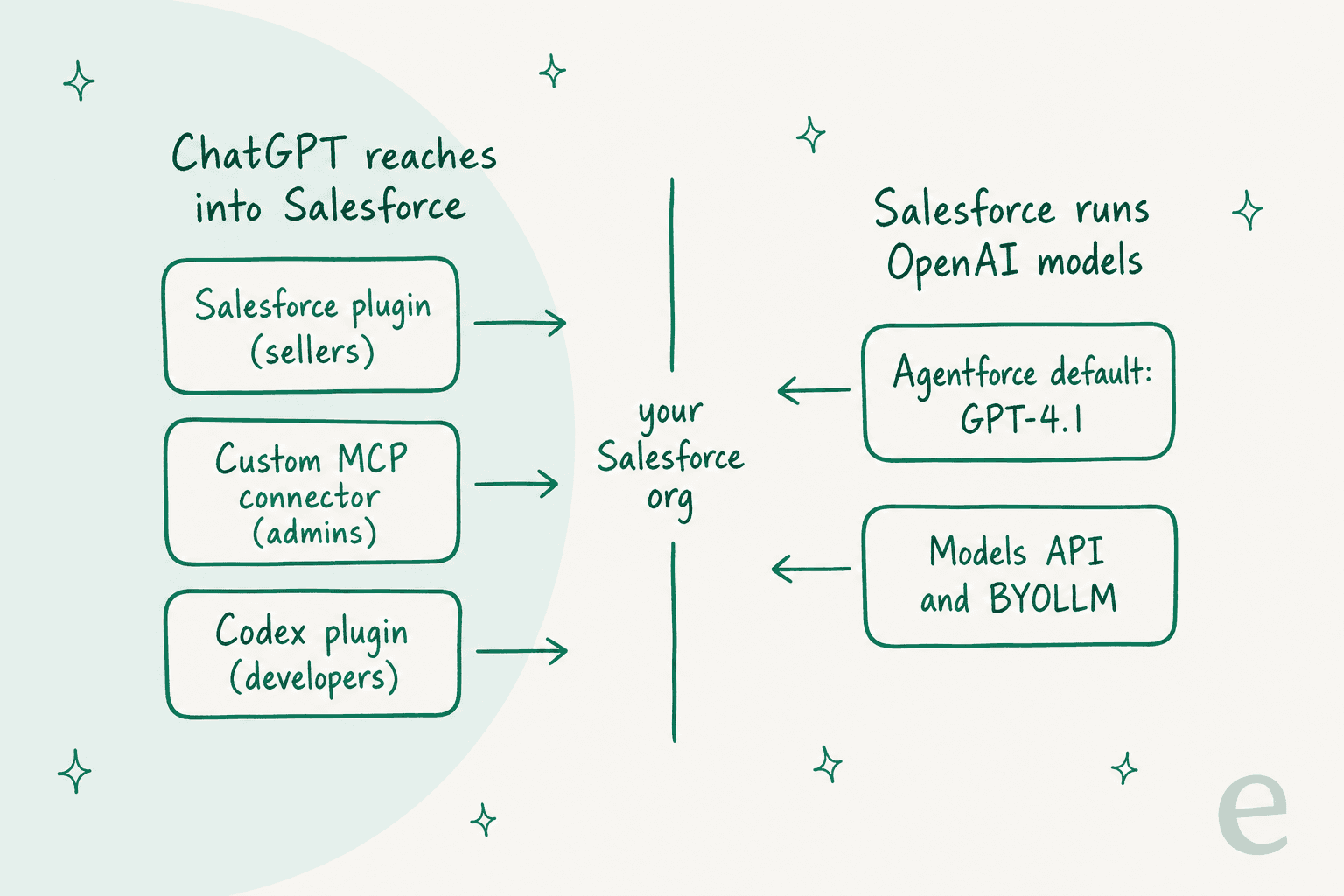
The routes split on one question: is ChatGPT reaching into Salesforce, or is Salesforce running OpenAI's models inside its own product?
| Route | Where it runs | Who signs in | Status | Best for |
|---|---|---|---|---|
| Salesforce plugin (Agentforce Sales app) | ChatGPT, ChatGPT Work and Codex | Each seller, with their own Salesforce login | Beta | Pipeline reviews, account briefs, CRM updates |
| Custom MCP connector to hosted MCP servers | ChatGPT web | Each user | GA servers, billing changing | Admins and ops who need any object |
| Agentforce Coworker through MCP | ChatGPT and other surfaces | Each user | Rolling out | Employees already on Coworker |
| OpenAI models inside Agentforce | Inside Salesforce | Salesforce runs it | GA, the default | Customer-facing agents on Salesforce |
| Codex with the Salesforce plugin | Codex | The developer | Rolling out | Salesforce developers |
The first three are ChatGPT reaching into Salesforce, and all three were designed around employees, not customers. The fourth is the only one that talks to customers, and there it's Agentforce doing the talking, with an OpenAI model underneath.
How does the Salesforce plugin in ChatGPT work?
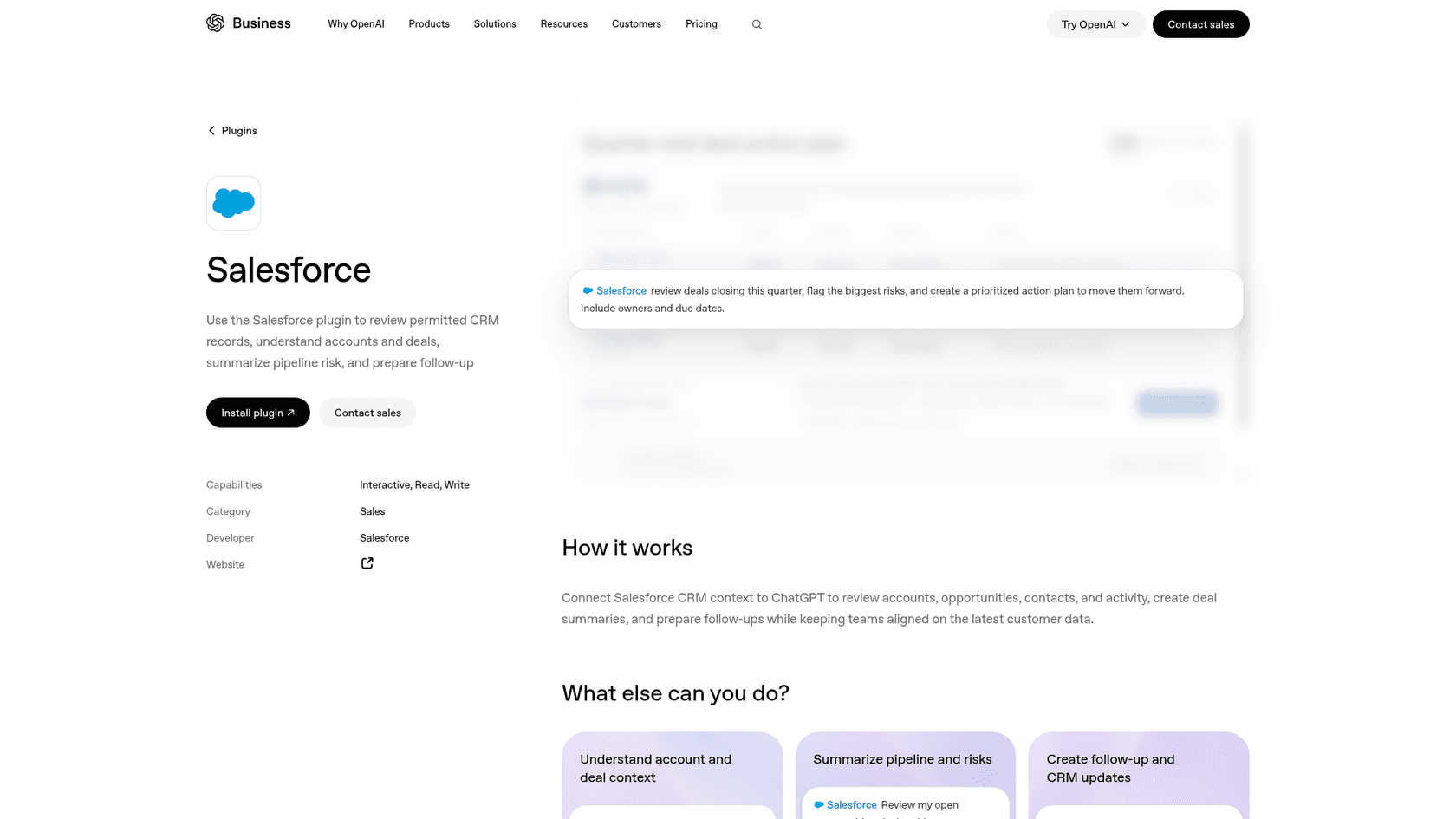
It's a plugin published by Salesforce that wraps one app, Agentforce Sales, and six skills: salesforce, salesforce-account-brief, salesforce-automation, salesforce-pipeline-review, salesforce-querying and salesforce-writeback. OpenAI lists its capabilities as "Interactive, Read, Write," and the plugin page describes the job as reviewing "accounts, opportunities, contacts, and activity," creating deal summaries and preparing follow-ups.
In practice, a seller asks things like "Show me my new uncontacted leads" or "Update the opportunity to Closed Won," and the app pulls a live list or makes the change, per Salesforce's launch post. It can also generate an account plan and save it back to Salesforce, and hand low-priority leads to an Engagement Agent. OpenAI adds that your dot, the always-on agent in ChatGPT, can use the same plugins to prepare meeting briefs and track deal updates. Salesforce's best customer number is from West Monroe, which automated weekly reporting for top accounts and says it saves 13,104 hours a year across 252 accounts (Salesforce blog).
OpenAI's launch page carries this quote from a nonprofit using it:
"With the Salesforce Plugin for ChatGPT, our relationship builders can uncover deeper insights about donor prospects and research partners. It also reduces the time and effort required to gather and synthesize that information."
Who can actually turn it on?
This is where most readers get stuck. Salesforce's setup guide lists two requirements, one on each side:
- Salesforce: Enterprise, Performance or Unlimited edition with the Agentforce for Sales and Einstein for Sales add-ons, or the Einstein 1 Sales or Agentforce 1 Sales editions. Each user also needs the "Agentforce Sales ChatGPT App User" permission set.
- ChatGPT: "Salesforce users need a ChatGPT Enterprise or Business account."
Setup is ten steps split across both admin consoles. A Salesforce admin turns on the app from Salesforce Go and assigns the permission set. A ChatGPT admin enables the app under Workspace Settings, configures access, accepts the terms and publishes. Then each seller signs in with their own Salesforce credentials. Since the November 17 launch, ChatGPT admins can also make the Sales plugin and partner plugins available or install them by default from the Admin Console.
What it can see
Salesforce says your data in the app "is being handled by the Agentforce Trust Layer," and that ChatGPT "only accesses information the user already has access to in the connected app" (Salesforce). On the ChatGPT side, each person sets how much it asks first: Always ask, Allow read actions, Allow low-risk actions, or for some apps Allow all actions. OpenAI notes the account-wide selector doesn't offer Allow all (app permissions). Creating or editing a record counts as an action that may need review, so I'd leave sellers on "Allow read actions" for the first month.
So for a sales team already paying for Agentforce for Sales, this is the route. If you aren't, read the cost section before you get excited.
Connecting ChatGPT to Salesforce with a custom MCP connector
If your org doesn't have the Agentforce for Sales add-on, or you need objects the sales skills don't touch, the general route is a hosted MCP server. MCP, the Model Context Protocol, is the standard ChatGPT uses to talk to outside tools, and Salesforce runs the server for you. Salesforce lists ChatGPT as a tested client, "supported via developer mode and connectors (a.k.a. apps)" (client guide).
Who can add one depends on your ChatGPT plan:
- Business: "Only admins and owners can create and publish plugins for custom MCP servers" (OpenAI help).
- Enterprise and Edu: admins can grant the right to selected members and choose which actions the app may take before publishing. New actions arrive disabled by default.
- Plus and Pro: ChatGPT pricing lists developer mode (beta), which is fine for a solo test against a sandbox.
Salesforce's ChatGPT guide is short. You create an External Client App in Salesforce (Connected Apps aren't supported), then in ChatGPT go to Settings, Apps, Create App, and paste a server URL such as https://api.salesforce.com/platform/mcp/v1/platform/sobject-all. Under Advanced settings, set the registration method to "User-defined OAuth client," copy ChatGPT's callback URL into the External Client App, and paste the consumer key and secret. One gotcha: "ChatGPT lists this field as optional, but Salesforce requires it." After that, you pick Salesforce from the plus button in the prompt.
OpenAI has since moved this into Plugins, where you choose "Add custom MCP server" and acknowledge a risk warning instead of turning on developer mode first (OpenAI help). If your provider doesn't issue refresh tokens, OpenAI warns that "ChatGPT may lose access after the original authorization expires," so test it for more than an afternoon.
"We've deployed a few internal MCP servers (e.g. to access our slack messages, salesforce cases and other internal information)... Tbf I am still under the impression that for the later use case you would rather use the (HTTP) API directly because MCP doesn't allow you to customize the tool descriptions"

The "later use case" he means is automation, as opposed to mounting the server in a chatbot. That matches my read: MCP is great for a person asking questions in ChatGPT, and weaker as the backbone of an unattended workflow.
Every call runs as the signed-in user, so Salesforce's sharing rules and field-level security apply. The audit trail for who asked ChatGPT to change what is still yours to build.
What does ChatGPT for Salesforce cost?
You pay two vendors, and Salesforce hasn't finished pricing its half.
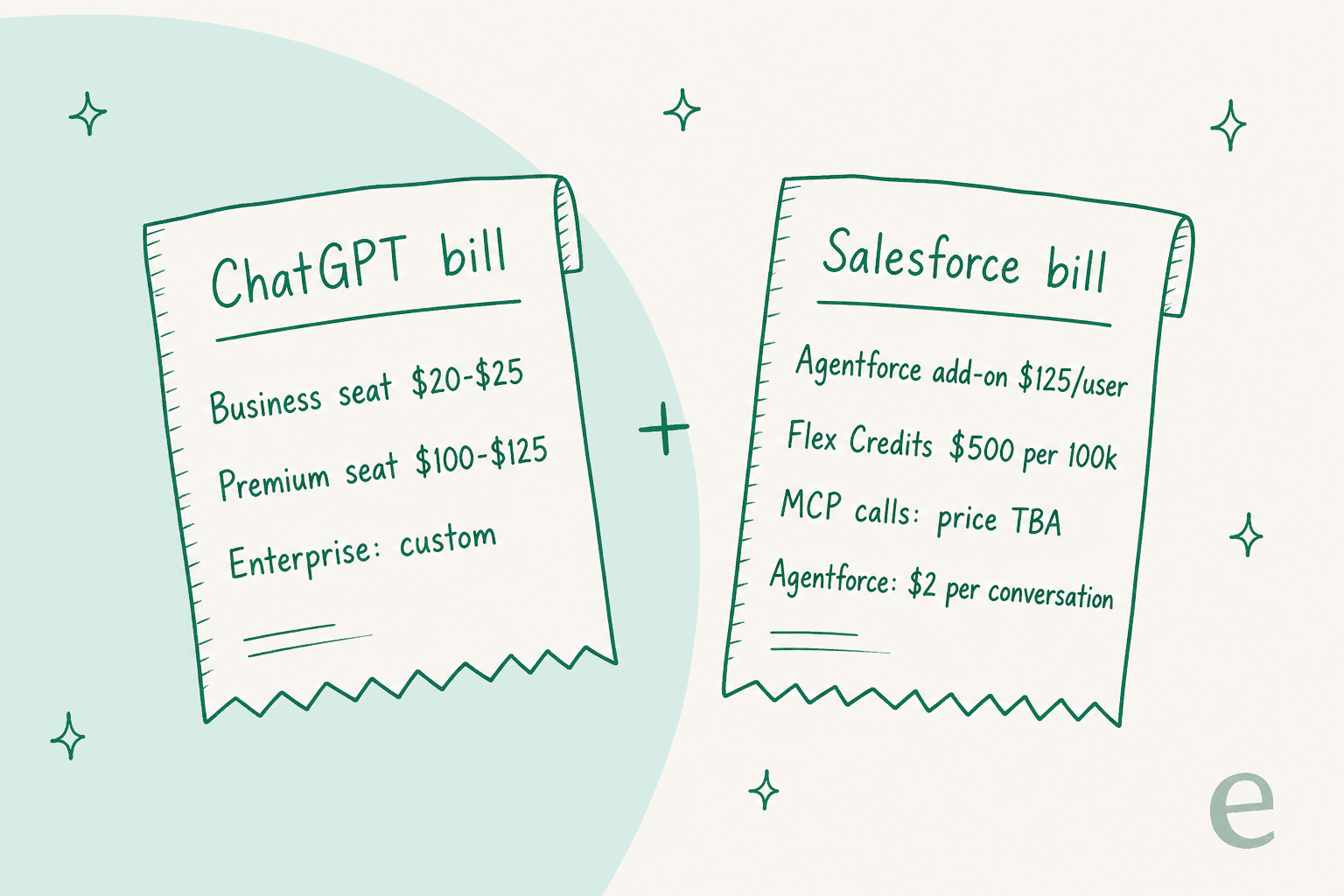
The ChatGPT side is public. Per OpenAI's business pricing and ChatGPT pricing, checked November 18, 2026 (my ChatGPT pricing post goes deeper):
| ChatGPT plan | Price | Salesforce relevance |
|---|---|---|
| Plus | $20/month | Developer mode (beta) for MCP tests, no Salesforce plugin per Salesforce |
| Pro | From $100/month | Same as Plus, higher limits |
| Business, Standard seat | $20/month billed yearly, $25 monthly | Salesforce plugin, custom MCP (admins publish) |
| Business, Premium seat | $100/month billed yearly, $125 monthly | More usage, no 5-hour limit |
| Enterprise | Custom | RBAC, action controls on custom apps |
Business is for teams of 2 to 200, and OpenAI notes that from December, plan usage will share one limit across ChatGPT and Codex.
The Salesforce side depends on the route. The plugin needs the Agentforce for Sales add-on, which Agentforce pricing lists at $125 per user per month, or a Max Edition "from $550" per user per month with the add-on and 2.75M Flex Credits per org per year included. If you weigh the plugin, those are the numbers that decide it.
The MCP route has a newer catch. Salesforce's docs now say hosted MCP servers "are intended only for customers with Flex Credits and you may be billed for server usage" (Salesforce). Every successful call a registered agent makes will be metered as a "Headless Platform Interaction," the price is still listed as TBA on the November 3 rate card, and Salesforce promises 30 days' notice before metering starts (KA 005360285). Sandboxes, scratch orgs and Developer Edition orgs aren't metered. For reference, Flex Credits cost $500 per 100,000.
Here's the math for a sales team, before Sales Cloud licences themselves:
At 10 sellers on Standard seats, the Salesforce add-on is more than six times the ChatGPT bill. If your org already has the add-on for other Agentforce features, the plugin is cheap. If it doesn't, you're really buying Agentforce for Sales, and ChatGPT is the window you use it through.
Agentforce Coworker and Codex: two more ways in
Two smaller routes are worth knowing about.
Agentforce Coworker is Salesforce's own employee assistant, sold as a standalone licence at $50 per user per month. The product page says you can use it "in Claude and ChatGPT through MCP," and it orchestrates other Agentforce agents, flows and processes from one request. When Salesforce introduced it in May, its launch post said the ChatGPT surface was "coming later this year," so check availability for your org before you plan around it. If your company is standardizing on ChatGPT as the place people work, Coworker is Salesforce's answer to "bring Salesforce with you."
If your sellers live in Slack instead, that's a separate decision. My ChatGPT for Slack guide covers @ChatGPT there, and Salesforce's own Agentforce in Slack is the native alternative.
Codex gets Salesforce too. OpenAI's release notes from June 2, 2026 list Salesforce among the 66 single-app plugins added to Codex for Business and Enterprise workspaces, and the Salesforce plugin page says to "start a new chat in ChatGPT Work or Codex." For Apex, LWC and Flow work, Salesforce's own tooling has moved to forcedotcom/sf-skills, and my best AI for Salesforce coding roundup compares the options.
OpenAI models inside Agentforce
This route reverses the direction: Salesforce calls OpenAI's models inside its own product, and most orgs are already on it without noticing.
Salesforce Help says the Salesforce Default model option for Agentforce is "a managed mix of trusted models," and that agents in the new Agentforce Builder use GPT-4.1, while agents in the legacy builder use GPT-4o (Salesforce Help). The alternatives are an AWS-hosted Claude option and a Google Gemini option, and the choice applies to every agent in the org. Salesforce also says it enforces zero data retention with OpenAI, Anthropic and Google.
If you want a newer OpenAI model, custom actions are the way in. Prompt templates, Apex and the Models API can call any Salesforce-managed model, and Salesforce's supported models list now runs past 20 OpenAI models, up to GPT 6.1 Sol. You can also bring your own OpenAI or Azure OpenAI key through BYOLLM.
This is the only route where an OpenAI model answers your customers, and you pay Agentforce prices for it: $2 per conversation, or Flex Credits at $500 per 100,000 credits, per Agentforce pricing. My Agentforce review covers what that buys, and the Service Cloud guide walks through the bring-your-own-model setup.
What about custom GPTs and copy-paste?
Skip the custom GPT tutorials. OpenAI says it's retiring custom GPTs and moving creators to plugins, with standard retirement scheduled for December 11, 2026. Personal accounts, including Plus and Pro, can no longer create or publish new GPTs. A GPT with a Salesforce action built this year is a migration project, not a foundation. My custom GPT post covers what moves over.
Copy-pasting records into ChatGPT still works for a one-off, but watch the plan. OpenAI says that on Free, Go, Plus and Pro, it "may use information accessed from apps to train our models" if the improve-the-model setting is on, while Business, Enterprise and Edu don't train on it by default (OpenAI help). Customer records in a personal Plus account is the version of this I'd stop first.
Where ChatGPT for Salesforce stops for support teams
Here's the part I'd read twice if you run a Service Cloud queue. Each route gets a case part of the way, and only one reaches the customer.
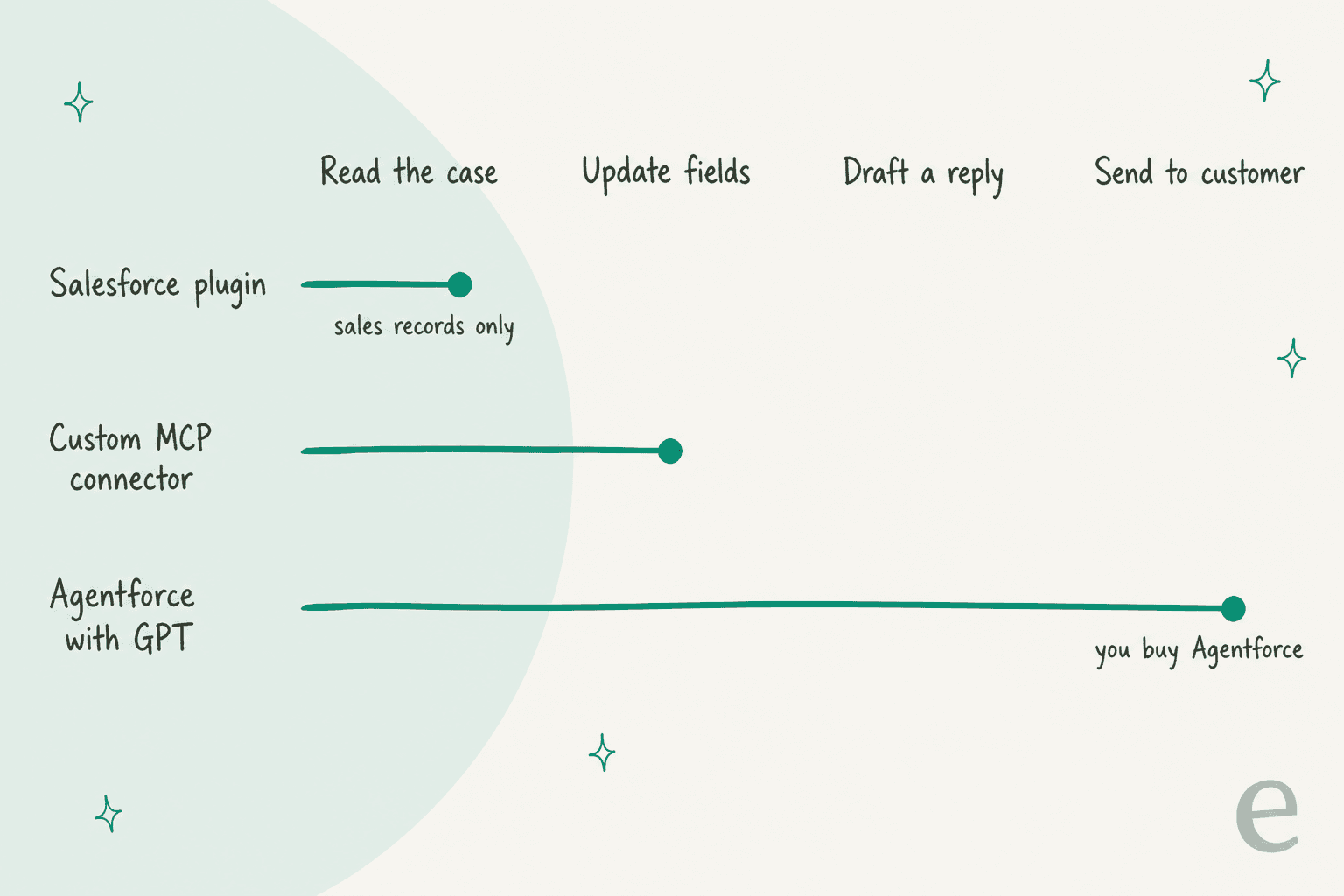
- The Salesforce plugin is built around accounts, opportunities, contacts and pipeline. Its skills are account briefs, pipeline reviews, querying, writeback and automation, with no case or service skill, and OpenAI files it under Sales.
- A custom MCP connector can read a Case and update its fields through the generic record tools, with a person approving each write. There's no ready-made "reply to this customer" tool.
- Agentforce Coworker helps employees get work done. It isn't a responder on your queue.
- Agentforce with an OpenAI model does answer customers, and Salesforce's own OpenAI partnership post describes exactly that for service. But you're buying Agentforce, at
$2a conversation or in Flex Credits.
So the support question isn't really "how do I connect ChatGPT." It's "who drafts the reply on the case, and who approves it." If your answer is "an AI, with my team approving," you need something that works on the case itself. My AI for Salesforce Service Cloud roundup and the sibling Claude for Salesforce guide cover the options; Claude's sales plugin has the same gap.
Which route should you pick?
Pick by team, not by model.
| You are | Use | Why |
|---|---|---|
| Sellers on Agentforce for Sales | Salesforce plugin in ChatGPT | Vendor-built skills, per-user permissions, writes with approval |
| Sellers without the add-on | Price the add-on first | The add-on costs more than the ChatGPT seat |
| An admin or ops lead who needs any object | Custom MCP connector | Full record access as yourself, free to test in a sandbox |
| A company standardizing on Coworker | Agentforce Coworker via MCP | One Salesforce assistant across surfaces |
| Already on Agentforce for service | Keep the default GPT model | You're already using OpenAI there |
| A Salesforce developer | Codex with the Salesforce plugin or sf-skills | Code and metadata work |
| A support team that wants cases handled | A support teammate on the case, like eesel | None of the ChatGPT routes reply on a Case |
The trap I'd avoid is wiring a homemade support bot onto ChatGPT plus hosted MCP right now. You'd build reply logic neither vendor provides, on calls that are about to carry a meter with no published price.
How eesel handles Salesforce cases
I'll be upfront about how eesel fits. It doesn't replace the Salesforce plugin for your sellers. It's the AI helpdesk teammate for the case queue.
eesel's own sales calls show why this matters. Earlier this year, eesel lost mid-market support teams, one of them handling roughly 900 tickets a month, because eesel had no native Salesforce integration and they treated that as a dealbreaker. eesel now installs as a managed package inside your org.
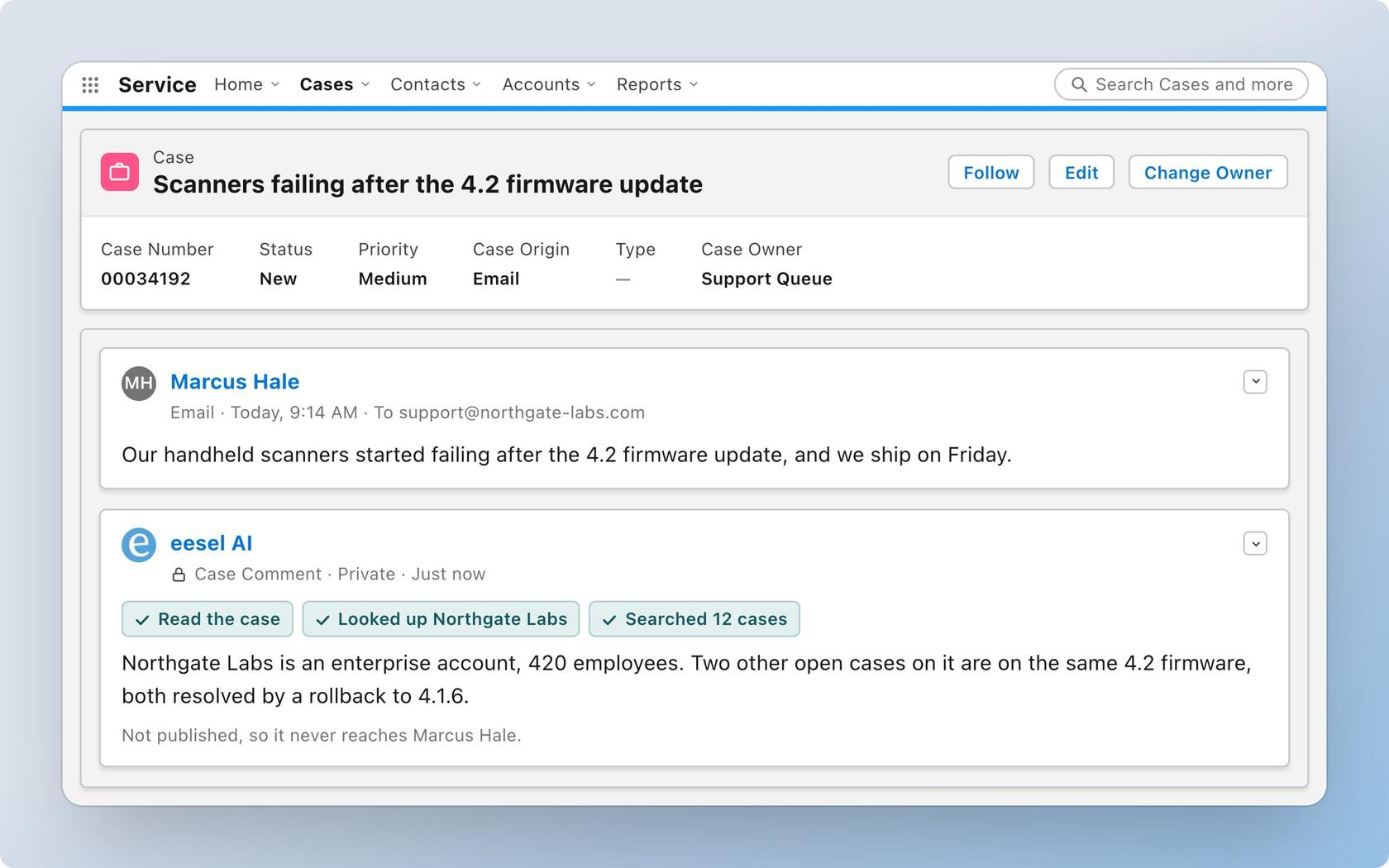
Per the eesel Salesforce docs, the agent "works inside your Salesforce org. It reads cases and Knowledge articles (and contacts and accounts once you switch them on), drafts replies as internal case comments, and updates records." It can also send an email to the customer, close a case, or update a contact or opportunity, and each action can require approval, which is how I'd set agent permissions on day one. It "only sees what the Salesforce user you authorized can see," so your Salesforce permissions stay the real limit.
What that looks like with a real customer: MentorShow runs eesel on HubSpot, where it reads each member's subscription status, renewal date and past tickets from the CRM record before drafting, and refunds and billing go straight to a person. In a month it read 1,200 conversations and tickets and wrote 432 reply drafts. That's HubSpot rather than Salesforce, but the job is the same: the CRM record changes the answer. On Salesforce itself, CartonCloud's service desk lead said eesel keeps "that human touch" while getting agents to the right articles quickly (eesel pricing).
On the ChatGPT side, I'll be precise. eesel's ready-made apps for ChatGPT are built per helpdesk, and Salesforce isn't one of them yet (eesel docs). Your eesel workspace is an MCP server that any MCP client can sign in to, so a ChatGPT Business admin could add it as a custom MCP server, and the Claude connector works today. Where eesel isn't the right fit: it has no trigger for Salesforce chat or messaging sessions, since it works on records like Cases.
If you'd rather set it up from a terminal, the eesel CLI lets Codex run eesel integrations connect salesforce, copy your past cases and Knowledge articles in, and switch on a new-case automation, then ask the agent test questions before anything goes live. A Salesforce admin still approves the connection in the browser.
Try eesel on your Salesforce cases
ChatGPT for Salesforce is a strong sales tool today, if you already pay for Agentforce for Sales. If your cases need help now, eesel for Salesforce joins your Service Cloud queue, learns from past cases and Knowledge articles, and drafts or sends replies with the approvals you set. Plans start at $299 a month for 500 credits with a 7-day free trial (eesel pricing), so you can try eesel on a slice of your queue before you commit.
Frequently Asked Questions
Is there an official ChatGPT for Salesforce integration?
How much does ChatGPT for Salesforce cost?
$20 a month billed yearly or $25 monthly. On the Salesforce side, the plugin needs the Agentforce for Sales add-on, listed at $125 per user per month on Agentforce pricing, or an edition that includes it. See my Agentforce pricing breakdown for the rest.