

ChatGPT for Slack today means @ChatGPT: one shared assistant per Slack workspace, set up by a ChatGPT admin on Business, Enterprise or Edu, and paid for from workspace credits under a per-agent spend cap. For a support team it's a solid helper in internal channels, and workspace agents let you build a dedicated triage bot with its own handle. It is not a customer-facing tool: OpenAI says @ChatGPT ignores Slack guests and isn't supported in Slack Connect at all.
If your Slack questions come from customers, or the answer has to touch a ticket, eesel joins Slack as a support teammate that answers from your docs and helpdesk and asks for approval before it acts. With the eesel CLI, a coding agent like Codex can connect Slack, upload your help articles and test the answers first, while a Slack admin still approves the install.
What does "ChatGPT for Slack" mean in 2026?
It means something different from a year ago. In October 2025, OpenAI launched a ChatGPT app for Slack that put a one-on-one ChatGPT chat in Slack's sidebar, tied to each person's own account, for Plus, Pro, Business and Enterprise users. On September 29, 2026, that changed. OpenAI's release notes announced @ChatGPT for Business and Enterprise, and its help center now says plainly that "@ChatGPT replaces the previous ChatGPT app experience in Slack."
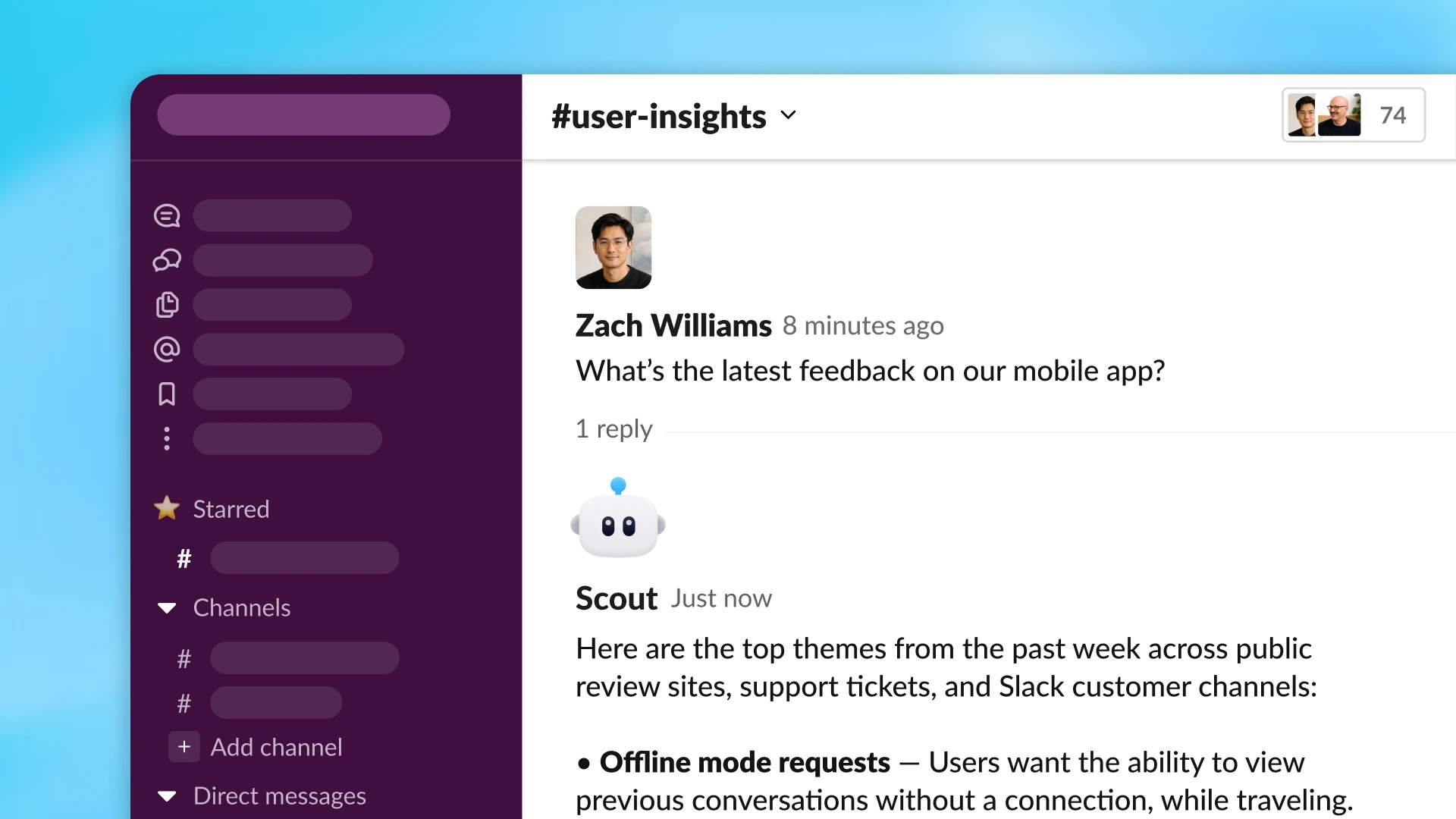
I ship integrations at eesel, so the part I read twice was the account model. Per OpenAI's member guide, "@ChatGPT runs through a service account: an account configured for the assistant, rather than your personal ChatGPT account." Your Slack login only identifies who asked. Your saved memories, custom instructions and chat history don't come along, and at launch "@ChatGPT does not record or access memory." For anyone doing a security review, that's a much cleaner story than a bot acting with each person's own access. For anyone expecting their personal ChatGPT to show up in Slack, it's a surprise.
Old installs don't break overnight. OpenAI says existing installations "do not stop working immediately," but a Slack admin has to approve a scope upgrade on the ChatGPT app page before @ChatGPT works.
The four ways to run ChatGPT in Slack
There are four routes, and they split along one question: does ChatGPT live inside Slack, or does ChatGPT reach into Slack from somewhere else?
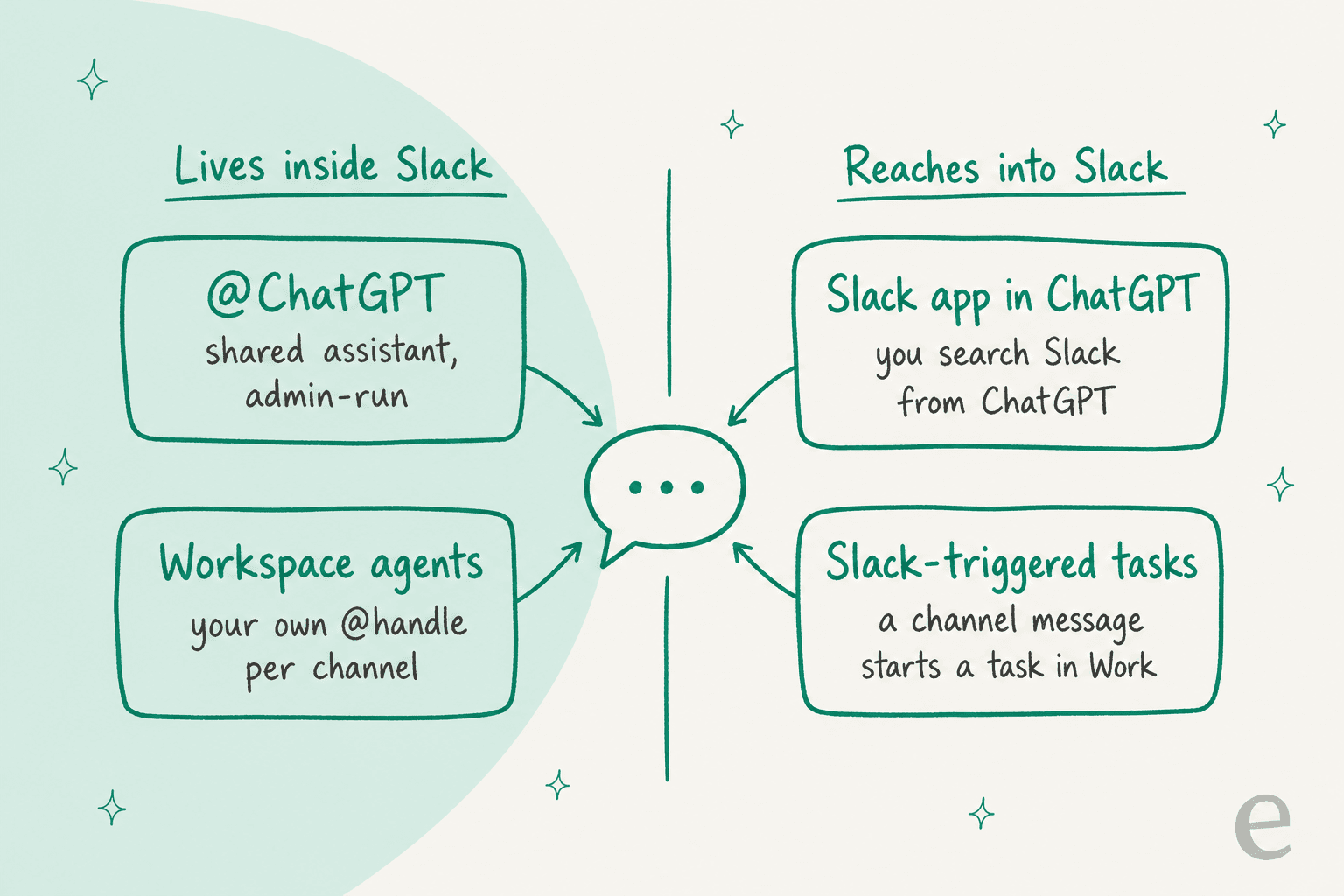
| Route | Where ChatGPT runs | Plans | How it bills | Best for |
|---|---|---|---|---|
| @ChatGPT | Slack channels and DMs, one shared assistant | Business, Enterprise, Edu | Workspace credits, capped per agent | General internal help: summaries, drafts, questions |
| Workspace agents | Slack channels under a custom @handle | Business, Enterprise, Edu, paid Slack plan | Token-based credits per run | A dedicated triage or knowledge bot for one channel |
| Slack app in ChatGPT | In ChatGPT, reading your Slack | Plus, Pro, Business, Enterprise, Edu | Your ChatGPT plan | One person researching Slack history |
| Slack-triggered tasks in Work | ChatGPT Work, started by a channel message | Business, Enterprise, Edu (admin opt-in on Enterprise and Edu) | Shared agentic usage pool | Hands-off follow-ups on new channel messages |
Most support teams will look hard at the first two rows, so I'll cover those in depth. The other two are useful side doors.
How do you set up @ChatGPT in Slack?
Setup takes two people: a ChatGPT workspace admin or owner and a Slack admin. OpenAI's admin guide runs it from the OpenAI admin console, and the steps are short:
- In the admin console, open Agents, then @ChatGPT agents, and select Add. Choose Slack and connect the workspace.
- Have the Slack owner or app manager approve the app (or the scope upgrade, if the old app was installed).
- Create the agent, then switch on Selected channels only and add a test channel.
- Add @ChatGPT to that channel and ask it to summarize a few notes pasted into the message.
- Add company tools under Plugins, one connection at a time, using an account approved for the assistant.
Two settings deserve more thought than the click-path suggests. First, Selected channels only is a real scoping tool, but OpenAI notes that in this mode @ChatGPT "cannot reply to direct messages." Second, the connections. The connected account's permissions decide what @ChatGPT can read and do, and anyone who can reach @ChatGPT can ask it to use them. OpenAI's own advice is to "start with read access when that is sufficient for the workflow." That's the least-privilege thinking you'd want from any AI agent near customer data.
Enterprise Grid customers have one more step: OpenAI says to "set up @ChatGPT separately for each Slack workspace" in the org. Admins can also force every user to link a ChatGPT account first, under Restrict access to @ChatGPT to users in this workspace.
What does ChatGPT for Slack cost?
There is no Slack-specific price. You pay for ChatGPT seats, and the Slack work draws credits. OpenAI's setup guide says "your workspace needs credits to use @ChatGPT," and usage through the service account is "attributed to that account." If a member approves a request that uses their own connected apps, that piece bills to them instead.
Here are the seat prices from OpenAI's business pricing page:
| Plan | Price per user per month | What it adds for Slack |
|---|---|---|
| Business (standard seat) | $20 billed annually, $25 monthly | @ChatGPT, workspace agents, Slack app in ChatGPT |
| Business (Premium seat) | $100 billed annually, $125 monthly | Same, plus up to $500 a month in API credits per workspace |
| Enterprise | Custom | Same, plus credit-based or token-based billing, RBAC, Compliance API |
The credits are where a busy support channel will show up. Three details matter for budgeting:
- Workspace agents bill by tokens. Since July 6, 2026, agent runs use token-based pricing. The rate card lists GPT-5.6 at
100credits per million input tokens,10cached and500output, and says "a typical end-to-end Workspace Agent run using GPT-5.6 may consume between 5 and 25 credits." - Business seats share one pool. Workspace agents share an allowance with ChatGPT Work, Excel, PowerPoint, Word and Codex. Once a seat's included limit runs out, usage continues only if the workspace bought credits. Business credits stay valid for 12 months, per OpenAI's flexible pricing FAQ.
- Caps are per agent. Admins set a default @ChatGPT usage limit for each agent's service account and can override it per agent under Spend controls. Workspace spending limits still apply on top.
OpenAI doesn't publish a per-message credit figure for @ChatGPT itself, so the honest plan is a pilot: one channel, a modest cap, and a week of watching the usage view in the admin console. The ChatGPT Team review and ChatGPT pricing guides cover the seat decision in more detail.
Workspace agents: the better fit for a triage channel
@ChatGPT is a generalist. If you want a bot that owns one job in one channel, OpenAI's other Slack app is the stronger tool. Workspace agents, launched April 22, 2026, are agents you build in ChatGPT with their own tools, skills, files and instructions, then deploy into Slack under a custom handle through the ChatGPT Agents app.
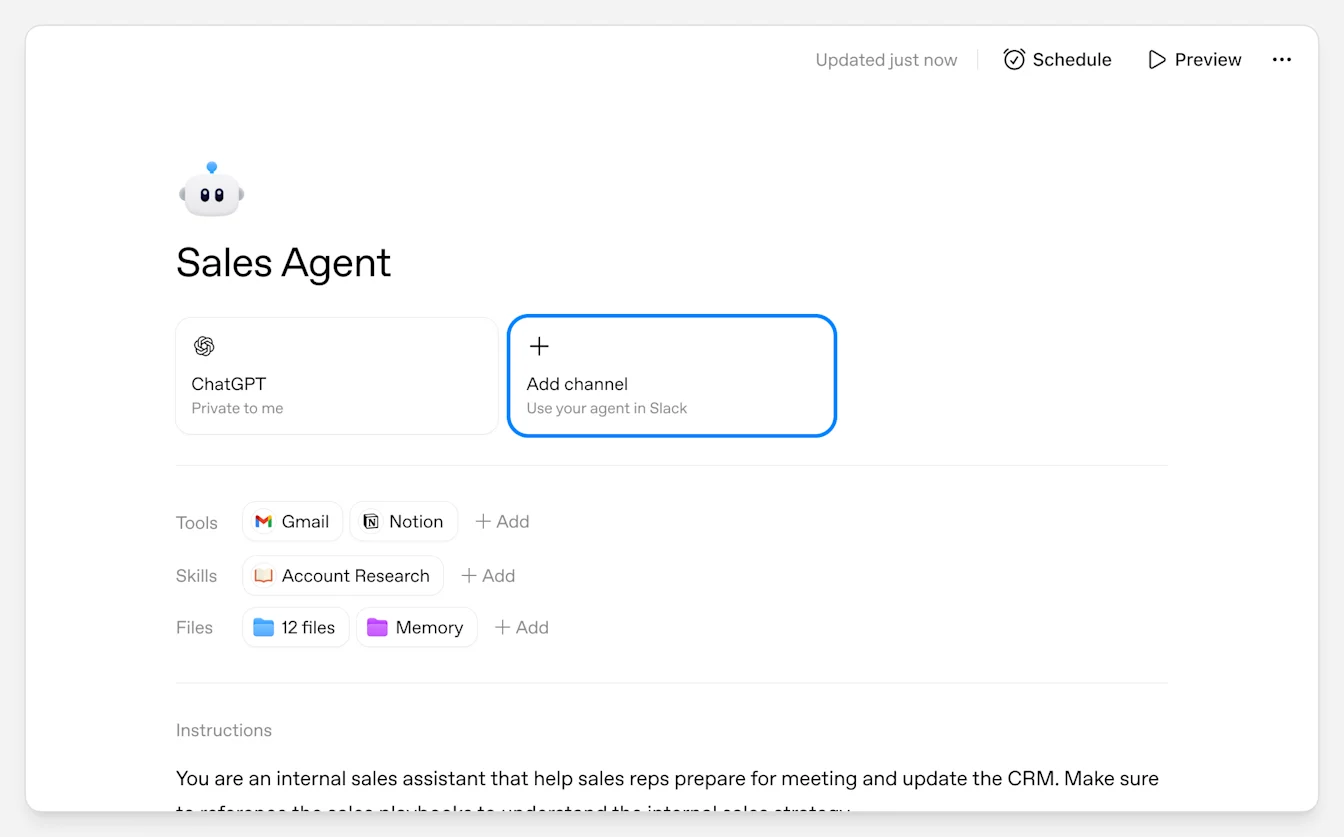
The setup is close to what a support lead would design on a whiteboard:
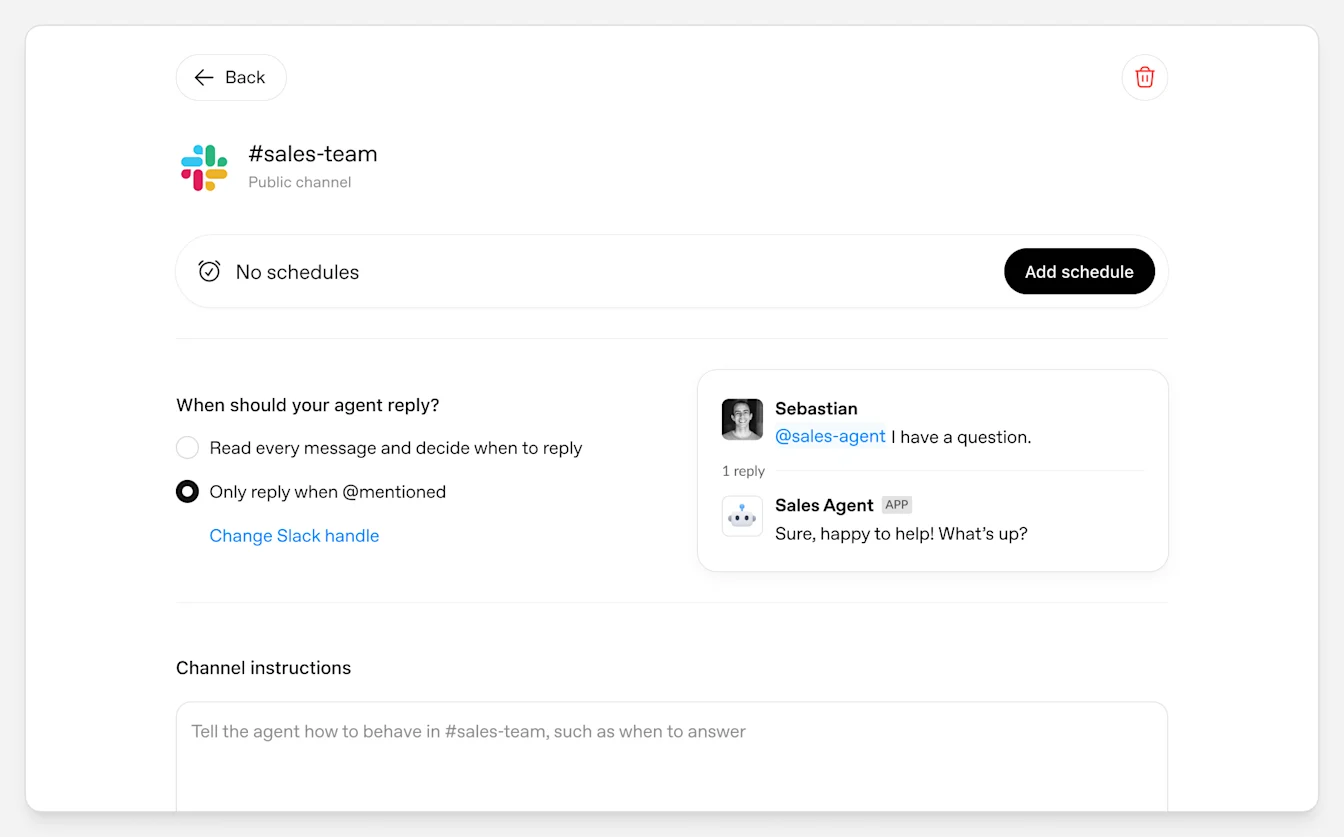
- Pick a handle and a channel. The agent gets an @handle, which ChatGPT creates as a Slack user group. That's why Slack has to let members create user groups, or handle creation fails.
- Choose how it replies. Under "When should this agent respond?", you pick between reading every message and deciding when to reply, or only replying when @mentioned. With mentions on, it can keep following up in the thread.
- Write channel instructions. Each channel gets its own instructions, so the same agent can behave differently in #it-help and #billing-questions.
- Add a schedule. An agent can run on a timer and post its results into a channel, which suits a daily digest of open escalations.
OpenAI's own example is the support use case almost word for word. Its launch post describes an internal agent that "proactively answers employee questions in Slack channels," links relevant documentation, "and can file a ticket when it finds a new issue." That's a knowledge base bot with an escape hatch, and for an internal #help channel it's a sensible pattern.
The catches are about who can build and run it. You need a paid Slack plan, a Business, Edu or Enterprise ChatGPT workspace, and on Enterprise an admin has to switch on the Workspace agents in Slack app. Only the agent's owner can add, remove or change its Slack channels. And agents can't be called from an API. As one developer put it in the Hacker News launch thread:
"With one Caveat , it needs to be invoked from ChatGPT or Slack does not support invoking from APIs, so cannot embed it."

So you can't drop a workspace agent into your help center widget or your helpdesk. It lives in ChatGPT and Slack only.
Where ChatGPT in Slack works well for support teams
The strongest support uses are internal. Think #it-help, #ask-billing, #support-escalations, or any channel where agents ask each other "what's the policy on this?" all day. @ChatGPT can summarize a long escalation thread, draft the internal handover note, or answer from a connected policy doc. A workspace agent can take the first pass on every new question in a channel and route the rest.
One OpenAI employee, who flagged their role up front, described the kind of chore it takes off a team's plate:
"Now, I tag workspace agent in the slack thread, it reads the thread, puts it into the right shape, and logs it (with considerably high fidelity)."
That's exactly the job support teams hate doing by hand: turning a good Slack thread into a reusable article. A few more details make the internal case stronger:
- Codex rides along. Where Codex Cloud is enabled, people can ask @ChatGPT to investigate a bug in a repo, and the coding task runs under the requester's account with Allow and Deny approval cards. Handy when a support escalation is really a bug. The Codex and Slack post goes deeper.
- Slack messages can start work. Since August 25, 2026, a new channel message can trigger a task in ChatGPT Work, narrowed by channel, sender or thread. DMs, reactions and edits don't trigger anything.
- Search reaches your history. The Slack app in ChatGPT searches channels and DMs you can already see, by meaning on Slack Business+ or Enterprise+ workspaces with Slack AI Search, and by keyword everywhere else.
This matches what I see from eesel's side. Slack is often a bigger support channel than people admit: one martech team eesel works with handles around 1,200 Zendesk tickets a month and roughly 2,800 more through Slack. When that much support runs through Slack, a triage helper in the channel stops being a side project. If internal questions are your main load, the guide to AI for internal support teams covers the wider field.
Where ChatGPT in Slack stops for customer support
The limits show up the moment the person asking isn't on your team, or the answer has to land in a helpdesk.
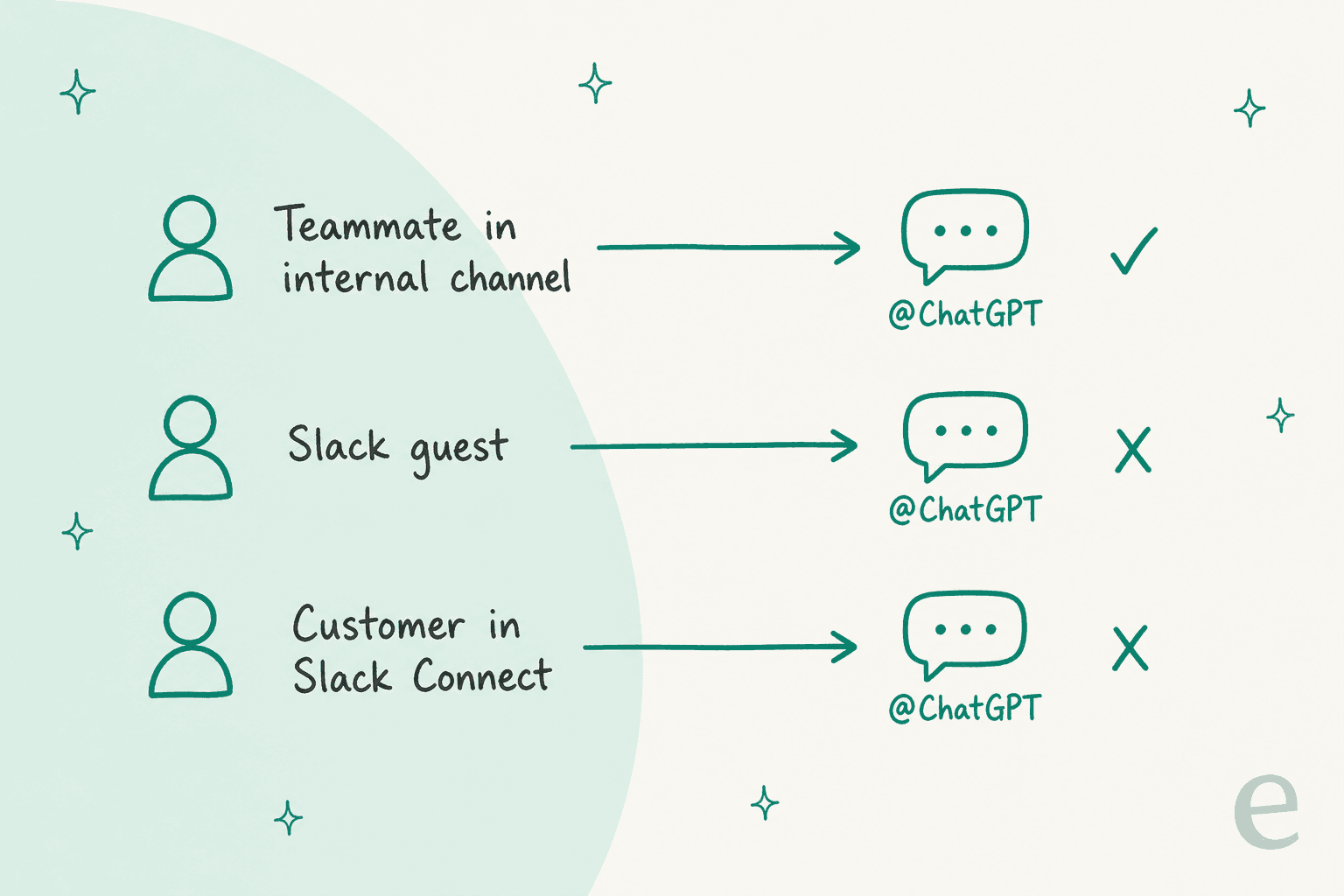
Slack Connect is out. OpenAI's member guide is direct: @ChatGPT "isn't supported in Slack Connect channels." The Codex flow says the same about channels shared with another organization. If you run support in Slack Connect with your biggest B2B customers, @ChatGPT can't help in that channel at all. Claude Tag at least has a restricted mode for shared channels; @ChatGPT has none.
Guests are ignored. @ChatGPT "doesn't respond to single-channel or multi-channel Slack guests, even when connecting a ChatGPT account is optional." Contractors, partners and customers invited as guests get silence.
Connections are shared by everyone who can ask. The service account model cuts both ways. If you connect a CRM or billing tool to @ChatGPT, any person who can reach @ChatGPT can ask it to use that connection, within the account's permissions. OpenAI tells admins to "choose access appropriate for the people who can use @ChatGPT." In practice, that pushes you toward read-only connections, which limits how much ticket work it can do.
No memory yet, and no built-in approval step for your helpdesk. At launch, @ChatGPT doesn't remember anything between threads. OpenAI's admin guide doesn't name ready-made helpdesk connections for @ChatGPT, so any ticket action depends on what your workspace's plugin list offers and on the permissions you grant. There's no documented "draft the reply, wait for a human to approve, then post to the ticket" step like a support tool would have.
API quotas can bite. OpenAI warns that using the Slack app with deep research, Pro models or agent mode "may exhaust your per-user Slack API quota even if workspace-wide limits are not reached."
None of this makes @ChatGPT a weak product. It's an internal work assistant, and its defaults reflect that. It just means "ChatGPT for Slack" and "AI for customer support in Slack" are two different jobs. The Slack AI for support teams guide covers the same gap on Slack's side, and ChatGPT for Zendesk covers the helpdesk side.
Which route should a support team pick?
The question to start with isn't "which ChatGPT," it's "who is asking, and where?"
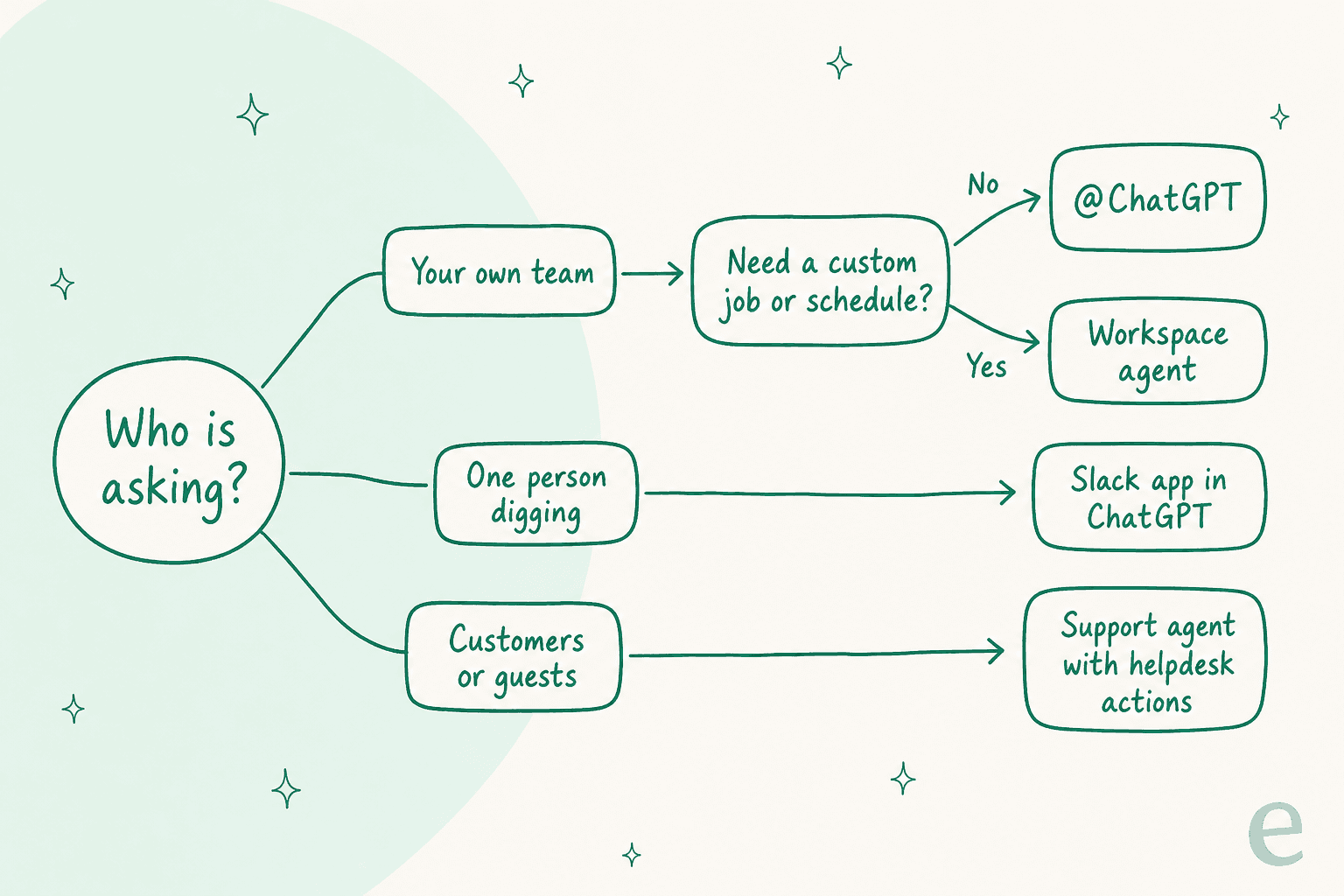
- Your own team, general questions. @ChatGPT, if you're already on ChatGPT Business or Enterprise. Start with Selected channels only, a modest per-agent cap, and read-only connections.
- Your own team, one defined job. A workspace agent with its own handle, channel instructions, and a schedule if it needs one. This is the better pick for an #it-help or escalation triage channel.
- One person digging through Slack history. The Slack app in ChatGPT is enough, even on Plus or Pro.
- Customers, guests, or a helpdesk queue. Use a support agent built for that job, with helpdesk actions and an approval step. None of OpenAI's Slack routes cover Slack Connect.
If you're not on a ChatGPT business plan at all, compare against the field before upgrading just for Slack. The list of AI tools for Slack support and the helpdesks with a Slack integration roundup are good starting points. If you have engineers, the guide to building a Slack AI chatbot covers the DIY route.
How eesel handles support work in Slack
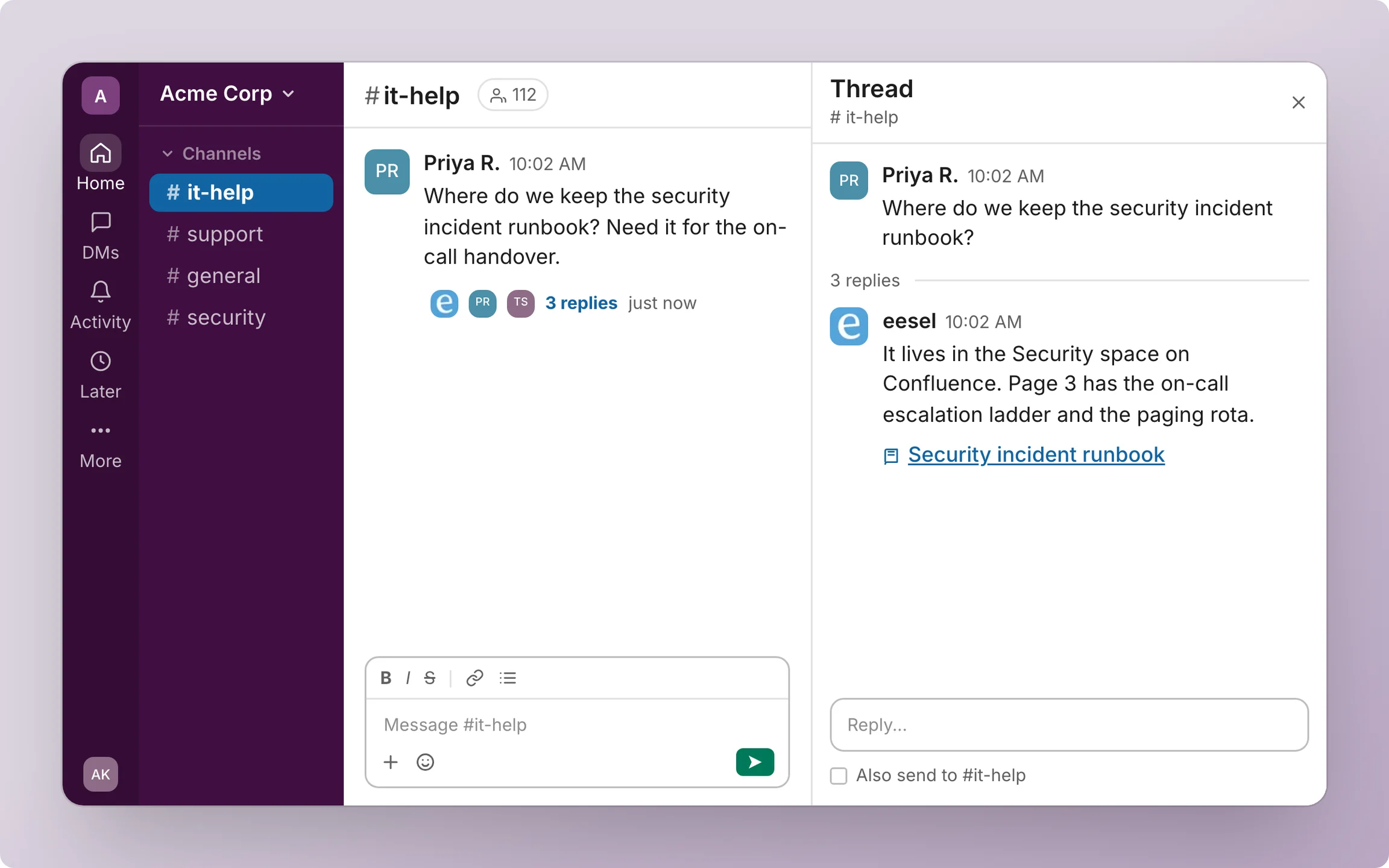
This is the gap eesel was built for. eesel is an AI teammate platform, and the AI helpdesk teammate joins your Slack the way a new support hire would: people @mention it or DM it, and it answers in the thread with a link to its source. It reads Slack history live rather than copying your workspace into a store, and it learns from your Confluence, Notion, Google Drive, help center and past tickets.
The part that matters for support is what happens when the answer needs an action. From a thread, eesel can look up a ticket in a connected helpdesk like Zendesk or Freshdesk, draft a customer reply, or create and route a ticket, for example in Jira. Anything that writes shows up as an approval card with Approve and Deny, and only people with edit access to the eesel workspace can decide. That's the human-in-the-loop step @ChatGPT doesn't have for ticket work.
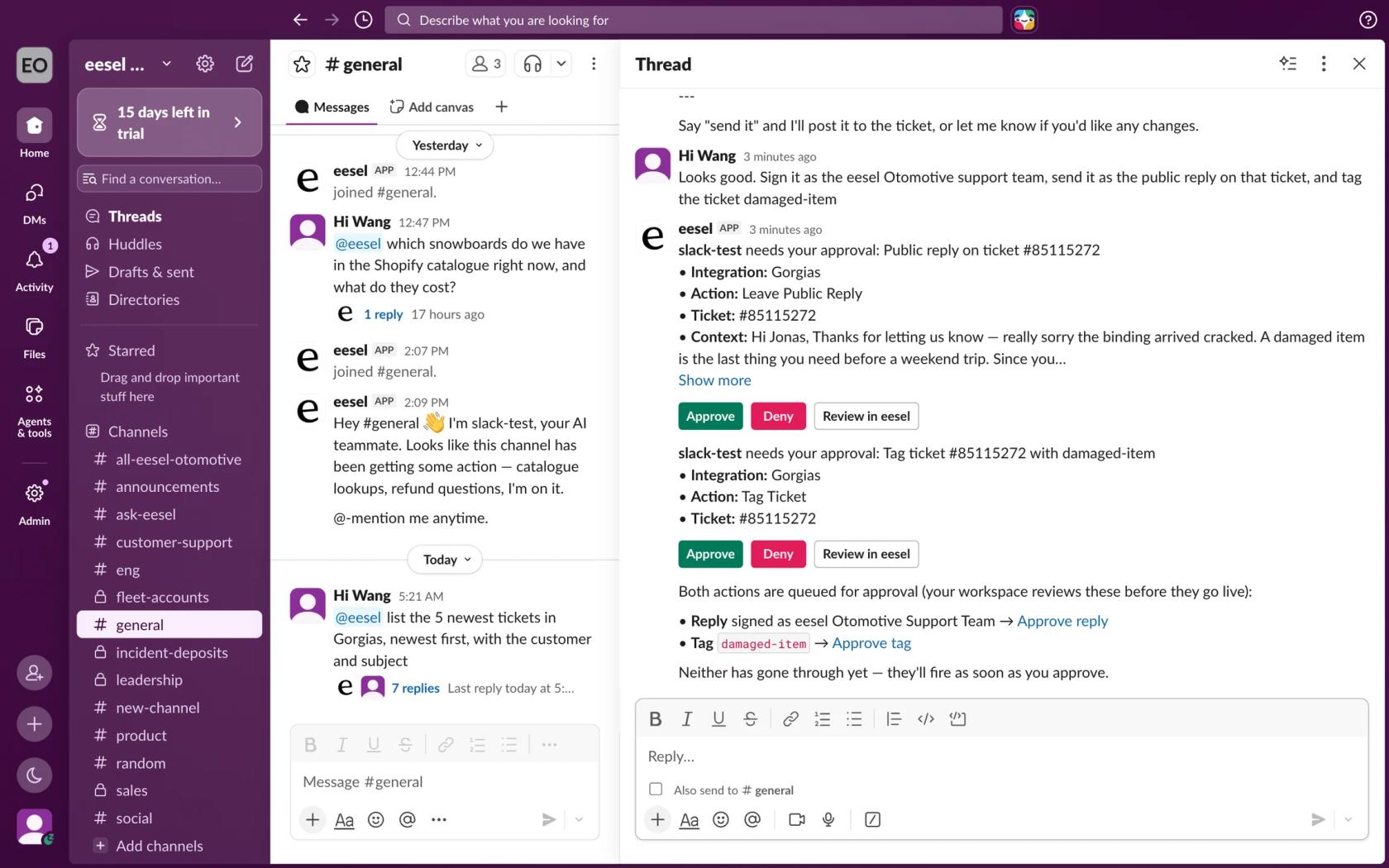
Here is how that looks with real customers:
- Swiftreg runs eesel on Zendesk, where it handled
2,100tickets and sent1,500public replies in a month. Slack is connected too, so the team can ask eesel a question there as well as in Zendesk. - Lesson Pro works across two Zendesk accounts, about
1,900tickets a month, and every Monday a scheduled run posts each booking agent's plan for the week into a Slack channel. - SaunaSpace connected Gorgias, Slack and its website, and the team calls it with @eesel on a Gorgias ticket or in Slack.
Pricing is per credit rather than per seat: eesel plans start at $299 a month for 500 credits, and a Slack question uses a credit the same way a ticket does. There's a 7-day free trial with 100 credits.
And if your team already lives in ChatGPT, the two aren't either/or. Every eesel workspace is also an MCP server, so per the eesel Slack docs you can talk to the same Slack agent from ChatGPT once Slack is connected. With the eesel CLI, Codex or another coding agent can run eesel integrations connect slack, upload your handbook or exported help articles, set up the mention automation, and run a simulation on past tickets to check the answers before anyone relies on them. A Slack admin still approves the install and invites the bot to channels, and someone with helpdesk admin access still approves that connection.
Try eesel in your Slack
If your Slack questions come from customers, or the answer needs to touch a ticket, eesel is the shorter path than stretching @ChatGPT past what OpenAI built it for. It joins Slack in a few minutes, answers from your docs and helpdesk with sources linked, and waits for your approval before it acts. Try eesel free for 7 days.