

There is no official WhatsApp Claude connector. I couldn't find WhatsApp in Claude's connector marketplace, Anthropic's Claude Code channels ship for Telegram, Discord and iMessage only, and the GitHub request to add WhatsApp has been open since March. The bigger reason sits on Meta's side. Since January 15, 2026, Meta's WhatsApp Business terms bar "AI Providers" from offering general-purpose assistants on the platform, except in markets where Meta is legally required to allow it.
So people take one of three routes. A community bridge or MCP server that drives your personal WhatsApp (handy for one person, outside WhatsApp's terms). A bot you build yourself on Meta's Cloud API with the Claude API underneath (allowed, but you own the webhooks, the 24-hour window and the message bills). Or an AI teammate that already lives in WhatsApp.
That last one is eesel. It answers your team on eesel's WhatsApp number and your customers on your own WhatsApp Business number, and what it may do depends on who is messaging: your ops lead can approve a held action right in the chat, a verified customer gets their own order, and an unknown number gets public answers only. If you'd rather not click through a dashboard, the eesel CLI lets Claude Code load your policies and ask test questions first, though connecting the WhatsApp number itself is a Meta sign-in a person does once.
Why I care about this one
I build eesel's integrations, which means I spend a lot of time reading what platforms allow under the marketing copy. WhatsApp is the one with the most fine print. Its rules decide who can send what, when, from which number and at whose expense, they changed a lot this year (my 2026 platform updates post tracks them), and none of that bends because a clever model wrote the reply.
eesel has spent years letting AI act inside teams' own tools, and the lesson WhatsApp teaches fastest is this. The hard part is deciding what the AI may do alone, what waits for a person, and what it must never hand to a stranger who happens to know your number. The model is the easy bit.
Is there an official WhatsApp Claude connector?
No, and not for lack of asking. I checked three places.
- Claude's connector marketplace. The marketplace shows 1,137 connectors and plugins. I couldn't find a WhatsApp listing, from Anthropic or from Meta.
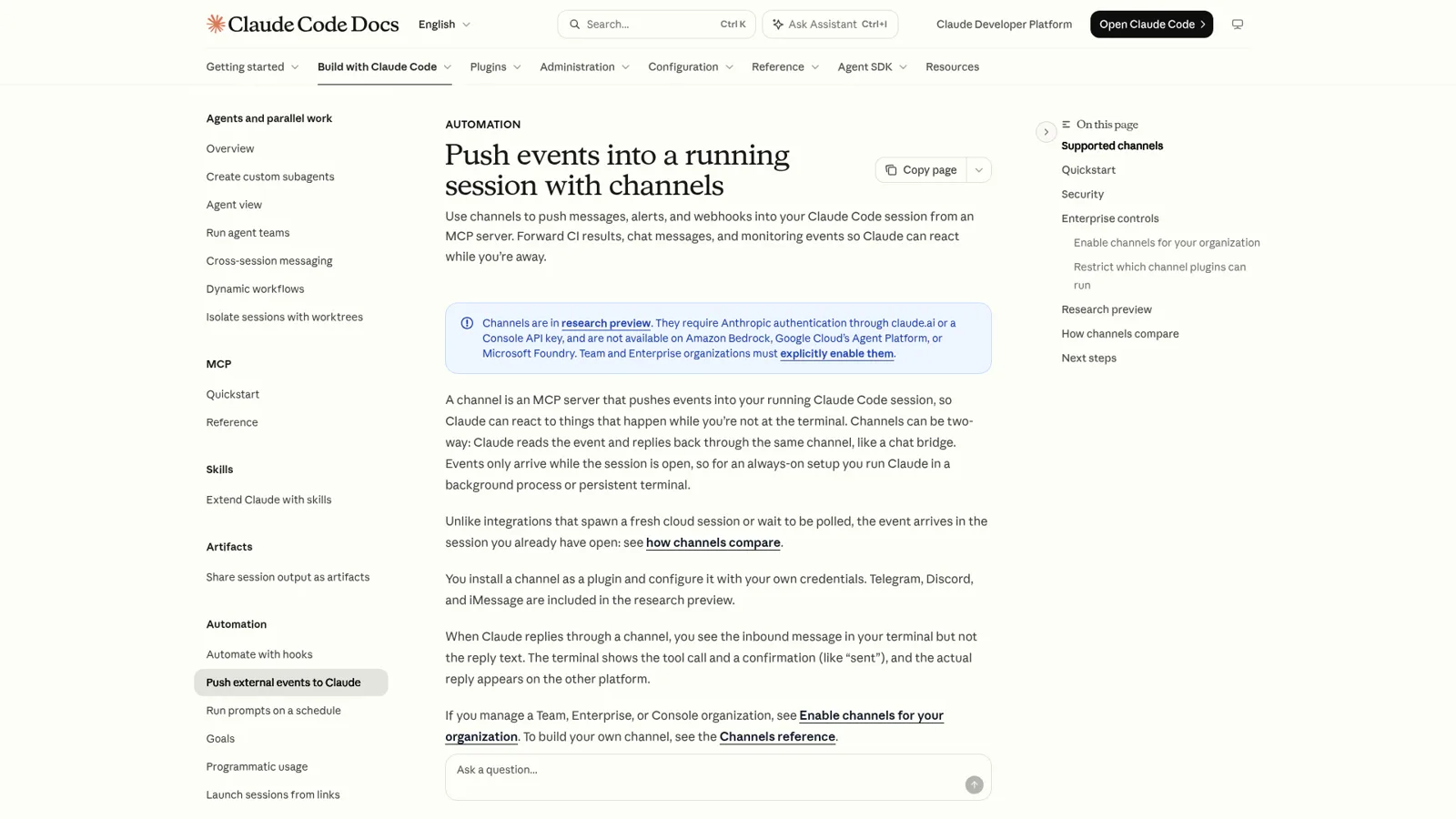
- Claude Code channels. Channels push chat messages into a running Claude Code session and let Claude reply. The supported list is Telegram, Discord and iMessage, all in research preview.
- GitHub. Issue #36814, "WhatsApp channel support (alongside Telegram/Discord)", was opened on March 20, 2026 and carries a "stale" label. A second request, #91445, asks for an official WhatsApp MCP server that works with personal accounts. Both are open.
One commenter on that first issue explained why WhatsApp is harder than the others. Telegram and Discord hand out bot accounts with their own tokens. WhatsApp doesn't, outside the Business API:
"WhatsApp doesn't, outside the Business API, which is metered, template-gated, and rejects anything that looks like a personal assistant flow."
That last clause is the real story, so it gets its own section.
Why can't Anthropic just put Claude on WhatsApp?
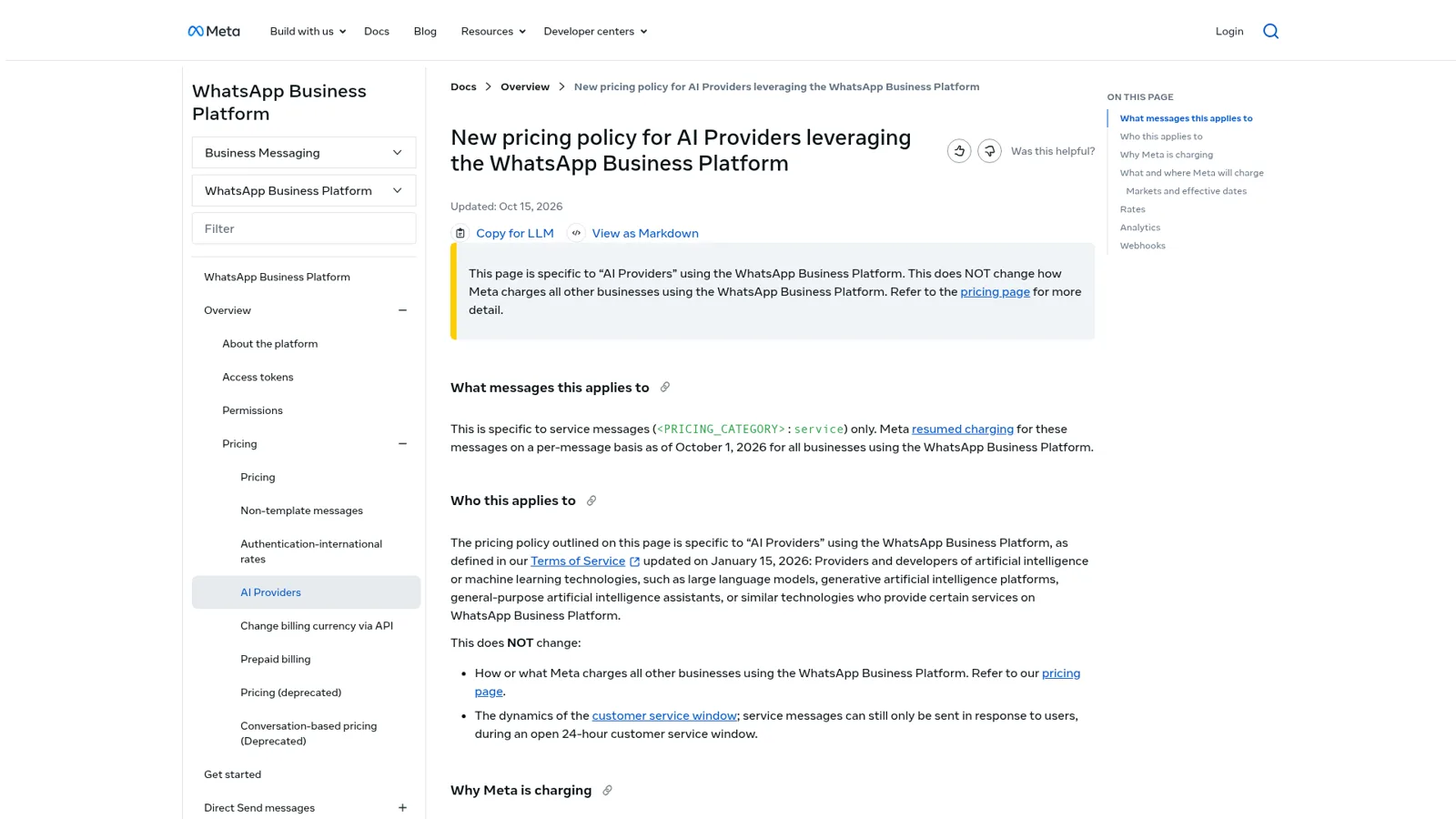
Because Meta's terms don't allow it in most of the world. Section 4.7 of the Meta Terms for WhatsApp Business Platform defines "AI Providers" as makers of "large language models, generative artificial intelligence platforms, general-purpose artificial intelligence assistants, or similar technologies", and says they are "strictly prohibited" from using the platform when that technology is "the primary (rather than incidental or ancillary) functionality being made available".
Meta's developer page on AI Providers puts dates on it. Effective January 15, 2026, AI Providers "are only permitted to offer general-purpose AI assistants on the WhatsApp Business Platform where Meta is legally required to permit this use case." As of its October 15, 2026 update, that means Italy (from February 16, 2026), the other EEA countries and Brazil (from March 11, 2026) and Türkiye (from October 15, 2026). This is the rule that pulled ChatGPT off WhatsApp in January. My Meta policy explainer has the longer version, and the ChatGPT for WhatsApp post covers how OpenAI handled it.
Two details in that same clause matter if you run a business:
- The ban is about the assistant being the product. A store, clinic or agency using AI to answer its own customers is using AI as an "incidental or ancillary" part of its service. That's the normal case on the WhatsApp Business API, and it's allowed.
- "You may retain an AI Provider as your Solution Provider." Your WhatsApp Business Platform data then can't be used to train or improve anyone's models, except a model fine-tuned for your exclusive use.
So the honest answer to "WhatsApp Claude connector" splits in two. A Claude-branded assistant that anyone can message on WhatsApp isn't something Anthropic can offer in most countries. Claude answering your customers on your number is fine, if you build or buy the plumbing.
Three ways people connect Claude and WhatsApp anyway
Here is the map before the detail.
| Route | What it is | Who it works for | Main catch | Cost |
|---|---|---|---|---|
| Community bridge or MCP server | A plugin that links to your personal WhatsApp like WhatsApp Web does | You, at your machine | Unofficial; WhatsApp's terms forbid auto-messaging and non-personal use | Your Claude plan, from $17 a month on Pro billed annually (full Claude pricing) |
| Your own bot on the Cloud API | Meta webhook in, Claude API call, Meta send API out | Whoever you build it for | You build and run hosting, history, the 24-hour window and permissions | Claude API tokens plus Meta's per-message charges |
| An AI teammate in WhatsApp | A product that already holds the number, the knowledge and the rules | Your team and your customers | It's another product to pay for | eesel from $299 a month |
Route 1: a community bridge on your personal WhatsApp
This is what most people mean when they search for a WhatsApp Claude connector. Projects like the open-source whatsapp-mcp server and the WhatsApp channel plugins posted in the GitHub thread above pair with your account through WhatsApp's linked-device flow, then let Claude read chats and send messages. OpenClaw (formerly Clawdbot) is the best-known all-in-one version, and I've written up its WhatsApp integration separately.
People who run these like them a lot:
"Having Claude in WhatsApp/Telegram is actually life-changing for quick tasks."

The same commenter's downsides ring true too, "Token usage can get expensive fast if you're not careful" and "Setup is intimidating for non-technical folks". Three more things to know before you pair your number:
- WhatsApp's terms. The WhatsApp Terms of Service rule out "bulk messaging, auto-messaging, auto-dialing, and the like" and "any non-personal use of our Services unless otherwise authorized by us." A bridge that only you talk to, on your own account, is a grey area. One that answers customers is not.
- Anthropic's terms. Anthropic's legal and compliance page says subscription sign-in is "designed to support ordinary use of Claude Code and other native Anthropic applications", and developers building products should use API keys. A Pro plan powering an always-on reply bot for other people sits uneasily with that.
- It's your session. Per the channels docs, events "only arrive while the session is open", so the bot is up when your laptop or server is.
Claude's own safety checks can also step in, which is a feature until it lands on your business. A holiday-rental owner with 30 apartments had a Cowork scheduled task sending departure instructions to guests through WhatsApp Web every morning. Per issue #107944, it started getting refused on November 3, 2026, logged as "Real-World Transactions". I think Claude is right to be careful about messaging third parties on a schedule. It does show that a personal assistant driving your WhatsApp is the wrong shape for messaging customers.
Route 2: build your own WhatsApp bot on the Claude API
If the bot is for your business, this is the clean route. Meta's Cloud API quickstart has you create a Meta app with the WhatsApp use case, connect a WhatsApp Business account, send a test message and set up a webhook. Your server receives each incoming message, calls Claude, and posts the reply back through Meta's send endpoint.
Most of the work is around the model, not in it.
- The 24-hour window. Per Meta's Business Messaging Policy, you can reply freely only within 24 hours of the customer's last message. After that you need a pre-approved Message Template.
- Message charges. Meta resumed charging for service messages on October 1, 2026. Each business number gets 1,000 free service messages a month, then each one is billed, and numbers without a payment method stop delivering after the free tier.
- Claude's tokens. On Anthropic's API pricing, Claude Sonnet 5.5 is $2 per million input tokens and $10 per million output, and Haiku 5.5 is $0.10 and $0.50 for prompts up to 100,000 tokens.
- Everything else. Conversation memory per phone number, a store lookup, a handoff to a person, logging, and some way to stop it doing things it shouldn't.
A developer who built a WhatsApp tool for parents on Claude summed it up better than I can:
"The AI is never the bottleneck. It's the boring infrastructure, platform constraints, and product decisions about where to meet users and what to be transparent about."
The developer's list of what "nearly killed" the project included the 24-hour rule, templates "marked 'marketing' when they're clearly utility", and dashboards where "verified" meant "pending". If you have an engineer and a narrow job, like an auto-reply for opening hours, it's worth doing. If you want it to also act in Shopify, your helpdesk and your team's tools, the build grows fast. My WhatsApp Business API providers roundup covers the middle ground.
Route 3: an AI teammate that already lives in WhatsApp
The third route skips the plumbing. You connect your number through Meta's own sign-in, and something that already knows your docs, your store and your rules starts answering. My roundup of the best WhatsApp chatbots compares the options in this group. That's the route the rest of this post is about, because it's where the question of who is asking finally gets an answer.
What does a WhatsApp AI need that a Claude bridge doesn't have?
It needs to know who it's talking to, and change what it does accordingly. Claude works for whoever is typing. That's the right design for a personal assistant, and Claude does have real controls. On Team and Enterprise, admins manage connectors, and each connector tool can be set to Always allow, Needs approval or Blocked, per Claude's connector docs. Those controls follow the person using Claude. They don't change with who the request is for.
WhatsApp breaks that model, because the people messaging you there aren't all the same kind of person:
- Your ops lead, asking from her phone at the warehouse whether the Henderson order shipped, and saying yes to a held refund.
- A verified customer, asking where their parcel is (the classic ecommerce WhatsApp question).
- An unknown number, asking your opening hours, or asking for someone else's address.
Each of those needs a different answer to "what may the AI do here?" That's the part eesel was built around. Every action is set to On, Ask first or Off, per agent and per action, and per eesel's actions and approvals docs you can say it in plain words ("look orders up on your own, but ask me before any refund"). On top of that, what it does changes with who is talking: your team, specific people you name, a verified customer, or an anonymous visitor. Actions tagged Team only never run for someone outside your team, and files set to Team only are never used to answer them.

Here's how that plays out in WhatsApp specifically.
| Who's messaging | What eesel does | What waits | What never happens |
|---|---|---|---|
| Your ops lead, on eesel's team number | Answers from your docs and Slack history, looks up orders, works in your connected apps | Anything on Ask first sends her Approve and Deny buttons in the chat | Her own eesel role still applies, so a viewer can ask but not approve |
| A verified customer, on your business number | Finds their own order and replies with what it found | A refund or address change you set to Ask first goes to a person | Team only actions and files stay off |
| An unknown number | Public answers from your help center and site | Anything account-specific | No order details, no internal docs, no Team only tools |
How eesel works in WhatsApp
eesel's WhatsApp docs describe two modes, and you can turn on both yourself.
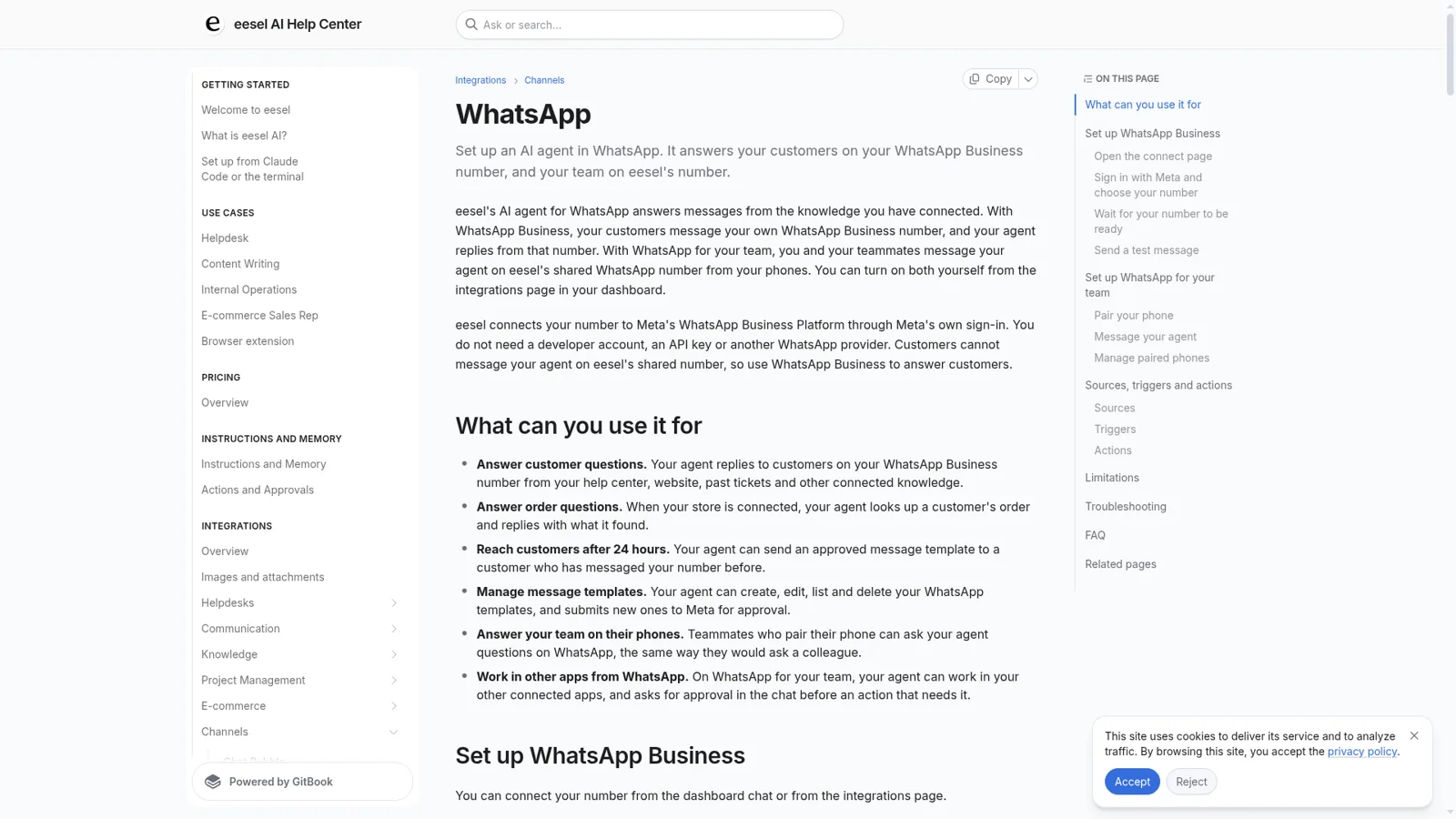
WhatsApp for your team. Each teammate pairs their phone once by sending a one-time code to eesel's shared number. After that eesel knows who is messaging, and "what it does for you follows the access you already have in eesel." When an action needs approval, the agent sends Approve and Deny buttons right in the WhatsApp chat, and only people with edit access can approve. Messages from unpaired numbers never reach your agent. Think of it as eesel in Slack or Microsoft Teams, on your phone. This is the closest thing to what people want from a WhatsApp Claude connector. You ask a colleague from your phone, and it can actually do the thing in Shopify, Jira or your helpdesk.
WhatsApp Business. Customers message your own number and the agent replies from it. You connect through Meta's sign-in, with no developer account or API key. It answers from your help center, website and past tickets, looks up orders when your Shopify store is connected (Question Beauty's agent looked up 290 Shopify orders in a month), and can send approved templates after the 24-hour window and create or edit templates for Meta's review. On the current dashboard, eesel's safety check decides each template send, and you can set it to Ask first to approve every one.
It's proactive, too. Automations start work from a schedule, an event in a connected app or a webhook, so it can post the morning summary or chase the order that stalled without anyone typing. Corrections stick through memory. Cape Coffee Beans runs 160 scheduled checks a month this way, with a short list of slipped tickets emailed to the founder.
Now the limits. The agent reads text, not the inside of images or voice notes. There's no built-in human handover on WhatsApp like the one for the chat bubble, though it can open a ticket in your helpdesk if your instructions say so. A workspace connects one WhatsApp Business number, and numbers coming from another WhatsApp provider can't be moved over yet. Meta bills template messages to your own account.
Keep Claude for your own work
None of this means giving Claude up. Claude is a great assistant for your own drafting, analysis and code, and I use it daily. If you want Claude on customer conversations specifically, my Claude for customer support guide covers the routes. My Claude for work post covers where it shines, and Claude Tag is Anthropic's take on a shared assistant in Slack.
The two also connect. Your eesel workspace is an MCP server, so you can add it to Claude as a custom connector and ask "what did eesel answer on WhatsApp today?" or "have eesel draft a reply to that customer". Editors can change things, viewers get the read side, and anything set to Ask first still asks. That's the split I'd recommend: Claude for you, a teammate for the WhatsApp number everyone else messages. My ChatGPT for WhatsApp post makes the same call from the OpenAI side.
Try eesel as your team's WhatsApp teammate
If you came here for a WhatsApp Claude connector, what you probably wanted was an AI you can message from your phone that can do real work, and answer customers without handing a stranger something they shouldn't see. eesel does that on both numbers, with permissions that follow who's asking. It's a free 7-day trial with 100 credits and no card, then plans from $299 a month on the pricing page, with unlimited seats.
