

ChatGPT for WhatsApp still exists, but only in the European Economic Area. You message the verified 1-800-CHATGPT contact at +1-800-242-8478, no account needed, and it answers text, images and voice notes. Everywhere else it has been gone since January 15, 2026, when a change to Meta's WhatsApp Business terms barred general-purpose AI assistants from the platform except where Meta is legally required to allow them. OpenAI brought it back to the EEA on July 13, 2026.
That covers ChatGPT as your assistant. If you searched "WhatsApp ChatGPT integration" because you want AI on your business number, the path is different. A ChatGPT seat can't power a third-party service, so you either build a bot on the OpenAI API and Meta's Cloud API, or you hire an AI teammate that already works there.
That teammate is eesel. It answers customers on your own WhatsApp Business number and your staff on eesel's number, and it changes what it will do based on who is messaging: a teammate can approve a held action from the chat, a verified customer can ask about their own order, and a number it doesn't recognise only gets public answers. And if you'd rather let a coding agent do the setup, Codex can drive the eesel CLI to load your return policy and FAQs and run test questions before anything goes live.
Why this search got so confusing
I spend a lot of my week on what people actually type into Google, and "WhatsApp ChatGPT" is a strange one. It's two searches wearing one keyword. Half the people want to chat with ChatGPT inside WhatsApp, and since January they've been landing on tutorials for a number that no longer answers them. The other half run a business on WhatsApp and want ChatGPT answering their customers, which was never what 1-800-CHATGPT did.
I write for eesel, which has spent years putting AI to work inside teams' own tools, so I'm going to answer both halves. The second half is where the interesting decisions are, because once an AI talks to customers on your number, who is asking matters more than which model is answering.
Can you still use ChatGPT on WhatsApp?
Yes, if your WhatsApp number has an EEA country code. OpenAI's 1-800-ChatGPT help article opens with it: "ChatGPT is available again on WhatsApp in the European Economic Area (EEA)." Availability "is based on the country code associated with your WhatsApp number and may roll out gradually."
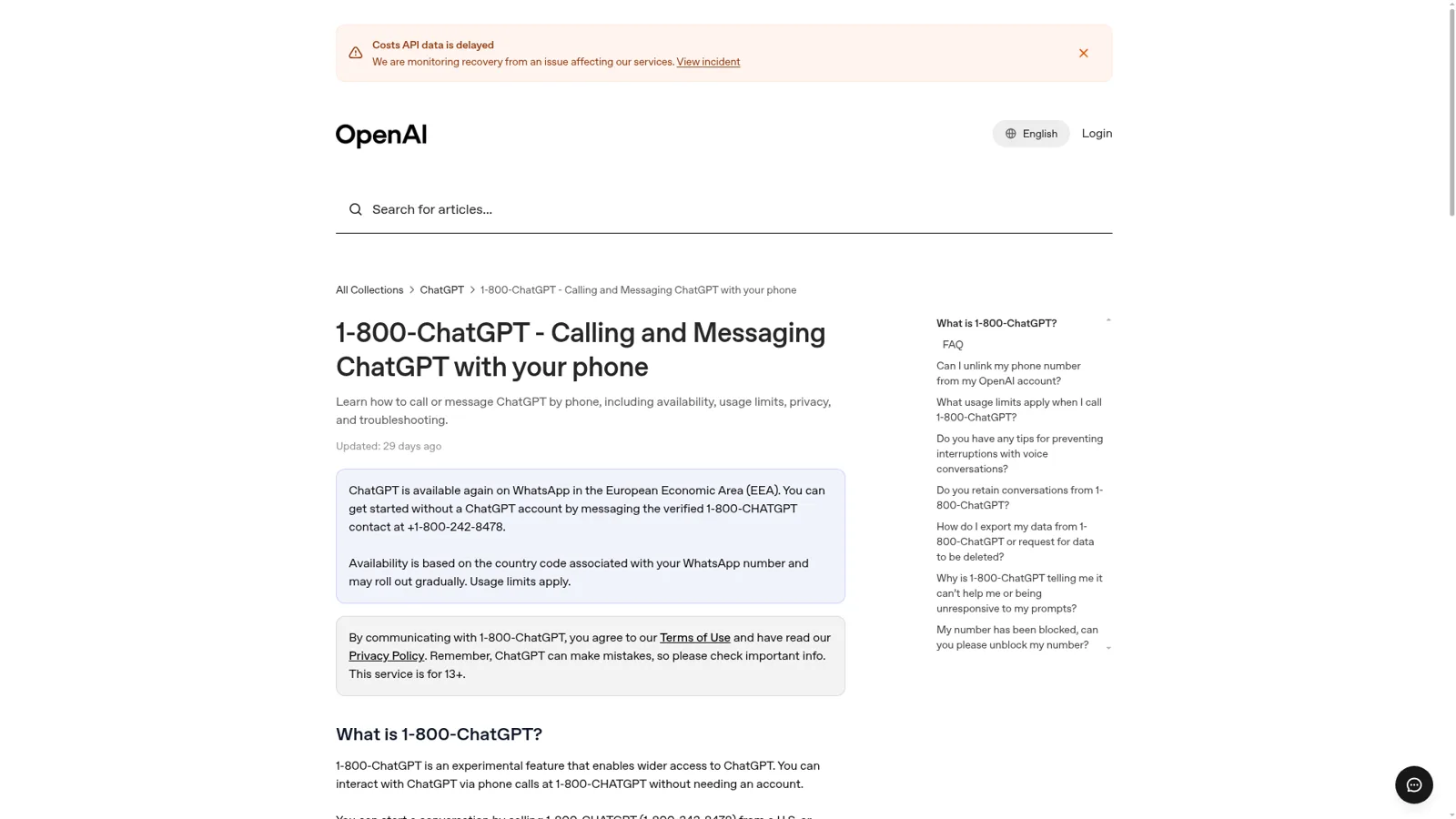
Here's where that leaves you, by where your number is registered.
| Your WhatsApp number | ChatGPT on WhatsApp today | What OpenAI points you to |
|---|---|---|
| EEA (e.g. +33, +49, +39, +34, +47) | Yes, via 1-800-CHATGPT | WhatsApp, or the ChatGPT app |
| US or Canada | No WhatsApp chat; you can still call 1-800-CHATGPT for 30 free minutes a month | The ChatGPT app or chatgpt.com |
| Everywhere else | No | The ChatGPT app or chatgpt.com |
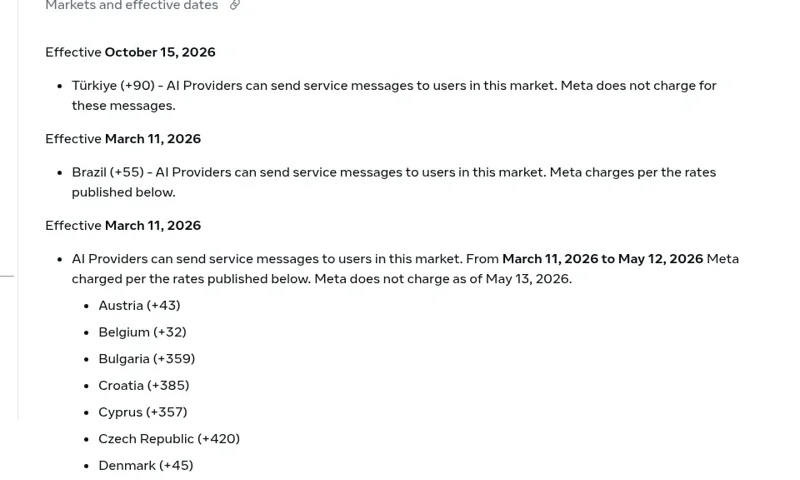
Meta's own rules also open the door in Brazil and Türkiye (more on that below). OpenAI's pages only name the EEA, so I wouldn't count on those until OpenAI says so.
How to start a ChatGPT chat on WhatsApp
It takes about a minute in the EEA:
- Save +1-800-242-8478 as a contact, or open a chat with it. It shows as the verified 1-800-CHATGPT contact.
- Send a message. Per OpenAI's release notes for July 13, 2026, you can "message ChatGPT, upload images, send voice notes, create images, and use ChatGPT in many languages."
- Optionally link your ChatGPT account. "Linking your ChatGPT account is optional and provides higher usage limits," and your WhatsApp chats then show up in your ChatGPT history.
Usage limits apply and the service is for 13+. If you need connectors, projects or long documents, that's the ChatGPT app on a paid plan; the ChatGPT pricing page runs from Free and Go at $8 a month to Plus at $20 (my ChatGPT pricing post has every tier).
What happened to ChatGPT on WhatsApp?
Meta changed its WhatsApp Business terms, and ChatGPT had to leave. The short version is a timeline.
| Date | What happened | Source |
|---|---|---|
| December 2024 | 1-800-CHATGPT launches as day 10 of OpenAI's "12 Days" | OpenAI |
| October 21, 2025 | OpenAI says ChatGPT will leave WhatsApp "due to a policy and terms change from WhatsApp" | OpenAI |
| January 15, 2026 | Meta's AI Providers rule takes effect; ChatGPT leaves WhatsApp | Meta |
| February 16, 2026 | AI Providers allowed again for Italian numbers, with Meta charging per message | Meta |
| March 11, 2026 | Allowed again across the rest of the EEA and in Brazil | Meta |
| May 13, 2026 | Meta stops charging AI Providers for EEA and Italian messages | Meta |
| July 13, 2026 | ChatGPT returns to WhatsApp in the EEA | OpenAI |
| October 15, 2026 | Türkiye added, with no Meta charge | Meta |
The goodbye post is worth reading for one number. OpenAI said it had "loved seeing more than 50 million of you chat, create, and learn with ChatGPT on WhatsApp", and that "WhatsApp does not support chat exports", so unlinked chats didn't carry over.

People liked it for a simple reason. It was there, in the app they already had open:
"Having ChatGPT in my WhatsApp (I live in a place where WhatsApp is everywhere) is a nice middle ground, lets me occasionally ask it stuff without worrying about accounts and projects and models and all that stuff."

And when the exit was announced, not everyone took Meta's side:
"I'm a bit disappointed, I feel that was certaintly a monopolist move and clear abuse of dominant position from Whatsapp/Meta."
The rule itself (my 2026 platform roundup puts it in context) is section 4.7 of the Meta Terms for WhatsApp Business Platform. It says "AI Providers", meaning makers of "large language models, generative artificial intelligence platforms, general-purpose artificial intelligence assistants", are "strictly prohibited" from the platform when that technology is "the primary (rather than incidental or ancillary) functionality being made available", except in the countries Meta lists. Meta's AI Providers page lists those markets and when each one opened.
Can your business connect ChatGPT to its own WhatsApp number?
Yes, but not through ChatGPT itself, and the rule above isn't what stops you. Meta's ban covers an AI company offering a general assistant as the product. A store, a clinic or a travel agency running a WhatsApp chatbot for business is using it as an "incidental or ancillary" part of its business, which is what the WhatsApp Business API is for. The same clause even says "you may retain an AI Provider as your Solution Provider", as long as your WhatsApp data isn't used to train anyone else's model.
What stops a shortcut is OpenAI's side. Its ChatGPT Business limits page lists "Reselling access or using ChatGPT to power third-party services" among the things you can't do. A ChatGPT seat is a staff tool. Customer-facing bots go through the API, billed separately.
So you have three ways to put AI answers on your number.
Build it on the OpenAI API
The do-it-yourself route is a small web service. Meta's Cloud API quickstart has you create a Meta app with the WhatsApp use case, connect a WhatsApp Business account, generate an access token and point a webhook at your server. Each incoming message hits your webhook, your code calls OpenAI, and you post the answer back. Plenty of teams have done it, like this one in Brazil:
"The LLM works great for this use case for doctors in Brazil where a lot of the scheduling happens in WhatsApp. Hooking up a WhatsApp bot to chatgpt and Google calendar is incredibly powerful"
What the quickstart doesn't show you is the stuff you learn in production. On the OpenAI developer forum, a builder running a WhatsApp bot for his business found one customer's details turning up in another's conversation ("sometimes he knows my name in this case “Steve” which was said in another chat with another thread"), and another WhatsApp bot operator explained why they queue messages before answering:
"People in chat apps tend to send batches of messages like “Hmmm…idk” “I guess maybe this” “Or that”"
Then there's Meta's paperwork. One developer on Hacker News found their number shut down because they weren't a real company: "I got my account blocked when Meta discovered I'm not a business unfortunately" (fgblanch). You need a verified business, a payment method and approved templates before you're done.
Here's what you pay, from the vendors' own pages.
| Cost line | What it is | Price |
|---|---|---|
| Model | OpenAI API, GPT-6.2 Sol | $2.00 per 1M input tokens, $10.00 per 1M output |
| Model, cheaper | OpenAI API, GPT-6 Luna | $0.10 per 1M input tokens, $0.50 per 1M output |
| Replies in the 24-hour window | Meta service messages | First 1,000 a month per number free, then charged per message since October 1, 2026 |
| Messages after 24 hours | Approved templates | Meta's per-market rate card |
| Hosting, logging, handover | Yours to build | Your engineer's time |
My WhatsApp Business API pricing post goes deeper on Meta's side, and the 24-hour window guide covers what to do when a customer goes quiet.
Use Meta's own AI
Meta now sells its own option. Since July 1, 2026 its pricing docs list a fifth message category, "Meta Business Agent", for replies "powered by the Meta Business Agent Platform", priced on the tokens each conversation uses. It's worth a look if you'd rather stay inside Meta's stack.
Hire a teammate that already works in WhatsApp
The third way is a product that already holds the number, the knowledge and the rules. That's the rest of this post. If you want to compare a few, my roundups of the best WhatsApp chatbots and WhatsApp API providers cover the field.
Where a homemade ChatGPT bot stops
A bot you build answers whoever messages it, the same way. That's fine for opening hours. It falls apart the first time three very different people write in on the same afternoon:
- The shop manager, from the stock room, asking "how many returns came in this week, and can you refund the two damaged ones?"
- A customer asking "can you change the delivery address on my order?", the bread and butter of ecommerce WhatsApp support.
- A number you've never seen, asking "what's the address on order 4471?"
Your bot needs three different behaviours there, which means a permission model you'd have to design, build and test. ChatGPT itself does have controls for the person using it. Connected apps can be set to Always ask or to allow read actions, per OpenAI's app permissions guide, and Business workspace agents set write actions to Always ask by default. Those controls follow the ChatGPT user or the agent, and they don't change with who a WhatsApp message is from.
| ChatGPT on WhatsApp | Your own bot on the OpenAI API | eesel on WhatsApp | |
|---|---|---|---|
| Who it works for | You | Whoever you build it for | Your team and your customers |
| Which number | 1-800-CHATGPT | Your business number | Your business number, plus eesel's team number |
| Where it's available | EEA numbers | Anywhere WhatsApp Business works | Anywhere WhatsApp Business works |
| What decides what it may do | Your own account | Code you write | On, Ask first or Off per action, changed by who is asking |
| Approvals | Not applicable | Build it | Approve and Deny buttons in the WhatsApp chat |
| Works without anyone typing | No | If you build triggers | Automations on schedules, app events and webhooks |
| Cost | Free with limits | API tokens, Meta messages, engineering | From $299 a month, plus Meta's message charges |
eesel on WhatsApp: one teammate, two numbers
eesel is an AI teammate that works in the apps your team already uses, WhatsApp included. Per eesel's WhatsApp docs, it runs on two numbers at once.
Your WhatsApp Business number, for customers. You connect it through Meta's own sign-in, with no developer account, API key or other WhatsApp provider. The agent answers from your help center, website and past tickets, looks up orders when your Shopify store is connected (my Shopify WhatsApp guide covers the store side), sends approved templates after the 24-hour window, and drafts new templates for Meta's review. It replies in the customer's language, the way ClutchLoop's agent handled website chats.
eesel's number, for your team. Each person pairs their phone once with a one-time code. From then on, the shop manager in the stock room can ask about returns or ask it to act in your other connected apps, and "what it does for you follows the access you already have in eesel." When something needs a yes, Approve and Deny buttons show up in the WhatsApp chat itself, and only editors can approve. Unpaired numbers never reach the agent.

The permissions are what make the three messages above safe. Every action is On, Ask first or Off, per agent and per action, and eesel's actions and approvals docs let you set it in a sentence ("look up orders on your own, but ask me before changing an address"). On top of that, eesel changes its behaviour depending on whether the person is on your team, one of the specific people you've named, a verified customer or an anonymous visitor. So for the three messages:
| Who's asking | What happens |
|---|---|
| Shop manager, paired on eesel's number | Gets the returns count; the two refunds wait for her Approve tap if refunds are on Ask first |
| Verified customer, on your business number | The address change waits for a person if you set it to Ask first, or runs if you trust it |
| Unknown number asking about order 4471 | Gets your public policy, never someone else's order or a Team only file |
It also starts work on its own. Automations run on a schedule, an event in a connected app or a webhook, and a correction you give it sticks through memory. Stil Classics has its agent look up Shopify orders before drafting, 230 of them in a month.
If customers write to you in more than one place, the same agent can sit in your helpdesk, your inbox and your site's chat bubble, with the same rules everywhere.
Some honest limits. The agent reads message text but not what's inside images or voice notes, and its replies are text. There's no built-in human handover on WhatsApp, though it can create a ticket in your helpdesk if your instructions say so. One workspace connects one WhatsApp Business number, and Meta bills template messages to your own account. If you also keep answering from the WhatsApp Business app on your phone, the agent doesn't see those replies.
Keep ChatGPT for your own work
You don't have to pick one. ChatGPT is a great assistant for your own writing and thinking, and EEA readers can keep it in WhatsApp too. My ChatGPT at work post covers what it does for a team inside ChatGPT, my ChatGPT customer service alternatives list covers support tools, and the Claude version of this question has a different answer worth reading if you use both.
eesel also meets ChatGPT halfway. eesel's apps for ChatGPT are being listed in ChatGPT's app directory, so you'll be able to ask your eesel agent what it did on WhatsApp from a ChatGPT conversation. And Codex, ChatGPT's coding agent, can set eesel up for you through the CLI today.
Try eesel as your WhatsApp teammate
If what you wanted from "ChatGPT for WhatsApp" was AI on your own number, eesel is the version that knows your store, your policies and who's asking. Your team gets a colleague they can message from their phones, and your customers get answers without anyone handing out what they shouldn't. Start with a free 7-day trial (100 credits, no card), then plans from $299 a month on the pricing page, with unlimited seats.
