


OpenAI doesn't offer ChatGPT for Discord. There's no ChatGPT bot from OpenAI you can add to your server, Discord isn't one of the apps in ChatGPT, and a read-only Discord connector is still sitting in OpenAI's forum as a feature request. What OpenAI does run on Discord is its own community server, where you can talk to other ChatGPT users. Every "ChatGPT" bot you can invite to your server is a third party calling the OpenAI API.
So a Discord ChatGPT bot means one of two things. You build one on the API (from $0.10 per million input tokens on GPT-6 Luna, plus hosting and Discord's rules), or you add an AI teammate that already lives in Discord.
That teammate is eesel. Members mention it and get an answer in a thread from your docs; it can also work in your other apps, and what it may do depends on who is asking. Your linked moderators can approve a held action right in the thread, while a member who joined yesterday gets answers and nothing more. If you live in Codex, it can run the eesel CLI to fetch the Discord connection link, upload your FAQ and patch notes, and ask test questions before the bot says a word in public.
Why "ChatGPT for Discord" is a confusing search
I write about AI tools for eesel, and I keep seeing this keyword pull in three very different readers. One wants ChatGPT to read their Discord. One wants a ChatGPT bot in their server. And one mostly wants to know whether that bot named "ChatGPT" in a server they joined is real (it isn't from OpenAI).
eesel has spent years letting an AI act inside teams' own tools, and Discord servers are the hardest room of all (my Discord overview explains how they differ from Slack), because half the people talking to the bot aren't on your team. I'll answer all three readers, then get to the bit that matters once a bot can actually do things.
Where OpenAI actually shows up on Discord
OpenAI's Discord presence is a community, not a product. Its help center article OpenAI's Discord server links an invite and asks you to "complete your OpenAI Discord verification to access the server." It's a place to swap prompts and get help from other users.

The closest thing to ChatGPT built into Discord was Discord's own. In March 2023, Discord announced Clyde, an AI chatbot "using OpenAI technology" that you could summon with @Clyde in any channel, alongside experiments called AutoMod AI and Conversation Summaries. Discord said at the time that "more than 30 million people already use AI apps on Discord every month." Clyde didn't last the year:
"It's worth noting (though I'm not sure whether this is related), that Discord has announced that they're shutting down their ChatGPT-based bot"

Users could no longer chat with Clyde from December 1, 2023. It was popular, and it also made people nervous, which is a theme you'll see again below:
"Discord rolled out a ChatGPT based bot that can be used in (and thus can read) all private conversations. Not surprised there are issues with it."
Is there a ChatGPT app for Discord?
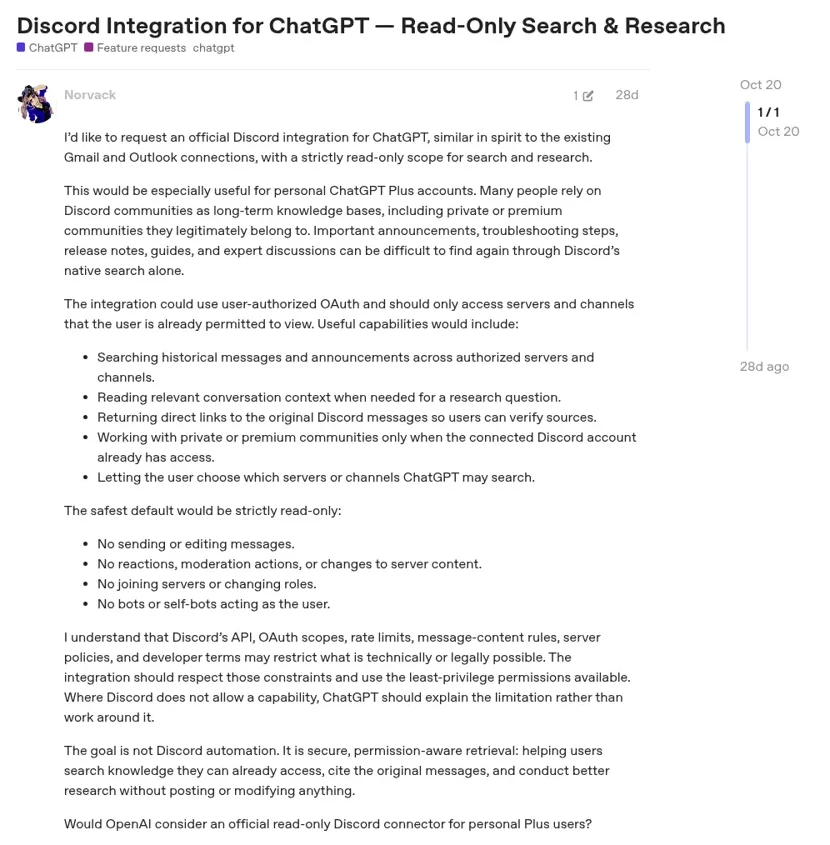
No. ChatGPT's apps connect it to services like Google Drive, Gmail and Slack, and you call them with @ in a chat. Discord isn't on the list. In October, a ChatGPT Plus user asked OpenAI for exactly that in the developer forum, and kept the ask modest:
"I'd like to request an official Discord integration for ChatGPT, similar in spirit to the existing Gmail and Outlook connections, with a strictly read-only scope for search and research."
The team-side features stop at Slack too. ChatGPT Business workspace agents can be added to a Slack channel, and they can be started through an API trigger "from an internal workflow, scheduled job, support tool, or other system". There's no Discord channel option. My ChatGPT workspace agents guide covers what they do in Slack, and apps in ChatGPT lists what ChatGPT does connect to.
Which "ChatGPT for Discord" do you need?
Pick the one that sounds like you.
"I want ChatGPT to search or summarise my Discord."
There's no ChatGPT app for that today. Copy the thread into ChatGPT, or use a server bot that can read channel history and answer there. Discord's Developer Policy says bots can't mine or scrape servers, so look for one that reads only what it's asked about.
"I want a ChatGPT bot my friends or I can talk to."
Build a small bot on the OpenAI API. Codex can write most of it. Budget for tokens and a place to host it, and keep it in a private server.
"I run a community or a product server and want AI to answer members."
You need permissions by who is asking, approvals for actions, and answers grounded in your docs. Build that yourself on the API, or add a teammate like eesel that ships with it. See the best AI teammates roundup.
"I saw a bot called ChatGPT in a server. Is it official?"
No. OpenAI doesn't publish a ChatGPT bot for Discord. It's someone's app on the API, so check who made it before you share anything personal.
How to build a Discord ChatGPT bot on the OpenAI API
A ChatGPT seat won't power a bot. ChatGPT Business's models and limits page lists "Reselling access or using ChatGPT to power third-party services" among the things the Services Agreement prohibits, and the API is billed separately from any ChatGPT plan. So the bot runs on an API key.
The skeleton is short. Create an application in the Discord Developer Portal, add a bot user, turn on the Message Content intent, invite it to your server, and run a small service that listens for messages and sends each one to OpenAI. OpenAI Codex will happily write the first version, and my Codex and Discord post shows how people pair them.
Here's what it costs to run, from OpenAI's own page (OpenAI API pricing has the full list).
| Model | Input per 1M tokens | Output per 1M tokens | Good for |
|---|---|---|---|
| GPT-6.2 Sol | $2.00 | $10.00 | Everyday answers and tool use |
| GPT-6.1 Terra | $1.00 | $5.00 | Fast replies, reading screenshots |
| GPT-6 Luna | $0.10 | $0.50 | High-volume FAQ answers |
| GPT-6.2 Astra | $8.00 | $40.00 | Hard questions you'd rather not answer twice |
Then come Discord's rules, which matter more the bigger your server gets.
- Message content is privileged. Per Discord's privileged intents FAQ, apps under 10,000 users can switch it on themselves. "Once your app reaches 10,000 users, your app requires review for continued access."
- No training on chats. The Developer Policy says "Do not use message content obtained through the APIs to train machine learning or AI models (including large language models) unless express permission is granted by Discord."
- No unsolicited DMs. The same policy says "Do not contact users on Discord without their explicit permission", so a bot that DMs members to follow up needs a clear opt-in.
People who've run a homemade bot for years tend to keep adding to it. One server owner who tried a heavier agent setup and gave up went back to the bot he already had:
"What I have done from what I've learned though, is upgrade my trusty Discord bot so it now has a SOUL.md and MEMORIES.md. Maybe at some point I'll also give it a heartbeat, but I'm not sure..."
That's the honest arc of a homemade bot. It starts as a chat window, then it needs memory, then a schedule, then knowledge, then a way to stop it doing the wrong thing for the wrong person.
The moderator problem
Picture a small game studio's Discord on patch day. Within ten minutes three people ping your bot.
- A player in
#supportasks why their save won't load after the patch. - Mara, a community moderator, asks the bot to tag that thread as a patch bug in your tracker.
- An account created an hour ago asks for the internal list of known issues and who's working on them.
A bot built on the OpenAI API answers all three the same way, unless you write the code that tells them apart. ChatGPT itself does have controls, and they're good ones. Connected apps can be set to Always ask, Allow read actions, or Allow low-risk actions, per OpenAI's app permissions guide, and workspace agents set write actions to Always ask by default. Those controls follow the ChatGPT user or the agent. They don't change with which Discord member sent the message, because ChatGPT isn't in your server to see who that is.
Here's what a server actually wants for those three people, and what eesel does.
| Who's asking | What they need | What eesel does |
|---|---|---|
| The player | A real answer from your patch notes and help docs | Answers in a thread from your connected knowledge |
| Mara, linked to eesel as an editor | The tag added, and the power to approve it | Posts an approval card in the thread; Mara can approve it |
| The new account | Public answers only | Answers questions; Team only actions and files stay off, and its approve clicks get a private "you can't decide" message |
eesel in Discord: one teammate, rules by person
eesel is an AI teammate that works in your team's tools, and Discord is one of its chat apps. You connect it from the dashboard chat, a server admin picks the server and clicks Authorize, and it posts nothing until someone talks to it.

What it does in the server, per the docs:
- Answers mentions in threads. It adds a 👀, opens a thread off the message and answers there, and keeps answering follow-ups in that thread.
- Answers questions nobody tagged it in. The channel message automation runs a filter on each message; by default it replies to "questions, requests and problems, and ignores small talk and messages meant for someone else." You can reword the filter or pause it.
- Reads before it speaks. It can read the thread or a channel's recent messages to see what members already said, live, without copying Discord into its knowledge.
- Works in your other apps. From the thread it can look up an order in Shopify, draft a reply on a Gorgias ticket, tag or assign it, and ask for approval before it changes anything.
The permissions are the part I'd point a moderator team at. You link a teammate by giving eesel their Discord user ID and their eesel email, and from then on they get "the same access as their eesel account has in the dashboard chat." Editors can change its instructions or add an automation straight from Discord. Everyone else, "including server admins, can only ask questions." Every action is On, Ask first or Off, per the actions and approvals docs, and beyond your team you can set what it does for specific named people, a verified customer and an anonymous visitor. Even its @mentions are careful: they only notify linked people, and @everyone never pings anyone.
It's also the same agent everywhere your team works, so the answer a player gets in Discord matches what your support lead sees in Slack and what lands in your helpdesk. SE Ranking runs one agent per product across 4,650 conversations a month, which is the shape I'd copy if your studio has more than one game.
Automations let it start work on a schedule or an app event, like a Monday summary of last week's bug threads. If your team chats in Microsoft Teams instead, the same agent works in Teams.
ChatGPT on your desk, a teammate in your server
Keep ChatGPT. It's a great assistant for your own drafting, analysis and code, and my ChatGPT at work post covers where it earns its seat (the ChatGPT pricing guide has the plans). The two meet in the middle, too. eesel apps are being listed in ChatGPT's app directory, so you'll be able to ask ChatGPT "what's eesel waiting on me for?", and Codex can set eesel up from a repo with the CLI.
If you're weighing Anthropic's side, my Discord Claude connector post covers Claude Code's official Discord plugin, which is a different beast: a bridge to one developer's own session. For picking the bot itself, my roundups of Discord AI bots and Discord AI chatbots compare the field.
If you're still deciding how much to invest in the server itself, Discord's pricing explains what Nitro and server boosts do and don't change.
Try eesel as your server's AI teammate
If you came here for ChatGPT for Discord, what you probably want is an AI your members can ask anything, that answers from what your team actually knows, and that your moderators can trust with real work. eesel does that, with rules that change by who is asking. Try it free for 7 days with 100 credits and no card; plans start at $299 a month for 500 credits on the pricing page, with unlimited agents and seats.
