


There is no Discord Claude connector in Claude's connector directory. The official way to put Claude in Discord is Anthropic's Claude Code channels Discord plugin, in research preview. You create a Discord bot, install the plugin, restart Claude Code with --channels, and pair your account. After that, DMs to your bot (and any server channels you opt in) land in the Claude Code session running on your machine, and Claude replies through the bot.
That is a great setup for one person. You get Claude, your repo and your files from your phone. It is a different thing from a bot your server talks to, because every message the plugin lets through is answered by your session, with your access.
A community server needs a bot that knows who is asking. That's what eesel in Discord does: anyone in the server can mention it and get an answer from your docs, linked teammates can ask it to work in your other apps, and only linked editors can approve what it holds. If you'd rather not click through a dashboard, Claude Code can drive the eesel CLI to fetch the Discord connection link, load your docs and ask test questions, though a server admin still clicks Authorize in Discord.
Why I care about this one
I work on eesel's integrations, and Discord is my favourite trap. It looks like Slack with better emoji. Then you notice that the people in the channel aren't your colleagues. They're players, customers, contributors, moderators, and the occasional stranger who joined ten minutes ago.
eesel has spent years letting an AI act inside teams' own tools, and the lesson Discord teaches fastest is this. Connecting a model to a chat app is a weekend project. Deciding what it may do alone, what waits for a person, and what it must never hand to the stranger who joined ten minutes ago is the real work.
Is there an official Discord Claude connector?
Not in the sense most people mean. I checked three places.
- Claude's connector directory. The connectors page lists Slack, but there's no Discord listing, and
claude.com/marketplace/connectors/discordreturns a "Nothing to see here" page. - Claude Code channels. This is where Discord lives. Per Anthropic's docs, "A channel is an MCP server that pushes events into your running Claude Code session, so Claude can react to things that happen while you're not at the terminal." Telegram, Discord and iMessage are the three supported channels.
- Anthropic's GitHub. The Discord plugin lives in
claude-plugins-official. Its README sums it up as "Connect a Discord bot to your Claude Code with an MCP server."
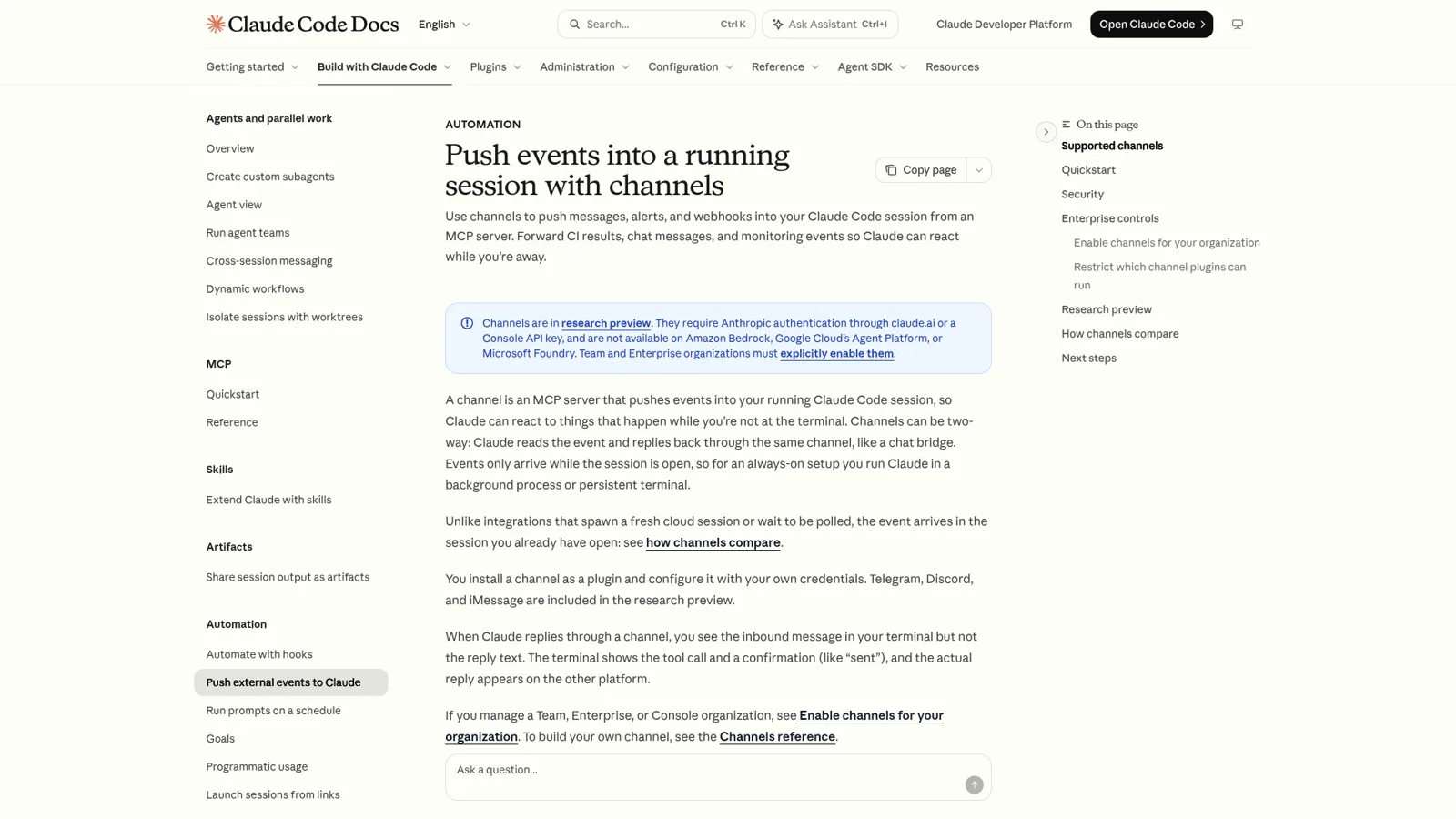
So the honest answer is that the Discord Claude connector is a Claude Code plugin, not a claude.ai connector. It needs Claude Code, a terminal and Bun, and it doesn't run in the Claude web or mobile app.
How to set up the Claude Code Discord plugin
Setup takes about fifteen minutes if you've made a Discord bot before. Here are the steps from Anthropic's docs and the plugin README, in order.
| Step | What you do | Where |
|---|---|---|
| 1 | Create an application, add a bot, click Reset Token and copy it | Discord Developer Portal |
| 2 | Turn on Message Content Intent under Privileged Gateway Intents | Bot settings |
| 3 | Generate an invite with the bot scope plus View Channels, Send Messages, Send Messages in Threads, Read Message History, Attach Files and Add Reactions | OAuth2 > URL Generator |
| 4 | Run /plugin install discord@claude-plugins-official | Claude Code |
| 5 | Run /discord:configure <token> | Claude Code |
| 6 | Restart with claude --channels plugin:discord@claude-plugins-official | Terminal |
| 7 | DM your bot, get a pairing code, run /discord:access pair <code> | Discord, then Claude Code |
| 8 | Lock it down with /discord:access policy allowlist | Claude Code |
Two things trip people up. Skip step 2 and, per the README, "the bot receives messages with empty content". Skip the --channels flag in step 6 and messages are silently dropped, which is its own GitHub issue.
If you're on a Claude Team or Enterprise plan, there's a step zero. Channels "are blocked until an Owner enables them" from Organization settings, and admins can limit which channel plugins may run with allowedChannelPlugins. Pro, Max and Ultra users without an organization can opt in per session. The plugin costs nothing extra on top of your Claude plan, which starts at $17 a month for Pro billed annually (my Claude pricing post has every tier).
What the plugin is good at, and where it stops
The plugin gives Claude five tools in Discord: reply, react, edit_message, fetch_messages and download_attachment. Claude can answer you, thread its reply, send files (up to 10 per message, 25MB each), and pull up to 100 recent messages from a channel. The README is candid that "Discord's search API isn't exposed to bots, so this is the only lookback."
For a developer, that's a lovely setup. You can ask Claude Code to check a failing test from the bus and get the answer in Discord, while the work runs against your real files. Permission prompts can travel too: the docs say channel servers that declare the permission relay capability "can forward these prompts to you so you can approve or deny remotely", and one GitHub report describes them arriving "as DMs with Allow/Deny buttons" (#74645).
The limits come from the same design.
- It runs while your session runs. "Events only arrive while the session is open." Close the laptop and the bot goes quiet.
- One bot token per machine. A request to run several sessions with separate bots, #56109, was closed as a duplicate. Today, "only the first session successfully connects to the Discord gateway."
- It's a research preview. The flags "may change based on feedback", and inbound delivery has had rough patches. One Pro user on version 2.1.278 found DMs never reached the session and settled on a workaround:
"Polling
fetch_messagesevery 30-60s from a/loopskill and callingreplyfor anything new. Functional but eats tokens on every idle tick and adds latency equal to the poll interval."
Early users noticed the one-session shape quickly too:
"Well, it's one conversation per bot. I set it up, connected the channel. DM'd it (only way to converse with it - wish I could have a Discord channel per project, different CWDs etc...)"

Channel support exists now (more on that next), but the point stands. Every message goes to one session, and that session is you.
What happens when a whole server can talk to it?
Your session answers, with your permissions. That's the part to think hard about before you invite the bot anywhere public.
The plugin's access docs are clear about it. "Discord only allows DMs between accounts that share a server," so "a public community means every member there can open a DM." Unknown senders get a pairing code and their message is dropped, which is a sensible default. Server channels are off until you opt each one in, and then the bot answers when @mentioned unless you pass --no-mention. You can also pass --allow with a list of user IDs.
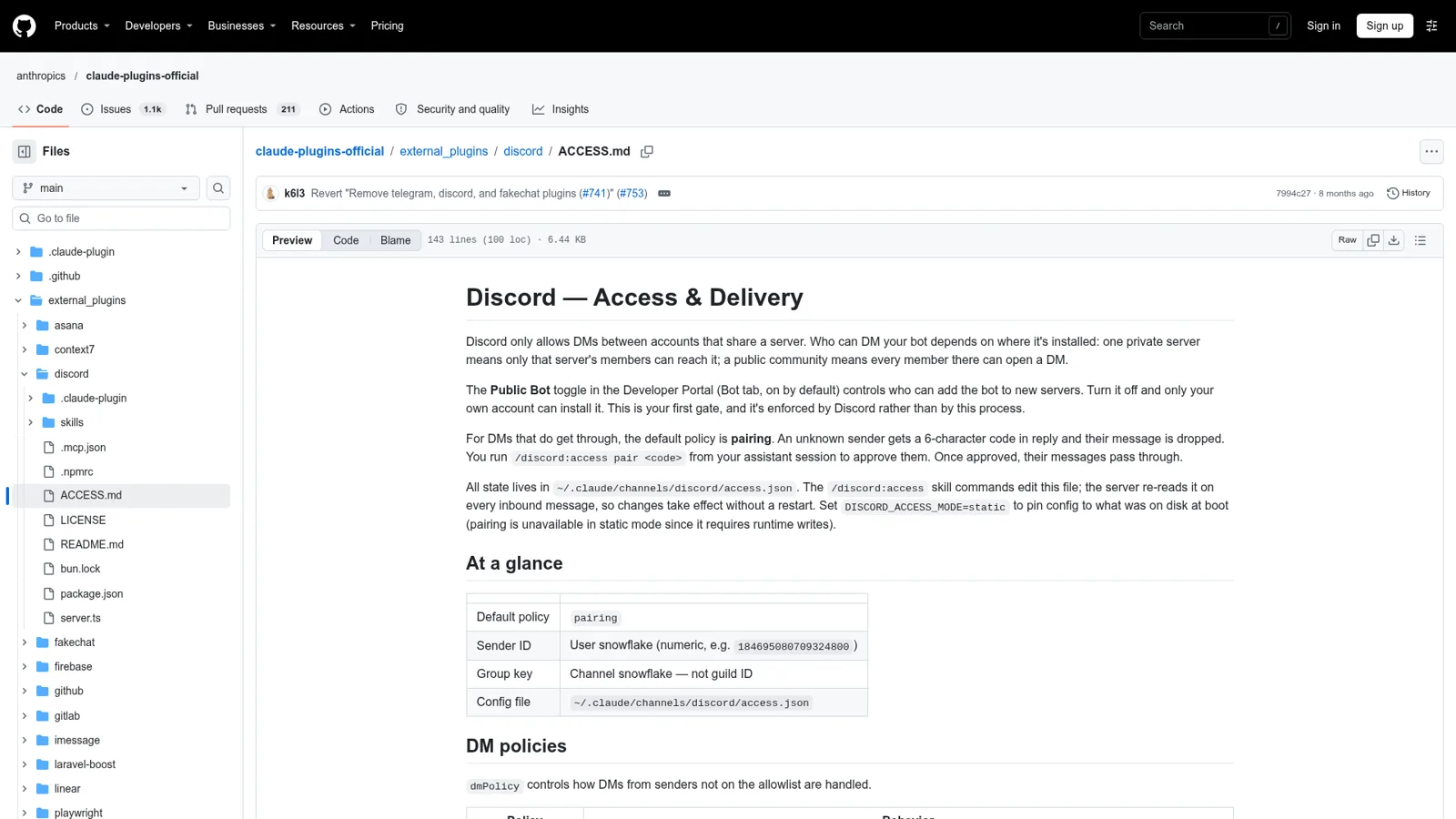
That allowlist is a yes or no. Anyone on it reaches the same Claude Code session, with the same repo, files and connected tools. There's no setting for "moderators can ask it to edit the changelog, members can only ask questions, and that account from yesterday gets public answers only."
To be fair to Anthropic, Claude has real controls. On Team and Enterprise, an Owner must enable each connector, and admins can set each connector permission to Always allow, Needs approval or Blocked, per Claude's connector docs. Channels have their own channelsEnabled switch. Those controls follow the person using Claude and the organization they belong to. They don't change with who sent the Discord message, because Claude Code was built to work for the person at the keyboard. My Claude Code permissions guide goes deeper on that model.
One Hacker News commenter put the enterprise worry plainly:
"I'm struggling with how useful this is in an enterprise setting where a security team will be at least slightly annoyed at devs hooking into their personal machines via untrusted chat"
Here's how the three kinds of people in a typical server play out.
| Who's talking | Claude Code Discord plugin | What a server actually wants |
|---|---|---|
| You, the developer | Your session, your files, your tools | Same |
| A moderator on your team | Everything you can do, if allowlisted | Can ask for changes and approve held actions |
| A member asking a question | Everything you can do, if allowlisted; dropped if not | Answers from your docs, nothing internal |
| Someone who joined an hour ago | Dropped, or everything if you opened the channel | Public answers only |
Building your own Claude Discord bot instead
If you want Claude answering a server, the clean route is your own bot on the Claude API. Anthropic's legal and compliance page says signing in with a subscription is "designed to support ordinary use of Claude Code and other native Anthropic applications", so a bot that serves other people belongs on an API key.
The build is familiar. A Discord application with a bot user, a gateway connection, a handler that calls Claude for each message, and a reply. The costs and rules sit around it.
- Model cost. Claude Sonnet 5.5 is $2 per million input tokens and $10 per million output. Haiku 5.5 is $0.10 and $0.50 for prompts up to 100,000 tokens.
- Message Content intent. Per Discord's privileged intents FAQ, an app with fewer than 10,000 users can switch it on in the portal. Past that, "your app requires review for continued access."
- Discord's data rules. The Developer Policy says "Do not use message content obtained through the APIs to train machine learning or AI models (including large language models) unless express permission is granted by Discord." It also rules out mining or scraping and using API Data beyond your stated functionality.
- Everything else. Memory per thread, a knowledge source, logging, rate limits and a permission model you design yourself.
Developers have opinions on that first step:
"Discord webhooks aren't too bad... but the proper bot thing is ridiculous. They really lack a development mode server, having to know everything about oauth and token permissions before even starting is bonkers"
If you have an engineer and one narrow job, like answering FAQs in #help, it's a fine project. My Discord AI chatbot and Discord AI bots roundups cover ready-made options, and OpenAI vs Anthropic API compares the two model bills. The moment you want it to also look up orders, tag tickets and know which members are staff, you're building a product.
Claude Code, your own bot, or a teammate in Discord
Here's the whole picture side by side.
| Claude Code Discord plugin | Your own bot on the Claude API | eesel in Discord | |
|---|---|---|---|
| Who it works for | You | Whoever you build it for | Your server and your team |
| Who can ask it | Allowlisted Discord users | Whoever you code for | Anyone in the server |
| What decides what it may do | Your Claude Code permissions | Code you write | On, Ask first or Off per action, changed by who is asking |
| Approvals | Permission prompts relayed to your DMs | Build it | Approval cards in the thread, decided by linked editors |
| Works with nobody at a keyboard | Only while your session runs | If you host it | Yes, plus automations on schedules and events |
| Knowledge | Your local files | Whatever you wire up | Your docs, past tickets, wiki and other connected sources |
| Cost | Your Claude plan | API tokens and hosting | From $299 a month |
How eesel works in Discord
eesel is an AI teammate that works in the apps your team already uses, Discord included. Per eesel's Discord docs, you ask your agent in the dashboard chat to connect Discord, check the workspace and agent on the page it links, pick your server and click Authorize. Connecting posts nothing; it offers to say hello in a channel you choose.
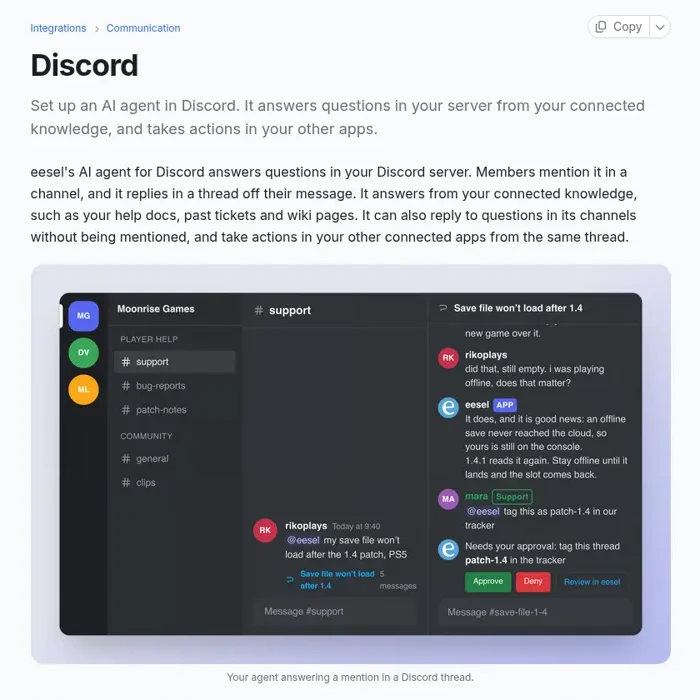
Then it behaves like a colleague who knows the room.
- Anyone can ask. Members mention eesel in a channel and it answers in a thread off their message, from your help docs, past tickets and wiki pages. A channel message automation also lets it answer questions nobody addressed to it, with a filter that skips small talk.
- It reads the room live. It can read the thread, or a channel's recent messages, to see what your community already said. Nothing from Discord is copied into eesel as knowledge.
- It works in your other apps. From the same thread it can look up an order in your Shopify store, draft a reply on a Gorgias or Zendesk ticket, tag it or assign it.
- Who's asking changes what happens. People whose Discord account is linked to an eesel account "have the same access as their eesel account has in the dashboard chat." Linked editors can change instructions and automations from Discord. "Everyone else, including server admins, can only ask questions."
That last point is where the actions and approvals model earns its keep. Every action is On, Ask first or Off, per agent and per action, and you can set it in a sentence ("look orders up on your own, but ask me before tagging anything"). An action on Ask first posts an approval card in the thread, and only linked editors can approve or deny it; anyone else who tries gets a private message saying they can't decide. On top of that, eesel can treat your team, specific people you name, a verified customer and an anonymous visitor differently. Actions marked Team only never run for someone outside your team, so the member who joined an hour ago gets public answers, never your internal runbook.
It also works when nobody's typing. Automations start work from a schedule, an event in a connected app or a webhook, and corrections stick through memory. Cape Coffee Beans runs 160 scheduled checks a month that way, with a short list of slipped tickets emailed to the founder each morning.
For more on running a community this way, see my guide to community support automation.
Keep Claude for your own work
None of this is a reason to drop Claude. Claude Code with the Discord plugin is a lovely way to drive your own session from your phone, and Claude is the assistant I'd pick for drafting and code. My Claude for work post covers where it shines, and Claude Tag is Anthropic's own take on a shared assistant in Slack.
The two also connect. Your eesel workspace is an MCP server, so you can add it to Claude as a custom connector and ask "what did eesel answer in Discord today?" or "have eesel draft a reply to that thread". Editors can change things, viewers get the read side, and anything set to Ask first still asks. If your team leans OpenAI, my ChatGPT for Discord post makes the same call from that side, and Slack vs Discord helps if you're still picking where the team talks.
Try eesel as your Discord teammate
If you searched for a Discord Claude connector, you probably wanted an AI your server can talk to that answers from what your team knows and does real work, without handing a stranger the keys. eesel does that, in Discord and in Slack or Microsoft Teams for the team behind it. It's a free 7-day trial with 100 credits and no card, then plans from $299 a month for 500 credits on the pricing page, with unlimited agents and seats.
