How much does Level AI cost?
Short answer: nobody outside of a Level AI sales call knows, me included. A good part of my time goes on how buyers actually search for software, and "Level AI pricing" is one of those queries where the search result promises an answer that the vendor has kept off the internet on purpose. So rather than guessing a number, I'll do the next most useful thing here, which is showing everything that is public and what the quote is going to hinge on, then what to ask so the number you get back is one you can actually compare.
This is where each public route ends up, as I checked it on October 1, 2026:
| Where I looked | What it shows |
|---|---|
| thelevel.ai/pricing | 404, "the page you're looking for can't be found" |
| thelevel.ai/plans | 404, same page |
| Level AI ROI calculator | Inputs only: monthly interactions, agent count, channel mix |
| G2 pricing page | "Not listed on G2 by the vendor"; 8% average discount; perceived cost $$$$$ |
| Capterra listing | Starting price "Contact vendor"; "Free trial not available" |
| Salesforce AppExchange | Listing exists, pricing tab empty |
| Five9 Marketplace | "Request More Information" and "Buy" buttons, no price |
| AWS, Zendesk and Google Cloud marketplaces | No Level AI listing |
Plan names, a per-agent price, a monthly price and the billable unit are all unpublished. I won't make any of them up. There are per-agent estimates floating around on third-party sites, but none of those trace back to Level AI, so I left them out. To be fair, Level AI is not alone on this, most call center software at this size gets sold the same way.
If you'd rather have the product picture first and the price picture after, my Level AI guide covers what the platform does, and my Level AI review goes deeper into how accurate the AI scoring really is.
What a Level AI quote is built on
Even with no rate card, Level AI still tells you what sales is going to size your deal on. Its ROI calculator carries the title "Pre-Sales ROI Calculator," and under "Your Snapshot" it asks you for three things.
The page defaults give a useful hint on who the calculator was built for: 132,000 interactions a month and 300 agents, with a mix of 45% calls, 36% chat and 18% email. That is a big contact center leaning heavily on the phone, and it matches the G2 reviewer split of 123 mid-market and 72 enterprise reviewers against only 23 small businesses.
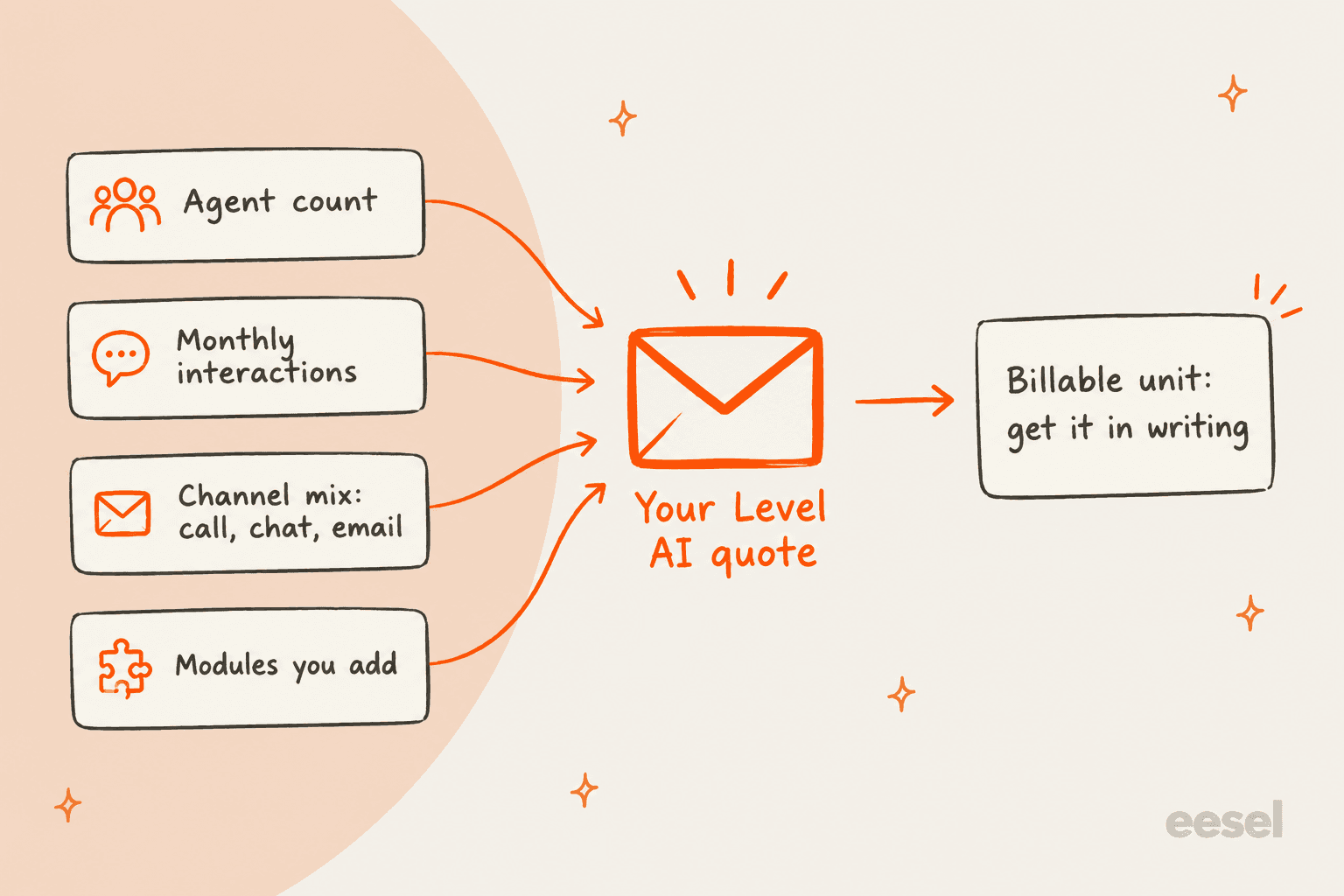
Then there is a fourth lever, which is how much of the platform you buy. Level AI sells a set of products on one platform: AutoQA and QA-GPT for scoring, Agent Assist for live calls, coaching, screen recording, iCSAT, AI Workers and the virtual agent for voice and chat. Which of these come bundled and which are add-ons, Level AI doesn't say, so ask for the quote broken out per product. A deal for QA only and a deal for QA plus Agent Assist plus the virtual agent are really two different purchases, and you'll want to see which line is the one moving the total.
Does Level AI charge per agent or per interaction?
It doesn't say. The calculator asks for agent count and also interaction volume, which tells you what sales sizes on but not how the billing will work. Once you are live, that difference matters quite a lot:
- Per agent (seat). Predictable as long as headcount stays stable, though it climbs with every hire, and an agent taking 20 calls a day costs the same as one taking 80.
- Per interaction or per minute. This tracks usage, but then your bill goes up in exactly the months when your contact center is busiest. For a QA tool that's fine if the price per unit is low, less so if you have seasonal peaks.
- Platform fee. One flat annual number. It's the easiest to budget for and the hardest to compare against anything else.
On voice AI in particular, Level AI's own voice AI pricing guide says most enterprises now pay between $0.10 and $0.25 per minute for voice AI, with premium platforms at $0.75 to $1.50 or more. Those are bands for the whole category that Level AI is describing, not its own rate card. The same post does say Level AI thinks cost "only makes sense in the context of outcomes, not minutes," so if the virtual agent is part of your purchase, expect the talk to steer toward cost per resolution, and ask what counts as one.
What you pay beyond the license
The license is the part of a Level AI deal you will negotiate hardest, and often enough it isn't the biggest cost. G2 reviewers report an average of 3 months to implement, and for that whole quarter your QA team keeps sampling calls the old way while also building and calibrating the new scorecard.
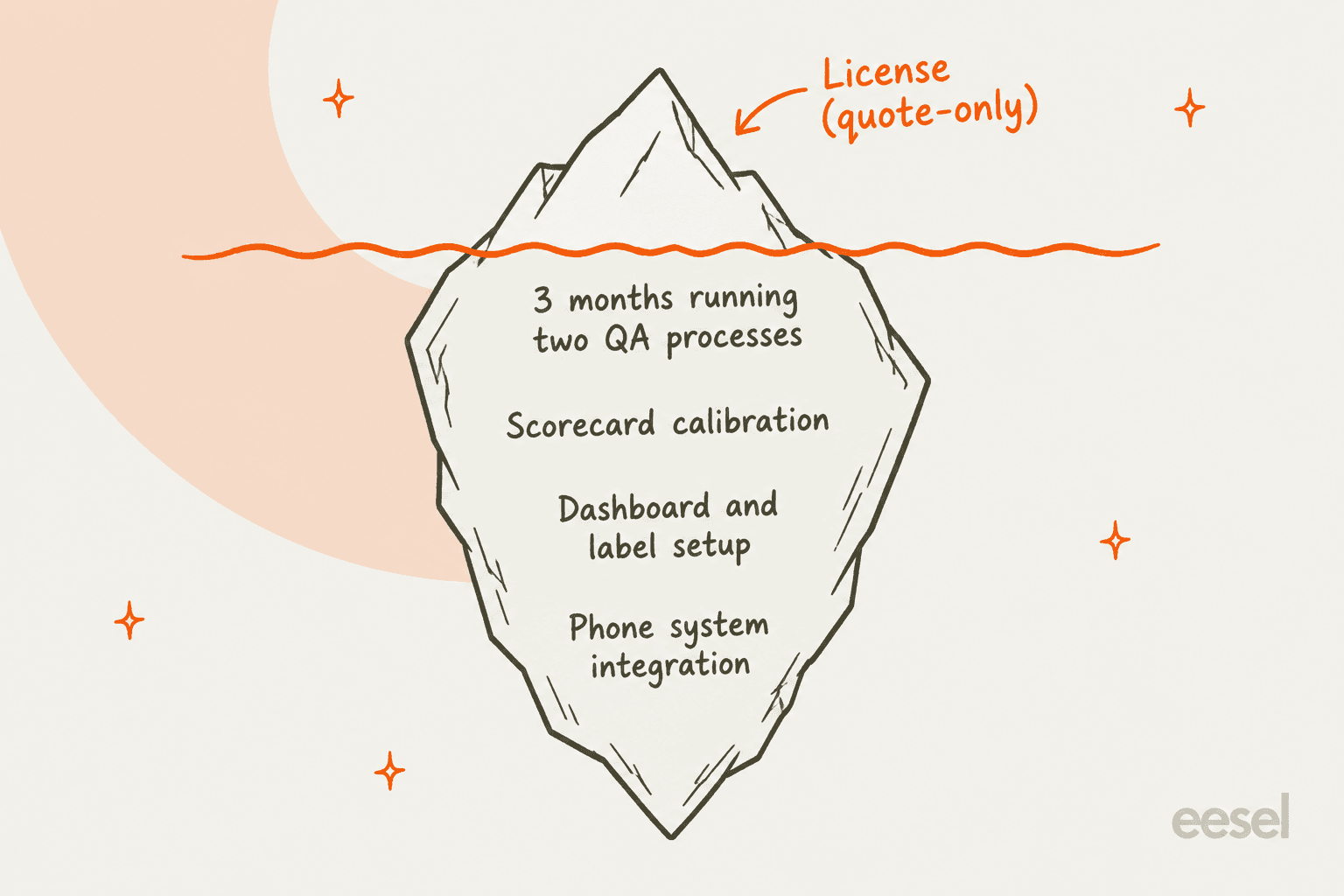
There are four costs sitting under the waterline:
- Running two QA processes. Someone keeps doing manual reviews until the AutoQA scores are trusted. At a contact center with 300 agents, that adds up to a full quarter of QA time done twice.
- Scorecard calibration. Level AI's own FAQ says accuracy "depends on how well the evaluation criteria and scoring logic are configured." On G2's pros and cons summary inaccuracy is the top con too, with 17 mentions. Set aside analyst hours to test questions in the 50-conversation sandbox before they go live, which is the same discipline that sits behind good AI support QA.
- Dashboard and label setup. Somebody has to build the views that your managers will trust (the G2 quote below shows why).
- Integration work. The integrations page lists 51 tools, weighted toward phone systems such as Five9, Genesys and Nice. Going the Salesforce route needs Service Cloud on Professional edition or higher, according to the AppExchange specs. In case your stack isn't on the list, ask who builds the connector and who pays for it.
"At times, the analytics dashboard can be somewhat ambiguous. It is occasionally unclear how certain metrics are being calculated or visualized, which can make it difficult to fully trust the data without secondary validation."

For an enterprise QA rollout, none of this is unusual. It just doesn't show up on the quote, so put your own number on it before you compare Level AI with anything else. There's a fuller checklist in my breakdown of AI customer service costs.
How long until Level AI pays for itself?
G2 shows 4 months as the average return on investment, based on 18 reviewer responses. For enterprise software that is quick, and it lines up with the case studies. Empyrean, with about 400 agents, went from reviewing 3% of calls to 100% and says it saved 13,000+ agent hours a year, while VistaPrint cut over-crediting from 20% to 8% within six months.
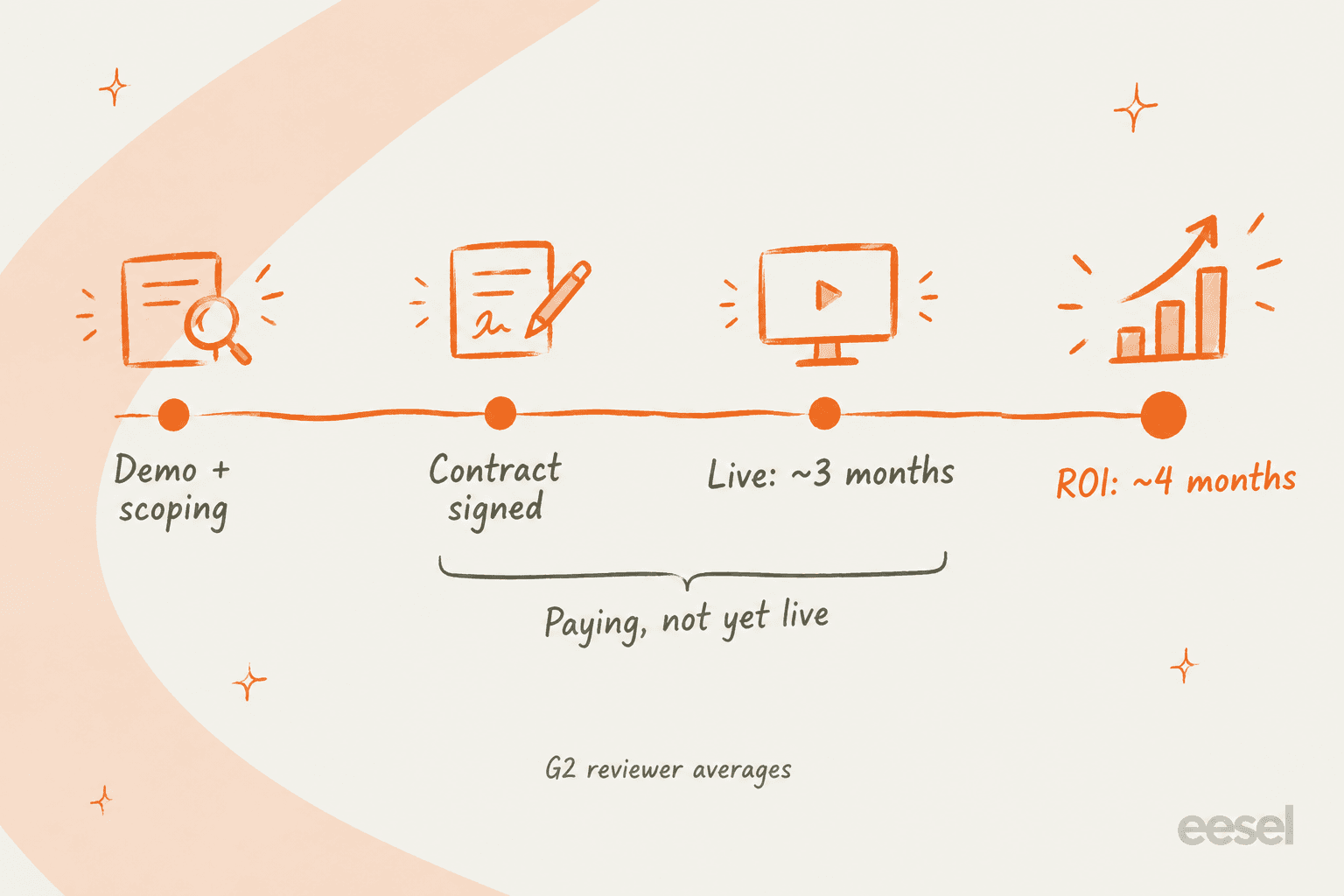
The timeline is the part worth reading carefully. When implementation averages three months and payback averages four, most of the payback window goes on getting the tool live in the first place. You are paying from contract signature, so ask whether billing starts at signature or at go-live. That one clause alone can be worth a quarter of your first-year spend.
Any quote is best judged against what you already spend on QA, so plug your numbers in:
The sample defaults are 20,000 conversations a month with 2% sampled, at 12 minutes a review and $35 an hour. Level AI's QA page puts typical manual coverage at "often around 1% to 3%," which makes 2% a fair middle. How teams usually pick that sample is covered in my guide to call center QA. The minutes and the hourly cost are yours to change, and those two move the result more than anything else.
Level AI pricing vs other contact center QA tools
Hiding the price doesn't make Level AI unusual. I checked eight contact center QA and conversation intelligence vendors on the same day, and only NICE publishes a full per-agent rate card on its own site. Cresta and Calabrio do publish real numbers, though only through their AWS Marketplace listings.
| Tool | Public price? | What's published | Billable unit | Free trial |
|---|---|---|---|---|
| Level AI | No | Nothing | Not disclosed | No |
| Cresta | AWS only | Agent Assist for Chat or Voice, $150,000/year each (up to 125,000 chats or 100,000 calls); overage $1.20/chat, $1.50/call | Interaction volume, annual | No |
| NICE CXone Mpower | Yes | $110 to $249/agent/month; Quality Management included from the $169 Core suite | Per agent/month | Not on NICE's page |
| Calabrio ONE | AWS only | QM $492/user/year (about $41/month); full suite $1,500/user/year | Per user, 12-month term | No |
| Zendesk QA | Partly | WFM + QA bundle $50/agent/month on top of a Zendesk plan; standalone QA add-on not listed | Per agent/month | On request |
| Observe.AI | No | Consumption, outcome-based or fixed-rate, no figures | Not disclosed | No |
| MaestroQA | No | Pricing form only | Not disclosed | Yes (G2) |
| ScorebuddyCX | No | Foundation, Accelerate (500 AI scores/month), Elite (1,000) | Per user plus AI credits | 14 days |
| eesel | Yes | Free (100 credits); Teammate $299/month for 500 credits | Per ticket or chat | Free plan |
What tells you more is what G2 reviewers report after they've already bought, and there Level AI's numbers are some of the best in the category:
| Tool | Time to implement | Return on investment | Average discount |
|---|---|---|---|
| Level AI | 3 months | 4 months | 8% |
| Convin | 1 month | 8 months | 11% |
| Balto | 2 months | 12 months | 11% |
| ScorebuddyCX | 2 months | 12 months | 13% |
| Observe.AI | 3 months | 16 months | 18% |
| Calabrio ONE | 3 months | 16 months | 19% |
| MaestroQA | 3 months | 18 months | 28% |
Two things stand out here. Level AI's 4-month ROI is a quarter of what reviewers report for Observe.AI or Calabrio, which counts as a real point in its favor. Its 8% average discount, on the other hand, is the smallest in the group, so expect less room to negotiate than with MaestroQA's 28%. Keep in mind these are reviewer survey averages and not audited figures, some of them on small samples, but they are still the closest thing to a price benchmark this category has.
To go deeper on the field, my Cresta review covers the closest like-for-like rival, and in my roundup of support QA tools you'll find options with published per-agent prices.
How to get a Level AI quote you can compare
With no rate card around, the quote becomes the rate card. Here are the questions I would send over before the second call, so that you end up comparing like with like:
- What is the billable unit? Per agent, per interaction, per minute or a platform fee, plus what counts as one.
- Which products are in the number? AutoQA, Agent Assist, coaching, screen recording, iCSAT, AI Workers and the virtual agent, with each one on its own line.
- When does billing start? At signature or at go-live, which matters given the 3-month average rollout.
- What happens when volume spikes? Ask for the overage rates, or whether the contract can absorb a busy season.
- What does renewal look like? Whether there's a price cap or a lock on year two.
That last one comes up on eesel's own sales calls more often than you'd expect. One budget-conscious buyer at a hardware company told the eesel team they had watched a previous vendor's price more than double, so the first thing they asked for was a contractual price lock, and they even offered to pay yearly to get it. Quote-only pricing makes this risk bigger rather than smaller, because when the renewal lands there is no public list price to point at.
There's one more piece of leverage you have. G2's 8% average discount means the first number is rarely the final one, and on a platform with no free trial, asking for a pilot on a subset of agents or for a shorter first term is a fair request.
Who Level AI's pricing makes sense for
Level AI's pricing model fits the buyer it was designed for, which is a contact center with hundreds of agents and real phone volume, plus a QA team and a procurement process that expects a demo and a negotiated contract. For a team like that, quote-only pricing is not a red flag but simply normal, and the case studies show the coverage gains are real. If that is you, read up on how to do QA with AI, then compare it head to head with the tools in the table above and push hard on the five questions.
The fit gets harder when you have under 50 agents, or when your work is mostly email and helpdesk tickets. In that case you would be negotiating an enterprise contract and a three-month rollout just to grade a queue that a lighter support QA tool or Zendesk QA could cover at a published per-agent price. And if your real problem is not being able to answer enough tickets, rather than not grading enough calls, then a scoring tool won't fix it.
A ticket-queue option with a public price
For teams in that second group, eesel's AI helpdesk teammate does the work itself instead of scoring it. It joins your helpdesk the way a new agent would and learns from your help center, macros and past tickets, then it drafts or sends replies, tags and routes inside Zendesk, Freshdesk, Gorgias and other helpdesks.

Pricing here works the opposite way to Level AI's, because it sits right on the pricing page. A free plan gives you 100 credits with no card needed. The Teammate plan is $299/month for 500 credits, where one ticket or chat counts as one credit no matter how many replies it takes, with unlimited agents and seats. Before it answers even a single customer, its simulation replays hundreds of your past tickets and scores each answer against what your team actually sent, the same "test before you trust" step that Level AI asks of its AutoQA buyers.
One honest limit to mention: eesel has no phone channel. If calls make up most of your volume, Level AI or a dedicated AI voice agent is the right category for you. If it's tickets, you can try eesel on your own queue today and look at the simulation results before you ever talk to sales.
Frequently Asked Questions
How much does Level AI cost?
Level AI doesn't publish pricing. Its /pricing page returns a 404, Capterra lists "Contact vendor", and there's no free trial, so Level AI pricing comes as a custom quote after a demo. G2 reviewers report an 8% average discount. For context on how other vendors price, see my AI customer service cost breakdown.
Does Level AI have a free trial or free plan?
No. Capterra says "Free trial not available" and G2 lists no free plan or trial. The closest thing is a demo with Level AI's sales team. If you want something you can test yourself first, eesel's free plan includes 100 credits with no card.
Is Level AI priced per agent?
Level AI doesn't say. Its ROI calculator asks for agent count and monthly interactions, so both shape the quote, but the billable unit isn't published. Ask sales to put it in writing, along with overage rules. My Cresta pricing post shows how another quote-only contact center vendor handles the same question.
What affects Level AI pricing the most?
Agent count, monthly interaction volume, your call, chat and email mix, and which products you buy (AutoQA, Agent Assist, coaching, screen recording, iCSAT, AI Workers, virtual agent). Ask for the quote broken out by product so you can see which line moves the total.
How long does Level AI take to pay for itself?
G2 reviewers report an average of 4 months to see a return on investment and 3 months to implement. Since most of that window is setup, ask whether billing starts at signature or at go-live. My guide to call center ROI covers how to measure it.
Is Level AI worth the price?
For a phone-heavy contact center with hundreds of agents and a QA team stuck sampling 1% to 3% of calls, often yes; case studies like VistaPrint and Empyrean show real coverage gains. For a small team working tickets, a support QA tool with published pricing is usually the better value. My Level AI review covers the full verdict.
What are cheaper Level AI alternatives?
For QA inside a helpdesk, Zendesk QA fits teams already on Zendesk. For large contact centers, Cresta is the closest match, though it's also quote-only. For ticket queues where you want AI to answer, not just score, eesel's AI helpdesk teammate starts at $299/month with unlimited seats.


Article by
Kurnia Kharisma
Kurnia is a software engineer and writer at eesel AI with two years of SEO experience, writing about AI tools, helpdesk software, and customer support. He pairs a developer's understanding of how these products are built with search-driven research into what actually ranks and resonates with the people searching for them.