

Gemini Omni 1.2 Flash is Google DeepMind's November 5, 2026 update to its Omni video model. The headline changes are 15-second clips (up from 10), about $0.07 per second of 720p video (down from about $0.10), and tighter character and product consistency across reference images. It is still a model you build on, not a worker that does a job. I'd use it for ad and product video pipelines. For support tickets or blog posts, a ready-made teammate like eesel fits better, and the eesel CLI lets a coding agent upload approved knowledge and test a teammate's answers before it goes live.
What is Gemini Omni 1.2 Flash?
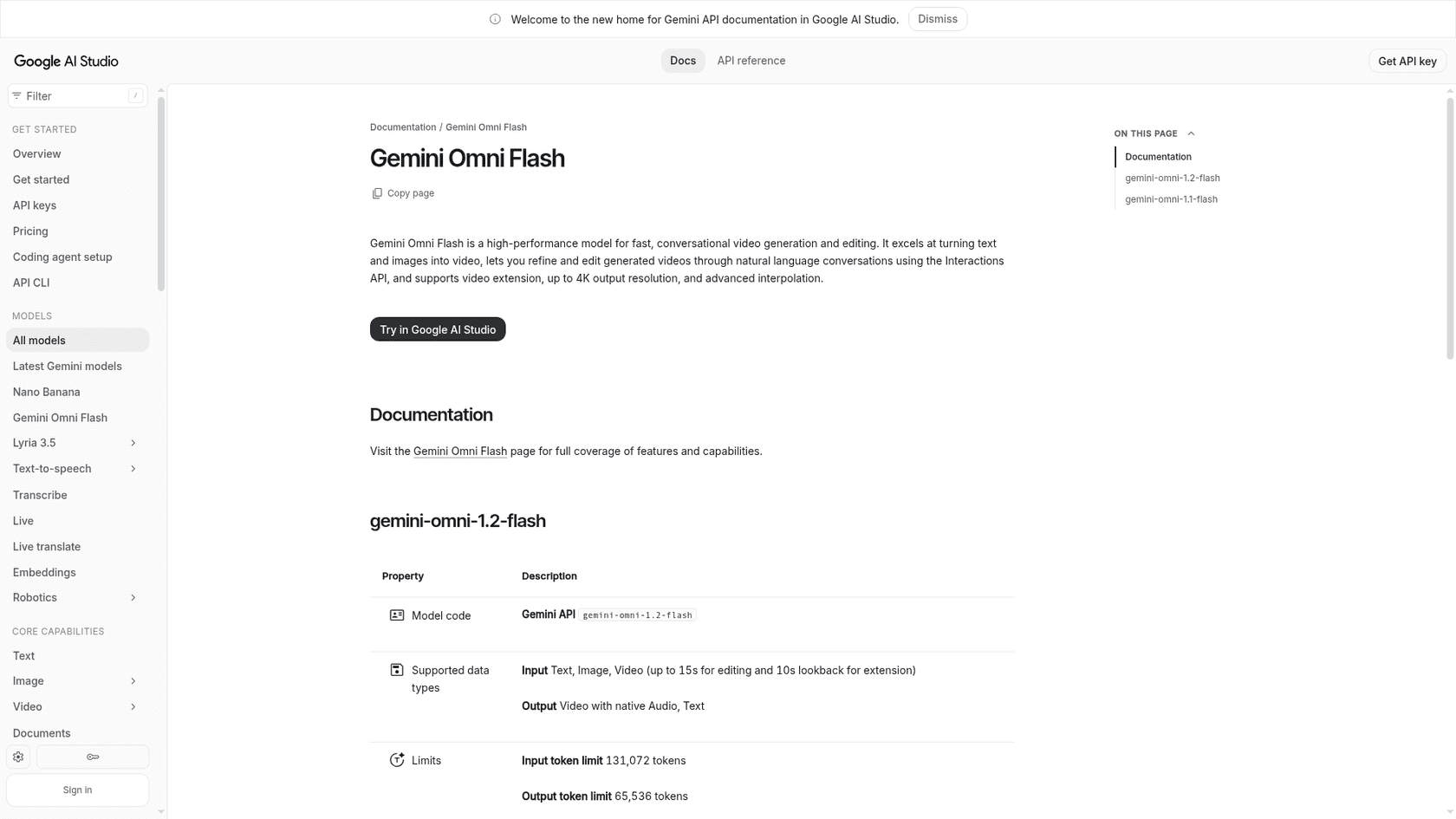
It is the third release in Google's Omni video line, after the original Gemini Omni Flash and the August update, Gemini Omni 1.1 Flash. Google's model card lists text, images, audio, and video as inputs, and "high-quality, high-resolution video with audio" as the output. The Gemini API model ID is gemini-omni-1.2-flash, and the Gemini API changelog marks it generally available on November 5, 2026.
The idea carries over from earlier releases: you describe a shot, then refine it by chatting instead of re-rendering from scratch. If you want the original model's backstory, my Gemini Omni Flash review covers it.
What changed from 1.1?
The short version is longer clips, a lower price, and stronger references. One detail runs the other way, which I flag below.
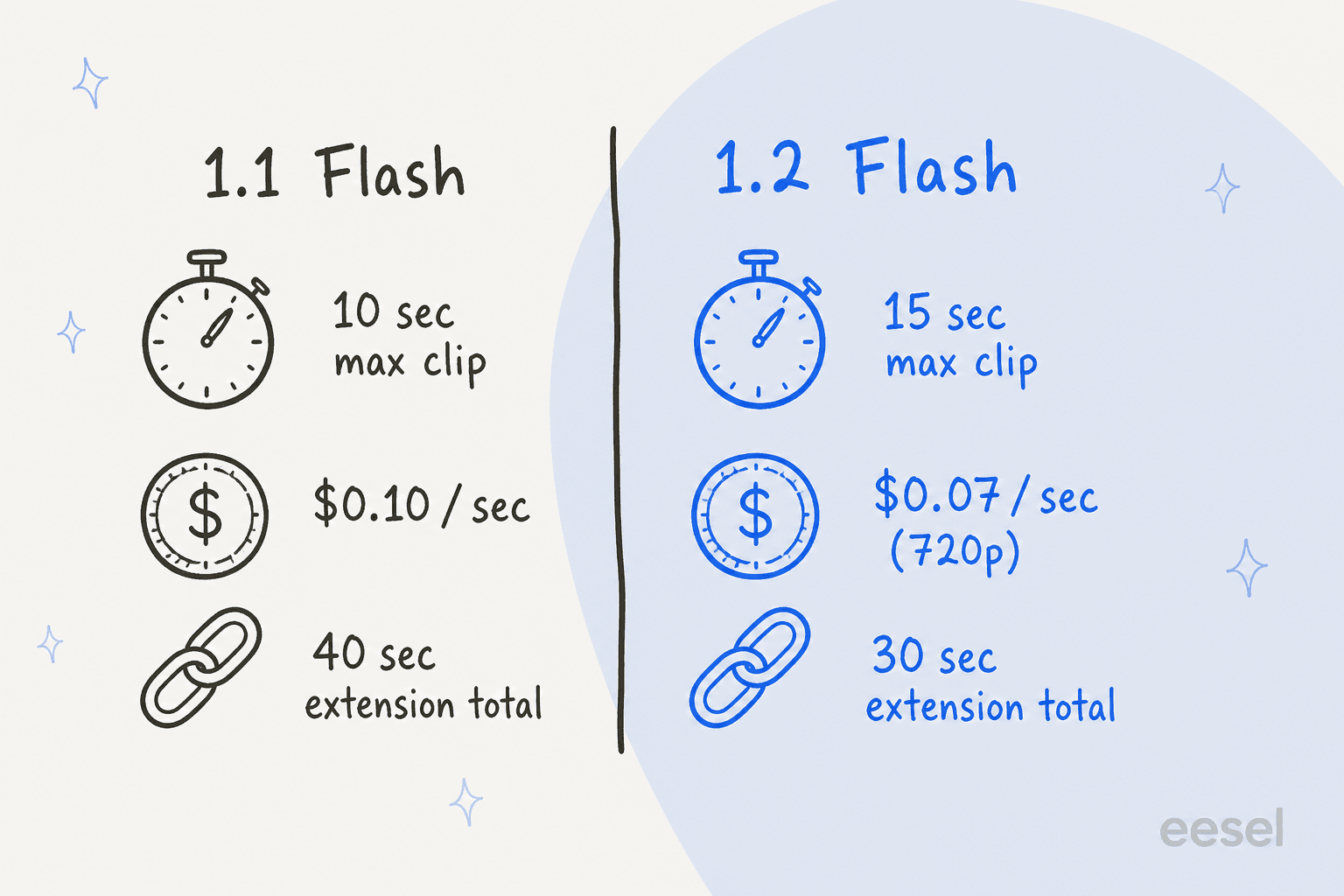
- Clip length: 3 to 15 seconds per generation, in one-second steps, per the Google AI Studio docs. Version 1.1 capped a generation at 10 seconds.
- Price: video output drops to
$12.00per 1M tokens from$17.50, which the pricing page puts at about$0.07per second of 720p video. - References: the changelog says the model keeps characters and subjects more consistent across up to six reference images. Audio references sit behind an allowlist on Google Cloud.
- Speech: Google Cloud's launch post cites clearer lip-sync and multi-speaker conditioning.
- Limits: paid-tier rate limits doubled, per the same changelog entry.
One thing runs against the trend. At launch, 1.1 advertised scene extension up to 40 seconds in total. The 1.2 docs list extension at 3 to 10 seconds per turn, up to 30 seconds total. Google's pages don't explain the difference, so if you planned around 40-second chains, test it before you commit.
How good is it, by Google's own numbers?
Google's Gemini Omni page publishes side-by-side win rates for 1.2 against 1.1. They are Google's own evaluations, not an independent benchmark, and your prompts and reference images were not in that sample.
| Test | 1.2 win rate | 1.1 win rate |
|---|---|---|
| Text to video, visual consistency | 62% | 38% |
| Reference to video, overall preference | 63% | 37% |
| Reference to video, identity consistency | 63% | 37% |
| Image to video, overall preference | 59% | n/a |
| Instruction editing | 57% | n/a |
Read these as "a clear but modest step up." A 62% win rate means roughly one comparison in three still preferred the older model. For ad work, the reference-consistency rows matter most, because drifting product colors are what usually gets a generation rejected.
How much does it cost?
The Gemini API pricing page lists the model on the standard tier only. There is no free tier and no batch tier. Input is $1.50 per 1M tokens, text output $9.00, and video output $12.00.
| Resolution | Per second | Tokens per second |
|---|---|---|
| 360p | $0.023 | 1,931 |
| 720p | about $0.07 | 5,792 |
| 1080p (with upsampling) | $0.104 | 8,688 |
| 4K (with upsampling) | $0.209 | 17,376 |
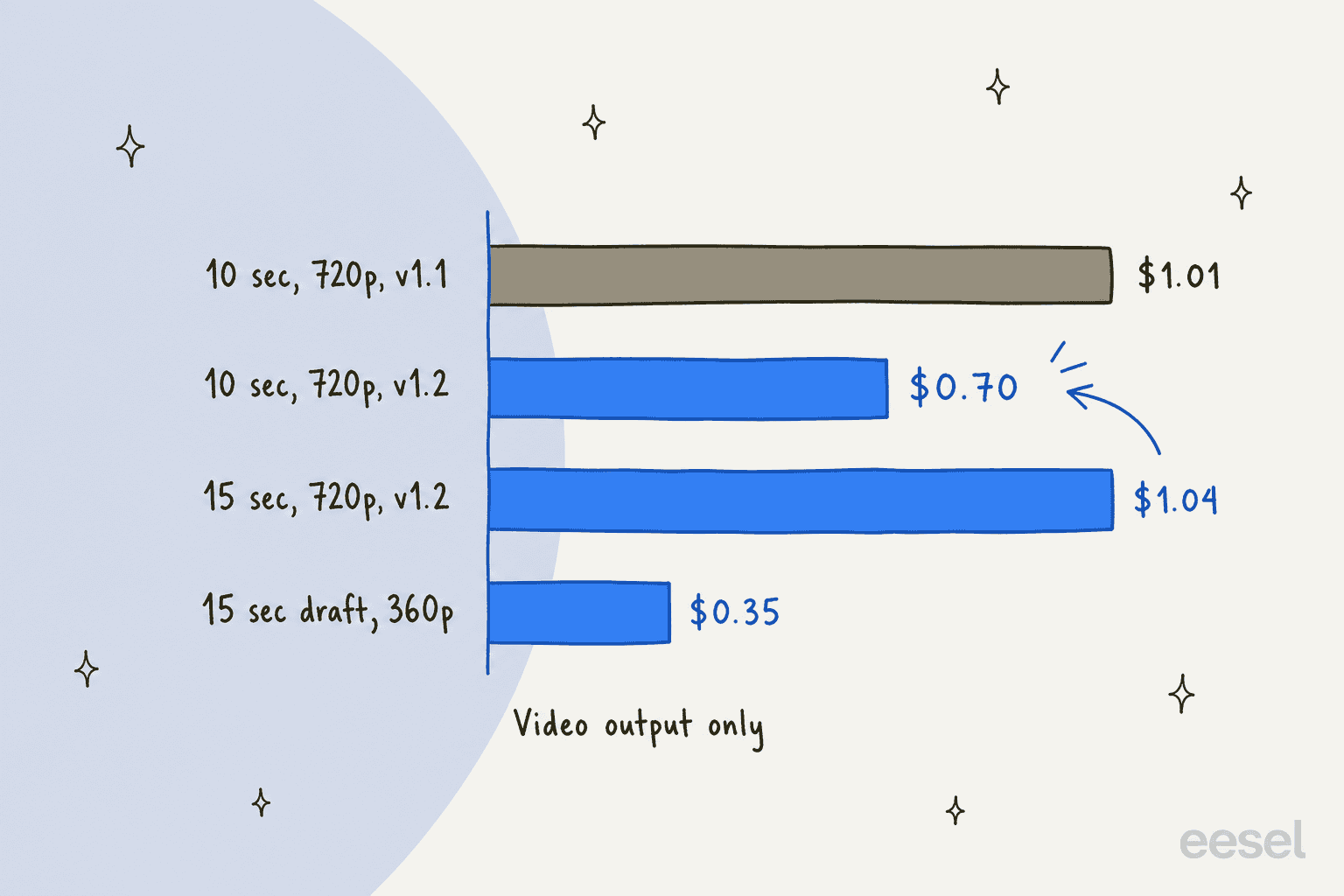
The 5,792 tokens per second at 720p comes from the same rate used in my Omni 1.1 pricing guide. Multiplying out, a full 15-second 720p clip costs about $1.04 and a 10-second one about $0.70, against about $1.01 for 10 seconds on 1.1. For wider context, see my Gemini Omni Flash pricing breakdown and the general Gemini pricing guide.
Google's pricing page says that from December 3, 2026, requests to the 1.1 model ID route automatically to 1.2 and bill at 1.2 rates. If you have 1.1 calls in production, your costs fall without a code change, and your output changes without one too.
How does the draft-then-upscale workflow work?
Google's launch post describes drafting at 360p or 720p, then upscaling the best take to 1080p or 4K. In practice you iterate cheaply, fix problems with a follow-up chat message, and only pay for the high-resolution render once.
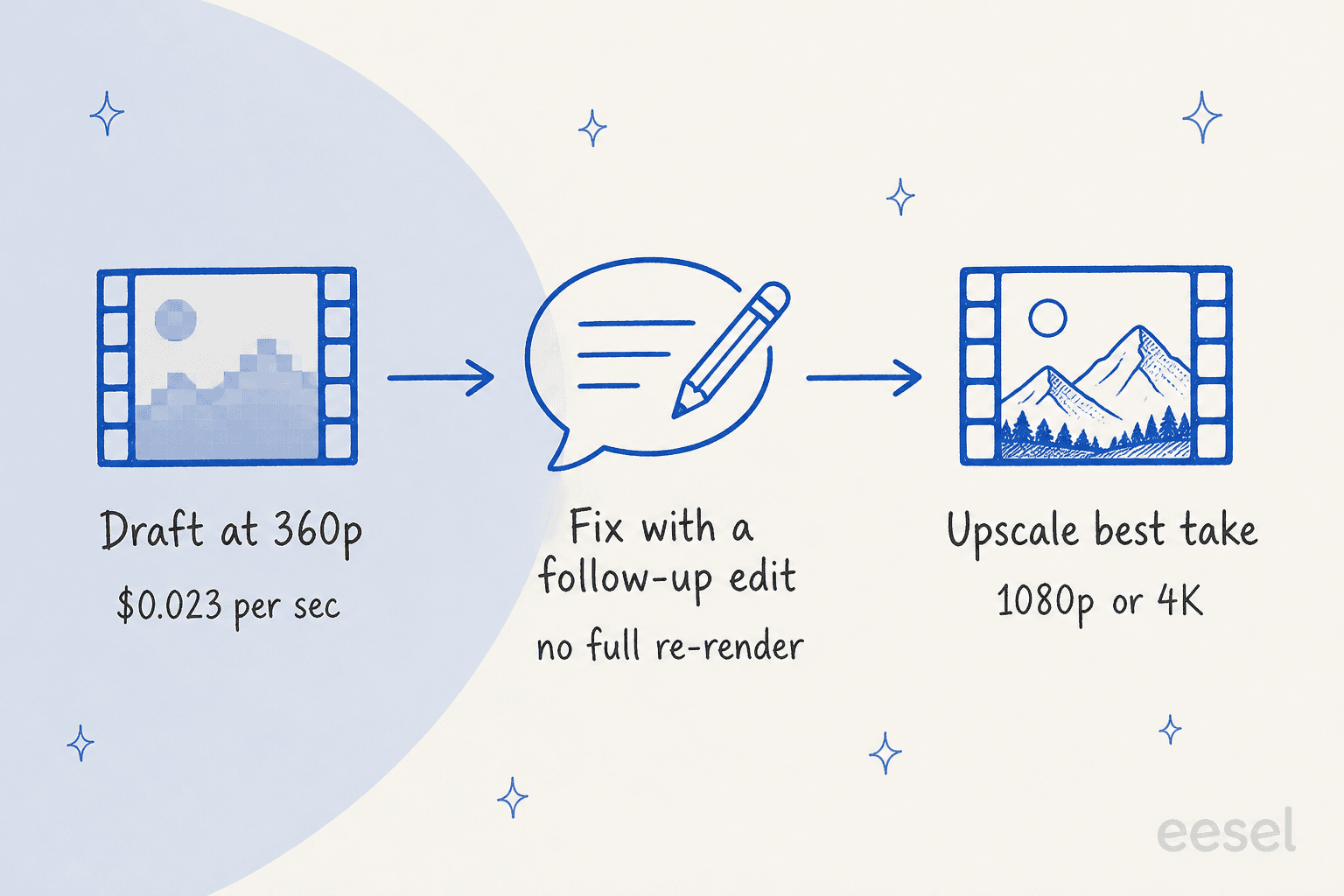
Two details the docs are silent on. They do not say whether a draft is billed on top of its later upscale, so a draft-heavy workflow should be priced with a small test run first. And as a Hacker News commenter noted about 1.1, drafts and final renders are not deterministic, so a draft is a preview of the direction rather than a guarantee of the final frame.
Where can you use it?
Google lists a wide spread of surfaces in the model card: the Gemini app, Gemini Enterprise app, Google AI Studio, YouTube, Flow, Google Cloud, the Gemini API, and Workspace. Details worth knowing:
- Google Vids: the Workspace Updates post says the rollout began November 5, with a 3 to 15 second slider and no admin control. It covers Business, Enterprise, and Education plans, plus personal accounts with Google AI Pro or Ultra.
- Google Cloud: generally available through the API and the console, with Provisioned Throughput for production workloads. Video creation in Gemini for business is listed as coming soon.
- Context limits: 131,072 input tokens and 65,536 output tokens, 24 FPS output, and 360p up to 4K.
Access is not even across plans. In the launch thread on Hacker News, one commenter described the friction:
"There have been months where we've paid 1500€ for my AI models, but I can't bother with Google's models because I literally don't know how to get them."

What about safety and provenance?
Every output carries an imperceptible SynthID watermark, and Google's product page adds C2PA Content Credentials. The model card says the model can change people's speech during video editing, a capability that is currently restricted. It also reports that, based on evaluations of Gemini 3.1 Pro and Gemini 3.7 Flash, the model is unlikely to reach any tracked or critical capability levels.
Who is already building on it?
Google Cloud's launch post quotes a run of video-product teams: invideo says 15 seconds lets a full scene land in one generation, QuickFrame AI says 15-second 1080p output lets users build a complete connected-TV ad in one pass, and Picsart points to draft mode for fast concept iteration. These are launch partners Google chose to feature, so read them as framing, not neutral reviews. Still, the pattern is clear: ads, product animation, and creative tooling.
If you are comparing video models, my Sora 2 pricing guide and Sora 2 alternatives list cover the OpenAI side, and the Omni 1.1 alternatives post covers the wider field.
Where does Gemini Omni 1.2 Flash fit?
I'm Rama, and I ship integrations and APIs at eesel, so I read a model launch the way an engineer does: what is the contract, and what do I still have to build? Omni 1.2 gives you a good contract for video: a model ID, a price per second, documented limits. You still build the app, the review step, and the wiring into your own tools.
That is the line I see between infrastructure and an employee. A video model is infrastructure; eesel is the employee. eesel is an AI teammate platform, and customers hire ready-to-work teammates for a defined job. The roster today is an AI blog writer and an AI helpdesk agent, each arriving with the skills, integrations, and company context for its role.
Named proof beats adjectives here. SE Ranking, the SEO software company, runs a separate eesel agent for each of its three products on Zendesk chat and tickets. In one month, from August 8 to September 8, 2026, those agents handled 4,650 conversations, 2,100 of them live chats answered first by eesel. No video model does that job, and no helpdesk agent renders an ad. Pick the tool for the job you actually have.
A practical note for developers: the eesel CLI lets a coding agent such as Claude Code or Codex upload approved knowledge, adjust a teammate's instructions, and ask test questions to check the answers before anything goes live. Connecting a helpdesk itself still needs someone with admin access to approve it.
If you are building the content side around video, the same thinking applies. My guides to the AI blog writer, AI blog automation, and the AI blog content pipeline show how to hand that job over. For scripts that feed a video model, see AI video script generators and whether AI can write video scripts. For the wider Google lineup, read Gemini alternatives, Gemini 3.8 Flash, Nano Banana 2, Nano Banana Pro, Gemini Lyria 3, and Gemini vs ChatGPT. For the AI teammate idea, see AI teammates and AI employees.
Try eesel for the work a video model can't do
If your team makes video with Omni, someone still has to write the posts around it and answer the questions it generates. The AI blog writer researches and drafts content from your own knowledge, and the AI helpdesk agent joins your existing support queue and works from your past tickets and help center. You can try eesel free and simulate a teammate against real historical data before it goes live.
Frequently Asked Questions
What is Gemini Omni 1.2 Flash?
How much does Gemini Omni 1.2 Flash cost?
How long can a Gemini Omni 1.2 Flash video be?
What is the Gemini Omni 1.2 Flash model ID?
gemini-omni-1.2-flash. From December 3, 2026, requests to gemini-omni-1.1-flash route to 1.2 and bill at 1.2 rates, per the Gemini API changelog.