


Gemini Omni 1.2 Flash costs $12.00 per 1M video output tokens, which Google rounds to about $0.07 per second of 720p video, so a 15-second clip with audio is roughly $1.04. It is generally available on the Gemini API paid tier, with no free tier, and the same rates apply on Google Cloud. The real lever is resolution: a 360p draft is $0.023 a second against $0.209 for 4K, so draft cheap and finish once. If you also need the launch post that goes with the video, eesel's AI blog writer is the teammate for that, and with the eesel CLI a coding agent can start a draft from a brief, though connecting your publishing tools still needs someone with access.
How much does Gemini Omni 1.2 Flash cost?
Three meters, all per 1M tokens, and they match on Google's Gemini API pricing page and its Google Cloud page.
| Meter | Price per 1M tokens | What it covers |
|---|---|---|
| Input | $1.50 | Text, image, video (and audio on Google Cloud) sent in |
| Text output | $9.00 | Text responses |
| Video output | $12.00 | Generated video with native audio |
| Free tier | Not available | Paid tier only |
The model ID is gemini-omni-1.2-flash, and Google calls it generally available as of November 5, 2026, with Provisioned Throughput on Google Cloud and an imperceptible SynthID watermark on outputs. The pricing page lists a Standard tab for this model only, so I would not budget for a batch discount unless Google adds one.
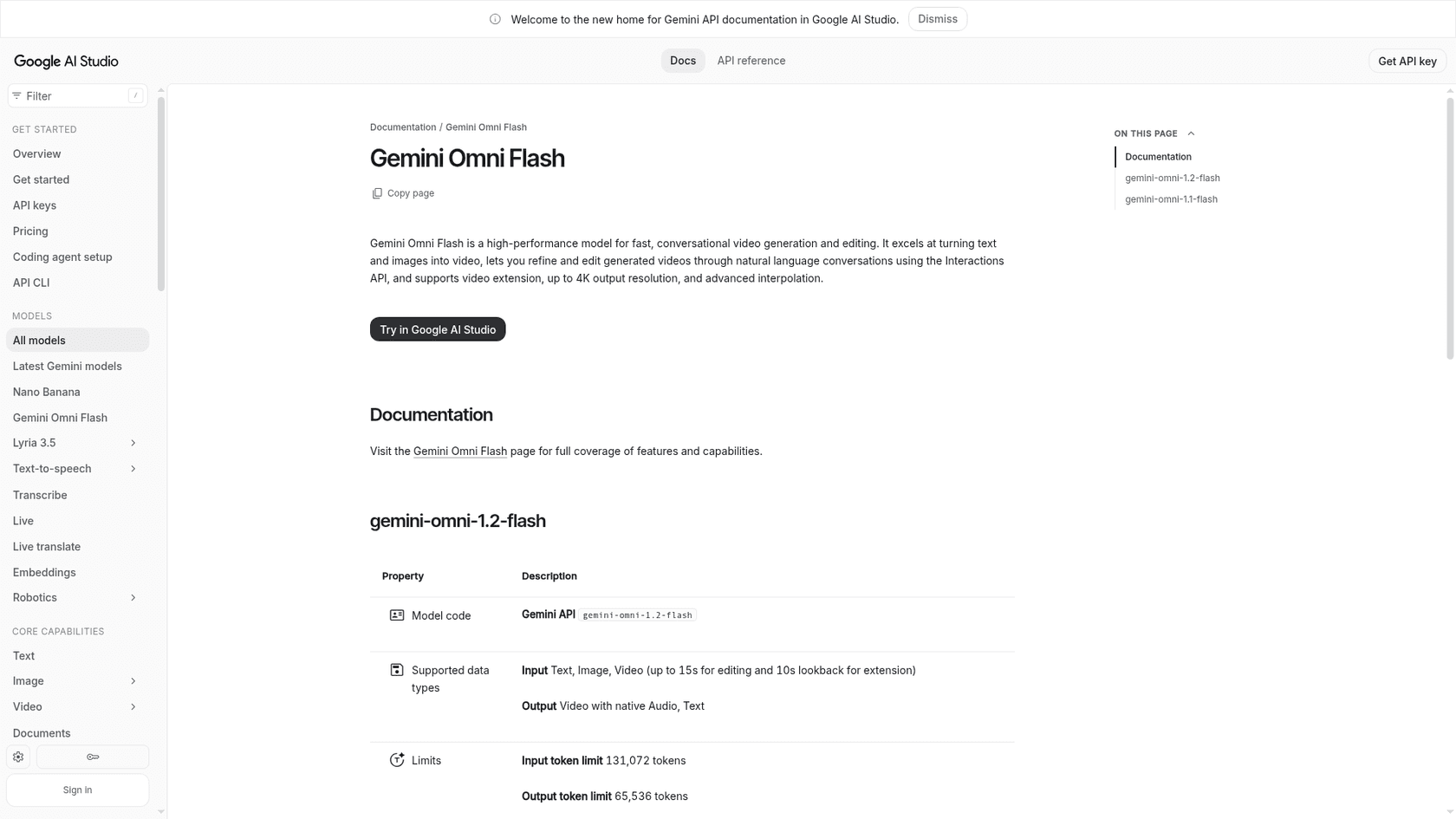
The limits matter for budgeting. Input is capped at 131,072 tokens, output video runs 3 to 15 seconds at 24 FPS, and you can request 360p, 720p, 1080p or 4K. Google's own model page is the source for all of that.
What does one second of video cost?
Video output is billed on tokens per second, and the token rate rises with resolution. Google publishes the rates, so this is arithmetic at $12.00 per 1M tokens, not an estimate.
| Resolution | Tokens per second | Cost per second | 10-second clip | 15-second clip |
|---|---|---|---|---|
| 360p | 1,931 | $0.023 | $0.23 | $0.35 |
| 720p | 5,792 | $0.070 | $0.70 | $1.04 |
| 1080p | 8,688 | $0.104 | $1.04 | $1.56 |
| 4K | 17,376 | $0.209 | $2.09 | $3.13 |
Google's pricing footnote gives the same figures: about $0.07 a second at 720p, $1.04 for a 15-second clip, $0.023 at 360p, $0.104 at 1080p and $0.209 at 4K. 4K costs nine times a 360p second, and that gap is where most budgets go wrong.
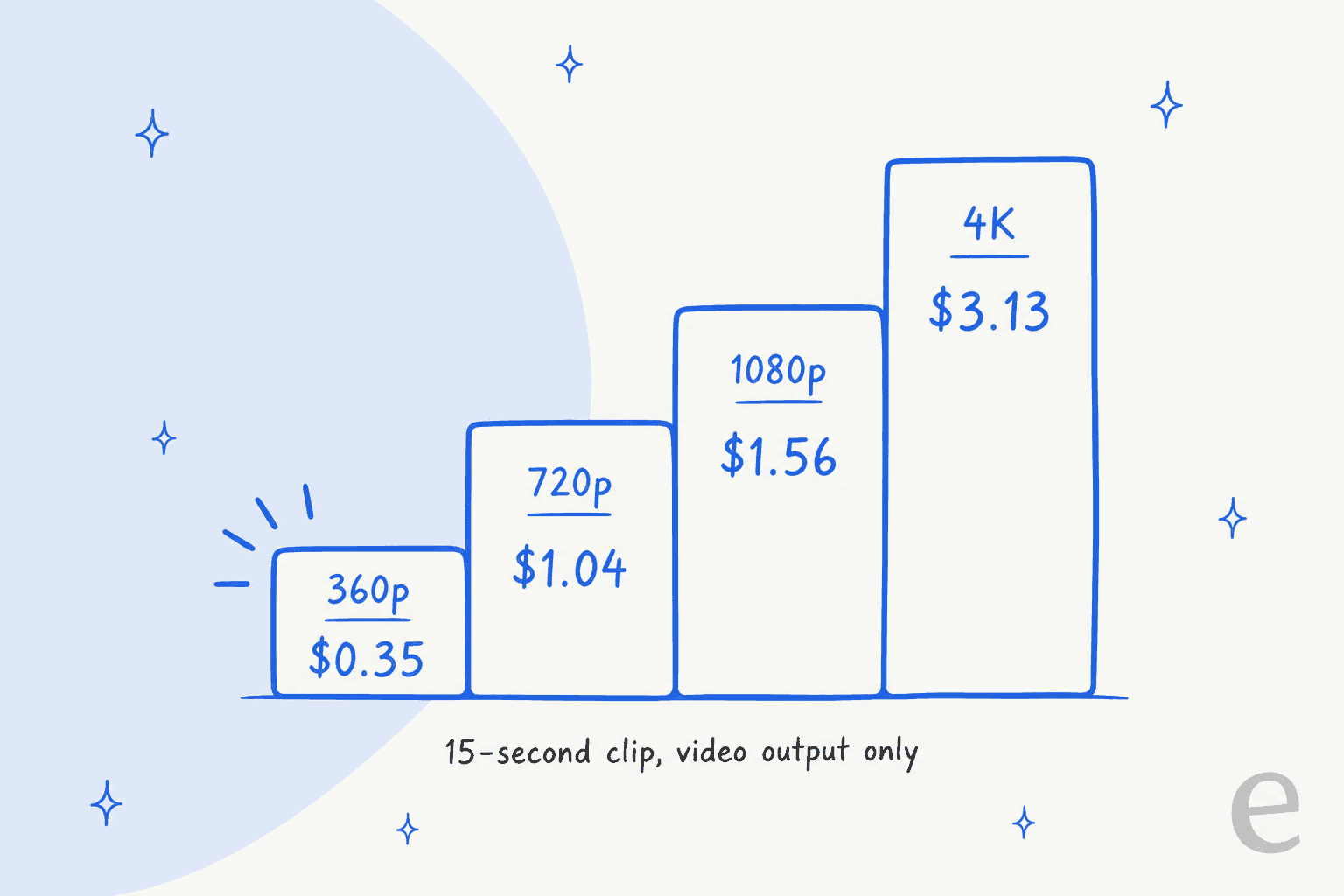
Plug in your own length, resolution and volume below. The draft slider adds cheap 360p attempts per keeper, which is the habit I would build around.
At the defaults, 50 finals of 15 seconds at 720p plus three 360p drafts each comes to about $104 a month, so three 360p drafts cost as much as the 720p final itself, and each extra draft is a third of the price of a rejected 720p attempt.
Why is draft mode where the savings are?
Google's own launch post says you can draft at 360p or 720p, fix a detail with a follow-up edit rather than regenerating, and upscale the best result to 1080p or 4K. The upscale tokens are published too, per second of output: 2,896 for 360p to 720p and 720p to 1080p, 5,792 for 360p to 1080p, and 11,584 for 720p to 4K and 1080p to 4K, per the Google Cloud pricing footnotes. Upscaling charges 0 tokens for inputs.
At $12.00 per 1M, that is $0.035 a second to upscale 360p to 720p, $0.070 for 360p to 1080p and $0.139 to reach 4K from 720p or 1080p.
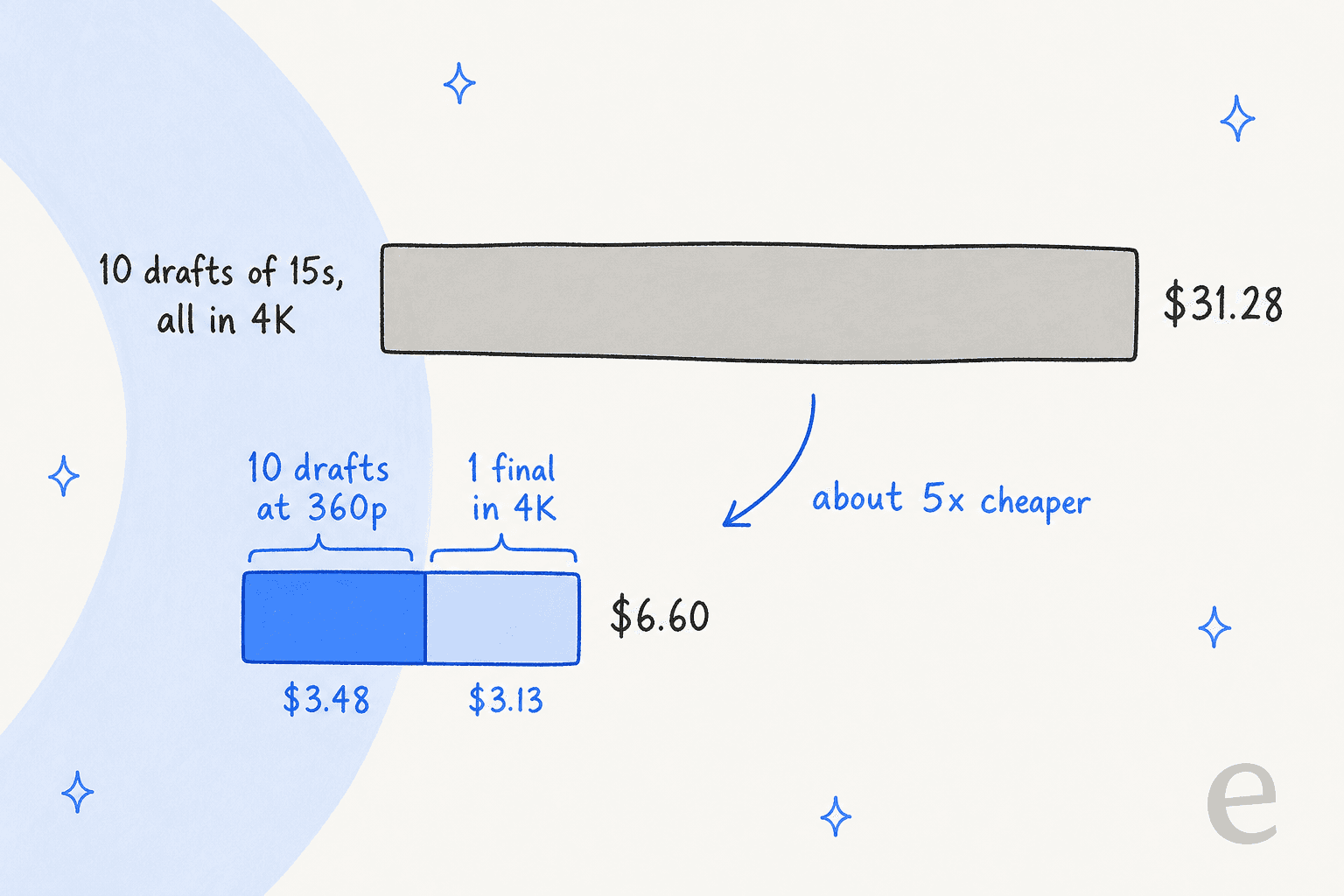
The chart assumes the keeper is rendered directly at 4K ($0.209 a second) and ignores upscaling, so treat the "about 5x cheaper" as the direction, not a quote. Ten 360p drafts of 15 seconds is $3.48, one 4K final is $3.13, and ten full 4K attempts is $31.28. The habit that saves money is deciding at 360p.
What changed from Gemini Omni 1.1 Flash?
The price cut is the headline. Google says 720p video is 30% cheaper than 1.1, and the rate card shows why.
| Omni 1.1 Flash | Omni 1.2 Flash | |
|---|---|---|
| Input per 1M tokens | $1.50 | $1.50 |
| Text output per 1M tokens | $9.00 | $9.00 |
| Video output per 1M tokens | $17.50 | $12.00 |
| About per second at 720p | $0.10 | $0.07 |
| Max clip length | 10 seconds | 15 seconds |
Only video output moved. From December 3, 2026, requests to gemini-omni-1.1-flash route to 1.2 and are billed at 1.2 rates, so you do not need to migrate to get the cut. My earlier notes on Omni 1.1 pricing, the original Omni Flash rates and the first Omni review show the old numbers.
Consumers feel it differently. One Hacker News reader compared the API with Google's Flow app:
"It's double the cost in Flow, but 30% cheaper via the API. And Flow has always been much cheaper than the API (by 5-6x)."

That is one commenter's read of Flow credits, not a Google price, and Google's API pages are the only numbers I have used here. The naming also confused people, which is fair when a video model carries the Gemini name:
"But it still starts with “Gemini”. It would be better if they called it Gemini Omni 4, 4.1 etc. Otherwise call it just Omni 1.2 and drop the Gemini prefix."
What do reference images and audio cost on the way in?
Almost nothing. Google's Vertex rate card says Omni charges 1,120 tokens per image, 32 tokens per audio second and up to 5,792 tokens per second of input video. At $1.50 per 1M tokens, an image is about $0.0017, a second of audio is $0.00005 and a second of input video is about $0.0087.
Editing a 15-second clip you already generated therefore costs the input side (about $0.13 for the 15 seconds) plus the new video output, not a full re-brief from scratch. Audio references are currently gated behind allowlisting, so do not plan a voice-conditioned workflow around them yet.
How does it compare with other AI video tools?
Per-token billing makes Omni awkward to compare with per-credit tools, so I convert everything to the cost of one finished clip before choosing. I have priced the rest of the field separately: Sora 2, Kling AI and Runway are the three most buyers weigh it against.
Luma and Pika have their own pricing posts, and if you are still choosing, the Runway alternatives and Sora alternatives lists are the place to start.
Omni's edge is the unit: you pay for seconds and resolution you chose, and nothing for a clip you edit in conversation instead of regenerating. Its limit is that there is no free tier to test on, which matters more than the headline rate for a small team.
Is Gemini Omni 1.2 Flash worth it?
For product videos, try-ons and short ads, yes, at the prices above. Photoroom's CEO put the production case this way:
"Version 1.2 brings 15-second videos, a top user request. With general availability and SLAs, we can rely on it in production for our sellers and enterprise customers."
I would skip it for a team that wants to experiment for free, and I would keep it away from untested 4K generation. Draft at 360p, edit by conversation, finish once. That puts a 15-second ad near $1.04 to $1.56 in output charges.
If you are budgeting a whole campaign, the Gemini 3.8 Flash and Gemini 4 Argon rate cards cover the text side, and the Nano Banana Pro pricing post covers stills.
eesel's AI blog writer for the content around your video
A video model makes the clip. It does not write the launch post, the how-to page or the comparison article that explains why the clip exists. That is the job eesel's AI blog writer takes: it is one of the ready-to-work teammates in the eesel roster, arriving with the company context to turn a topic into a draft you review. The AI blog generator guide and the AI content tools roundup show where it fits.
The reasoning carries over to support, where eesel's AI helpdesk teammate sits on a fixed credit plan from $299 a month for 500 credits, one credit per ticket or chat. At SE Ranking it handled about 4,650 conversations in one month across three products, with refunds and Tier 2 issues passed to people. If a launch video draws questions, that is the AI helpdesk teammate that answers them. Try eesel on a single launch topic before you commit to a content calendar.