Freddy AI natural language workflows: setup, plans, and costs in 2026

Rama Adi

Katelin Teen
Last edited November 12, 2026
Freddy AI natural language workflows let a Freshdesk admin write an AI Agent process the way they would brief a new hire, with a trigger, plain-English steps, and inline controls for data, API actions and handoffs. They are on Growth, Pro and Enterprise, but still an early access program you request through your Customer Success Manager, and every conversation they run draws on Freddy AI Agent sessions at $49 per 100 after 500 free ones. The writing is the easy part. The real work moves to exception handling and testing, which is where I would spend my time. If you want the same write-it-in-English approach on Freshdesk today, eesel runs on a trigger plus instructions and learns from your past tickets.
I build integrations at eesel, so when Freshworks ships a feature like this, my first move is to read the docs for what the agent actually does at runtime, not what the launch post says. eesel has spent years putting AI agents on live support queues, and the lesson that keeps repeating is that a process written in plain words only works if the exceptions are written down too. One practical note before I start: with the eesel CLI, an AI coding agent like Claude Code can upload the same SOPs and canned responses you would paste into a Freddy workflow, adjust the agent's instructions, and run test questions against them before anything goes live. Connecting Freshdesk itself still needs someone with admin access to approve it.
What are Freddy AI natural language workflows?
Natural language workflows are a second way to build workflows in Freddy AI Agent Studio, the console where Freshdesk admins configure Freddy AI agents. Instead of dragging blocks onto a canvas, you describe the business process in a document-style editor. Freshworks' help article says the goal is to turn existing SOPs and support processes into AI workflows "without sacrificing the governance, testing, and lifecycle capabilities" of AI Agent Studio.
When you click Add workflow, you now get two cards: Write it (natural language) and Build it (the visual Workflow Builder). In the current UI, Write it carries a Beta badge.
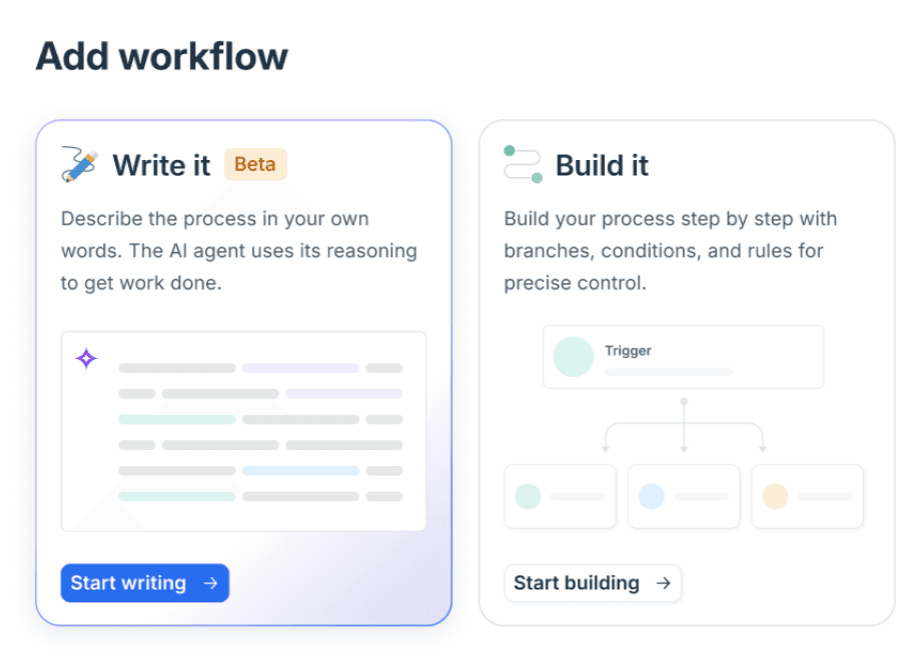
The important detail is that both options produce the same kind of Custom Workflow. Freshworks' Workflows for AI Agents article says they support the same trigger types, the same Workflow Library and the same draft-to-active lifecycle. Only the authoring changes. So this is not a new product to evaluate. It is a new editor on top of the Freshdesk AI agent you may already be running, sitting next to the prebuilt skills library and the knowledge sources you've already set up.
What does change is runtime behavior. A Workflow Builder flow follows the branch you drew. A natural language workflow, per the help article, has the agent "continuously" reason about the request, what it has already collected, ticket and contact properties, API responses, and where the conversation is. That is the real feature: the agent can cope when a customer gives the order number before being asked, or changes their mind halfway through a return.
Which Freshdesk plans can use natural language workflows?
The help article's plan badge ticks Growth, Pro and Enterprise on both Freshdesk and Freshdesk Omni. The Free plan is crossed out, and the badge says "Not available in previous plans," which covers accounts that signed up before December 2025. Here is what the eligible plans cost, straight from Freshworks' Freshdesk pricing and Omni pricing pages, billed annually:
| Plan | Freshdesk (per agent/month) | Freshdesk Omni (per agent/month) | Natural language workflows | Freddy AI Agent sessions |
|---|---|---|---|---|
| Growth | $19 | $29 | Yes, via early access | 500 free once, then $49/100 |
| Pro | $55 | $79 | Yes, via early access | 500 free once, then $49/100 |
| Enterprise | $89 | $119 | Yes, via early access | 500 free once, then $49/100 |
The column that matters most is the fourth one. Both the Freshdesk article and the Freshservice version carry the same note: natural language workflows are in an Early Access Program, and you contact your Customer Success Manager to request access. A plan badge tells you which tiers are eligible. It does not mean the Write it card is waiting in your account today.
For a deeper look at the tiers themselves, my Freshdesk pricing guide, the Omni pricing breakdown, and the Growth plan pricing and Pro plan pricing posts break down what each one includes beyond AI.
How does a natural language workflow work?
Every natural language workflow has two parts: a trigger that decides when it starts, and instructions that describe what the agent does next. The instructions are free text, but you can drop structured controls into them with a / command, so the important actions still run as defined steps rather than as the model's best guess.
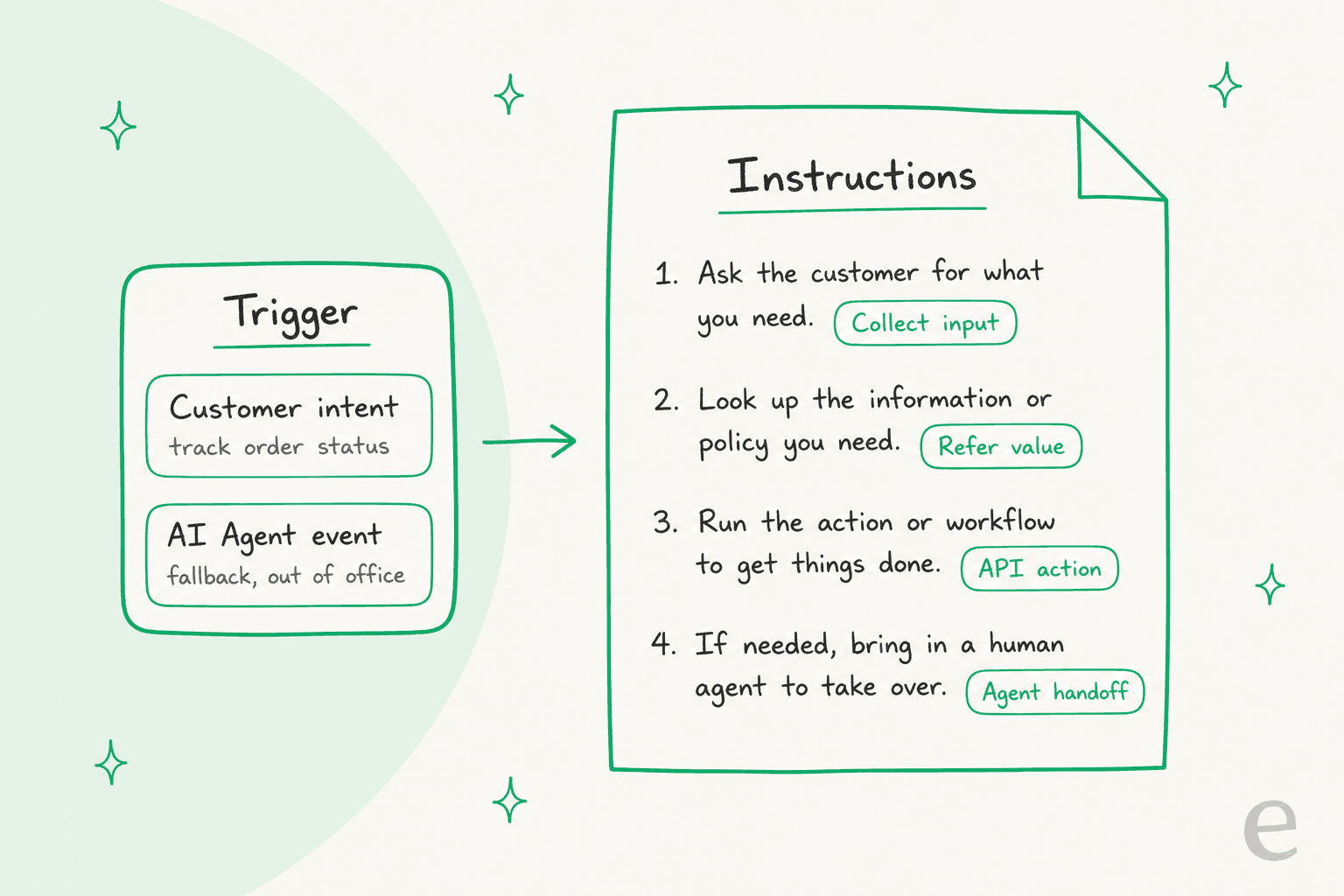
Triggers
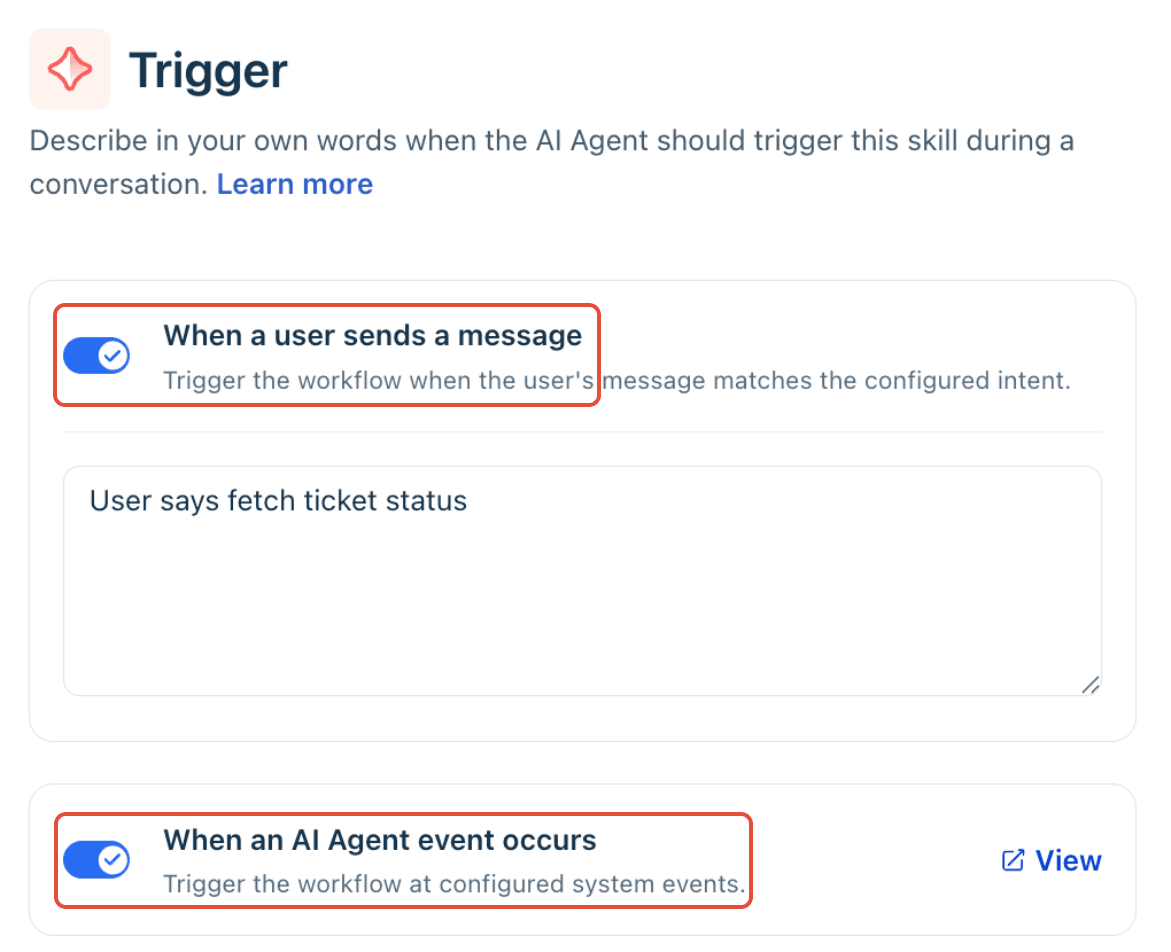
There are two trigger types, the same ones Workflow Builder uses:
These are separate from classic Freshdesk automation rules, which act on tickets rather than on AI Agent conversations.
- When a user sends a message. You describe the customer's goal ("Track order status") rather than listing keywords. Freshworks says that one trigger can match "Where's my package?", "Has my order shipped?" and "I haven't received my order yet."
- When an AI Agent event occurs. The workflow starts on a system event: a new conversation (Conversation initiation), a fallback when the agent can't answer, positive or negative feedback, a request to talk to an agent, or a message outside business hours.
The four inline controls
This is where the feature earns its keep. Free text handles the conversation, and four controls handle anything that has to be exact:
| Control | What it does | Example from the docs |
|---|---|---|
| Collect input | Asks the customer for a value and stores it as a variable for later steps | Ticket ID, order ID, booking reference |
| Refer value | Reuses a ticket, contact or conversation property instead of asking again | Customer name, membership tier, ticket priority |
| API action | Reads or updates a connected system | Retrieve order details, create a return request |
| Agent handoff | Passes the conversation to people, either to the open queue or straight to a group | Verification fails, manual approval needed |
Freshworks' worked example is a ticket status lookup. The trigger is "User says fetch ticket status," and the instructions split into two paths depending on whether the customer knows their ticket ID, with Collect, Refer and API chips sitting inside ordinary sentences:
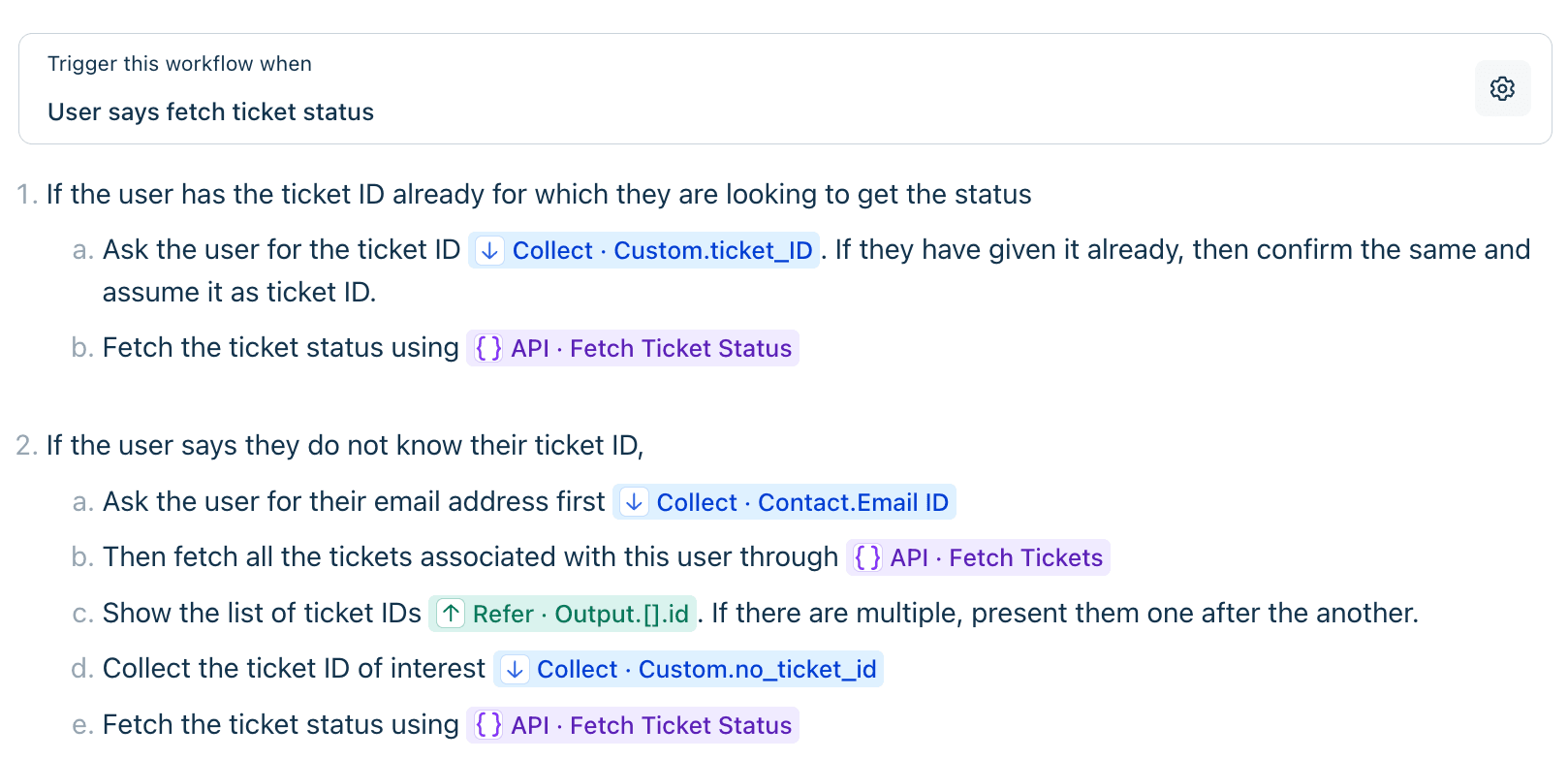
As an engineer, the line in the help article I like most is a small note on Collect input: if a value is only needed for the current step, just tell the agent to ask for it and check it. Only use Collect input when later steps need the value. That keeps the variable list short, which matters when someone else has to debug the workflow six months from now.
How do you set up a Freddy natural language workflow?
Once your account has early access, the setup steps are short. Before you start, make sure the API actions, ticket properties and contact properties the workflow depends on already exist. The editor references them; it doesn't create them.
- Open AI Agent Studio.
- Pick an AI Agent and go to Build > Workflows, or open the Workflow Library directly.
- Click Add workflow and choose Write it.
- Name the workflow and set the trigger.
- Write the instructions as numbered steps, one task per step.
- Type / to insert Collect input, Refer value, API action or Agent handoff where needed.
- Click Preview workflow and test it against different phrasings and edge cases.
- Save as draft, or activate it. If you started in the library, attach the workflow to an agent.
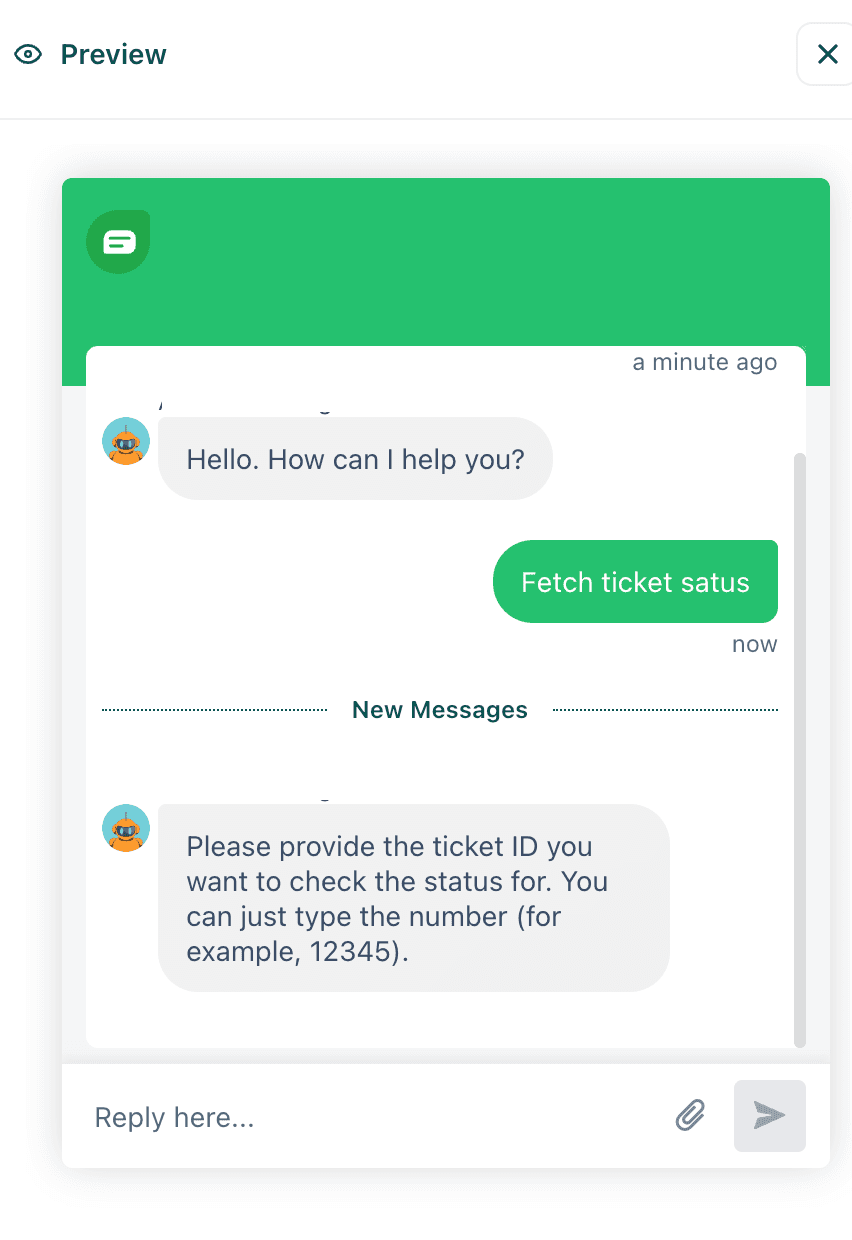
The preview runs in an isolated environment, so you can talk to the workflow without touching live conversations:
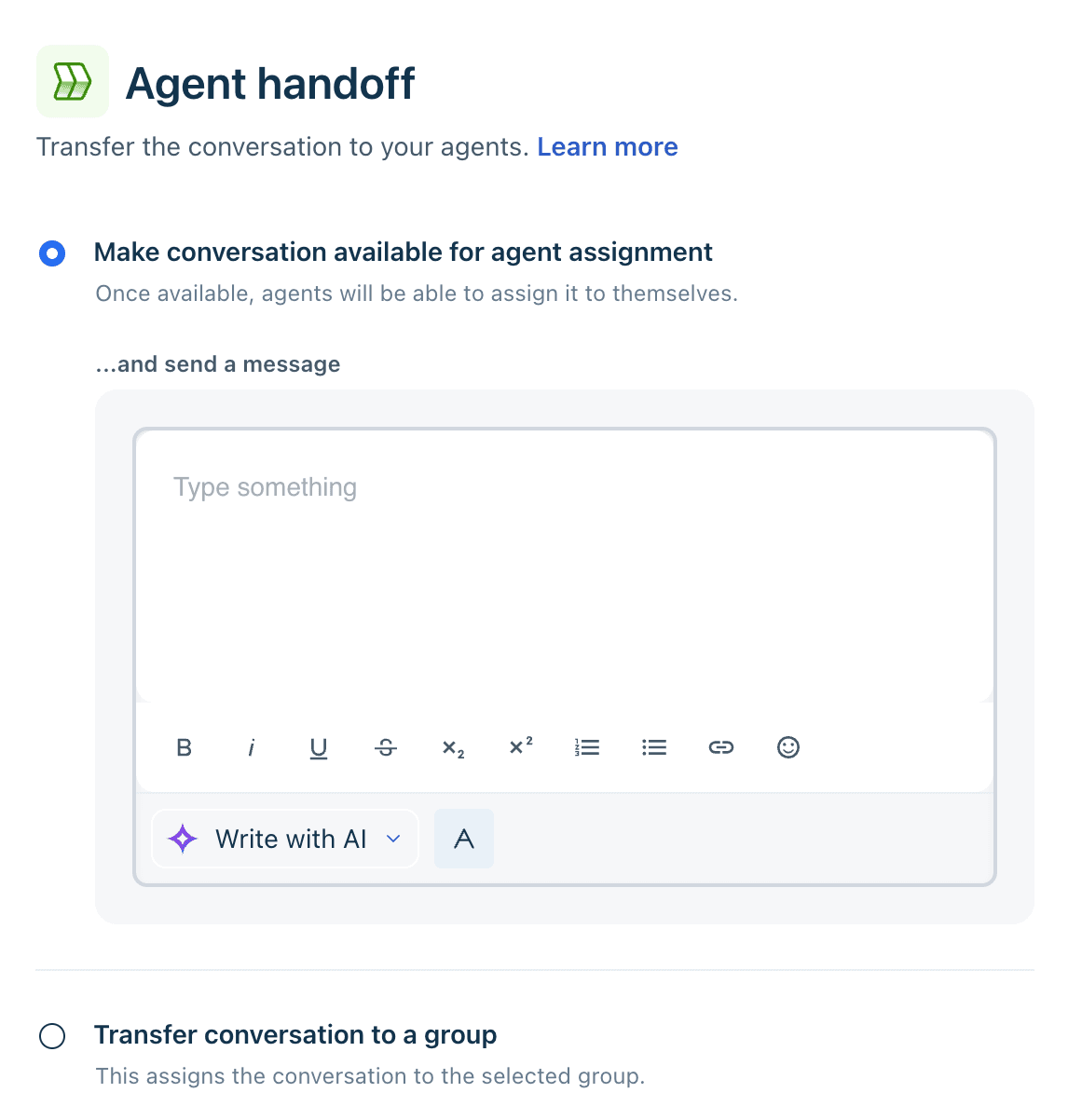
For the handoff step, you choose between making the conversation available for any agent to pick up (with an optional message to the customer) or transferring it to a specific group. If you have a skill-based routing setup already, the group option is usually the cleaner choice. My AI agent handoff best practices post covers what context to pass along.
When should you write a workflow instead of building it?
Freshworks is direct about this. Natural language workflows suit conversational processes such as account verification, refunds, order tracking, returns, subscriptions, eligibility checks and troubleshooting. The Workflow Builder is "better suited for deterministic, strictly sequenced, or compliance-driven processes." I agree with that split, and I'd put it more bluntly: write it when the customer will go off-script, build it when the order of steps is the point.
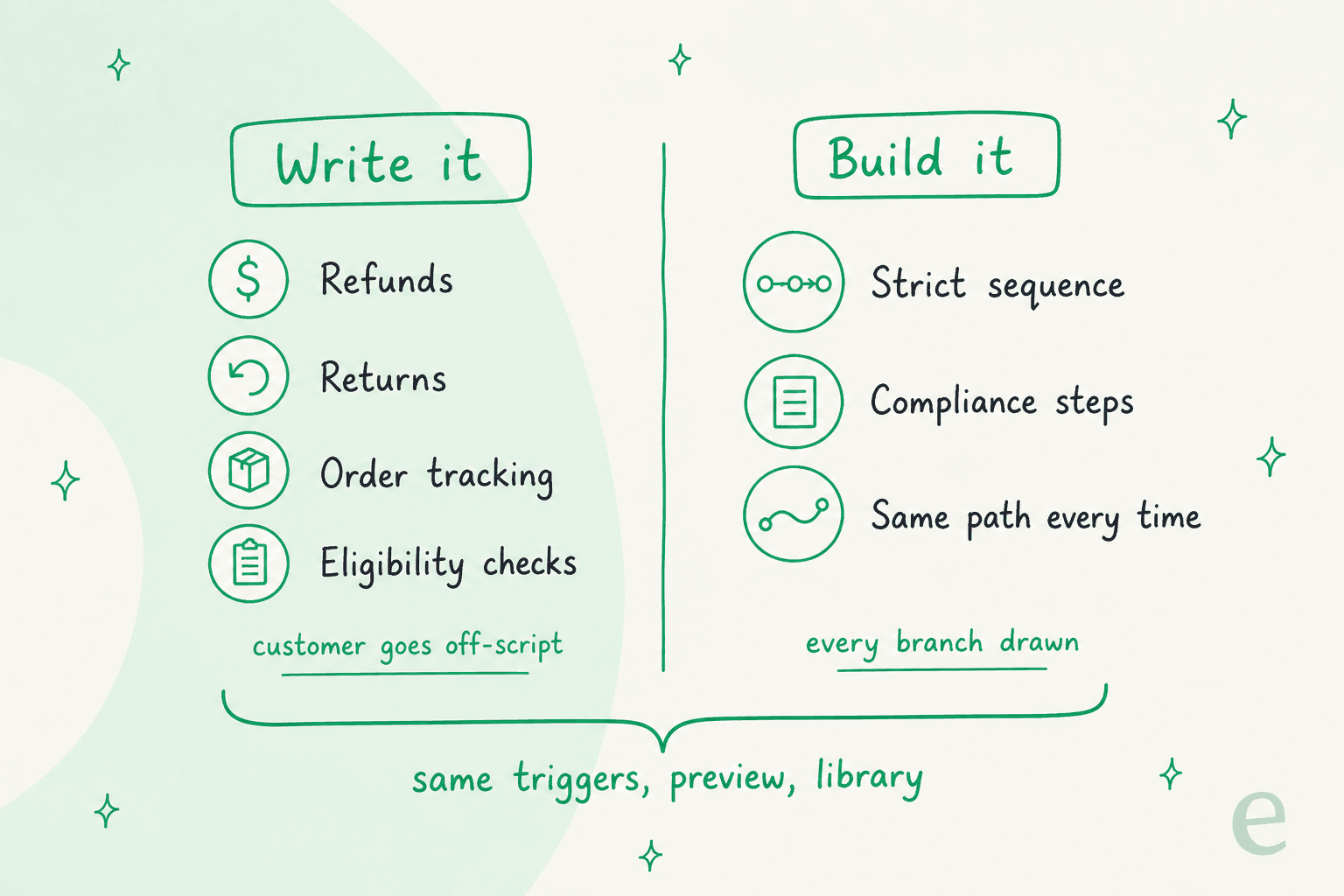
The help article explains why the visual builder struggles with real conversations:
"Conversational support is rarely linear, and handling incomplete answers, changed minds, and follow-up questions visually means building extra validation paths, branches, and recovery flows for every exception."
That is accurate, and it is also the catch. Refunds sit in Freshworks' "write it" column, and refunds are exactly where a reasoning step can do damage. One support operator on Reddit drew the line clearly:
"It's wonderful for rote background work like labeling, call routing, and pre-filling account histories before the agent even picks up. You can NEVER trust it to take independent actions like issuing refunds, though. If it hallucinates and nukes a Platinum account, you will never recover."

I wouldn't go as far as "never," but I'd treat it as a design rule. In a refund workflow, let the agent gather the reason, check the policy and explain the outcome in plain language, then put an Agent handoff in front of the actual money movement until your preview runs and your conversation logs show it getting the eligibility call right. Freshworks' own refund example already ends with a handoff for requests that need review, which is a sensible default to keep.
What does a natural language workflow cost to run?
There is no line item for natural language workflows on the pricing pages. They run inside Freddy AI Agent, which is metered by session. A session is "a unique interaction between an end-user and an AI Agent," Growth, Pro and Enterprise accounts get 500 free sessions once per account, and extra sessions cost $49 per 100 sessions, according to the Freshdesk pricing FAQ. For an email AI agent, a session is a 72-hour window from the customer's first email. Session packs expire with your billing cycle, so a quarterly payer's sessions expire quarterly.
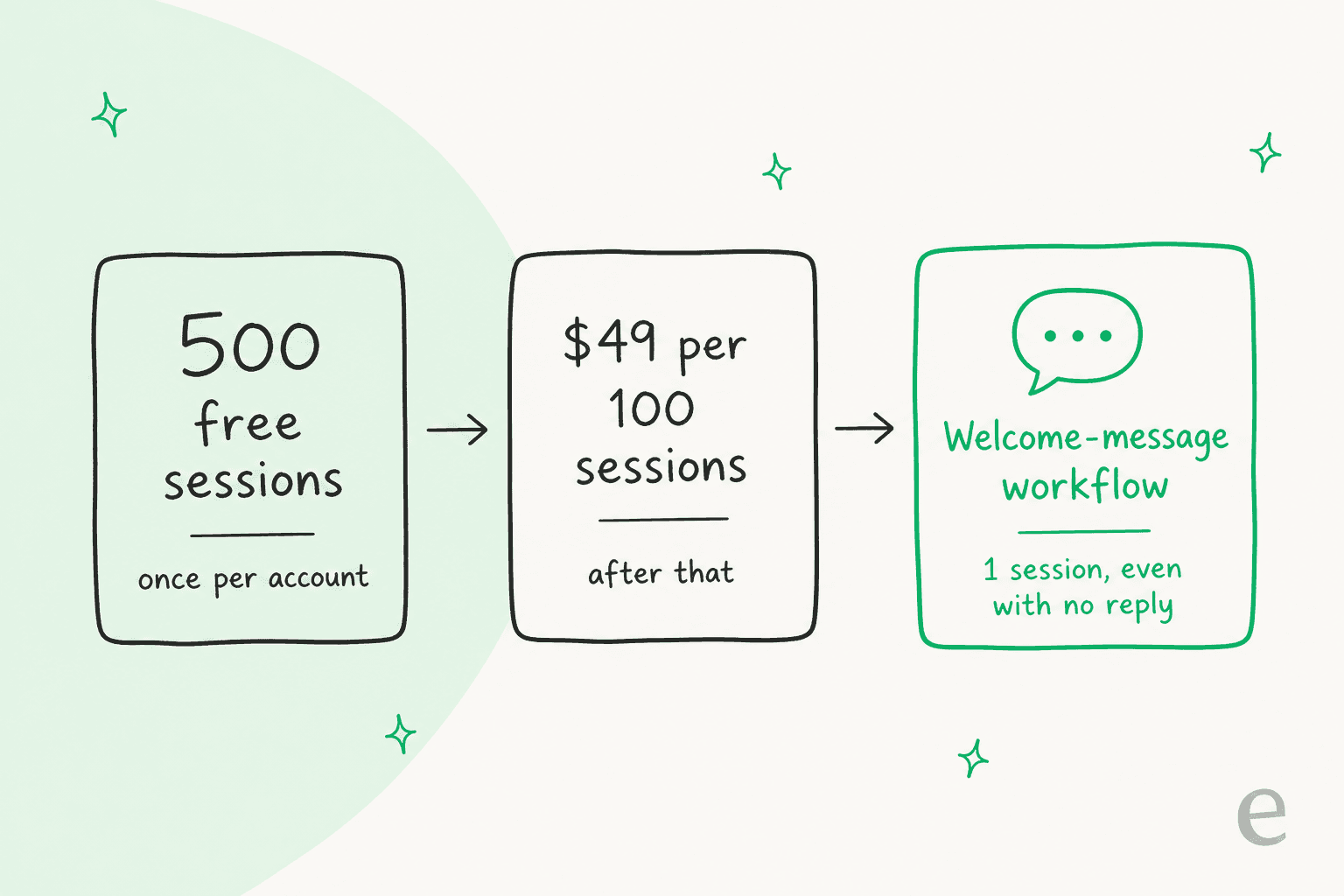
The trap is the Conversation initiation trigger. The Workflows for AI Agents article says that on a chat AI agent, a session is consumed as soon as the welcome message is sent if a workflow is mapped to Conversation initiation, whether or not the customer replies. In Freshdesk Omni those conversations show up in the Session Consumption Report even when the customer never typed anything. A friendly "Hi, are you asking about an order?" opener on a busy chat widget can burn through the 500 free sessions fast. If you want that opener on your Freshdesk chatbot, I'd measure how many chats actually turn into a question before you map a workflow to it. My session consumption guide walks through the report.
Session prices sit on top of seat prices. A 10-agent team on Freshdesk Omni Pro pays $790 a month in seats before any sessions, plus $29 per agent per month for Freddy AI Copilot if the human side wants AI help too. My Freddy AI pricing post has the full math.
What should you check before turning it on?
Freshworks' own best practices are solid, and most of them are about writing exceptions down. Here is my short list, from the docs plus what I've seen go wrong on live queues:
- Confirm you actually have access. Early access goes through your CSM. Plan eligibility alone won't show the Write it card.
- Start from a real SOP. Freshworks recommends beginning with an existing playbook and stripping out internal-only detail. If you don't have one, my customer support SOP guide is a decent template.
- Write the failure paths. The docs ask you to cover invalid input, missing information, empty API responses and ineligible requests explicitly. A workflow that only describes the happy path will improvise on the rest.
- Use controls, not prose, for anything exact. If a step calls an API or hands off, insert the control. Don't write "check the order system" and hope.
- Test the strange customers. Use a Freshdesk sandbox for anything that writes data, and preview with skipped questions, changed intent and follow-ups, not just the clean script. Simulating against real past conversations catches more than invented ones, which is the idea behind AI support simulation testing.
- Mind the naming. The help article calls one control "Refer Value" in its table, "Refer existing value" in its heading, "Reference existing properties" in its best practices and "Reference property" in an example. They are the same control.
If your workflow needs logic the controls don't cover, like comparing two dates, that's what custom functions are for. My Freshdesk AI agent best practices post covers the rest of a rollout.
It is also worth knowing this isn't unique to Freshworks. Zendesk calls its version natural language procedures, and Salesforce Agentforce uses written topic instructions. The whole category is moving from flowcharts to briefs, and the metric that tells you whether a brief works is AI resolution rate, not deflection.
How eesel handles the same job on Freshdesk
I'll be honest about the overlap: natural language workflows land very close to how eesel has always worked. In eesel, an automation is a Freshdesk trigger plus written instructions, and you set it up by asking for it in chat. Here, a user asks for a private-note draft on every new ticket and the agent picks the trigger and turns it on:
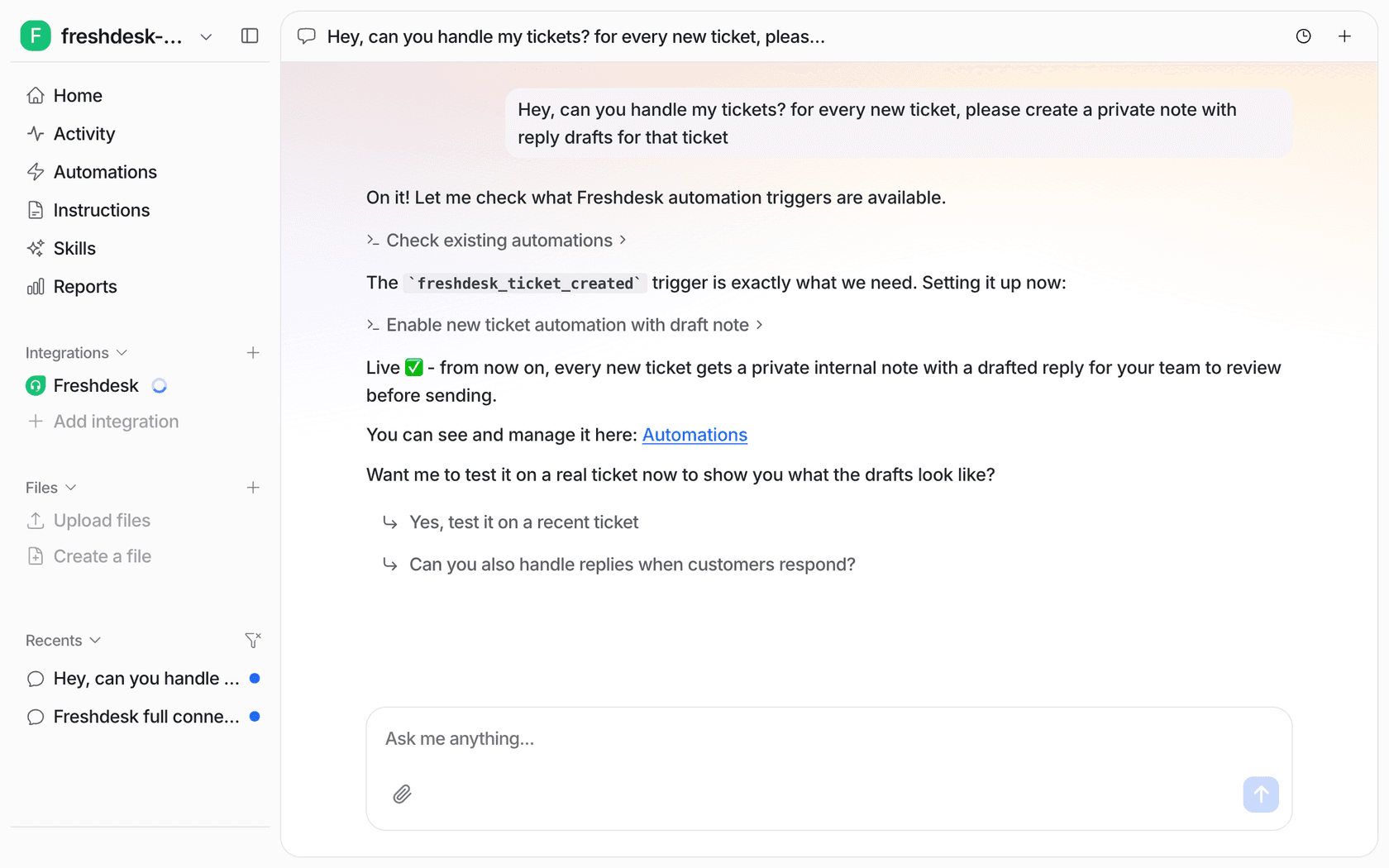
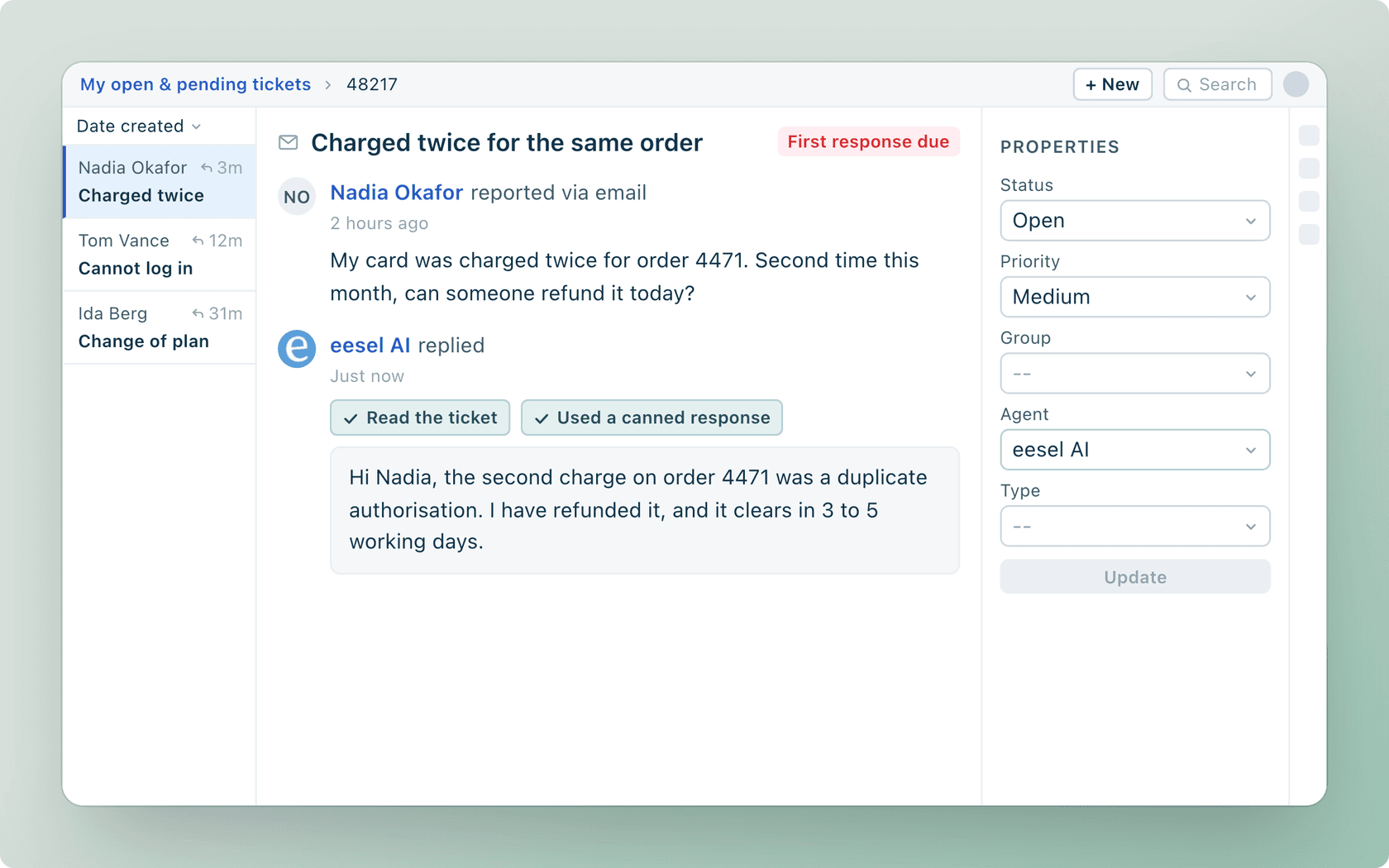
The difference is what the agent knows before you write a word. eesel reads your help center, canned responses and past Freshdesk tickets, so the instructions can stay short. Original Bootcamp, which runs outdoor fitness camps across Germany, wrote its filter in German with one job: let through only tickets that can be answered from the website and past tickets, and send anything about a booking, a payment or an injury to a person. The agent works from about 2,800 documents, including roughly 1,100 Freshdesk tickets and articles, and it never claims to change a booking it can't see.
SamCart shows the same pattern at more volume. Freshdesk automations decide which tickets the agent replies to, it answers from about 280 help center articles, and it steps back the moment a teammate picks up the ticket. Neither of these setups needed a CSM to unlock an editor.
Actions get the same care. In eesel each action can run on its own, ask first, or stay off, so "look things up on your own, but ask me before any refund" is a setting, not a hope. Where eesel isn't the right fit: if you need the strict, audited branch-by-branch control of a compliance flow, the Freddy Workflow Builder is built for that, and I'd use it. For a side-by-side, see Freddy AI vs eesel, or my wider list of Freshdesk AI alternatives.
Try eesel on Freshdesk
If you're adding AI to Freshdesk, on the waitlist for Write it, and your SOPs are already sitting in a doc, eesel lets you use them on Freshdesk this week. It joins as a teammate with its own seat, learns from your past tickets and help center, and drafts or sends replies under instructions you write in plain English. You can start with drafts only, the way Timengo does, and hand over more as it gets things right. Try eesel free.
Frequently asked questions
What are Freddy AI natural language workflows?
They are AI Agent workflows in Freshdesk that you write as plain-English instructions instead of drawing them block by block. Each one has a trigger and a set of instructions, with inline controls for collecting input, reusing ticket data, calling API actions, and handing off to a person. The wider product is covered in my Freddy AI agents guide.
Which Freshdesk plans include natural language workflows?
Freshworks' help article marks the feature on Growth, Pro, and Enterprise for both Freshdesk and Freshdesk Omni, not on the Free plan or on plans bought before December 2025. It is also in an early access program, so you request it through your Customer Success Manager. The Freshdesk plans comparison shows what else each tier carries.
How much do Freddy AI natural language workflows cost?
There is no separate fee for the workflow itself. It runs inside Freddy AI Agent, which includes 500 sessions once per account and then costs $49 per 100 sessions, on top of the per-agent plan price. My Freddy AI pricing breakdown and the session consumption guide go deeper.
Should I use Write it or Build it in Freddy AI Agent Studio?
Freshworks suggests Write it for conversational jobs like refunds, returns, order tracking, and eligibility checks, and Build it (the visual Workflow Builder) for strict, compliance-driven sequences. Both share the same triggers, preview, and workflow library, so you can mix them on one agent. For other no-code options, see my no-code AI agent builder roundup.
Can a Freddy natural language workflow call external systems?
Yes, but only through API actions you configure first. You insert an API action into the instructions with the slash menu and map its inputs. The help article lists configured API actions and properties as a prerequisite. My Freddy conversational actions post covers the action side.
Is there a natural language workflow option for Freshservice too?
Yes. Freshservice has its own Write AI Agent workflows article, also in early access, aimed at employee requests such as software access. If you run IT support, my Freshservice AI agent guide covers that product.
What is a good alternative to Freddy natural language workflows?
If you want plain-English control over an AI agent on Freshdesk without waiting for early access, eesel for Freshdesk uses the same idea: a trigger plus written instructions, learned from your help center and past tickets. My Freddy AI alternatives list compares more options.