Freddy AI Agent custom functions: setup, plans, and billing in 2026

Kira

Katelin Teen
Last edited November 12, 2026

Freddy AI Agent custom functions are JavaScript snippets that reshape data between workflow steps, not a way to call outside systems. Freshworks tags them for Freshdesk Omni on Growth, Pro, and Enterprise, with no separate price line on the pricing page; you still pay per session at $49 per 100, after 500 included once per account. For live lookups you need an API action first. If you would rather describe the job than draw the workflow, eesel plugs into Freshdesk and reaches your own APIs without a function to write. The eesel CLI lets a coding agent set it up and test answers first.
What are Freddy AI Agent custom functions?
Freddy AI Agent custom functions are reusable JavaScript snippets that take inputs, run your logic, and return a JSON object that later workflow blocks can read. Freshworks describes them as a way to transform and process data, such as pulling a delivery date out of a full order payload or deciding whether an order is still inside the return window.
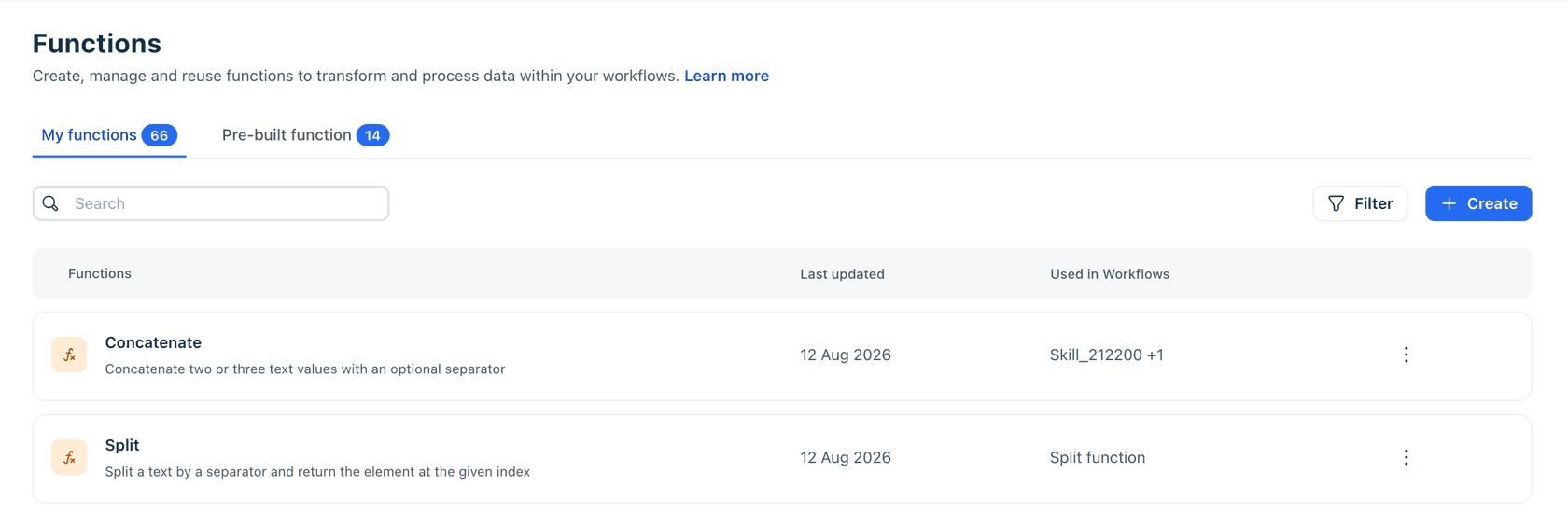
The function library sits under AI Agent Studio > Library > Functions. It has two tabs: pre-built functions for dates, text, lists, arithmetic, and Base64, and My functions for the ones you write. The screenshot above, taken from Freshworks' own functions guide, is the page you will live in.
Here is the part that is easy to miss. A function never talks to your order system. I read every article Freshworks has published on this, and each one describes functions as data transformation inside the workflow. The call to the outside world is a different block, the API action, and the two are chained. September's Freshworks product update lists custom functions among the Freddy AI Agent Studio additions, alongside preset workflow triggers.
| Piece | What it does | Calls an outside system? |
|---|---|---|
| Pre-built function | Ready-made date, text, list, math, or Base64 step | No |
| Custom function | Your own JavaScript, returns JSON | No |
| API action | REST request with headers, body, and auth | Yes |
| AI Actions app | Typed operations built with the Freshworks SDK | Yes, if you code the callback |
How do functions fit with API actions in a workflow?
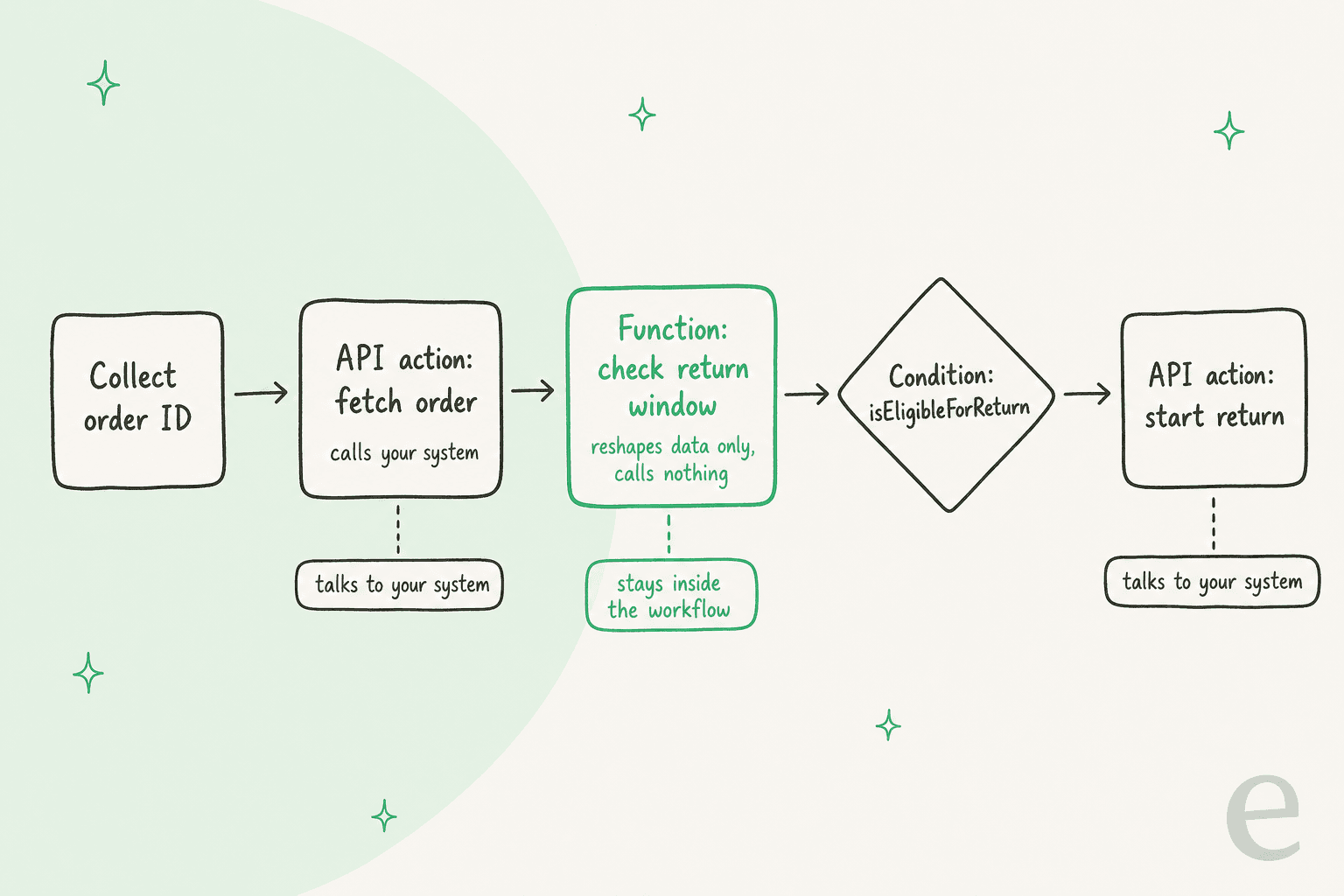
A function sits between two blocks that do talk to your systems: it takes what an API action returned and gives the next step something it can branch on. Freshworks' own example is an order workflow where an API action returns the order and delivery dates, a function checks eligibility, and a condition reads isEligibleForReturn.
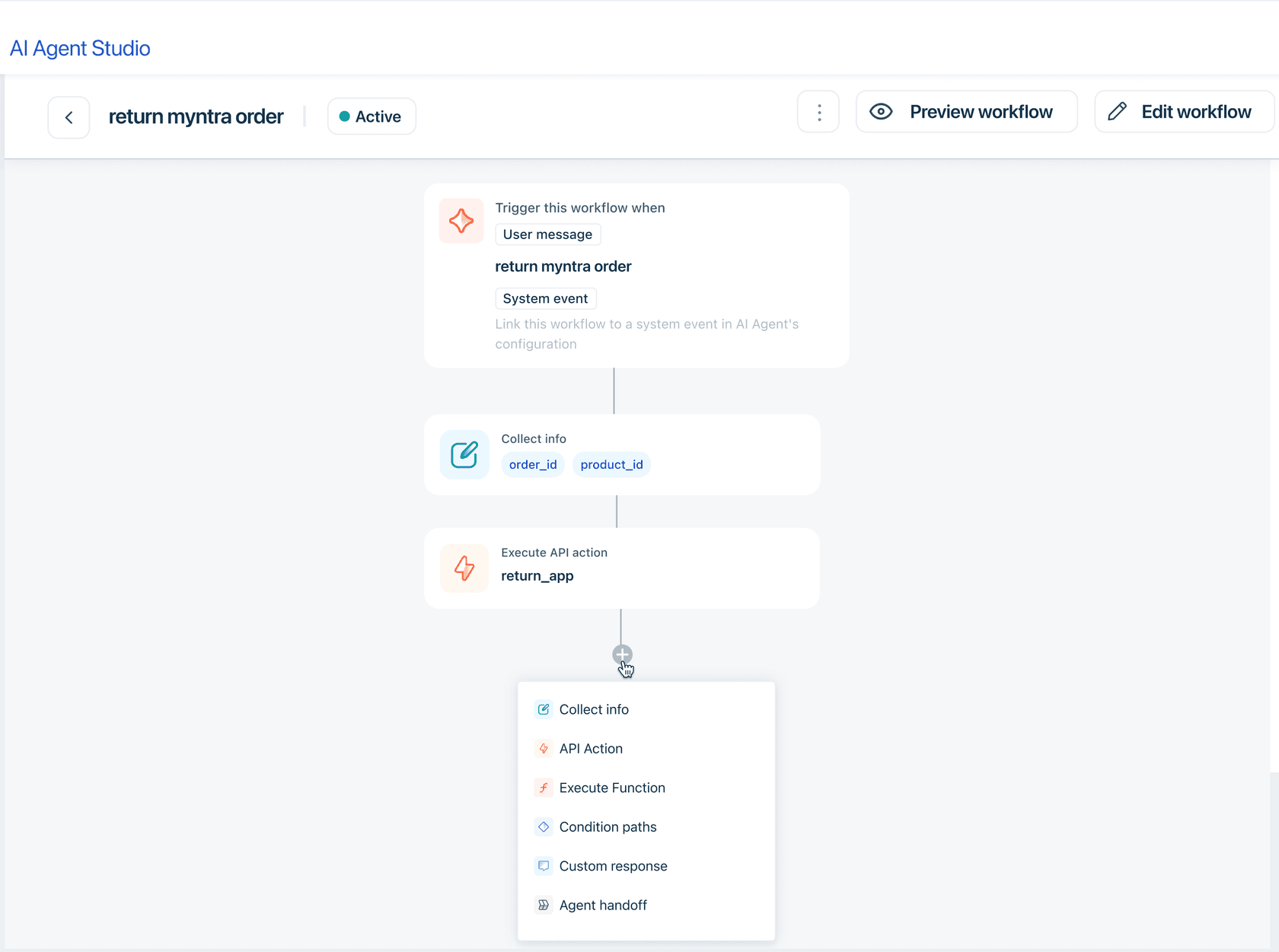
The workflow builder shows the same split. When you click the plus icon, the block menu lists Collect info, API Action, Execute Function, Condition paths, Custom response, and Agent handoff as separate things.
API actions are the half that costs setup time. You give each one a URL, an HTTP method (GET, POST, PUT, PATCH, or DELETE), headers, and an authentication choice of API Key, Bearer Token, Basic Auth, or OAuth 2.0. Output variables are mapped with JSON path, and the output of one action can feed the next. Freshworks' API actions article also notes that Ask for confirmation can be switched on for high-impact steps like refunds.
"Test requests use real values and may affect your external system depending on the endpoint."
How do you create a custom function?
You create a custom function in five moves: name it, define typed inputs, write the code, test it with sample values, and define the outputs the workflow can use. Freshworks' create custom functions guide walks through it, and you need administrator access to AI Agent Studio plus an existing workflow.
- Go to AI Agent Studio > Library > Functions and click Create.
- Under General, add a name and description.
- Add inputs. Each has a name, a type of text, number, boolean, or list, and an optional Required flag.
- Write the logic in the Code editor. It must return a valid JSON object. In Freshworks' example, the workflow response body is read from
data['Response_body']. - Click Test function, enter sample values, run it, then check the response and console logs. Finish with Define outputs and Create.
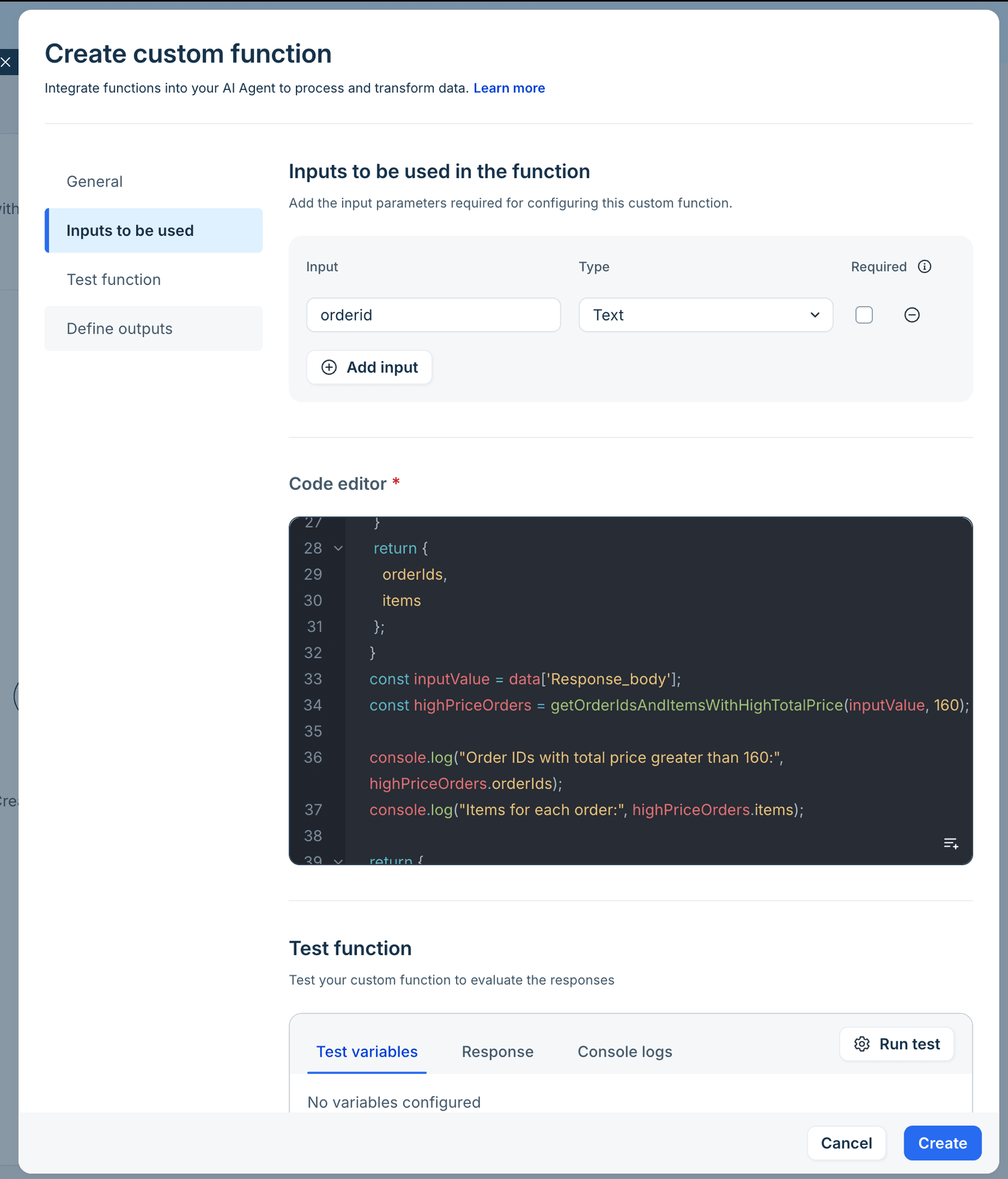
The sample in the docs filters orders whose total_price is above a threshold of 160 and returns the order IDs and item names. That is typical of what these functions are for: trimming a big API response down to the two fields a customer-facing sentence needs.
Freshworks says in the intro that you can write or generate the function logic. The numbered steps only describe writing it, so I could not confirm what the generate option looks like. Its own tip is worth following either way: test with valid, invalid, and empty inputs.
How do you use a function inside a workflow?
You add an Execute Function block, choose a function from My functions or Pre-built functions, map workflow values to its parameters, and optionally map its outputs to contact or ticket properties. The panel previews function details before you commit.
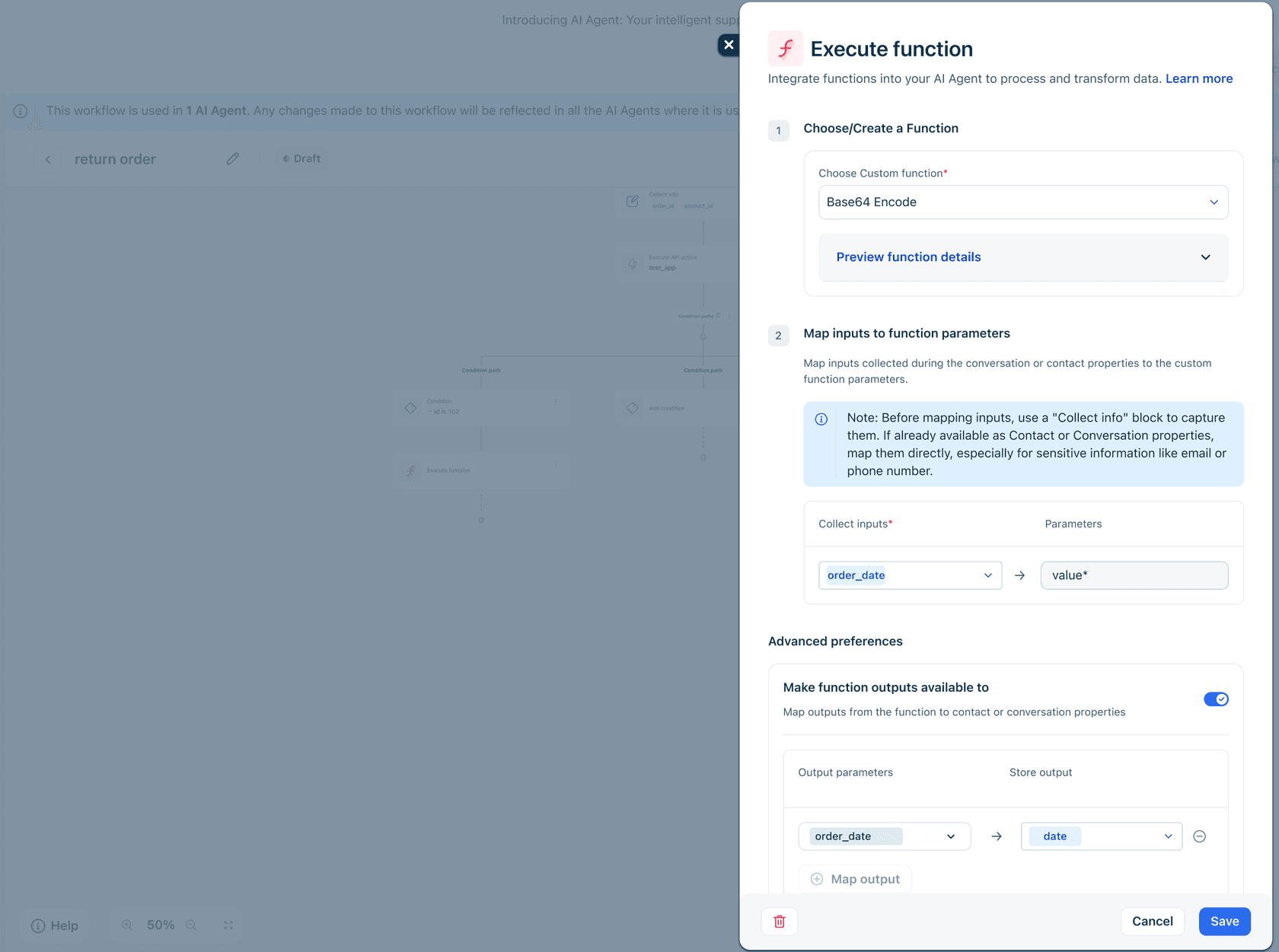
Two details from the manage and use functions guide save debugging time. First, capture inputs with a Collect info block before mapping them, or map them straight from contact or ticket properties, especially for email or phone. Second, you can clone a pre-built function and edit it, which is the fastest route to a variant of your own.
Here are three jobs where I would reach for a function instead of an instruction in the prompt:
- Return window: compute days since delivery and return a boolean, so the condition branch is deterministic.
- Promo or coupon checks: compare expiry to today before the agent says a code is valid.
- Trimming a payload: return only the tracking number and status from a long shipping response.
Freshworks' pre-built list covers the first two already (Get Days Between, Compare Dates), so a custom function earns its place only when your rule is specific to your business.
Which plans include custom functions?
Freshworks' functions articles carry a plan banner for Freshdesk Omni with ticks on Growth, Pro, and Enterprise, and the line "Not available in previous plans." They also say that if you signed up before December 2025, your Freshdesk Omni experience may differ. The current plans on the pricing page are $19, $55, and $89 per agent per month billed annually.
See the Freshdesk Growth plan and Pro plan guides for what else each tier holds, and the Freshdesk plans comparison for a side-by-side.
One adjacent fence: the developer route for custom operations, AI Actions apps, can currently be published only as custom apps, and is listed as unavailable on Freshdesk Legacy, Freshcaller, Freshsales Classic, and Freshservice MSP.
What do Freddy custom functions cost?
Freshworks lists no separate price for custom functions, so the meter you will actually watch is the AI Agent session. The pricing page gives the first 500 sessions free on Growth, Pro, and Enterprise, once per account, then $49 per 100 sessions. An email session is a 72-hour window from the customer's first email, however many replies go out inside it.
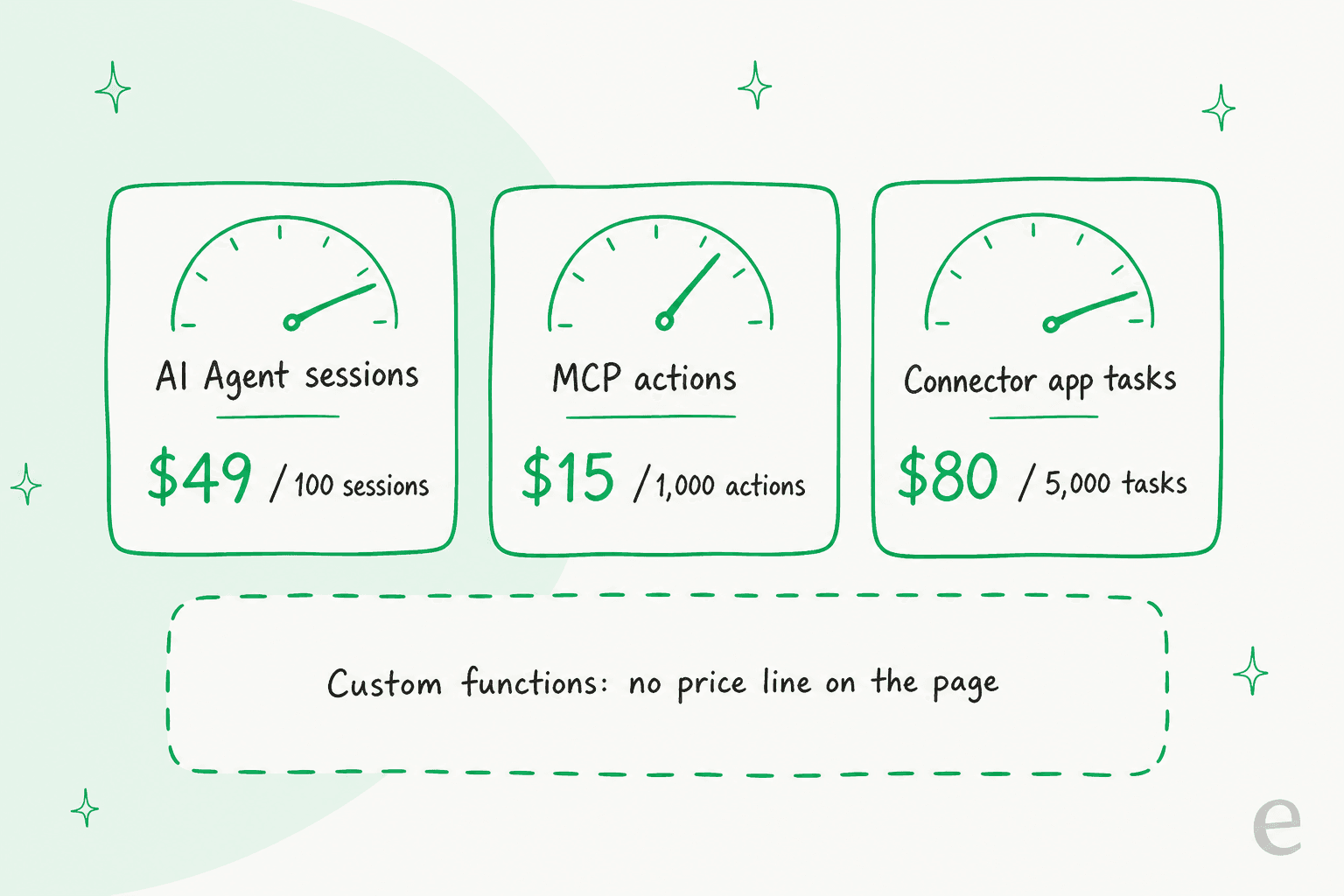
The same page lists two other usage meters: connector app tasks at $80 per 5,000, and MCP actions at $15 per 1,000. What I could not find is any statement of whether a function run, or an API action inside the workflow, increments either one. Treat that as a question for your Freshworks rep before you design a high-volume workflow. For session math in practice, my arithmetic: a team that has already used its free 500 and then handles 2,500 sessions in a quarter buys 25 packs, which is $1,225. The session consumption guide shows which conversations count, and the Freddy AI pricing per agent post covers the seat side.
What are the limits and gotchas?
The practical limits come from how functions are shared and how channels behave, not from a published quota. I found no stated run time, memory, or call-count cap for functions, so test with realistic payload sizes.
- Shared logic changes everywhere. Freshworks warns that editing a shared API action affects every workflow that uses it, so test in a non-production environment first.
- No deleting live functions. You cannot delete a function used in an active workflow.
- Chat is synchronous. In chat, API action blocks run during the conversation and the text input is unavailable until they finish; a timeout or failure routes to the Fallback path.
- Email skips confirmation. Confirmation blocks are skipped for email agents, so Freshworks tells you to put safeguards for high-impact operations at the API layer. The Freshdesk email AI agent guide covers that channel.
- Rules belong in code, not prose. A function gives you a deterministic check, which is its real strength over an instruction to the model.
Where Freshworks' docs disagree with themselves, here is what I found:
- MCP sign-in. The workflows article says the MCP layer "uses OAuth-based authentication". The MCP security article says OAuth is not currently supported for Freshdesk MCP integrations, and the MCP setup article says API key only. Those pages describe Freshworks' own MCP server, which may not be the same thing as an MCP server you link inside an API action, so I would treat both as unconfirmed.
- MCP quota period. The setup article's table gives included actions "per account, annually" (
1,200on Growth,6,000on Pro,12,000on Enterprise), while the security article talks about monthly quotas. - Prerequisites. The API actions article says your account must be on Freshdesk Omni "or have AI Agent Studio enabled", while the pricing page lists Freddy AI Agent on all three Freshdesk plans.
- Function count. The docs list
13pre-built functions across five groups, yet the screenshot of the Functions page shows14on the pre-built tab.
How do Freddy functions compare with eesel's custom API calls?
Freddy functions give you deterministic logic you draw and code; eesel gives you a teammate that decides when to call your APIs from instructions. They solve different halves of "my agent needs live data".
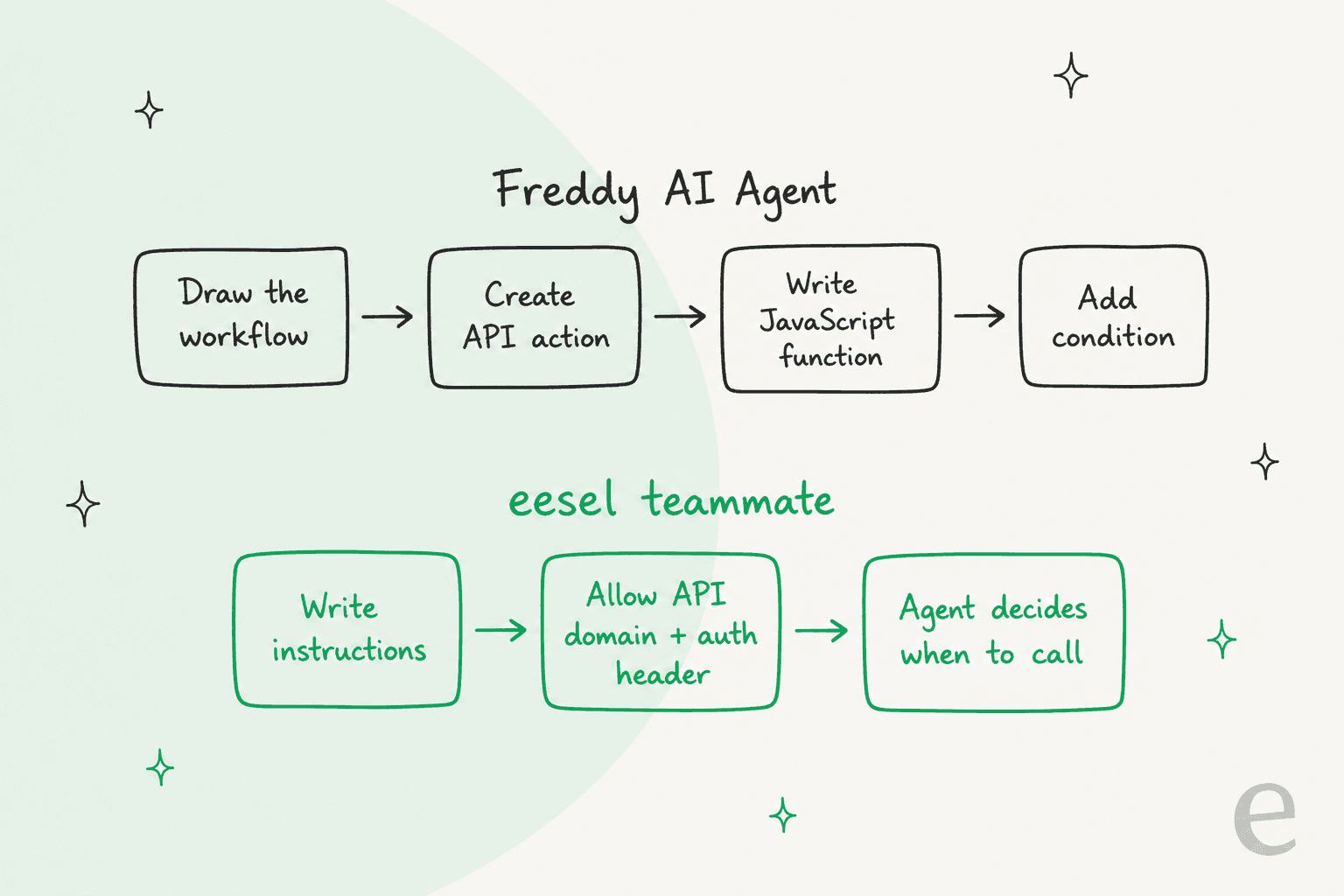
In eesel, Your APIs lets the teammate reach any REST API. You allow the domain, add the header the API expects (Bearer, Basic, or an API key), and the credentials stay in your settings and are never shown to the AI. It can make GET, POST, PATCH, and DELETE requests. Freshdesk itself is a native integration: with a full connection (subdomain plus API key) the teammate reads your help center, canned responses, and past tickets, and can reply, leave internal notes, tag, assign, and close. Every action can be set to on, ask first, or off, per the actions and approvals guide.
Where Freddy is better: the return-window check is code, so it behaves the same way every time, and the visual workflow makes the path auditable. In eesel that rule sits in your instructions, which a model follows well but which is not a compiled guarantee. Where eesel is better: there is no function to write or version, one workspace covers tickets and live chat, and a developer or a coding agent can run the whole setup from a terminal with the eesel CLI. The eesel Freshdesk page on docs.eesel.ai lists the action table.
I have built Freshdesk integrations for eesel for years, and the surprises are rarely in the API calls. One that cost us hours: Freshdesk does not fire its automation rules for tickets created by an agent, so a trigger you assumed would wake the teammate simply never arrives. Logic you control in code does not fix that; knowing the platform does.
Two customers show the pattern. SamCart runs one eesel agent on Freshdesk tickets and another on its website chat, both answering from about 280 help center articles, and the agent steps back once a person is assigned. Timengo uses eesel on Freshdesk for technical support in Danish, drafting replies from about 5,300 past tickets and articles, with an engineer sending every one. Neither needed a custom function; the work was in the knowledge and the handoff rules.
For the broader picture, see Freddy AI vs eesel AI, the Freddy AI alternatives, and the Freshdesk AI alternatives.
Where should you go next with Freddy and Freshdesk?
If you stay on Freddy, build the API action first, add a function only where a rule must be code, and watch your session count. Three neighbouring guides help here: Freddy knowledge sources, the Freshdesk AI Agent overview, and Freddy conversational actions.
If you are wiring Freshdesk to an order system, the Freshdesk webhooks and Freshdesk Shopify posts show the plumbing.
The Freshdesk API rate limits explain what throttles you.
The AI agent API integration guide covers the pattern in general.
For wider context, read adding AI to Freshdesk, then Freshdesk automation and the Freshdesk chatbot guide.
Weighing the helpdesk itself? Freshdesk vs Zendesk and the Freshdesk review are the places to start, and Freddy Copilot covers the agent-side assistant.
Try eesel for Freshdesk
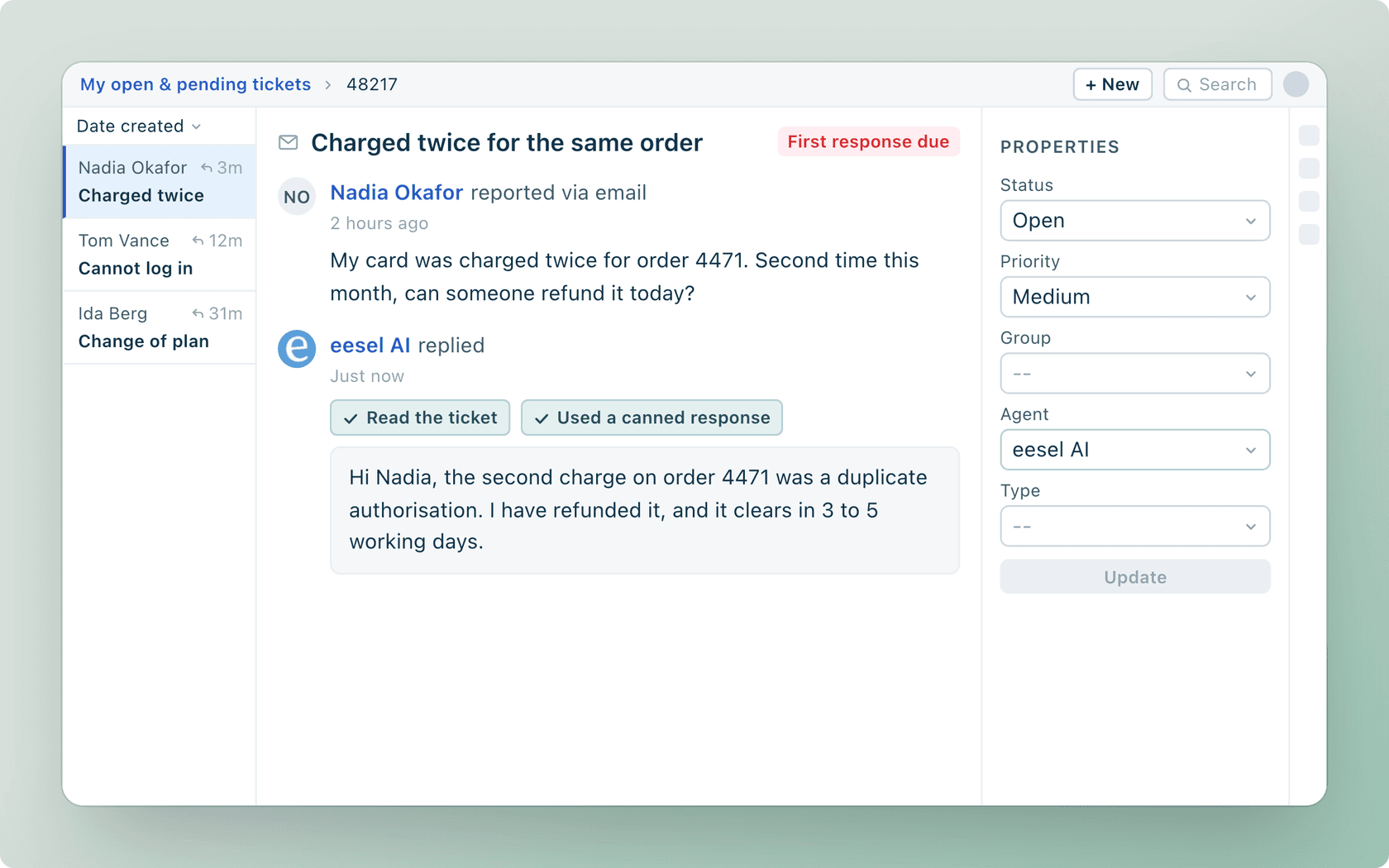
If your goal is a Freshdesk agent that answers from your help center and your own order system, eesel works like a new teammate that joins your queue in minutes. Connect Freshdesk with a subdomain and API key, start with drafts as internal notes, and widen its access as it earns trust. With the eesel CLI, an AI coding agent can upload approved knowledge such as exported solution articles, adjust the teammate's instructions, and ask test questions to check the answers before anything goes live, though a person with admin access still approves the Freshdesk connection itself. See the Freshdesk integration or the eesel pricing.
Frequently asked questions
What are Freddy AI Agent custom functions?
They are JavaScript snippets you write in AI Agent Studio that take inputs, return a JSON object, and feed the next workflow step. They reshape data, for example turning two dates into an eligibility flag. They do not call external systems; API actions do that. The Freddy AI agents guide covers the wider product.
Which Freshdesk plans include Freddy custom functions?
Freshworks' help articles tag functions as Freshdesk Omni on Growth, Pro, and Enterprise, and mark them not available in previous plans. If you signed up before December 2025, your setup may differ. Compare plan prices in the Freshdesk pricing guide.
How much do Freddy AI Agent custom functions cost?
Freshworks' pricing page has no separate price line for functions. The billed unit for the agent is the session: the first 500 are included once per account, then $49 per 100 sessions. See how sessions are counted and the Freddy AI pricing breakdown.
Can a Freddy custom function call an external API?
The Freshworks articles describe functions as data transformation only, and they route calls to outside systems through API actions. If you need a live order lookup, build an API action and pass its output into the function. A Freshdesk ticket API example shows the request shape.
Do I need to know JavaScript to build a Freddy custom function?
Freshworks says a basic understanding of JavaScript is needed if you write a custom function manually. Pre-built functions for dates, text, lists, math, and Base64 cover common cases without code. For a no-code route, see the Freddy prebuilt skills library.
What is the difference between a Freddy custom function and an eesel custom API?
A Freddy function is code you write inside a workflow you draw. In eesel you allow an API domain, add the auth header, and describe in instructions when the teammate should look something up. Read the Freddy AI vs eesel comparison or see the eesel Freshdesk integration.
Can I delete a custom function that is already in use?
No. Freshworks says you cannot delete a function used in an active workflow, so remove the dependency first. Cloning a function is the safe way to edit logic without touching a live one, which matters when you follow Freshdesk AI agent best practices for rollouts.