


How much does Flyweight cost in 2026?
I spend my days at eesel building the integrations that connect an AI agent to a store's orders, catalog and helpdesk, so when I read a pricing page I look for one thing first: what's the billable unit? On Flyweight's page, there isn't one. There's a single plan and a button that says "Get my tailored plan."
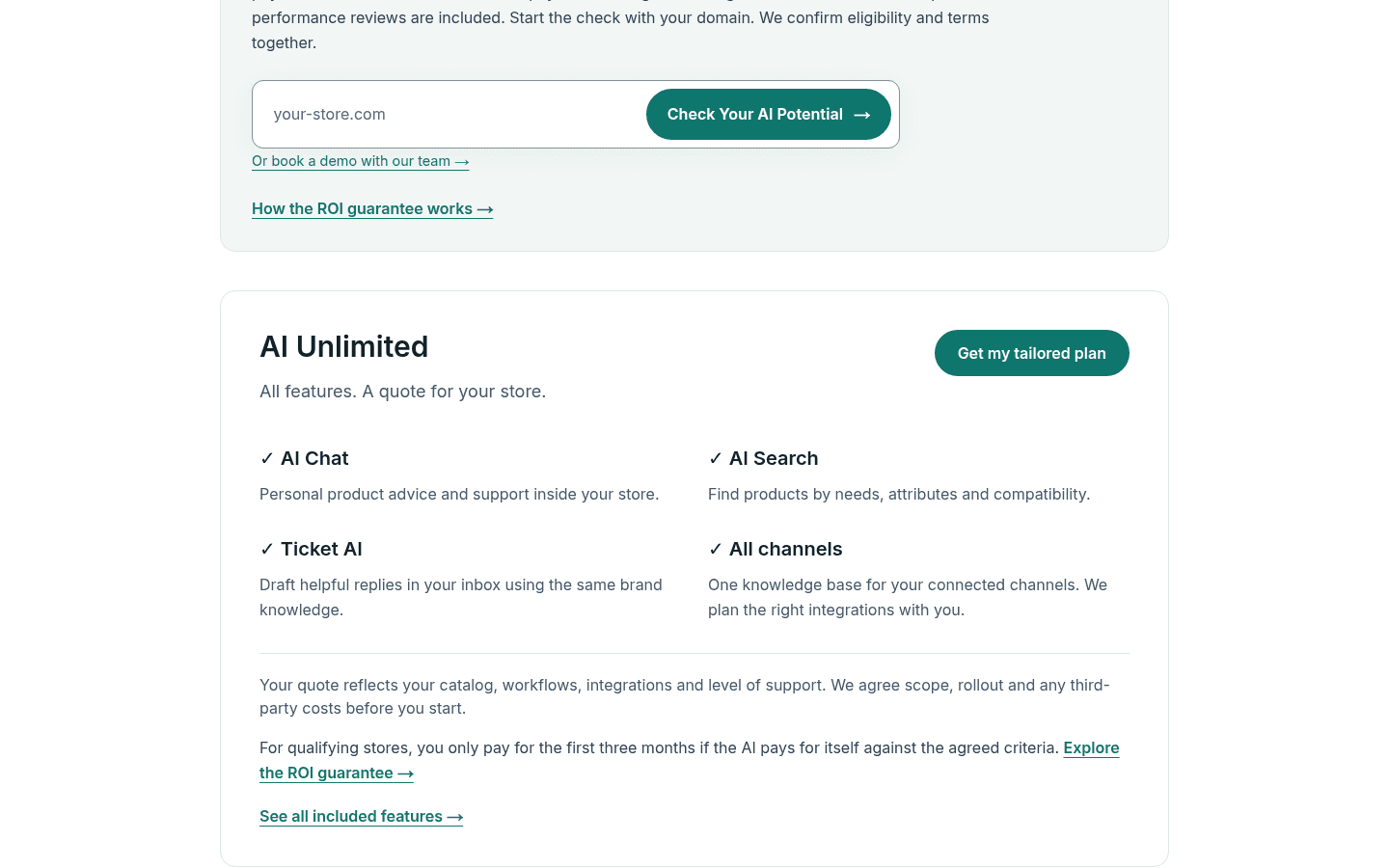
Here's everything Flyweight publishes about cost, checked on October 22, 2026 against flyweight.io and its Shopify App Store listing:
| What you're paying for | What Flyweight publishes | Price |
|---|---|---|
| Installing the Shopify app | "Free to install. Additional charges may apply." | $0 |
| Testing the AI before launch | Unlimited AI testing in preview, up to 5,000 products | $0 |
| AI Unlimited (AI Chat, AI Search, Ticket AI, all channels) | "All features. A quote for your store." | Quote only |
| AI Core, AI Pro, AI Leader | Named on Flyweight's site, no public prices | Not published |
| Live chats and human takeovers | "Always free" | $0 |
| ROI guarantee | Stores with $500,000+ annual revenue | Pay for months 1 to 3 only if the AI pays for itself |
| Third-party costs | "We agree scope, rollout and any third-party costs before you start" | Set in your quote |
| Billing currency | All charges billed in USD (Shopify listing) | USD |
Two things stand out. First, live chat and human takeovers are free, so you're paying for AI work, not for the human-in-the-loop moments when your team jumps into a chat. Second, Flyweight's own FAQ answers "What does Unlimited cost?" with "Your quote reflects your store and the agreed solution." That's honest, but it puts the job of judging the number on you. The rest of this post is about doing that job well.
If you want the product side first (how answers are grounded, what's live versus in beta, what 121 merchants say), a colleague, Riell, covered it in the Flyweight review. This post sticks to the money.
What does the Flyweight AI Unlimited plan include?
Flyweight's feature table runs to more than 50 rows, and every row reads either "Included", "Unlimited", "Rolling out" or "Tailored to your store." That last label is the one to watch, because those are the rows your quote actually prices.
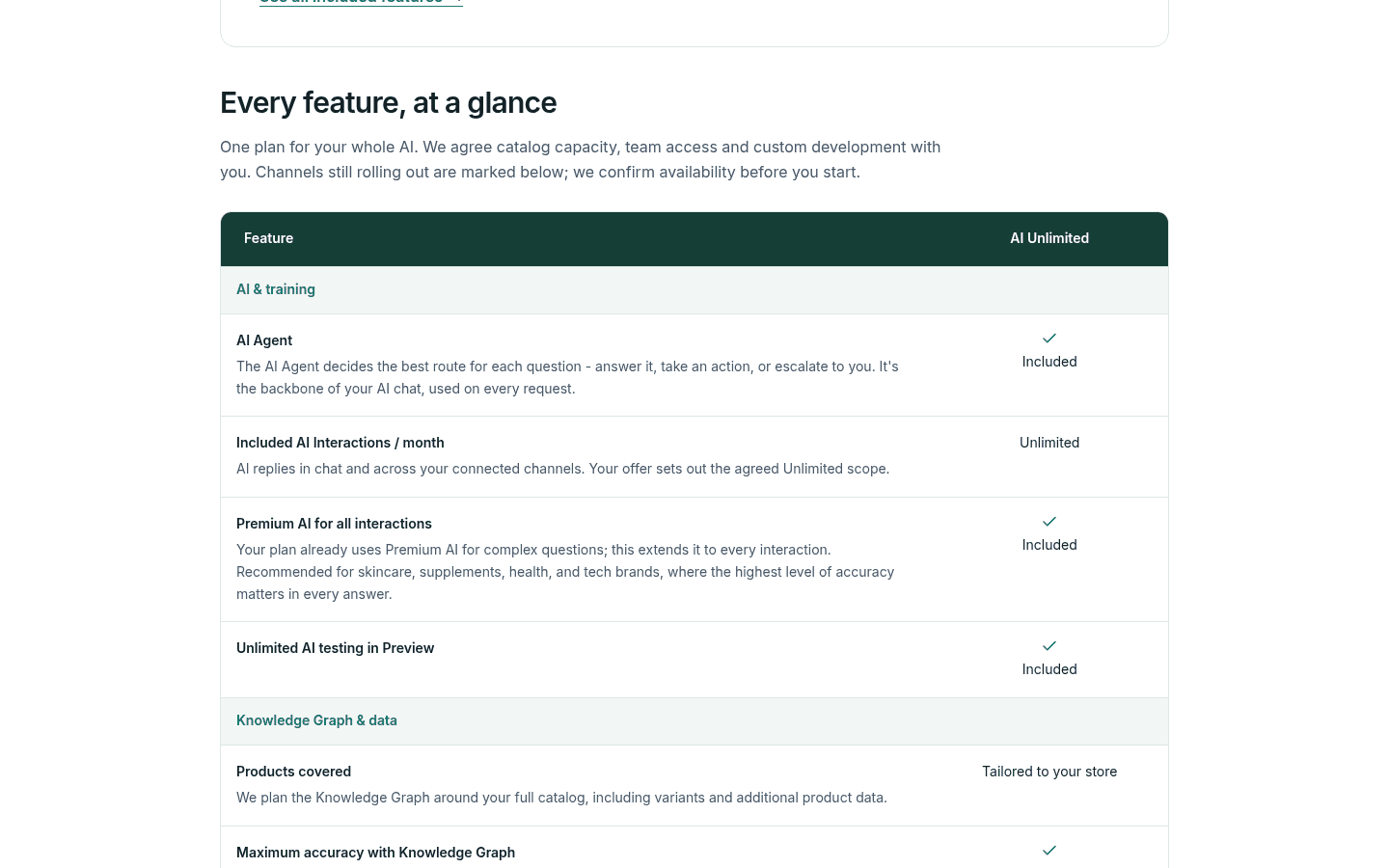
I grouped the table into what's fixed and what's negotiated:
| Area | Included on AI Unlimited | Set in your quote |
|---|---|---|
| AI and volume | AI Agent routing, unlimited AI interactions, Premium AI on every interaction, unlimited preview testing | The "agreed Unlimited scope" in your offer |
| Store data | Knowledge Graph over products, pages, articles and policies; Flyweight metafield for AI-only content; daily refresh; Zendesk Help Center as a source | Products covered, including variants and extra product data |
| Languages | 100+ languages, auto-detection, widget in 29 languages | Nothing |
| Channels | AI Chat, AI Search, Instagram | WhatsApp, Messenger and helpdesk ticketing are "Rolling out" |
| Actions | Unlimited routings, order tracking, cancellations and address changes via Shopify API or Shopify Flow, lead forms | Custom implementations and integrations |
| Team | Unlimited live chats and human takeovers | Web App and Ticket AI user seats |
| Support | Onboarding call, recurring AI performance calls, priority support, dedicated success manager | Nothing |
The order actions are the part I'd check hardest, because they're where a chatbot turns into something that saves agent time. Flyweight can cancel an order directly through Shopify after the customer confirms, or hand it to a Shopify Flow you approve. That second option is a nice touch for anyone nervous about letting an AI issue refunds. If order questions make up most of your inbox, the guide to AI order tracking covers what to automate first.
One caution on "all channels": the pricing page marks WhatsApp, Messenger and helpdesk ticketing as rolling out, and says Flyweight confirms availability before you start. If one of those channels is the reason you're buying, get its go-live date written into the offer, not just a "coming soon."
What drives your Flyweight quote?
Flyweight is unusually direct about this. The plan card says your quote "reflects your catalog, workflows, integrations and level of support." That gives you four levers, plus a fifth line item for anything third-party.
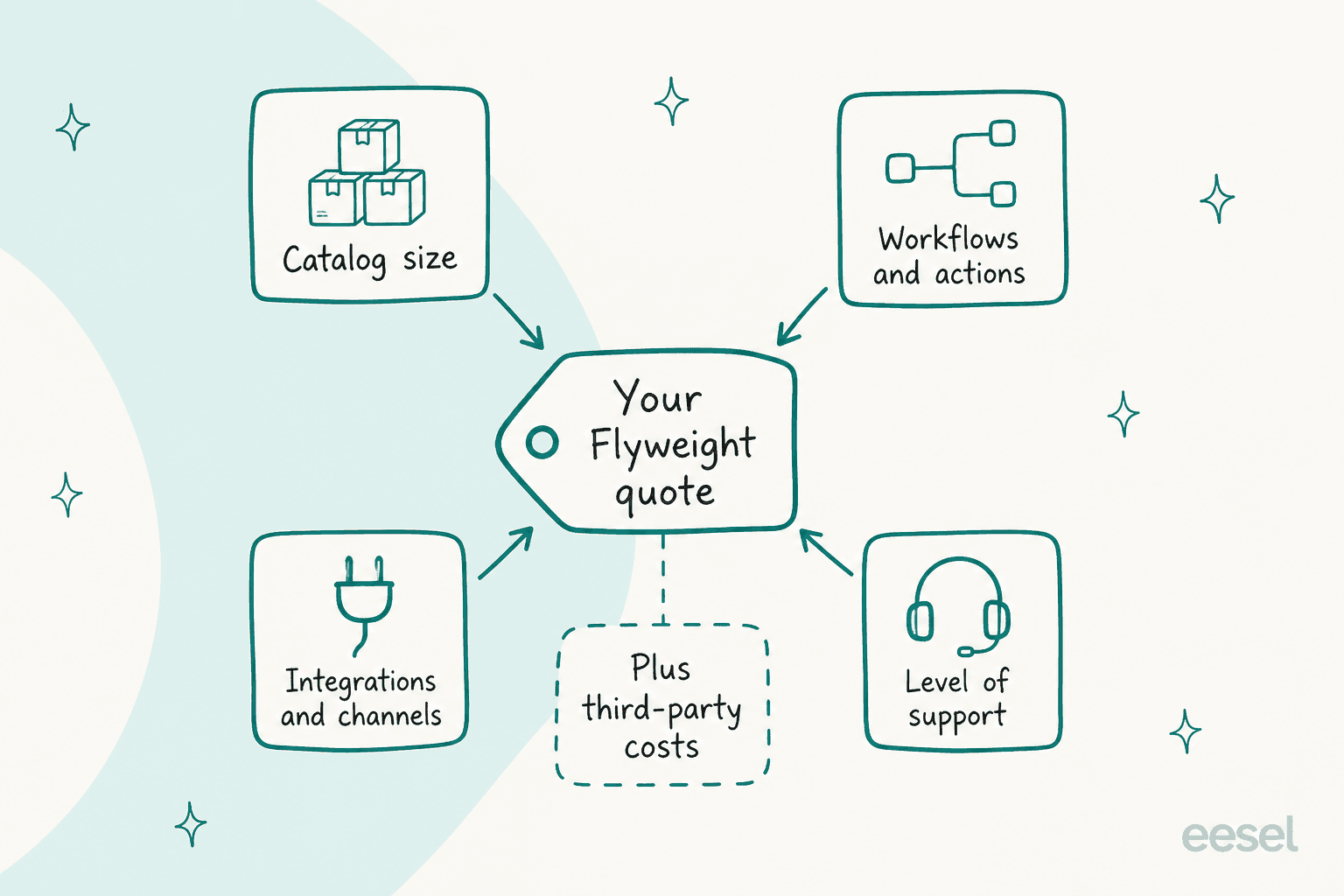
Here's how I'd read each one before the call:
- Catalog size. "Products covered" is tailored per store, and the Knowledge Graph is planned around your full catalog, variants included. The free preview stops at 5,000 products while the listing says 1M+ products are supported, so a large catalog is the most obvious thing that pushes the number up.
- Workflows and actions. Order tracking, cancellations and address updates are included. Anything beyond them, like a returns portal or an ERP lookup, falls under "custom implementations", which Flyweight scopes in the offer.
- Integrations and channels. Instagram is connected by a Flyweight expert. Helpdesk ticketing in Zendesk, Freshdesk, Gorgias, Gmail or Outlook is also expert-connected. More channels, more setup work.
- Level of support. Every plan lists a success manager and performance calls, but how often those calls happen is worth asking about.
- Third-party costs. Flyweight says these are agreed before you start. If you add WhatsApp later, Meta's own messaging fees are a typical example of a cost that sits outside any chatbot vendor's price.
What's missing from that list is traffic. That's deliberate, and it's the most important change in Flyweight's pricing history.
What happened to Flyweight's cheaper plans?
If you've read Shopify reviews of Flyweight, you've seen merchants mention small monthly plans and traffic-based packages. Those were real once, but Flyweight's own replies on the listing say they're gone. I won't repeat old numbers as prices, because they no longer apply.
The old model counted impressions, meaning visitors who saw the chat widget, not people who used it. A store that went viral paid for traffic that never opened the chat. One merchant who canceled after four months put it plainly:
"Honestly, even with thousands of visitors a day I'd get 2-5 AI questions so it's not like everyone was engaging with the chat."

Flyweight replied on July 2, 2026 that the criticism was fair and that it had introduced plans "based on AI interactions only, with unlimited visitors included." In a September 2026 reply to another merchant, it described the old plan as "outdated pricing" and said paid plans "now only charge for AI interactions, while live chats and human takeovers are completely free."
Another merchant had asked for exactly where Flyweight ended up, a year before the change:
"Also an unlimited plan for bigger stores with a lot of sessions."
So where does that leave a small store? The public site now shows only AI Unlimited, while the in-app tiers (AI Core, AI Pro, AI Leader) are referenced but unpriced. My read: Flyweight is steering toward larger stores with hands-on setup, and the ROI guarantee's $500,000 floor points the same way. A small shop can still install for free and see in-app plans, but it should expect the sales motion to be built for bigger catalogs. If that's you, the published-price apps in my best Shopify chatbot apps roundup are a quicker comparison.
How does the Flyweight ROI guarantee work?
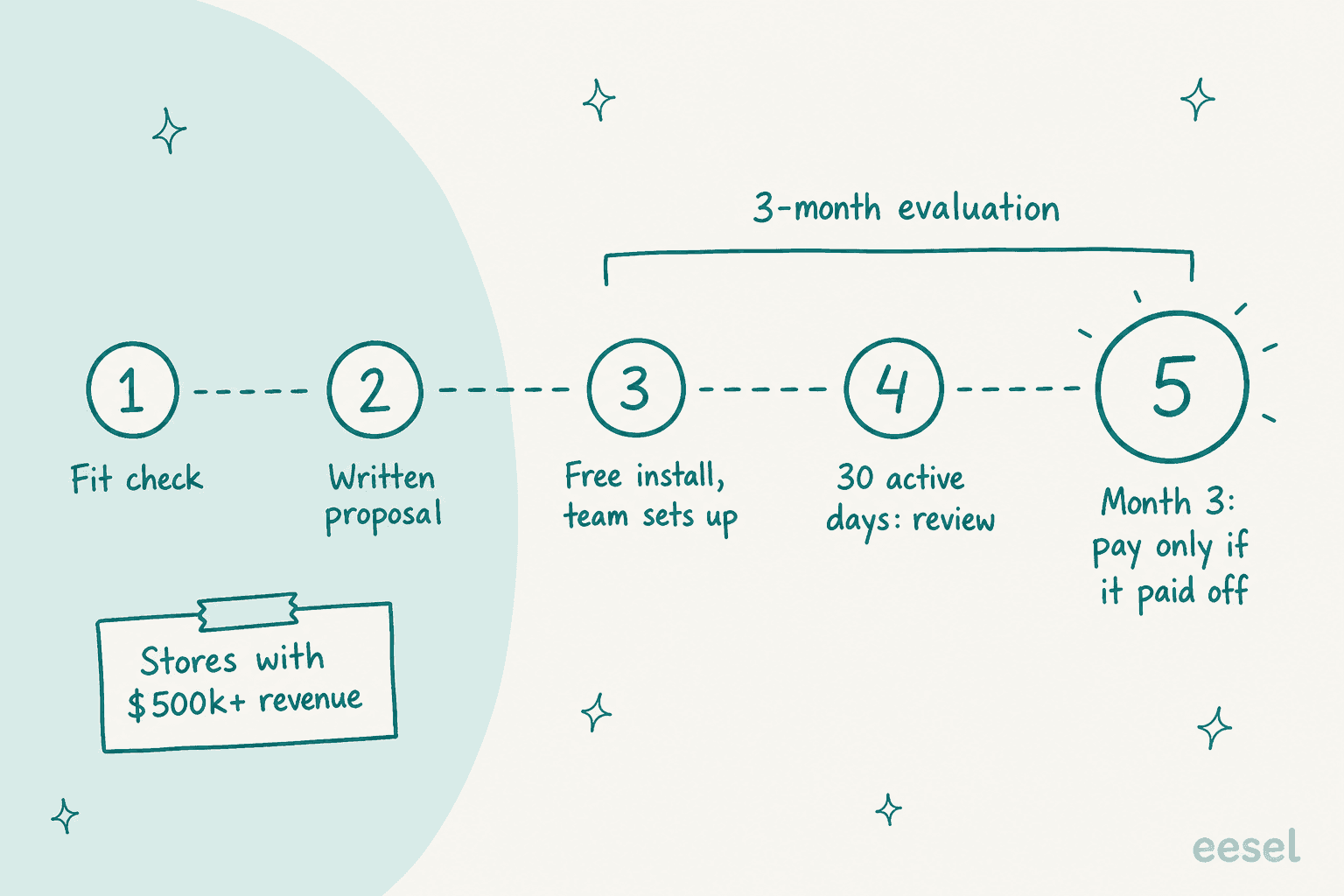
The ROI guarantee is the most buyer-friendly part of Flyweight pricing, and the part with the most fine print. It's a form of outcome-based pricing, applied to the first three months only. It's for established Shopify stores with at least $500,000 in annual revenue, and it turns the first three months into a paid-only-if-it-works evaluation.
Flyweight lays out five steps on the guarantee page:
- Fit check. You enter your store domain, pick a goal and adjust business numbers, then book a free call.
- Written proposal. Goals, measurement, fees and guarantee terms go in writing before anything starts.
- Free install. You install the app, and Flyweight's team sets up the AI and starts the evaluation period.
- Review at 30 active days. You go over results together and tune the AI.
- Decide after three months. You only pay for the first three months if the AI paid for itself against the agreed criteria, and there's no automatic commitment after that.
The line I'd underline is Flyweight's own: "AI-assisted revenue is not the same as additional profit." Credit to them for saying it. Value can be measured as sales contribution, support work saved, or a mix. Those produce very different numbers. A chat-attributed sale with a 7-day window will look bigger than a support-hours saving every time, so pick the metric that matches why you're buying. Flyweight's conversion analytics let you choose 2-hour, 1-day or 7-day attribution windows, and the window you agree on decides the result before the AI answers a single question.
Also note that submitting the check or installing the app doesn't activate a guarantee or start a contract. The guarantee exists only in the signed proposal. For a framework on picking the metric, the chatbot ROI guide walks through the support-cost side, and AI customer service cost covers what a resolved ticket is worth.
What should you ask in the Flyweight sales call?
A quote is only as good as the questions behind it. Here's the list I'd bring, based on what the pricing page leaves "tailored":
- What's the monthly price at my current volume, and at double it? "Unlimited" is defined by "your offer," so ask what happens in your November peak.
- Which plan am I actually on? AI Unlimited, or one of AI Core, AI Pro or AI Leader in the app? Features like custom CSS and the Ticket AI beta are tied to specific tiers.
- What counts as an AI interaction? Is it each AI reply, or each conversation? If a customer sends eight messages, is that one or eight? This is the single biggest swing in any AI chatbot bill, and the explainer on deflection versus resolution shows why the definition matters.
- How many products and variants are covered? Get the number in writing if your catalog grows fast.
- Which channels are live on day one? WhatsApp, Messenger and helpdesk ticketing are marked rolling out.
- How many Web App and Ticket AI seats do I get? Seats are "tailored to your store."
- What are the third-party costs? Ask for the list, not just the assurance.
- What's the contract length and notice period after month three? The guarantee page says there's no automatic commitment, so confirm what renewal looks like.
- If I qualify for the ROI guarantee, which metric and attribution window do we use? See the section above.
Then, before you sign, use the free preview the way Flyweight intends it. Run your 20 hardest real customer questions through it, the sizing, compatibility and "will this fit my model" ones. The checklist on testing an AI agent before launch has a fuller script.
How does Flyweight pricing compare with public-price tools?
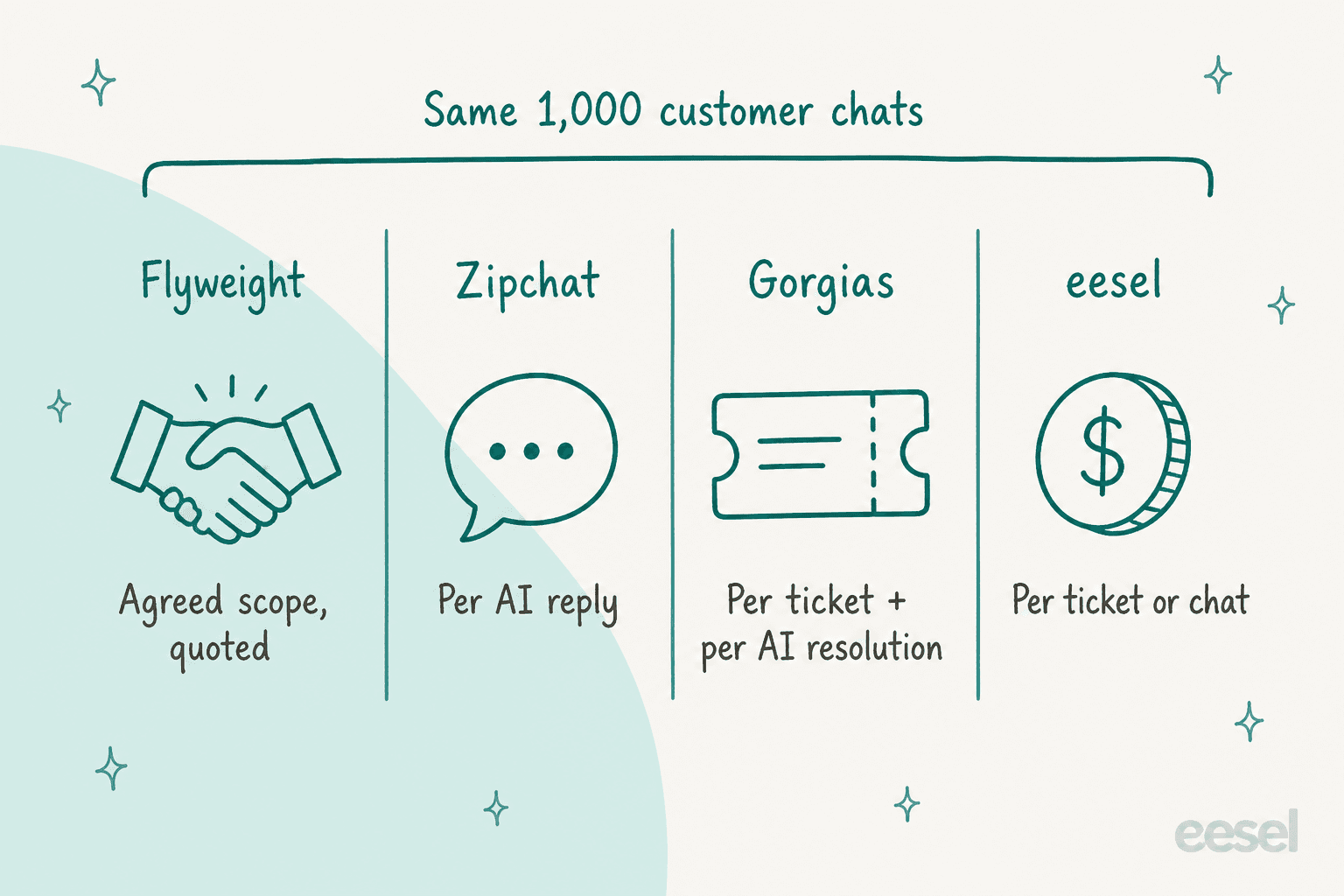
The fastest way to judge a quote is to know what you'd pay elsewhere for the same volume. The catch is that every vendor counts something different.
Here's what three alternatives publish on their own pricing pages, checked October 22, 2026:
| Tool | What it bills on | Entry price | Higher tiers | Quote-based tier |
|---|---|---|---|---|
| Flyweight | Agreed scope | Free install and preview | Not published | AI Unlimited, quote only |
| Zipchat | AI replies (each outbound AI message) | $64/month billed annually ($80 monthly), 750 replies | $240, $480, $960/month billed annually | Unlimited from $2,100/month |
| Gorgias | Helpdesk tickets plus each AI-resolved conversation | $10/month for 50 tickets, AI at $1.00 per resolution | $60, $360, $900/month, AI at $0.85 to $0.90 | Custom above 5,000 tickets |
| eesel | Tickets or chats (1 credit each, however long) | $299/month for 500 credits | Up to $1,749/month for 5,000 | Custom above 5,000 |
Zipchat is the closest like-for-like, since it's also a Shopify AI chat app, and its Unlimited plan starts at $2,100/month. That's a useful reference point for any "unlimited" quote: if Flyweight's number lands well above it for a similar store, ask why. My Zipchat pricing breakdown and Gorgias pricing guide go deeper on each.
Pick your monthly volume to see what the published-price tools would charge:
Two honest caveats on that comparison. The Gorgias number includes a full helpdesk, which you may already be paying for elsewhere. And eesel's price doesn't include a helpdesk: it works inside the one you have (Gorgias, Zendesk, Freshdesk) or as a chat bubble on your store. So the right comparison depends on your stack, not just the bottom line.
The billing unit also changes what "volume" means. In one real-traffic trial eesel ran for a German jewelry ecommerce brand on Zendesk and Shopify (about 1,000 tickets a month across 8 languages), 22% of the inbox turned out to be spam. Under any per-conversation or per-ticket model, that's a fifth of your bill spent on messages nobody needed answered. Ask any vendor, Flyweight included, whether filtered spam counts toward your volume. The cost per ticket benchmarks help you sanity-check the rest.
Is Flyweight worth the price?
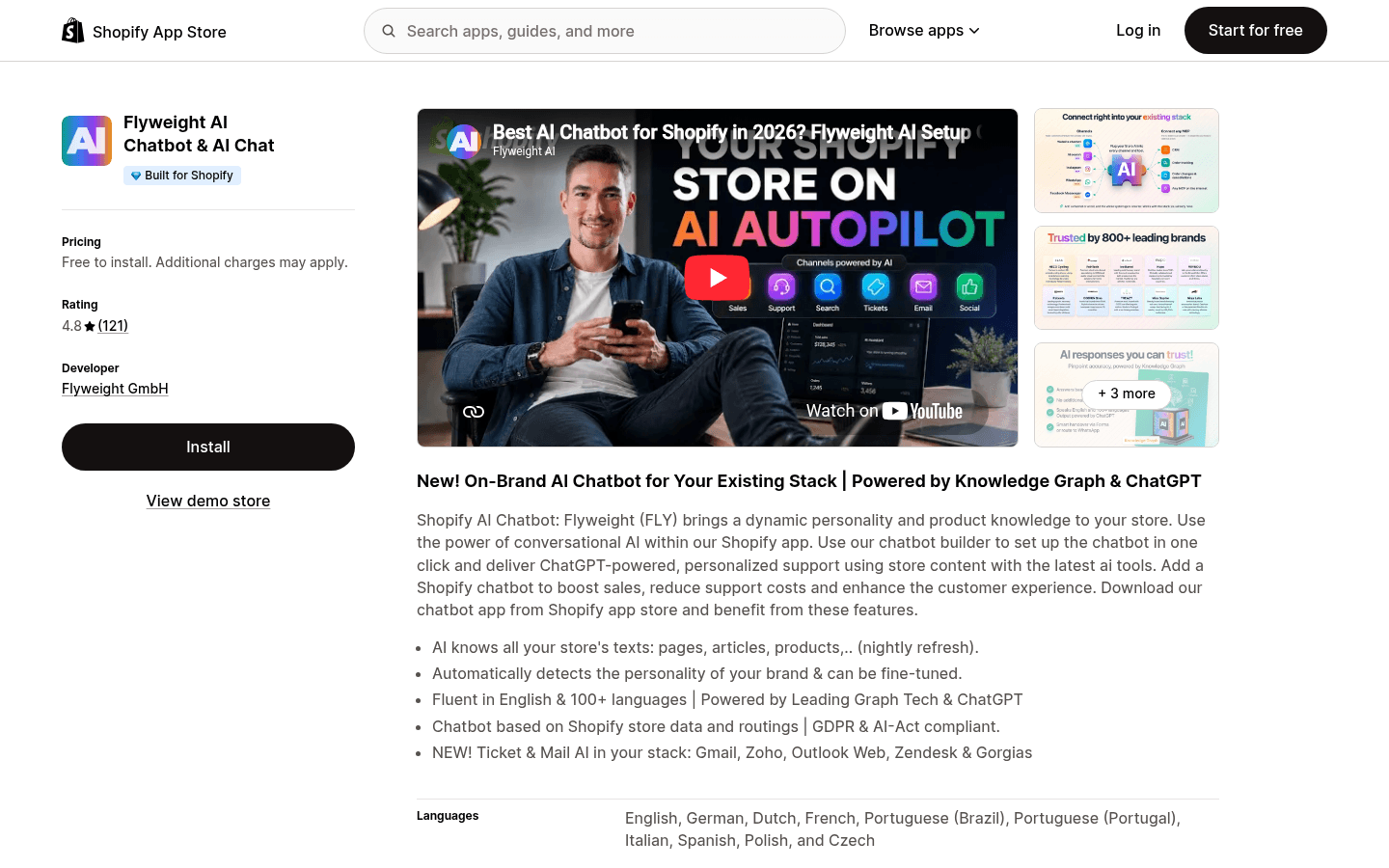
For the right store, I think yes, with one condition. Flyweight's strongest pitch is product knowledge: the Knowledge Graph acts as a knowledge base built from your products, pages and policies, refreshed daily, and the reviews back that up. It holds a 4.8 rating from 121 reviews on the Shopify App Store, 101 of them five-star. One auto parts store reported a big change in its phone queue:
"Our call volume has dropped by about 90%, as this app does most of the work for us."
That's the kind of result that makes a quote easy to justify. The condition is that you can price it. Here's how I'd decide:
| Your situation | My take on Flyweight pricing |
|---|---|
| $500k+ revenue, technical or high-consideration products | Worth the call. The ROI guarantee caps your downside if you agree the metric carefully |
| Large catalog that needs product advice in chat | Good fit, but get products covered and peak volume in writing |
| Small store, wants a monthly price today | Install the free preview, but compare against published-price Shopify chatbots before booking a demo |
| Most of your volume is email tickets in a helpdesk | Ticket AI is still marked rolling out on the pricing page, so check the date. A helpdesk-first AI may fit better |
| You need WhatsApp or Messenger now | Rolling out, so confirm availability before you sign |
The pricing model itself isn't a flaw. Quote-based plans with hands-on setup make sense for larger stores, and Flyweight dropped the traffic-based pricing merchants complained about. What it costs you is comparison time. If you want to see the alternatives side by side, the guides to Gorgias alternatives for Shopify and Tidio AI pricing cover two more published-price options.
Try eesel for Shopify support with a price you can see
If you've read this far, you probably want two things Flyweight's page doesn't give you yet: a number before the demo, and an AI that works your helpdesk queue, not only the store chat. That's the job eesel's AI helpdesk teammate is built for. It reads live Shopify orders and products, and answers tickets or drafts them for your team to review.
It joins your existing queue in Gorgias, Zendesk or Freshdesk. No helpdesk yet? It also runs as a chat bubble on your store, with a hand-off to a person when the question needs one.
Two eesel customers show what that looks like day to day. Cape Coffee Beans runs eesel on Zendesk, Shopify and Google Drive for a catalog of more than a thousand products. Between August 8 and September 8, 2026 it ran about 160 scheduled checks on the queue and about 120 knowledge searches, and every product answer links the product page it came from. SaunaSpace drafts beside every Gorgias ticket, answering from about 1,550 pages, articles and past tickets so replies sound like the company already.
The pricing is the part I'd point a Flyweight shopper to. eesel publishes it: $299/month for 500 tickets or chats, up to $1,749/month for 5,000, with every integration and unlimited seats on every plan. A ticket or chat is one credit, however long the conversation runs. Before you spend anything, you get 100 free credits, and eesel simulates the agent against your past tickets so you see how it would have answered before it touches a live customer. Try eesel on your own Shopify queue and you'll know your real cost before your first sales call anywhere else.
Frequently Asked Questions
How much does Flyweight cost per month?
Flyweight doesn't publish a monthly price. Its pricing page lists one plan, AI Unlimited, priced by quote based on your catalog, workflows, integrations and level of support. The Shopify app itself is free to install, with unlimited AI testing in preview for up to 5,000 products. To sanity-check a quote, compare it with tools that publish prices, like Zipchat or eesel.
Is Flyweight free on Shopify?
Installing is free. The Shopify App Store listing says "Free to install. Additional charges may apply," and the free preview lets you test the AI on your own store before you pay. Going live with the AI is where Flyweight pricing starts, and that runs through a quote or an in-app plan. My Shopify chatbot roundup covers apps with free tiers.
What is included in Flyweight AI Unlimited pricing?
AI Unlimited bundles AI Chat, AI Search, Ticket AI and all channels, with unlimited AI interactions, unlimited live chats and human takeovers, order tracking, cancellations and address changes through Shopify, plus a dedicated success manager. Catalog capacity, user seats and custom development are "tailored to your store", which means they're set in your quote. See how that compares in the Flyweight review.
What are Flyweight's AI Core, AI Pro and AI Leader plans?
They're in-app plan names. Flyweight's pricing page says custom CSS is "unlocked from AI Core up", and its Ticket AI beta rolls out on AI Pro and AI Leader first, but none of the three has a public price on flyweight.io today. Ask your rep which tier you'd land on and what it includes. The chatbot cost guide explains the common pricing models.
How does the Flyweight ROI guarantee work?
Shopify stores with at least $500,000 in annual revenue can qualify. You agree goals, measurement and fees in writing, Flyweight sets up the AI, and after three months you only pay for those months if the AI paid for itself against the agreed criteria. Flyweight notes that AI-assisted revenue isn't the same as additional profit, so agree the metric carefully. The chatbot ROI guide helps you pick one.
Does Flyweight still charge by website traffic?
Not on its current plans. Older Flyweight pricing counted impressions, and some Shopify reviews still mention it. In 2026 replies on the listing, Flyweight says its paid plans now charge for AI interactions only, with live chats and human takeovers free. Know which billable unit your quote uses before you sign.
What is a cheaper alternative to Flyweight pricing?
If you want a price you can see upfront, Zipchat publishes plans from $64/month billed annually, Gorgias bundles a helpdesk with AI from $10/month plus per-resolution fees, and eesel for Shopify starts at $299/month for 500 tickets or chats, with 100 free credits to test. Cheaper depends on your volume, so run your numbers through the calculator in this post first.