

Gen Z tries a search and a written message before calling: only 25% of Gen Z pick the phone as their first way to reach a company, against 52% of Baby Boomers (YouGov), yet 72% say they're likely to choose phone support again (Nextiva). So customer service for Gen Z works when one conversation follows them from search to a person. On Zendesk that means a help center they can find, messaging in the apps they already use (WhatsApp, Instagram), a visible "talk to a human" option, and callbacks instead of hold. eesel can sit inside that Zendesk setup and answer messaging and social tickets in the channel the customer used, from your past tickets, handing the rest to your team with notes. An AI coding agent can upload approved help articles and run test questions through the eesel CLI, though connecting Zendesk still needs an admin's approval.
Does Gen Z really avoid phone calls?
Not as much as the jokes say. Gen Z is the least likely generation to pick the phone first, but most of them still use it when they're stuck.
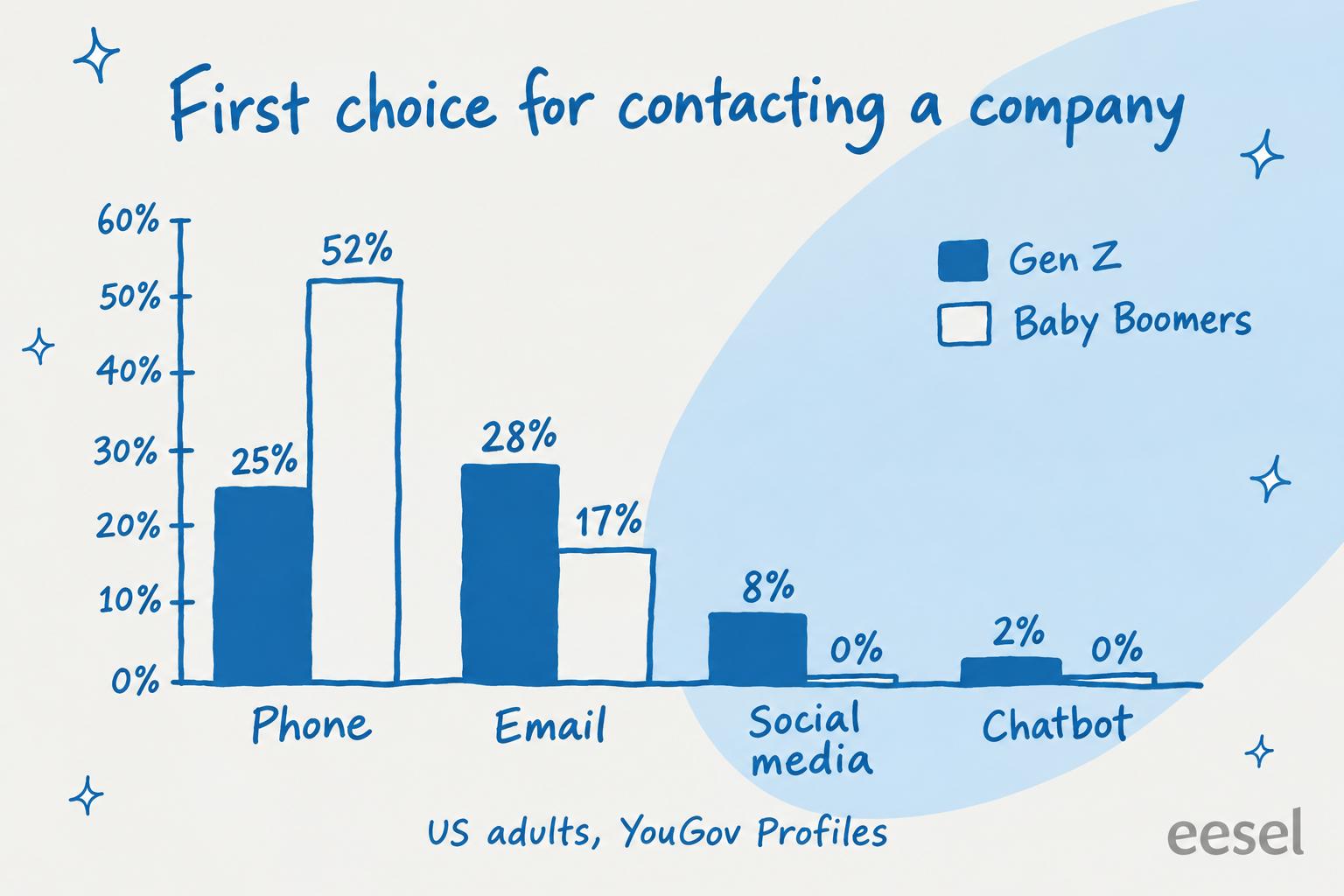
YouGov Profiles data asked Americans which channel they prefer for customer service. Gen Z's top pick is email (28%), then phone (25%). For Baby Boomers it's phone by a wide margin (52%). Gen Z also leads on social media (8%, against 6% of Millennials and 0% of Boomers) and on never contacting businesses at all (9%).
Now the other side. In a Nextiva survey of Gen Z, 77% have used a phone call for support and 72% say they're "likely" or "very likely" to choose phone support again. A Five9 study of 4,000 US and UK adults found 66% of Gen Z prefer talking to a real person, in person or by phone. That's lower than Gen X (76%) and Boomers and the Silent Generation (86%), but it's still two in three.
These numbers don't contradict each other. They answer different questions. Asked for a first choice, Gen Z picks a written channel. Asked whether they'd call, they say yes. The phone is the escalation path, not the front door.
One caveat before going further: these are averages across millions of people. I build integrations at eesel, and the setups below aren't "for Gen Z". They're what fixes the experience for anyone who reaches you from a phone, which is most people now. Nextiva found younger respondents, especially under 28, have the least patience for slow service, so they notice first.
What does Gen Z expect from customer service?
Three things show up across the research: they try to solve it themselves first, they're more comfortable with AI than older customers, and they leave when they can't reach you the way they want.
They search first. In Nextiva's survey, 84% of Gen Z use Google and 49% use an AI tool like ChatGPT before contacting support, and 55% "always" or "often" do their own research first. By the time they message you, they've usually read something, possibly something wrong. Zendesk's CX Trends research adds that 58% of consumers say a company's service systems should work with whatever AI assistant they already use.
They trust AI more than older customers do. In the Five9 study, 63% of Gen Z say they trust information from AI customer service bots, and 61% say online self-service has improved over the last three years. But trusting the bot isn't the same as wanting only the bot: YouGov found just 2% of Gen Z pick a chatbot as their first choice. They'll use one if it works and leave if it traps them.
They switch channels, and expect you to keep up. That's the omnichannel support problem in one line. Zendesk's own customer service statistics put it at 70% of customers expecting anyone they talk to to have the full context. Nextiva found 45% of Gen Z have cancelled a product or service because their preferred support channel wasn't available.
Where they spend time matters too. Pew Research's 2024 teen survey, which covers the youngest Gen Z, found roughly six in ten US teens use Instagram, 23% use WhatsApp (up 6 points since 2022), and only 32% use Facebook, down from 71% in 2014-15. A Facebook page as your only social channel misses most of them, which is why teams now use AI for Instagram DMs as well as email.
Step 1: Put the answer where they search first
The first support interaction most Gen Z customers have with you is a search, not a ticket. If your Zendesk help center has the answer and search engines can find it, a big share of questions never reach your queue. If it doesn't, they get an answer from somewhere else, and you get the follow-up ticket explaining why it didn't work.
What to do in Zendesk:
- Pull your top 20 ticket reasons from the last quarter (a Zendesk Explore report by tag works) and check each has a help center article that answers it in the first paragraph.
- Title articles the way customers ask ("Where is my order?"), not the way your team files them ("Order tracking policy").
- Keep the help center public, so search engines and AI assistants can read it. The guide to customizing the Zendesk help center covers the theme side.
This is the cheapest part of customer self-service, and it's also what your AI agent will answer from later, which helps your deflection rate. The post on reducing frustration with self-service goes deeper on where self-service breaks.
Step 2: Move chat to messaging so a conversation can wait
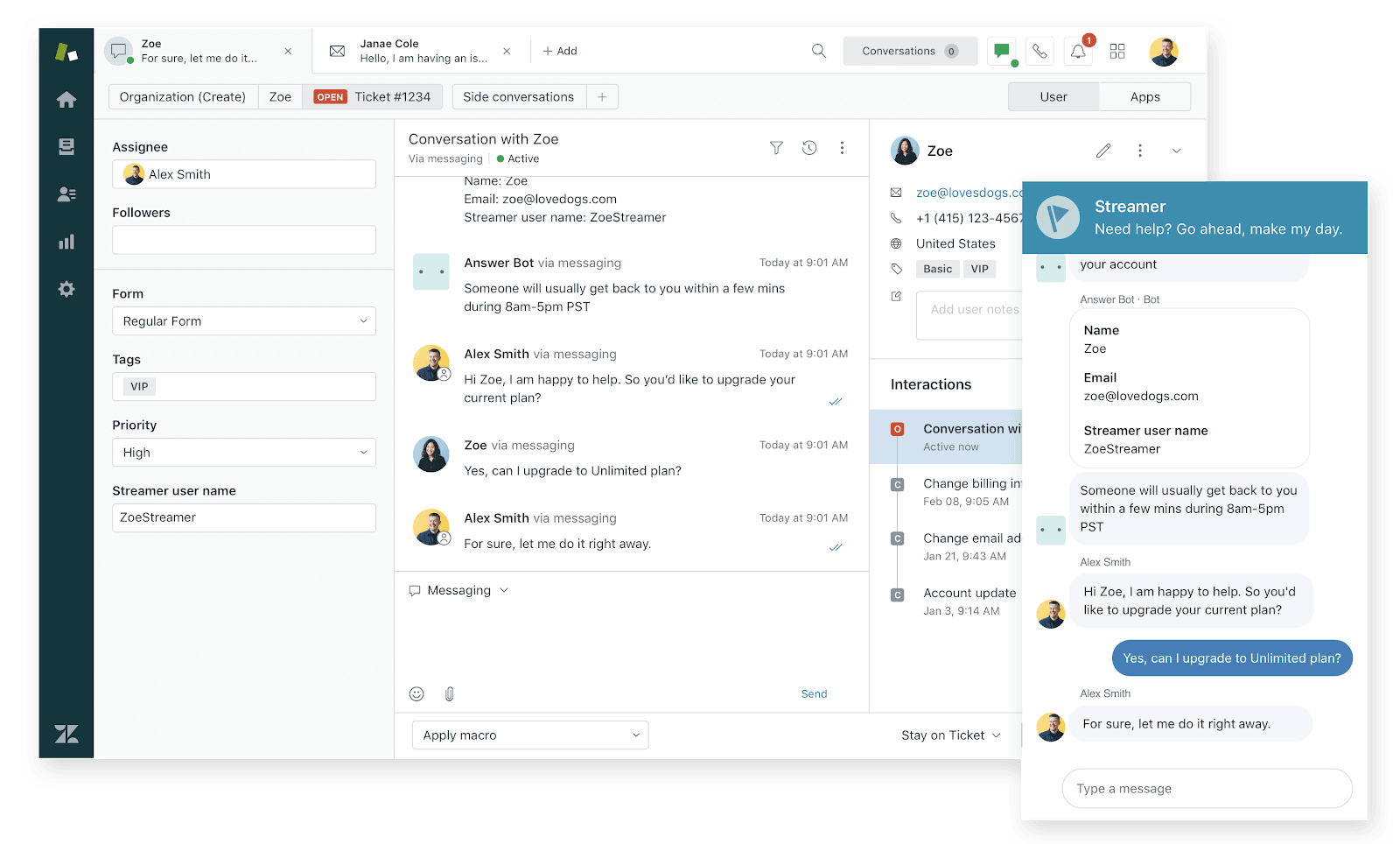
A live chat is built for both people being there at once. Zendesk messaging isn't. Zendesk describes messaging as conversations that are "persistent, with full context and history", supporting both real-time chat and asynchronous support. Agents and customers can come back to the same conversation over time and across channels.
That matters for a customer who messages between classes or on a commute. They ask, put the phone away, and see your answer an hour later in the same thread, instead of finding a "chat ended" screen and starting again.
Messaging is available on all Zendesk Suite plans from Team up. If you're still on the older chat widget, the guide to migrating Zendesk Chat to messaging walks through the switch.
Step 3: Add the apps they already message in
About six in ten US teens use Instagram, and a growing share use WhatsApp. Letting them reach you there removes a step. In Zendesk, social messaging connects WhatsApp, Instagram Direct, Facebook Messenger, X DMs, LINE, WeChat and Apple Messages for Business, and each conversation lands as a ticket in the Agent Workspace. Suite Team and above include it. Without Suite, Support plans get the public Facebook and X channels only, and Instagram Direct or WhatsApp need Support and Chat with the Social Messaging add-on.
Each channel has rules from the app's owner that change how your team works:
- Instagram Direct. Zendesk's Instagram guide says Instagram gives a business seven days to respond before the messaging window closes, and requires a reply to the first message within 24 hours, by an agent or an auto-responder. Agents must reply inside Zendesk: replies typed in the Instagram app aren't added to the ticket.
- WhatsApp. Per Zendesk's WhatsApp guide, once you connect a number to the WhatsApp Business API, that number can no longer receive WhatsApp calls. Until Meta approves your business account, you get one restricted channel that can message at most 10 users, and usage-based WhatsApp charges may apply. The WhatsApp Business API pricing post covers those costs.
Start with the one app your customers already message you on. Whichever you pick, watch your first response time on it from day one. The Zendesk Instagram integration and Zendesk WhatsApp integration guides cover setup in detail.
Step 4: Let one conversation follow them across channels
This is the setting most teams miss. Social channel linking lets a customer start in your website's messaging widget and move the same conversation to WhatsApp, Facebook Messenger or Instagram, with every message synced back to the widget. A customer who starts on a laptop and has to leave scans a QR code and carries on from their phone.
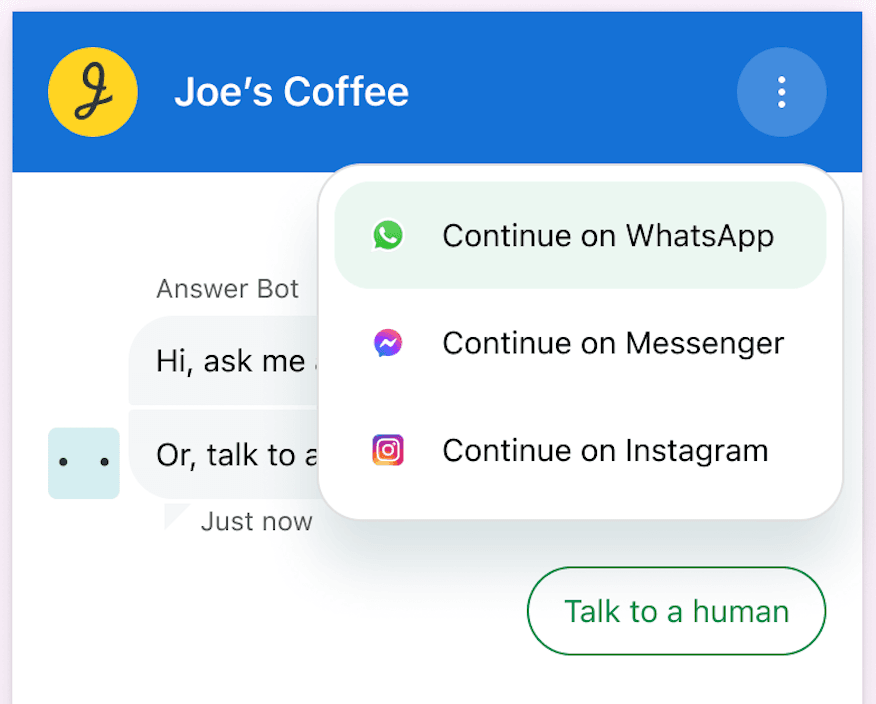
On the agent side nothing changes. Agents reply in the Agent Workspace (Zendesk's social inbox covers how it looks), replies go to whichever channel the customer used last, and the conversation history shows where each message came from. It's the same idea as a single customer view, applied to one conversation.
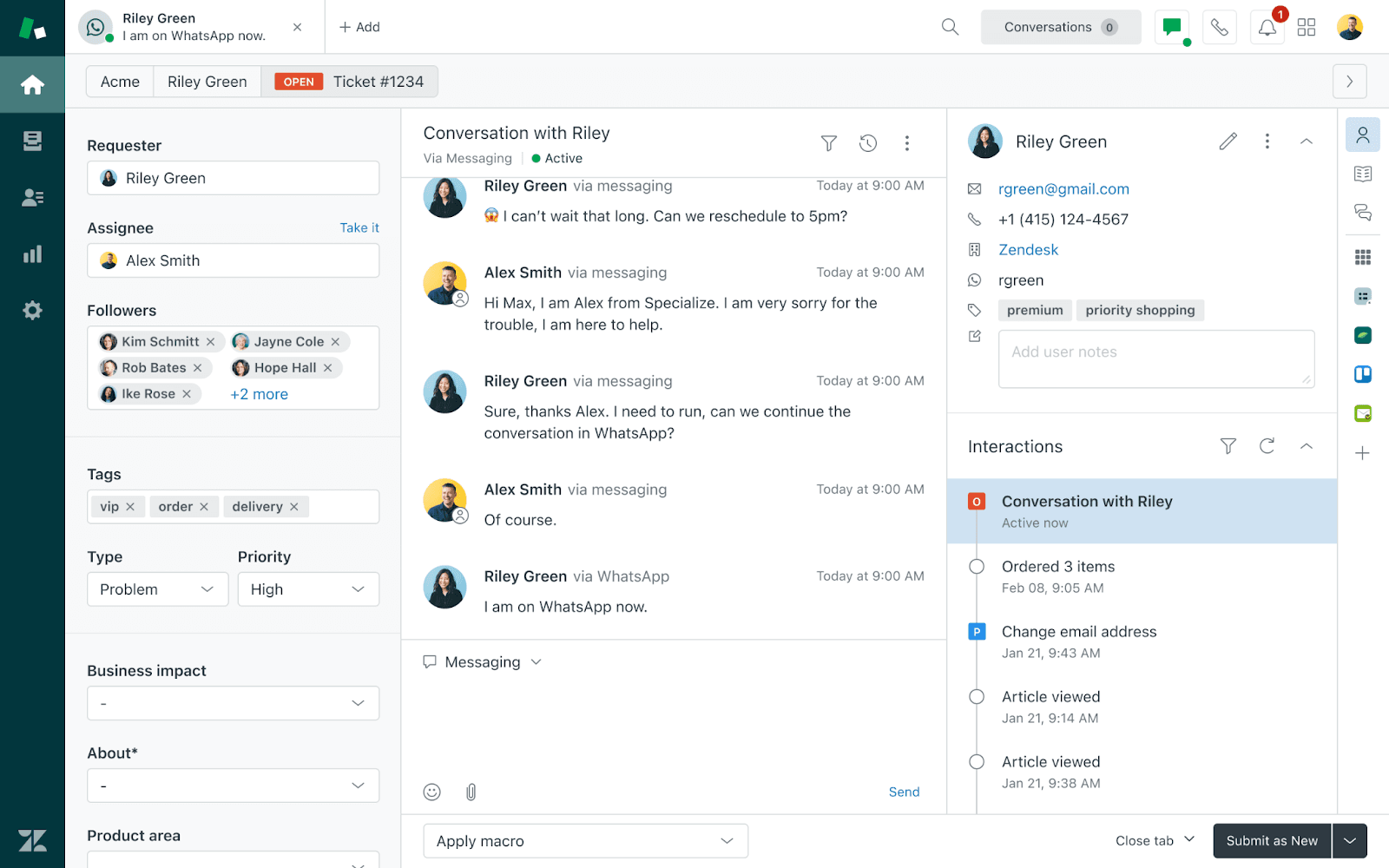
Two details from Zendesk's docs to know before you turn it on. It needs a Suite plan with the Agent Workspace and at least one of those three channels connected. And it works differently for Instagram: if a customer links Instagram DM from the widget, Zendesk creates a new ticket instead of merging with the existing one.
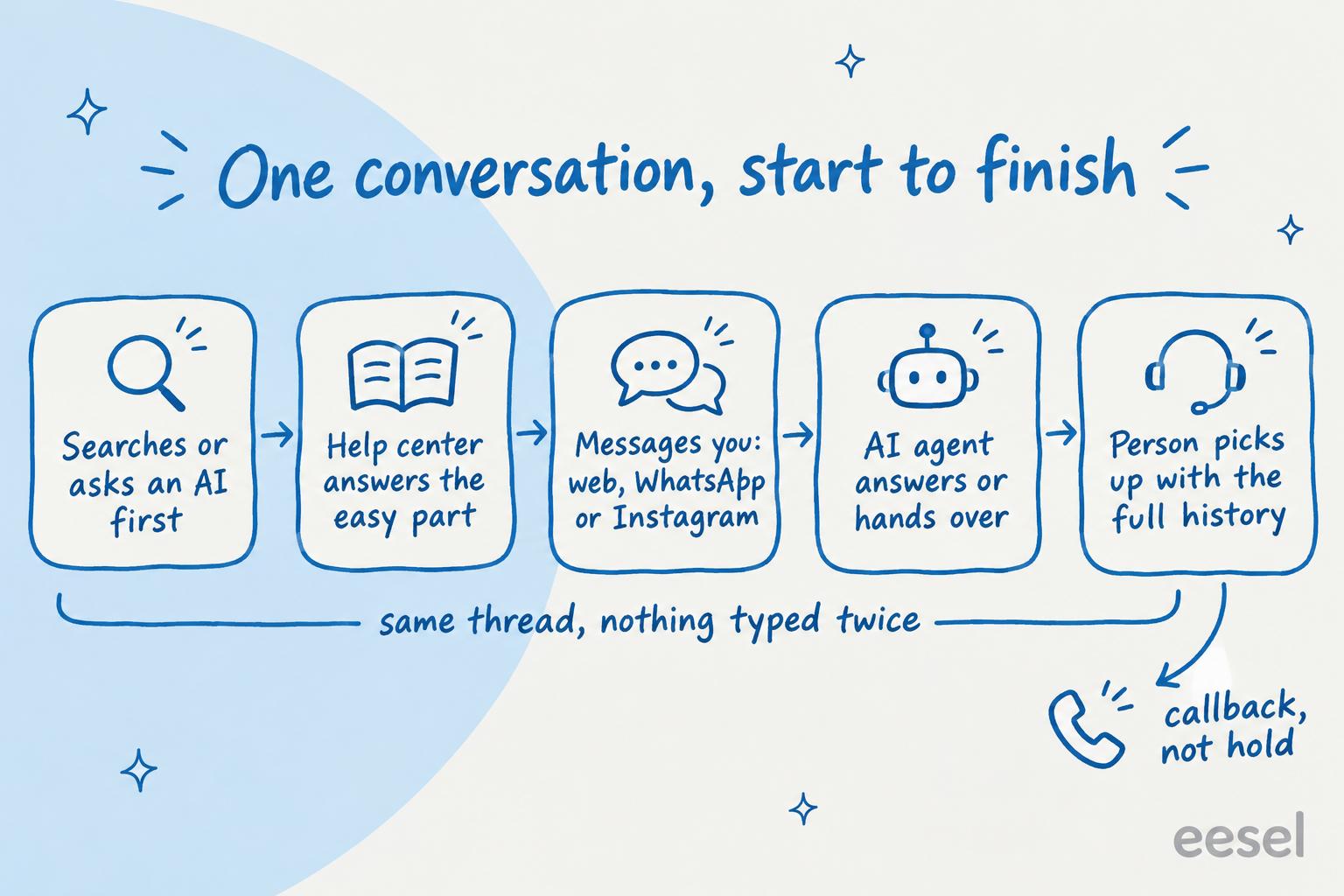
Step 5: Keep a way to a person in sight, and call back instead of hold
Most Gen Z customers will try your bot. They won't forgive one with no exit. Zendesk AI agents (Essential) have an Add option to talk to a human setting at the start of the conversation, after helpful and unhelpful replies, and when the AI agent can't answer. Zendesk's own help article on preventing handoff explains how to remove those options. For a Gen Z audience, I'd do the opposite and leave them all on. The guide to Zendesk AI agent handoff covers what the agent sees when a conversation is handed over, and transferring to a human covers the triggers.
For phone, the fix is the hold queue. With Zendesk's customer callback, a caller can press a key to keep their place in the queue and hang up, and the call is returned automatically when an agent is free. It needs Suite Professional or above (or Talk Professional or Enterprise), at least one agent online or away, and it doesn't work on digital lines. The Zendesk callback setup guide has the steps.
Which Zendesk setup fits your customers?
Not every team needs every step at once. Start with the place your younger customers already reach you, and fix the break there first.
Pick the channel your younger customers use most to see the first Zendesk change and the catch that trips teams up.
Common mistakes with Gen Z customers
Hiding the phone number to push people to chat. In Nextiva's numbers, 72% of Gen Z would still call. Hiding the number turns a short call into a complaint.
A bot with no exit. Gen Z trusts AI answers more than older customers do, which makes a dead-end bot feel worse, not better. Keep Add option to talk to a human on, and make sure the handoff carries the conversation.
Answering in the Instagram app. It feels faster, but the reply never reaches the Zendesk ticket, so the next agent has no idea it happened.
Treating short messages as unclear. A message that just says "price?" or "where's my order" is a complete question. Asking them to fill in a form first is how you lose them. eesel's customer Question Beauty gets a lot of these on Messenger and chat, so its agent reads them as buying intent and replies with the product link straight away.
Writing for a stereotype. Slang and emoji in macros date fast and read as trying too hard. What younger customers notice is a fast, specific answer and not having to repeat themselves. The customer service tone guide covers the voice side, and personalizing replies with AI covers the facts side.
Try eesel on your Zendesk messaging
If your younger customers are already in your Zendesk queue through messaging, WhatsApp or Instagram, eesel can join that queue as an AI teammate. It handles Zendesk support across the channels Zendesk supports, including email, web messaging and social, and replies in the channel the customer used. It learns from your past tickets and help center, and you can test it against real past tickets before it answers anyone.
You decide what it does on its own and what waits for a yes from your team, as the docs on actions and approvals explain. At Question Beauty, eesel handled about 990 Gorgias tickets in a month, sent about 960 replies, and handed refunds, complaints and wholesale requests to a person with a note saying what the customer asked and what it found. The same split works on Zendesk: quick answers in the channel the customer picked, and a person when it matters.
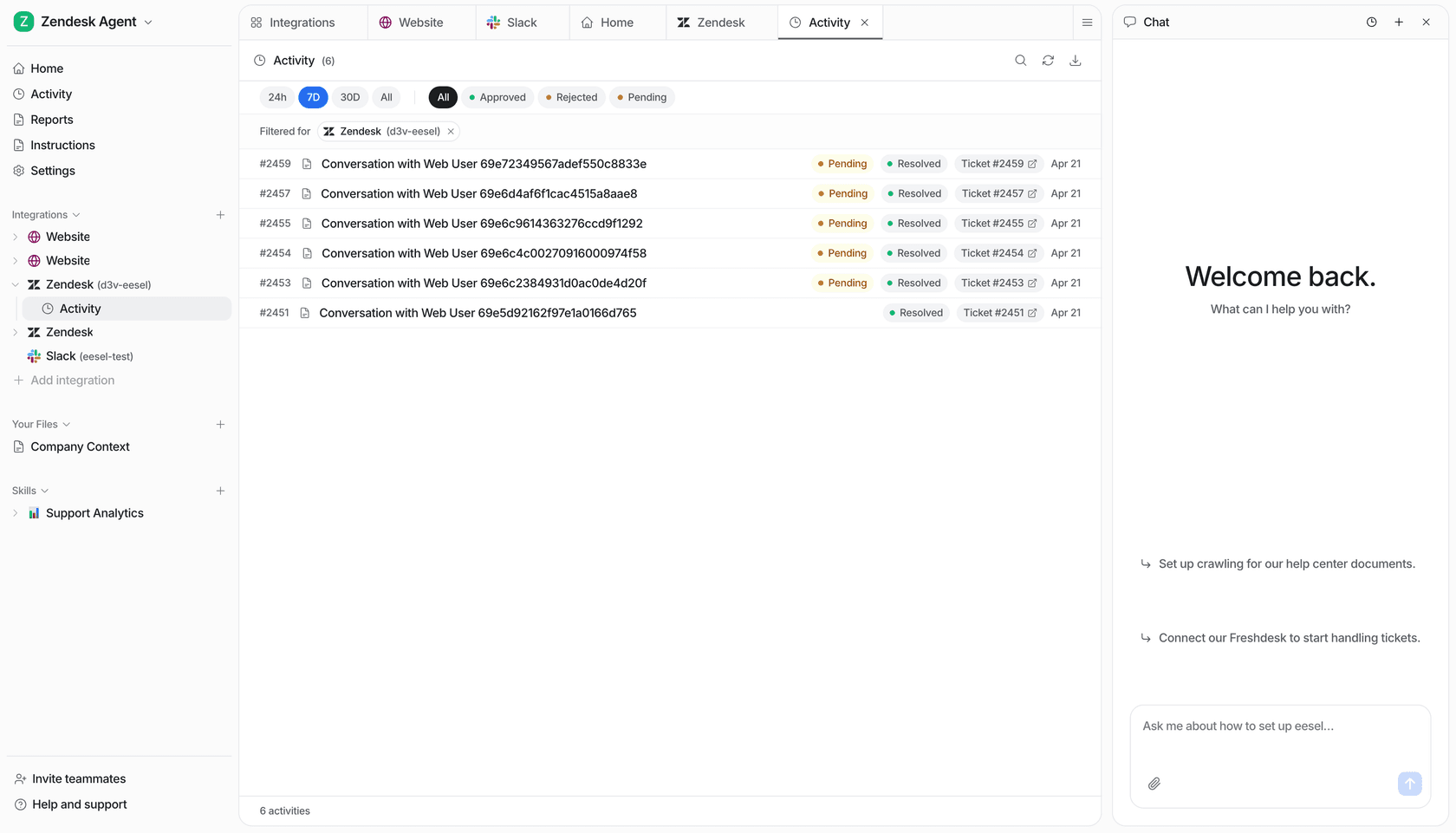
Try eesel free on your own Zendesk tickets and see what it would have answered last week.