8 best Codex Security Cloud alternatives in 2026 (compared)

Kira

Katelin Teen
Last edited October 1, 2026

Why teams look for Codex Security Cloud alternatives
Codex Security Cloud does its job well, to be fair. What it is, basically, is the hosted security agent that lives inside OpenAI Codex. Once you connect a GitHub repo it writes a threat model and scans the code (or each new commit), then it also tries to reproduce every likely bug in a throwaway sandbox before suggesting any fix. My colleague Rama ran the scanner hands-on for the Codex Security Cloud review: it caught all 5 bugs planted in a 56-line Flask app, in 8 minutes 56 seconds, for $3.75 to $6.77 in tokens.
So why would anyone look elsewhere? In my reading there are five reasons that keep coming up, and none of them is "it doesn't work."
- It's GitHub only. Cloud scans "connected GitHub repositories," per OpenAI's setup guide. If your code sits on GitLab or Bitbucket, or on a locked-down network, then it's out of reach, even if Codex's GitHub integration is the only one you need today.
- The plan list is a moving target. OpenAI's DevDay recap says Pro, Business, Enterprise and Edu. The feature matrix on the Codex pricing page still lists GitHub repo scanning as Enterprise and Edu only. Either way Plus is out, and accounts on an API key get no cloud features at all.
- There's no price tag. Scans draw on your plan's included Codex usage, then credits. Daybreak Blue, the reduced-refusal security model it bundles, bills at GPT-5.6 Sol credit rates, which means you find out the cost after the scan and not before it.
- Your code goes to OpenAI. By definition it's a hosted service, so a company that doesn't allow ChatGPT is not going to allow this one either.
- It's a research preview. It launched on September 29, 2026, only two days before I wrote this, and the earlier CLI went through a rough summer with refusals.
That last point is the one I would give the most weight. Back before Daybreak Blue was bundled, CLI users kept on losing long scans to the cyber guardrail:
"it ran for over 40 minutes and during that time I had no idea what was happening, thought it was frozen or in a bad state. Also, it ate through 25% of my weekly credits :("

Bundling Blue by default is how OpenAI tries to fix exactly that. Whether it worked, nobody can say yet, since there's no hands-on Cloud review published so far.
How I picked these alternatives
I looked for tools that do at least one of the three jobs Codex Security Cloud does, which are finding the vulnerabilities in your code and checking that they're real, plus proposing a patch. Each price and feature below I took from the vendor's own pricing page or docs, checked on October 1, 2026.
The thing I paid the most attention to is validation. A scanner that floods you with 400 maybe-bugs hasn't saved you any time, it has just handed you a triage job instead. At eesel I've watched confident-sounding bots give wrong answers more than once, and that is the reason eesel's helpdesk teammate runs against hundreds of past tickets in a simulation before it touches a live one. The CX lead at one supplements brand put the requirement better than I can:
"The AI will never be able to answer 100% of the questions... I need an AI who is only handling the tickets that it's confident to handle and all the other ones, leave them alone."
CX lead at a DTC supplements brand, on an eesel customer call
If you swap "tickets" for "findings", that's pretty much the bar for any AI agent that acts on your behalf, security included. So for each tool I asked one question: does it just match rules or re-check its own work, or does it actually run the exploit?
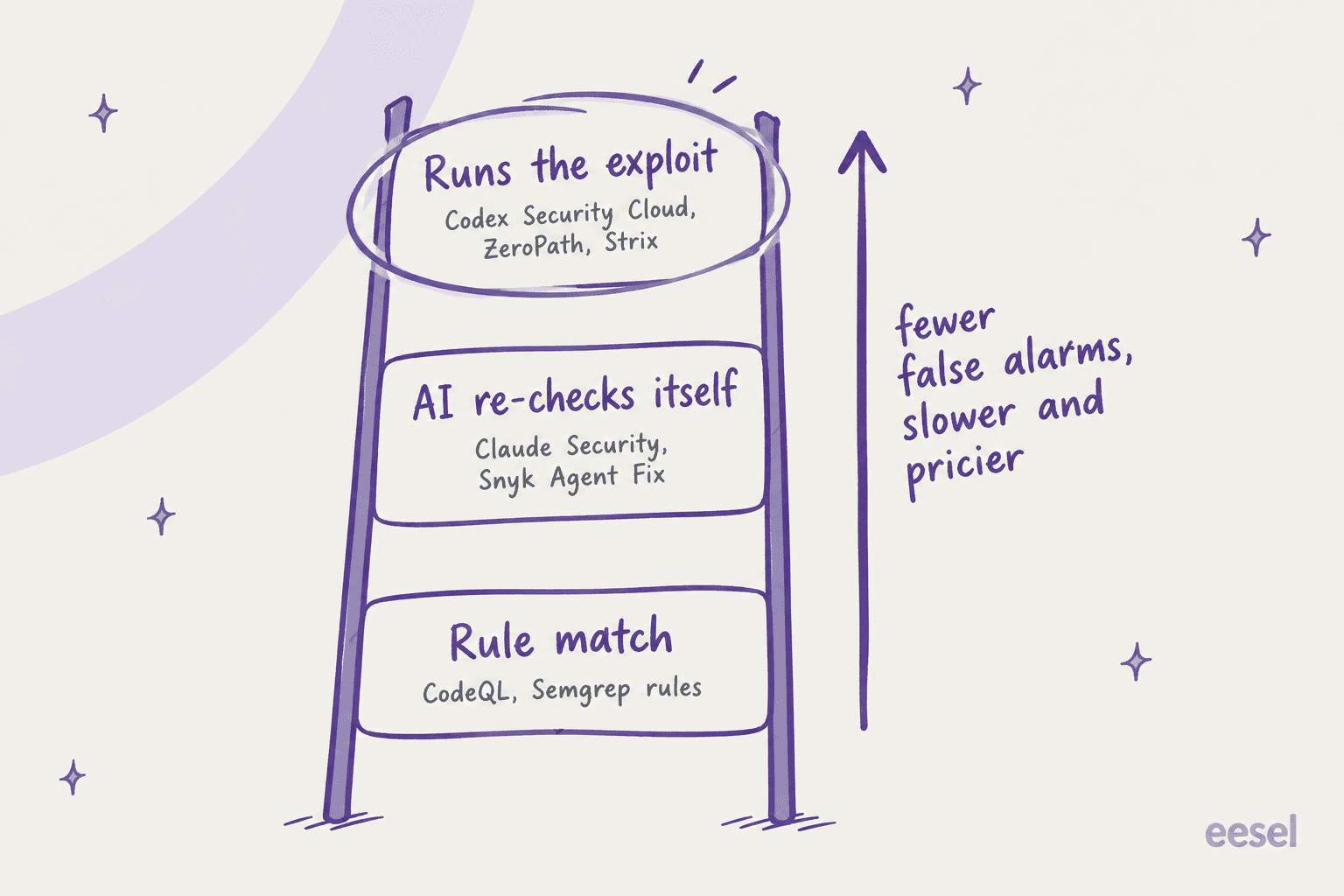
The higher up the ladder, the less noise, but each scan takes longer and costs more too. Neither end is wrong in itself; where people go wrong is buying a top-rung tool and then expecting bottom-rung speed in CI.
Codex Security Cloud alternatives at a glance
| Tool | How it finds bugs | How it checks findings | Proposes patches | Where it runs | Free option | Published entry price | Status |
|---|---|---|---|---|---|---|---|
| Claude Security | Reasoning agent (Mythos 5.1) | Adversarial verification pass, confidence rating | Yes, opened in Claude Code on the web | Anthropic cloud, GitHub repos | No | Claude Enterprise, $20/seat/month + API usage | Public beta |
| Claude Security plugin | Multi-agent scan, your session model | Independent verifier agents; patch reviewer runs tests | Yes, .patch files you git apply | Your machine, any git repo | No | Any paid Claude plan or API usage | Beta |
| Codex Security CLI | Reasoning agent (GPT-5.6 Sol default) | Source-traced validation | Written remediation | Your terminal or CI | Apache-2.0, pay for tokens | API usage (~$3.75-6.77 per small scan in our test) | Open source |
| GitHub Code Security | CodeQL rules | Static analysis, no exploit proof stated | Copilot Autofix suggestions | GitHub | CodeQL + Autofix on public repos | $30/active committer/month | GA |
| Snyk | Static engine + Agent Fix | Re-scans each fix candidate | Yes, Snyk Agent Fix | Snyk cloud + IDE/CI | $0 plan | From $25/month per developer | GA |
| Semgrep | Rules + AI reasoning (Multimodal) | AI triage per finding | AI Autofix | Semgrep cloud + CI | Free up to 10 contributors | $30/month per contributor (Code) | GA |
| ZeroPath | AI-native SAST, SCA, secrets, IaC | Runtime validation for exploitable findings | PR reviews, one-click autofix | ZeroPath cloud, or self-hosted on Enterprise | Free personal workspace | $1,000/month + $60/dev | GA |
| Strix | Autonomous pentesting agents | Proof-of-exploit per finding | Autofix PRs | Strix cloud, or your Docker | Apache-2.0 CLI | $29/seat/month + per test | GA + open source |
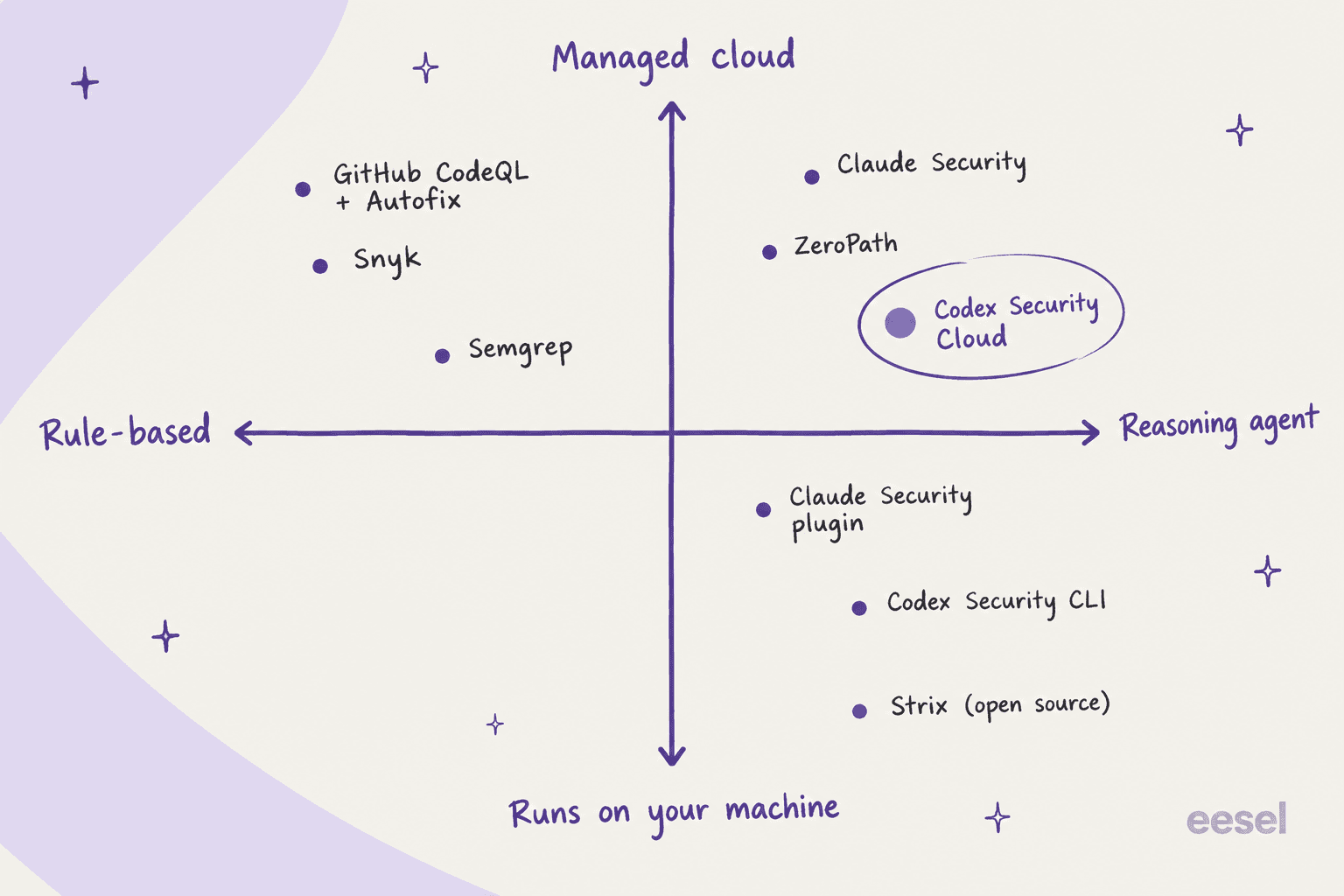
The map below sorts them by two questions that, to me, matter more than features: does it reason or match rules, and does your code leave your machine?
1. Claude Security
Best for: teams on Claude Enterprise who want a managed scanner like Codex Security Cloud, on a different lab's model.
Of all eight, this is the closest like-for-like swap. It started as Claude Code Security, a limited research preview in February 2026, and was renamed and opened as a public beta for Enterprise on April 30. According to Anthropic, hundreds of organizations tested it during the preview. The product page now says scans run on Claude Mythos 5.1 for all Enterprise customers, Anthropic's most cyber-capable model, without you needing direct access to Mythos itself.
The flow will feel familiar enough. You open it from the Claude.ai sidebar and pick a GitHub repo (or just one directory or branch), then start a scan. Every finding goes through an "adversarial verification pass" in which Claude challenges its own result, and after that it comes back with a confidence rating, severity, likely impact, reproduction steps and a suggested patch. The fixing then happens in Claude Code on the web, with whatever models your account has.
What stands out:
- Scheduled scans and directory-scoped scans, which lets you cover the auth code every week without rescanning the whole thing.
- Every dismissal carries a documented reason, so the next reviewer can trust the triage that came before.
- Findings go out by webhook to Slack, Jira or anything else, and export as CSV or Markdown for audits.
Where it falls short:
- Enterprise only. Anthropic's pricing page marks Claude Security as "No" on Team.
- It connects to GitHub repositories, which means teams on GitLab and Bitbucket need the plugin instead.
- What the page describes is self-checking plus reproduction steps, not running an exploit in a sandbox the way Codex Security Cloud does.
Pricing: included with Claude Enterprise, which Anthropic lists at $20 per seat per month plus usage at API rates, billed annually. There isn't a separate per-scan price on top.
My take: if your company already standardized on Claude, this is the default choice, and having Mythos 5.1 on tap is a real draw on its own. If you're on ChatGPT Enterprise and happy, switching labs only for the scanner is a lot of procurement work for what is basically a sideways move.
2. Claude Security plugin for Claude Code
Best for: developers on any paid Claude plan, and anyone whose code lives outside GitHub.
This is the one I'd tell most readers to try first, for the simple reason that it's the cheapest way to get a real deep scan today. It's a Claude Code plugin, in beta for all Claude Code users. Install it with /plugin install claude-security@claude-plugins-official, run /claude-security, and a team of agents maps your architecture and builds a threat model, then goes hunting for bugs and has independent verifier agents review every finding before it reaches the report.
The plugin docs are unusually honest about the limits. Scans are nondeterministic, so "two scans of the same code can surface different findings." Patches get drafted in a scratch copy of your repo and reviewed by a separate agent that runs your tests, and they're written only when that reviewer can vouch the fix addresses the one finding without adding a new hole. Applying them is on you, with git apply. Nothing happens automatically.
What stands out:
- It reaches code that the managed product can't: GitLab, Bitbucket, or networks that block inbound connections.
- Scans a whole repo, a branch's diff, a pull request, or one commit.
- Output lands in a
CLAUDE-SECURITY-<timestamp>/folder with a Markdown report, JSONL, and a SARIF 2.1.0 file for GitHub code scanning, plus its own.gitignoreso a straygit addnever commits it. - Runs on Anthropic's API, Amazon Bedrock, Google Cloud or Microsoft Foundry.
Where it falls short:
- No Mythos. Mythos 5.1 scans are only in the managed app; the plugin uses your session's model.
- It needs Python 3.9+ on your
PATH, and Claude Code has to stay open for the whole scan. - Each scan counts toward your usage, and the docs themselves warn it "may use a significant number of tokens."
- On a Fable model you may see a "safeguards flagged this message" notice, and Claude Code reruns the request on Opus.
Pricing: no separate fee. It runs on your paid Claude plan, API access or cloud provider, at normal Claude Code pricing.
My take: for a small team this is the best value on the list. You get a verified, patch-producing scan for the cost of tokens, on any git host you like. Just budget for scans that run long and vary from one run to the next.
3. Codex Security CLI
Best for: teams that like OpenAI's scanner but are on Plus, API-only, or need it in CI.
Before you leave OpenAI entirely, it's worth knowing that the scanner behind Cloud also exists as a free, open-source tool. The Codex Security CLI shipped in July 2026 under Apache-2.0 and had 10,941 GitHub stars when I checked. You run it with npx @openai/codex-security against any local checkout, which means GitLab and Bitbucket code works fine, and it also exports SARIF for CI.
The best real number I can give you comes from Rama's test. On the 56-line test app, the default scan on GPT-5.6 Sol found 5 out of 5 planted bugs, used 3,623,546 tokens (93% of them cache reads), and cost $3.75 to $6.77. In practice the CI flags are where the win is: --fail-on-severity high to block a merge and --max-cost for an estimated spend limit.
What stands out:
- Same scanner as Cloud, no ChatGPT plan required.
- It works anywhere you can run Node, CI runners included.
findings false-positiverecords why a finding doesn't apply and feeds that context into future scans.
Where it falls short:
--max-costis an estimate, not a cap. Rama's--max-cost 4run finished with a high estimate of $6.77.- GitHub issue #1024 reports that Daybreak Blue gets dropped under API-key auth, so CI scans run with the standard guardrails and their refusal risk.
- There's no sandbox reproduction like in Cloud; the standard scan does its validation by tracing the source.
- In Rama's test, the first run failed at preflight, and kept failing until Rama passed
--pythonand inherited the shell environment.
Pricing: free software; you pay OpenAI API rates for the tokens.
My take: it's the right pick when your blocker with Cloud is the plan or the git host rather than the scanner. If refusals were the blocker for you, the API-key path doesn't fix that yet.
4. GitHub Code Security (CodeQL and Copilot Autofix)
Best for: GitHub teams that want a cheap, predictable, rule-based baseline in every pull request.
GitHub's answer goes the opposite way in design. CodeQL finds issues with queries, which makes it fast and repeatable, and auditable as well. Then Copilot Autofix "automatically generates fix suggestions for CodeQL alerts on pull requests and the default branch," with an explanation for each, and it doesn't need a GitHub Copilot subscription.
What stands out:
- It lives where your code already is, so there's no new vendor or data flow to deal with.
- Deterministic: the same code gives the same alerts, which is something auditors like.
- CodeQL and Autofix are free on public repositories, per GitHub's plans page.
Where it falls short:
- Because it's rule-driven, business-logic bugs and broken access control that no query describes will slip through.
- The docs describe fix suggestions, not exploit proof.
- GitHub only, like Codex Security Cloud.
Pricing: Code Security is $30 per active committer per month, and Secret Protection is a separate $19. See my GitHub pricing breakdown for the base plans.
My take: keep this running no matter what else you buy. Think of it as the cheap floor that catches the common stuff on every PR, and the AI agent on top is there for the bugs it can't see.
5. Snyk
Best for: teams that want code, dependency, container and IaC scanning in one place, with a real free plan.
In terms of surface, Snyk covers more than any agent on this list. Its AI fix layer, Snyk Agent Fix (renamed from DeepCode AI Fix in May 2026), drafts candidate fixes and re-scans each one "to ensure the vulnerability is gone and no new ones have been introduced," and it retries when that fails. It draws from a database of more than 35,000 expert-written fixes.
Not every Snyk user is a fan, which is part of why agents like Codex Security get the attention they do:
"I wonder if tools like this will put companies like snyk out of business. We use snyk at work and I have not been satisfied."
What stands out:
- Dependencies, containers and infrastructure-as-code, not just your own source.
- Fix verification is concrete, in that the static engine has to stop flagging the issue.
- There's a $0 plan you can start on without a sales call.
Where it falls short:
- Verification here means the scanner no longer flags the issue, it doesn't mean an exploit was proven.
- Snyk's AI pentesting (Evo) isn't on Free or Team. It needs Enterprise and is rated at 4,000 credits per assessment, about $4,000 at $1 per credit.
- The Free plan is tight: 5 projects and 100 Code tests a month.
Pricing:
| Plan | Price | Limits |
|---|---|---|
| Free | $0 | 5 projects, 100 Code tests/month |
| Team | Starting at $25/month per contributing developer | Up to 10 developers, 100 projects, 1,000 Code tests/month |
| Enterprise | Credits (1 credit = $1), contact sales | Code at 1.0 credit per active contributor per day |
My take: a strong pick if dependencies are a bigger risk for you than your own logic, which is often the case. I'd treat Agent Fix as a fast patch helper, not a replacement for an agent that reasons across files.
6. Semgrep
Best for: small teams that want a free scanner with custom rules, plus metered AI triage.
Semgrep made its name with rules you can write yourself, and over time it has added an AI layer on top. Semgrep Multimodal pairs "AI reasoning with rule-based analysis for detection, triage, and remediation," and its newer Agentic Workflows trace untrusted input through SQL injection, XSS, SSRF and command injection checks.
What stands out:
- Free for up to 10 contributors and 10 repositories, with 60 AI credits a month.
- With custom rules you can encode "never do this in our codebase" in a way that an AI agent can't promise.
- The AI is metered per finding, so you're able to see what it costs.
Where it falls short:
- The pages I checked don't describe exploit proof or an automatic patch-PR flow.
- Teams pricing goes through "Contact us" rather than a checkout.
- AI credits are small on paid plans: 20 per developer per month on Teams.
Pricing: Free Edition at $0. Teams starts at $30 per month per contributor for Code, with Supply Chain another $30 and Secrets $15. Enterprise is custom.
My take: if you have 10 or fewer contributors, this is the best free starting point. Pair it with the Claude Security plugin for occasional deep scans and you have both rungs of the ladder covered for very little money.
7. ZeroPath
Best for: security teams that want an AI-native platform with runtime validation and flat, unlimited scanning.
When it comes to philosophy, ZeroPath is the closest commercial match to Codex Security Cloud. Its Team plan lists AI-native SAST "with business logic & broken auth detection," SCA with reachability analysis, secrets and IaC scanning, and runtime validation for exploitable findings, plus PR reviews and one-click autofix. Its DAST layer is billed as "live testing, exploit proof, and fix verification."
What stands out:
- Unlimited repositories, PR scans and full scans on Team, so cost doesn't grow with scan count.
- Validation goes further than re-reading the code, into live testing.
- Enterprise adds on-prem or self-hosted deployment and bring-your-own LLM keys.
Where it falls short:
- Team is demo-gated, with "Book a Demo" as the only button.
- Its pay-per-scan credits plan is still marked "Coming soon."
- For a small team it's expensive compared with everything above it.
Pricing: Team starts at $1,000 per month plus $60 per developer, Enterprise is custom, and startups can get up to 50% off. ZeroPath's quickstart docs also offer a free Personal Workspace for individual developers.
My take: worth taking the demo if you have a security team and enough repos for unlimited scanning to pay for itself. For a 10-person dev shop, $1,600 a month is hard to justify over the plugin.
8. Strix
Best for: teams that want open-source, agent-driven pentesting with proof-of-exploit for every finding.
Strix comes at the problem from the attacker's side instead. It runs autonomous pentests across APIs and web apps, also code and pull requests, and its open-source repo promises proof-of-exploit for every finding and merge-ready autofix PRs. It's Apache-2.0 and had 65,804 GitHub stars on October 1, 2026, with commits landing that same day.
What you get is a real pentester's kit: an HTTP interception proxy, browser exploitation for XSS and auth bypass, a Python sandbox for proof-of-concept exploits, recon, and SAST plus DAST. It ships agent skills too, so Claude Code, Cursor or Codex can drive it.
What stands out:
- Exploit proof, the top rung of the ladder, available for free if you self-host.
- Tests the running app, not just the source, so it catches config and deployment bugs a code scanner can't.
- Enterprise supports bring-your-own model keys and VPC or on-prem deployment.
Where it falls short:
- The self-hosted CLI needs Docker and your own LLM key, so "free" means you pay the model bill.
- The managed per-test price isn't published, so you can't total a Pro bill in advance.
- Pentesting a live target needs authorization and a test environment, which is more setup than just pointing a scanner at a repo.
Pricing: Pro is $29 per seat per month with pentests "billed separately, pay per test," and a 7-day free trial. Enterprise is custom, and early-stage startups get 50% off Pro for 6 months.
My take: the most interesting tool here, if you can run it against a staging environment. Pair it with a code scanner, since it's doing a different job and isn't a substitute.
What these alternatives actually cost a 10-person team
Comparing prices gets messy, because every vendor bills on a different unit: active committers, contributing developers, contributors, seats, or tokens. So here is the same team of 10 developers, at list price:
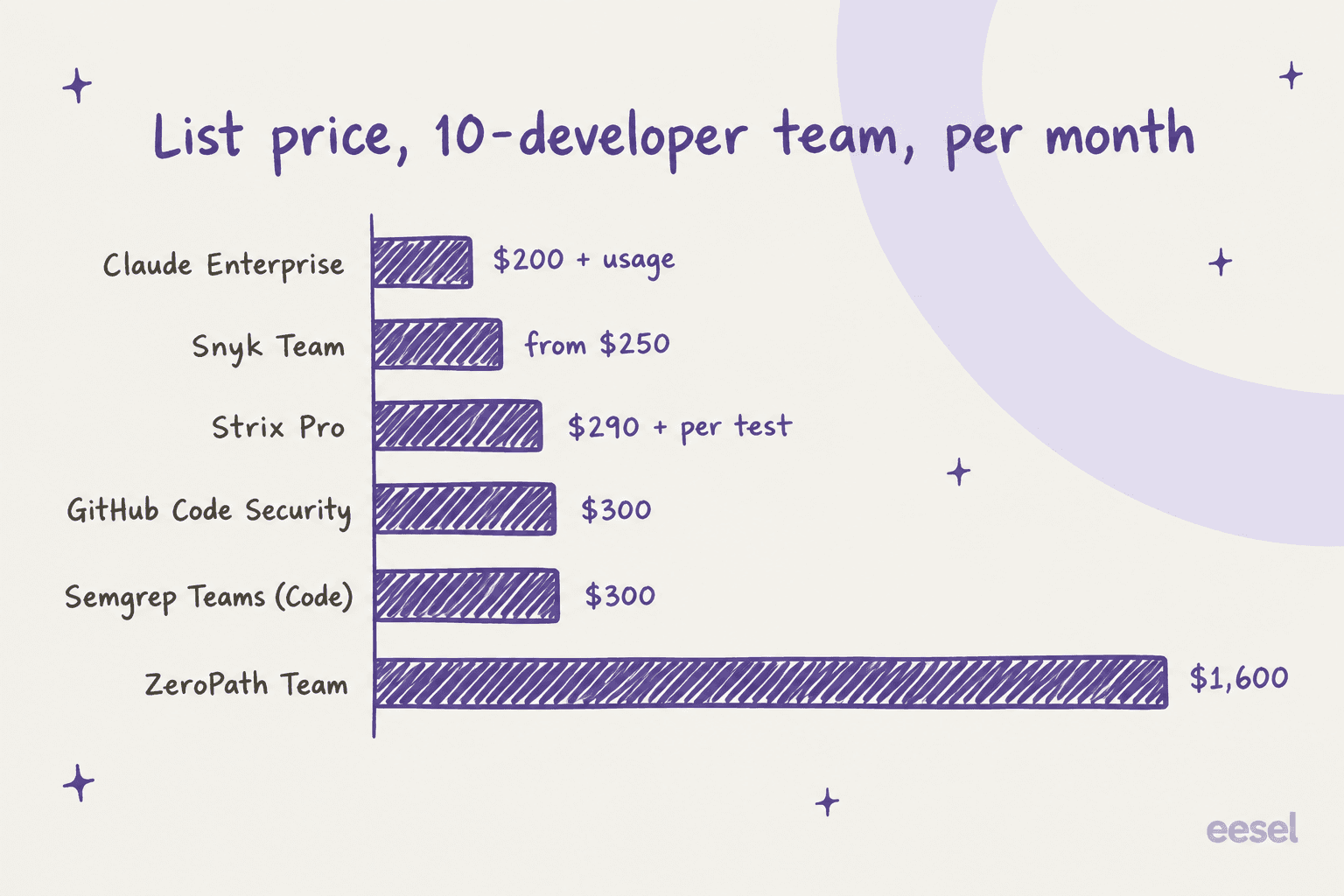
There are three things the chart hides. Claude Enterprise and Strix both add usage on top, and neither one gives you a way of estimating it up front. Snyk's Team plan stops at 10 developers, so an 11th hire moves you up to a sales-led plan. And the token-billed options, Codex Security Cloud, the Claude plugin and the Codex CLI, cost whatever your scans cost. Rama's small-app CLI test landed between $3.75 and $6.77, and a real codebase is going to cost many times that.
If you're on ChatGPT Business already, Codex Security Cloud is still the cheapest place to start, because the scans draw on usage you're already paying for. Where the alternatives win is when you're on the wrong plan or the wrong git host, or when you need a number your finance team can approve before the scan runs.
Which Codex Security Cloud alternative should you pick?
Here's the short version I'd give a friend:
| Your situation | Pick |
|---|---|
| On Claude Enterprise, want managed scans | Claude Security |
| Any paid Claude plan, or code on GitLab or Bitbucket | Claude Security plugin |
| Like OpenAI's scanner, but on Plus or API-only | Codex Security CLI |
| GitHub team, want a cheap baseline on every PR | GitHub Code Security |
| Dependencies and containers are the bigger risk | Snyk |
| 10 or fewer contributors, want free | Semgrep Free Edition |
| Security team, many repos, want runtime validation | ZeroPath |
| Want exploit proof against a live staging app | Strix |
Whatever you end up picking, don't skip the boring layer. Both OpenAI and Anthropic say their agents complement static analysis rather than replace it, and Anthropic's plugin docs list "your existing static analysis and dependency scanners" as the CI layer under everything else. Run a rules tool on every PR and add an agent for the deep logic bugs, then keep a human on the merge. Anthropic's own Claude Code security model works the same way, with permissions you approve.
Simon Willison's early take on Codex Security points at a use that's worth stealing, whichever tool you choose:
"I've been previewing this in Codex for a few weeks - it's very good! Had some great results from it having it run security reviews against code written using other models"
That cross-checking idea works both ways. If your team writes code with Claude, scanning it with an OpenAI model (or the reverse) makes for a cheap second opinion. My best AI coding assistant tools roundup covers the writing side.
One last caveat, on privacy. Every managed option sends your code off to someone's hosted model. On Hacker News, one developer summed up the blocker plainly:
"Yes, I suspect companies that don't allow ChatGPT will not be able to use the ChatGPT security analysis tool."
If that sounds like your company, look at the options that run on your own machine or your own cloud: the Claude plugin on Bedrock or Google Cloud, Strix self-hosted, or ZeroPath Enterprise on-prem.
Try eesel for the work that needs proof before action
Every good tool on this list follows one rule: the agent proves its work, and then a human approves the change. At eesel I build AI agents on that same rule. eesel is an AI teammate platform, and for most teams the relevant hire is the AI helpdesk teammate, which joins your existing queue in Zendesk, Freshdesk, Gorgias or Front and works tickets like a new support hire.
The part that connects to this post is the validation step. Before the teammate answers a single live customer, it replays hundreds of your past tickets in a simulation so you can read every reply it would have sent. Once it's live, anything outside its rules waits for an approval, in the same way a security patch waits for your review.

If the CLI tools here are more your style, eesel works the same way from a terminal too. The eesel CLI runs the same teammate and workspace as the dashboard: eesel approvals list shows what's waiting on a human, eesel activity lists every run for an audit trail, and --dry-run prints the exact call a write would make without sending it. Because each workspace is also an MCP server, Claude Code and Codex can drive it like any other tool. My AI agent CLI guide goes deeper.
Pricing is on the eesel pricing page: a free plan with 100 credits, then plans from $299 a month for 500 credits, where one ticket or chat is one credit. Try eesel and run the simulation on your own ticket history. If you're curious about how the teammate model works more broadly, my AI teammates explainer covers it.
Frequently Asked Questions
What is the best Codex Security Cloud alternative?
Is there a free alternative to Codex Security Cloud?
How does Codex Security Cloud compare to Claude Security?
Can I use a Codex Security Cloud alternative with GitLab or Bitbucket?
How much do Codex Security Cloud alternatives cost?
Do Codex Security Cloud alternatives replace static analysis?
Which Codex Security Cloud alternative works without a ChatGPT plan?


Article by
Kira
Kira is a writer at eesel AI with a Computer Science background and over a year of hands-on experience evaluating AI-powered customer service tools. She focuses on breaking down how helpdesk platforms and AI agents actually work so that support teams can make better buying decisions.