What is Codex Security Cloud?
Codex Security is OpenAI's application security agent inside OpenAI Codex. It reads your code and builds a threat model, hunts for vulnerabilities, then checks each one, and also proposes a fix. The Cloud version launched at DevDay on September 29, 2026 as a plugin that runs in Codex cloud against connected GitHub repos. Per OpenAI's DevDay recap, it can scan whole repos "on demand or on a schedule, with ongoing checks of new commits," even when your laptop is closed, which is handy.
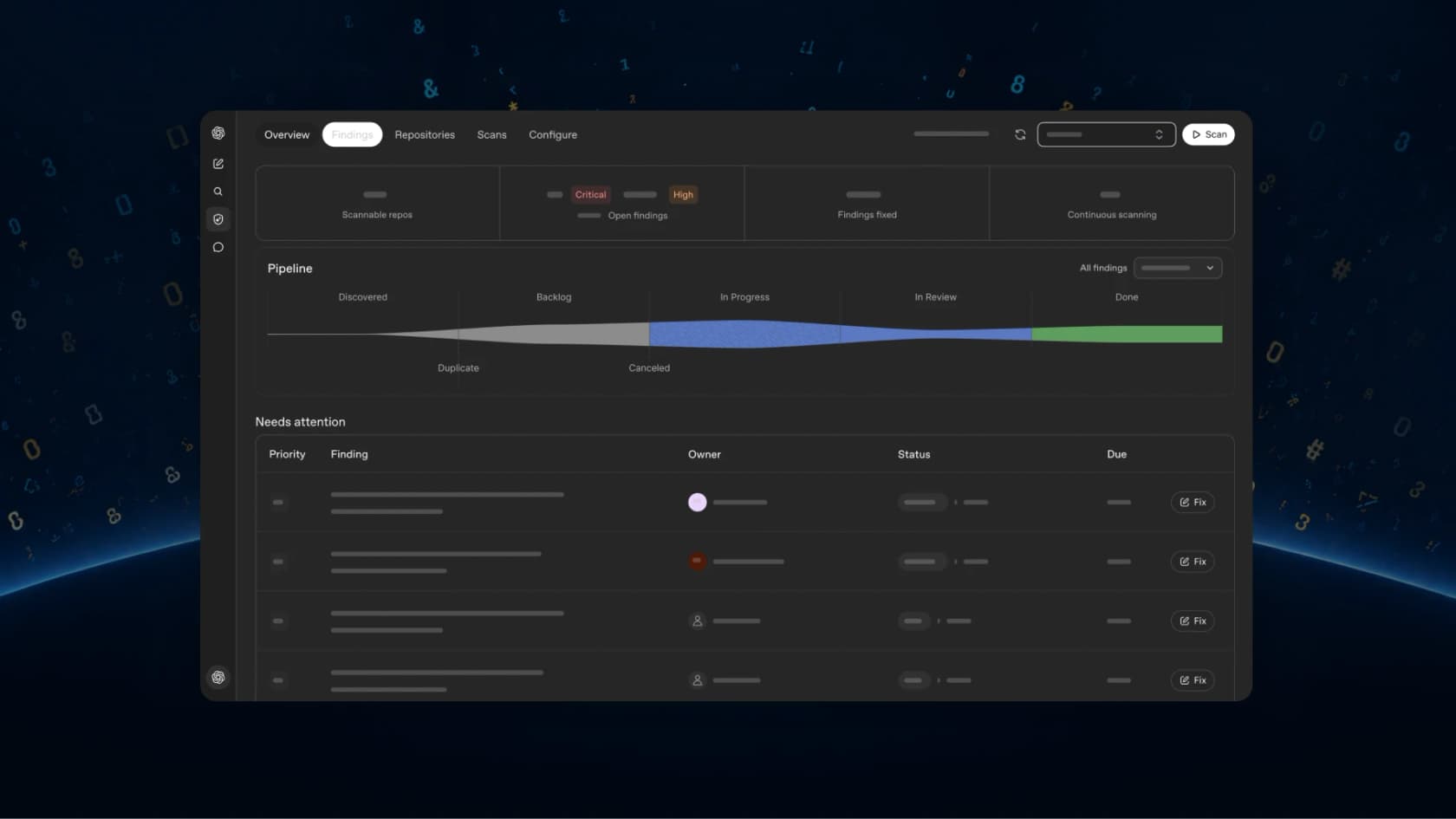
The headline upgrade is access to Daybreak Blue, OpenAI's reduced-refusal model for defensive security work, "without a separate Daybreak application." That matters because, in terms of what people complained about before Cloud, the most common complaint wasn't bad findings. It was scans that ran for half an hour and then got refused. My GPT-5.6-Cyber post covers how the Blue and Red tiers work.
If you want the full feature tour of it, my Codex Security Cloud explainer walks through setup, the four surfaces, and the history back to Aardvark. This post is the verdict.
How I tested it
I don't have a team workspace with the Cloud plugin enabled, so I went with the next closest thing to it. That's the open-source Codex Security CLI, which bundles the same Codex Security plugin and runs the same pipeline from your terminal. I used version 0.1.31 with its defaults, which are model gpt-5.6-sol at xhigh reasoning effort in standard scan mode, authenticated with an OpenAI API key.
The test target was one tiny internal ticket API that I wrote for the job. It's one Flask file, about 60 lines, plus a one-line README saying it runs on a company network. I planted five classic bugs:
- SQL injection in a ticket search that concatenates the customer email into the query.
- Path traversal in an attachment download that joins a user-supplied filename onto a folder.
- Command injection in an admin export route that passes a
formatvalue to the shell. - Missing authorization on a delete route, with a
# TODO: only admins should do thiscomment. - Debug mode on all interfaces, with
app.run(host="0.0.0.0", debug=True).
These are easy bugs, which is the point of the test. If a security agent misses textbook bugs in 60 lines, then nothing else really matters. If it catches them, the interesting question becomes how well it explains them and what it costs to get there.
In terms of my test, two limits are worth stating before the results. First, an API key doesn't get Daybreak Blue, so I ran with the standard guardrails, which is harder setting for refusals than Cloud. Second, the CLI's standard scan validated findings by tracing the source, and its report says "no runtime query was executed." Cloud's docs describe reproducing findings in a sandbox container, which I couldn't exercise here.
What Codex Security found
The second run finished in 8m 56s with full coverage. Here's the summary it printed:
FINDINGS  5 (5 confirmed this scan; 0 previously found; 2 high, 2 medium, 1 low)
COVERAGE  complete
ELAPSED   8m 56s
TOKENS    18,684 uncached input, 3,357,854 cache reads, 173,804 cache writes, 73,204 output, 3,623,546 total
COST      $3.7509776–$6.7699152 (standard, context unknown)
And here is how its findings are lining up with what I planted:
| What I planted | Did it find it? | Severity it gave | Its reasoning |
|---|---|---|---|
Command injection in /admin/export | Yes | High | Single unauthenticated request gives command execution, held below critical because the app is internal |
| Missing auth on delete | Yes, widened to every route | High | No route checks identity, so any network client can read, change and delete tickets |
| Path traversal in attachments | Yes | Medium | Path escape is direct, but impact depends on which files the service account can read |
| SQL injection in search | Yes | Medium | Python's SQLite runs one statement at a time, so stacked writes aren't possible, only data reads |
debug=True on 0.0.0.0 | Yes | Low | Exposes debug error pages, and the console still needs a PIN to unlock |
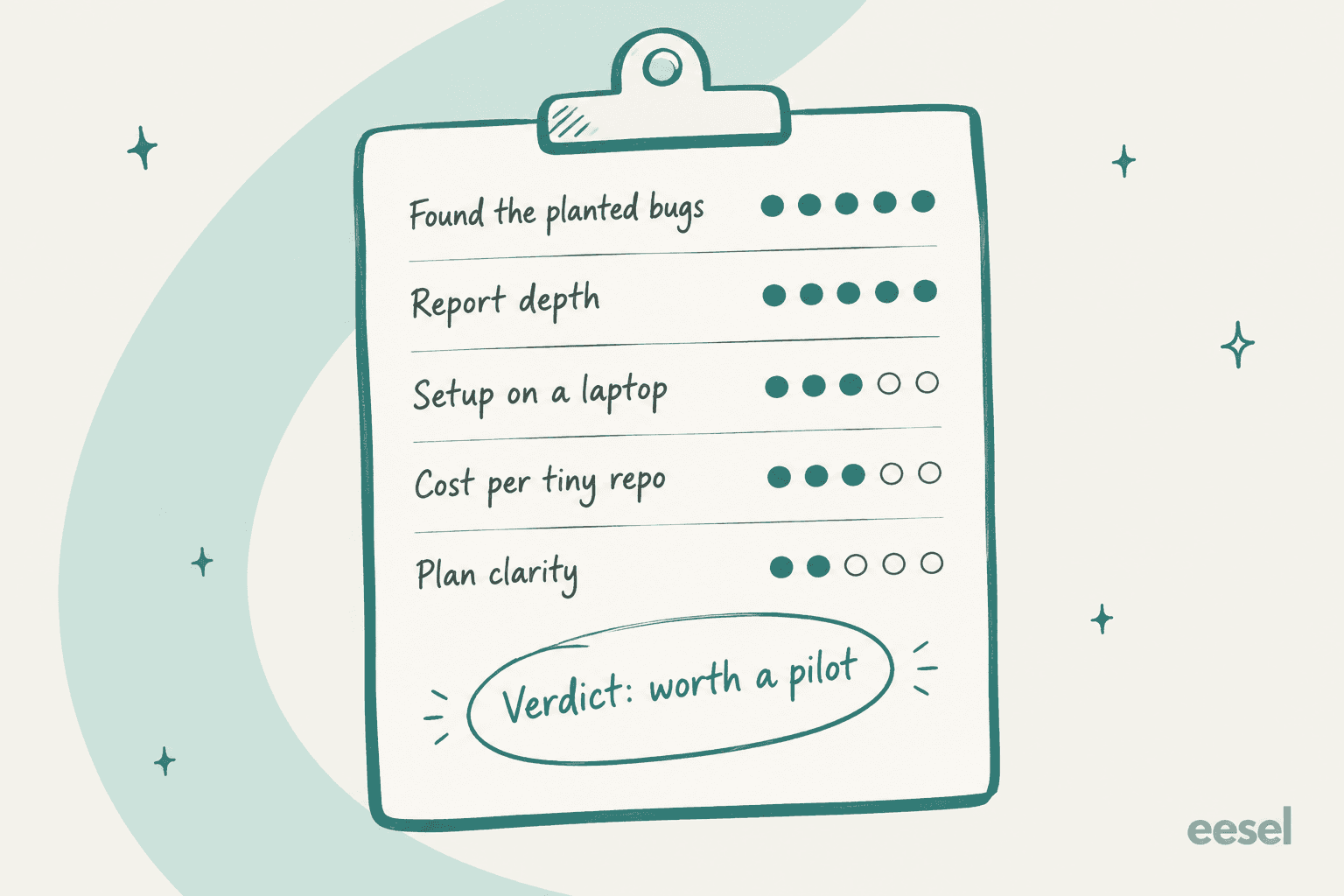
Five for five, all rated high confidence, and nothing invented. On a toy app that's the floor, it's not a trophy. What impressed me more was the severity reasoning that it gave. Most scanners would mark the SQL injection as critical by reflex, which is the usual habit. This one noticed that Python's sqlite3 won't run stacked statements, so the damage tops out at reading data, and it rated it medium with a note on what would raise it. That is the kind of call a good human reviewer would make.
It also didn't stop on my TODO comment. It found that the status-update route had the same missing check, so it rolled both into one broader finding: the app has no authentication at all. That's the more useful framing, since fixing one route would still leave the rest open.
What the report looks like
The output folder held a report.md, a findings.json, a coverage.json, and a SARIF export you can upload to GitHub's code scanning view. The report runs 55KB for a 60-line app, so this isn't a tool which skimps on detail.
Before any findings, it writes a threat model of your app. It lists the assets (the ticket database, the attachment folder, the process's shell access), and the trust boundaries, and also what a realistic attacker can do. It even flagged what it couldn't see. My export route calls an export.py that doesn't exist in the repo, and the report says so instead of guessing.
Each finding then gets a severity rationale, the evidence traced line by line, the "counter-evidence" that would lower the risk, and a remediation section with tests to write. For the command injection, the fix reads:
"Require administrator authorization, remove
shell=True, invoke a fixed interpreter and script with an argument vector, and allowlist the supported export formats."
That's correct and it is specific too. It also suggested two tests, one checking that shell metacharacters in format never start a second process, and one checking that non-admins can't reach the route. I didn't pass --patch, so it didn't write code. In Cloud, the equivalent is the Fix with Codex button, which drafts a patch for you to review before you select Create draft pull request, per the Cloud setup guide.
If you've used Claude Code's /security-review, this is a lot more structured. The report reads like an audit document, not like a code comment.
Where it stumbled
My first run failed. The scan spent two and a half minutes in its preflight stage, then quit with "Scan agent did not create required draft artifacts" and an empty output folder. The logs showed the agent couldn't see the runtime settings it needed, including the Python path. It had already used 527,000 input tokens, about $0.74 to $1.40, to produce nothing. The second run worked after I passed the Python path explicitly and let it inherit my shell environment.
I'm not the only one who hit this. An open issue on the repo, #73, describes the same pattern on Windows and Linux: the scan runs, tokens get billed, then saving fails and "the 'partial output' directory is completely empty." The CLI's --max-cost flag doesn't save you here, and OpenAI's CLI FAQ says the limit is "an estimate, not a hard spending cap." I set it to $4, and the high end of my final estimate was $6.77.
This is the strongest argument for the Cloud over the CLI. In Cloud, OpenAI owns the container, the environment and the Python setup, so this whole class of local setup failure shouldn't reach you.
Is the cost reasonable?
Cost is the thing that made me lower my score. My scan used 3.6 million tokens on 60 lines of code. The breakdown explains why:
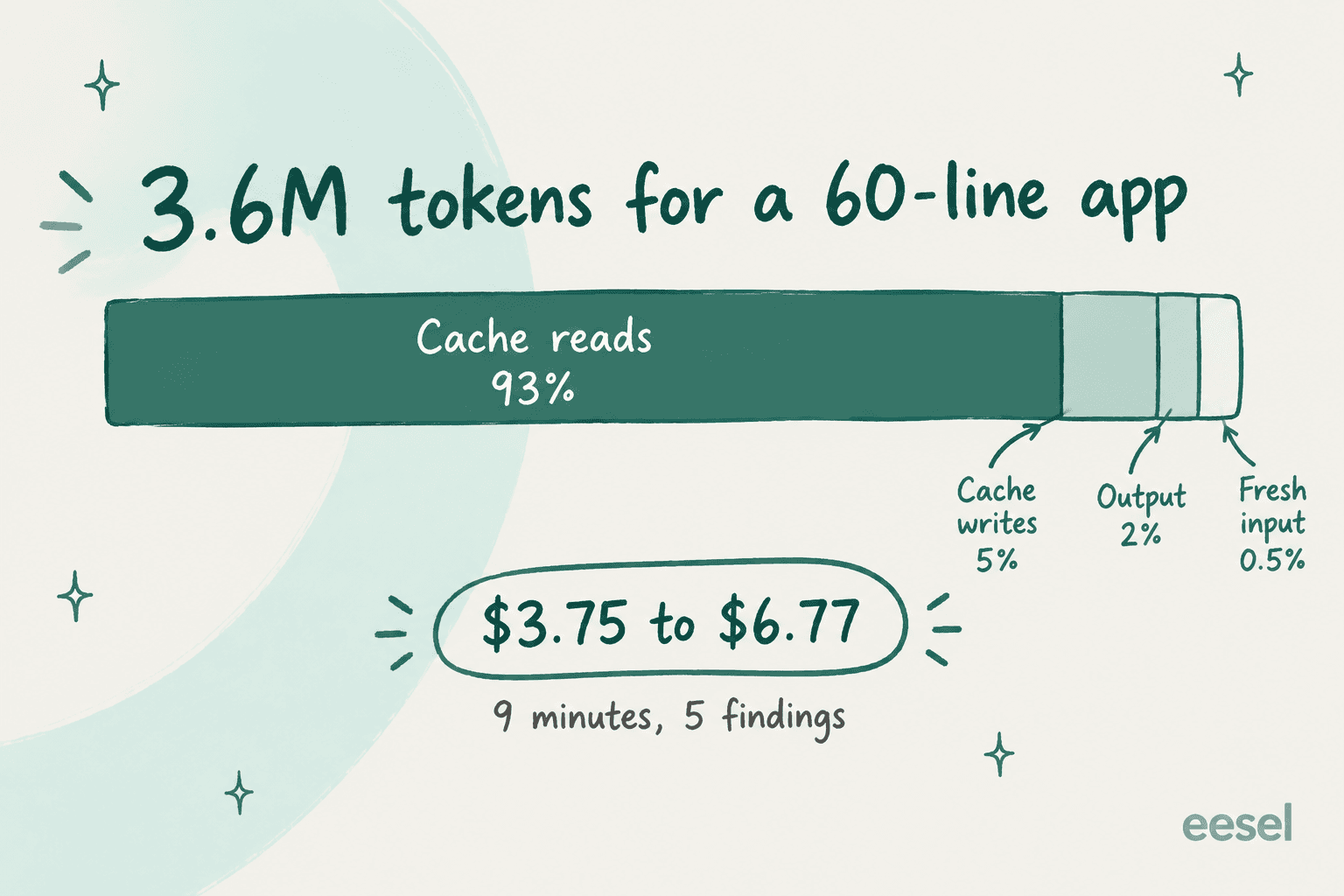
93% of the tokens were cache reads. The agent re-reads its own instructions, the threat model and the code over and over as it moves through threat modeling, discovery, validation, attack-path analysis and reporting. Most of that is a fixed overhead, so a bigger repo shouldn't cost proportionally more per line. But it does mean even a trivial scan is a few dollars, and commit monitoring repeats part of that work on every push.
On the CLI's own price table for gpt-5.6-sol, cache reads are $0.40 per million tokens and output is $20 per million. Output was only 2% of tokens but $1.46 of the low estimate.
In Cloud, you won't see dollars. Scans draw from your plan's included Codex usage and then credits. OpenAI's pricing page says "Daybreak Blue uses GPT-5.6 Sol credit rates," which is 100 credits per million input tokens, 10 per million cached input and 500 per million output. That's twice the rate of GPT-6 Sol.
Here are the plans that can get Cloud, based on the DevDay recap and the same pricing page:
| Plan | Price | Cloud access | Overage path |
|---|---|---|---|
| Plus | $20/month | Not included | Not applicable |
| Pro | $100, $200 or $500/month | Yes, per DevDay | ChatGPT credits |
| Business | $20/user/month annual, $25 monthly | Yes, per DevDay | Workspace credits |
| Enterprise and Edu | Contact sales | Yes | Workspace credits or pay-as-you-go |
| API key only | API rates | No cloud features | Billed per token |
The plan picture has one wrinkle. The feature matrix on the same pricing page still marks "Codex Security for connected GitHub repositories" as Enterprise and Edu only. I'd trust the newer DevDay post, but I'd also check that the plugin shows up in your own workspace before upgrading for it. My Codex pricing guide has more on how credits get consumed.
To put my scan in perspective, a few dollars per repo scan is cheap when you compare to an hour of a security engineer's time. It's expensive next to a rule-based scanner that runs for free on every pull request. That's why the right model is both of them, not either.
The Daybreak Blue catch most people will miss
Daybreak Blue is the best reason to pick Cloud, and it comes with a condition which isn't in the launch post. It only applies when you sign in with ChatGPT.
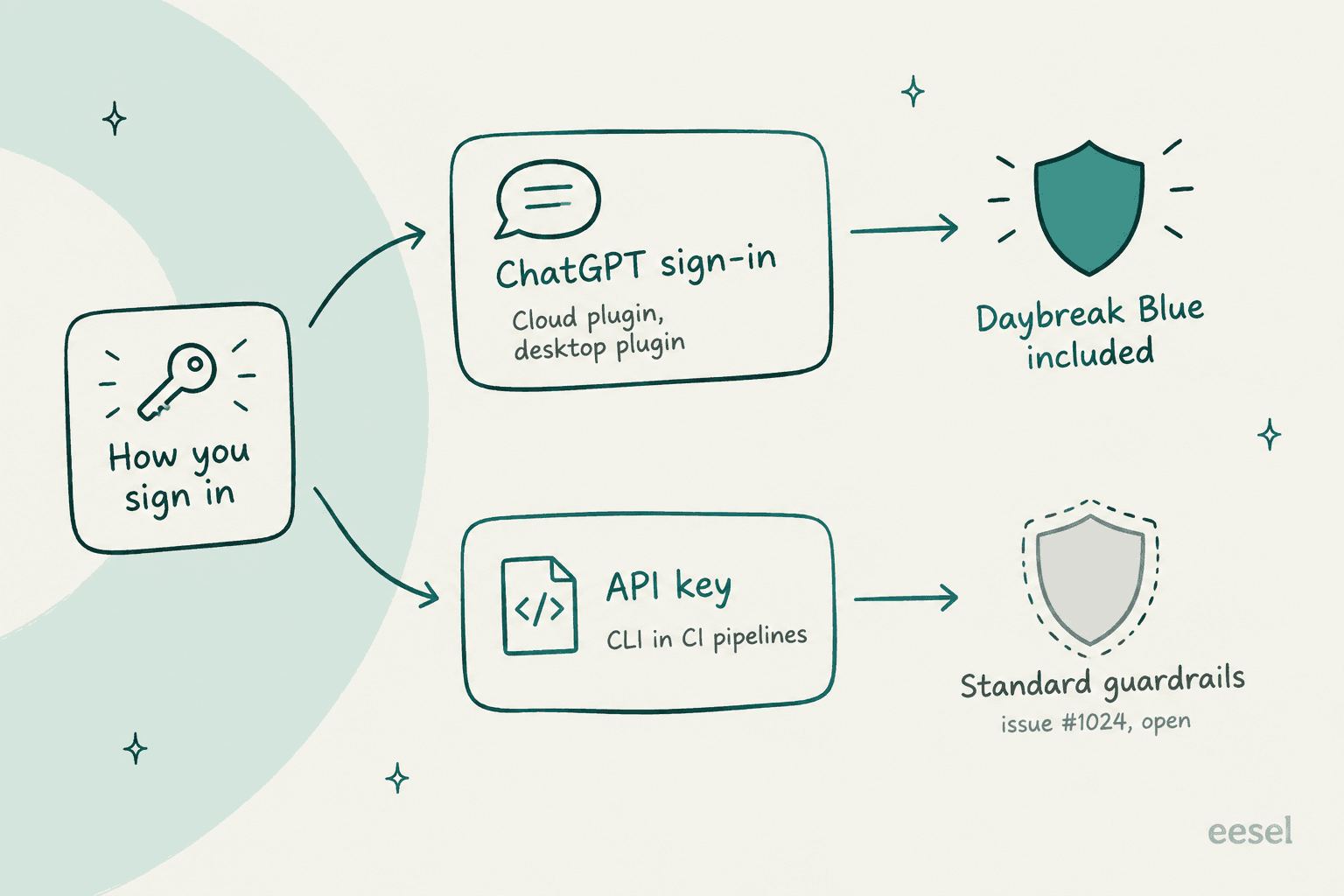
An open issue, #1024, filed by a team that's already approved for Daybreak Blue, reports that the CLI's pinned Codex version "filters out the cyber access program unless authentication is through ChatGPT." So the Blue selection gets dropped when you use an API key, which is exactly how most CI pipelines run. The plugin changelog backs this up from another angle, saying "Sessions that use only an API key can't verify account access."
Why does this matter? Because the refusal problem is real. When OpenAI open-sourced the CLI in July, the Hacker News thread filled up with people who hit it:
"Thing is, you WILL encounter refusals with Sol doing anything remotely adjacent to security work. Which for Codex Security is kinda... problematic."

Another user watched a scan of a small open-source library run for over 40 minutes, then end with "This content was flagged for possible cybersecurity risk":
"it ran for over 40 minutes and during that time I had no idea what was happening, thought it was frozen or in a bad state. Also, it ate through 25% of my weekly credits :("
To be fair, I didn't get a single refusal on my test app, even under standard guardrails. That may be because my bugs are textbook, also my app is tiny. The issue thread for that error, #56, is still open. My practical read is to use Cloud or a ChatGPT-signed-in plugin for anything real, and to treat API-key CI scans as a lighter gate until #1024 is fixed.
What other users say
Hands-on reports on Cloud specifically are still thin, since it is only two days old. The Hacker News launch thread had no comments when I checked. The voices so far are mostly from the CLI and the earlier plugin preview, which run the same scanner.
The positive take comes from Simon Willison, who previewed it back in April:
"I've been previewing this in Codex for a few weeks - it's very good! Had some great results from it having it run security reviews against code written using other models"
The skeptical takes fall into two groups. Some people think it's mostly a harness around OpenAI's models. One engineer's teardown on X summed up the CLI as "just JS calling Codex in a loop." I would push back a little on that. After reading my 55KB report, the harness clearly adds structure that a raw prompt wouldn't. But it's true that the quality comes from the model.
The other group worries about coverage. A Hacker News commenter, relaying curl maintainer Daniel Stenberg's posts, said both Codex Security and Claude Mythos reported zero issues on curl before another tool's scan led to six CVEs. It's secondhand, but it's still a fair warning. The best number OpenAI publishes is from the Aardvark days, when it found 92% of known vulnerabilities in its own "golden" test repos, and there's no public bake-off against rule-based tools yet. My five-for-five result was on bugs I knew were there. A mature codebase will hide the harder ones.
How it compares to the alternatives
OpenAI's own Cloud FAQ answers the replacement question in one line: "Codex Security complements SAST." Here's how the closest tools stack up on what each vendor publishes:
| Tool | Published price | Checks its findings? | Proposes fixes? | Best for |
|---|---|---|---|---|
| Codex Security Cloud | Included Codex usage, then credits | Yes, reproduces in a sandbox | Yes, you open the draft PR | Reasoning-heavy bugs on ChatGPT-plan teams |
| Claude Code Security | No public price, limited preview | Re-examines each finding | Yes, with human approval | Teams standardized on Claude Code |
| GitHub Code Security | $30 per active committer/month | Rule-based CodeQL analysis | Yes, Copilot Autofix | A deterministic floor on every PR |
| Snyk | Free tier, Team from $25/month | Re-scans fix candidates | Yes, Snyk Agent Fix | Dependency and open-source risk |
| Semgrep | Free to 10 contributors, Teams from $30/contributor/month | Not stated | Remediation guidance | Custom rules you write yourself |
The setup I'd run is a rule-based scanner on every pull request as the floor, through GitHub's paid plans, Snyk or Semgrep. Then add Codex Security Cloud on a schedule for the bugs a rule can't express, like a missing auth check that only makes sense once you understand the whole app.
If your team works in Claude Code, its GitHub integration gives you the closest PR-side equivalent. For the wider field, see my OpenAI Codex alternatives list. Security teams weighing the specialist cyber models should start with the GPT-5.6-Cyber alternatives roundup.
Pros and cons
| Pros | Cons |
|---|---|
| Found all 5 planted bugs with zero false positives | A 60-line app cost $3.75 to $6.77 and took 9 minutes |
| Severity calls with real reasoning, not reflex | My first run failed in setup and still billed about $1 |
| Threat model, evidence and tests for every finding | Plan access is contradictory across OpenAI's own pages |
| SARIF export for GitHub code scanning | Daybreak Blue doesn't apply to API-key CI scans yet |
| Never applies a patch without a human | No public benchmark against SAST tools, only OpenAI's own numbers |
One more thing to watch is that the repo is moving fast. A commit merged two days ago, visible on the GitHub repo, switches the CLI's default model to GPT-6 Sol at xhigh. The npm version I installed still defaulted to gpt-5.6-sol. If that lands, scans should get cheaper, since GPT-6 Sol's credit rate is half of GPT-5.6 Sol's.
Who should use Codex Security Cloud?
Use it if you're on ChatGPT Pro, Business, Enterprise or Edu, your code is on GitHub, and you have no security engineer reviewing every change. It's a strong second opinion on the logic bugs that rule-based tools miss, the reports are also good enough to hand to a developer as-is. Start with one repository scan on your most sensitive service, check your usage dashboard before and after, and only then turn on commit monitoring.
Skip it if your policy says source code can't leave your environment. It isn't an offline scanner, and also as an OpenAI team member explained on Hacker News, code and context go to OpenAI's hosted model. Skip it too if you're on Plus, or if you need a cheap, deterministic gate on every pull request. That's a job for CodeQL or Semgrep.
Wait if you planned to run it headless from CI with an API key. Until the Daybreak Blue issue is fixed and the save failures settle down, the CLI in CI is the weakest way for using it.
Compared with OpenAI's other recent launches, like always-on OpenAI Dots and GPT-6.1 Sol, this is the one which feels closest to production-ready. It's still labeled a research preview, so pin your expectations to the version in front of you.
Try eesel for the queue that never stops
Codex Security does one job, finding and explaining security bugs, and earns trust by showing its evidence before a human acts. That's the same shape as the teammates I build at eesel. eesel is an AI teammate platform with two ready-to-work hires today: an AI helpdesk teammate that joins Zendesk, Freshdesk, Gorgias or Front, and an AI blog writer for content and SEO.
In terms of support, the lesson from my scan applies directly. Confidence isn't the same as being right. One B2B vehicle telematics team on Zendesk watched a bot answer "yes, we support your car model" for brands that weren't in their database, just because the knowledge base said "we support all models." That's why eesel runs the helpdesk teammate against hundreds of your past tickets in a simulation first, so you see every answer it would have sent before it touches a live customer. Actions outside its rules wait for human approval, like a draft PR waiting on your review.

If the CLI side of Codex Security appealed to you, eesel has one too. The eesel CLI operates the same teammate and workspace you see in the dashboard, from a terminal or a script. eesel approvals list shows what's waiting on a human, and eesel activity lists every run so you can audit what the teammate did. Coding agents like Codex and Claude Code can drive it too, because each workspace also works as an MCP server. My AI agent CLI guide explains why that matters.
Pricing is public: a free plan with 100 credits, then plans from $299/month for 500 credits, where one ticket or chat is one credit, per the pricing page. Try eesel and run the helpdesk teammate on your own past tickets the same afternoon. My AI teammates explainer covers the model in more depth.
Frequently Asked Questions
Is Codex Security Cloud worth it?
How accurate is Codex Security Cloud?
How much does a Codex Security Cloud scan cost?
Which ChatGPT plans include Codex Security Cloud?
Can I use Codex Security Cloud with an API key?
Does Codex Security Cloud fix the bugs it finds?
What are the best Codex Security Cloud alternatives?


Article by
Rama Adi
Rama is a software engineer at eesel AI with two years of experience writing about B2B SaaS, AI tools, and customer support technology. Based in Bali, Indonesia, he brings a developer's perspective to product comparisons — cutting through marketing copy to what the integrations and APIs actually do.