Zendesk quality score: how IQS and AQS work, and what they cost in 2026

Riellvriany Indriawan

Katelin Teen
Last edited November 13, 2026
Zendesk has two quality scores, not one. The Internal Quality Score (IQS) averages your manual QA reviews, and the Auto Quality Score (AQS) averages what AutoQA scores on its own. Only IQS respects your weights, scales and critical categories. Both need the Quality Assurance add-on, listed at $35 per agent per month paid yearly. I'd start with AQS for coverage and use IQS to audit it. If you run an AI helpdesk teammate like eesel on Zendesk, QA is also how you check its work.
What is the Zendesk quality score?
It is two numbers that share a product and little else. Zendesk's AutoQA dashboard guide says automated reviews are tracked in the Auto Quality Score (AQS), while grades from manual reviews feed an agent's Internal Quality Score (IQS). Zendesk's own blog calls the first one the "Automated Quality Score," so you will see both names for AQS (Zendesk blog).
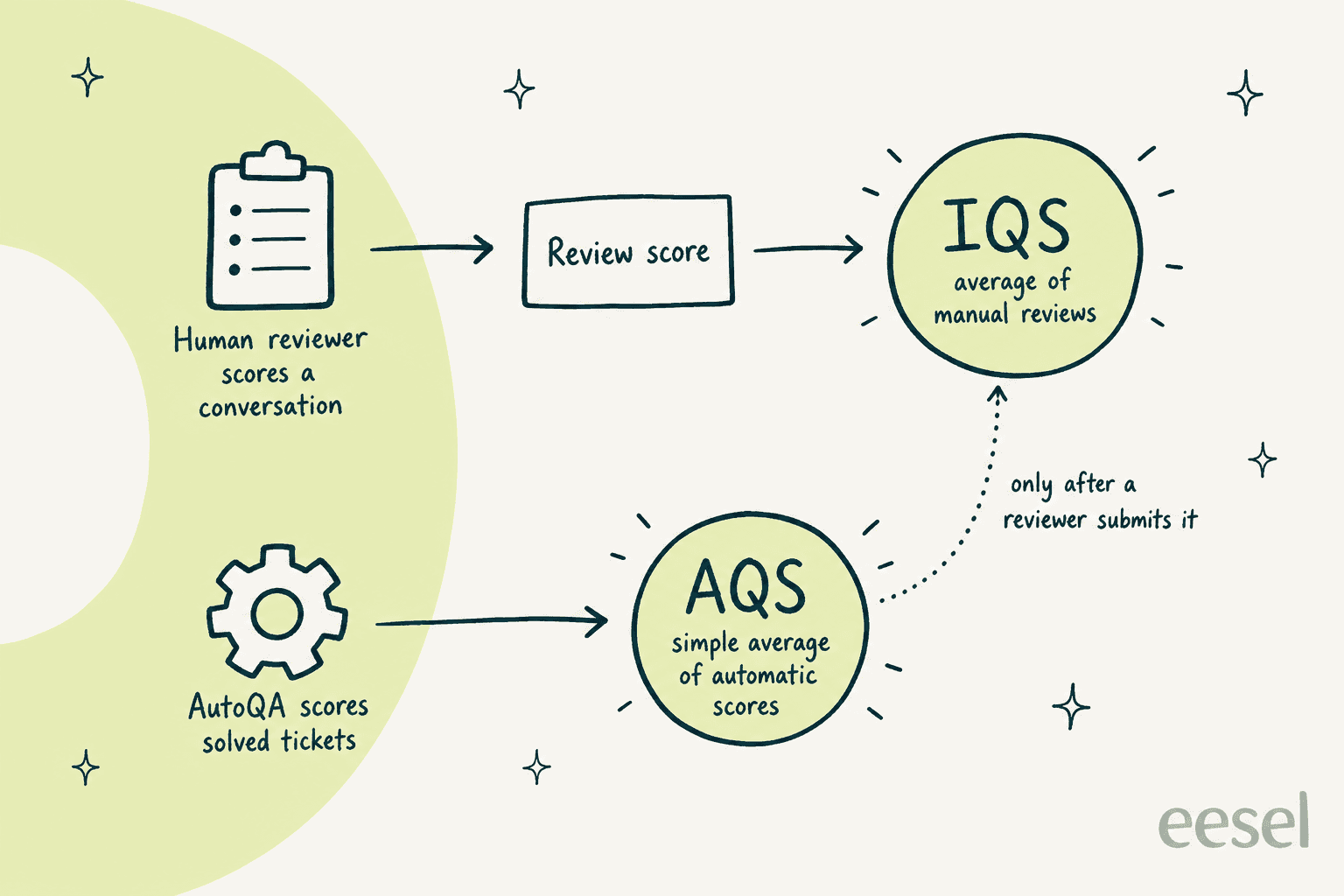
How the two scores are built, from Zendesk's AutoQA accuracy article and its dashboard calculations article.
The split has real consequences. A change to a category weight moves your IQS and does nothing to your AQS, because Zendesk says grouping, rating scale, weight, criticality and conditions apply only to manual reviews. If you have spent an afternoon tuning weights and your AutoQA dashboard score barely moved, that is why.
Both scores sit inside Zendesk QA, a product that started life as Klaus before Zendesk acquired it. I walk through the whole product in my Zendesk QA guide, so here I will stay on the score itself. If quality assurance is new to your team, that glossary entry covers the basics.
How is the internal quality score (IQS) calculated?
IQS is the plain average of your manual review scores over a period. Zendesk's formula is the sum of the review scores divided by the number of reviews, times 100. Its own example uses five reviews scoring 100%, 9.91%, 63.96%, 90.99% and 0%, which gives an IQS of 52.97% (Zendesk Reviews dashboard calculations).
So the work is in how a single review gets its score, and that takes two steps. First, each category score is normalized to a percentage from the rating scale you picked. A 3-point scale maps to 0%, 50% and 100%, and a 5-point scale to 0%, 25%, 50%, 75% and 100%.
| Rating scale | Possible category scores |
|---|---|
| Binary | 0%, 100% |
| 3-point | 0%, 50%, 100% |
| 4-point | 0%, 33.3%, 66.6%, 100% |
| 5-point | 0%, 25%, 50%, 75%, 100% |
Second, the review score is a weighted average. Each category has a weight from 0 to 100, and the default for a new category is 10 (scorecard guide). Multiply each category score by its weight, add the results, and divide by the sum of the weights.
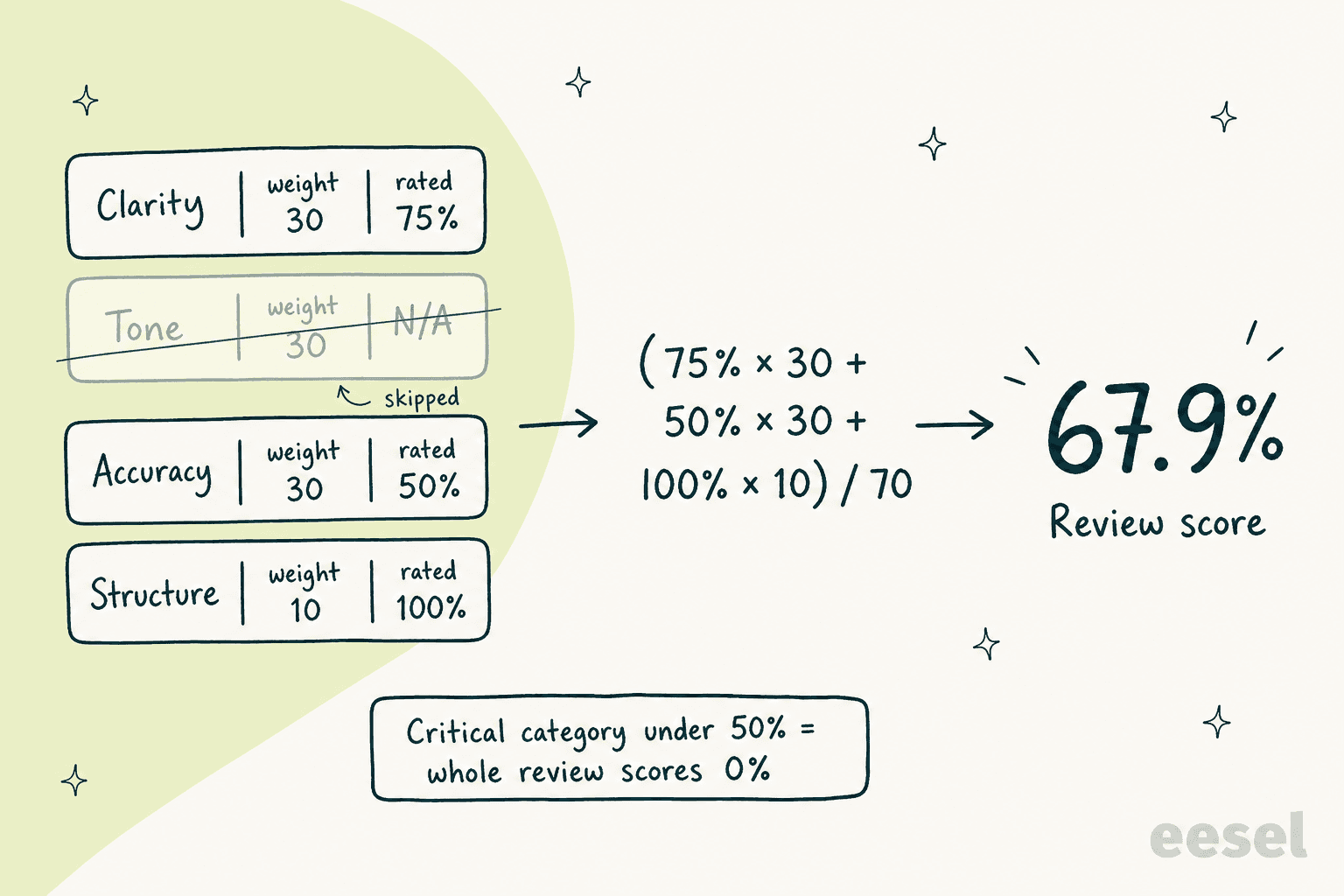
The N/A example from Zendesk's calculations article, drawn out. Zendesk's own total is 67.8571%.
Two rules change the result more than any weight does:
- Critical categories. If a category is marked critical and rated below 50%, the review fails. "Fails the whole review" sets the score to 0%, while "Fails the group only" zeroes just that group.
- N/A ratings. A category marked N/A drops out of both the numerator and the denominator. If every category is N/A, the review shows as unscored.
Here is the same formula as something you can poke at. Set a critical category low, or flip one to N/A, and watch what happens.
A calculator for Zendesk's review-score formula. It does not model the "Fails the group only" option.
That calculator is also why I'd be careful with critical categories. One critical flag on something easy to miss, like a closing line, turns an otherwise good conversation into a 0% and drags your IQS down hard. I'd keep it for compliance wording, which is what Zendesk suggests it for as well.
How is the Auto Quality Score (AQS) calculated?
AQS is a simple average of the automatic scores for every conversation AutoQA evaluated, using all the active AutoQA categories on your scorecards (AutoQA dashboard). There are no weights and no critical categories. That keeps it fast and consistent, and it also makes it blunter than IQS.
AutoQA only scores after the fact. Categories are evaluated once a ticket is solved or closed, and each agent and bot is evaluated independently (autoscoring categories). The default system categories are:
| Category | Scale | Voice |
|---|---|---|
| Greeting | Binary | Yes |
| Empathy | Binary | Yes |
| Spelling and grammar | Customizable | No |
| Closing | Binary | Yes |
| Solution offered | Binary or N/A | Yes |
| Tone | Customizable | No |
| Readability | Fixed 3-point | No |
| Comprehension | Binary | Yes |
Since October 6, 2026, Tone is scored per agent with five label sets (Warmth, Helpfulness, Courtesy, Empathy and Neutral) instead of the older seven emotion categories, per the same article. If you compare tone scores across that date, expect a step change.
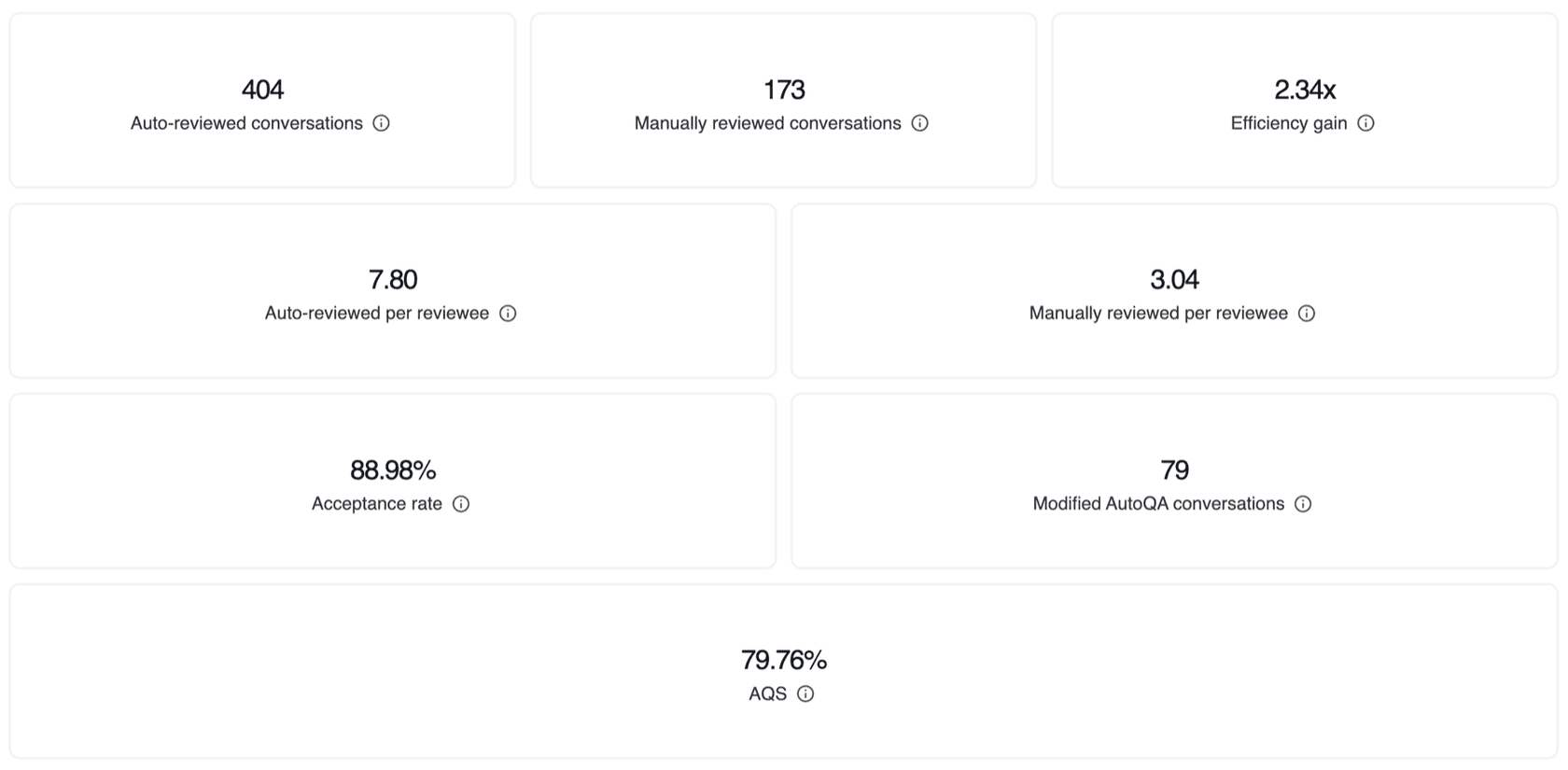
The AutoQA dashboard cards, as taken from Zendesk's help center. The numbers are sample data from Zendesk, not a benchmark.
The dashboard also tells you whether to trust AQS. Its accuracy score compares AutoQA's ratings with human ratings on the same conversations, and Zendesk treats 75% and above as high agreement. You cannot change an autoscore, but a reviewer can submit a different rating, and AQS counts toward a conversation's IQS only after a reviewer submits that review (Improving AutoQA accuracy).
The efficiency gain card is a useful number for the budget conversation. It divides auto-reviewed conversations by manually reviewed ones, so Zendesk's sample of 404 to 173 reads as 2.34x.
Which categories and scorecards sit behind the score?
Everything a human reviewer scores comes from a scorecard. Admins build them under Settings, then Scorecards, choosing workspaces for manual review and, separately, workspaces where AutoQA runs (creating scorecards). I wrote a longer how to build a scorecard walkthrough, and a post on which scorecard criteria to include.
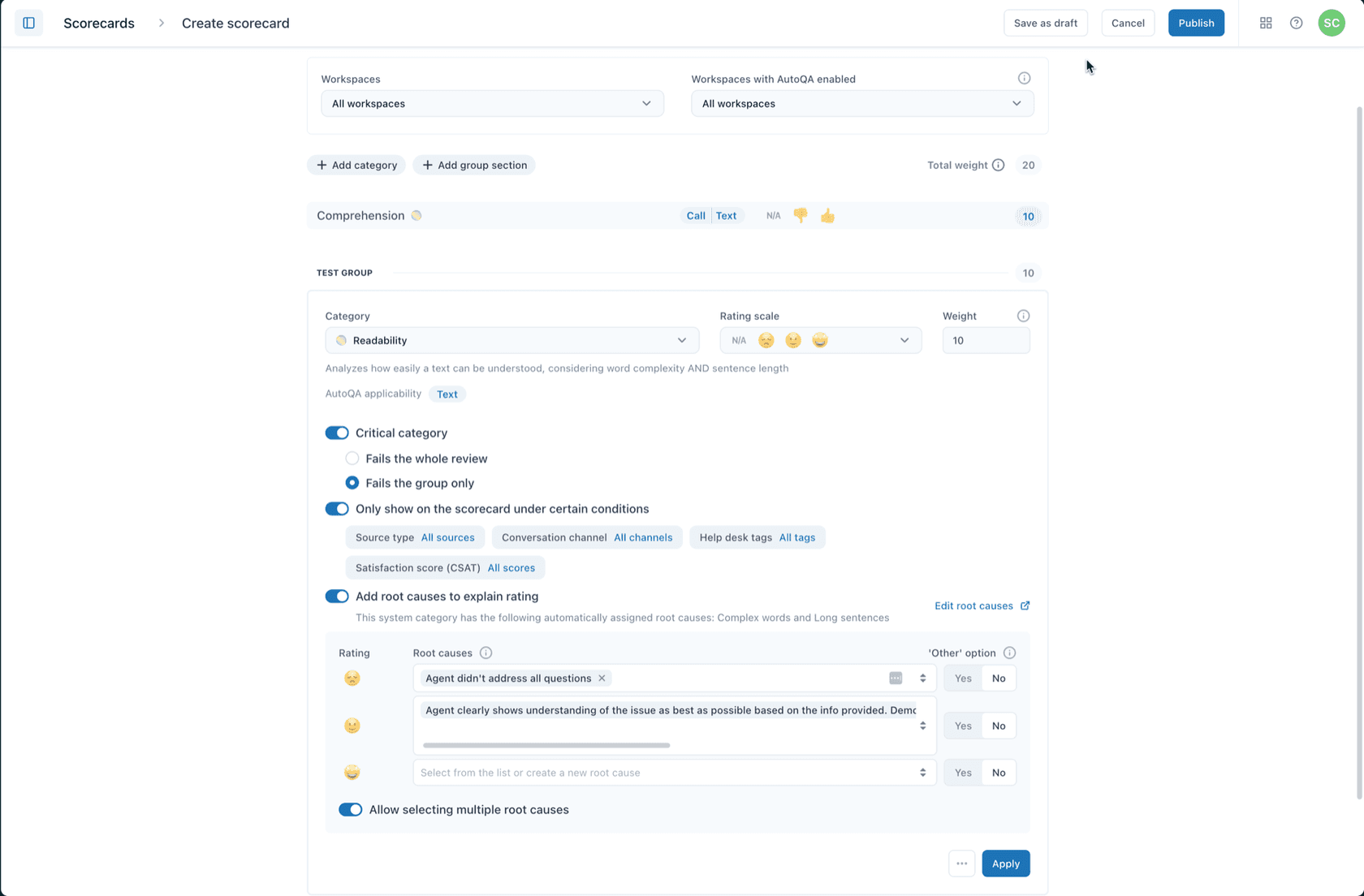
A scorecard category with its weight and critical toggle, as taken from Zendesk's scorecard guide.
The settings that decide your IQS are all on that screen:
- Rating scale. Binary, 3-point, 4-point, 5-point, or a custom scale where each label maps to a percentage. Zendesk's advice is that smaller scales suit high volume and larger scales suit coaching.
- Weight. An integer from 0 to 100.
- Critical category. Whole-review or group-only failure.
- Conditions and root causes. Show a category only for certain channels or tags, and attach reasons to a rating.
You can also write your own categories in plain language. AI prompt-based categories accept up to 2,000 characters of instructions, and an account can have 10 active AI prompt-based categories and prompt-based spotlight insights combined (prompt-based categories). Spotlight insights such as churn risk flag a ticket for attention and do not produce a score.
Calibration is the part teams skip. Two reviewers on the same 5-point scale will drift, so it is worth running calibration sessions before you trust a team average. I'd also read a few feedback examples first, because the weakest scorecards are the ones full of categories nobody can rate the same way twice.
Once the scorecard holds up, the rest is routine. My QA workflow post covers the review cadence, and agent feedback covers what to say to the person afterwards.
What is a good quality score?
Zendesk does not publish a benchmark, and I would be wary of anyone who gives you one. What the docs do give you is a threshold slider per workspace. If your internal quality KPI is 80%, set the threshold to 80%, and scores below it show in red on the Reviews dashboard (setting a threshold).
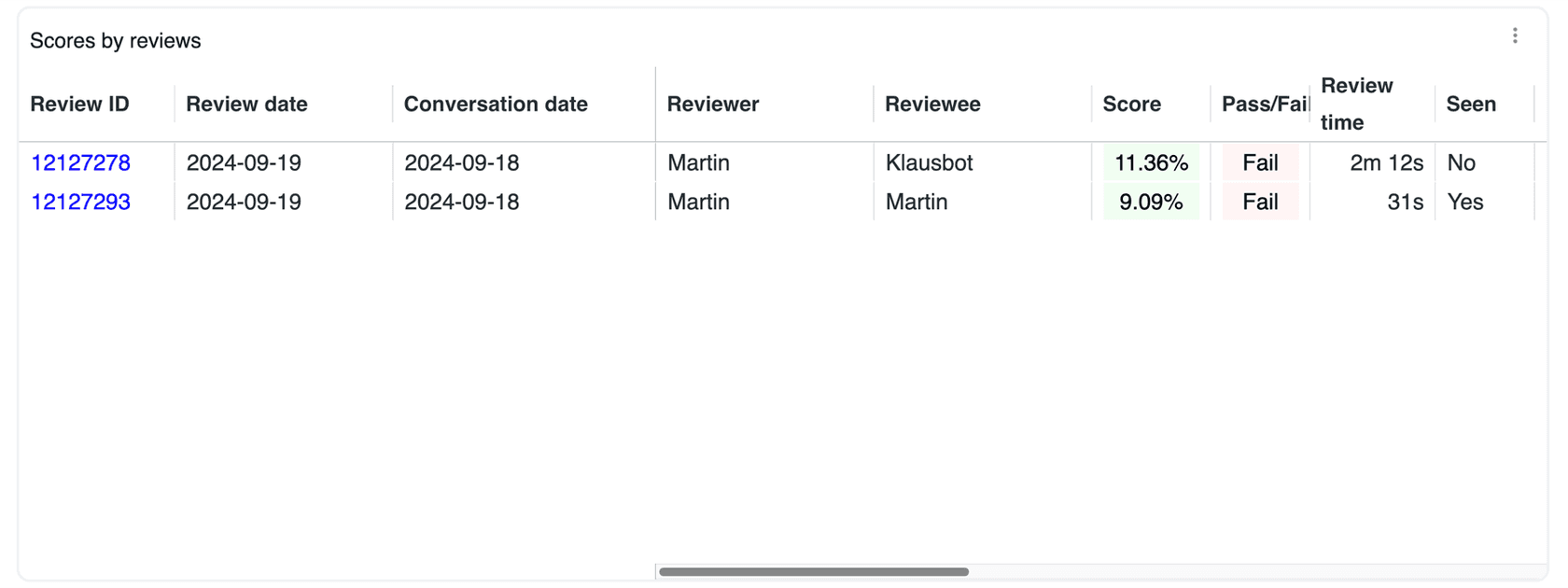
Zendesk's example of a green score next to a red Fail, as taken from its threshold article.
That screenshot shows a trap. The Score column follows your workspace threshold, while the Pass/Fail column follows the separate pass rate baseline, so a review can look green and still read Fail. Set both to the same value or you will spend a meeting explaining the colors.
For context, Zendesk's QA page quotes CityGo's head of customer service saying its quality scores frequently range between 90 and 96%, and lists Liberty at a 4% rise in IQS with a 2.3% rise in CSAT. Those are vendor-published customer results, so treat them as a ceiling for a mature program, not a target for week one.
For the link to customer satisfaction itself, see my notes on Zendesk CSAT reporting and on AI CSAT. CSAT is the customer's verdict, and the quality score is yours, so I'd track them side by side.
Which plan and add-on do I need, and what does it cost?
You need a Support or Suite plan plus the Quality Assurance add-on. Zendesk's QA page says customers on any Support or Suite plan can purchase it, and its pricing table shows "Requires QA add-on" for Quality Assurance in every plan column.
| Item | Price (per agent per month) | Where Zendesk lists it |
|---|---|---|
| Support Team | $19 annual, $25 monthly | Customer Service pricing |
| Suite Team | $55 annual, $69 monthly | Customer Service pricing |
| Suite Professional | $115 annual, $149 monthly | Customer Service pricing |
| Quality Assurance add-on | $35, paid yearly | Employee Service pricing |
| Workforce Engagement Bundle | $50, paid yearly | Customer Service pricing |
The $50 bundle is Zendesk's Workforce Engagement Management package, which its pricing page says covers scheduling, performance management and quality assurance. A monthly price for the QA add-on alone is not published, and the QA page sends you to sales for a trial. For the rest of the bill, my Zendesk review and Zendesk alternatives pages cover the seats and the other ways to buy this.
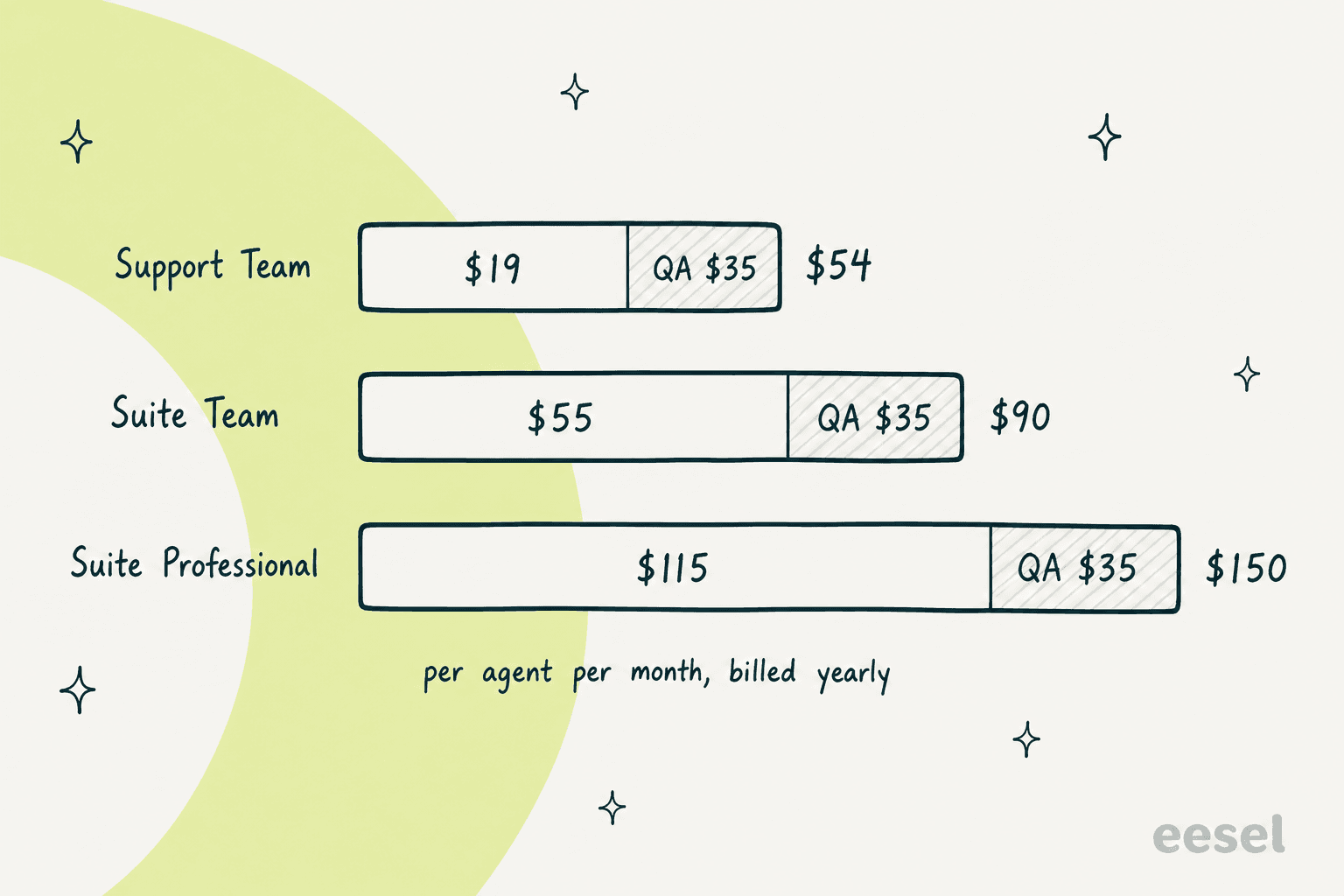
Base plan plus QA add-on, per agent per month on annual billing. My math from Zendesk's published prices.
For a worked example, 25 agents on Suite Team with the add-on come to 25 x ($55 + $35) = $2,250 a month, billed yearly. That is before any AI agent charges. Zendesk prices automated resolutions separately, at $1.50 committed or $2.00 pay-as-you-go per resolution, which my Zendesk AI pricing post unpacks. Two ceilings are worth knowing: 10 active AI prompt-based categories and insights per account, and up to 50 help desk connections (connections guide).
Does Zendesk QA score AI agents too?
Yes, with some fine print. Zendesk QA detects Zendesk AI agents on messaging and voice automatically, bots are reviewable unless you turn them off, and they use the same scorecards as people (evaluating AI agents). The product page confirms that AI Agent QA is part of the add-on at no extra charge, while the AI agents themselves are sold separately.
The fine print is third-party bots. Zendesk's manual identification article says QA supports only Marketplace-installed bots, and that each bot needs a unique email address. If you run a bot that does not come from the Marketplace, confirm a test conversation shows up under the right reviewee before you build a scorecard around it. I cover the setup in my guide to evaluating AI agents, and the escalation side in AI agent escalations.
To judge whether a bot is working at all, start with resolution rate and then read the conversations.
What do QA teams say about it?
The short version from reviews is that coverage is the draw and setup is the cost.
"Is the ability to evaluate a much larger number of customer interactions and have everything organized in on place."

"There is a bit of learning curve in the beginning, especially when setting up the scorecards and deciding which criteria are actually important for your team."
On Reddit, the case for tooling over spot checks comes through in one reply to a thread on how teams monitor support quality:
"Most teams I've seen struggle with this. Sampling + CSAT only catches a fraction of issues, so patterns show up late."

That matches how the scores split the work: AQS gives you the pattern on every ticket, IQS gives you the judgement on a sample, and scorecard design is where teams lose weeks. If you are choosing between tools, my QA tools roundup and the post on whether AI can do QA are the places to start.
Where does an AI helpdesk teammate fit with Zendesk QA?
A quality score tells you a reply was weak. It does not write a better one. That gap is what eesel's helpdesk teammate works on: it drafts replies inside Zendesk from your macros, help center and past tickets, and a person approves before anything is sent. If you want the broader comparison, my Zendesk AI vs eesel post lays it out.
I'd point to smava here, because regulated wording is where QA scores get tested. It shares one Zendesk across two lending brands, and in one month eesel handled about 27,000 tickets there, drafting from about 820 macros and help center articles kept apart by brand, with people approving the drafts. At SE Ranking, eesel answered first on about 2,100 live chats in a month across three products on Zendesk Messenger. The team behind eesel has spent more than three years putting AI on live support queues, and the lesson from those rollouts is the one QA teaches: a score only means something if you know who or what produced the reply.
eesel working inside a Zendesk queue.
So before trusting any score, I'd open a few records and check the reviewee. A person who rewrites or sends an AI draft is a different reviewee from the draft's author, so a clean AQS does not prove the AI was right. Zendesk QA does not replace that judgement, and eesel does not configure your scorecards.
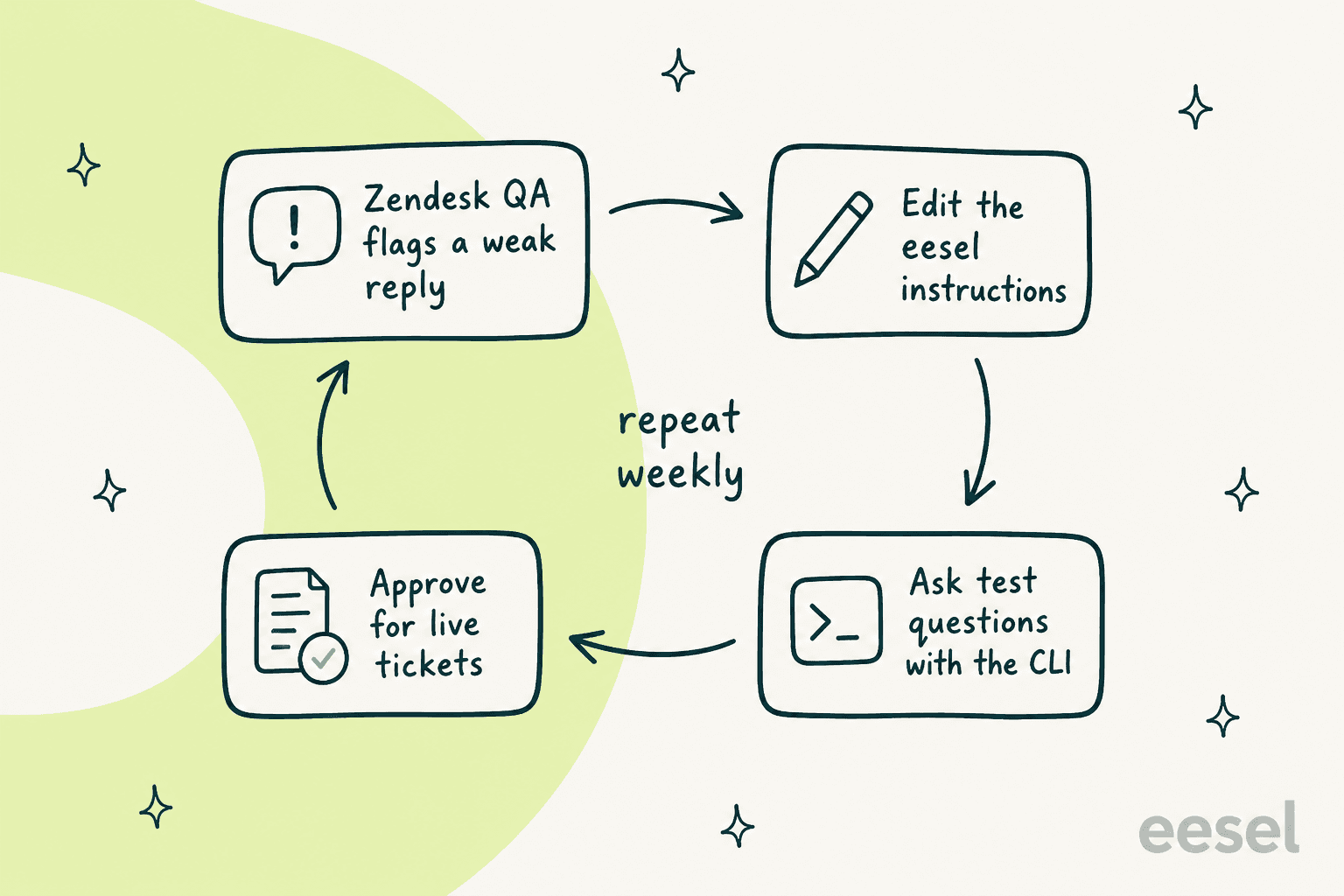
A weekly loop I'd run: QA finds the weak reply, the instructions change, a test confirms it, then it goes live.
With the eesel CLI, an AI coding agent can upload approved knowledge, like exported macros and policy documents, adjust the teammate's instructions, and ask test questions to check the answers before they go live. Connecting the Zendesk account itself still needs someone with admin access to approve it, and a test question is a spot check, not a scored simulation. For the cost side, eesel's pricing is a fixed monthly credit plan from $299 a month for 500 credits, where a ticket or chat is one credit, so you can cost a pilot before you commit, and my pilot scorecard gives you something to grade it against.
Try eesel on your Zendesk queue
If your QA dashboard keeps flagging the same weak replies, the fix is usually upstream: better source material and clearer instructions for whoever drafts. eesel for Zendesk learns from your macros and past tickets, drafts replies your team approves, and works alongside the Zendesk QA review you already run. Try eesel on a small slice of tickets, then let your next QA cycle tell you how it did.
Frequently Asked Questions
What is the Zendesk quality score?
Zendesk has two. The internal quality score (IQS) averages your manual QA reviews, and the Auto Quality Score (AQS) averages what AutoQA scores on its own. Both live in Zendesk QA, which I cover in my Zendesk QA guide.
How is the Zendesk QA internal quality score calculated?
IQS is the sum of your review scores divided by the number of reviews, shown as a percentage. Each review score is a weighted average of its category scores, and a failed critical category sets that review to 0%. My scorecard criteria post shows which categories to weight.
What is the difference between IQS and AQS in Zendesk?
IQS comes from human reviewers and honors your weights, scales and critical settings. AQS comes from AutoQA and ignores them. Zendesk says AQS counts toward a conversation's IQS only after a reviewer manually submits the review.
How much does Zendesk QA cost?
Zendesk lists the Quality Assurance add-on at $35 per agent per month, paid yearly, on top of a Support or Suite plan. See my Zendesk pricing and Suite pricing breakdowns for the base seat costs.
What is a good quality score in Zendesk QA?
Zendesk publishes no universal benchmark. Its help center example uses an 80% threshold, and one customer on its QA page reports scores of 90 to 96%. Pick a threshold from your own baseline, and read QA calibration before comparing reviewers.
Does Zendesk QA score AI agents too?
Yes. Zendesk QA detects Zendesk AI agents on messaging and voice, and AI Agent QA is part of the add-on at no extra charge. Third-party bots are limited, so test your setup first, as in my guide to evaluating AI agents.
Do I need a Suite plan to use Zendesk QA?
No. Zendesk says customers on any Support or Suite plan can buy the add-on. None of the plans include it, so each agent seat you want reviewed needs the add-on on top of the Zendesk AI pricing you already pay.
How do I improve my Zendesk quality score?
Fix the scorecard before the agents: remove vague categories, lower the weight of things you rarely act on, and hold feedback sessions with real examples. An AI helpdesk teammate like eesel for Zendesk can draft consistent first replies so reviewers spend time on the hard tickets.