How Treg pricing works
I build integrations at eesel, which mostly means reading other people's API billing docs and working out where the surprises are hiding. Treg's billing docs have fewer surprises than most, and the ones they do have are written down.
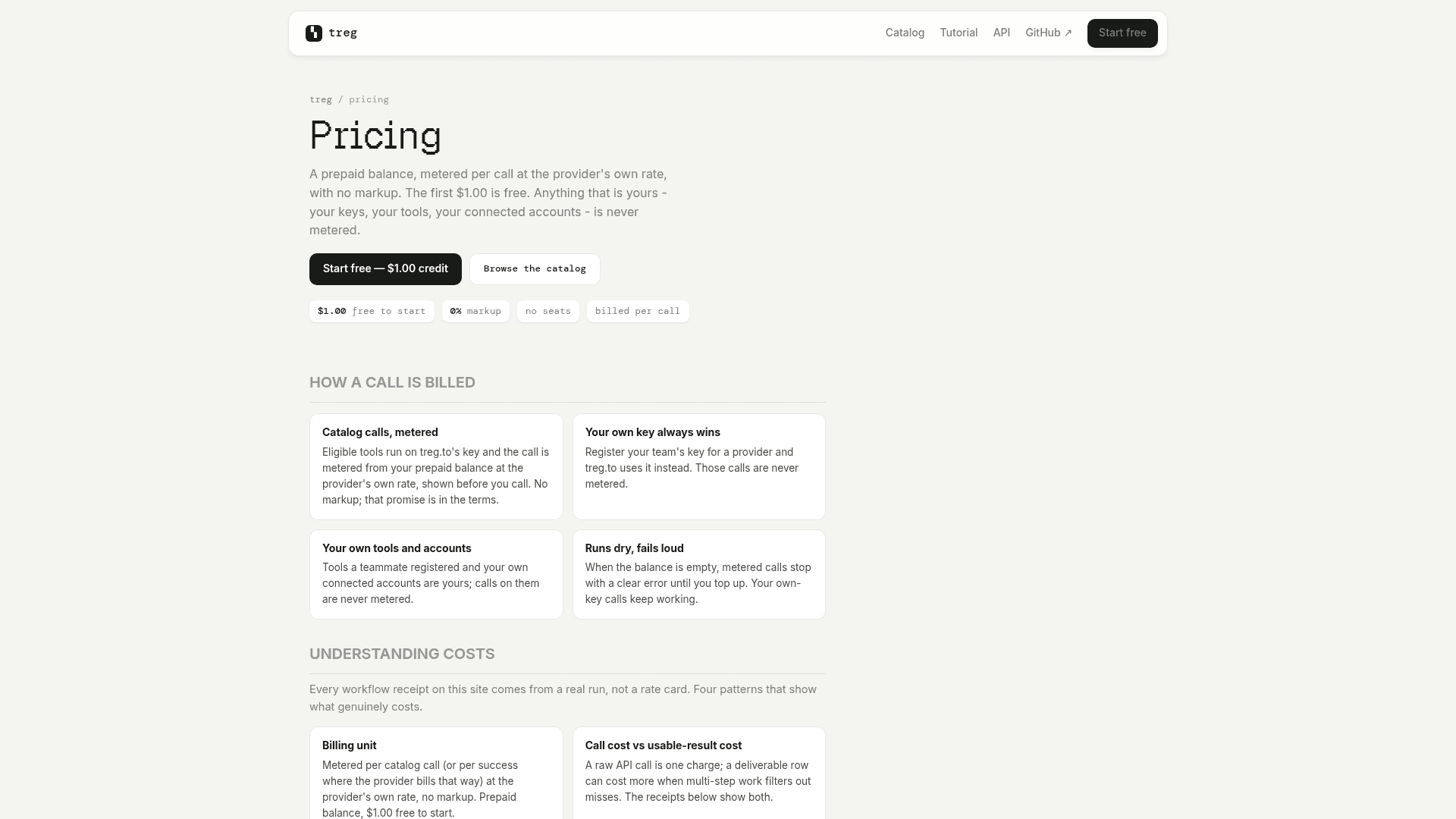
If you haven't met it yet, Treg is Superdesign's "OpenRouter for agent tools": one token and one /call/ endpoint that let an agent like Claude Code or Codex reach 3,700+ third-party endpoints for SEO, social, enrichment and ads. The pricing page sums up the model in one line: "A prepaid balance, metered per call at the provider's own rate, with no markup."
Here's the whole thing on one card:
| Item | What Treg charges |
|---|---|
| Subscription or seats | None |
| Monthly minimum | None |
| Signup credit | $1.00 free, once per verified identity |
| Markup on provider rates | 0% |
| Catalog call on Treg's key | The provider's own rate, shown before the call |
| Your own key, tool or connected account | $0, never metered |
| Cache hit on a question your team already asked | 10% of the price (free on your own key) |
| Referral credit | $5.00 to each side, once the referred team adds funds |
| Self-hosting the open code | Free, on your own infrastructure |
| Minimum top-up | Not published (the top-up screen is behind sign-in) |
The price is visible before your agent spends anything. treg catalog get <id> returns the rate, and after the call the real charge comes back in an X-Treg-Cost-Micro header in micro-dollars. If that header is missing, the call ran on your own key and wasn't billed at all. For anyone who has been burned by an agentic coding CLI quietly burning through credits, that's a nice design.
Billing units vary by endpoint
"Per call" is a simplification, and it's where most of the real cost variance lives. The catalog lists a cost.type on every endpoint, and they don't all count the same thing:
per_call: a flat charge every time, whatever comes back.per_success: you pay only on a hit. A miss settles at $0.00.per_resultby row: the headline figure assumes a 20-row page, so bigger pages cost more.per_resultby target, domain or keyword: you pay per thing you ask about. The docs say "a body listing ten domains reserves ten."free: exactly what it sounds like.
This matters more than the headline rate. An email finder on per_success that misses half the time costs you half as much as the sticker suggests, and a per_call finder charges for every miss. If you're building a lead generation agent, I'd look at the billing unit before the price.
What's metered and what's free
This is the part of Treg pricing I'd read twice. Treg's docs put the rule plainly: "Your own key always wins over treg's, and those calls are never metered." A credential ladder runs on every call, and only the last rung costs money.
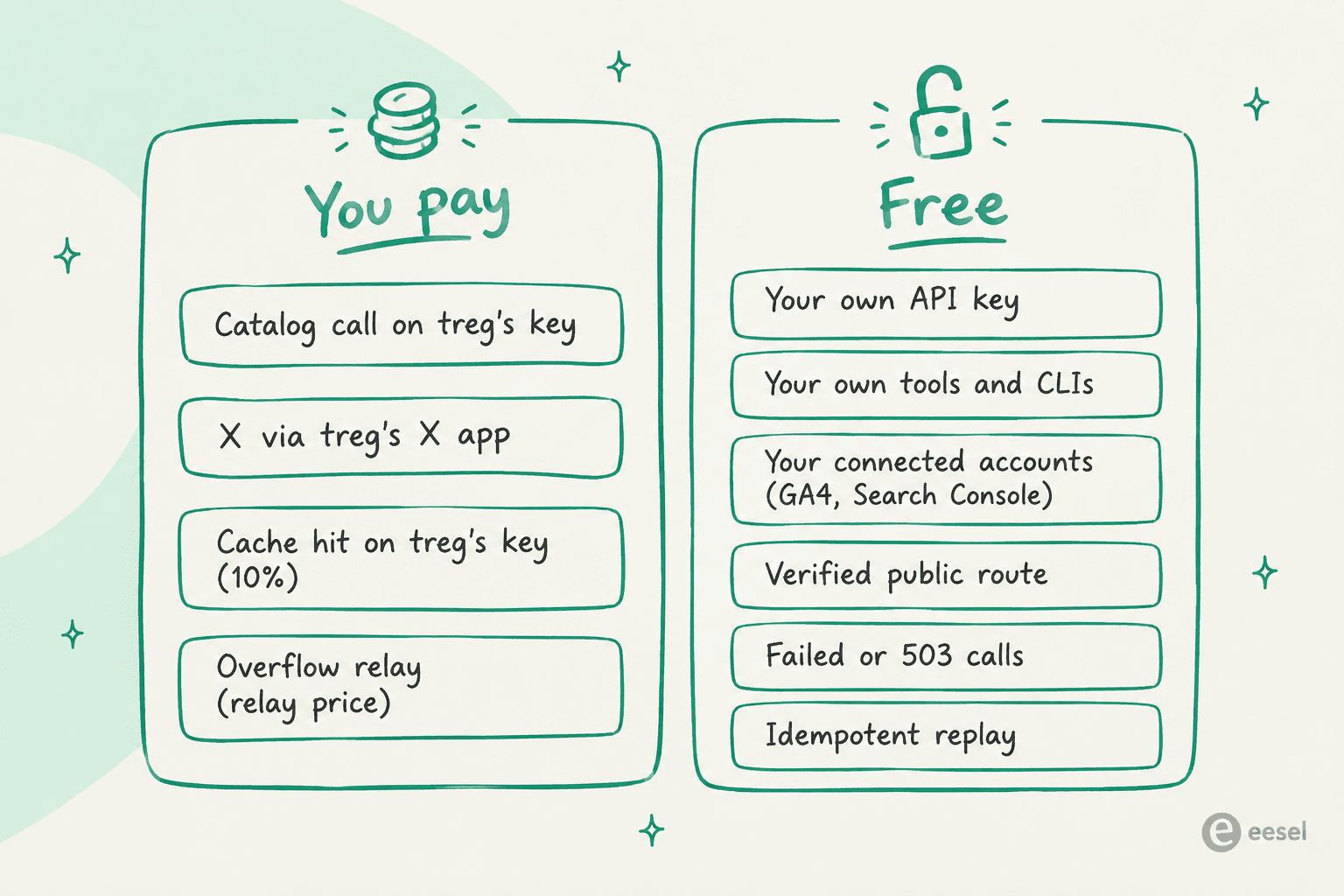
So if you already pay for Firecrawl or Apify, connecting those keys makes the calls "free of the balance rather than duplicating them." The pricing page even shows it on a Meta Ad Library receipt: "own key $0, shared key $0.12."
Four details are easy to miss:
- X is the exception to "your account is free." An X connection made through Treg's own X app is metered per call, because "X bills the app owner per use, whoever's account consented." Bring your own X developer app and it's unmetered again.
- Failed calls are mostly free, with one caveat. The main docs say a provider 4xx or 5xx is "charged nothing," but the integration guide narrows that: a
per_callendpoint does bill "a genuine4xxcaused by your own bad input." Credential and quota errors never bill. - Overflow relays can change the price. If Treg's own account for a provider runs dry, it may serve the call through a relay account at "the relay's real price," flagged with an
X-Treg-Served-Viaheader. You can turn that off withtreg org overflow off. - Free trial pools exist for market data. Finnhub, Twelve Data and Tiingo run at $0 with a daily allowance of 50, 20 and 20 calls per team, then return a 429.
What real Treg runs cost
Rate cards are one thing. What I trust more is a receipt, and Treg publishes them from real runs on its workflows page. Treg's pricing page puts it well: every receipt "comes from a real run, not a rate card."
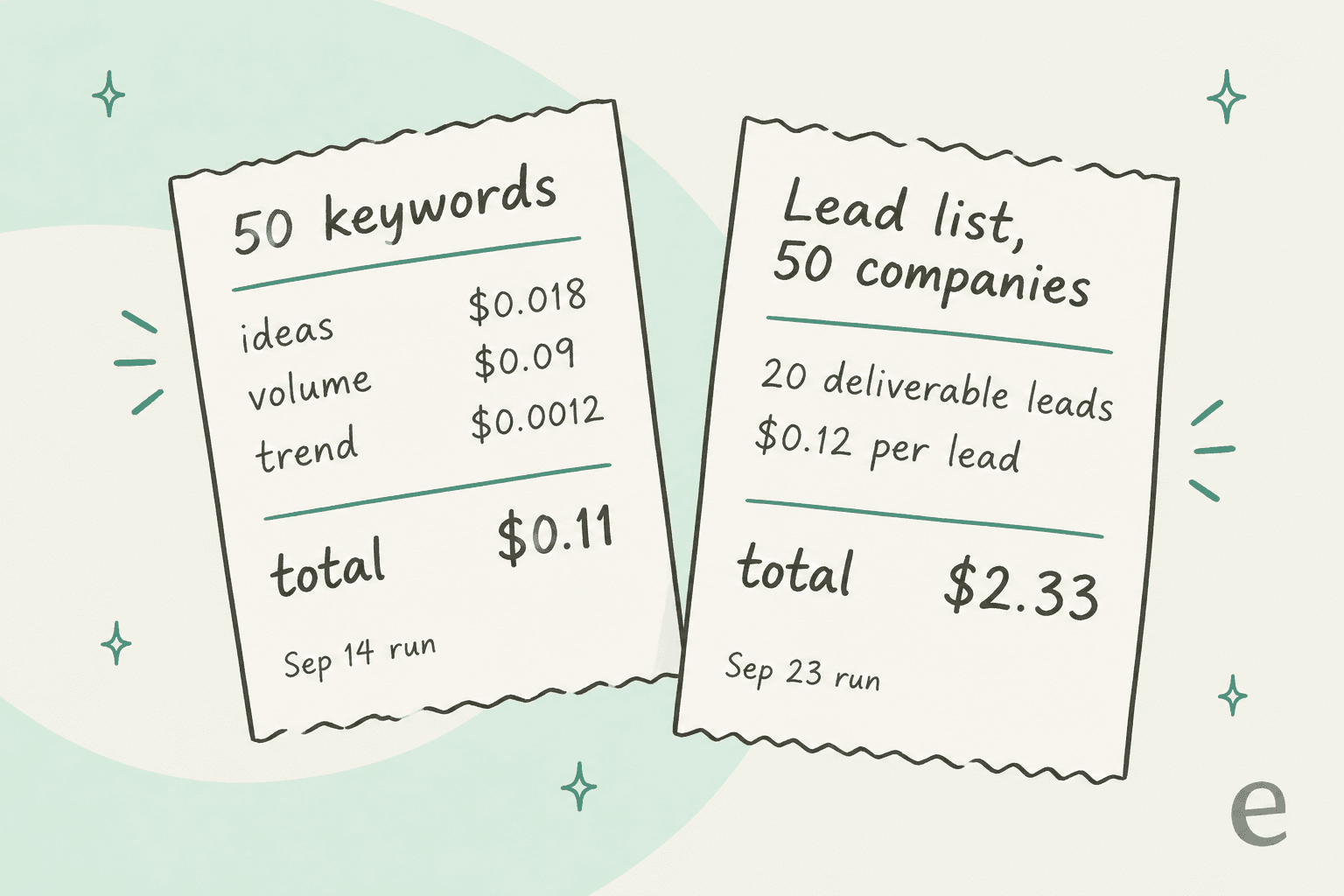
| Run (date) | What it did | Total cost |
|---|---|---|
| Keyword demand (Sep 14) | 50 keywords: ideas $0.018, volume $0.09, trend $0.0012 | $0.11 |
| Verified lead list (Sep 23) | 50 companies into 20 deliverable leads | $2.33 ($0.12 per lead) |
| Instagram creator discovery | Creator search and profiles | $0.20 ($0.008 per creator) |
| Meta and Google ads lookup | Google on the shared key, Meta on the team's own Apify key | $0.015 for Google, $0 for Meta |
The lead-list receipt is the honest one. It chained Apollo, an AI filter and several email finders, and it admits that Findymail misses were billed anyway. That's the gap between "call cost" and "usable-result cost" that the pricing page warns about: a raw call is one charge, but "a deliverable row can cost more when multi-step work filters out misses."
Published floor prices by platform give you a sense of the low end:
| Platform | Floor price on Treg |
|---|---|
| X | from $0.0001 per success |
| TikTok | from $0.0005 per success |
| Instagram, YouTube, Douyin | from $0.001 per success |
| Company data | from $0.000178 per call |
| People and contact data | from $0.00038 per result |
| Open web and SEO | under $0.0001 per result |
The spread above the floor is big. Treg's own docs say "spreads inside one capability reach 200×." On the email-finder page, QuickEnrich is $0.00483 per found address while Hunter is $0.0245, which is about five times the price for the same job.
Treg vs subscription seats: where the math flips
The homepage panel that everyone screenshots swaps four subscriptions for per-call prices and totals it up: "$371/mo of seats → cents per call." I like the idea, but when I checked it against the live catalog it compares jobs, not vendors. Semrush and Crunchbase only run on your own key in Treg, and Hunter's real email-find rate is $0.0245, not the $0.004 on the panel.
| Job | Seat it replaces | Homepage price | Live catalog rate (Sep 29, 2026) |
|---|---|---|---|
| Keyword volume | Semrush, $139/mo | $0.006/call | Semrush is bring-your-own-key only. DataForSEO $0.09 per batch (up to ~1,000 keywords), Serpstat $0.0005 per result |
| Backlinks | Moz, $99/mo | $0.012/call | Moz summary $0.013334, Serpstat summary $0.0025 |
| Funding data | Crunchbase, $99/mo | $0.020/call | Crunchbase is bring-your-own-key only. Aviato $0.01 per success, PredictLeads $0.04 |
| Work email | Hunter, $34/mo | $0.004/call | Hunter find $0.0245 per success, QuickEnrich $0.00483 |
So the useful question isn't "is Treg cheaper?" It's "how many calls before the seat is cheaper?" Here's that math using the live rates:
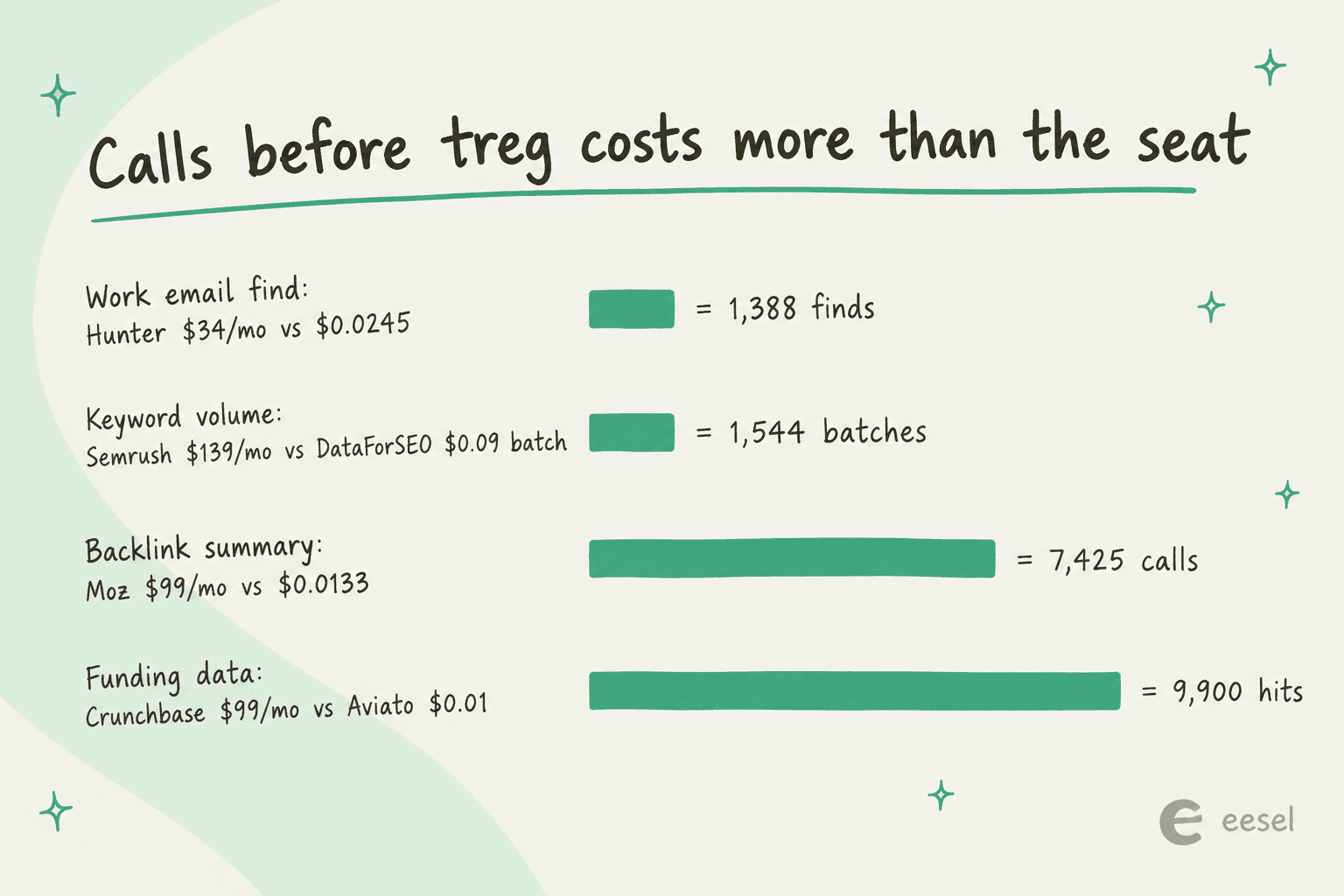
The keyword row is worth a second look, because one DataForSEO batch covers up to about 1,000 keywords. That's over a million keyword lookups before the Semrush seat catches up on raw data. What you don't get is the Semrush dashboard, its own numbers, or the rest of the suite. If your team lives in Ahrefs or Semrush every day, you'd keep that seat anyway (my Moz vs Ahrefs comparison covers what the full seats include).
Plug your own volumes in below. Treg rates are the live catalog prices above, and seat prices are the ones on Treg's homepage.
At the default volumes the Treg bill comes to about $13 a month against $371 of seats. Push the email row past 1,388 and it turns red, which is your sign that that one job wants its own subscription.
Spend controls, top-ups and refunds
A prepaid balance is itself a spend cap, which is the main reason I'm comfortable pointing an unattended agent at it. When the balance runs out, metered calls fail with an HTTP 402 carrying balance_micro, estimated_cost_micro and a topup_url. The pricing page calls it "Runs dry, fails loud," and own-key calls keep working.
On top of that, you get three more levers:
- A per-call ceiling. Send
X-Treg-Route-Max-Cost: <usd>and Treg refuses any call whose reserve would go over it, with nothing charged. Direct calls have no default cap, while routedtreg.<capability>calls default to $1 per call. - Scoped agent tokens. Admins can mint a token limited to certain tools and a daily call count, like
treg org agent-new ci-bot --tools stripe,gh --cap 500. - Opt-in auto top-up. The Terms say "automatic top-ups only happen if you turn them on and agree to the amount." The integration guide's ship checklist says to either enable it or monitor
GET /orgs/<id>/balance.
Refunds are thinner. There's no general refund policy for paid balance published. The only refund language covers async generation tasks, where "a failed or moderated task refunds the whole hold," and promotional credit, which is "never refundable." The hosted service is also early access with "no uptime commitment and no support commitment," so budget for that if an agent in production depends on it.
If you're reselling Treg inside your own product, which the docs say is "allowed and encouraged," you can tag calls with X-Treg-Meta: customer=... and invoice from a usage-by-tag endpoint. Per-customer daily caps are "advisory," so your balance stays the hard limit.
What users say about Treg pricing
The community around Treg is small and mostly on X, and it talks about price more than anything else. The most concrete comment I found was about minimum credit buys on the raw APIs:
"For example DFS you need to buy minimum $50 credits to use platform, but with Treg I can pay per api call."
That's the real pitch for a small team. DataForSEO is cheap per call, but you still have to front $50 before your first one, and that's one vendor out of the dozen an agent might touch. The same pay-as-you-go point came up on LinkedIn about lead data:
"Instead of paying 99$/mo for a service like Apollo. You pay to Treg only the amount you needed (turns it to Pay As you Go). Pay per Tool Call."

The fair criticism is about choosing between providers, not the price itself. The one Product Hunt reviewer said that when a job maps to several providers, the listing doesn't make it obvious which one is cheaper or more reliable, so they ran test calls to compare. Treg's Enrich Arena, launched September 10, reads like a direct answer, and one tester summed up the shift well:
"The question isn't necessarily: 'Which provider is the best?' It becomes: 'Which provider is giving me the best result for this particular request?'"
I'd add one thing from my own side. Treg bills your agent's choices, so an agent that picks Hunter at $0.0245 over QuickEnrich at $0.00483 pays five times more for the same job. Treg doesn't run waterfall logic for you the way Clay does, so pinning a job to one vendor with treg org pin is the simplest cost control there is.
Is Treg worth it?
For most agent builders, yes. The pricing model is transparent, the 0% markup is written into the terms, and BYOK means you never pay twice for a key you already own. If your agent needs a few hundred lookups a month across many vendors, per-call billing beats a stack of seats by a wide margin.
Treg pricing makes sense when:
- Your agent touches many vendors a little, rather than one vendor a lot.
- You want to test an AI SEO agent or outbound workflow without signing up for five trials.
- You already pay for some keys and want one front door for the rest.
A seat is the better deal when:
- One job runs past its break-even point every month, like 1,400+ email finds.
- Your team needs the vendor's dashboard and its own data, not a similar provider's numbers.
- You need an SLA, since the hosted service has no uptime commitment yet.
There's also a bigger point the receipts make without meaning to. A 50-keyword pull cost eleven cents. The data was never the expensive part of SEO automation. The expensive part is what happens after: picking the angle, writing a content brief, drafting something worth citing, and linking it into your site.
Treg vs hiring the job done
Treg is infrastructure. It gives an agent cheap hands, and you still bring the agent (my roundup of the best AI agents is a good start), the prompts, the review loop and the strategy. For builders who like wiring things up, that's a great trade.
The other option is to hire a teammate who already does the job. That's what eesel does: it gives you ready-to-work AI teammates for specific jobs, and for SEO content that's the AI blog writer. It researches the keyword, studies what ranks, pulls real sources, makes the visuals and drafts in your brand voice, and you review and approve. One SEO content lead on Webflow uses it to publish 360+ posts a month, with bulk review before anything goes live.
If you want the mechanics, I wrote up how an AI blog writer works, including how it trains on your brand voice.
For builders, it isn't a closed box either. The eesel CLI, @eesel/cli, drives the same teammate you'd use in the dashboard. Every command prints JSON, writes have a --dry-run flag that shows the exact server call before sending it, and headless auth works through environment variables, so it fits in scripts and CI. Every eesel workspace is also an MCP server: npx @eesel/cli mcp token prints a ready-to-paste claude mcp add command, so Claude Code, Codex or Cursor can hand a post to the blog writer the same way they call Treg for data. Plenty of teams will run both.
Try eesel for SEO content
If the Treg receipts made you realise the data costs pennies and the writing is the real job, the eesel AI blog writer takes that part off your plate. Give it your site and a keyword and it comes back with a researched, cited draft with visuals and FAQs for you to approve, no per-call math required. It's free to start, and my AI blog writer cost breakdown and SEO blog writer roundup show how it compares.

Frequently Asked Questions
How much does Treg cost?
Is Treg free?
Does Treg charge a markup on API calls?
Is Treg cheaper than Semrush or Hunter?
What happens when my Treg balance runs out?
Does Treg have a referral program?
Can I cap what an agent spends on Treg?
X-Treg-Route-Max-Cost header and Treg refuses any call whose reserve would exceed it, charging nothing. Admins can also mint scoped agent tokens with a daily call cap. Your prepaid balance is the hard ceiling either way, which is the same safety net I'd want on any AI agent CLI.

Article by
Rama Adi
Rama is a software engineer at eesel AI with two years of experience writing about B2B SaaS, AI tools, and customer support technology. Based in Bali, Indonesia, he brings a developer's perspective to product comparisons — cutting through marketing copy to what the integrations and APIs actually do.