What Quidget is, and who is behind it
I spend most of my day on eesel's own support queue, so I look at every one of these tools through one question: would this actually take work off a real agent's plate, or just demo well? Quidget earns a fair hearing on that score, because the team behind it has run support for a living.
Quidget is made by SupportYourApp, a customer-service BPO that says it has supported 250+ companies over roughly 15 years. That heritage shows up in the positioning: Quidget is pitched as an AI agent for customer service that "takes action and resolves 80% of tickets across chat, email, and voice," trained on your data with no manual work. The homepage claims it is trusted by 100+ brands (Sorare is one of the named logos), and the one public case study, Softorino, reports a roughly 35% cut in ticket volume with Quidget handling 60% of first-level responses.
That is a solid, believable story for the small-to-mid segment. It is not an enterprise AI helpdesk with a full agent workspace, and it does not pretend to be. Keeping that scope in mind is the fairest way to judge it.
Quidget pricing: the $0.20-per-resolution model
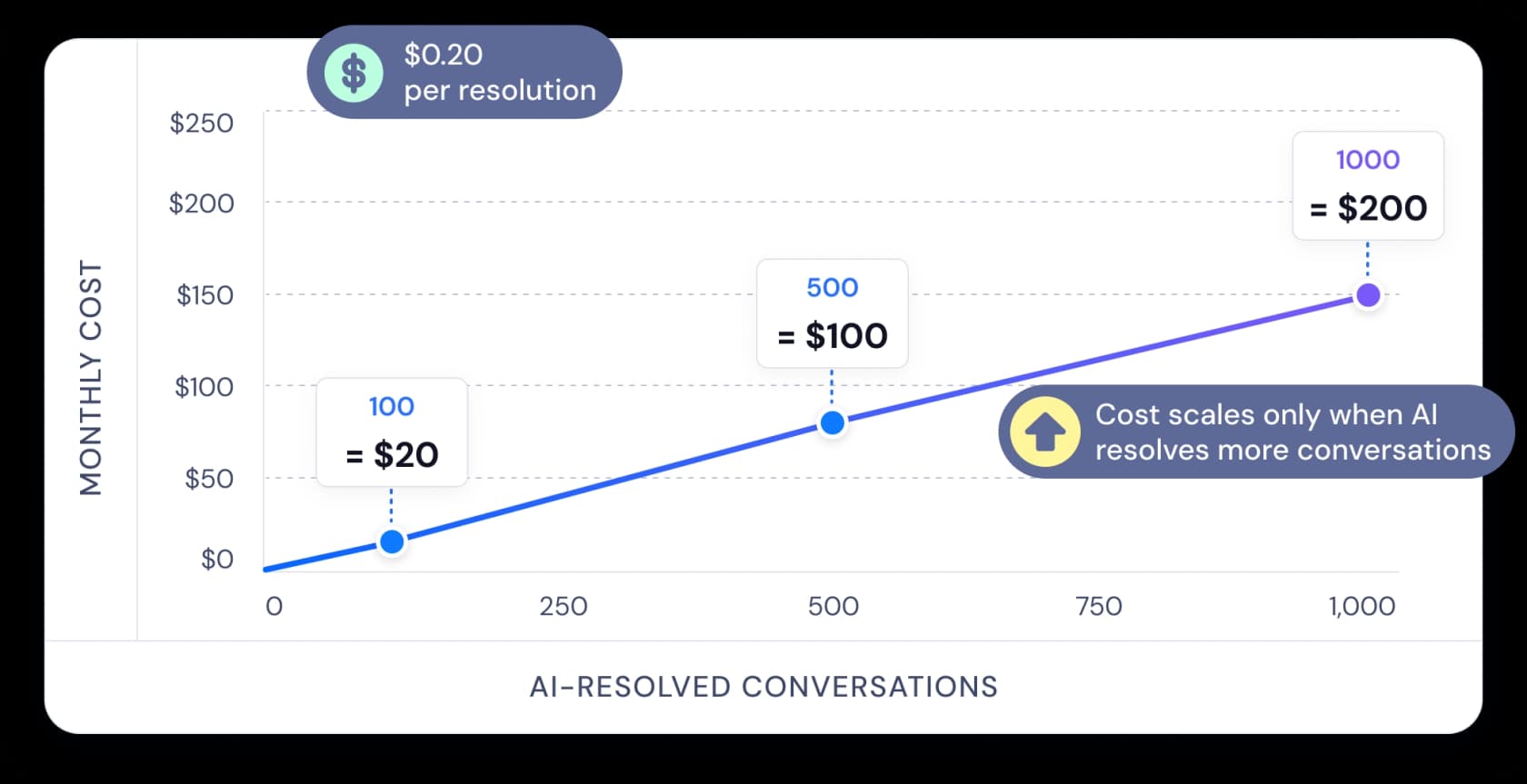
Pricing is where Quidget is most interesting, so let me start there. Instead of per-seat or per-conversation billing, Quidget charges $0.20 for every AI resolution, defined on its pricing page as "a conversation the AI closed without a human." Handoffs and abandoned chats are free. You pay for outcomes, not attempts.
Here is the full breakdown:
| Plan | Price | Billing unit | Best for |
|---|---|---|---|
| Native Quidget | $0.20 / AI resolution | Per resolved conversation | Website widget, live chat, and messaging channels in one place |
| Helpdesk Integration | $0.20 / resolution + $249 / month | Per resolution plus a flat platform fee | Teams on Zendesk, Freshdesk, Freshchat, or connected workflows |
| Enterprise | Custom | Negotiated | High volume, volume discounts, custom seat pricing, dedicated manager |
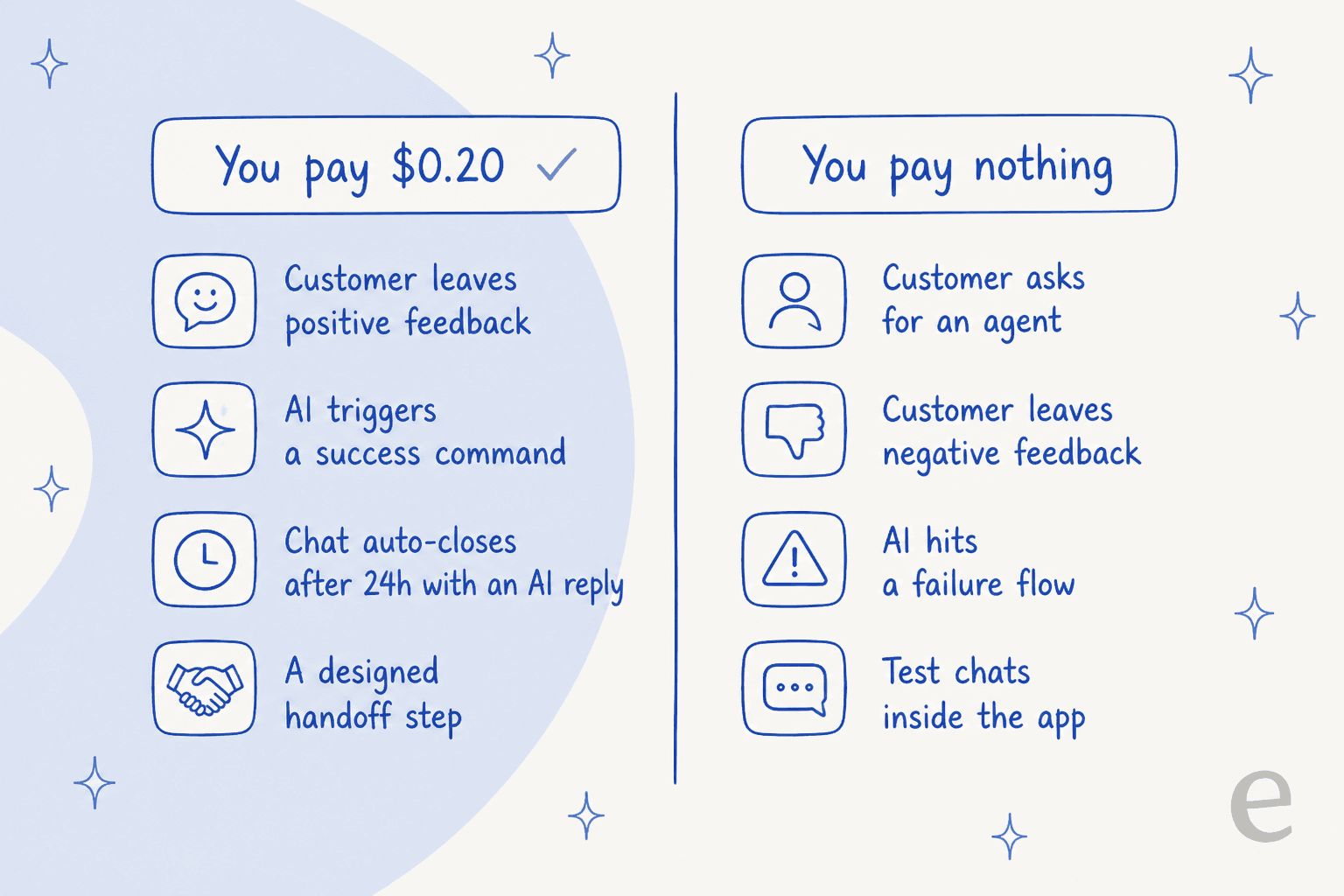
The part worth reading twice is what actually counts as a billable resolution. Per Quidget's own FAQ, you are charged when the customer leaves positive feedback, when the AI triggers a success command, when a chat auto-closes after 24 hours and the AI had responded, or when a workflow is deliberately built to hand off. You are not charged when the customer clicks "contact an agent," leaves negative feedback, hits a failure flow, gets transferred to a helpdesk, or when it was just a test chat.
I like this model, and I want to be fair about its one wrinkle. Paying only for wins is genuinely reassuring, and at scale it stays cheap: 500 resolved conversations is $100 a month, 1,000 is $200. The wrinkle is that "resolution" is a defined term with edge cases, like the 24-hour auto-close counting as a win even if the customer never confirmed it. That is not a gotcha, it is just the reality of any resolution-based price: you have to trust the vendor's definition of a resolution, because it is the thing you are paying for.
One practical note for teams comparing quotes: the $249/month integration fee is a real line item. If you are on Zendesk or Freshdesk and only doing a few hundred resolutions a month, that flat fee can be larger than your usage bill, so factor it into the total rather than just the per-resolution rate.
How Quidget actually works
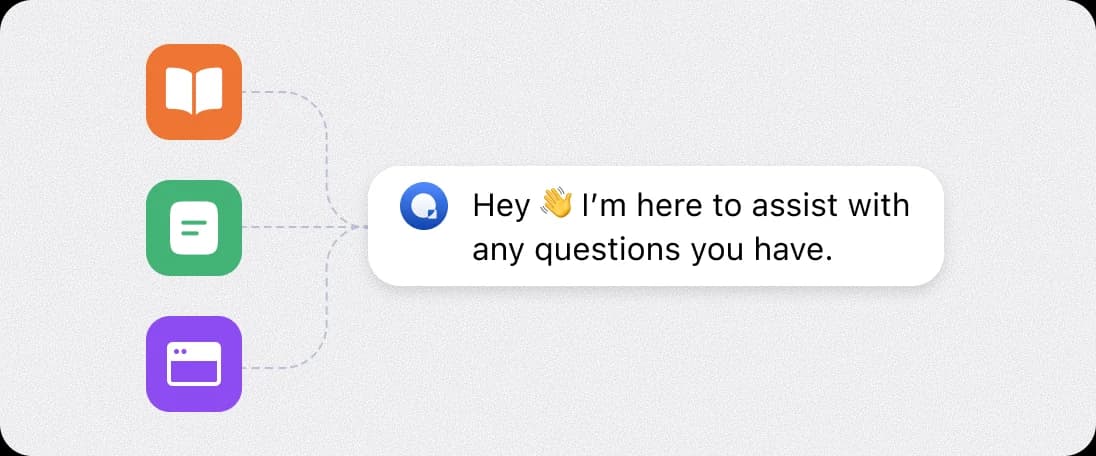
Under the hood, Quidget is a trained AI agent wired into a visual flow builder. You point it at your website, help docs, FAQs, uploaded files, and past email replies, and it builds a knowledge base with, in Quidget's words, "no manual training required." The guardrail is that it only answers from the content you give it and "won't go off-topic or invent information," with custom instructions to steer tone.
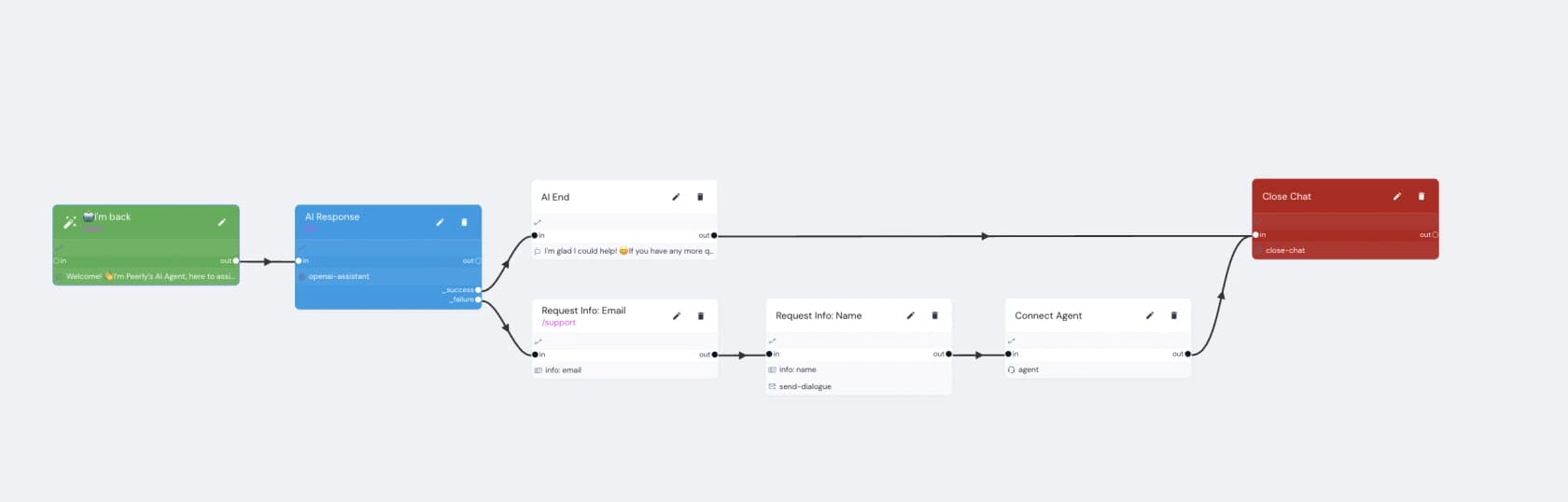
The flow builder is the real heart of it, and it is nicer than I expected. Each conversation runs through nodes: an AI Response node (running on an OpenAI assistant) with _success and _failure branches, then routes to an "AI End," a "Request Info" step, a "Connect Agent" handoff, or a "Close Chat." It is close to the kind of no-code bot builder a non-developer can actually reason about, which is a real strength.
The handoff logic is the mechanism I care about most as a support person, because a confident bot giving wrong answers is worse than no bot. Quidget handles this with confidence-based escalation: when it is not sure, it does not guess, it routes to a human with the full thread and a suggested reply attached.
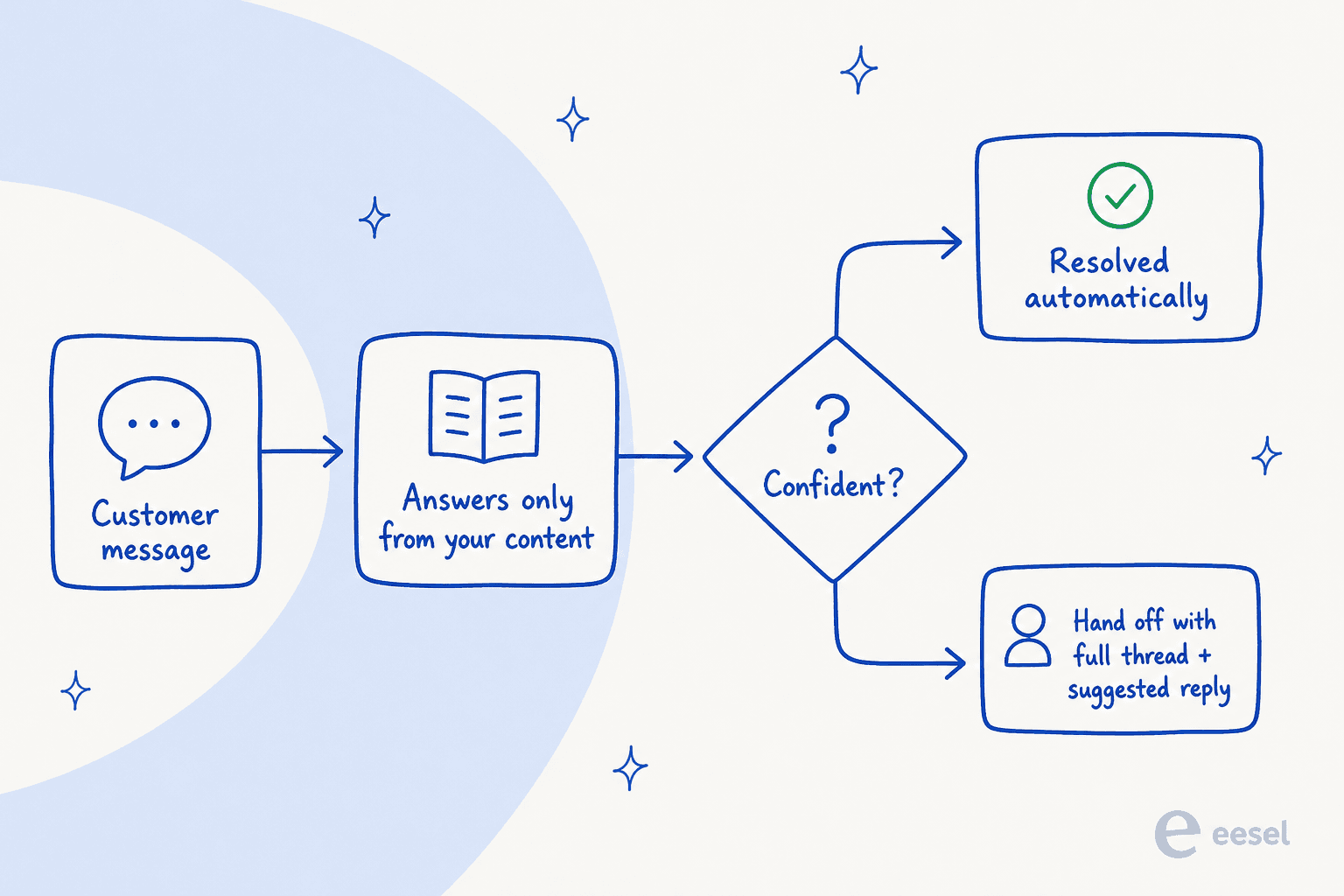
That "the customer never repeats themselves" detail is the difference between a a helpful bot and one that frustrates customers, and Quidget gets it right. Handoffs can land in your helpdesk, in email, or in Quidget's own built-in chat, with a Slack alert so an agent knows to jump in.
The three channels: chat, email, and voice
Quidget ships as three surfaces off that same trained agent.
The AI Live Chat is the flagship: a 24/7 website widget you enable by pasting one script, no developer needed. It answers instantly from your content and hands off when unsure. This is the piece most teams will start with, and it is a clean AI chatbot for a website.
Email AI Support runs inside Gmail. It reads incoming messages, drafts replies in your tone from your docs and past emails, and either sends automatically or hands to a human based on a confidence score. The Voice AI Agent is newer, in early access: it greets callers, answers basics like hours and order status, qualifies and filters, and routes complex calls to a real agent. Quidget is careful to call voice a "front door, not a phone system," which is the honest framing, it is not trying to be a full IVR. If voice is central to your plans, it is worth watching the wider AI voice space rather than betting on an early-access feature today.
Across all three, Quidget supports over 45 languages with auto-detection, continuing each conversation in the customer's language. For a small team serving multiple markets, that multilingual breadth is a legitimately strong point and one of the benefits of conversational AI done well.
Setting it up, and the one testing gap
Setup genuinely is fast. Quidget markets a two-to-three minute install, and the flow is honest to that: pick your agent, train it on your website and docs, go live on chat or voice. For a website widget, pasting one script really is most of the work. If speed-to-live is your priority, this is among the quicker tools I have set up.
Here is the one thing I would flag before you commit, and it matters more than it sounds. Quidget's testing is a live preview, not a simulation over your history. Per its docs, you test a chatbot by chatting with it in a preview pane before publishing. There is no mode that replays your last few hundred real tickets and scores the AI's answers against what your team actually sent.
That gap is exactly the scar that shaped how my team works. We have watched confident-sounding bots quietly give wrong answers in production, which is why we now insist on simulating every rollout against historical tickets before a single customer sees it. A live preview tells you the bot can answer the questions you think to ask it. A simulation over your real backlog tells you how it will do on the questions your customers actually send, which are messier and are the ones that bite.
Integrations, and where they stop
Quidget's integration list is broad on consumer messaging and focused on a few helpdesks. Here is the honest map.
| Category | What Quidget connects to | Notes |
|---|---|---|
| Messaging channels | WhatsApp, Telegram, Viber, Instagram, Facebook Messenger, Gmail | Genuinely strong consumer-messaging coverage |
| Helpdesks | Zendesk, Zoho Desk, Freshdesk, Freshchat | Escalate chats and create tickets with full context |
| Team alerts | Slack | Handoff alerts when the AI gets stuck |
| Automation and booking | Zapier, Calendly | HubSpot, Trello, Mailchimp reachable via Zapier |
The strength here is real: WhatsApp, Telegram, Instagram, and Messenger out of the box is more consumer-channel breadth than a lot of helpdesk-first tools offer, and if your customers live in WhatsApp, that is a genuine reason to shortlist Quidget.
The limit, stated plainly and not as a knock: there is no first-party Gorgias, Help Scout, HubSpot, or Salesforce connector. Those run through Zapier, which works but adds a layer to maintain. If your team is standardized on one of those platforms, that is worth knowing before you buy.
What real users say about Quidget
This is where I have to be straight with you, because it is the weakest part of Quidget's story and the easiest to be misled by. Quidget has about 12 third-party reviews total, and most are vendor-solicited.
The G2 reviews (4 of them, 4.5/5) and Capterra reviews (4, 4.8/5) are all marked "incentivized" or "vendor referred" and cluster in a single June-July 2024 batch. G2 itself notes "there are not enough reviews of Quidget for G2 to provide buying insight." Treat those scores as vendor-collected testimonials, not organic sentiment.
The most independent signal is Trustpilot, where reviews are marked "unprompted." The praise there is consistent and specific, and it lands on setup speed:
"We're using Quidget to collect feedback from candidates about the hiring process... Setting up the bot took us about 15 minutes. We're looking forward to more integration options, especially with popular CRMs out there."

The recurring wish, echoed across platforms, is deeper analytics and a wider integration pool:
"Quidget acts as our chat channel, and all the chats are managed by our AI through Quidget. It's an excellent tool for managing interactions... While I'd like more in-depth analytics in Quidget, it works great for our needs overall."
A Capterra reviewer put the integration gap directly: the "integration pool is lacking a little at the moment. We're hoping for Zendesk and Google Docs integration soon." The single most critical review, a lone 2-star, argues that Quidget feels underdeveloped as a full support platform: no proper shared inboxes or team views, limited conversation management, no macros, and little message or bot customization. I could not independently verify every one of those points, but they line up with what Quidget is: an AI answer layer, not a full agent workspace. That is a fair way to hold it.
Where Quidget fits, and where I would look elsewhere
Pulling it together, here is my verdict as someone who works a queue.
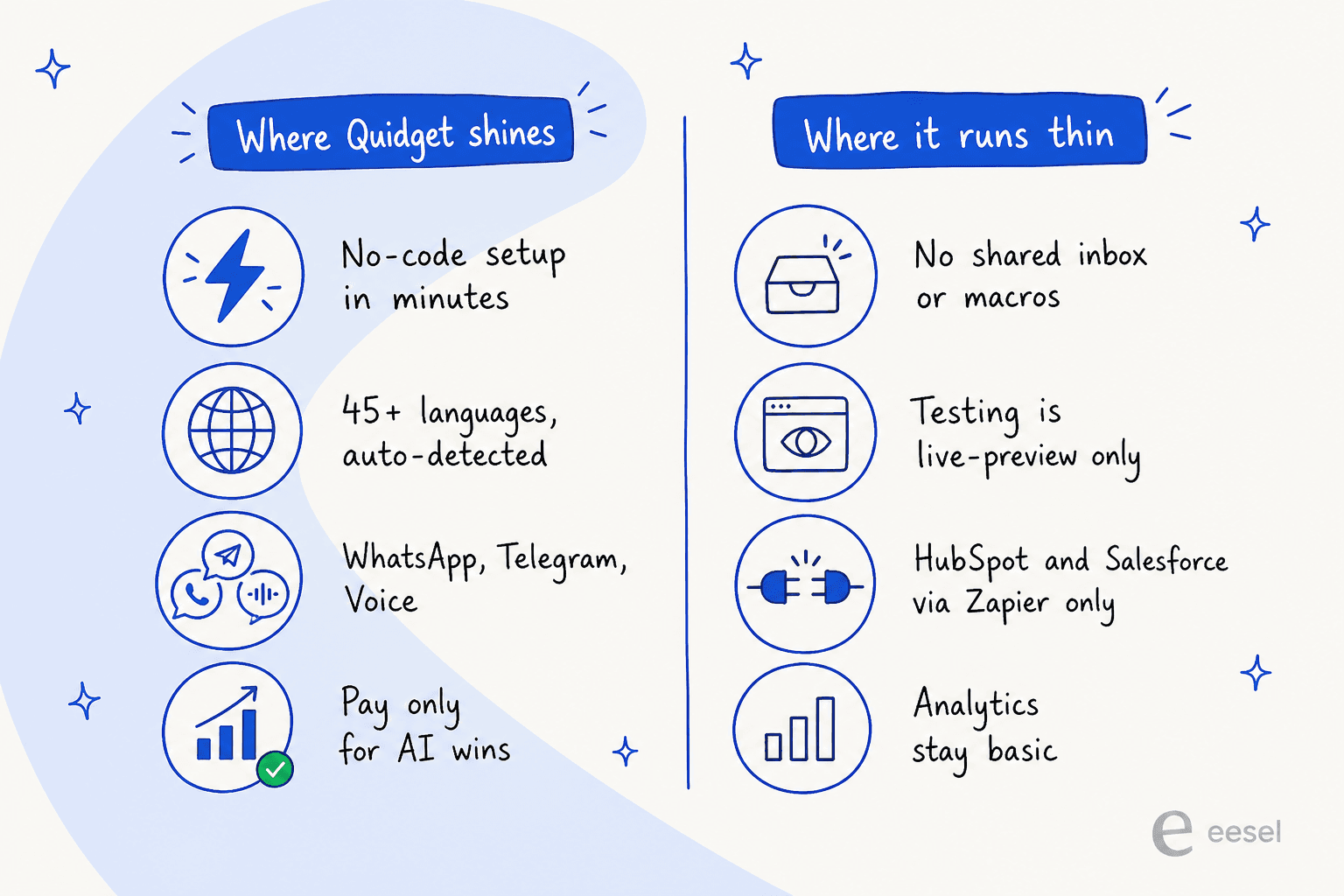
Pick Quidget if you are a small or mid-sized team that wants a no-code AI bot live quickly, especially on WhatsApp or a website widget, in lots of languages, and you like paying only for resolved conversations. It is a clean, fair-priced starter and the flow builder is friendly.
Look elsewhere if your support already lives inside a helpdesk and you need the AI to be a full teammate in that queue: simulate against your real past tickets before launch, deflect from a shared inbox with macros, and connect natively to whatever platform you run without a per-integration surcharge. That is a different category of tool, and it is the one I would reach for once support volume gets serious. For the broader field, our AI chatbot for customer service and AI customer service software roundups are good next reads.
Try eesel for helpdesk-native AI support
If the Quidget testing gap is the part that gave you pause, that is exactly where eesel is built to be strong. eesel is an AI support teammate that joins your existing helpdesk queue, Zendesk, Freshdesk, Gorgias, Front, Help Scout, HubSpot, or Salesforce, and works from day one rather than sitting beside your tools.

Two differences matter most against a tool like Quidget. First, eesel simulates every rollout against hundreds of your real past tickets and scores its answers against what your team actually sent, so you see how it will perform before a customer ever does, no guessing from a live preview. Second, eesel bills a flat $0.40 per ticket handled with no per-seat and no separate integration fee, so connecting Zendesk or Freshdesk does not add a $249 monthly line. There is a $50 free trial with no credit card, so you can point it at your own helpdesk and watch it work on real tickets. Quidget is a fine place to start a bot; eesel is where I would go when the queue gets real.
Frequently Asked Questions
How much does Quidget cost?
Is Quidget worth it for a small support team?
How does Quidget count an AI resolution?
What are the best Quidget alternatives?


Article by
Riellvriany Indriawan
Riell is a designer and writer at eesel AI with about two years of experience researching CX platforms, AI chatbots, and helpdesk software. She combines her design background with a sharp eye for how these tools actually look and feel in practice — making her comparisons unusually visual and user-focused.