HubSpot help desk AI sentiment analysis: the three sentiment fields and the CX score

Riellvriany Indriawan

Katelin Teen
Last edited November 21, 2026

HubSpot's help desk tags every ticket that has customer messages with three AI sentiment fields (the customer's first message, their latest message, and the average of all their messages), each Positive, Neutral or Negative on a 0-100 score, and Service Hub Professional and Enterprise add a 0-100 CX score once the ticket closes. The field to watch on an open ticket is Last message sentiment: the average can read Neutral on a ticket that started happy and ended furious, and the CX score arrives only after the customer has left.
If you want "angry and getting angrier" to change who handles a ticket, an AI agent for HubSpot such as eesel can read the whole conversation on every new message and raise the priority or reassign it by a rule you write in plain words. With the eesel CLI, an AI coding agent can load your escalation policy and run test tickets before anything goes live, though connecting HubSpot still needs an admin's approval.
What is HubSpot help desk AI sentiment analysis?
It is HubSpot's AI sentiment analysis: a reading of how a customer feels on a support ticket, stored on the ticket so reps and managers don't have to read every thread to find the unhappy ones. I'm on eesel's support team, so I look at it from the rep's chair: which number tells me, right now, that this ticket needs a person before it gets worse?
HubSpot has two separate pieces, and they are easy to blur together:
- Message sentiment. HubSpot's ticket object reference defines three fields, each worked out from AI scores of the customer's messages: First message sentiment, Last message sentiment and Average ticket sentiment.
- The CX score. A 0-100 rating of the whole experience, built from named signals, that HubSpot's CX score article says is calculated for closed tickets.
HubSpot's help desk product page lists sentiment among the AI help for reps, next to language detection, ticket summaries and reply recommendations. The rest of this post takes each piece in turn, then what to build on it.
How does HubSpot calculate ticket sentiment?
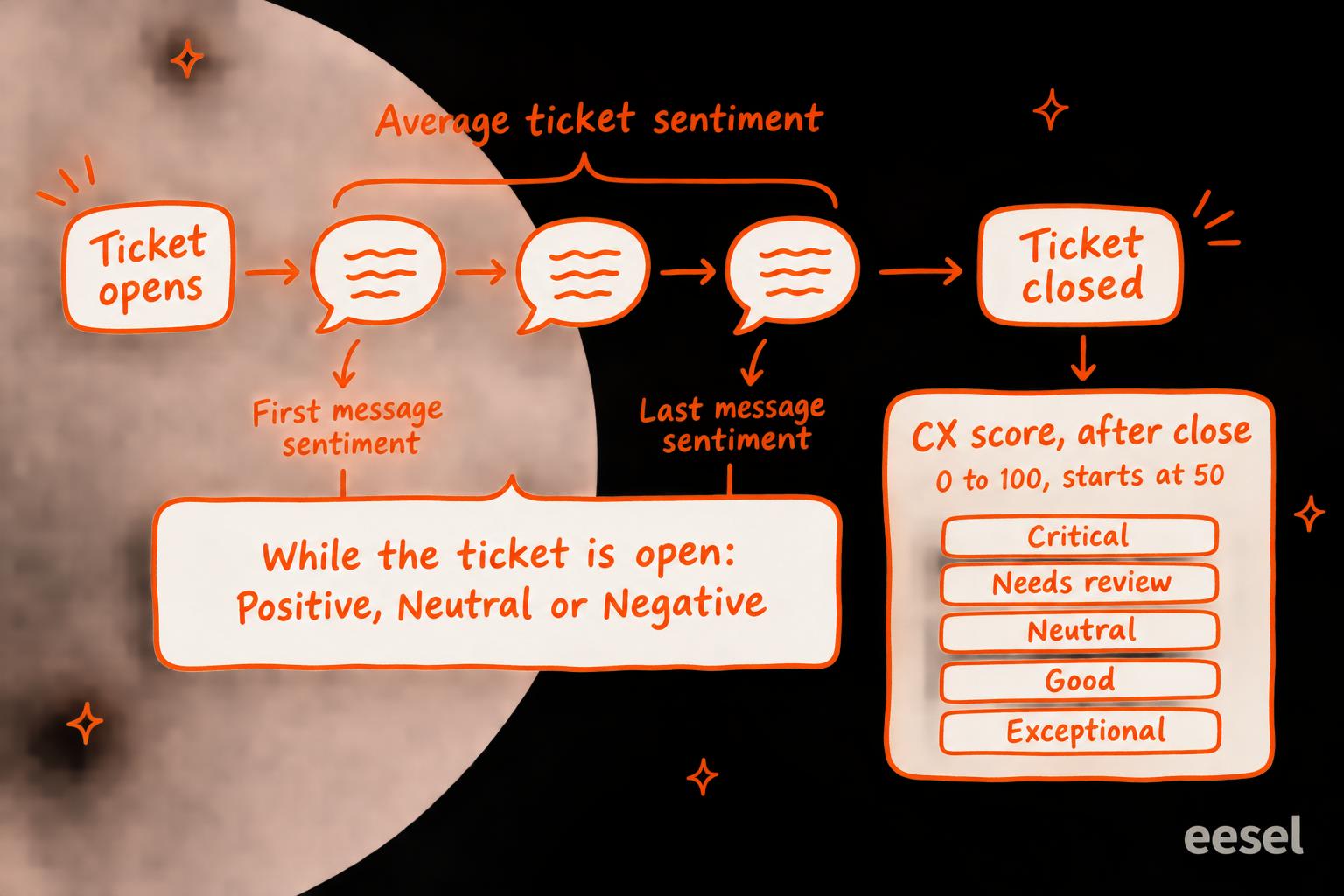
Each customer message gets an AI-generated sentiment score from 0 to 100, and HubSpot turns it into a label: 0-40 is Negative, 41-59 Neutral and 60-100 Positive. The three fields apply that rule to different messages:
| Field | Internal name | What it reads |
|---|---|---|
| First message sentiment | hs_first_visitor_message_sentiment | The customer's first message |
| Last message sentiment | hs_last_visitor_message_sentiment | The customer's latest message |
| Average ticket sentiment | hs_overall_visitor_messages_sentiment | The average score of all the customer's messages |
All three come from the ticket object reference, which lists them as calculated (equation) fields with the same three values. HubSpot's knowledge vaults article also lists "Last message sentiment" and "Last message sentiment score" among the ticket properties Breeze reads by default, so the number behind the label is stored too.
What I couldn't find is a knowledge-base article that documents message sentiment for admins: which plans carry it, where reps see it, or whether it can be switched off. The developer reference is the only place HubSpot defines it, so treat the plan question as one to confirm with your HubSpot rep.
Which sentiment field should you watch?
Watch Last message sentiment on open tickets, and treat Average ticket sentiment as a report, not an alarm. An average flattens the one thing a rep needs to know, which is the direction the customer is moving, and direction is what ticket prioritization runs on. Pick a ticket below to see it. The message scores are made up for the example; the labels follow HubSpot's documented bands.
First message sentiment has a job too: compared with Last message sentiment in a report, it shows whether your team tends to turn tickets around or let them slide. Measuring customer sentiment covers that kind of report.
What is the HubSpot CX score?
The CX score is HubSpot's AI rating of how a closed ticket went for the customer, a kind of AI CSAT that needs no survey. It starts at 50 and moves up or down with signals HubSpot built from historical tickets and feedback, and the CX score article groups the result into five bands:
| CX score | Band |
|---|---|
| 0-30 | Critical |
| 31-45 | Needs review |
| 46-55 | Neutral |
| 56-84 | Good |
| 85-100 | Exceptional |
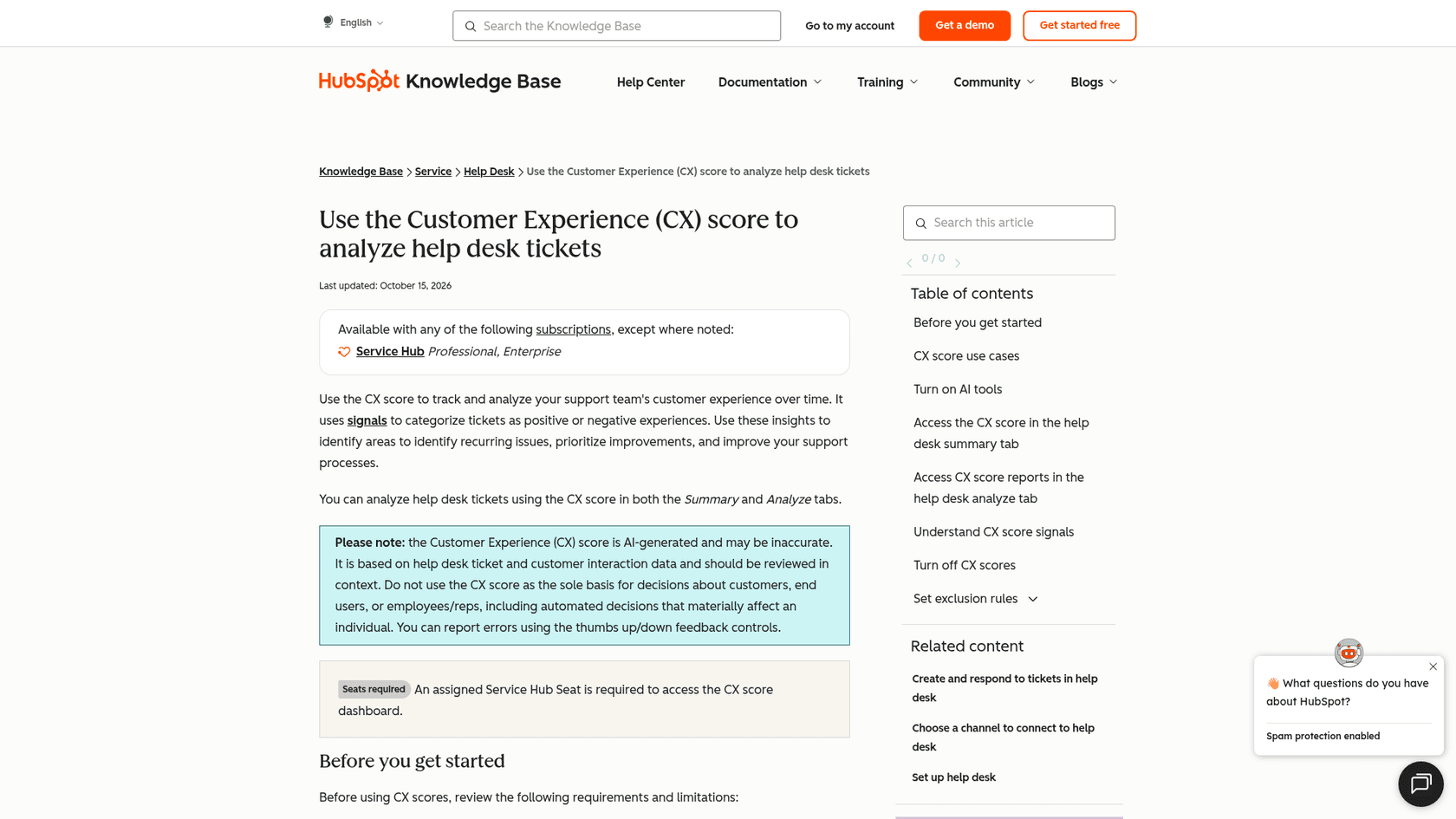
The signals are the useful part, because each one names a cause. The positive ones are enthusiastic gratitude, a confirmed resolution with satisfaction, and positive future intent or advocacy. The negative list is longer and reads like a support lead's worry list: a dismissive or hostile tone, a legal or public-exposure threat, a handoff breakdown, generic support, broken promises, premature closure, a long wait, a billing or refund failure, a product problem hitting the customer's own customers, an internal escalation failure, a problem that keeps coming back, and explicit or inferred time pressure. Each scored ticket also gets a CX Score explanation saying which signals moved it.
The article's rules matter more than they look:
- It needs a conversation. A ticket with no associated conversation record gets no CX score, so tickets a rep logs by hand drop out of your averages.
- Reopening wipes it. A reopened ticket's score is cleared and recalculated when it closes again, keeping the earlier signals.
- Some accounts can't have it. It isn't available when sensitive data processing is turned on.
- It's on by default. HubSpot says CX scores are on unless you switch them off in Settings > Inbox & Help Desk > Help Desk > AI tools, and the same switch controls the QA score.
Two uses make it worth turning on. "Average CXS over time by owner type" splits scores between tickets handled by a human rep only and by HubSpot's customer agent only, which is the fairest test of an AI agent you'll get inside HubSpot. And HubSpot's CX and QA article suggests reading the CX score next to the QA score on Enterprise: a low CX score with a high QA score usually means the problem was the product or the policy, not the rep.
Can you escalate HubSpot tickets on sentiment?
Not on the CX score: it exists only after the ticket closes. By then the customer who threatened to cancel has already had the experience the score describes. HubSpot also says plainly not to use the CX score "as the sole basis for decisions about customers, end users, or employees/reps, including automated decisions that materially affect an individual". It is a coaching and reporting tool, and a good one.
For an open ticket, Last message sentiment is the live signal. HubSpot's knowledge base doesn't document using the three sentiment fields in workflows or custom views, so before you plan an escalation around them, check that they show up as a filter in your own portal and watch a week of tickets to see how often a Negative label matches what you'd have called negative.
Even when it works, a sentiment label answers "how does this message sound", not "what should happen now". A frustrated customer asking a simple question needs a fast answer, not a manager. A polite customer writing "I've spoken to my lawyer" needs a manager, whatever the score says. That judgement is what escalation rules are for. The closest HubSpot gets to a built-in escalation is a workflow on a ticket's SLA status, covered in HubSpot SLA goals, and that fires on time, not tone. A HubSpot Community member asking for Breeze to analyse ticket content put the gap well:
"While HubSpot already provides reporting based on ticket properties, the most valuable information is often contained within the actual conversation."
How much does HubSpot sentiment analysis cost?
The CX score comes with Service Hub Professional or Enterprise; HubSpot doesn't list a separate charge for it. On HubSpot's Service Hub pricing page, Professional starts at $90 per seat per month ($100 on monthly billing) plus a one-time $1,500 Professional Onboarding fee, and Enterprise starts at $150 per seat per month plus $3,500 onboarding. For a 10-seat team on Professional (see Service Hub AI's value) that is $900 a month and $1,500 up front before you've scored a single ticket.
HubSpot doesn't publish which plans carry the three message sentiment fields, so ask before you buy on the strength of them. The full plan breakdown is in HubSpot pricing.
Where does HubSpot sentiment fall short?
- The average hides the turn. Two tickets that moved in opposite directions can both read Neutral, as the example above shows.
- The CX score is after the fact. Great for coaching and spotting causes, no help to the customer who is upset right now.
- A label isn't an action. Neither piece decides who should take the ticket or what to say; that still needs a rule or a person, as in Breeze in workflows.
- Message sentiment is barely documented. Outside the developer reference, there is no admin article for plans, settings or where reps see it.
Where does eesel fit?
eesel is an AI teammate that works inside HubSpot Service Hub, one of the options in best AI for HubSpot. Every time a customer writes, it reads the whole conversation (up to the newest 100 messages), the ticket's fields and, when it needs them, the contact, company and deals behind it, as its HubSpot docs describe. It can then raise the priority, change the owner or stage, or leave an internal note with a draft reply for a rep to send.
That means the rule you care about can be written the way you'd say it to a new hire: "If the customer mentions cancelling, a lawyer or a review, set the priority to high and assign it to the support lead. If they're frustrated but the answer is in the help center, answer fast and stay out of the way." It reads the direction of the conversation, not a single message's score, and it never needs the ticket to close first.
MentorShow runs it this way. Its team works entirely in HubSpot, and in one month (8 August to 8 September 2026) eesel read about 1,200 HubSpot conversations and tickets, leaving an analysis and a draft in the member's language. Its instructions give a member who is going through something hard a longer reply (250 words at most instead of 150), and hand refunds, legal threats and anything touching a member's wellbeing straight to a person.
Try eesel next to your HubSpot help desk
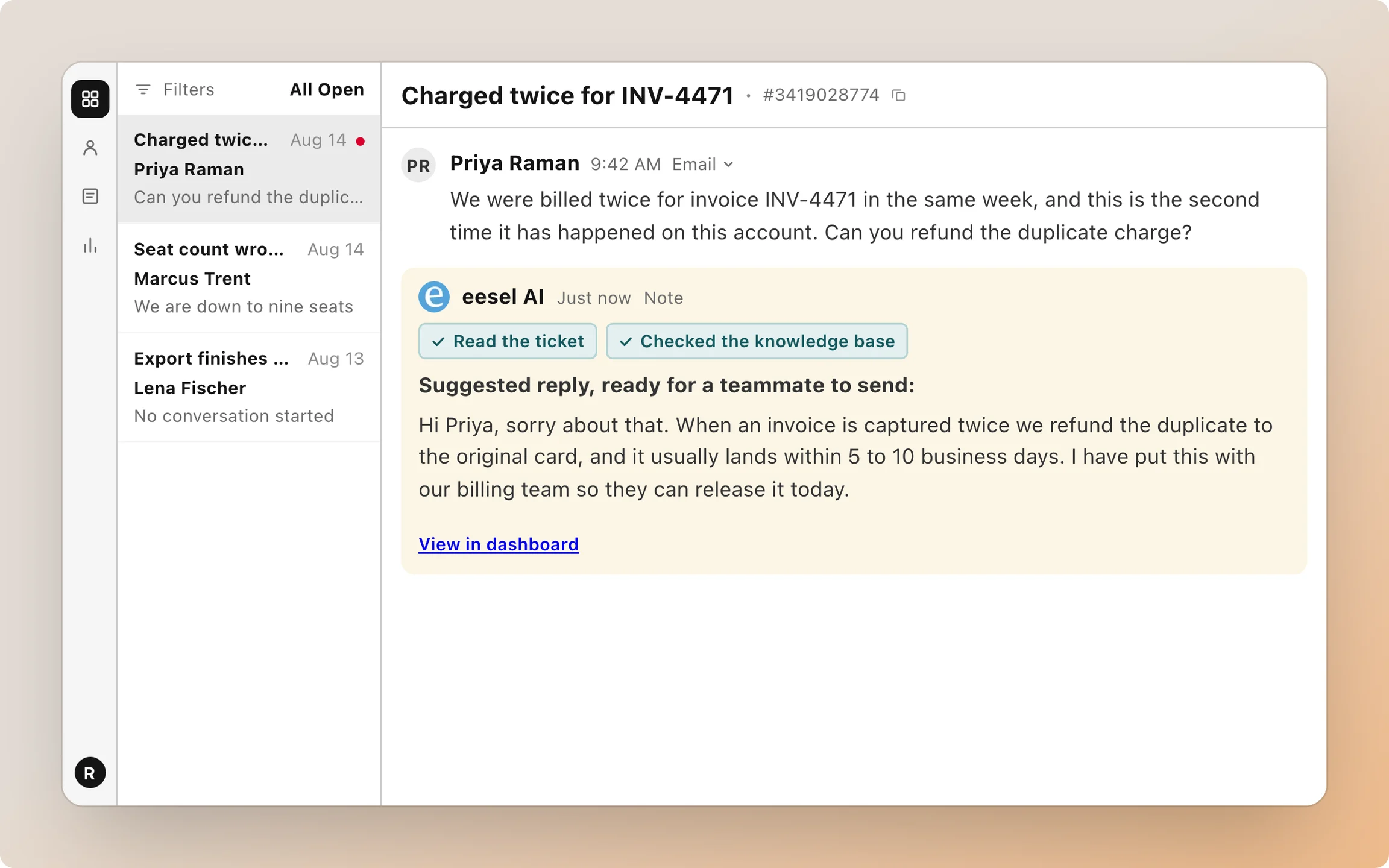
Keep HubSpot's sentiment fields and CX score for what they're good at: spotting trends and coaching. For what happens on the next message, give the decision to something that reads the whole thread. You set each of its HubSpot actions to On, Ask first or Off, and before each change its safety check looks at who is asking, as its actions and approvals page explains. Start with internal notes only, read a week of its calls on real tickets, then let it move priorities and owners.
Try eesel on a copy of your escalation rules and see which tickets it would have flagged that your average missed.