


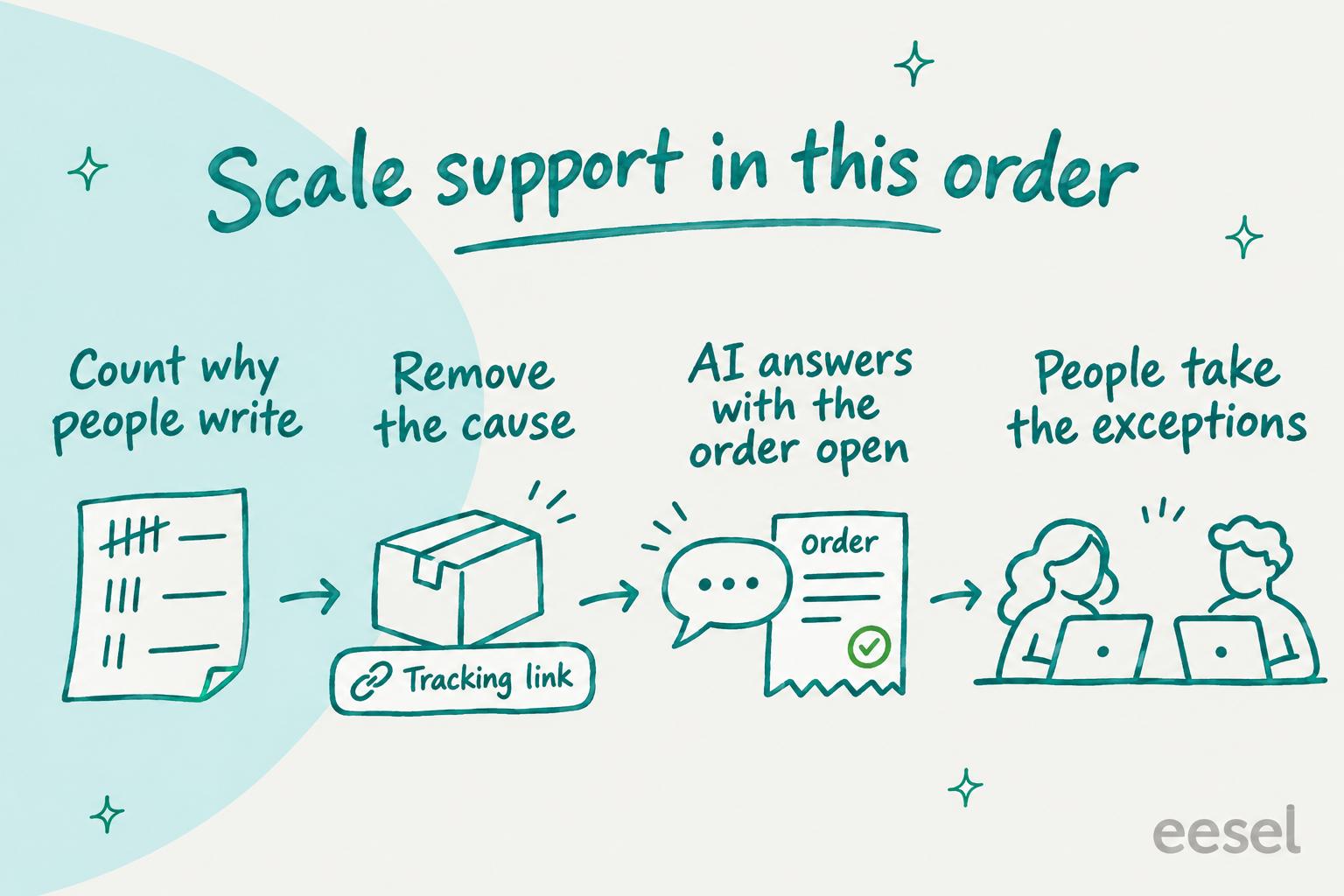
You scale ecommerce support without hiring by cutting tickets per order, not by answering faster: Gorgias's March 2026 data puts stores at 19.4 to 46.3 tickets per 100 orders depending on category, so every order you add brings its share of tickets. Fix the causes first (orders shipped without tracking, returns handled by email), then let an AI agent that can open the live order take the repeat questions, and keep your people on the exceptions.
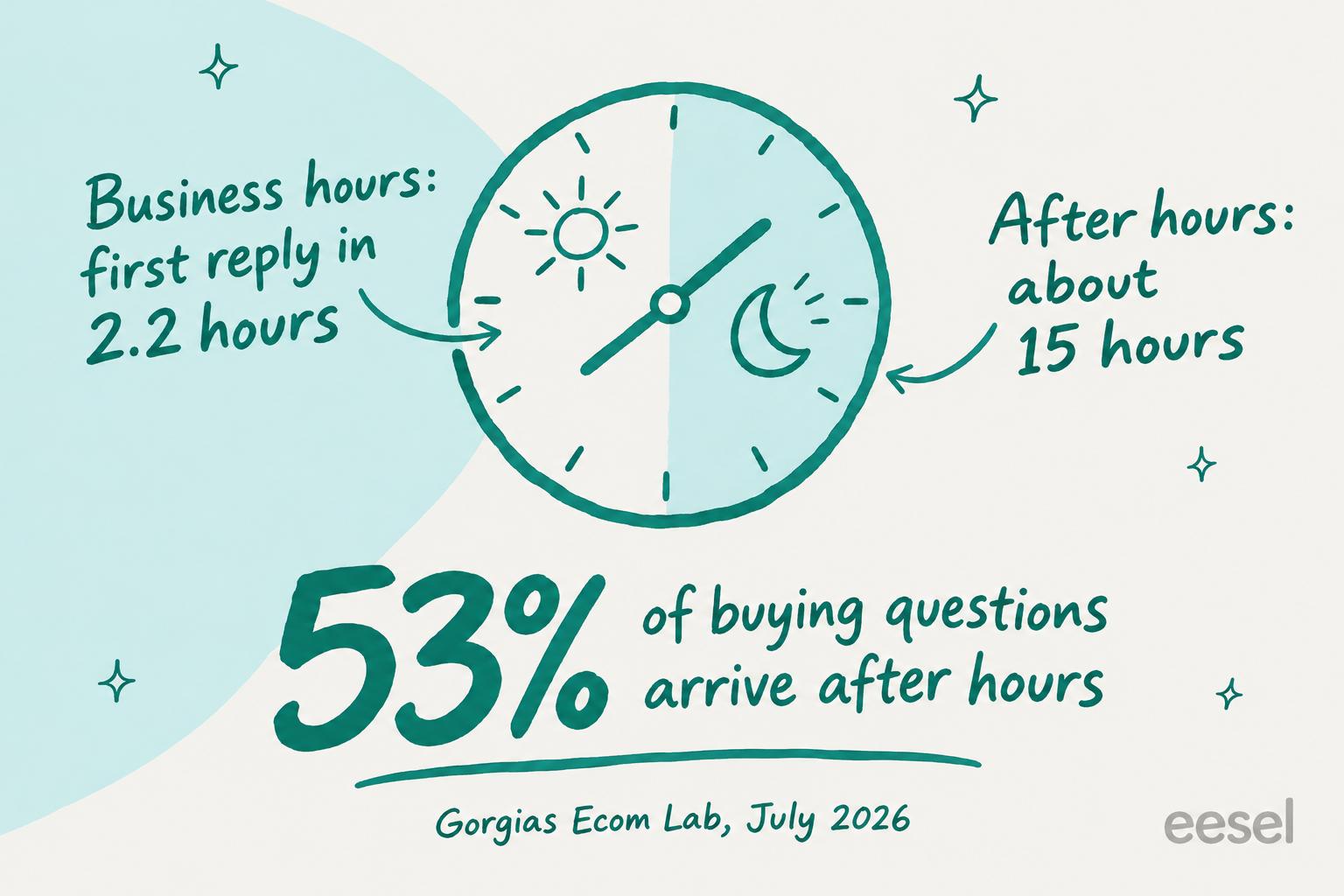
My order of work: count why people write, remove the cause behind the biggest bucket, give your existing team macros for what's left, put AI on the repeat questions with real order data (in draft mode first), and cover nights and peaks before you think about a new hire. The cover matters more than most teams expect: Gorgias found 53% of pre-purchase questions arrive outside business hours.
eesel is the option I'd test for the AI step if you already run a helpdesk: it joins Gorgias, Zendesk, Freshdesk or another helpdesk you already use, reads your past tickets and live Shopify orders, and answers or drafts inside the queue. Question Beauty had it handle 990 Gorgias tickets in a month. If you work with a coding agent such as Claude Code, it can use the eesel CLI to load your approved macros and help articles and run test questions before anything goes live; connecting Shopify still needs a store owner's approval in the browser.
Why does hiring stop keeping up with an online store?
Hiring stops keeping up because tickets grow with orders, and orders don't arrive on a schedule a team can staff for. Gorgias's Ecom Lab benchmark measured tickets per 100 orders across 14 verticals at the $10M GMV band, from 19.4 in Toys and Games to 46.3 in Electronics. Apparel sits at 22.4, Home and Garden at 31.9. Its own reading of that range: "If you are in a high-ticket-volume vertical, that is your baseline, not a problem to fix."
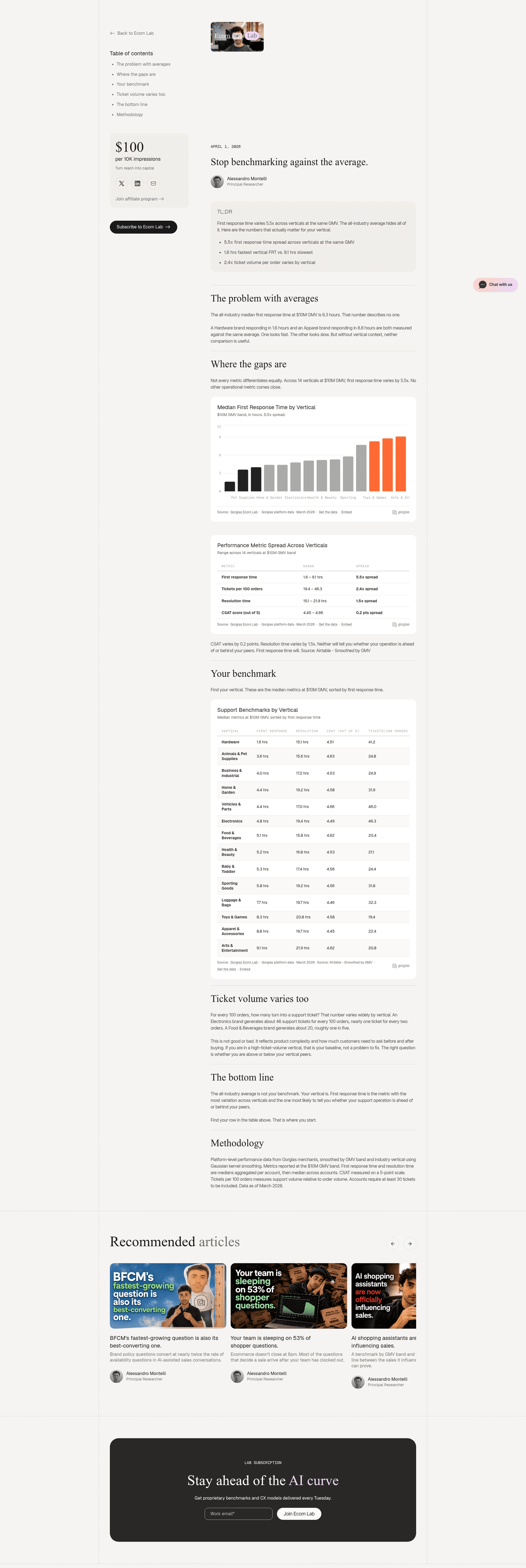
So a store at 3,000 orders a month in Apparel gets about 672 tickets. Double the orders and you double the tickets, at the same moment you're busiest with everything else. That's the trap with a hire as the first answer: it adds capacity in one step, after the volume has already arrived, and it does nothing about why people wrote in.
The other half of the problem is the clock. Gorgias's July 2026 report on after-hours questions found the median brand takes 53% of its pre-purchase questions outside business hours. During the day the median human first reply to a buying question is 2.2 hours; after hours it stretches to about 15 hours. A day-shift hire doesn't touch that gap.
If you want the general version of this argument for any support team, the scaling customer support guide covers it. The rest of this post is the ecommerce version, where the work starts and ends with an order.
Step 1: find out why people write to you
Before you change anything, tag a month of tickets by reason and divide by orders. You need two numbers: your contact rate (tickets per 100 orders) and the share of tickets each reason takes. Most helpdesks have a reason field; Gorgias, for example, suggests contact reasons with AI. If yours doesn't, AI ticket tagging can backfill it.
Then sort the reasons into three groups:
- Caused by the store. Where is my order, a missing tracking number, how do I return this. These should shrink before anyone automates them.
- Repeat questions that need an order looked up. Can I change my address, has my refund gone through, is this size back in stock. These are the AI's job.
- Exceptions. Damaged items, chargebacks, an angry customer on their third message. These stay with people.
A G2 reviewer who runs customer experience at a small business described what that visibility buys:
"It provides our customer experience team with clear visibility to address root problems instead of just handling repetitive tickets, which has resulted in a sustained reduction in volume."

The customer service KPIs guide has the other numbers worth tracking next to contact rate, and cost per ticket is the one your finance person will ask about.
Step 2: remove the tickets your store causes
The cheapest ticket is the one nobody needs to send. For most stores that means order status and returns, the two buckets WISMO automation and returns management posts cover in depth. On Shopify, three settings do most of the work.
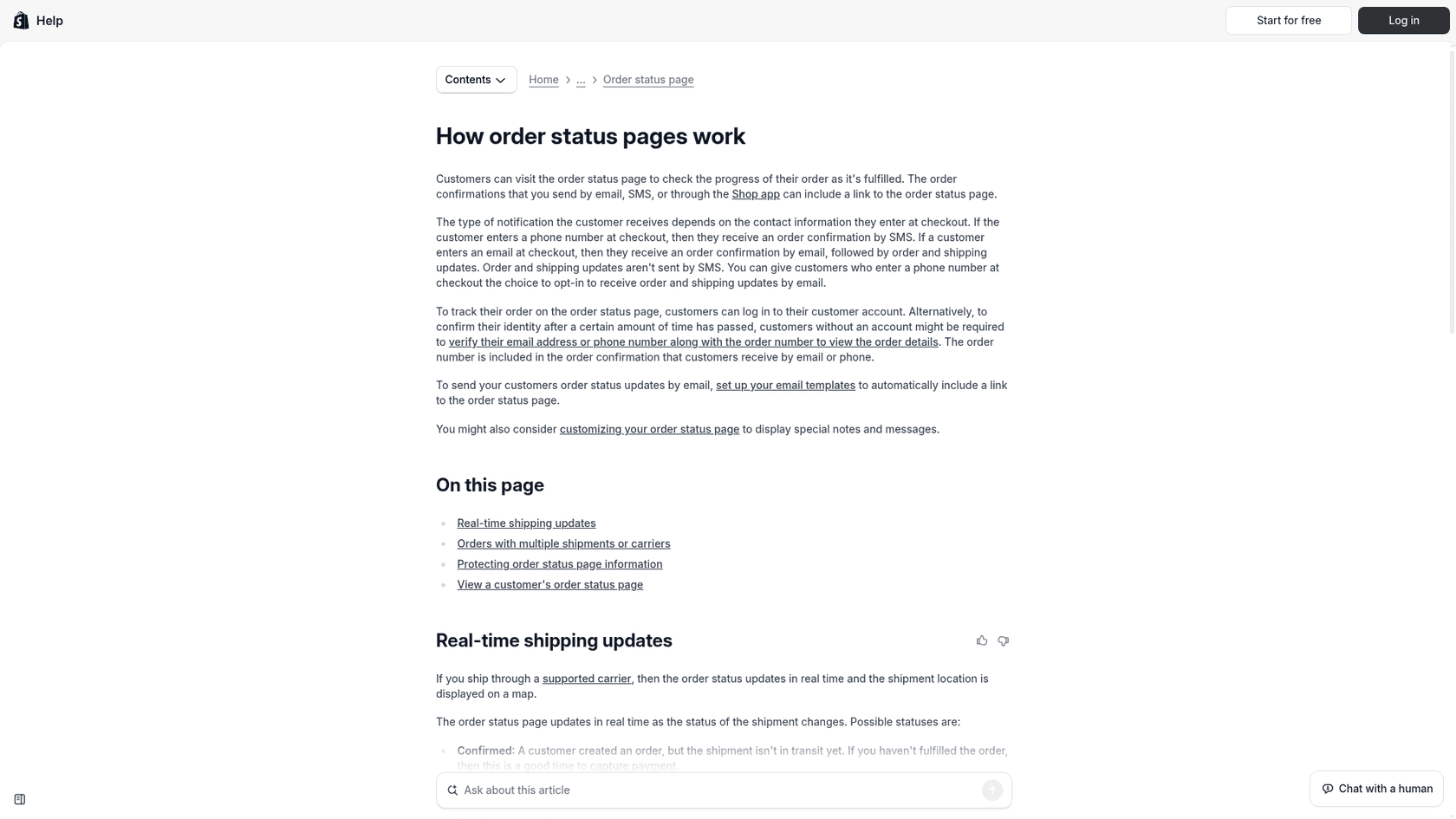
Add a tracking number to every fulfillment. Shopify's order status page updates in real time through supported carriers, from Confirmed to On its way, Out for delivery and Delivered. The catch is in the same doc: if you fulfill an order without a tracking number, no shipping updates arrive and the page stays on Confirmed. A customer looking at "Confirmed" a week after buying writes in, and they're right to.
Leave the shipping notifications on. Shopify's customer notifications include Shipping update, Out for delivery and Delivered, sent as the tracking changes. Some teams switch them off to cut email. A Hacker News commenter on a thread about one item triggering ten emails explained why that backfires:
"This, plus the fact if they don't overcommunicate and send you 10 transactional emails (eg. "your order is still on its way!") they'll have people filing credit card disputes and BBB complaints, blasting support screaming this-site-is-a-scam-where-is-my-order!??"

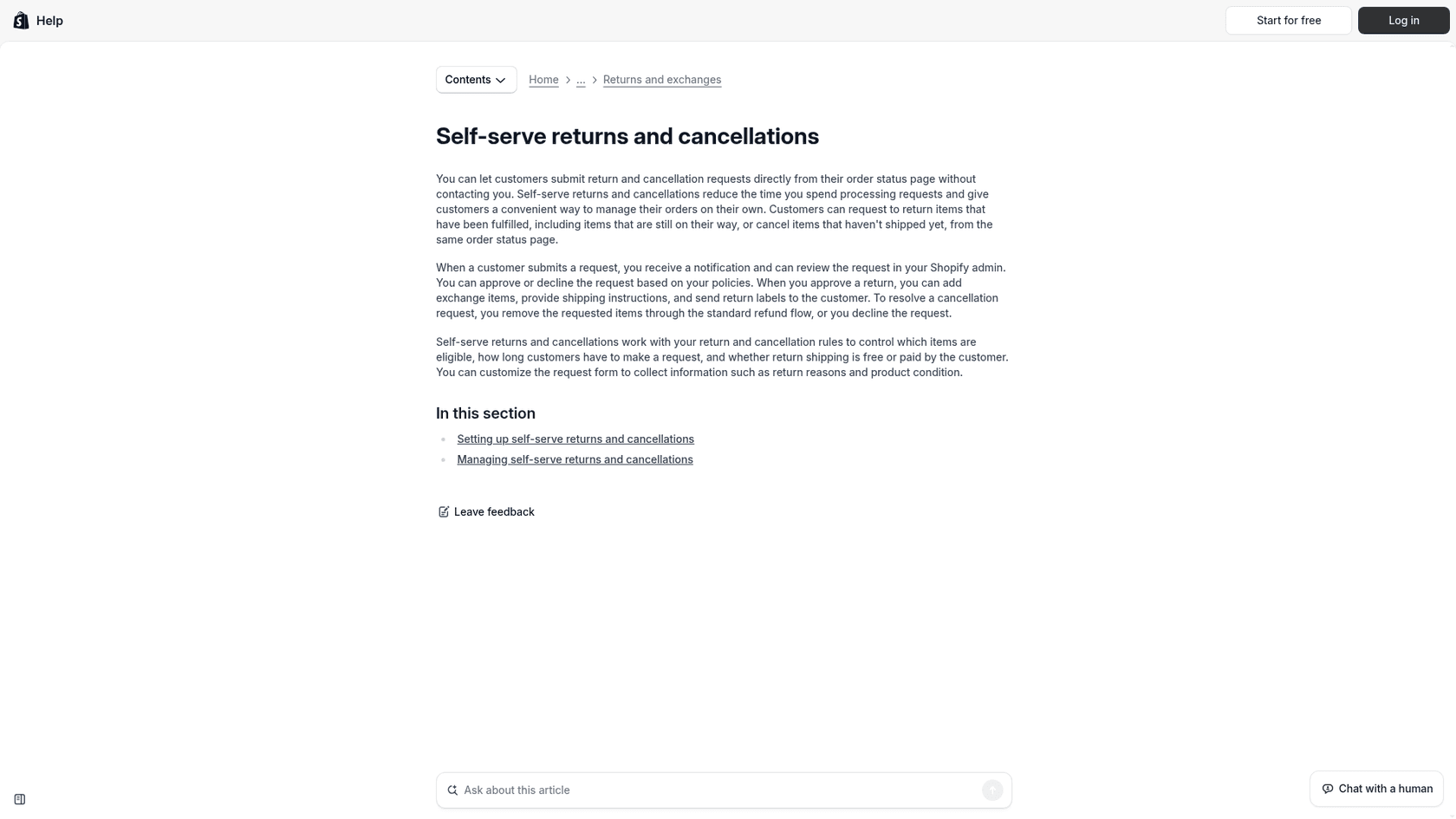
Turn on self-serve returns and cancellations. Shopify's self-serve returns let customers request a return or cancel unshipped items from the order status page "without contacting you". You still approve or decline each request in the admin, under the return rules you set, so nothing goes out that you didn't agree to.
Beyond those three: send a delay email before the customer notices the delay (proactive support is the long version), and put your return window and shipping times on a page people can find. The ecommerce FAQ examples post has wording you can borrow. None of this costs a seat, and every ticket it removes is one you never pay anyone, human or AI, to answer.
Step 3: give your team macros for what's left
Whatever still arrives, your current team should answer it from saved replies, not from scratch. Gorgias's macros doc puts it plainly: "Macros enable your agents to respond to customers and take actions on tickets in a single click." Connect a Shopify store and Gorgias generates default macros with Shopify actions and variables. Zendesk, Freshdesk and Help Scout all have the same idea under different names. The Gorgias macros guide walks through a set for a store.
Macros matter for the next step too. A good macro library is the policy your AI agent will follow, already written in your voice, so time spent here pays twice. If your library is thin, AI macros can draft a first set from your past replies for a person to check.
Step 4: put AI on the repeat questions, with the order open
This is the step that replaces the hire, and the one where the choice of tool matters most. An AI that can only read your FAQ answers the questions your FAQ already answers. The tickets that eat a team's day need the order: is it shipped, where is it, can the address still change, has the refund gone through. So the question to ask of any AI agent is what it can read and do in your store, and what it asks a person about first.
Three common routes for a Shopify store:
| Option | Where it answers | Order data | Price |
|---|---|---|---|
| Shopify Inbox agent | Your online store chat | Order review after the customer signs in; a Track my order answer by order number and email | Free app |
| Gorgias AI Agent | Inside Gorgias (email, chat and more) | Your Shopify data through Gorgias; actions such as cancel from Basic up | $0.85 to $1.00 per automated interaction, plus the helpdesk plan |
| eesel | Inside your existing helpdesk, chat bubble, Slack | Live Shopify orders, tracking, refunds and returns, each set to act alone, ask first or stay off | 7-day free trial, then from $299/month for 500 credits |
Shopify Inbox is the free start for chat. Its Inbox agent answers from your catalog, policies, Knowledge Base and storefront pages, and Shopify's docs say "Order lookup always requires the customer to sign in"; a separate Track my order instant answer works from an order number and email. It also has AI suggested replies for staff. It lives in store chat, so your email queue stays as it was. The Shopify Inbox guide covers its setup.
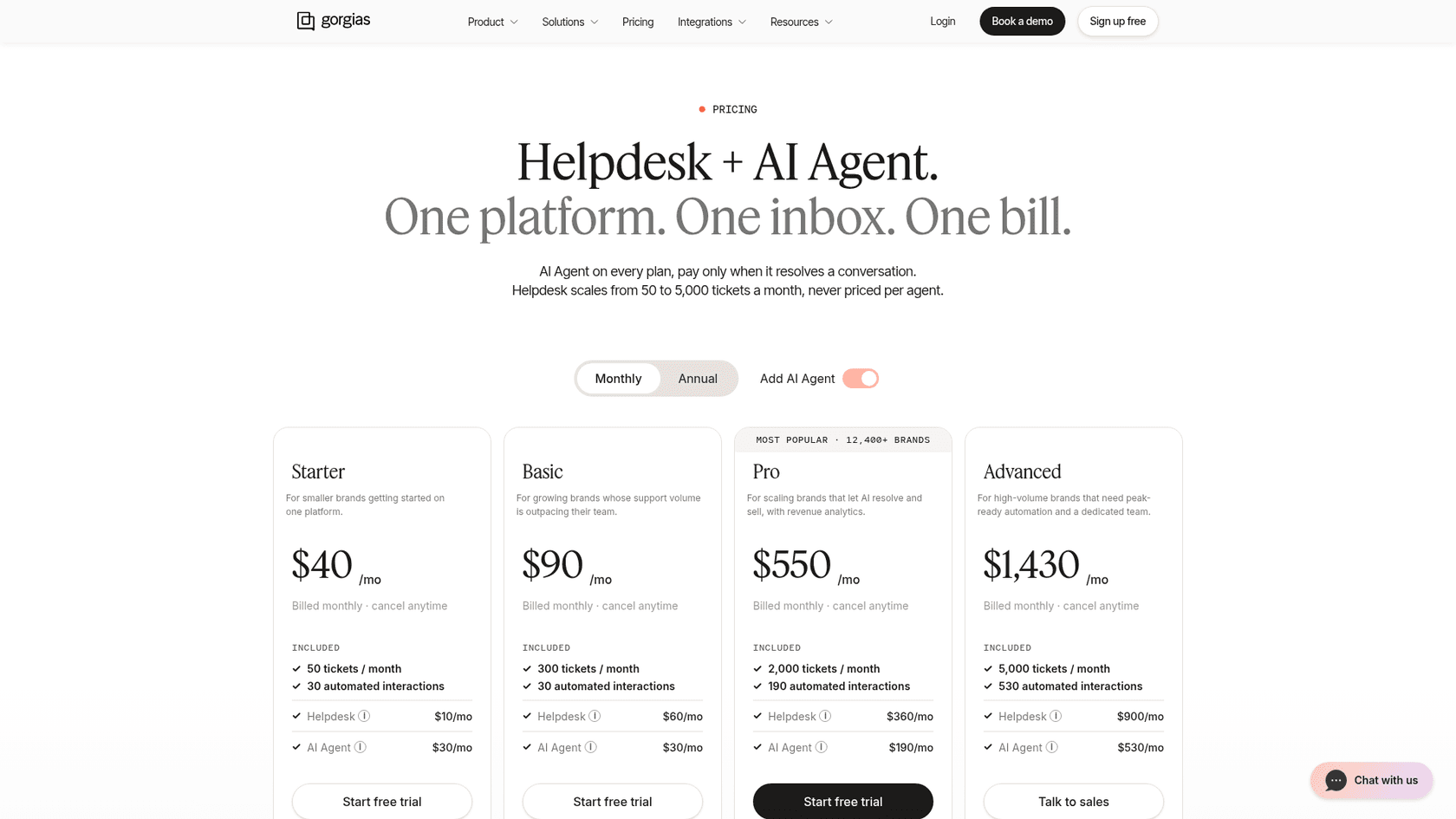
Gorgias AI Agent is the natural pick if you're on Gorgias already. The pricing page charges per automated interaction, $1.00 on Starter down to $0.85 on Advanced, on top of the helpdesk; Pro is $550 a month with 2,000 tickets and 190 automated interactions included. Its compare table lists actions such as cancel and discount from Basic upward. The Gorgias AI Agent pricing breakdown does the per-resolution maths.
eesel joins the helpdesk you already run rather than replacing it. Its Shopify docs list what it can read live (orders, each parcel's carrier and scan events, a customer's order history by email, stock by variant or location) and what it can do: refund, cancel an unfulfilled order, create a return, change the shipping address on an order that hasn't shipped. Each action can run on its own, wait for a person's yes, or stay off, set in actions and approvals, so it can look up any order freely while refunds wait for your team, if that's how you set it.
Two eesel limits to plan around. Shopify starts nothing: per those docs, "Shopify has no triggers", so eesel works when a ticket, chat or Slack message arrives, not on an order event such as a failed payment. And on a store that hasn't granted full order history, order lookups reach back 60 days. If you need an email sent the moment an order changes, keep Shopify Flow or your email tool on that job.
What the step looks like in a real queue: Stil Classics, a planner and stationery brand on Gorgias, had eesel prepare about 320 tickets in a month, with about 230 Shopify orders looked up before a line was drafted. Almost every reply sat as an internal note for a person to send (about 16 went out as public replies that month), and eesel never changed an order. Question Beauty went further: 990 Gorgias tickets handled in a month, 960 replies sent by eesel directly, and 280 tickets closed without a person, with the rest tagged for the team.
That's the order I'd copy. Start in draft mode, read a week of drafts, then let it send on the question types it got right. The deflection vs resolution rate post covers how to measure the switch honestly, and best AI for ecommerce support compares more tools if these three don't fit.
Step 5: cover nights, weekends and peaks without a new shift
Once an agent can answer the repeat questions, it answers them at 11pm too, which is where the 53% after-hours share bites. Gorgias's own report puts its AI Agent's reply at 23 seconds against a human median of about 15 hours after hours, and says its Shopping Assistant resolved 91% of after-hours pre-purchase conversations without a handover. Those are Gorgias's figures for its own product, but any agent that answers overnight has the same edge over a queue that waits for Monday. The after-hours support guide covers the setup.
Peaks are the other place a hire looks tempting. Before Black Friday, check three things: the agent's handover rules for damaged and missing items, your delay emails, and the credit or ticket allowance on whatever AI plan you're on, since November volume can outrun a plan sized for October. The Black Friday support and seasonal spikes posts have the checklist.
If you'd rather nobody on your team ran any of this, outsourcing is the other road. eesel's Managed Support runs a brand's whole support team inside its own helpdesk and store for $5,000 a month flat, built for brands with up to about 5,000 conversations a month. Its page compares that with a five-agent 24/7 team at $7,000 to $10,000 a month offshore or about $25,000 US-based. The ecommerce outsourcing guide weighs the options.
What scaling without hiring costs for your store
The bill depends on three numbers you now have: orders, tickets per 100 orders, and how many tickets you removed at the source. Pick your category and move the sliders to see what reaches your queue, what an AI agent could close on its own, and what eesel would cost for it.
Pick your category and orders, then move the two sliders to see what's left for your team and what the AI step costs.
The AI slider starts at 28% because that's roughly what Question Beauty's story shows: 280 of 990 tickets closed without a person. Treat it as one store's result, not a promise; your number depends on how many of your tickets are order lookups versus judgment calls. On eesel's pricing page, a ticket is 1 credit however long it runs, tickets the agent stays out of cost nothing, and extra credits are $0.80 each up to a cap you set. The AI vs offshore team post puts the same numbers next to an outsourced team.
What goes wrong when stores scale support this way?
These are the mistakes I'd watch for, in the order they tend to happen.
- Automating before removing. An AI that answers "where is my order" 400 times a month for orders shipped without tracking is paying to paper over a fulfilment habit. Fix the tracking first.
- Hiding the contact button. A lower contact rate from customers who gave up is a worse result than a higher one, and Gorgias's report notes that CSAT only surveys people who stayed.
- Letting the AI send on day one. Read a week of drafts first. Stil Classics keeps almost every reply as a draft for a person to send, and that's a fine place to stay for a small team.
- Giving refunds no approval step. Let the agent look up any order freely, and make refunds and cancellations wait for a person until you trust the pattern. Can AI handle refunds covers where that line usually sits.
- Sizing the plan for a quiet month. Whatever you pay per ticket or per resolution, November is the month it runs out.
Try eesel on your store's busiest questions
If your queue is mostly order questions, eesel is the AI step I'd test first: it joins the helpdesk you already have, opens the live Shopify order before it answers, and does only what you've allowed for each kind of person writing in. A verified customer can get their tracking straight away, while a refund request waits for your support lead's yes in Slack or the dashboard.
The trial is 7 days with 100 credits and no card, enough to connect your helpdesk and Shopify and read real drafts before you pay anything. Try eesel, or book a call if you want someone to look at your queue with you.