The 7 best TeamSupport alternatives in 2026

Riellvriany Indriawan

Katelin Teen
Last edited October 14, 2026

Why teams leave TeamSupport
Let me start by being fair: TeamSupport does the core job well. It was founded in 2008 as the first cloud-based support tool built for B2B, and that heritage shows. It rolls tickets, contacts, and health signals up to the company level, so a support lead sees the whole account instead of scattered emails. Reviewers back this up, praising how it unifies email, chat, and calls into one system and gets new agents productive fast. On Capterra it holds a 4.5/5 across 849 reviews.
So this is not a hit piece. It is a "here is why you might be shopping anyway" piece, and there are three real reasons.
First, you cannot see what it costs without a sales call. Every button on the TeamSupport pricing page reads "Get a Quote." The listed Support figures are Starter at $45/month (capped at 5 users), Professional at $65/month, and Scale at $85/month, all billed annually. There is no free tier and no self-serve checkout, which makes it hard to budget before you are already in a demo.
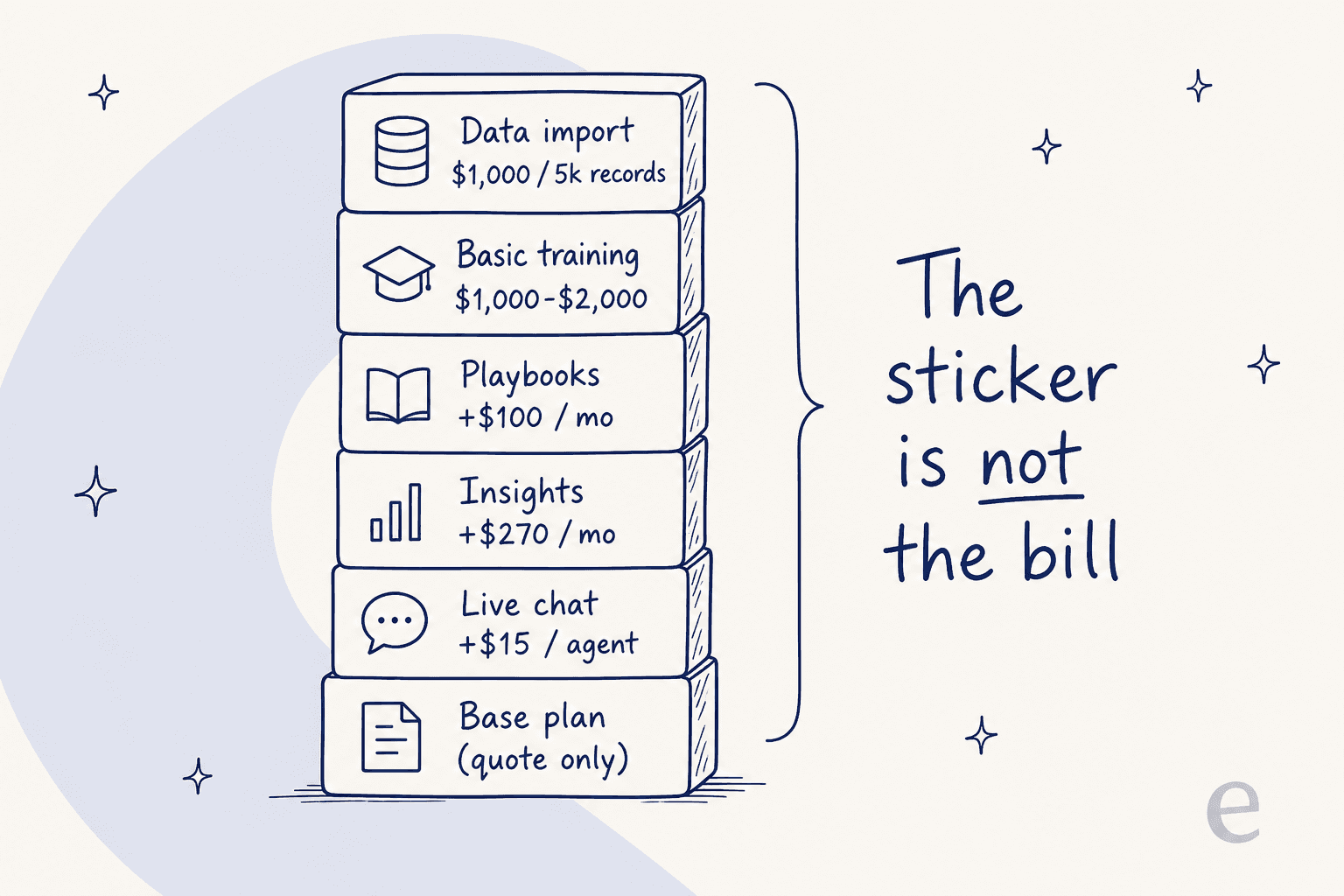
Second, the sticker is not the bill. Live chat is a $15/month/agent add-on on every tier. The Insights analytics module is $270/month. Playbooks run $100/month past the one or three included. Then there are one-time services: Basic Training at $1,000-$2,000 and data import at $1,000 per 5,000 records. None of that is hidden, but it stacks up quickly.
Third, performance is the recurring gripe. The features are there; the speed sometimes is not. Reviewers are candid about it:
"It's annoying when the user interface is sluggish and unresponsive when we need to reply fast to a client's request."

"The search feature sometimes performs poorly; especially when looking up tickets issued for past events."
G2's own aggregate flags the mobile app as the top area for improvement. If any of that sounds like your day, the seven customer service software options below are worth a look.
How I picked, and how to choose
I weighed each tool on the things a B2B support team actually feels: transparent pricing you can check without a call, a genuine free trial or tier, how the AI is priced (per resolution, per seat, or per session), whether it fits an account-based B2B model, and how heavy the setup is. Security certifications (SOC 2, GDPR, HIPAA) matter too once you are past a handful of agents.
The quickest way to narrow it down is to name your single biggest need first, then match it to a tool.
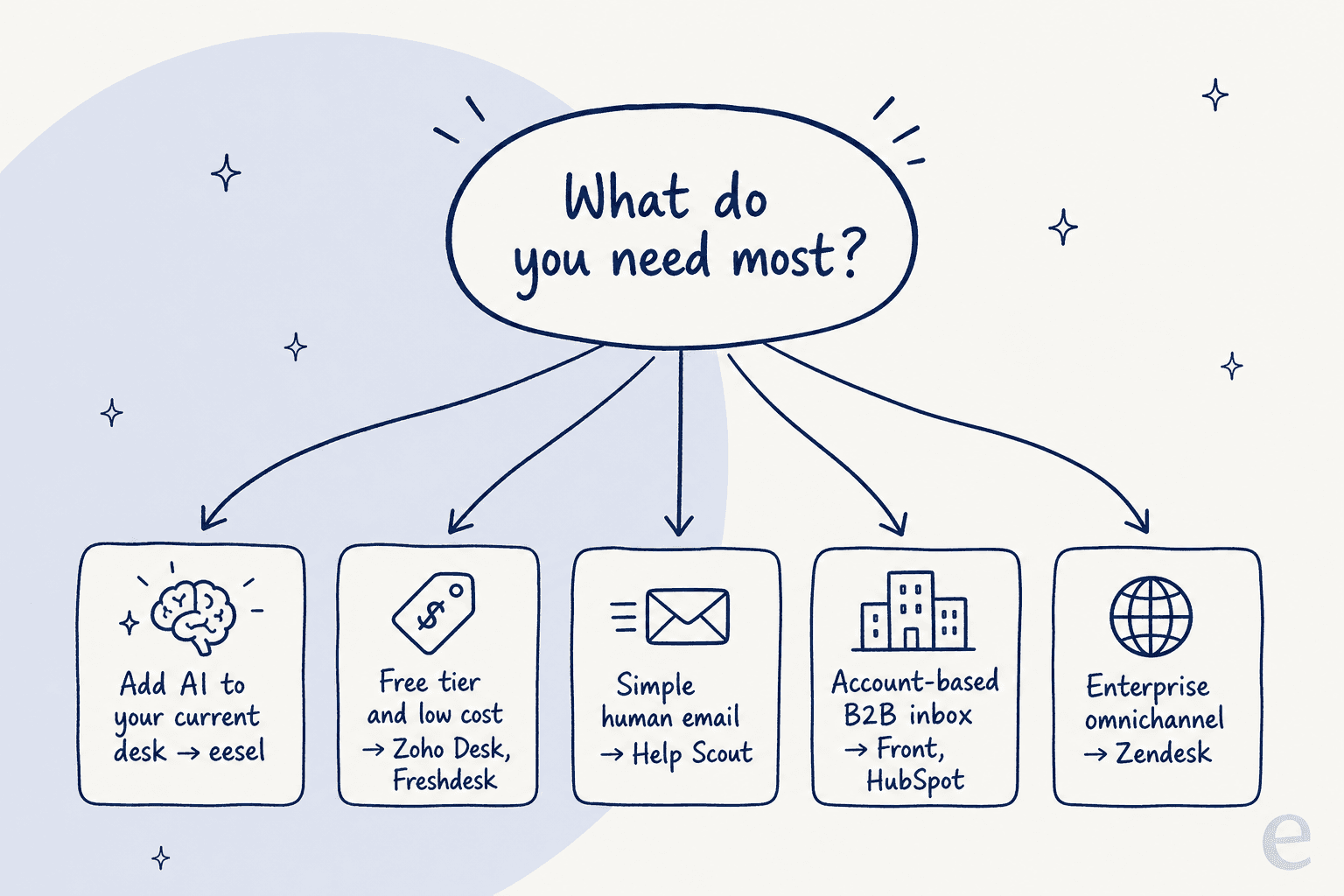
Here is the whole field at a glance before we go deep on each one.
| Tool | Best for | Starting price | AI pricing | Free tier | Where it is weak |
|---|---|---|---|---|---|
| eesel AI | AI on your existing desk | From $299/mo (500 credits) | 1 credit per ticket or chat (bundled) | 100 free credits | Not a full ticketing system on its own |
| Zendesk | Enterprise omnichannel | $19/agent/mo (Support Team) | Per automated resolution | 14-day trial | Cost climbs fast with AI add-ons |
| Freshdesk | Budget + free program | Paid from $19/agent/mo | $49 per 100 sessions | 2-agent Free Program (6 months) | AI billed per session, not resolution |
| Zoho Desk | Lowest cost | $0 free, paid from $7/user/mo | Own OpenAI key / Answer Bot from Standard | Yes (3 users) | Zia Actions and prebuilt AI agents are Enterprise-only ($40) |
| Help Scout | Simple email support | $0 free, paid from $25/user/mo | $0.75 per AI resolution | Yes (5 users) | Light on deep automation |
| Front | Account-based B2B inbox | $25/seat/mo | Autopilot from $0.05/conversation | 14-day trial | AI add-ons stack over Enterprise |
| HubSpot Service Hub | Teams on HubSpot CRM | $0 free, Pro from $90/seat/mo | 50 credits per resolution | Yes (2 users) | Onboarding fee + credit math |
Now the details.
1. eesel AI
Best for: teams who like their current helpdesk and just want AI to handle the repetitive tickets, without a migration.
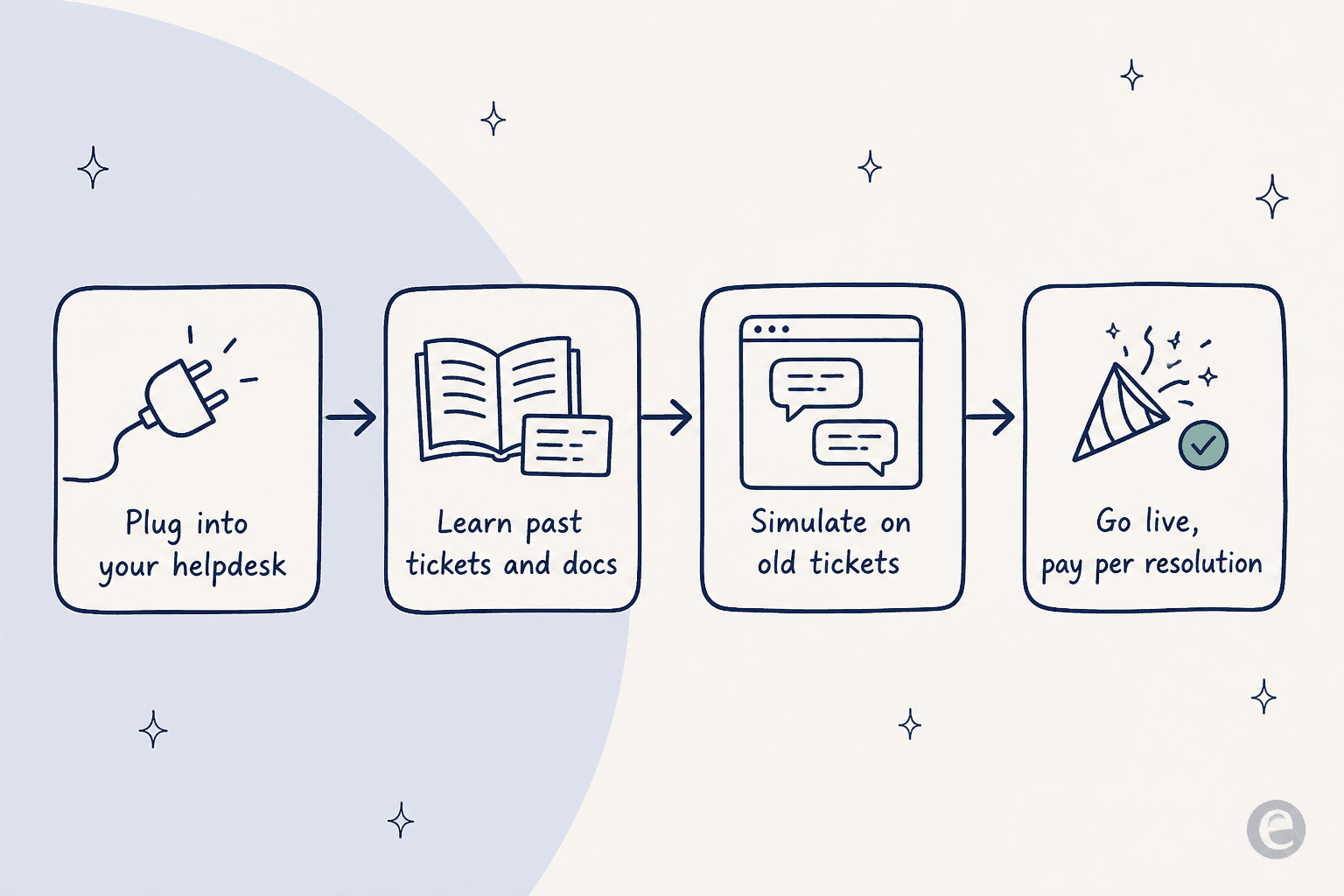
Most tools on this list ask you to switch helpdesks. eesel AI takes the opposite bet: keep the desk you have, and hire an AI helpdesk teammate that works inside it. It connects to Zendesk, Freshdesk, Zoho Desk, Help Scout, Gorgias, and shared inboxes, learns from your past tickets and help center, and then drafts or fully resolves tickets in the same queue your human agents use.
The reason I put it first for TeamSupport switchers is the risk profile. TeamSupport buyers tend to sit on high-value B2B accounts, so a confident-but-wrong bot is a real fear. eesel's answer is a simulation mode that runs the AI over thousands of your historical tickets before it touches a live customer, so you see the resolution rate and the exact replies it would have sent first.
Pros:
- No rip-and-replace. Works on top of your existing helpdesk, so you are not migrating tickets or retraining your team on a new UI.
- Simulate before go-live. Test on real past tickets and see the numbers before customers do.
- One fixed monthly price. 100 free credits, then from $299/month for 500 credits (1 credit per ticket or chat), with no per-seat fees and no platform fee. Only tickets the AI actually works on count.
- Selective automation. Route only the ticket types you trust to AI and leave the rest to humans.
Cons:
- It is an AI layer and reporting tool, not a full ticketing system with its own queue, SLAs, and portal. If you want to replace TeamSupport's helpdesk entirely rather than automate on top of one, you still need an underlying desk.
- Deep account-health scoring like TeamSupport's Customer Distress Index is not a native eesel feature.
Pricing: one fixed monthly price. 100 free credits, then from $299/month for 500 credits. One credit covers a ticket or chat no matter how many messages it takes, and tickets your humans handle do not use credits.
Verdict: if the thing pushing you off TeamSupport is "I want AI that works and I do not want a migration," start here. It is the lowest-risk automation path on this list. If you need a brand-new ticketing backbone, pair eesel with one of the desks below.
2. Zendesk
Best for: larger teams that need every channel and have the budget to match.
Zendesk is the default enterprise answer, and for good reason: it does email, messaging, voice, and social in one place, with a deep app marketplace and mature reporting. If TeamSupport feels too narrow for a support org that spans many channels and regions, Zendesk is the obvious step up. Our full Zendesk review goes deeper on the AI side.
Pros:
- The most complete omnichannel platform here, with the biggest integration ecosystem.
- Transparent published pricing on the lower tiers: Support Team at $19/agent/month, Suite Team at $55, Suite Professional at $115 (all annual).
- Strong native AI agents billed per automated resolution.
Cons:
- The real cost is higher than the sticker. Anything above Suite Professional is quote-only, and Copilot features are mostly add-ons even on Professional, with writing tools capped at 5 uses per agent per month, pooled and capped at 500 per instance.
- It is a lot of platform if all you needed was TeamSupport's account view.
Pricing: from $19/agent/month (Support Team) up to $115/agent/month (Suite Professional), with the top tiers sales-quoted. Included automated resolutions run 5-10 per agent per month depending on plan. See our guide to Zendesk AI agents, setup and costs.
Verdict: pick Zendesk if you are scaling into a true multi-channel operation and want the category leader. Skip it if you are a lean B2B team that mostly lives in email and tickets, since you will pay for breadth you may not use.
3. Freshdesk
Best for: budget-conscious teams that still want a free six-month start.
Freshdesk is the friendly, affordable ticketing tool that gets a small team going without a sales call, which is the exact opposite of TeamSupport's quote wall. It has a six-month Free Program for 2 agents and a clean upgrade path. For a fuller list, our Freshdesk alternatives roundup is worth a read too.
Pros:
- A six-month Free Program for 2 agents, then Growth at $19/agent/month, Pro at $55, Enterprise at $89 (annual). Published, no quote required.
- Fast to set up and easy for new agents to learn.
- Freddy AI is available, with the first 500 AI Agent sessions free on Growth, Pro and Enterprise.
Cons:
- The AI is billed per session at $49 per 100 sessions, not per resolution, so budgeting depends on volume. The Freddy Copilot agent-assist add-on is a separate $29/agent.
- Less of a native B2B account model than TeamSupport; it is contact-first out of the box.
Pricing: a six-month Free Program for 2 agents, then $19-$89/agent/month standalone (Omni SKUs run higher). Full detail in our Freshdesk AI pricing breakdown.
Verdict: a great landing spot if price transparency and a free start are what you are missing. If you specifically need TeamSupport's account-level rollups, Freshdesk will feel more ticket-centric. You can always add eesel on top of Freshdesk for AI priced at 1 credit per ticket instead of the session meter.
4. Zoho Desk
Best for: cost-sensitive teams, especially anyone already living in the Zoho ecosystem.
Zoho Desk is the value pick. It markets itself as the low-cost help desk and the numbers back it up, with a free tier for three users and paid plans starting at $7/user/month. If you already run Zoho CRM or Books, the integration is the real draw. Our Zoho Desk AI review covers the AI in depth.
Pros:
- The cheapest serious option here: Express at $7, Standard at $14, Professional at $23, Enterprise at $40 (per user/month, annual).
- Free forever plan for 3 users, and a 15-day trial on paid tiers.
- Tight fit with the wider Zoho suite.
Cons:
- The knowledge base only appears from Standard ($14), and the Zia Answer Bot starts at Standard, while the one inside the ASAP widget is Enterprise-only at $40. Generative AI on lower tiers needs your own OpenAI API key.
- The account-level B2B depth is lighter than TeamSupport's.
Pricing: $0 free (3 users) up to $40/user/month for Enterprise. See our Zoho Desk AI pricing explainer for what unlocks where.
Verdict: the best choice if raw cost is the deciding factor, particularly for Zoho-native shops. Just know the most advanced AI (Zia Actions, prebuilt AI agents) sits at the top tier, so if AI is the priority, price the Enterprise plan (or bolt AI on separately). Worth weighing against Zendesk in our Zendesk vs Zoho Desk comparison.
5. Help Scout
Best for: teams that want support to feel personal and human, not like a ticket factory.
Help Scout hides the "ticket" feeling entirely. Conversations look like real emails, which customers tend to prefer, and the product is famously easy to adopt. If TeamSupport feels heavy and you mostly need a clean shared inbox with a knowledge base, this is the calm option. More in our Help Scout review.
Pros:
- Clean, human-feeling interface with a very short learning curve.
- Transparent per-seat pricing: Standard $25, Plus $45, Pro $75 (per user/month, annual), plus a free plan for 5 users.
- AI Answers is priced honestly per resolution at $0.75, which is easy to reason about.
Cons:
- Lighter on deep automation and account-based B2B structure than TeamSupport.
- Some advanced routing and SLA features sit on the higher tiers.
Pricing: free (5 users), then $25-$75/user/month. Full detail in our Help Scout pricing guide, and other options in Help Scout alternatives.
Verdict: the pick when tone and simplicity beat feature depth. If your B2B accounts need heavy customization and health scoring, Help Scout will feel too light, but for a lean team that values the customer experience, it is lovely.
6. Front
Best for: account-based B2B teams that want a shared inbox with real relationship context, which is the closest match to TeamSupport's DNA.
Front blends the feel of email with the structure of a helpdesk, and crucially it can group conversations by company, which mirrors TeamSupport's account-centric approach better than most tools here. For high-touch B2B relationships where the same customer emails from three addresses, that grouping is the whole game. See our Front review for the deep dive.
Pros:
- Genuinely account- and relationship-oriented, not just ticket-oriented.
- Published seat pricing: Starter $25, Professional $65, Enterprise $105 (per seat/month, annual).
- Strong collaboration features (internal comments, assignments) that support teams love.
Cons:
- Front AI is mostly add-ons. Copilot, Smart QA, and Smart CSAT each cost extra, and stacking them on Professional can cost more than Enterprise where they are bundled. Autopilot is a separate $0.05+/conversation usage charge.
- A 2-seat minimum and per-tier seat caps to watch.
Pricing: $25-$105/seat/month, plus AI add-ons. Compare options in our Front alternatives list.
Verdict: if TeamSupport's account view is the thing you would miss most, Front is the most natural switch. Price the AI carefully, though; if you want full assistive AI, quote Enterprise first, or add AI priced at 1 credit per ticket on top instead of buying every Front add-on.
7. HubSpot Service Hub
Best for: teams already using (or planning to use) HubSpot CRM, who want support tied to the full customer record.
HubSpot Service Hub is the strongest choice when support cannot be separated from sales and marketing context. Because it sits on HubSpot's Smart CRM, every ticket carries deal stage, prior conversations, and marketing touchpoints, which is a very B2B way to work. Our writeup on HubSpot AI agents has the full picture.
Pros:
- Unmatched CRM context on every ticket if you are already a HubSpot shop.
- A free tier (2 users) and a clear feature ladder.
- Breeze Customer Agent handles resolutions, priced at 50 credits per resolution.
Cons:
- It gets expensive: Professional is $90/seat/month with a required one-time $1,500 onboarding fee, and Enterprise adds a $3,500 fee. AI runs on a separate HubSpot Credits meter at $9 per 1,000 credits.
- Overkill (and pricey) if you do not use the rest of HubSpot.
Pricing: free (2 users), Starter from $7-$20/seat, Professional $90/seat, Enterprise $150/seat, plus onboarding fees and credits. Our HubSpot AI pricing guide breaks down the credit math.
Verdict: the best fit if you are consolidating support into an existing HubSpot stack. If you are not already on HubSpot, the onboarding fee and credit model make it a heavier commitment than a standalone desk.
Try eesel AI on your existing helpdesk
If you have read this far, you probably like a lot about TeamSupport and mostly want faster, cheaper, more automated support without a painful migration. That is the exact gap eesel AI is built for.
Instead of switching desks, eesel drops an AI teammate into the helpdesk you already run, learns from your past tickets and help center, and starts resolving the repetitive ones. The part that matters for B2B teams with high-value accounts: you can simulate it on past tickets first, see the resolution rate and the actual replies, and only then turn it on, one ticket type at a time.

Pricing is public and fixed per month: 100 free credits, then from $299/month for 500 credits (1 credit per ticket or chat), with no per-seat fee. You can start free, no credit card, and try eesel against your own tickets in an afternoon.