The 8 best Storebird AI alternatives for WooCommerce support in 2026

eesel Team
Last edited October 14, 2026

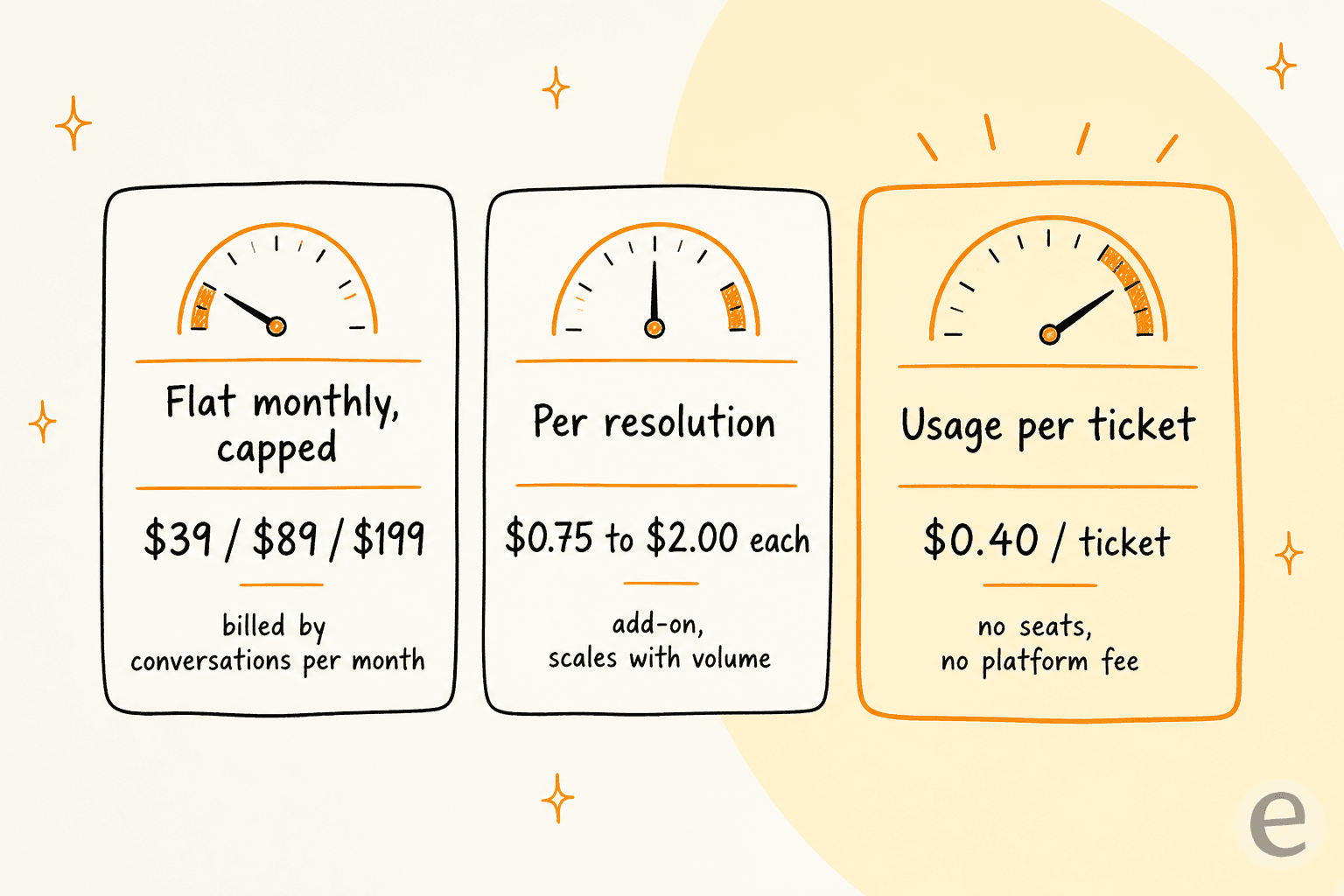
Storebird AI is a solid, WooCommerce-native support chatbot: it reads your live catalog and orders and answers "where is my order?" without a scrape. But it is WooCommerce-only, has no free tier, and caps you by conversations per month ($39/750, $89/5,000, $199/15,000). If your store outgrows that, or runs on more than WooCommerce, you have two routes.
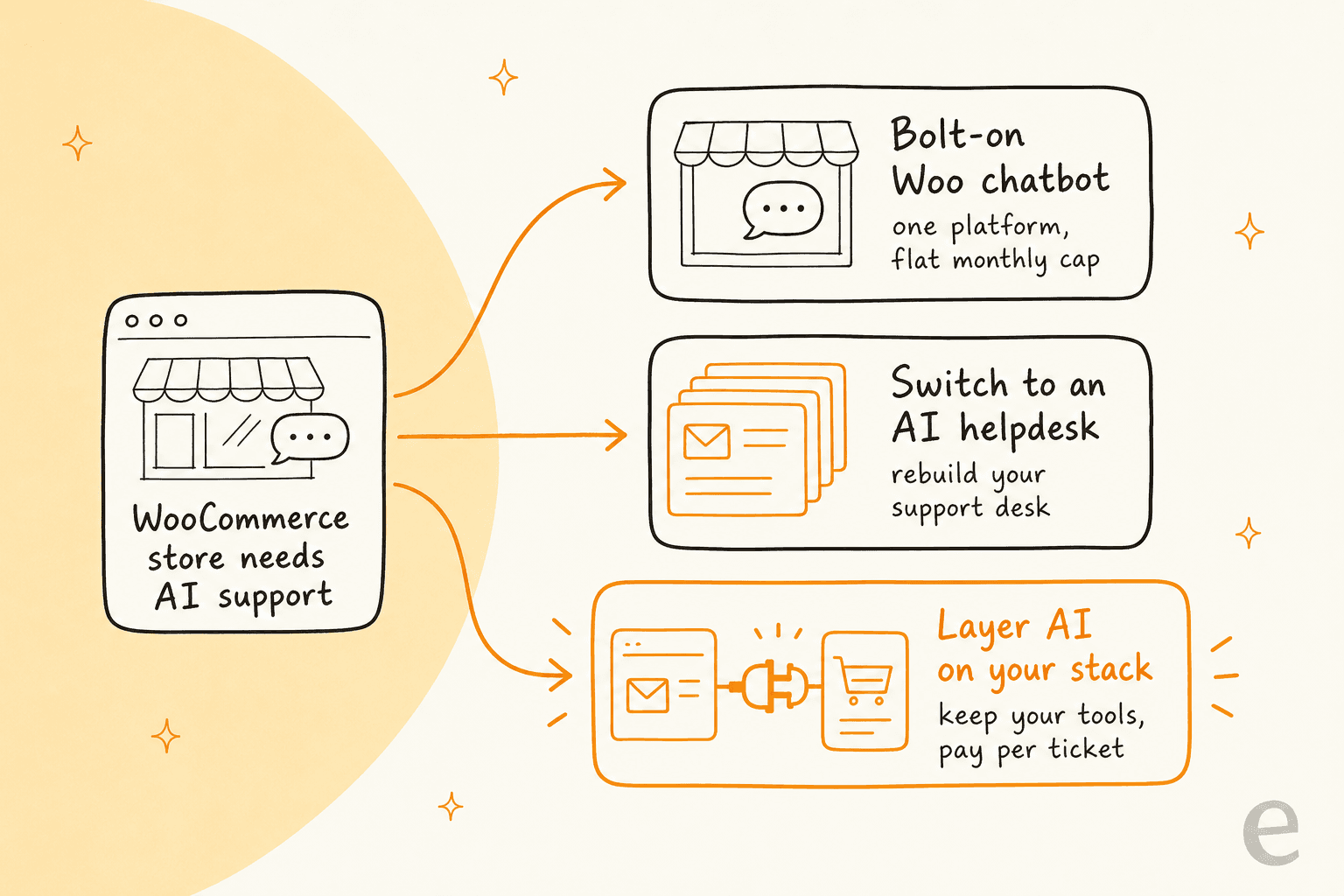
Switch to an all-in-one ecommerce helpdesk that has AI built in: Gorgias, Re:amaze, Richpanel, or Tidio for the chat-widget angle. General helpdesks Zendesk, Freshdesk, and Help Scout also work if you want a broader tool.
Layer AI onto the inbox you already run. eesel AI connects to WooCommerce and your existing helpdesk, trains on your past tickets, and answers from $299/month for 500 credits (1 credit per ticket) with no seats and no platform fee. It is my pick when you do not want to rip out and replace your support desk to get good AI.
Storebird is good at one thing, and that is also the catch
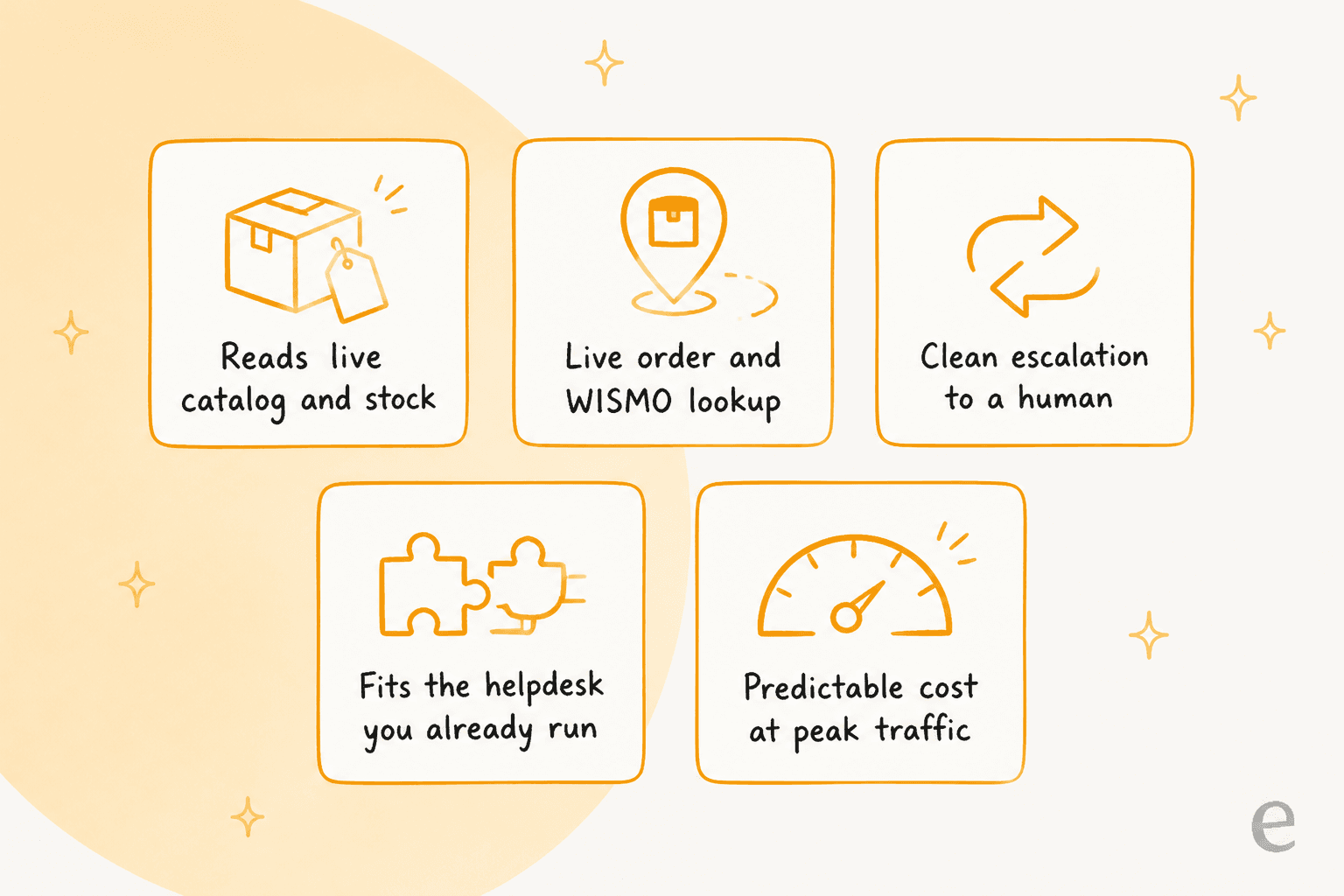
Let me be fair to Storebird first, because it does the hard part well. It is built only for WooCommerce, and it shows: it reads your live product data (variations, attributes, stock, price) and your real orders at query time, so a shopper asking for "the leather one in XL" gets an in-stock answer and "where's my order?" returns the actual tracking status. One store on its site reports WISMO emails dropping around 70%. That is genuinely useful, and generic bots that just scrape your page text do not come close.
The catch is the flip side of that focus. Storebird only works with WooCommerce, by design ("WooCommerce is our ONLY focus"). There is no free tier: the WordPress plugin installs for free, but the assistant only goes live to shoppers on a paid plan. Billing is by conversations per month, so a viral week or a Black Friday spike pushes you toward the cap. And the third-party proof is thin: a perfect 5/5, but across only three WordPress.org reviews, with the strongest numbers vendor-published.
None of that makes Storebird a bad tool. It makes it a specific one. If you are on WooCommerce, plan to stay there, and your volume fits neatly inside a tier, it is a reasonable pick. The reason people go looking for alternatives is that most stores eventually bump into one of those edges.
I have spent the last few years putting AI on live support queues for ecommerce teams, and the pattern is consistent. In one of our sales calls, an ops lead at a DTC supplements brand running roughly 7,000 tickets a month told us their team simply could not keep up, and that WISMO, subscription changes, and basic product questions were most of the flood. That is the exact shape of work these tools fight over. The question is never "does AI help?" It is "do I switch my whole support setup to get it, or add it to what I already have?"
How I picked these 8 alternatives
I kept the bar practical, aimed at a real WooCommerce store owner, not a feature checklist. Every tool here had to clear four things:
- It handles ecommerce support, not just generic FAQs. Order lookups, WISMO, product questions, returns.
- It has real AI, an agent or chatbot that resolves tickets, not just canned macros.
- It fits WooCommerce natively or through a clean connector, so it can read your catalog and orders.
- Its pricing is knowable. No "contact us" black boxes as the only option.
I also split the list by intent, because that is the decision that actually matters. Some of these are a full switch (you move your support into their helpdesk). One of them is a layer (you keep your tools and add AI on top). That distinction drives most of the cost difference, so it is worth being honest about up front.
Storebird AI alternatives at a glance
Here is the whole field on the dimensions a buyer actually compares. Prices are the entry points; AI is usually metered separately, which is the column most roundups skip.
| Tool | Best for | Approach | Starting price | AI billing | WooCommerce fit | Free option |
|---|---|---|---|---|---|---|
| eesel AI | Adding AI without switching tools | Layer | From $299/mo (500 credits) | 1 credit per ticket, no seats | Native + WordPress widget | 100 free credits |
| Gorgias | All-in-one ecommerce helpdesk | Switch | $10/mo | AI resolutions per plan | Native connector | 7-day trial |
| Tidio | Live chat + AI on the storefront | Switch | Free / $24.17/mo | Lyro AI conversations | WooCommerce plugin | Free plan |
| Re:amaze | Multi-brand ecommerce support | Switch | $29/user/mo | 5-20 resolutions/user + $0.85 each | Native connector | 14-day trial |
| Richpanel | Ecommerce with a "1 agent = AI" model | Switch | $99/seat + AI | $200 / 1,000 AI conversations | Native connector | 7-day trial |
| Zendesk | Scaling support beyond ecommerce | Switch | $19/agent/mo | Per automated resolution | Via app / API | 14-day trial |
| Freshdesk | Budget helpdesk with an AI add-on | Switch | $19/agent/mo | Freddy $49 / 100 sessions | Via app / API | 2-agent Free Program (6 months) |
| Help Scout | Simple, human-first email support | Switch | Free / $25/user/mo | AI Answers $0.75/resolution | Via integration | Free (5 users) |
Two things jump out. The layer option is the only one priced purely on what the AI resolves. And the switch options range from $10 a month to real per-seat spend, so the sticker price hides most of the real cost. Let me get into each.
1. eesel AI
Best for: WooCommerce stores that want great AI without ripping out their current support setup.
eesel AI is the one tool on this list you do not switch to. It is an AI teammate that plugs into the helpdesk and store you already run, learns your past tickets and help docs, and starts answering. It has a native WooCommerce integration for catalog and order sync, and a chat widget that drops onto any WordPress site with a script tag, so you get Storebird's "reads live orders" trick without leaving your inbox. It also connects to Zendesk, Freshdesk, Gorgias, and Help Scout, which matters if you ever grow past a single storefront.
The differentiator I would flag over Storebird is the simulation mode: before it answers a single customer, eesel runs the agent over your historical tickets so you can see exactly what it would have said and what it would have resolved. That is the thing I wish every store did first, because we have watched confident bots quietly give wrong answers, and a dry run against your own past tickets is how you catch it.
Pros:
- Keeps your current helpdesk and store, so there is no migration.
- Native WooCommerce sync plus a WordPress chat widget.
- Simulation over your past tickets before go-live.
- One fixed monthly price with no per-seat fee.
Cons:
- It is a layer, not a standalone all-in-one helpdesk, so you still run an inbox somewhere.
- Deepest ecommerce actions depend on which store and helpdesk you connect.
Pricing: One fixed monthly price, from $299/month for 500 credits (1 credit per ticket or chat), no seats, no platform fee. You get 100 free credits to start (no card), and paying a year upfront gets you two months free. A store handling 500 AI tickets a month pays $299; one handling 1,000 pays $499; one handling 100 fits the free plan.
Verdict: Pick eesel if the appeal of Storebird was "AI that knows my orders" but the constraint was "I do not want to bet my whole support desk on a WooCommerce-only tool." You get the live-data answers and the option to grow, and you only pay for tickets the AI actually resolves.
2. Gorgias
Best for: stores that want a purpose-built ecommerce helpdesk with AI baked in.
Gorgias is the ecommerce helpdesk a lot of DTC brands land on. It has a real WooCommerce integration alongside Shopify, and its AI Agent resolves order and product questions inside a proper ticketing system with macros, rules, and multichannel inbox. If you are moving off a bolt-on chatbot to something you can run a whole support team on, this is the natural upgrade.
Pros:
- Built for ecommerce, with strong WooCommerce and Shopify data access.
- AI Agent handles resolutions inside a full helpdesk.
- Unlimited users; billed on conversations, not seats.
Cons:
- Real cost climbs fast: the Pro plan starts at $300/mo for 2,000 tickets.
- It is a full switch, so you are migrating your support desk.
Pricing: Conversation-based. Starter from $10/mo (50 tickets), Basic from $50/mo (300 tickets, 60 AI resolutions), Pro from $300/mo (2,000 tickets, 600 AI resolutions), Advanced from $750/mo. AI resolutions are bundled per tier, with overage above that.
Verdict: The strongest all-in-one switch for a growing WooCommerce store, and my top pick if you genuinely want a new helpdesk rather than an add-on. Just price the plan you will actually be on, not the $10 headline. If you are happy with your current inbox, layering AI onto Gorgias is cheaper than upgrading tiers.
3. Tidio
Best for: stores that want live chat and an AI bot on the storefront, fast.
Tidio sits closest to Storebird in spirit: a chat widget with an AI agent (Lyro) that answers shoppers on the page. It has a WooCommerce plugin, a genuinely usable free plan, and it is quick to install. Lyro handles FAQ-style and order questions, and the visual flow builder covers the scripted paths.
Pros:
- Free plan with 50 Lyro AI conversations to test the water.
- Fast storefront install; strong live-chat side.
- WooCommerce plugin for order and product context.
Cons:
- Lyro conversations are metered separately and the free allowance is small.
- Pay-per-resolution billing only appears on the top Premium tier.
Pricing: Free $0 (50 Lyro conversations, one-time), Starter $24.17/mo, Growth from $49.17/mo, Plus from $749/mo. Lyro AI conversations are an add-on meter across the paid plans.
Verdict: A good, low-commitment switch if what you liked about Storebird was the on-page chat bubble. Watch the Lyro conversation meter as you scale, and compare against Lyro alternatives if resolution volume gets serious.
4. Re:amaze
Best for: multi-brand or multi-store ecommerce teams.
Re:amaze is a shared-inbox helpdesk built for ecommerce and SaaS, with chat, FAQ, status pages, and an AI Agent. It handles multiple brands cleanly, which is exactly where Storebird charges you €29 per extra store. If you run a few storefronts, Re:amaze's per-brand handling is a real advantage.
Pros:
- Handles multiple brands and channels in one inbox.
- Flat Starter plan with unlimited team members.
- WooCommerce and other ecommerce connectors.
Cons:
- AI Agent resolutions are limited per user, then metered at $0.85 each.
- Paid tiers are per-seat, so a big team adds up.
Pricing: Starter $59 flat/mo (unlimited members, capped at 500 responded conversations), Basic $29/user/mo (AI Agent 5 resolutions/user), Pro $49/user/mo (10 resolutions/user), Plus $69/user/mo (20 resolutions/user). Extra AI resolutions are $0.85 each.
Verdict: The best switch for multi-store operators, and cheaper than stacking Storebird's per-store fees. Read the AI resolution allowances carefully, because the included counts are small and the overage is where it adds up. See how it stacks up against other Re:amaze AI options before you commit.
5. Richpanel
Best for: stores that want to think of AI as "hiring one more agent."
Richpanel is an ecommerce helpdesk with a self-service portal and an AI agent, and it frames its pricing around a nice mental model: 1,000 AI-handled conversations is "equivalent to hiring one agent." It splits the bill cleanly between AI conversations and human seats, with no per-resolution charge stacked on top.
Pros:
- Clear split between AI usage and human seats, "no double-meter."
- Strong self-service and order-management flows.
- Ecommerce connectors including WooCommerce.
Cons:
- Entry cost is higher: a realistic setup is around $299/mo.
- The all-in-one model is a full switch from your current tools.
Pricing: AI handled conversations start at $200 per 1,000, and helpdesk seats are $99/seat/mo. A common starting bill is around $299/mo (1,000 AI conversations plus one seat).
Verdict: A tidy switch if the "AI as a coworker you pay for by the conversation" framing clicks for you. It is pricier at entry than Storebird, but the model scales more predictably than a conversation cap you can blow through.
6. Zendesk
Best for: stores that expect to outgrow ecommerce-only support.
Zendesk is the enterprise-grade option. It is not ecommerce-native like Storebird, but it connects to WooCommerce through an app or the API, and its AI Agents resolve tickets across every channel. If your roadmap includes B2B, multiple regions, or a support org that outgrows "just the store," Zendesk has the depth.
Pros:
- Deep, mature platform with heavy automation and reporting.
- AI Agents work across email, chat, and messaging.
- Connects to WooCommerce via app or API.
Cons:
- Not ecommerce-native; order flows need setup.
- Automated resolutions are billed on top of per-agent seats, so the real cost climbs fast.
Pricing: Per agent/mo: Support Team $19, Suite Team $55, Suite Professional $115 (annual). AI Agent automated resolutions are metered separately.
Verdict: Overkill for a small WooCommerce shop, right for one that is becoming a real support organization. If you already run Zendesk and just want better AI, adding a layer to it beats paying for its resolution meter.
7. Freshdesk
Best for: budget-conscious stores that want a real helpdesk plus optional AI.
Freshdesk is the value pick among the full helpdesks. It has a six-month Free Program for up to two agents, low-cost paid plans, and Freddy AI as an add-on. Like Zendesk it is not WooCommerce-native, but it connects through apps and the API, and it gives you a proper ticketing system for less than most rivals.
Pros:
- A six-month Free Program for up to two agents; cheap paid tiers.
- Freddy AI Agent available as an add-on.
- Solid ticketing, knowledge base, and reporting.
Cons:
- Not ecommerce-native; WooCommerce is a connector.
- Freddy sessions are metered on top of seat costs.
Pricing: Standalone Freshdesk is a Free Program ($0, 2 agents, 6 months), Growth $19, Pro $55, Enterprise $89 (per agent/mo, annual). Freddy AI Agent runs $49 per 100 sessions on the Omni Growth plan.
Verdict: The best-value switch if you want a general-purpose helpdesk and are fine wiring up WooCommerce yourself. If Freddy's per-session math looks steep, compare it against Freddy alternatives before you turn it on.
8. Help Scout
Best for: stores that want simple, human-feeling email support with light AI.
Help Scout is the friendliest, least "enterprise" helpdesk here. It is built around a clean shared inbox and a docs site, with AI Answers as a usage-based add-on. It has ecommerce depth through integrations, and its per-resolution AI pricing is transparent.
Pros:
- Simple, fast, genuinely pleasant to use.
- Free for five users; predictable per-resolution AI pricing.
- Good knowledge base and self-service.
Cons:
- Lighter on deep ecommerce automation than Gorgias or Richpanel.
- WooCommerce data comes through an integration, not native.
Pricing: Free (5 users), Standard $25, Plus $45, Pro $75 (per user/mo, annual). AI Answers is $0.75 per resolution, billed separately.
Verdict: The right switch if your support is mostly email and you value simplicity over ecommerce bells and whistles. For heavier AI on top of that clean inbox, Help Scout AI alternatives are worth a look.
So which one should you actually pick?
Strip it back to the decision that matters: switch or layer.
If you want a new, all-in-one ecommerce helpdesk, switch. Gorgias is the strongest ecommerce-native option, Re:amaze wins for multi-store, Richpanel has the cleanest pricing model, and Tidio is the fastest storefront-chat route. Zendesk and Freshdesk make sense if you are outgrowing ecommerce-only support, and Help Scout if you want simple email support.
If you want the AI without the migration, layer. That is where eesel AI fits: it keeps your WooCommerce store and your current inbox, learns your tickets, and charges only for what it resolves. For a lot of stores that is the honest answer, because the thing that made Storebird appealing (AI that knows your orders) does not actually require you to bet your whole support desk on a single-platform tool.
Try eesel for WooCommerce support

If Storebird's live-order answers were the draw but "WooCommerce-only, no free tier, capped by conversations" was the dealbreaker, eesel AI is built for exactly that gap. It connects to WooCommerce and the helpdesk you already run, simulates against your past tickets so you can see its resolution rate before it goes live, and costs from $299/month for 500 credits with no seats and no platform fee. You can start with 100 free credits, no card, and keep every tool you already have. Try eesel or book a demo to see it on your own store data.