


Re:amaze's AI conversation translation is two on-demand buttons: a Translate link under a customer's message that shows it in the agent's language, and a Translate quick action that turns the agent's reply into the customer's language. Re:amaze says its AI tools run on OpenAI's GPT models, and translation needs only one setting, each agent's own language. Nothing translates by itself, Re:amaze publishes no language list, and its chat widget can't switch language by store locale out of the box, Re:amaze says. It suits a store that gets a handful of messages a week in languages nobody on the team speaks.
If those messages are a daily share of your inbox, an AI helpdesk agent such as eesel can draft each Re:amaze reply in the customer's language from the start, as an internal note your team sends. With the eesel CLI, an AI coding agent can load approved help content and ask test questions in each language before anything goes live, though a person still pastes the Re:amaze API token in.
What is Re:amaze AI conversation translation?
It is the translator built into the Re:amaze shared inbox, so an agent can read and answer a customer who writes in another language without copying text into a separate tool. The Re:amaze AI page describes it in one line: "Customer messages in a foreign language? Ask Re:amaze AI to translate them to your preferred language on demand." The same page says the AI tools are "Powered by OpenAI's GPT models", and Re:amaze's product menu still labels AI as beta.
I work on eesel's support team, so I judge a translation feature by what the agent has to do on a busy Monday. In Re:amaze that comes down to two clicks per exchange.
- Read the customer. When a message is in a language other than yours, Re:amaze shows it as written with a Translate link underneath ("Show Translation" in some of Re:amaze's screenshots). Click it and the message appears in your language; Show Original switches back. Per Re:amaze's translation article, the link appears because Re:amaze compares each message with your language setting.
- Answer the customer. Write your reply in your own language, then press Translate in the AI quick actions under the reply box, the same row that holds the tools in Re:amaze AI draft replies. Re:amaze's blog post on reply translation says this translates "your text back into Spanish before sending it off to customers", Spanish being the customer's language in its example.
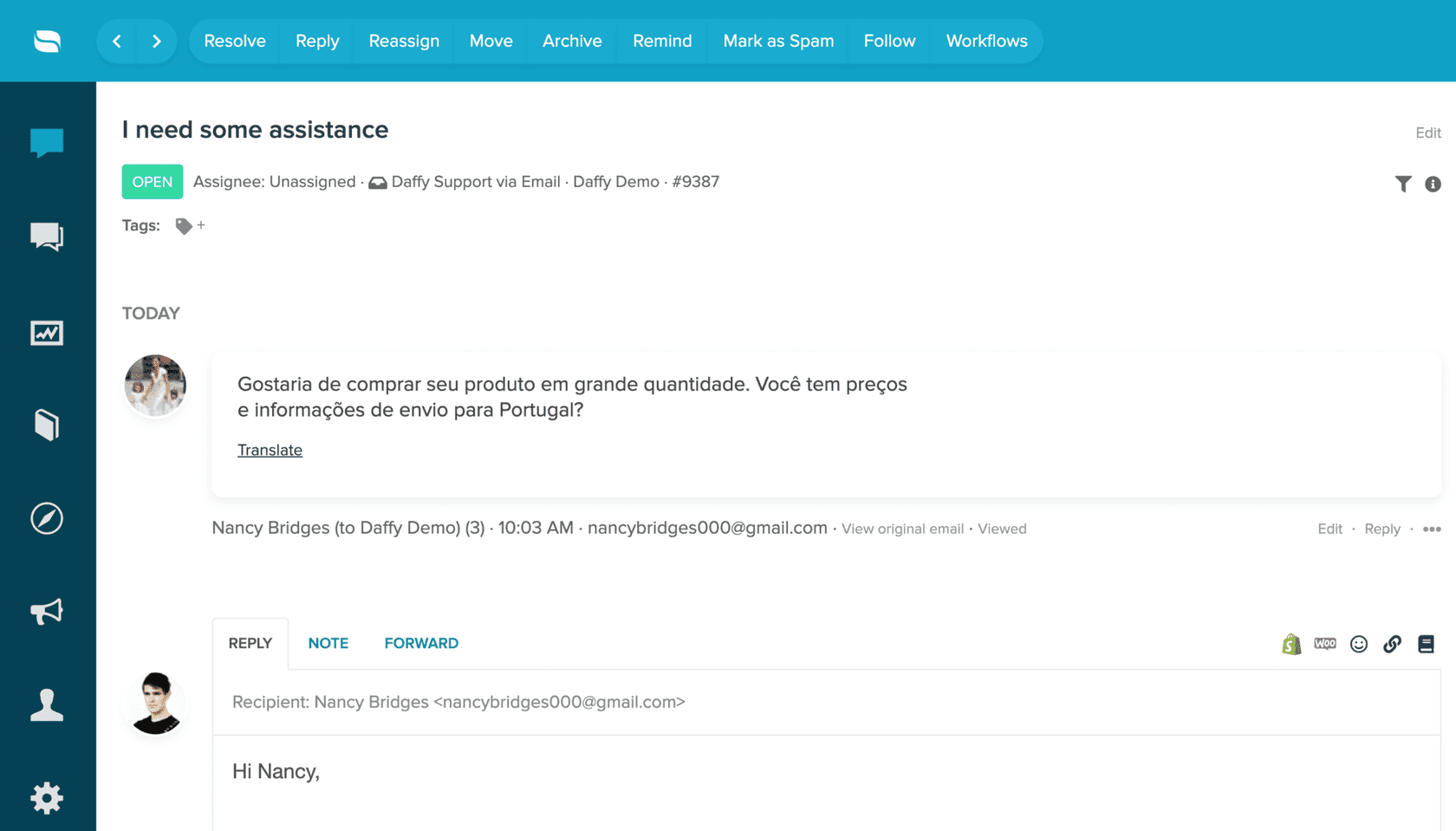
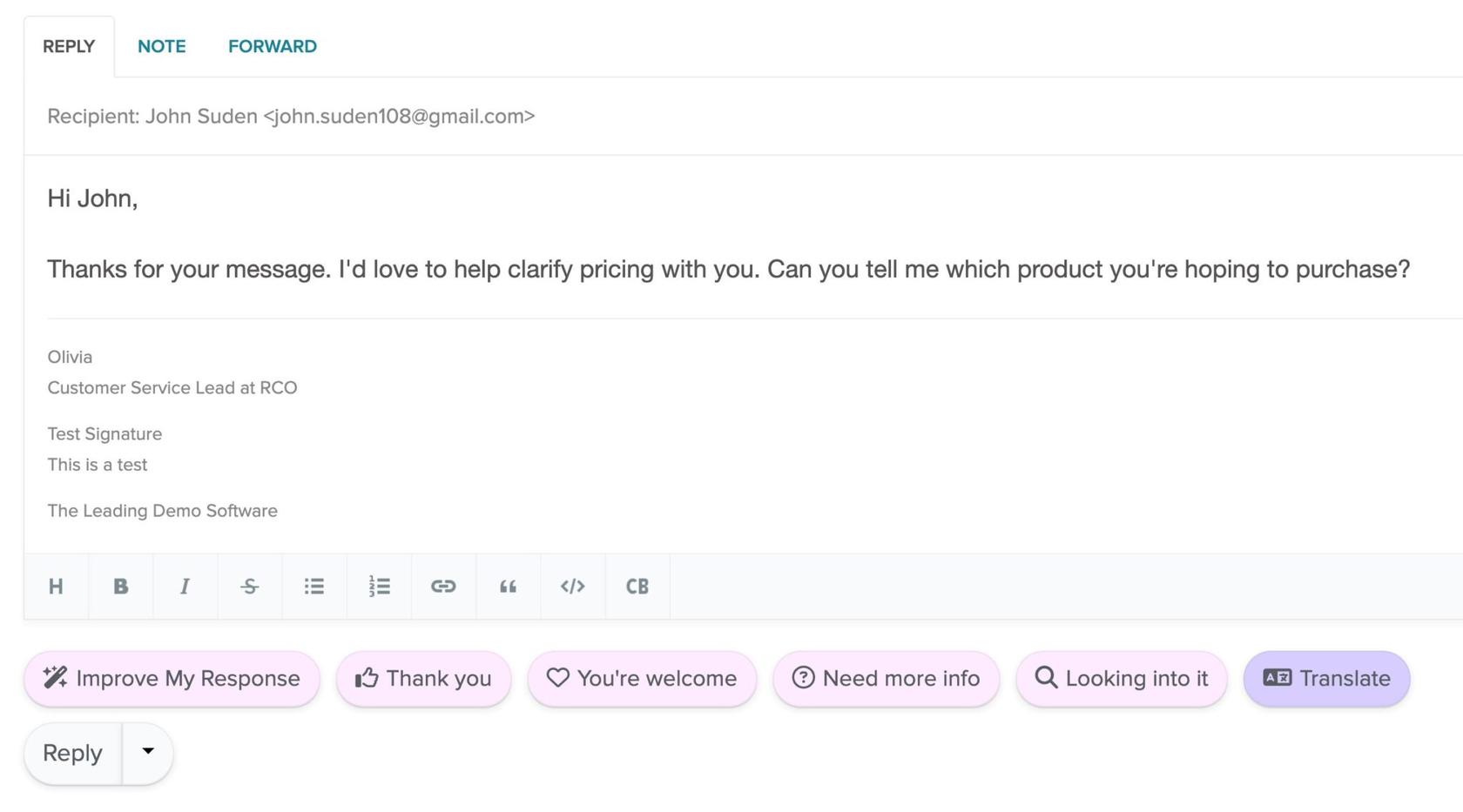
The two buttons are separate steps for a reason: Re:amaze's help article says plainly that "Translation applies only to incoming customer messages. Messages sent by staff are not automatically translated for customers." If an agent skips the quick action, the customer gets the reply in the agent's language.
How to set up translation in Re:amaze
There is one setting, and it is per agent.
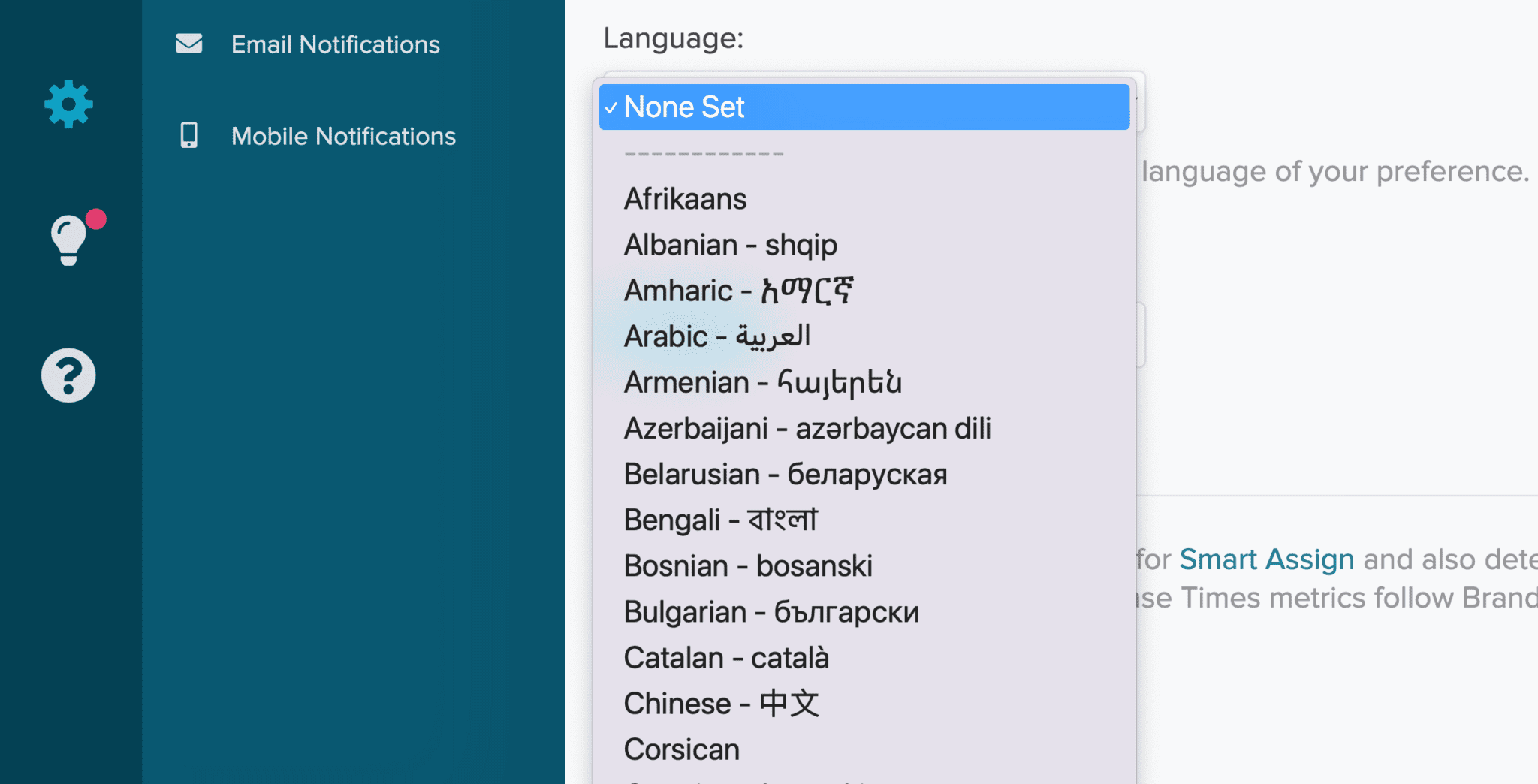
- Each agent sets their language. Go to Settings > Personal Settings and pick a language from the Language menu. Re:amaze uses it as the target for translations and to spot messages written in another language. Re:amaze's 2023 announcement says that with no language set, Re:amaze uses your browser's language instead.
- Show agents the two clicks. Translate under the customer's message to read it, then Translate in the quick actions after writing the reply. Read the translated reply before you send it.
- Test the languages you get most. Re:amaze doesn't publish which languages it translates, so send yourself a test message in each language that shows up in your inbox and check both directions.
- Have a speaker check a few replies. Before you trust it on refunds or anything with an order number, have someone who reads the language look at five translated replies against your support translation glossary.
That is the whole setup, which is the appeal: there is nothing to configure per channel and no add-on to buy.
Where does Re:amaze translation fall short?
It falls short wherever you need translation to happen without someone pressing a button.
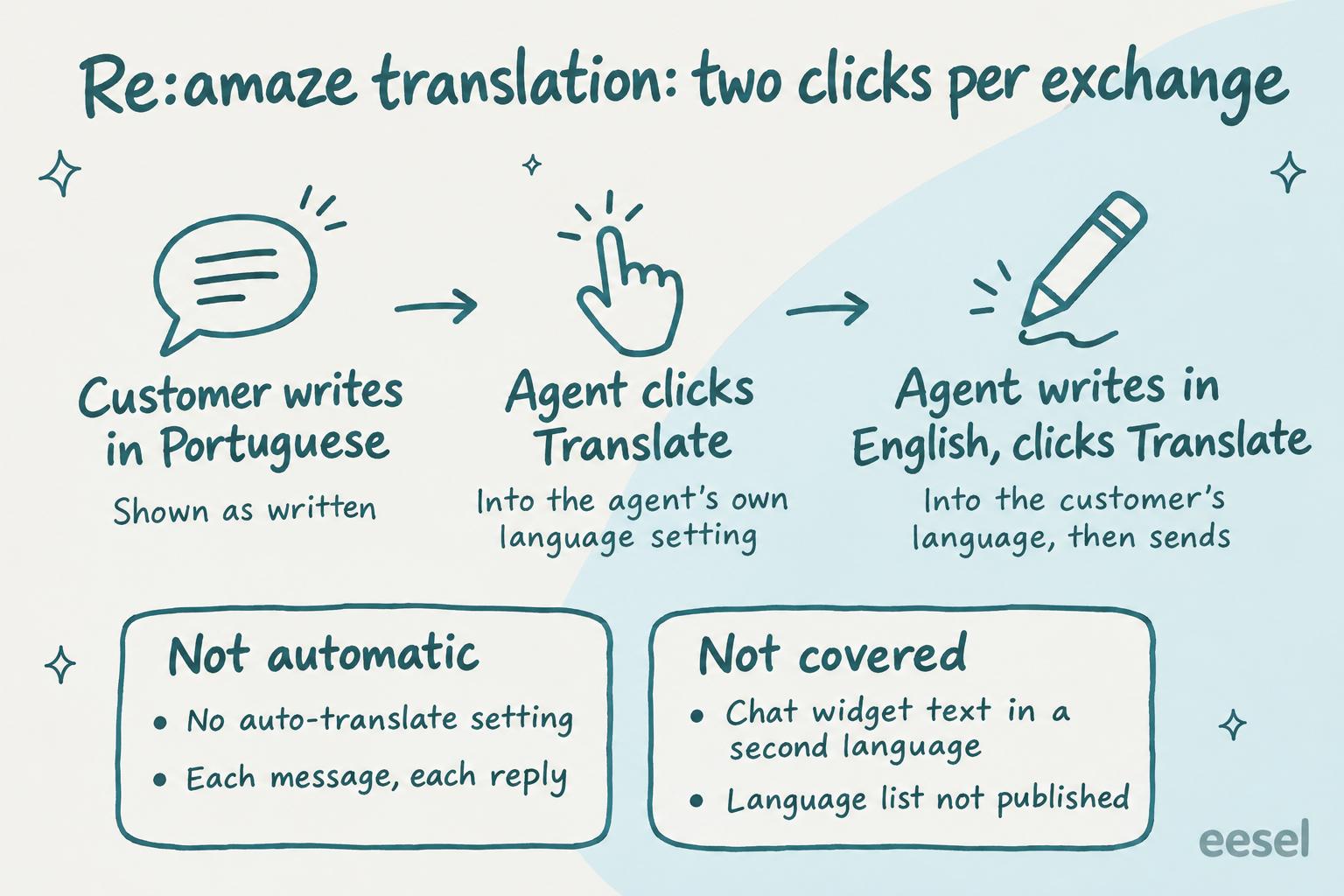
- Nothing is automatic. Re:amaze's article describes no setting that translates incoming messages or outgoing replies by itself. Every customer message is a click and every reply is a click.
- The reply step is easy to skip. Staff messages aren't translated unless the agent presses Translate, so a rushed agent sends English to a customer who wrote in Portuguese.
- No published language list. Re:amaze doesn't say which languages translation covers or how it handles a message that mixes two, so test before you rely on it.
- The chat widget shows one language. Widget text and language are set in Brand Settings, and Re:amaze has said automatic translation by store locale isn't supported out of the box. A store owner wrote in an August 2026 Shopify App Store review: "Apparently we can't show the widget in 2 languages which is almost funny given how many multi-languages stores there are." Re:amaze replied: "you're right that automatic widget translation based on store locale isn't something we support out of the box today".
- The AI Agent's languages aren't documented. Re:amaze's AI Agent setup guide doesn't say whether the AI Agent answers in the customer's language. Its Test AI Agent tab lets you check: send a test message in each language you serve and read what comes back.
None of this makes the feature bad. For an occasional German or Portuguese email in an English-speaking team, two clicks is fine. It becomes a problem when one language is 20% of your volume, because then the clicks, and the replies where someone forgot them, add up. Other helpdesks draw the line elsewhere: Gorgias, Help Scout and Dixa each automate a different part of it.
What are the other ways to handle languages in Re:amaze?
Besides the Translate buttons there are three options: give a language its own inbox and people, check the AI Agent, or have an AI agent draft in the customer's language. Under a few messages a week, keep the buttons; a daily share needs one of the other options.
Give a language its own inbox
If you have agents who speak a language, they will always beat a translation. Every Re:amaze plan includes unlimited email inboxes, per the pricing page, so a separate address for, say, German customers keeps those conversations together for the agents who speak German. Re:amaze ticket tagging and routing covers how to route and assign conversations.
Check the AI Agent in each language
The Re:amaze AI Agent answers on chat, email and SMS from your FAQ articles, response templates and custom AI context. Before you switch it on for customers who write in other languages, test it in the Test AI Agent tab in each language, since Re:amaze doesn't document that part. It is billed per resolution past your plan's allowance, which adding AI to Re:amaze works through, and the Re:amaze chatbot guide covers the chat side.
Have an AI agent draft in the customer's language
An AI agent connected to Re:amaze can write the draft in the customer's language from the start, so nobody translates at the last step and nobody forgets to. eesel does that on Re:amaze (below); best AI for multilingual support lists other options.
Pick the situation closest to yours to see which setup handles it.
What does Re:amaze translation cost?
Re:amaze's pricing page doesn't list translation as a plan feature at all; the AI page lists Translate with AI among its AI tools, and the pricing page lists no add-on for it. What the pricing page does list, as of 21 November 2026:
| Plan | Monthly, per team member | Annual, per team member a month | AI Agent resolutions included |
|---|---|---|---|
| Starter | $59 flat (unlimited team members, 500 responded conversations a month) | Not listed | Not listed |
| Basic | $29 | $26.10 | 5 per user a month |
| Pro | $49 | $44.10 | 10 per user a month |
| Plus | $69 | $62.10 | 20 per user a month |
Extra AI Agent resolutions are $0.85 each. Trials include all Plus features, so a trial can't show whether translation is on Basic or Pro; ask Re:amaze before buying a lower plan. For 10 agents on Pro, that is 10 x $49 = $490 a month before any extra resolutions. Re:amaze pricing covers the rest, and what non-English AI support costs puts the language side in context.
Where does eesel fit?
eesel fits the team for whom other languages are a daily share of the inbox, not a weekly surprise. eesel is an AI teammate that joins the tools a team already uses, and on Re:amaze it works in your conversations. Per eesel's Re:amaze docs, it learns from your response templates and past conversations, reads your help center articles live, and leaves a drafted reply as an internal note or sends it, depending on what you allow.
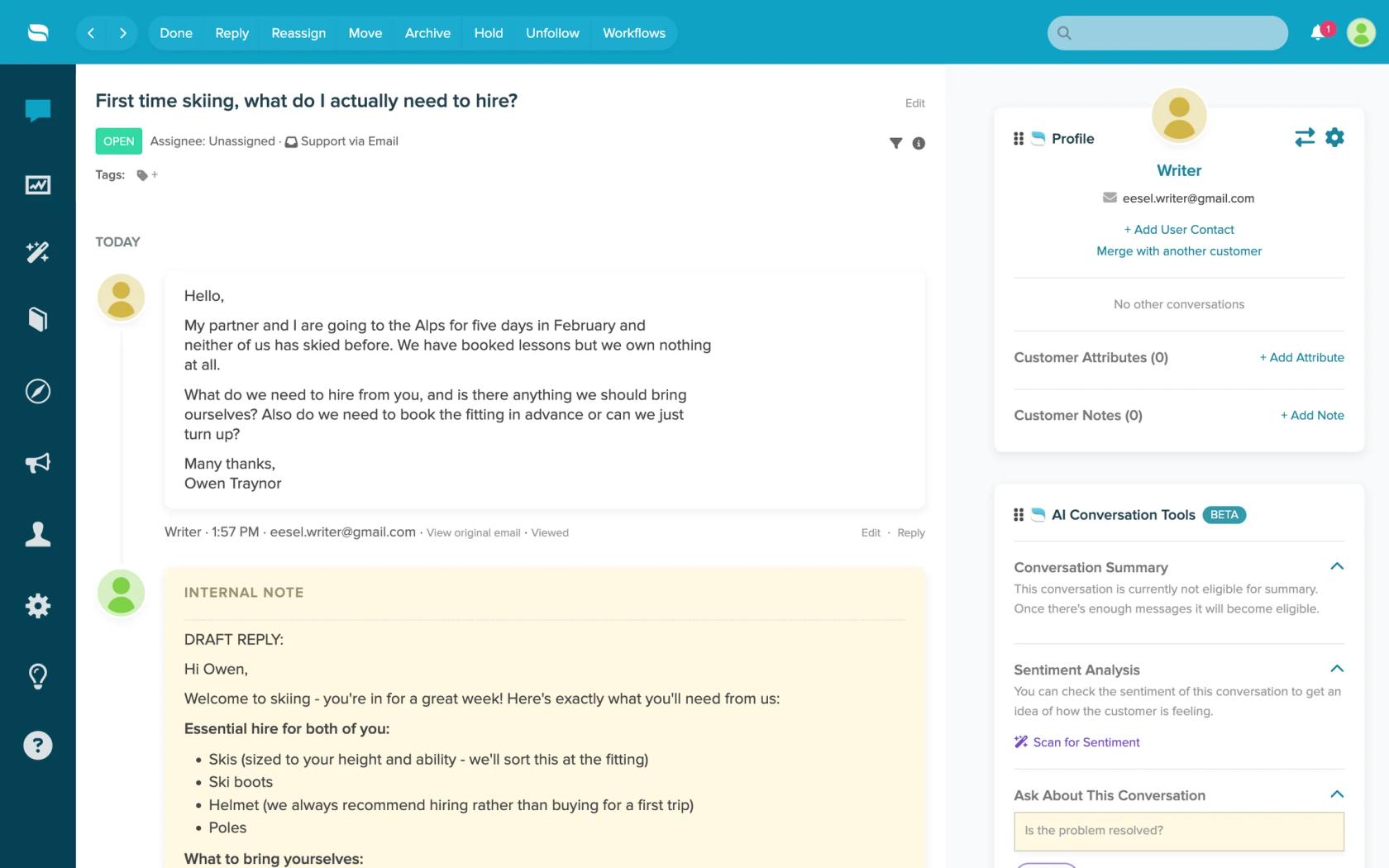
For translation, that means the draft is in the customer's language from the start. You tell eesel in plain words, "draft in the language the customer wrote in, and add a one-line English summary for the team", and it saves that as an instruction every later draft follows. The agent reads the summary, checks the draft and sends it, with no Translate step to forget.
Innr runs it this way on Freshdesk: when a customer writes in Dutch, German, English or French, eesel leaves a draft reply in that language as an internal note, and a person sends it.
Know the limits before you start. Re:amaze has no event triggers in eesel, so it works on a schedule, as often as every ten minutes, and a new conversation is picked up on the next run. It doesn't read files attached to messages or custom fields. And it doesn't change your chat widget's language, which stays a Re:amaze setting.
Try eesel next to Re:amaze's Translate buttons
Keep the Translate buttons for the occasional message, and let eesel draft the language you see every day. Connect Re:amaze with an API token, ask eesel for a draft on an unanswered conversation in that language, and compare it with what your agent would have sent after two clicks. Then set a schedule that leaves a draft note on every open conversation with no staff reply. What eesel may send on its own, and what waits for a person, is set per action in actions and approvals.
The free trial lets you watch it draft on real conversations before you pay. Try eesel on one language first, or compare options in best AI for Re:amaze and Re:amaze AI alternatives.