

Dixa's AI conversation translation is part of Copilot, an add-on Dixa lists at €39 per agent per month on every plan. An agent can translate a whole conversation into their own language, turn on auto-translation of incoming messages for each channel, and press Translate reply to send their answer in the customer's language. It covers 53 languages, and it works well for a team that gets conversations in languages nobody on shift speaks. The part to understand before you rely on it is the conversation language: on email, Dixa sets it from the first text message, inbound or outbound, and never checks it again, and that language decides what Translate reply translates into.
On Zendesk, Freshdesk, Gorgias or Help Scout, an AI helpdesk agent such as eesel writes the reply in the customer's language from the start; it doesn't connect to Dixa. With the eesel CLI, an AI coding agent can upload approved help articles and ask test questions in each language before anything goes live, though an admin still has to approve the helpdesk connection.
What is Dixa AI conversation translation?
It is the translation built into Dixa's agent workspace, so an agent can read and answer a customer in a language they don't speak without copying text into another tool. Dixa ships it inside Copilot, its add-on for human agents (an agent assist tool), next to AI drafts, summaries and suggested tags. Dixa's pitch is short: "Customers write in their language. Agents respond in theirs. Copilot translates both ways, instantly." The customer-facing side is Mim, Dixa's AI agent, which handles languages its own way (below).
I build features and AI agents at eesel, so I read a translation feature by asking what triggers it, which language it translates into, and what is left for a person. Dixa's AI translations article splits it into four pieces.
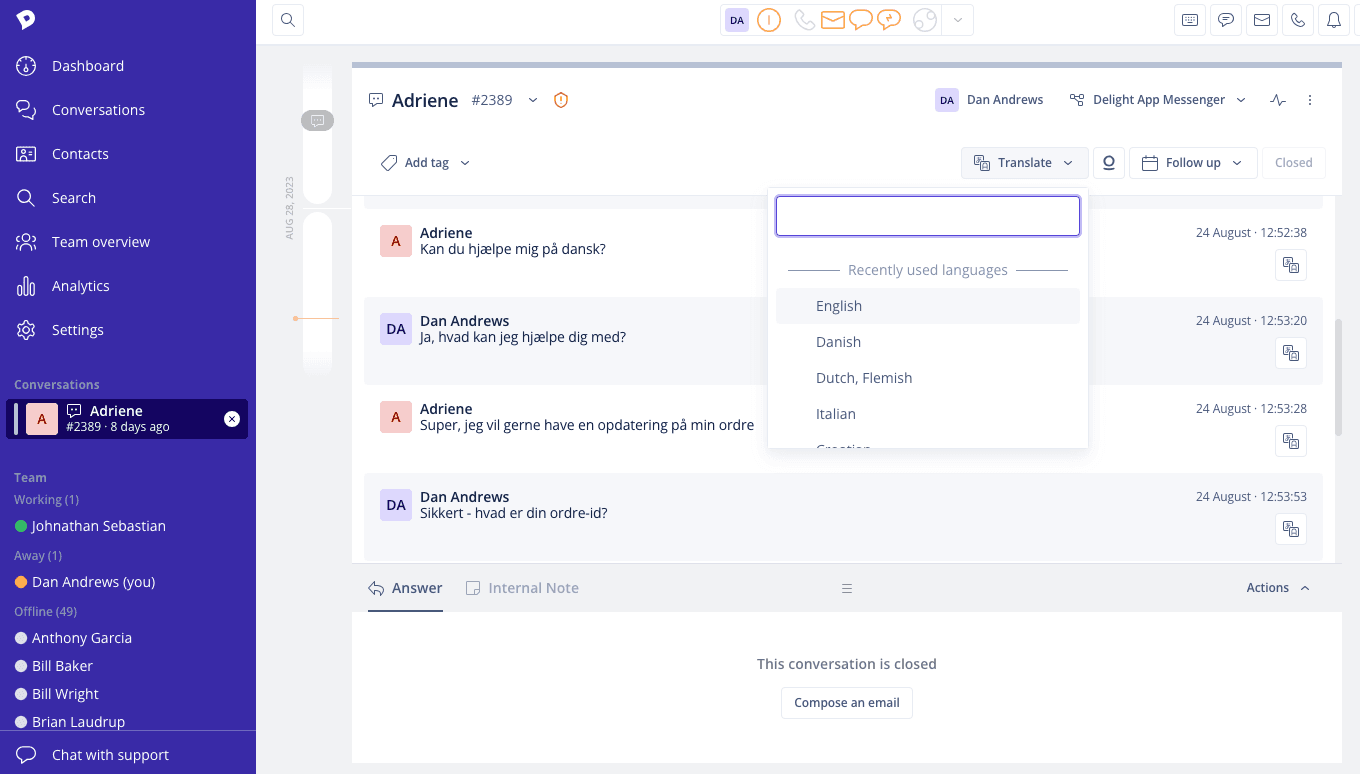
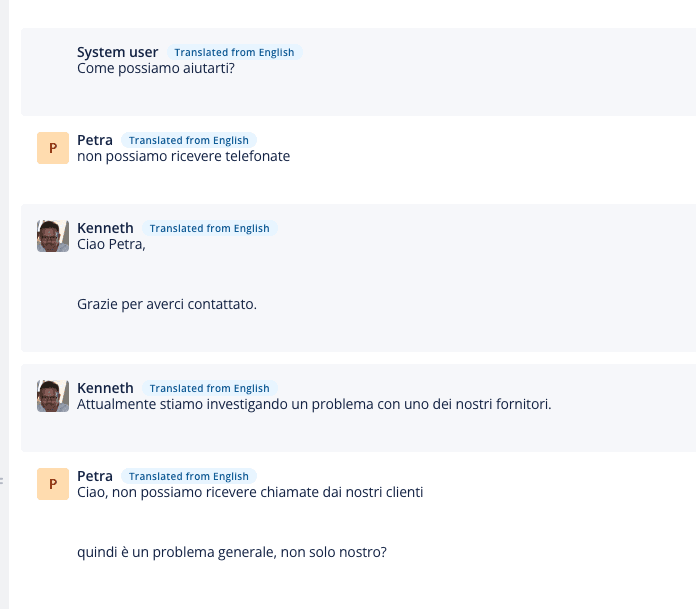
- Translate the conversation. From the Translate menu at the top of a conversation, the agent picks a language, and every message, existing and new, inbound and outbound, shows translated with a "Translated from" label. Show original reverts it.
- Translate one message. Each message has its own translate icon, which forces a translation even when auto-translate refuses with "conversation is already in
". That happens when one message mixes languages. - Auto-translate inbound. Each agent can turn on automatic translation of incoming messages per channel.
- Translate the reply. The agent writes in their own language and presses Translate reply in the AI toolbar, or the one-click Quick Translate, which translates into the conversation's language.
How to set up AI translation in Dixa
Translation needs Copilot on the account; after that, most of the setup is per agent.
- Add Copilot. It is a paid add-on on the Team, Professional and Enterprise plans, billed per agent (pricing below). Dixa's Copilot bundle article lists AI translations among its tools.
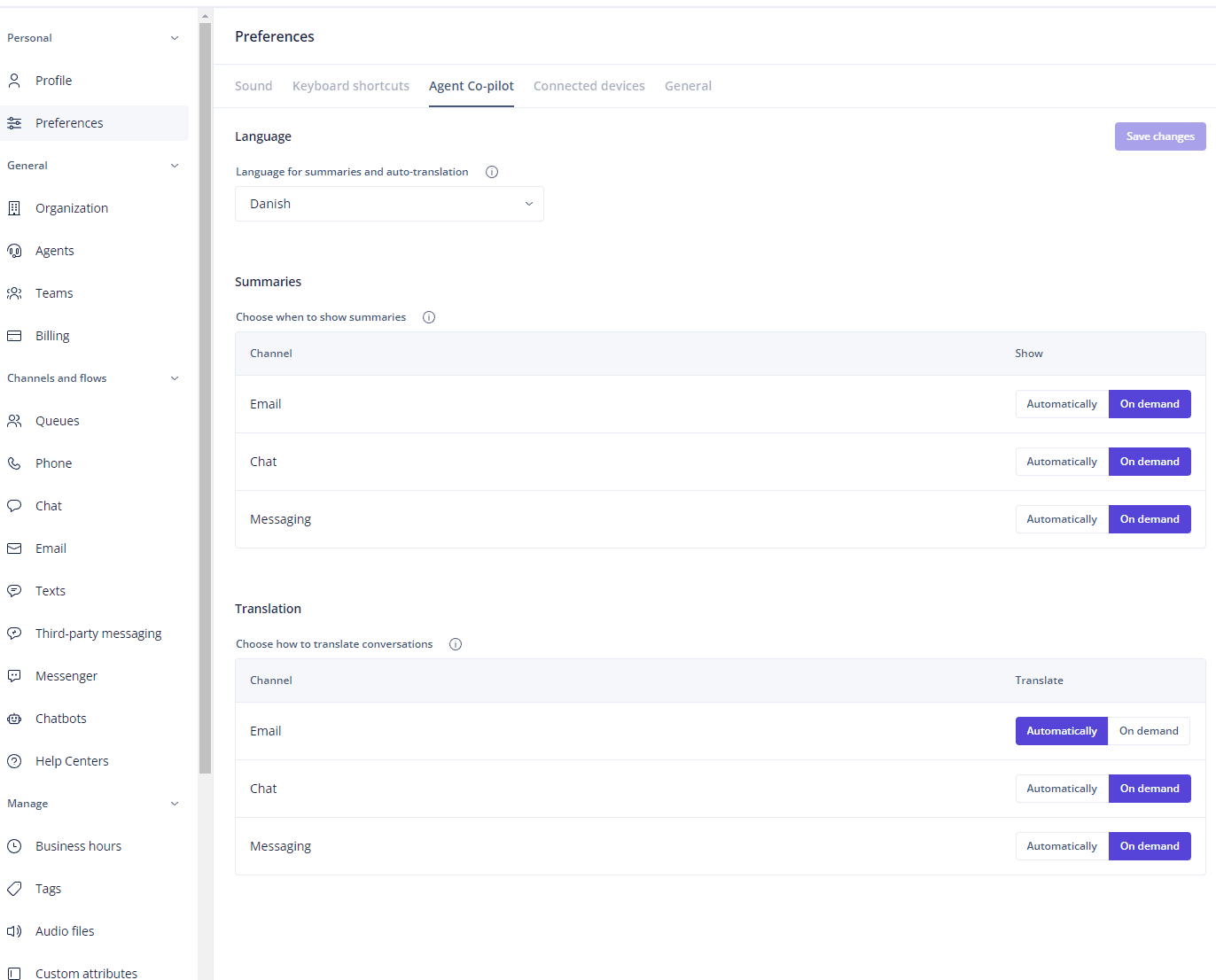
- Each agent picks their language. Under Settings > Preferences > Agent Co-pilot, set Language for summaries and auto-translation. This sits under the Personal settings, so it is one setting per agent, not one for the team.
- Each agent chooses auto or on demand per channel. In the same screen, the Translation table sets email, chat and messaging to Automatically or On demand.
- Show agents the reply flow. Read the translated thread, write the answer in your own language, then press Translate reply or Quick Translate before sending. Agents in Dixa's keyboard shortcuts beta can assign a shortcut to Translate reply.
- Check the language on test conversations. Send a test email in each language you get most and look at what Dixa set as the conversation language before agents rely on Quick Translate (next section).
Then have someone who reads the language check five translated replies against your support translation glossary. I'd do that before trusting it on refunds or anything with a policy number in it.
How does Dixa pick the conversation language?
Dixa sets a language on every conversation, and the rules differ by channel. Per Dixa's language detection article:
- Email: the language is set from the first text-based message, "whether inbound or outbound", reading the beginning of the body so signatures and quoted replies don't weigh too much. "Language detection is done solely on the first text-based message of the conversation and not re-analyzed on every back-and-forth message." Very short messages are ignored.
- Chat and Dixa Messenger: the customer's browser language sets both the widget and the conversation language, and you can override the widget language.
- Facebook Messenger, Instagram and WhatsApp: detected from the inbound text, and when confidence is low, "we'll fall back to English".
- Forms and the API: Dixa doesn't detect it; you set the language when you create the conversation. An email or contact form conversation created without one gets detected on its next message.
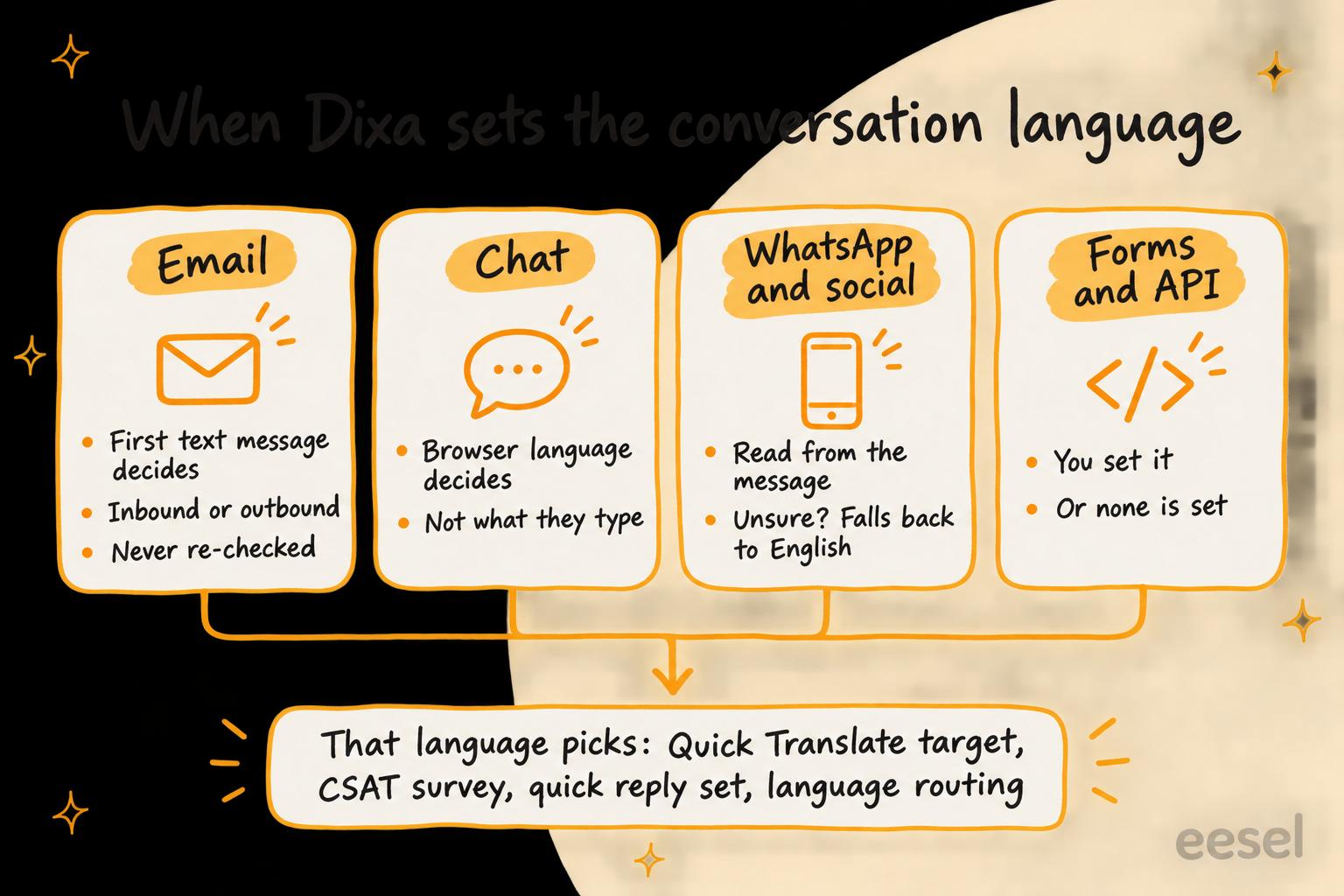
That field matters because other features read it. Dixa says the conversation language sets the CSAT survey localisation, the quick reply template set and routing on a global email address, and Quick Translate translates into it. So the cases to plan for are the ones where it is set wrong:
- An outbound email in English. If an agent opens the email conversation, the first message is theirs, so the conversation can be set to English before the customer replies in Spanish.
- A chat from an English browser. A customer on an English-language browser who types in Portuguese gets an English conversation.
- A short WhatsApp message. A one-word "Hola" may be too short to detect, and when confidence is low Dixa falls back to English.
For a message that doesn't match, the per-message translate icon is the fix Dixa gives: it always forces the translation. Dixa's article doesn't say Translate reply can target a different language, so check the conversation language before you send.
Where does Dixa translation fall short?
It falls short where it leaves work to each agent: per-agent settings, a manual step on every reply, and an email language that is set once.
- Settings are per agent. Auto-translation and the target language live in each agent's own preferences, so each new hire has to set it; Dixa doesn't describe a team-wide default.
- Every reply is a manual step. Outbound translation is write, Translate reply, check, send. That keeps a person in control, which is right for most teams, and a busy agent who skips the step sends their own language.
- Email language is set once. As above, a first message in the wrong language sticks for the life of the conversation.
- Phone calls aren't translated as a whole. Dixa's article says it doesn't allow "the full translation of the entire phone call, as these can often consist of 100s of messages."
- Translated knowledge articles go stale on new sections. Copilot's article auto-translation can re-translate a changed block, but "this does not work if you add any new sections to the default language article", so you re-translate the whole article.
None of this is a reason to skip it. It is a reason to put the Agent Co-pilot settings in onboarding and test how Dixa sets the language on each channel you use.
What are the other ways to handle languages in Dixa?
Besides Copilot translation there are four options: routing by language, Mim, a multilingual knowledge base, and an AI agent that writes in the customer's language. They solve different problems.
Route by language
If you have agents who speak the language, routing beats translating. Dixa's routing by language uses a Filters node in an email or Messenger flow to send each language to its own queue, and Dixa recommends filtering out lower-volume languages first and leaving your main language last. Dixa conversation routing covers flows and queues.
Mim, the customer-facing AI agent
Mim answers customers directly. Dixa's Mim page says it "detects the customer's language and replies in it, including the handoff message to your team", and the default instructions in Dixa's Mim getting started guide say "Always respond in the same language the customer is writing in." Mim is on every plan at €0.40 per conversation, whether it resolves it or hands it over. Dixa's AI agent covers what it answers.
A multilingual knowledge base
For self-service, enable more languages in Knowledge settings, add a language to an article and choose Auto-translate from its menu. This is also a Copilot feature. Multilingual knowledge base software compares the wider field.
An AI agent that writes in the customer's language
An AI agent connected to the helpdesk can draft the reply in the customer's language from the start, so nobody translates at the last step. eesel does that on the helpdesks it connects to (below); best AI for multilingual support lists other options.
Pick what your team needs to see which Dixa setup handles it.
What does Dixa translation cost?
AI translations come with Copilot, which Dixa's pricing page lists at €39 per agent per month as an add-on to the Team, Professional and Enterprise plans. Copilot also covers AI drafts, conversation summaries, suggested tags and the writing assistant.
| What | Team | Professional | Enterprise |
|---|---|---|---|
| Platform, per agent / month, billed annually | €49 | €139 | Custom |
| Language detection | Included | Included | Included |
| Copilot (AI translations, drafts, summaries) | €39 per agent / month | €39 per agent / month | €39 per agent / month |
| Mim AI agent (replies in the customer's language) | €0.40 per conversation | €0.40 per conversation | €0.40 per conversation |
For 20 agents on Team, the platform is 20 x €49 = €980 a month and Copilot adds 20 x €39 = €780, so €1,760 a month before any Mim conversations. Judge the €780 on everything Copilot does, including Dixa AI drafts and conversation summaries, and against what non-English AI support costs elsewhere. Dixa pricing covers the platform side.
Where does eesel fit?
eesel fits a team weighing a move off Dixa, or one running a second helpdesk next to it. eesel is an AI teammate that joins the tools a team already uses; on support it works in the helpdesk queue, learns from past tickets and is tested against them before it replies. On Zendesk, Freshdesk, Gorgias and Help Scout it writes the reply in the language the customer wrote in, so the translation step disappears rather than moving to a button.
Two published stories show the shape. Innr runs eesel on Freshdesk: when a customer writes in Dutch, German, English or French, eesel leaves a draft reply in that language as an internal note, and a person sends it. Koffer.ch gets a draft reply (a draft, not an internal note) in German, French, English or Italian, with Swiss spelling in German, and a person sends it.
eesel doesn't connect to Dixa: Dixa is not in eesel's helpdesk docs, so I can't tell you to connect it to your Dixa account. If you are staying on Dixa, Copilot's translations are the native answer, and my advice is the setup above: Agent Co-pilot settings in onboarding, and a test of how each channel sets the language.
Try eesel for replies in your customer's language
If you're comparing helpdesks partly on how they handle languages, try eesel on a trial of Zendesk, Freshdesk, Gorgias or Help Scout next to your Dixa evaluation. Start with drafts as internal notes in the customer's language, read a week of them, then decide what it may send on its own: what eesel does alone and what waits for a person's yes is set per action in actions and approvals. The free trial lets you watch it draft on real tickets before you pay.

Try eesel on one language first, or compare options in best AI for Dixa.