


Free tier first: $0, and it caps you at 2,000 words a day. Then $20/month for Individual. $65/month if you go Professional. Team is $20 per seat, with a two-seat floor, so the real floor is $40. Above that the prices stop. Institutional License is quote-gated and so is Enterprise, which the page lists only as "Variable Pricing".
With Pangram 4 the price stayed put. The unit moved. Billing moved from one scan per 1,000 words to one scan per 100 words, and both paid word ceilings were halved at the same time. Which works out to exactly 10x more per word on the API. It also drops a line at a 500-word document. Under that length you gain, up to 5x of it. Over that length, half your scans are gone.
One more thing that is worth to know before a card goes in. The Pangram 4 API costs 7.5x more per word than the $20 Individual subscription. If you are scanning under 1.5 million words in a month, API credits are almost certainly the wrong door.
I build eesel's integrations. eesel also moved its own billing last year, from per-interaction over to per-ticket, so I have watched from the vendor side what happens when the unit shifts underneath a price that still looks the same. One prospect, a multi-company e-commerce operator scaling toward ~150K tickets a month, got confused about the interaction-versus-ticket thing live on a call, and had projected ~$30k/month at ~20 cents a ticket before I could finish the sentence. Unit changes is where pricing pages lose people. Pangram is a good product carrying a tricky one, which is why this post does the arithmetic instead of restating the cards. For the accuracy question there is my Pangram 4 review, and for the mechanism, the Pangram 4 explainer covers it.
Work out what you would actually pay
Everything below is metered in 100-word units now. Which means your monthly cost hangs on the average length of a document about as much as on the total volume. Put both in:
Pangram pricing at a glance
Six purchase paths in total, and four of them have a published price. All of this comes off the pricing page, checked 4 August 2026.
| Plan | Monthly | Annual | Effective /mo | Words / month | Image scans | Seats | Trial |
|---|---|---|---|---|---|---|---|
| Free | $0.00 | $0.00 | $0.00 | 2,000 per day | 3 / day | 1 | No card needed |
| Individual | $20.00 | $180.00 | $15.00 | 300,000 | 100 | 1 | 7 days |
| Professional | $65.00 | $540.00 | $45.00 | 1,500,000 | 500 | 1 | None listed |
| Team | $20.00 / seat | $180.00 / seat | $15.00 / seat | 300,000 per seat | Not published | 2-seat floor | 7 days |
| Institutional License | Quote | Quote | Quote | "Unlimited" checks | Not published | Not published | Not published |
| Enterprise | "Variable Pricing" | Quote | Quote | Not published | Not published | Not published | Not published |
If you are staying longer than five months the annual discounts is worth taking. Individual saves $60 a year, so a 25% cut. Professional saves $240, which comes to 30.77%, and Team saves $60 per seat. The real Team entry price is $40 a month, not $20, because of the two-seat floor.
One small discrepancy, worth to flag. Pangram's G2 listing carries a vendor-supplied table that shows Professional at $64.97, and not the $65.00 sitting on Pangram's own page. Three cents is nothing to plan around. Still, when you quote a figure internally, take it off the vendor's own page and not a directory.
The change that matters: 100-word units
This next part does not show up on the pricing card at all. From the Pangram 4 announcement: "Instead of each scan rounding up to 1,000 words, one scan will be used per 100 words, letting you make the most of your credits. We're also adjusting scan volume to better reflect our model upgrades and current user behavior."
Both halves of that landed at once, and they pull against each other.
| Pangram 3 billing | Pangram 4 billing | |
|---|---|---|
| Billable unit | 1 scan per 1,000 words, rounded up | 1 scan per 100 words |
| Individual allowance | 600 credits of 1,000 words, so 600,000 words nominal | 300,000 words plus 100 image scans |
| Professional allowance | 3,000 scans of 1,000 words, so 3,000,000 words nominal | 1,500,000 words plus 500 image scans |
| API rate | $0.05 per 1,000 words | $0.05 per 100 words |
Granularity got 10x finer, and that is a real improvement. A 150-word snippet used to burn a full 1,000-word credit; now it burns 200 words. The nominal ceiling, though, was cut by 50% on both paid tiers.
The breakeven sits at a 500-word document, and the arithmetic here is short enough that you can check it. Under the old model any document up to 1,000 words cost one credit, so Individual got its 600 scans whatever the length was. Under the new one Individual gets 300,000 words at 100-word granularity, which is 600 scans of a 500-word document. Exactly level. Either side of that line, then:
- A 100-word document goes from 600 scans a month to 3,000, a 5x gain.
- A 1,000-word document goes from 600 scans to 300.
- A 2,000-word document goes from 300 scans to 150.
Pangram's own framing of the API side matches: the change "represents a price change of 1-2x for short documents and up to 10x for long-form documents". If you scan comment threads and product copy, this is a win. If you scan articles, it is a 10x rise wearing the same price tag.
The giveaway running in the other direction is not ambiguous at all. Image scanning got added to every plan with no price increase: 3 a day on Free, 100 a month on Individual, 500 on Professional.
If long drafts at volume is your situation, now is the moment to put your AI content production speed numbers next to the bill. In most pipelines the scan count and the draft count are the same number.
What each tier actually unlocks
The plan cards read almost the same as each other, so the gates show up easier in a grid.
| Feature | Free | Individual | Professional | Team |
|---|---|---|---|---|
| AI-assistance detection | Yes | Yes | Yes | Yes |
| Interpretability, which spans are AI | Yes | Yes | Yes | Yes |
| File upload plus OCR | Yes | Yes | Yes | Yes |
| 20+ language detection | Yes | Yes | Yes | Yes |
| Browser extension | Yes | Yes | Yes | Yes |
| Google Docs integration | Yes | Yes | Yes | Yes |
| Plagiarism detection | No | Yes | Yes | Yes |
| Auto-scan of social and Substack feeds | No | Yes | Yes | Yes |
| $200/month bundled API usage | No | No | Yes | No |
| Admin controls, member management | No | No | No | Yes |
| Unified billing | No | No | No | Yes |
| LMS integrations | No | No | No | Institutional only |
| Zero data retention | n/a | n/a | n/a | Enterprise only |
| Rate limits above 5 QPS | n/a | n/a | n/a | Enterprise only |
Two of these gates are worth pointing at directly.
Plagiarism detection is the paywall line. Absent on Free, present on every paid tier, which makes that $20 step less about volume than it first looks. If plagiarism is the reason you are buying at all, Free was never going to work for you, whatever the word count says.
The $200 monthly API allowance exists only on Professional. Not on Individual, not on Team. At the Pangram 4 realtime rate that bundle is worth 400,000 words, or 500,000 through the Bulk API, and if a call routes to Pangram 3 it stretches to 4,000,000. For a small team wanting both a UI and an API key, Professional at $45 a month annual-billed often comes out cheaper than Individual plus credits bought separately. That is the least obvious thing on the card. If an API key is why you are buying, my notes on content pipeline tooling cover where the key actually gets used.
Developer API pricing
The Developer API runs on prepaid credits rather than a subscription. Presets go $25, $50, $100, $250, $500 and $1,000, and the stated accepted range is $5 to $2,000. Auto-refill is available at checkout, recharging when your balance drops under a threshold that you pick.
| Model and mode | Rate | Per word | Per 1,000,000 words |
|---|---|---|---|
| Pangram 4, realtime | $0.05 per 100 words | $0.000500 | $500.00 |
| Pangram 4, Bulk API | $0.04 per 100 words | $0.000400 | $400.00 |
| Pangram 3, realtime, legacy | $0.05 per 1,000 words | $0.000050 | $50.00 |
| Pangram 3, Bulk API, legacy | $0.04 per 1,000 words | $0.000040 | $40.00 |
No volume ladder is published anywhere. The only two discounts that exist are the flat 20% Bulk API discount, plus "progressive discounting beyond the developer tier", and that one is Enterprise-only with no figures attached to it.
Rate limits are the other half of the pricing here, and they are easy to miss. Realtime caps at 5 QPS. Bulk jobs cap at 1,000 billable units each, so one batch of 1,000 units is 100,000 words maximum per job. Anything higher is quote-gated.
What the presets buy, at the Pangram 4 realtime rate:
| Credit purchase | Units of 100 words | Pangram 4 words | Pangram 3 words |
|---|---|---|---|
| $25.00 | 500 | 50,000 | 500,000 |
| $100.00 | 2,000 | 200,000 | 2,000,000 |
| $250.00 | 5,000 | 500,000 | 5,000,000 |
| $1,000.00 | 20,000 | 2,000,000 | 20,000,000 |
I have watched this exact shape of surprise land on a customer before. An email-security company on Freshdesk, scaling toward ~20k tickets a year and expecting ~9,000 interactions a month, burned 200 API calls inside a single test day, then came back worried about what that meant at scale. A test day is never representative, and prepaid credits make that visible very fast. So buy the $25 preset first, measure a real week, and only then go for the $500 one.
The routing trap with a deadline
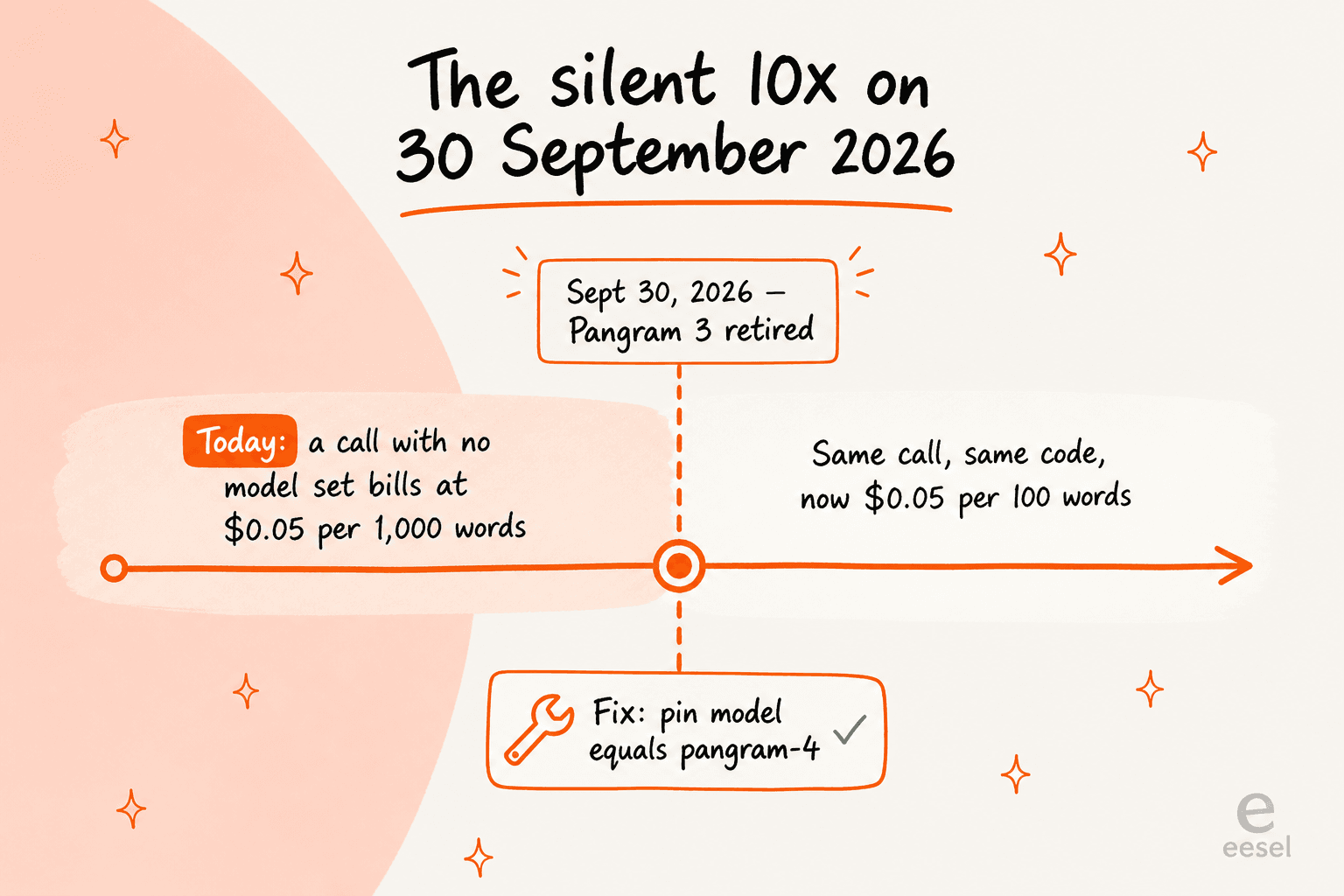
Of everything in this post, this is the one I would put in a calendar. Per the Pangram 4 announcement: "We will continue to support Pangram 3 for the next two months, with a scheduled deprecation date of September 30, 2026. Default requests that don't specify a model will continue routing to Pangram 3 using the previous billing system, until Pangram 3 is deprecated."
So a live pricing fork exists that the pricing page never mentions. An API call that omits the model argument is still billed at $0.05 per 1,000 words today, and on 30 September 2026 the identical call becomes 10x more expensive per word. No code change on your side. No deploy. Just a different invoice.
The API docs confirm that list_models() returns values like ["default", "pangram-4"], and that the model goes in as a keyword-only argument, so opting in is explicit and it takes one line. Pin it. The docs also flag that SDK compatibility methods are deprecated and "may be removed on August 1, 2026", a date which has already passed, so check your client version while you are in there.
I write integration code for a living, and this is the failure mode I run into most. A default that costs nothing to ignore, right up until it does. The wider version of that lesson sits in my notes on the blog writer API.
Cost per million words, every path
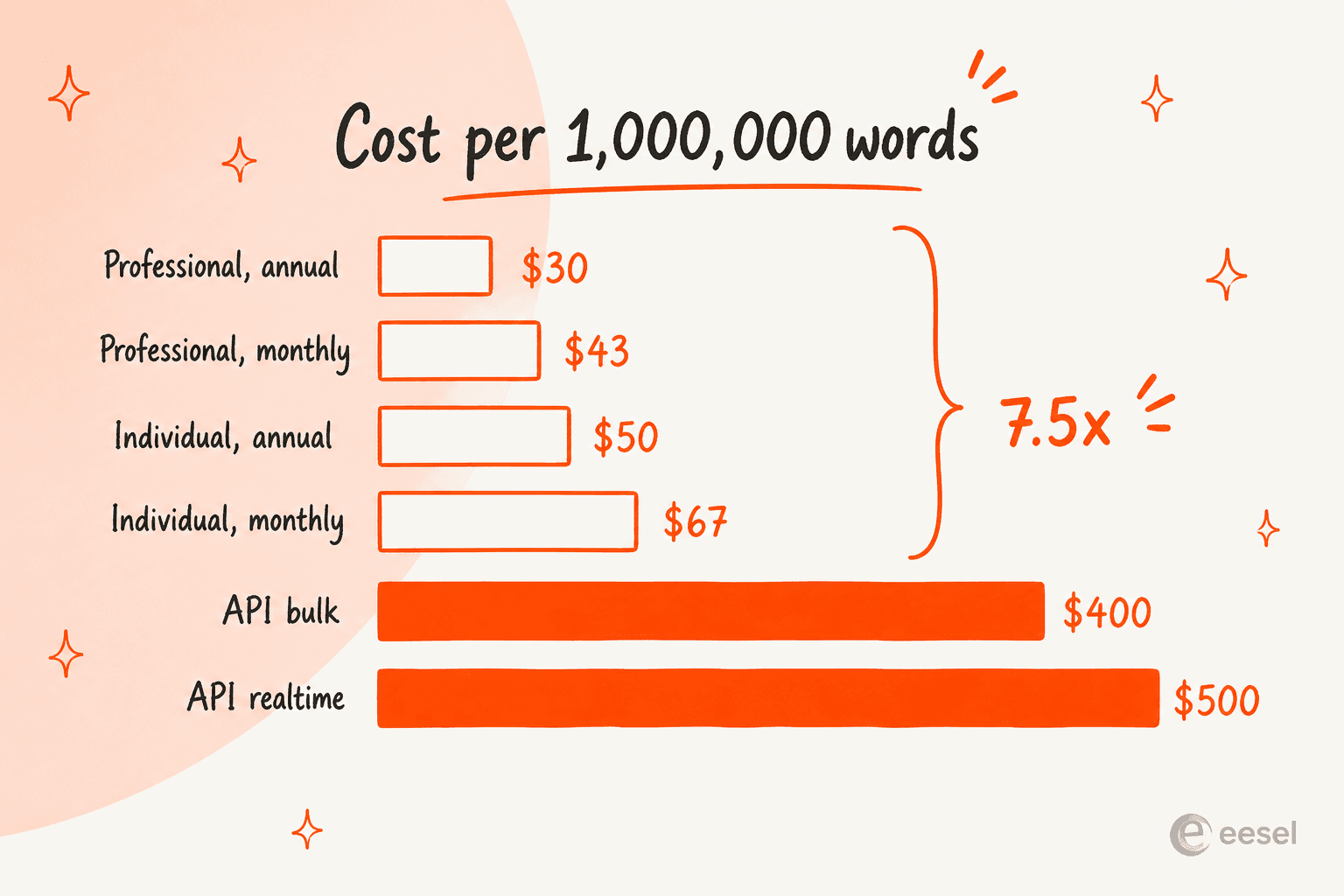
Normalising every path onto the same unit is where this gets clear. It assumes you consume the whole monthly allowance, which is the generous reading of any subscription.
| Path | Cost per 1,000,000 words |
|---|---|
| Free tier, 60,000 words/mo ceiling | $0.00 |
| Professional, annual | $30.00 |
| Professional, monthly | $43.33 |
| Individual, annual | $50.00 |
| Team, annual | $50.00 per seat |
| Individual, monthly | $66.67 |
| Team, monthly | $66.67 per seat |
| Pangram 3 API, bulk, until 30 Sept | $40.00 |
| Pangram 3 API, realtime, until 30 Sept | $50.00 |
| Pangram 4 API, bulk | $400.00 |
| Pangram 4 API, realtime | $500.00 |
The Pangram 4 API costs 7.5x more per word than the Individual subscription and 11.5x more than annual Professional. This is not a mistake in the pricing. It is what the pricing is for. The API gets priced for embedding detection inside a product that you sell, where every call hangs off revenue. It is not priced for bulk self-serve scanning, and using it that way means paying a platform premium for a job that a $20 login already does.
The practical rule is short. If your volume fits inside 1,500,000 words a month, buy a subscription. Reach for credits only when detection has to live inside your own software, or when you have already run past the ceiling. Sizing it against the rest of the stack is worth doing once, and my breakdown of AI blog writer cost is the wider frame there.
How the price compares to other detectors
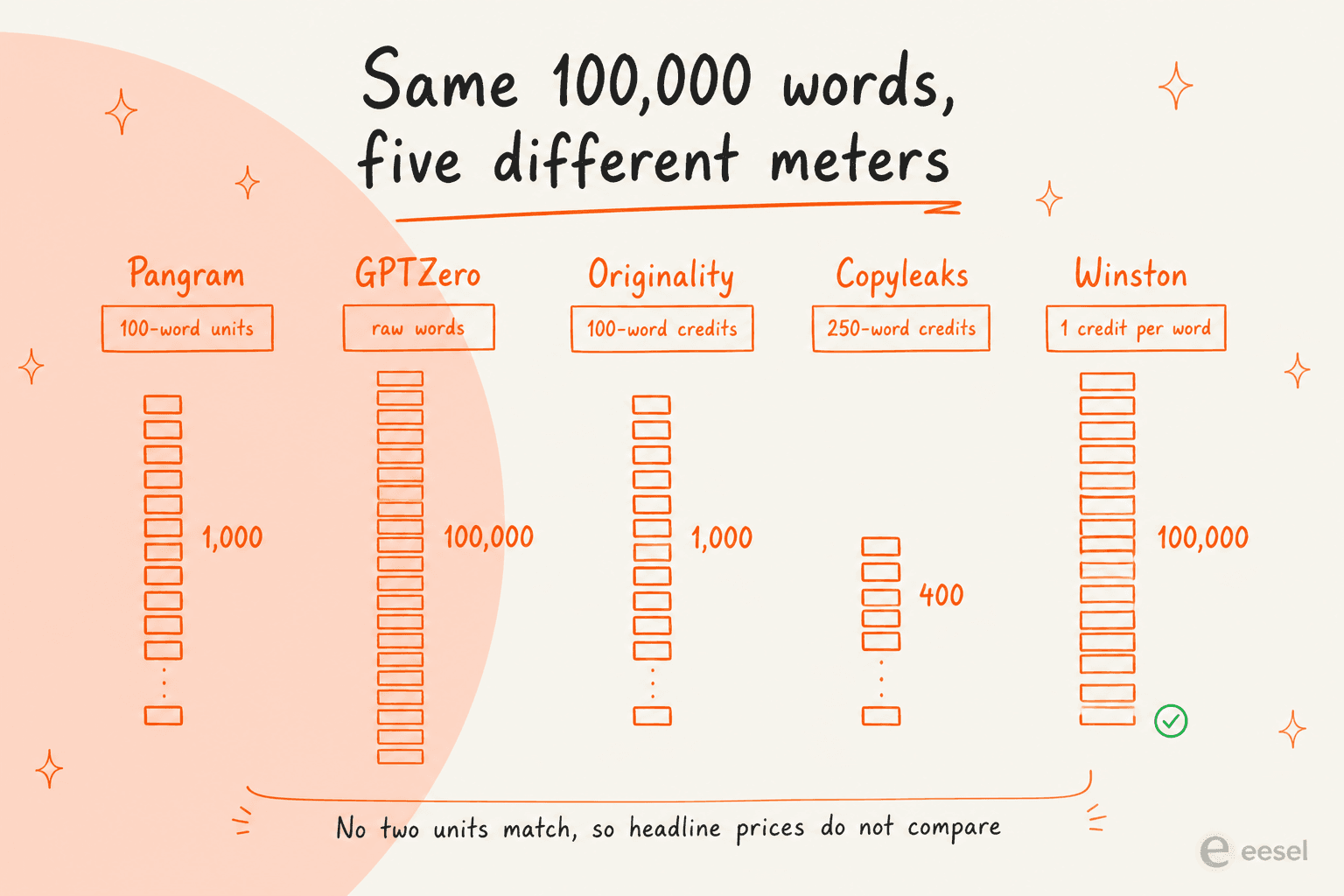
This is the part that most comparisons get wrong, and it is not the fault of the vendors. Four of the five major detectors bill by volume and no two use the same unit. A 100,000-word month works out to 1,000 Originality credits, or 400 Copyleaks credits, or 100,000 Winston credits, and also 100,000 raw GPTZero words. Until you convert, the headline prices simply do not compare.
| Tool | Cheapest paid tier | Billable unit | Free tier | Self-serve API? | Image detection |
|---|---|---|---|---|---|
| Pangram | $20/mo ($15 annual) | 100-word units | 2,000 words/day | Yes, prepaid credits | Yes, metered in scans |
| GPTZero | $12.99/mo annual-billed | Raw words | 10,000 words/mo | No, contact sales | No |
| Originality.ai | $14.95/mo ($12.95 annual) | 100-word credits | No plan, 3 scans/day | No, Enterprise tier only | No |
| Copyleaks | $16.99/mo ($13.99 annual) | 250-word-or-1-image credits | 25,000 chars, logged out | No, quote-gated | Yes, same credit pool |
| Winston AI | $18/mo ($10 annual) | 1 credit per word | 2,000 credits, 14-day trial | Yes, separate dashboard | Yes, every plan |
A few honest reads off that table.
On monthly subscriptions Pangram is the most expensive entry point of the five. $20 against $12.99 to $18. It is also the only one with no standing monthly free allowance, because its free tier resets daily instead. What that difference buys is the accuracy record, which independent teams have backed consistently for Pangram 3.x, even where they could not confirm the headline figure. One thing to note too: light AI polish from tools like Grammarly is still just text to every detector, so an editing pass costs you scans as well.
On API access Pangram is the cheapest to start. Self-serve, $5 minimum. Originality gates its API behind a tier starting at $136.58 a month annual-billed, while Copyleaks and GPTZero both route it through sales. When detection has to be inside your own product by tomorrow, that difference matters more than any per-word rate does.
On raw word economics Winston undercuts everyone. Its Essential plan at $10 a month annual-billed gets you 100,000 words of detection, so $100 per million. But every plagiarism scan runs 2 credits per word, and every image runs 300, and all of it comes from the same pool. The published schedule is the most transparent of the five. The pool being shared means the effective rate depends completely on your mix.
One more structural note. Turnitin publishes no price at all for AI writing detection. It gets bundled into institutional products instead of being sold standalone, which is why it never turns up in a self-serve comparison. If your buying decision is an institutional one, then Turnitin and Pangram's Institutional License are competing inside the same quote-gated space, and neither of them hands you a figure without a call first.
For the full side-by-side I keep a running roundup of Pangram alternatives, plus a wider list of detection tools. Writer's content detector is the free one that most people try before they pay for anything.
Which plan you should actually buy
Working off the arithmetic above, and not off the plan names.
Stay on Free when you scan under 2,000 words a day and plagiarism checks are not something you need. That is roughly two blog drafts in a day, and otherwise the free tier is unusually complete: extension, Google Docs, OCR, 20+ languages. The catch is that daily reset. A Monday batch of ten articles will not fit, even where the monthly total would have. Anyone batching like that should look at their content creation cadence before they look at a plan tier.
Buy Individual at $180 a year when you are one person going through a normal content workload. 300,000 words comes to around 300 thousand-word drafts a year, so 25 a month, and plagiarism runs on every scan. For a solo writer, or a one-person SEO function, this is the default answer. It pairs with the workflow I describe in best AI blog writer.
Buy Professional at $540 a year when your volume goes past 300,000 words a month, or when you want API access without having to buy credits separately. The bundled $200 of monthly API usage is the reason. It includes 400,000 words of realtime calls, which on its own is worth more than the whole Individual subscription. Professional annual is also the cheapest per-word path Pangram sells, at $30 per million.
Buy Team for the admin layer only. Two seats cost you the same as two Individual licences, so member management and unified billing arrive at no extra charge. Which is a fair deal. Just do not expect LMS integration to come along with it.
Go quote-gated when you are a school or a district, or a company embedding detection at scale. Institutional License is where the Canvas, Brightspace, Moodle and Google Classroom integrations live, together with unlimited checks. Enterprise is where zero data retention sits, and SOC 2 documentation, and the higher rate limits. Neither one publishes a starting figure, so budget for a sales cycle instead of a checkout.
That last one is worth to say plainly, because in the education market the enthusiasm runs well ahead of the procurement reality. One associate CS professor put it this way in a thread about the tool:
"Currently Pangram does seem to have the best detector out there. e.g. https://papers.ssrn.com/sol3/papers.cfm?abstract_id=5407424 finds a false positive rate of less than 0.5%. The same paper also shows that free and open source detectors are significantly worse, so this seems to be a case of "you get what you pay for"."

On the accuracy side that framing is fair. It is also exactly why you do the volume arithmetic before the purchase, since "you get what you pay for" stops being reassuring somewhere around 10x.
Volume nobody budgets for
There is one pattern in how people actually use a detector that shows up constantly, and it wrecks volume estimates. Nobody scans a document once.
"For student work I would think it's reasonable to look for patterns across each student's work. A single Pangram positive across 10 assignments shouldn't be enough to bring suspicion upon a student, but when 8 out of 10 of someone's assignments are coming up as AI it's time to talk."

That is good practice. It is also a 10x multiplier sitting on your word count. A class of 30, 10 assignments each at 1,500 words, comes to 450,000 words a term, which goes past Individual's monthly ceiling inside one marking week. The same multiplier lands on any team running an AI writer with a review gate at the end of it.
On the writing side the same thing happens, just from the other direction:
"I have found that most of my writing gets flagged as AI, because I know how to use good grammar, and I have an extensive vocabulary. I spent several hours fighting with Pangram to get a 100% human rating and I finally decided to leave in some minor errors and that's when it rated the same bit of writing as 100% human."
Set aside whether that is the right way to write, and just count the scans. A rewrite-and-recheck loop on a 1,200-word piece burns 12 units a pass, so five passes is 60. Whatever monthly figure you got from your publishing calendar, multiply it before you pick a tier. The calculator above takes documents times length, so the rechecks go into the document count.
And where the loop itself is the problem, the fix is upstream of it. Chasing a score by degrading the prose is the wrong lever, which is the argument I made at length in my notes on avoiding AI detection.
What actually cuts your scan count is a real editing process, not a plan upgrade. Better prompts do more than either.
The humanizer-tool market exists for the same reason, and it is worth knowing that Pangram 4 now returns humanized text as its own labelled field. So paying for content humanization tools, including the Surfer humanizer, buys you less against this specific detector than it used to.
Where the pricing page is silent
Not a criticism. Just a checklist of what the public pages will not let you plan, so you know what to ask on a call.
- No API image-scan rate is published anywhere. Image detection is metered in scans on subscriptions only.
- No Team image-scan allowance. The card says "Everything in the individual plan", which implies 100 a month, but no per-seat figure is stated.
- No upper seat cap for Team, only the two-seat floor.
- No volume ladder for the API beyond the flat 20% bulk discount. Everything past that is a sales conversation.
- No currency stated on the pricing page. Figures carry a bare dollar sign.
- The footer reads "© 2025 Pangram" while the Pangram 4 launch and its price change are 2026, so treat any figure as worth a re-check before you sign something.
On security the site-wide footer badge says Pangram is SOC 2 Type 2, verified by AssuranceLab, while the pricing page has "SOC 2 compliance" sitting as an Enterprise bullet. Both of those can be true at once, since the certification is company-wide and the documentation access is a plan feature. Still worth confirming which one is being sold to you.
The part I would spend the money on instead
I build eesel's integrations, so a detector gets looked at the way I look at any metered API. What does a call cost, and what decision does it change? On the first one Pangram is clear enough now, thanks to the arithmetic above. On the second, my honest read after running eesel's own drafts through this gate is that the score is hygiene, not strategy. It tells you how a document was probably produced. Whether the document is worth publishing, it does not tell you.
Which is why the budget line I would grow is the draft and not the audit. Where the writing starts from your own research, in your own voice, the detector turns into a formality you pass instead of a rewrite loop you pay for by the unit. That is what eesel does for this blog. It researches off primary sources, writes in the house voice, and the Pangram check at the end comes back a green light rather than a fifth pass. The mechanics are in my blog writer explainer, and the setup is one connection, covered in automating content creation. Free to try, and cheaper than the rechecks.

If you want the mechanism rather than the price, the Pangram 4 explainer covers how the output fields work and which two are near-universally misread. If you want my verdict on the accuracy claim, that is the Pangram 4 review.
And if you are building the pipeline this gate sits in, start with my blog writing workflow.
The short version
Stop reading the dollar figures. Read the units, and Pangram pricing gets straightforward. $0 free, $20 Individual, $65 Professional, $40 minimum for Team, then two quote-gated tracks above all of that. The Pangram 4 change made the API exactly 10x more expensive per word, and halved both subscription ceilings while it was at it, so the 500-word document is the line that decides whether the new billing helps or hurts you.
Two things to do today if you already pay for it. Pin model="pangram-4" on any API call, and do it before 30 September 2026. Then, if you are on Individual and touching the API at all, go price out Professional annual, because that bundled $200 of monthly usage is worth more than the whole Individual subscription is.
The rest of it is volume arithmetic, and the calculator above does that faster than the pricing page ever will.
Still deciding? Start with detector accuracy and how detectors work.
And if the real question behind all of this is whether the scanning matters at all for rankings, that is does Google penalize AI content, with the practical version in scaling SEO content safely.