Freshdesk AI spam filtering: what Freddy closes and what it can't

Riellvriany Indriawan

Katelin Teen
Last edited November 22, 2026

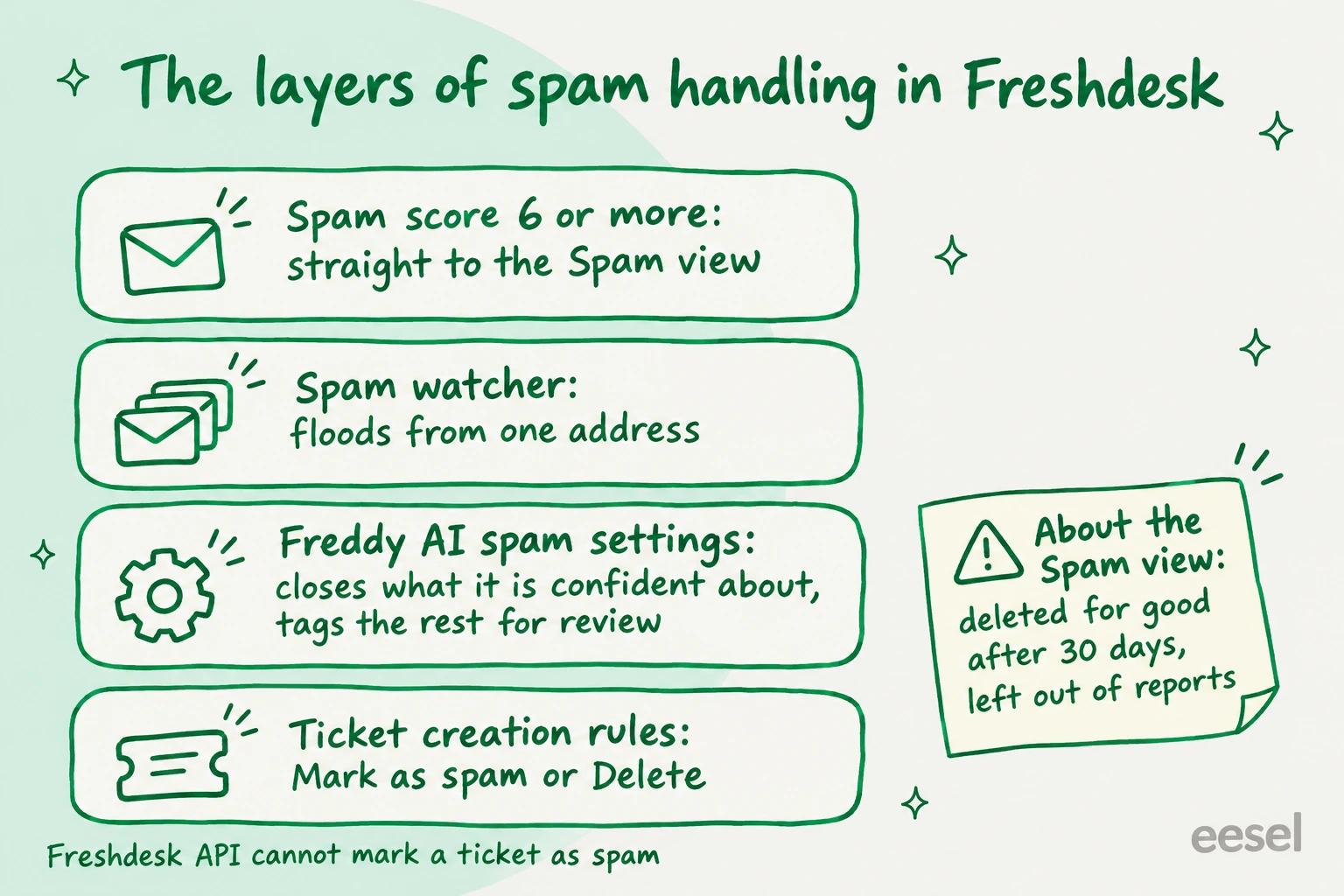
Freshdesk sends email scoring 6 or more on its spam score straight to the Spam view, and Freddy AI then auto-closes the out-of-office replies, bounces and receipts you list. Around those sit a spam watcher for floods from one address, ticket creation rules that Mark as spam or Delete, blocked contacts and a portal CAPTCHA. That AI step is the Spam settings panel in the Freddy Email AI Agent: it closes only what it's confident about and sends the rest to a group with a tag for review. It comes with every paid plan's Freddy AI Agent (500 one-time sessions included, then $49 per 100). Two things catch teams out: anything in Spam is deleted for good after 30 days and left out of reports, and Freshdesk's API can't mark a ticket as spam, so any AI outside Freddy has to tag or close the ticket and let a rule do the rest.
If an AI coding agent such as Claude Code helps run your support stack, it can set up an eesel teammate in Freshdesk through the eesel CLI and test it on your past tickets, though connecting Freshdesk still needs your Freshdesk API key.
How does Freshdesk filter spam?
Freshdesk catches spam with rules and a score, and the AI only sees what gets past them. Every email that reaches your support address becomes a ticket (email to ticket explains the plumbing), so the filters decide what your agents see. I work on eesel's support team, and spam is the part of a queue nobody talks about in a demo but everyone fights on a Monday morning. In Freshdesk it helps to know which layer did what, because each one fails differently.
| Layer | What it does | Where you set it | Plans |
|---|---|---|---|
| Proactive spam filter | Gives each incoming email a score; 6 or more goes straight to Spam | On by default, email only | Not listed |
| Spam watcher | More than 50 emails from one address in 30 minutes: the contact is deleted and their mail goes to Spam; still sending after an hour, the address is blocked | Automatic | All |
| Ticket creation and update rules | Mark as spam or Delete the ticket when conditions match | Admin > Automations | All |
| Blocked contacts | Every new ticket from a deleted or blocked contact goes to Spam | When an agent marks spam and blocks the sender | All |
| Portal CAPTCHA | Stops bots filling in your support form | Admin > Channels > Portals | Not listed |
| Email AI Agent spam settings | Auto-closes the non-actionable email types you list, routes unclear ones for review | AI Agent Studio > Build > Configurations | Growth, Pro, Enterprise (AI sessions) |
The score is described in Freshdesk's guide to protecting your helpdesk from spam, which also warns that "some valid emails can be marked as spam" when they arrive from a spam-reporting IP. The flood numbers come from Freshdesk's article on the spam watcher: the 51st email in 30 minutes trips it, and after the 60th minute Freshdesk stops receiving mail from that address. The rules, blocking and the 30-day clean-up are in the spam and trash guide, which lists three routes into Spam: an agent, an automation rule, or a contact on the Deleted contacts list.
Most of this is not AI. That matters, because the mail that wastes the most agent time in my experience isn't the obvious scam. It's the out-of-office reply to your CSAT survey, the "delivery failed" bounce, the Stripe receipt that landed in the support inbox. None of it scores as spam, so it sits in the queue as a real ticket. That is the gap Freddy's spam setting is built for, and the same gap behind Zendesk's spam filter.
What does Freddy AI's spam setting do?
It reads each new email the Email AI Agent is deployed on, decides whether it needs a person, and closes the ones that clearly don't. Freshworks' trigger rules guide for the Email AI Agent says Spam settings let the agent "automatically close non-actionable emails", and its examples are out-of-office replies, bounce notifications and payment receipts. The Freddy AI Agent page sells the same thing as "roll-out controls and spam detection".
The panel has two parts:
- Auto-close these emails. Click Add email type and pick a category. When Freddy spots one, it adds a private note to the ticket and closes it.
- What should happen when review is needed? For mail Freddy can't call, you choose a group, a queue or a workflow, and a tag to add.
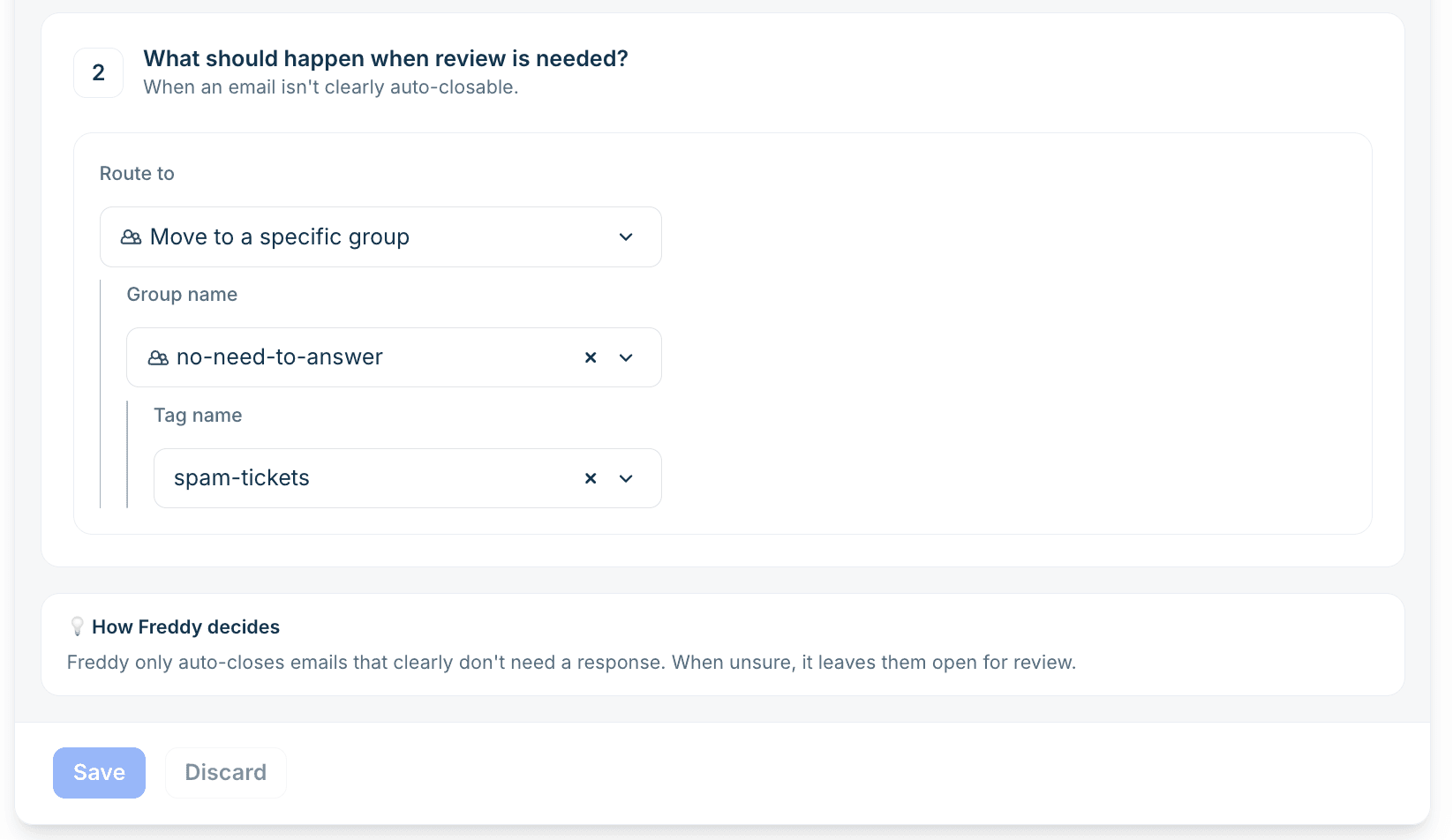
The design is cautious, which I like. In the guide's words, "Freddy AI only auto-closes emails when classification confidence is high"; anything ambiguous stays open and goes to your review group. So the review group is where you learn what Freddy is unsure of, and a weekly look at its tag tells you which category to add next. It works like any ticket tagging habit: the tag is only useful if someone reads the view.
Four things to know before you rely on it:
- It only sees tickets the Email AI Agent runs on. The agent evaluates tickets after every ticket creation rule has run, and Freshworks' table of rule interactions says that for a ticket a rule deleted or marked as spam, "The Email AI agent is not evaluated". That's fine: those were already handled. It does mean a rule you forgot about can hide tickets from the AI.
- New tickets only. Changes to Spam settings apply to tickets created after you save, so an old test ticket keeps the old behaviour.
- Email only. It's a setting on the email agent. Portal forms still need CAPTCHA (portal setup shows where), and chat spam is a Freshchat question.
- It runs on AI sessions. The Freshdesk pricing page lists Growth at $19, Pro at $55 and Enterprise at $89 per agent a month, billed annually, each with the first 500 Freddy AI Agent sessions included (a one-time allowance) and more at $49 per 100. Freshworks' session FAQ defines a session as all interactions with one customer inside 24 hours and lists no exception for emails the agent closes as spam, so check the usage page in your first week. Plan details are in Freddy AI pricing. The post on session consumption has more on how they're counted.
How do I set up a spam rule in Freshdesk?
Use a ticket creation rule for anything a pattern can catch, and keep the AI for what a pattern can't. Rules are free on every plan and they run before the AI, so every pitch a rule removes is one fewer ticket for the AI to read.
- Go to Admin > Automations > Ticket Creation and click New Rule.
- Under conditions, match what the junk has in common: Subject or description contains the phrases it repeats, or Requester email is the sender's address.
- Under actions, pick Mark as spam (recoverable for 30 days) or Delete the ticket (goes to Trash, also 30 days).
- Save, then send yourself a test email that should match.
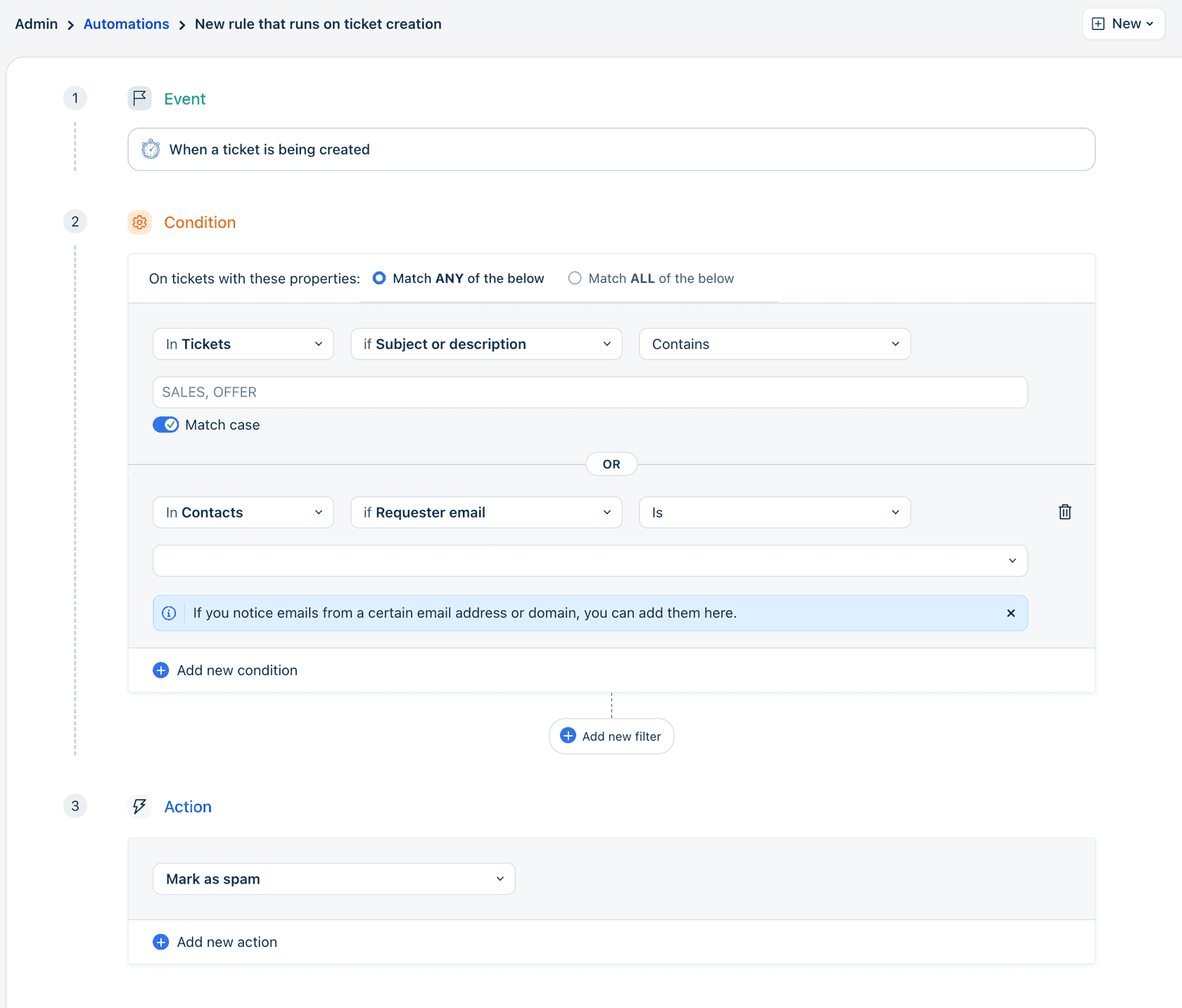
I'd start with Mark as spam rather than Delete. Both give you 30 days, but Spam is the view people check when a customer says "I emailed you last week", and Trash is not. Ticket update rules can mark spam too, per Freshdesk's article on tickets marked as spam. The guide to Freshdesk automation rules covers the rule builder in general, and AI auto-triage covers sorting the tickets that are left.
What goes wrong with spam in Freshdesk?
The failures that hurt are rarely spam getting in. They are real customers getting filtered out without anyone noticing, and spam that's too big to clear by hand.
Blocking a sender is silent and wide
When an agent marks a ticket as spam, Freshdesk offers to block the contact, and the spam and trash guide is clear about what follows: "If you block the contact, their subsequent tickets are automatically marked as spam." Blocked contacts sit in the Deleted contacts list. So a customer whose first email looked like a pitch can write to you for a month and every message goes to a view nobody opens.
It confuses admins too. A Freshworks staff answer on the community forum, to someone whose tickets kept landing in Spam with no agent touching them:
"One possibility could be that the tickets are being marked as spam because they're associated with deleted contacts."
Spam disappears from your numbers and then for good
Tickets in Spam and Trash "are excluded from reports and analytics metrics", and "after this period, Freshdesk permanently deletes them", the period being 30 days, per the same guide. Leaving spam out of your ticket volume is right. But it means an aggressive rule makes your queue look quieter, and your first response time better, while customers wait in Spam. I'd keep a saved view or a weekly glance at Spam for the first month after any new rule, and note in your custom reports that spam is excluded.
Clearing a backlog by hand is slow
When spam has already landed as normal tickets, you're left with bulk actions in the ticket list. One admin on the Freshworks Community had 4,000 of them, none caught by the filter:
"I have already "solved" the problem with a simple Selenium automation script doing the clicking while I am drinking tea."
A staff reply in that thread (from 2019) said bulk updates were capped at 30 tickets at a time and pointed to a rule on the shared pattern instead, which is still the right move: fix the next thousand with a rule, then deal with the backlog.
Your API can't mark spam
If you plan to use your own script or another AI, know that Freshdesk's Update a Ticket endpoint doesn't accept the ticket's spam field. A developer who sent "spam": true got "Unexpected/invalid field in request", and a reply on Freshworks' developer forum was:
"Your only option to mark it as spam is using Automations."
The workaround in that thread is to have the outside tool set a field, and an automation act on it. The API docs also note that once a ticket is marked as spam, updating it returns "405 Method Not Allowed", so an outside tool can't tidy up a ticket after it moves to Spam. More on what the API can do in Freshdesk API v2.
How do I find out why a ticket went to Spam?
Restore it, then read its activity log. Go to Tickets > Ticket views > Spam, open the ticket, click Not spam, then open Activities: it shows whether an agent or an automation rule marked it. If neither did, Freshdesk's spam folder article says the contact was deleted or blocked, and restoring the contact from Contacts > Contact views > Deleted lets their future emails through as tickets. Those articles don't list the email score as a cause, but the proactive filter can spam a valid email too, and Freshdesk's advice there is to keep track of the Spam folder and restore what's real.
Which Freshdesk setting deals with your junk?
Pick the kind of junk you see most to find the Freshdesk setting that deals with it.
Can a different AI filter Freshdesk spam?
Yes, with one adjustment: since the API can't move a ticket to Spam, an outside AI closes or tags it, and a rule takes it from there if you want it in the Spam view. That's how I'd set up eesel on a Freshdesk queue with heavy junk:
- Close the obvious non-actionable mail (auto-replies, bounces, receipts, newsletters) with a private note saying what it was, the same outcome Freddy's auto-close gives.
- Tag what it's unsure of, for example
review-spam, and leave it open for a person, the way Freddy's review routing works. - Never close a ticket from an existing customer's address without a person looking. That's an instruction, written in plain words, not a dropdown.
A field set by the AI and a rule that acts on it is the forum's workaround above; test it on one ticket first to check your update rule fires on the AI's change. If you'd rather keep everything in Freddy, its auto-close and review routing do the first two natively (eesel vs Freddy compares the two), and the Freshdesk AI alternatives roundup weighs it against other tools. For the general version of this across helpdesks, see AI spam ticket filtering.
Try eesel next to Freshdesk
If your spam problem is mostly mail that isn't technically spam, eesel can sort it inside Freshdesk as an AI teammate. It reads each new ticket with its tags, fields, requester and recent thread, and you tell it in plain words what to close, what to tag for review and what never to touch. It can tag, assign, set the status, update fields and leave a private note explaining every close, per the Freshdesk docs. You choose, for each action, whether it runs on its own, asks a person first or stays off, so you can let it close bounces alone while every close of a real-looking ticket waits for a yes (actions and approvals). The same teammate then answers the tickets that are left and hands over the ones it shouldn't. SamCart runs eesel on its Freshdesk tickets and its website chat, one agent per channel.
You can run it against your past Freshdesk tickets before it touches a live one. Try eesel