8 best ZeroClaw alternatives for support teams (2026)

Rama Adi

Katelin Teen
Last edited July 19, 2026

Why people leave ZeroClaw (and why that's not ZeroClaw's fault)
I build integrations and AI agents for a living, so let me be fair to ZeroClaw first, because it deserves it.
ZeroClaw is a ~3.4MB Rust binary that starts in under 10ms and runs on $10 hardware, per its Hacker News launch thread. It's dual-licensed MIT/Apache, sits at roughly 32k GitHub stars, speaks 30+ channels (Discord, Telegram, Matrix, email, webhooks), and is provider-agnostic across Claude, OpenAI, Ollama and ~20 more with fallback routing. It even talks to GPIO hardware on a Raspberry Pi. Its whole pitch is ownership: "You own the agent. You own the data. You own the machine it runs on." For a privacy-obsessed tinkerer, that's fantastic, and I mean that sincerely.
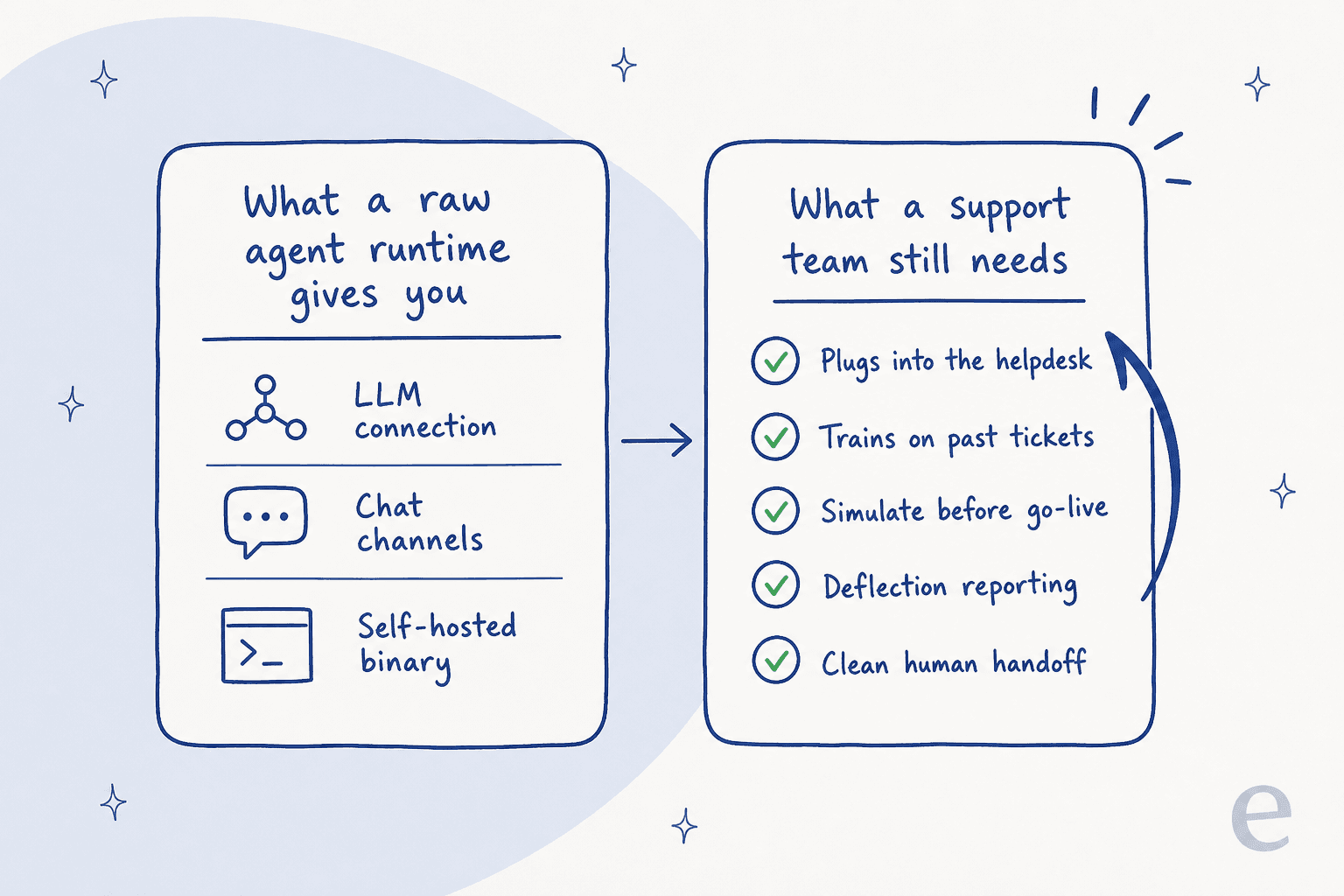
The problem is that none of that makes it a support product. The moment you try to run a real queue on it, the gaps show up fast:
- No native helpdesk integration. There's no Zendesk, Freshdesk, Gorgias, or Front connector. It doesn't read tickets, write back to them, or respect your macros and tags. Its channels are chat apps, not ticketing systems.
- No way to test before it goes live. Nothing lets you replay the agent against your past tickets to see how it would have answered. For support, that's the difference between a demo and a safe rollout.
- You're the ops team. Self-hosting a Rust binary, rotating LLM keys, configuring sandboxing, uptime, upgrades, all of it lands on you. Fine for a hobby agent, heavy for an always-on support function.
- Community-only support on the free tier, per ZeroClaw Cloud's pricing. A support tool where your support is a Discord channel is an ironic place to end up.
Even the launch crowd on Hacker News, exactly ZeroClaw's target audience, wasn't fully sold on trusting it:
"I see some things listed here, enough to make me feel this is a more solid app than OpenClaw / Moltbot, but not enough to let me feel okay installing it :) … I'm especially worried about exfiltration or other negative behaviours."

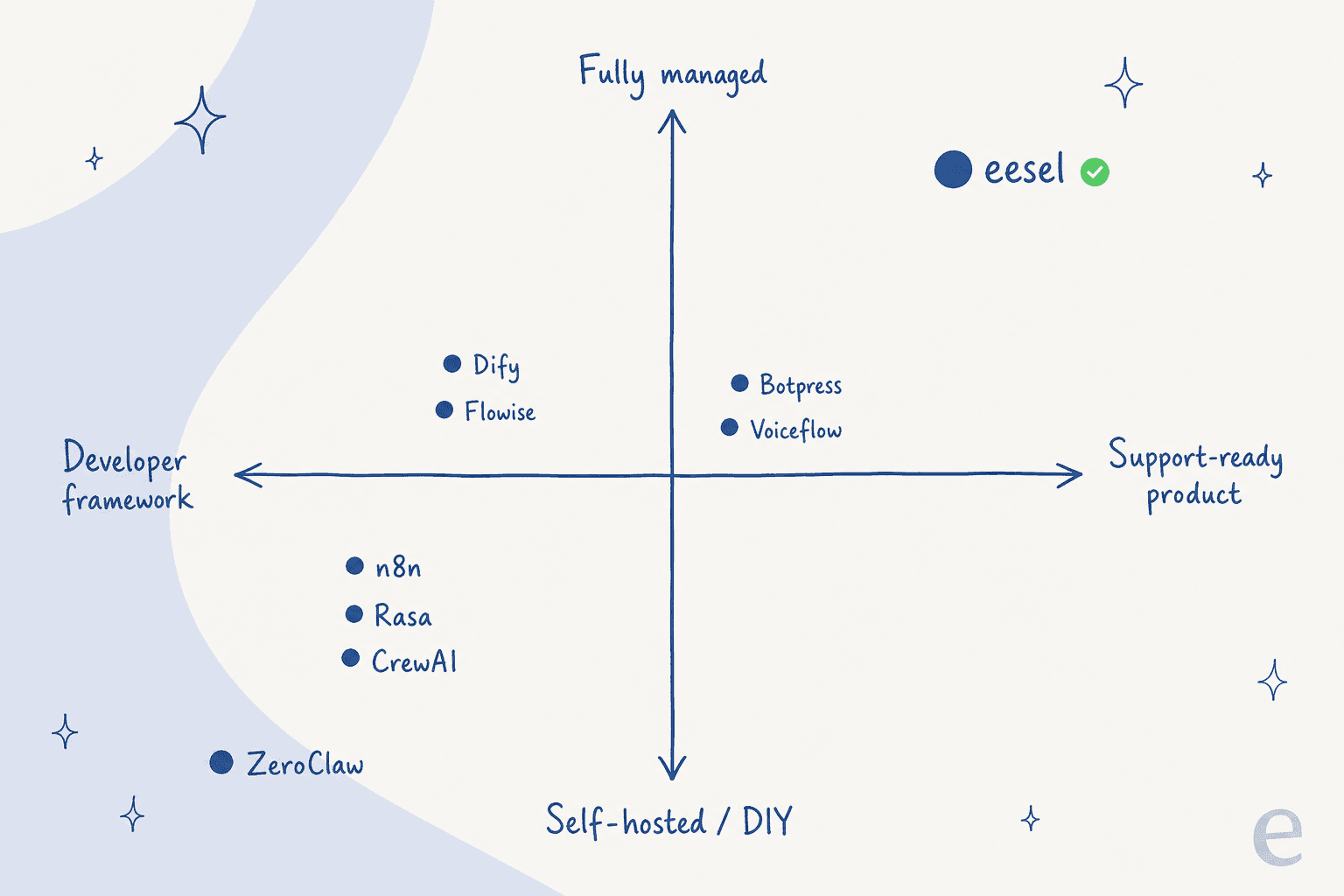
Here's the thing I keep coming back to, from years of putting AI agents on live support queues: the hardest part of support AI was never "can it chat." It's trust. The worst failure mode we've watched in production is an agent that confidently narrates work it never did, "searching your tickets now…" while never touching the API. That's why we simulate every rollout against a customer's real history before it answers anyone. A raw agent runtime gives you the chat; it gives you none of the scaffolding that keeps the chat from quietly going wrong.
One customer put the build-versus-buy question better than I can:
"We could try to write our own LLM application but we didn't want to invest our time into that. We wanted something that we would not have to maintain."
Karel, GENERAL BYTES
That's the whole post in two sentences. So let's find you the tool that fits.
The 8 best ZeroClaw alternatives at a glance
Before the deep dives, here's the comparison I wish existed when I started researching this. Billing units matter more than sticker prices here (the same trap shows up when you compare cheap helpdesk AI apps), so I've called them out explicitly.
| Tool | Best for | Open source | Self-host | Billing unit | Free tier | Helpdesk-native | Engineering needed |
|---|---|---|---|---|---|---|---|
| eesel | Support teams who want AI live in the helpdesk now | No | No (managed) | Per credit (1 per ticket or chat) | Yes (100 free credits) | ✅ Yes | Low |
| n8n | Self-hosting the automation layer | Source-available | ✅ Yes | Per workflow execution | Self-host free | ❌ No | High |
| Dify | Building a full LLM app in-house | Modified Apache | ✅ Yes | Message credits | Sandbox $0 | ❌ No | High |
| Flowise | Fast visual prototyping | Apache 2.0 | ✅ Yes | Predictions | Free ($0) | ❌ No | Medium |
| Botpress | A purpose-built chatbot with a free tier | MIT (cloud SDK) | Legacy v12 only | AI Spend + conversations | Yes (free) | Partial | Medium |
| Voiceflow | No-code chat + voice agent design | No | No | Credits | Yes (one-time grant) | Partial | Low–Medium |
| Rasa | Regulated, on-prem conversational AI | Apache 2.0 (core) | ✅ Yes | Conversations/month | 1,000 conv/mo | ❌ No | High |
| CrewAI | Multi-agent Python orchestration | MIT | ✅ Yes | Workflow executions | 50 exec/mo | ❌ No | High |
A quick note on how I ranked these. Since you came from ZeroClaw, I weighted three things: how close each tool stays to the self-hosted, data-ownership ideal; how much engineering it takes to turn it into a working support agent; and whether the billing unit actually maps to support value. That last one is sneakier than it looks.
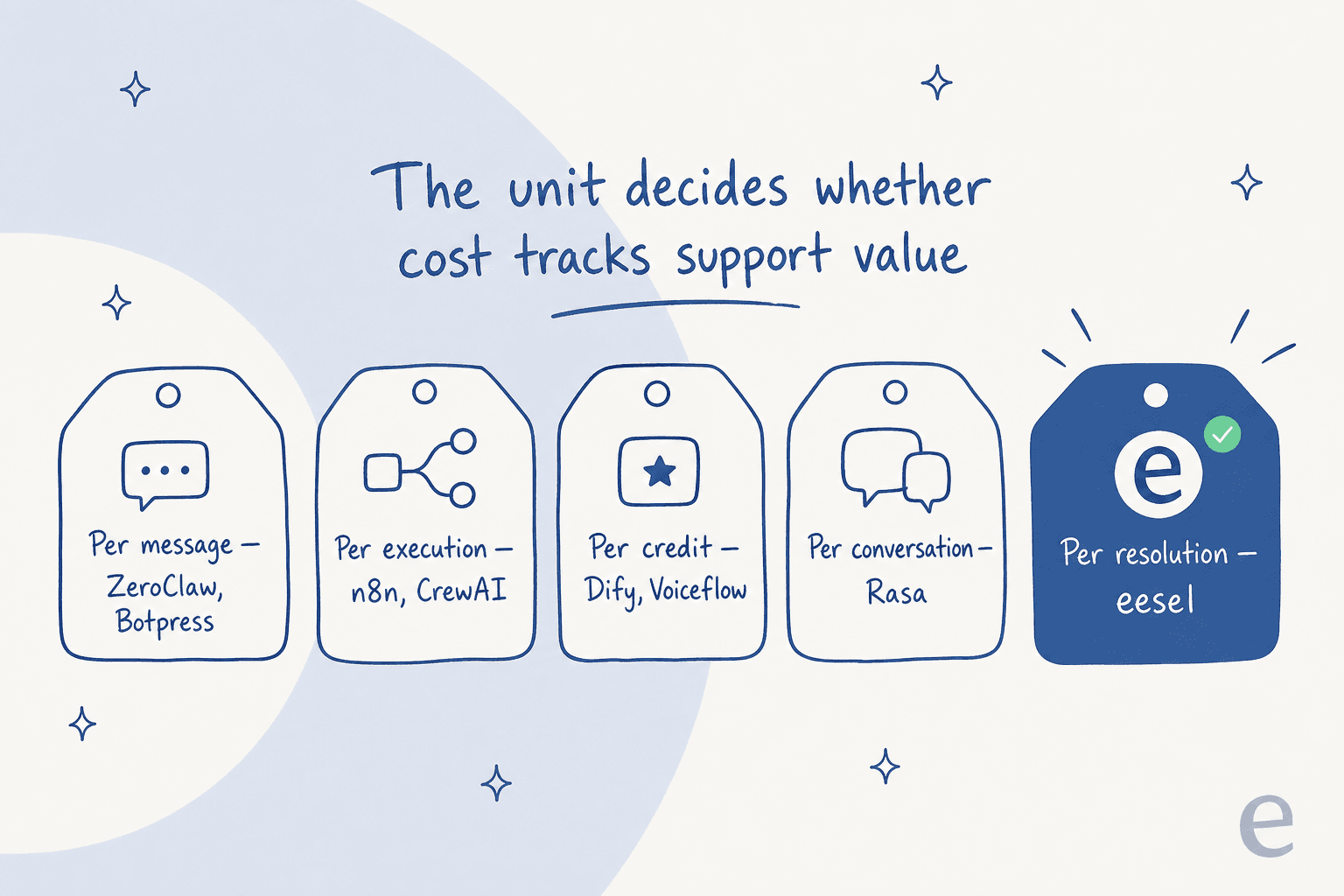
Per-message and per-credit models charge you whether or not the customer's problem got solved. Per-resolution charges only when it did. For a support budget, that gap compounds every month.
Quick picker: which one fits you?
1. eesel: best for support teams who want AI in the helpdesk now

Let me be upfront: I help build eesel, so treat this as the biased-but-informed entry. The reason it leads the list isn't loyalty, it's that it's the only tool here that answers the actual question a ZeroClaw refugee is asking, which is "how do I get an AI agent onto my support queue without becoming a full-time AI ops engineer?"
The difference from everything else on this list is that eesel is a support product first, not a framework you shape into one. You connect your helpdesk, it reads your existing tickets, macros, and help center, and it starts drafting or auto-sending replies as an AI copilot inside the tool your team already uses. No binary to host, no keys to rotate.
Features. eesel plugs into Zendesk, Freshdesk, Gorgias, and more as a native integration, not a webhook you maintain. It trains on your past tickets so its tone and answers match how your team actually replies. Its simulation mode replays the agent over hundreds of your real historical tickets and shows you the projected resolution rate before it touches a live customer. And confidence-based routing means it only answers what it's sure about and cleanly hands the rest to a human.
Pros. Minutes to first value, not weeks. It's the one tool here with a real answer to the trust problem: you see how it'll behave before it behaves that way. One fixed monthly price means you pay for ticket volume, not chat volume or seats. Real results back it up: one customer, Gridwise, resolved 73% of tier-1 requests in the first month, and another saw up to 80% time savings.
Cons. It's not self-hostable, so if on-prem data ownership is your hard line, this isn't your tool (look at Rasa or n8n instead). It's also scoped to support and internal-knowledge use cases, so it's not a general-purpose agent framework for building, say, a hardware-controlling edge agent the way ZeroClaw is.
Pricing. One fixed monthly price sized to volume (from $299/month for 500 credits, 1 credit per ticket or chat), with no per-seat fees, so a bigger team doesn't mean a bigger bill. There's a free plan with 100 credits, and because pricing tracks tickets rather than seats or messages, the cost lines up with the value you actually get.
Verdict. If you left ZeroClaw because you wanted a working support agent and got a build project instead, eesel is the shortest path back to the original goal. Skip it only if self-hosting is a genuine requirement.
2. n8n: best for self-hosting the automation layer
n8n is the closest thing on this list to ZeroClaw's spirit, and if data sovereignty is why you're here, it should be your first stop.
n8n is a source-available workflow automation platform with native AI agent and LangChain nodes. You wire triggers, apps, logic, and LLM steps together on a visual canvas, and drop into JavaScript or Python when the pre-built nodes fall short. At ~197k GitHub stars, it's one of the most-starred automation projects going.
Features. An AI Agent node plus LangChain nodes for multi-step agents; 1,500+ integrations plus a generic HTTP node to hit any API; a custom code node for logic the nodes don't cover; and fully self-hosted execution so ticket data stays on your infra. It's model-agnostic, no LLM lock-in, which will feel familiar coming from ZeroClaw.
Pros. Truly self-hostable with unlimited executions on the free Community edition. Its billing model is unusually sane: you pay per full workflow execution, not per step, so heavy AI flows stay cheap. One long-time user summed up the appeal:
"n8n in my experience using it for 2 years now, and compared to similar solutions as there are many doing quite the same thing: it is just a very good product. It's stable."
Cons. It's an automation canvas, not a helpdesk. There's no built-in ticketing UI, agent inbox, macros, or CSAT, you assemble a support bot from nodes yourself, which is real engineering. Reviewers flag a steep learning curve and surprise bills from runaway executions during testing.
Pricing. Community self-host is free (you pay for the server). Cloud starts at €20/month (Starter, 2,500 executions), €50/month (Pro, 10,000), and €667/month (Business, 40,000). n8n dropped active-workflow limits across all plans in 2026, so you're billed purely on executions now.
Verdict. The pick for technically-minded teams who want to keep the self-hosted, no-lock-in ethos and are happy to build the support layer themselves. Skip it if you want customer service software that works out of the box.
3. Dify: best for building a full LLM app in-house
If ZeroClaw felt too low-level and you'd rather build on a batteries-included platform, Dify is where a lot of teams land.
Dify is an open-source, self-hostable platform that bundles a visual workflow canvas, a RAG pipeline, a prompt IDE, and LLMOps into one stack. At ~149k GitHub stars, it's one of the most popular LLM app platforms on GitHub, and it's the broadest-scope tool in this roundup.
Features. A visual Workflow canvas for multi-step AI flows; a built-in RAG pipeline for document ingestion and retrieval; ReAct or function-calling agents with 50+ built-in tools; and a prompt IDE plus LLMOps for monitoring and analytics. Every app you build is exposed as its own API for embedding elsewhere.
Pros. The most complete all-in-one of the bunch, you can go from prompt to RAG to deployed API without leaving the tool. Docker Compose self-host is turnkey, and the huge community keeps models and integrations current.
Cons. It's a developer platform, not a helpdesk, so there are no native Zendesk/Freshdesk connectors; you build the agent, expose its API, and wire it into support yourself. No ticket simulation, no deflection reporting, no agent handoff. And the license is Apache-derived, not fully permissive (it has SaaS-resale and branding clauses), which matters if you plan to host it for clients. Early users have also been bitten by rough edges:
"It should auto-save. I did a lot of prompting work and then clicked another icon. When I came back, all my work was gone."
Pricing. The self-hosted Community edition is free. Dify Cloud runs on message credits: Sandbox $0 (200 one-off credits), Professional $590/year ($49/mo, 5,000 credits/month), Team $1,590/year ($132/mo, 10,000 credits/month), and Enterprise is custom.
Verdict. A strong choice for a team that wants to build a full LLM app with RAG and observability in one place. For a plug-and-play helpdesk agent, it's more platform than you need.
4. Flowise: best for fast visual prototyping
Flowise is the tool to reach for when you want to see a working agent in an afternoon.
It's an open-source, drag-and-drop builder, a ComfyUI-style node canvas for LLM apps and multi-agent systems, layered largely over LangChain and LangGraph. At ~54.7k GitHub stars and a fully permissive Apache 2.0 license, it's the lowest-friction way to prototype on this list.
Features. Chatflow for single-agent chatbots with tool calling and RAG; Agentflow for multi-agent systems with human-in-the-loop review; execution traces for debugging; and REST APIs, TypeScript/Python SDKs, and an embeddable chat widget. It supports 100+ LLMs and vector databases.
Pros. The easiest to run of the open-source options, an npm install -g flowise one-liner and you're going. The node canvas is widely praised, and the Apache license has no resale or branding strings.
"Flowise is pretty great. very ComfyUI-like."
Cons. It's repeatedly flagged as prototype-grade rather than production-grade, users report high RAM use, WebSocket friction in real apps, and a GUI that hides underlying LangChain errors and makes debugging hard. Like the others here, it has no native helpdesk integration, so a live support queue means wiring the widget and API into your stack yourself.
Pricing. Self-host is free. Flowise Cloud bills per prediction: Free $0 (100 predictions/month), Starter $35/month (10,000 predictions), and Pro $65/month (50,000 predictions, +$15/user). Remember the cloud price is only part of the bill, model and vector-storage costs are extra.
Verdict. Excellent for demos, internal tools, and basic chatbots. I'd hesitate to put it on a high-volume ticket queue without a lot of hardening.
5. Botpress: best for a purpose-built chatbot with a free tier
If the previous three felt too much like "assemble it yourself," Botpress is closer to an out-of-the-box chatbot builder.
Botpress is a visual studio for building LLM-powered conversational agents that deploy to web chat, WhatsApp, Slack, and more, with knowledge-base ingestion and human handoff built in. One caveat up front: the modern product is cloud-first. Only the legacy v12 is self-hostable, so if self-hosting is your reason for leaving ZeroClaw, this isn't a drop-in.
Features. A drag-and-drop flow Studio with agentic flows; knowledge-base ingestion so the bot answers from your docs (RAG); a large hub of channel integrations; and an AI Spend model that bills LLM usage at raw provider cost with no markup.
Pros. Purpose-built for chatbots and support deflection, so knowledge base, channels, and handoff are first-class rather than DIY. The free tier (500 messages + $5 AI credit) lets you prototype at zero cost, and it holds a solid 4.5/5 across ~486 G2 reviews. No token markup is a nice touch.
Cons. Not truly self-hostable anymore, which undercuts the data-sovereignty pitch. Reviewers cite a confusing multitude of settings and thin advanced tutorials, and costs can climb since conversation packs auto-add at the limit with AI Spend on top.
Pricing. Pay-as-you-go is free (500 messages/mo, 1 seat, $5/mo AI credit). Plus is $89/month (3 seats, unlimited agents), Team is $495/month (unlimited seats, RBAC), and Managed is $1,495/month. A May 2026 update bundled free AI Spend into every plan and added unlimited bots.
Verdict. A good fit if you want a purpose-built support bot and are fine on a hosted cloud. Compare it against the wider field of AI chatbot platforms before committing. If on-prem was the point, keep moving.
6. Voiceflow: best for no-code chat and voice agent design
Voiceflow is the most polished managed builder here, and the one to consider if you want voice alongside chat.
It's a hosted, visual platform for designing, testing, and deploying conversational agents across chat and voice, with a dedicated customer-support solution. It's the structural opposite of ZeroClaw: proprietary and cloud-only, with no self-hosting.
Features. An Agent step to interpret, route, and act within a flow; a drag-and-drop Workflows builder; a Knowledge Base for RAG-style answers; a Conversations API for programmatic messaging; and native voice support via an STT/TTS pipeline.
Pros. Ease of use is its headline strength, it holds ~4.6/5 across ~109 G2 reviews, with non-engineers shipping working agents. Native voice plus chat in one builder is rare, and managed hosting means no infra to run.
Cons. Not self-hostable and proprietary, a dealbreaker if you chose ZeroClaw for control. The credit model can bite at support volume: every inbound message burns a credit, and historically agents stop responding when the monthly allocation runs out. There's no native helpdesk integration out of the box, connecting to Zendesk or Freshdesk is custom plumbing. And in 2026 the pricing page went demo-gated, so budgeting is harder.
Pricing. Tiers are Free, Pro, Business, Enterprise, but exact dollar figures are now login/quote-gated. The billable unit is credits: 1 credit per user message, 10 credits per voice minute, with LLM/STT/TTS billed separately.
Verdict. A strong no-code builder for chat-and-voice agents, especially for ticket deflection and lead qualification. The per-message credit model and lack of helpdesk-native integration make it a weaker fit for a high-volume support queue.
7. Rasa: best for regulated, on-prem conversational AI
If your reason for self-hosting is compliance, not preference, Rasa is the most mature option on this list.
Rasa is a framework for building conversational AI assistants. Its 2026 flagship approach is CALM (Conversational AI with Language Models), an LLM-native, intent-free way to build assistants where the model handles understanding while the actions the agent can take stay defined in code. That split is exactly what you want when a hallucinated action is a real liability.
Features. CALM for LLM-native dialogue; Rasa Studio, a no-code UI for building assistants; enterprise search/RAG for grounded answers; a custom actions server for arbitrary business logic; and production-grade deployment via Kubernetes/Helm, Vault secrets, and OpenTelemetry observability.
Pros. True self-hosting with an Apache-2.0 open-source core, full data control, on-prem, even air-gapped. CALM's "LLM understands, code decides" model gives deterministic control over what the agent can do, which is gold for regulated support. The deployment tooling is properly enterprise-grade.
Cons. Heavy engineering lift, it's a developer framework, not a turnkey helpdesk agent, with no out-of-the-box helpdesk connectors. The legacy Rasa Open Source is now in maintenance mode, so you're committing to the CALM/Rasa Pro path (which needs a license key even on the free tier). And the paid tiers are expensive and quote-gated. A bootstrapped founder put it bluntly on Rasa's own forum:
"pricing for a startup that is in bootstrap mode of 35k is a turn off"
Pricing. The Developer Edition is free (up to 1,000 external conversations/month, one bot, community support, 12-month license key). Business and Enterprise are quote-gated, with the paid entry point historically cited around $35k/year. Rasa deliberately doesn't do pay-per-conversation pricing.
Verdict. The right call for engineering teams in regulated industries that need on-prem, deterministic control, and have the budget and headcount. Overkill, and over-budget, for a small team that just wants AI for customer service.
8. CrewAI: best for multi-agent Python orchestration
CrewAI is the closest to ZeroClaw's "open-source, self-hosted, developer-first" DNA, just aimed at multi-agent orchestration rather than a single runtime.
It's an MIT-licensed Python framework for orchestrating role-playing, autonomous multi-agent systems: you define agents with roles and goals, group them into a "Crew," and wire them into event-driven "Flows." At ~55.8k GitHub stars and notably with no LangChain dependency, it's a favorite for developers building complex agentic workflows.
Features. Crews (teams of collaborating role-playing agents); Flows (event-driven workflows for deterministic orchestration); a tools system for built-in and custom integrations; and a managed AMP/Enterprise platform with a visual editor and tracing.
Pros. Widely called the simplest multi-agent framework to start with, clean role/goal/task primitives, MIT-licensed, and fully self-hostable via pip install crewai. Dropping the LangChain dependency means fewer abstraction layers to fight.
"CrewAI is the simplest to get started with."
Cons. It's not a customer-support product at all, no helpdesk integrations, no ticketing, no CX tooling, so you'd be building a support agent from scratch on a general orchestration library. Community discussion repeatedly notes that agent frameworks are easy to prototype but hard to make reliable in production, and multi-agent crews are resource-hungry (guides cite ~32GB RAM as a practical local floor).
Pricing. The open-source framework is free forever (you pay your own LLM tokens). The managed Basic tier is free with 50 workflow executions/month; Enterprise is custom and quote-gated.
Verdict. A great pick for developers building multi-step, multi-agent automations who want a clean, self-hostable framework. Browse AI agent examples to see the range. For customer support specifically, you're signing up to build everything the support-shaped tools give you for free.
How to actually choose
Strip away the feature lists and the decision comes down to one question: do you want to build an AI agent, or deploy one? (If you're still weighing agents against simpler bots, this breakdown of agents vs rule-based chatbots helps.)
If you want to build, and self-hosting is the point, n8n and CrewAI keep you closest to ZeroClaw's ethos, with Rasa as the heavyweight for regulated shops. If you want a visual, no-code chatbot builder that's mostly done for you, Flowise, Dify, Botpress, and Voiceflow trade some control for speed.
But if you came to ZeroClaw trying to solve support and discovered you'd signed up for an infrastructure project, the honest answer is that none of the build-it-yourself tools shortcut the part that actually matters: plugging into your AI helpdesk, learning your tickets, and proving it's safe before it answers a customer. That's a support product's job, and it's the gap this whole category leaves open.
Try eesel for AI support without the build

Here's the pitch, tuned to exactly where you are. You liked ZeroClaw because you wanted an AI agent doing real work. eesel gives you that for support without the build: it plugs into Zendesk, Freshdesk, Gorgias, and more, learns from your past tickets so it sounds like your team, and, the part no framework on this list offers, it simulates on real tickets so you see the projected resolution rate before it goes live.
Pricing is one fixed monthly price with no per-seat fees, so you pay for ticket volume, not agent count. It's free to try with 100 credits, and you can have it drafting replies in your helpdesk in the time it'd take to cargo build a self-hosted runtime. If you want the ownership and tinkering of a raw agent framework, one of the eight above is your tool. If you want an AI teammate answering tickets today, that's what eesel is for.