


What is VanChat?
VanChat is an AI chat and chatbot app for Shopify, listed on the App Store since February 6, 2024. The listing pitch is direct: an AI assistant "built to close sales, not just answer questions." Its founder and CEO is Lucas Lee, and a Lucas from support is thanked by name in several reviews for hands-on help.
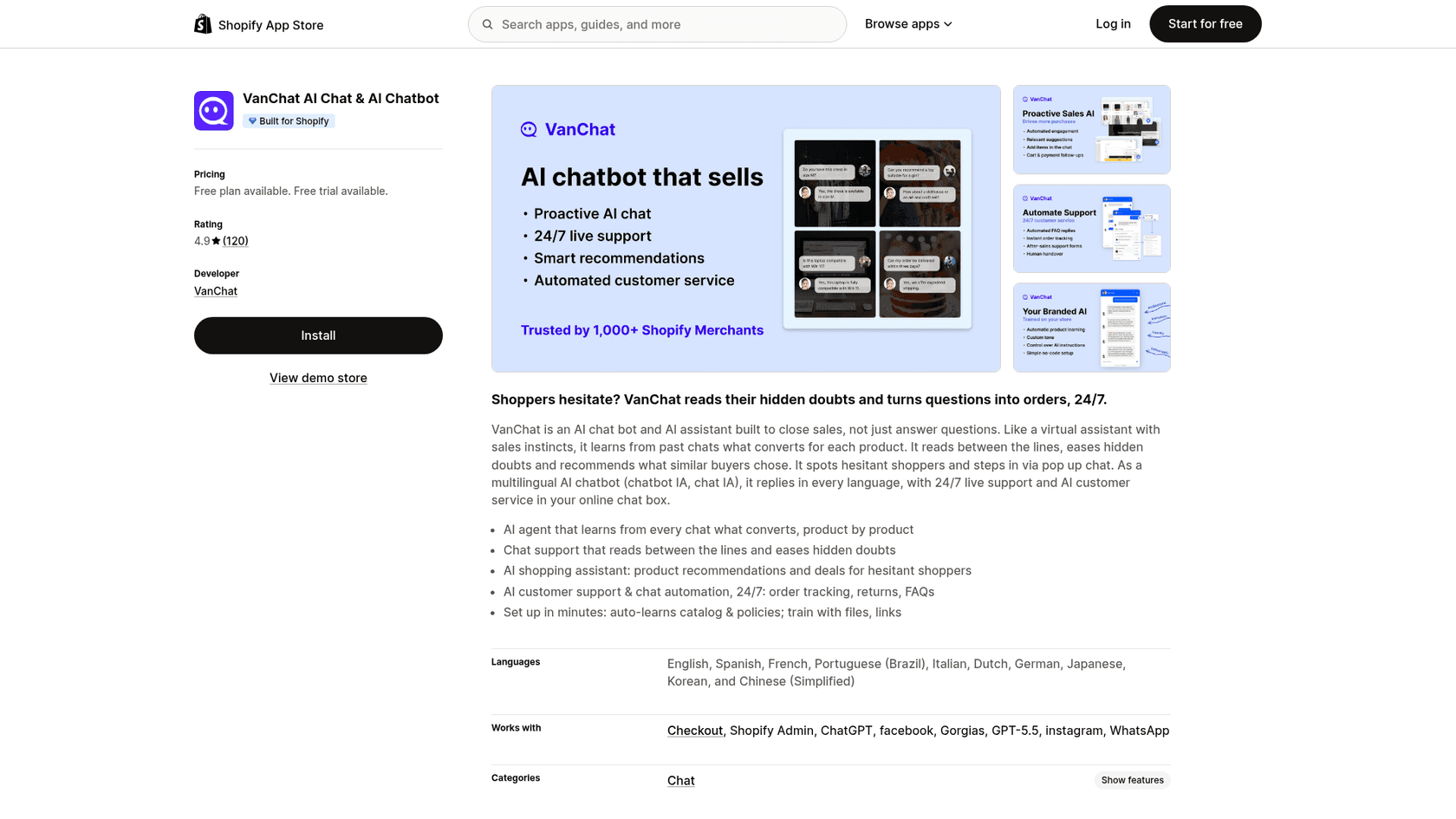
It sits in the same aisle as the apps in my Shopify AI chatbot list, a storefront widget that answers first with a person behind it. Its closest neighbors are Chizy and Zipchat.
Tidio is the bigger name. Shopify's free Shopify Inbox is the baseline, and VanChat connects to it on every plan.
| VanChat at a glance | |
|---|---|
| What it is | AI sales and support chat for Shopify, with live chat |
| On the App Store since | February 6, 2024 |
| Rating | 4.9 from 120 reviews: 115 five-star, 3 four-star, 1 three-star, 1 one-star |
| Price | Free, then $39, $149, $249, $499, $799 a month, Enterprise custom |
| What sets the price | AI replies per month, with $0.09 per extra reply |
| Shopper languages | Over 40, per the FAQ |
| AI models | Listed as working with ChatGPT and GPT-5.5 |
| Handover | Live chat, Shopify Inbox, WhatsApp and more; Gorgias on Growth |
| Built for Shopify badge | Yes |
One small thing I noticed: the homepage says VanChat is trusted by 1,000+ Shopify merchants, while the pricing page says 5,000+ brands. Neither changes the review, but it's a reminder to treat the marketing numbers loosely.
How VanChat works
VanChat does four jobs: learn the store, answer and sell in the chat, track orders and hand off, and let you correct it. The reviews love the first two. The last one is where VanChat is better than its price suggests.
What the AI learns from
On install, VanChat syncs your Shopify products, store description, and shipping and return policies, and keeps them updated. Each product gets an editable Q&A and "aliases," so you can teach it that "the blue one" means a specific SKU. Beyond the store, the training guide lists four extra sources: links, Q&A pairs (one at a time or in bulk from Excel), files (PDF, CSV or DOCX under 5MB), and text blocks for rules.
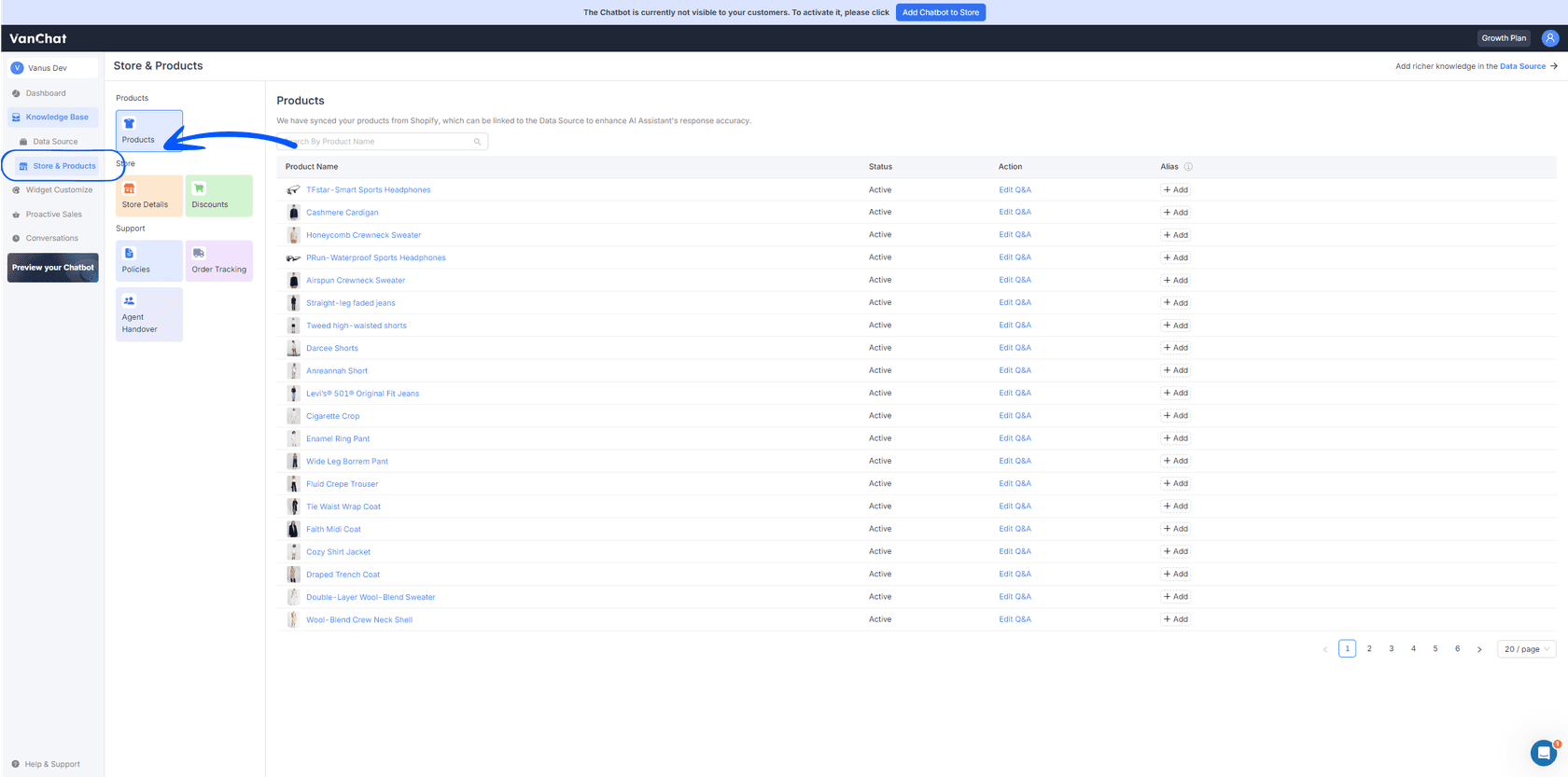
The product sync is what reviewers praise most. One UK supplement store trained it on far more than the catalog:
"Trained it on our website, our FAQs, all our articles and interactions on HubSpot over the past few years. It absorbed the lot. I tested it quite lot by trying to trick it into being a standard GPT, asking it to tell jokes, tried to trap it into giving false answers (and potentially dangerous answers - we sell supplements) and it didn't fall for any of it."

What it doesn't learn from on its own is your past support conversations. If your best answers live in a helpdesk, you'd export them into Q&A or files yourself. That's the main gap between a storefront chat and an AI knowledge base chatbot that reads ticket history.
Answering and selling in the chat
In conversation, VanChat answers product, sizing and policy questions and shows product cards. The listing says it also learns from past chats which answers convert for each product. The part that sets it apart is proactive sales: pop-up messages that fire on shopper behavior, not on a question.
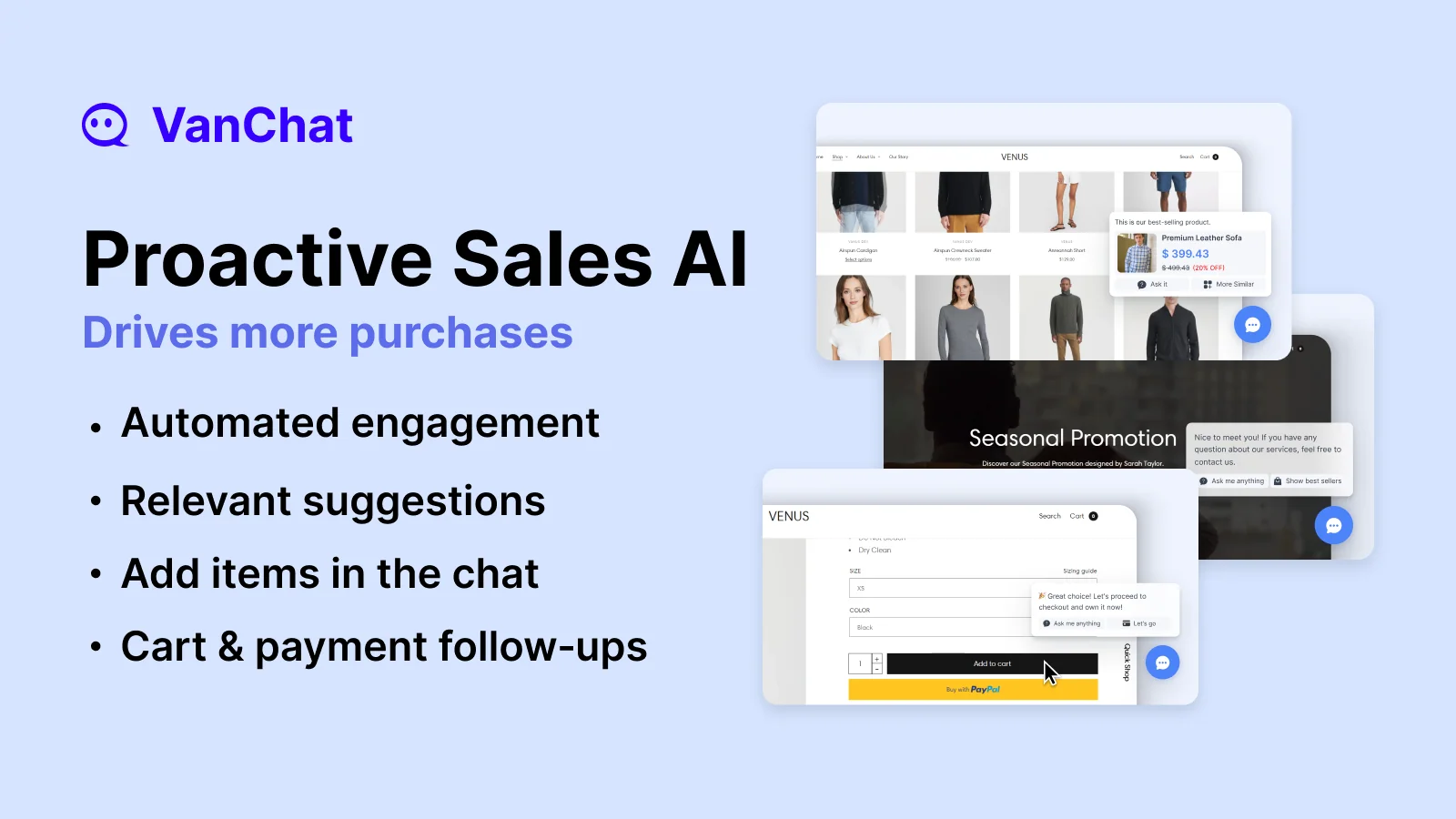
The help center lists six triggers, each with three message types to choose from:
| Trigger | What VanChat can show |
|---|---|
| Shopper lands on the homepage | Greeting, best sellers, or a discount code |
| Browsing a collection page | Best sellers or new arrivals |
| Browsing a product page | Help prompts or related products |
| Item added to cart | Discount reminder or complementary products |
| Item removed from cart | Alternatives to keep the shopper |
| Abandoned checkout | A coupon to bring them back |
The three message types are a conversation starter, a product recommendation, or a coupon that pulls a discount code from Shopify and can ask for an email first. Each pop-up fires on a time delay or scroll trigger, then auto-closes or stays until dismissed. VanChat's FAQ mentions seven scenarios, so the list may have grown since the help article was written.
My one caution: pop-ups are the setting most likely to annoy shoppers. A 2025 reviewer asked for a way to "better customize or disable certain default messages like promo pop-ups" (Chiara Rossetti). Turn on one trigger at a time and watch whether conversion moves, which is the same advice I give in my proactive chat guide.
Order tracking and handover
Order tracking is always on. A shopper asks where their order is, enters the email they used at checkout, and sees each active order with a status (shipment pending, in transit, out for delivery, delivered, failure) and a Track button that pulls carrier details through services like 17track. Orders delivered in the last 14 days are still shown.
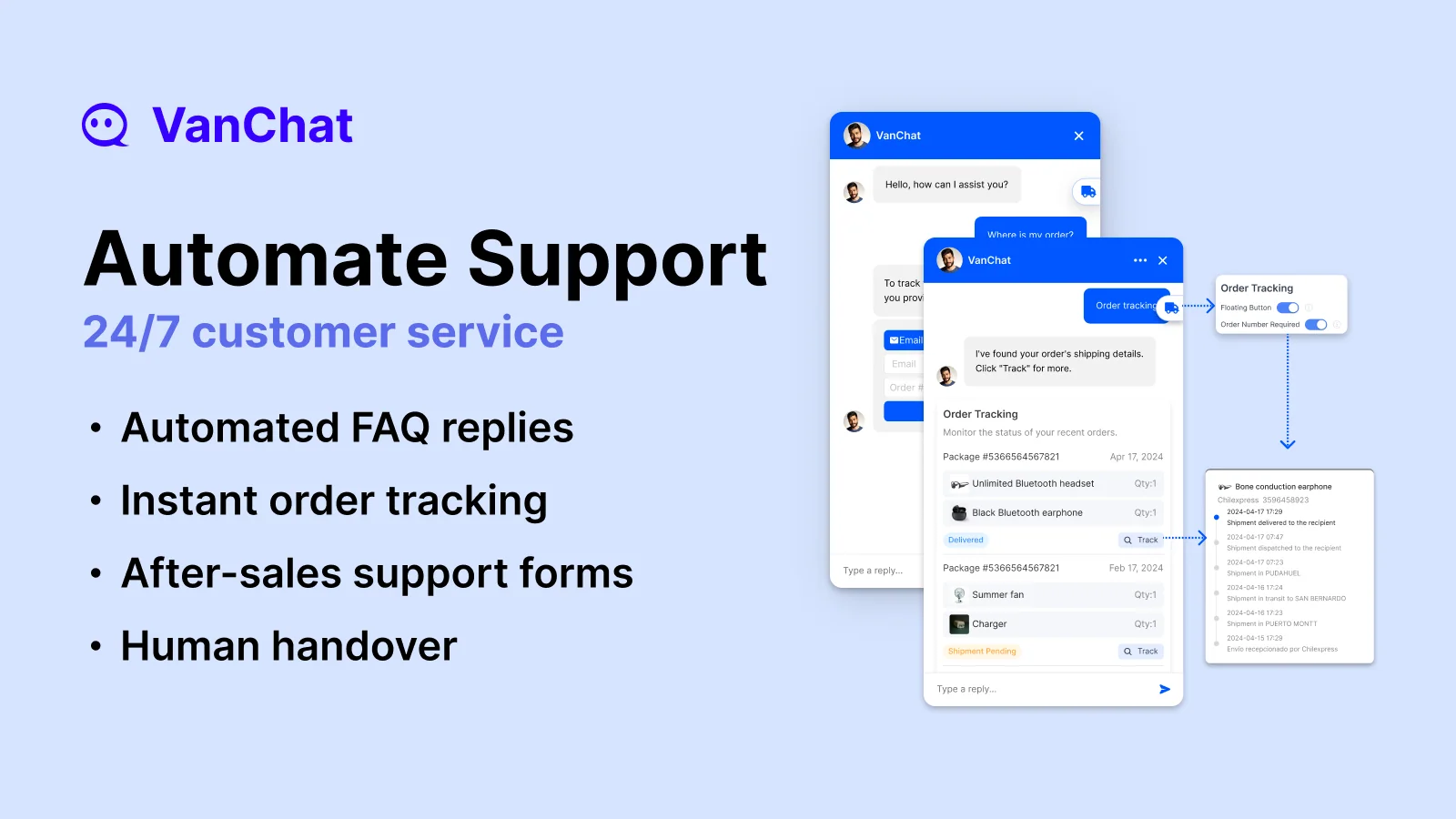
That flow covers the most common post-purchase question without a person. It's the same job I describe in my guide to WISMO automation, and it's narrower than it looks: VanChat can show status, but changing an address or processing a return still means a handover.
Handover is where VanChat has changed most. A UK store wrote in January 2025 that the "only thing it is lacking is direct integration with a live chat/handover to alive agent" (Heracles Wellness). Today the pricing table lists human handoff, live chat and Shopify Inbox on every paid plan, and the listing adds unlimited human replies from Starter up. The feature page adds WhatsApp, Messenger, Instagram, a contact form, email and calls as routes, and names Zendesk and Gorgias. A store that has used it for a year noticed the change:
"They now have integrations with Shopify Inbox, custom live chat, or Gorgias. It looks like they are adding even more integrations to popular help desk solutions. So its an even better solution than when I first started using it last year."
One catch: Gorgias and Klaviyo are on the Growth plan at $249 and up. If you run Gorgias and want chats to land there, price VanChat from Growth, not Starter. My AI handoff best practices cover what to test before you rely on it overnight.
Correcting and controlling the AI
This is the strongest part of the product for me. In Conversations, every AI answer has a Correct button; you rewrite the answer, and the correction applies to similar questions next time, per the knowledge base guide.
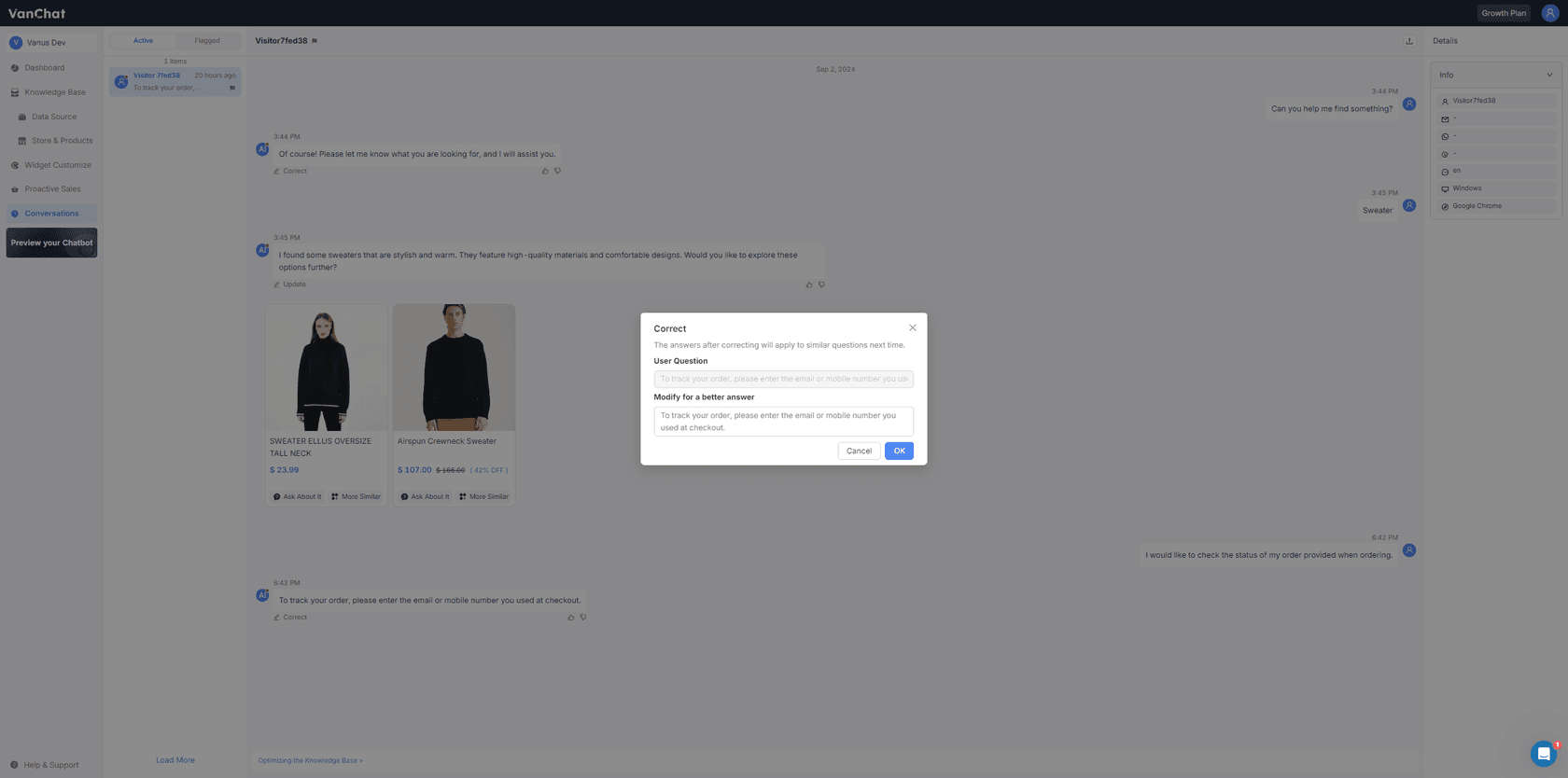
On top of that sit AI Instructions, the layer for what the bot must and must not say. The most detailed review on the listing, from a UK store a year in, explains why it matters in a regulated category:
"The AI Instructions layer is what won me over: a global instruction plus separate scenario rules, so you can hard-code what the assistant must never say. I tested it with deliberately leading questions, the kind designed to pull an overclaim out of a bot, and it held the line every time."
The same review flags two things worth knowing: the global instruction is capped at 1,500 characters (scenario rules take the overflow), and the switch that makes the widget visible to shoppers lives on the Dashboard, not in Widget Settings. Both are easy to work around once you know.
Testing is simpler. There's a Test your chatbot preview where you chat with it before publishing. It's a manual check, not a run over your past conversations, so write your own list of tricky questions. My checklist for testing an AI agent works for this.
The ROI numbers, and how VanChat counts them
VanChat's site leans hard on return on investment. Its pricing page quotes Patiowell at 15,687.1% first-month ROI after 18 orders in the first week, Aquastrong at $45,702 in first-month sales, and Monument Grills at +12.04% paid conversion. Those are real customer quotes on VanChat's pricing page, and I don't doubt the stores saw lift.
But the method matters, and VanChat is unusually open about it. Its FAQ says that if a visitor buys after interacting with VanChat, "we consider those interactions to have played a meaningful role in driving the sale." The next paragraph adds that "some customers may have intended to buy anyway."
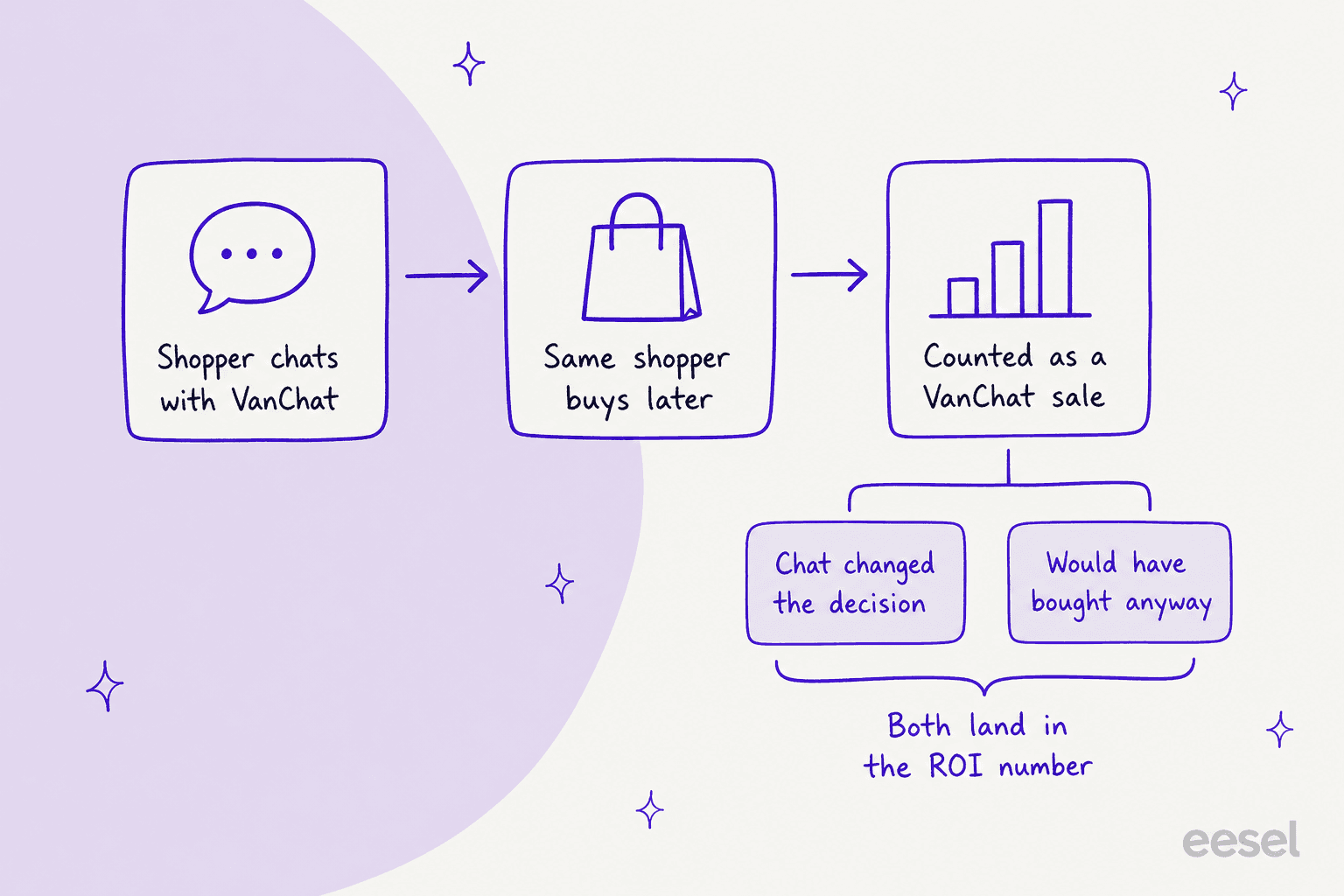
So the dashboard's revenue figure is revenue the chat touched, not revenue the chat alone caused. That's normal for chat attribution (most tools in my chatbot analytics guide work this way), and the Business Insights page also shows conversion rate and add-to-cart rate after interactions, which are more useful.
If you want a cleaner read, compare your store's conversion rate in the four weeks before and after you switch proactive sales on. That's the test I'd run before quoting any figure to a boss, and it's the method in my chatbot ROI guide.
VanChat pricing
VanChat charges by AI reply. Human replies in live chat are unlimited, and so are visitors, but every answer the AI writes counts against your plan.
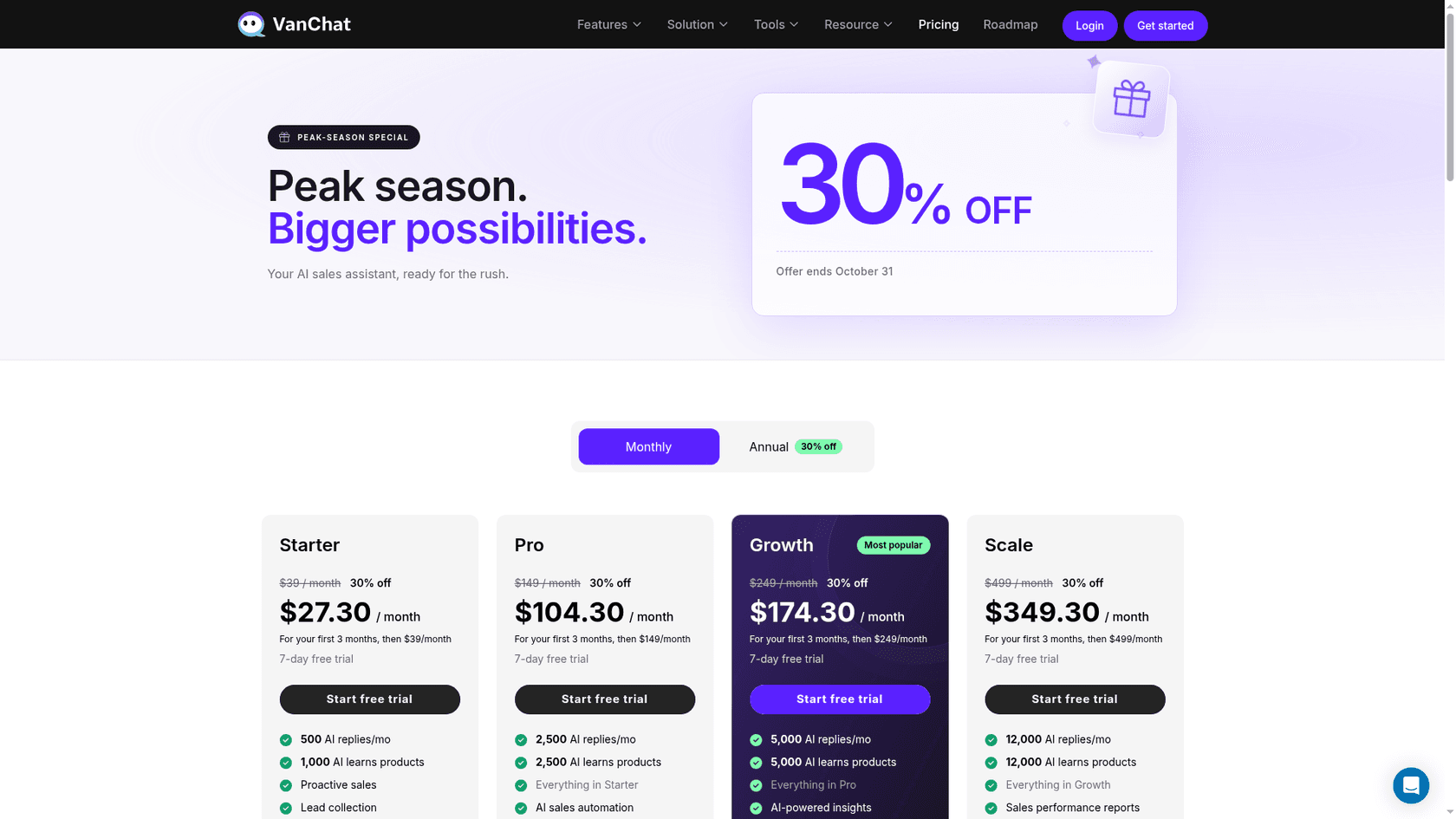
| Plan | Price a month | AI replies a month | Products learned | What it adds |
|---|---|---|---|---|
| Free | $0 | 100 | 100 | Recommendations, order tracking, handover, leads (Shopify listing only) |
| Starter | $39 | 500 | 1,000 | Proactive sales, lead sync and export, conversation search |
| Pro | $149 | 2,500 | 2,500 | AI sales automation, Instagram and Facebook, chat export |
| Growth | $249 | 5,000 | 5,000 | Gorgias, Klaviyo, multi-market, AI insights, no VanChat branding |
| Scale | $499 | 12,000 | 12,000 | Sales performance reports |
| Business | $799 | 20,000 | 20,000 | Dedicated customer success, 14-day trial |
| Enterprise | Custom | Custom | Custom | Custom reports |
Every plan charges $0.09 per extra AI reply. Paid plans come with a 7-day free trial, and the Shopify listing shows annual billing at $390, $1,490 and $2,490 for Starter, Pro and Growth (save 17%). Until October 31, the pricing page also runs a peak-season offer of 30% off the first three months, which puts Starter at $27.30.
The included replies get cheaper as you climb, from 7.8 cents each on Starter to 4 cents on Business. The overage rate never moves:
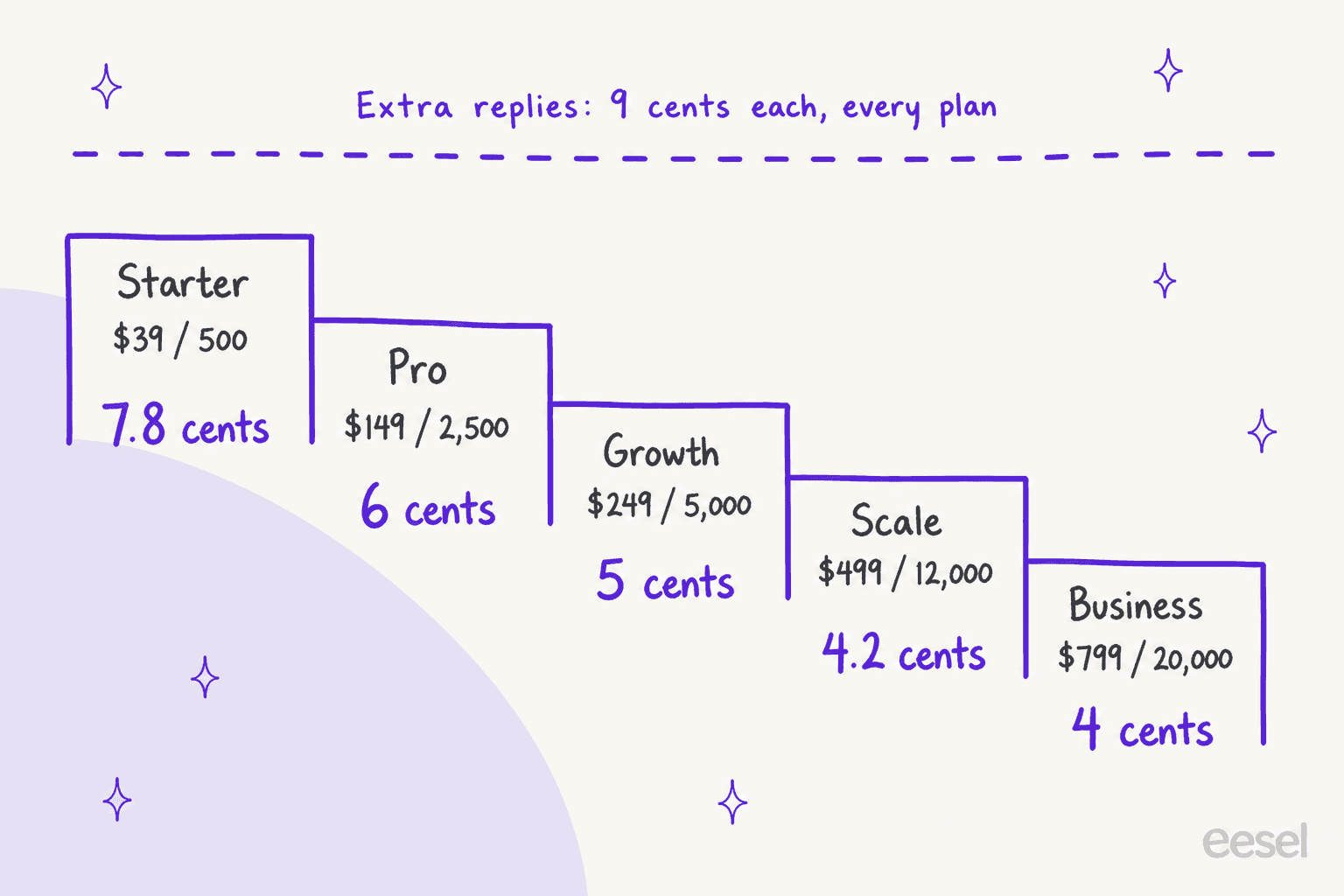
Because 9 cents is above every plan's included rate, overage stops making sense quickly. Here's where each upgrade pays for itself:
| If you're on | And use about | You pay | Same as |
|---|---|---|---|
| Starter ($39) | 1,722 replies | $39 + $110 overage = $149 | Pro |
| Pro ($149) | 3,611 replies | $149 + $100 overage = $249 | Growth |
| Growth ($249) | 7,778 replies | $249 + $250 overage = $499 | Scale |
Two practical notes. A reply is each AI message, not each conversation, so a chatty shopper who asks five questions uses five. And watch your first month: an eight-month reviewer mentioned "some unexpected charges" that the team sorted out (CKL KVM Switches). If you're comparing models, my chatbot cost breakdown shows how per-reply, per-conversation and flat plans play out.
What Shopify merchants say in their VanChat reviews
The headline is strong: 115 of 120 reviews are five-star. The praise clusters around fast product learning, answers that stay on script, and a support team that does custom work. Stores report the share of questions it handles in their own words: "at least 85% of customer questions from the start" (CKL KVM Switches), "nearly 98% of our pre-sales inquiries" (AULA), and "95% of the questions" (Hobby Armor).
Those are self-reported and use different definitions, so read them as a range, not a benchmark. VanChat's own homepage claim is that it answers 97% of questions without a person.
How long reviewers had used it
Each Shopify review shows how long the store had used the app when it wrote the review, so I went through all 119 I could read. This is where VanChat stands out from most young Shopify chat apps.
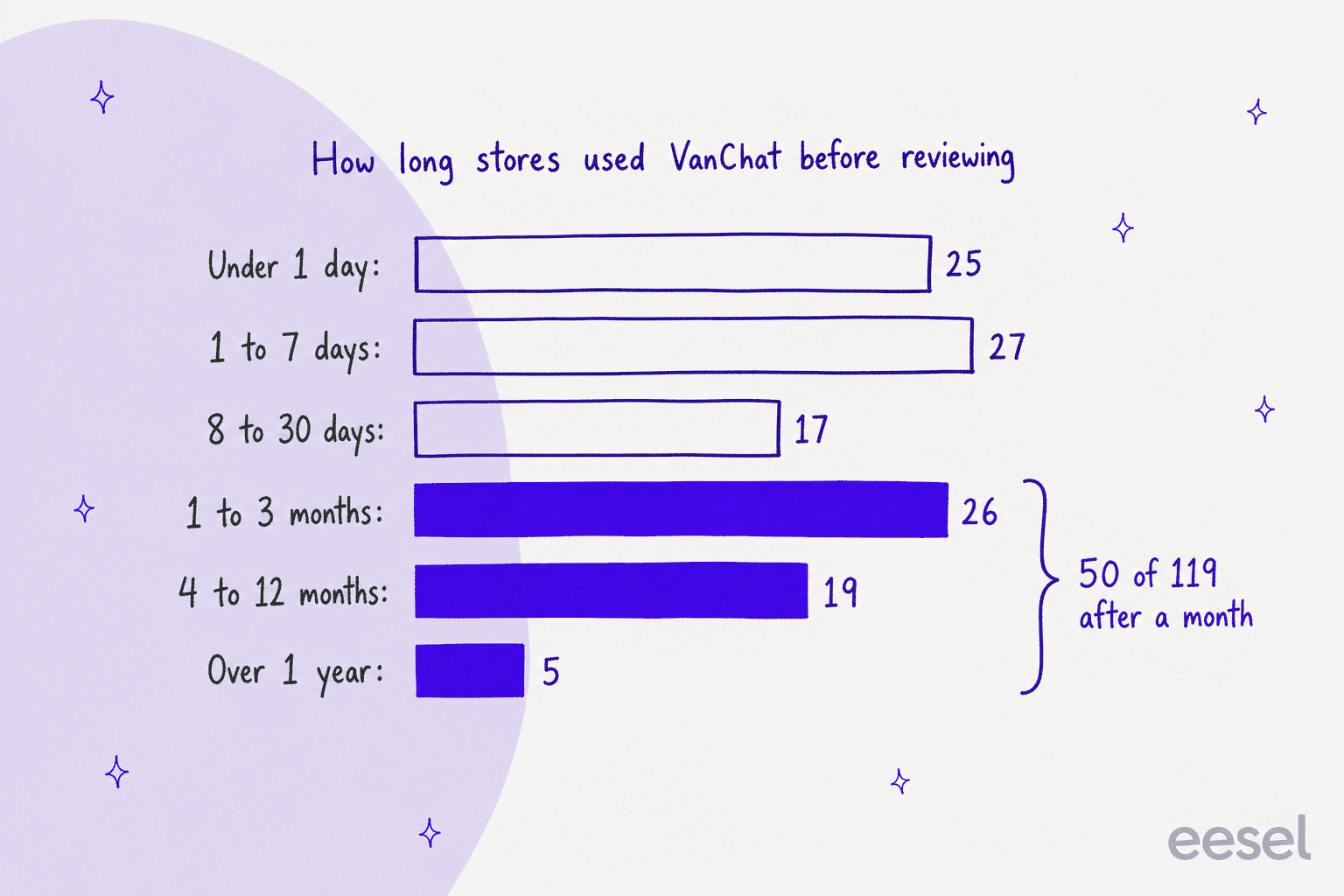
Week-one reviews still make up 52 of the 119, which is typical of how the App Store prompts reviews. But 24 stores wrote after four months or more, including two Italian stores at eight and eleven months saying it keeps improving. For comparison, in my Chizy review, 97 of 131 reviews came in the first week. VanChat's reviews say more about month six than most.
Outside Shopify there's little to go on. G2 has a single five-star review, and I found no Reddit threads from real users.
The critical notes
There's one one-star review, from a Chilean store 13 minutes in, about slow replies from VanChat's own support chat and not wanting to pay before knowing it would work. That was February 2025; the Free plan on the listing now covers the second point.
The three-star review is a question, not a rating of the product. A German store 11 months in asked:
"Hey, could you confirm whether VanChat is EU‑US Data Privacy Framework (DPF) certified – and if not, whether/when it's planned? Alternatively, do you offer EU data hosting / EU data residency (so no data leaves the EU)?"
There's no public reply under it, and neither the listing nor the pricing page mentions EU data hosting. If you sell into the EU, ask VanChat directly before installing, and read my notes on the EU AI Act for the disclosure side.
The other critical notes sit inside positive reviews: handover "could be smoother" in a 2024 review (jojopets), a request for less pushy default pop-ups, and the 1,500-character instruction cap. A UAE store gave four stars and uninstalled after eight days because it wanted something "100% ready" (IVORYNN). Several of these have since shipped, which fits the picture of a small team that builds what merchants ask for.
Pros and cons
| Pros | Cons |
|---|---|
| Learns products, pages and policies on install, plus files, links and Q&A | Billed per AI reply, with $0.09 overage on every plan |
| Six proactive sales triggers with coupons and product picks | ROI counts any sale after a chat, including buyers who'd have bought anyway |
| AI Instructions plus per-answer corrections for tight control | Global instruction capped at 1,500 characters |
| Order tracking with carrier status, always on | Gorgias, Klaviyo and branding removal need Growth at $249 |
| Handover to live chat, Shopify Inbox and messaging apps on every paid plan | Testing is a manual preview, not a run over past chats |
| 50 of 119 reviews from stores past their first month | No public answer yet on EU data hosting |
Who VanChat fits, and who should skip it
Pick VanChat if your chat is mostly pre-sale questions and you want an AI that actively sells: pop-ups on the product page, a coupon at checkout abandonment, product picks in the chat. It's a strong fit for stores in categories with claims they can't make (supplements, health, regulated goods), because the instruction layer lets you hard-code what the bot must never say. If you're weighing it against BestChat or the other apps in my Shopify chatbot apps roundup, proactive sales and control are the deciding differences.
Look harder if your chat volume is high but your margins are thin. At 5,000 AI replies a month you're on Growth at $249, and a store answering 10,000 is on Scale at $499. A flat-priced app like Chizy, with unlimited AI chats priced by catalog size, can cost less at high volume. Also look harder if you sell into the EU and need data residency answered in writing.
Skip it, or pair it, if most of your support is post-purchase email, returns and DMs handled in a helpdesk. VanChat hands chats into Gorgias, but it doesn't work the tickets already there. If your team is buried in refunds and order changes by email, an ecommerce helpdesk with AI inside it is the tool that touches that work.
My VanChat verdict: 4 out of 5
VanChat is a sales-first Shopify chat, and it's good at the job. It learns a store fast, it sells on its own initiative at six points in the journey, and its correction and instruction tools give a store real control over what the bot says, which is exactly what the CX lead I quoted up top was asking for. The reviews back it up beyond week one, which most apps in my Shopify AI chatbot list can't claim.
I take a point off for the meter and the math. Per-reply billing with a flat 9-cent overage needs watching, the helpdesk integrations start at $249, and the ROI figures count touched revenue, so run your own before-and-after test. As long as you do, it's the pick for stores that want their chat to sell, not just answer.
How eesel compares for Shopify support
eesel is an AI helpdesk teammate rather than a storefront widget. It joins the helpdesk where your tickets already live, through integrations like the one for Gorgias or Zendesk, and connects to Shopify for orders and the catalog.
It can also answer on the store through a chat bubble, so the chat and the queue share one knowledge base.
It learns from past tickets, macros and help docs as well as store content, and you set which topics always go to a person. Before it goes live, you can run it over past tickets and see what it would have said. What that looks like at real eesel customers:
- Question Beauty runs eesel on Gorgias and Shopify across Messenger, email and chat. Between August 8 and September 8, 2026 it handled about 990 tickets, sent about 960 replies and looked up about 290 Shopify orders before answering. Refunds, complaints and wholesale go to a person with a note.
- STIL Classics runs it on Gorgias in draft-only mode. In the same month it prepared about 320 tickets and looked up about 230 Shopify orders, leaving drafts as internal notes for a person to check and send.
- BEAUTEK uses eesel as the website chat on beautek.de and on Zendesk, in German. In that month it answered 77 website chats live and created 20 Zendesk tickets from chat, the same chat-to-helpdesk handover VanChat offers on Growth, with the AI also drafting the ticket replies.
| VanChat | eesel | |
|---|---|---|
| Main job | Storefront AI sales and support chat | Helpdesk tickets plus storefront chat |
| Learns from | Products, pages, policies, files, links, Q&A | Store data, past tickets, macros, help center, docs |
| Selling | Proactive pop-ups, coupons, product picks | Product links and answers on request |
| Where people answer | VanChat live chat, Shopify Inbox, or Gorgias on Growth | Your existing helpdesk |
| Email and helpdesk queue | Not worked by the AI | Drafts or sends replies inside tickets |
| Testing | Manual preview chat | Simulation on past tickets |
| Pricing | Free to $799 a month, $0.09 per extra reply | From $299 a month for 500 credits |
On price, I'll be straight: a store that only needs a storefront sales chat pays less on VanChat, and nothing in eesel matches its proactive pop-ups. eesel's $299 plan earns its cost when the email and helpdesk queue is where your team's day goes. For that comparison, see my AI helpdesks for Shopify list and the head-to-head of eesel vs Gorgias AI.
Try eesel on the queue behind your chat
If VanChat is selling on your storefront but the handed-off chats and order emails still pile up in Gorgias or Zendesk, that queue is where eesel helps. It checks the Shopify order, reads your policy, and drafts or sends the reply inside the ticket, and anything you'd rather a person handled, like refunds, goes to your team with a note. Run it on your past tickets first to see what it would have said, with 100 free credits and no card.
Try eesel free, or see how the Shopify integration works.
Frequently Asked Questions
Is VanChat worth it? What does an honest VanChat review conclude?
For a Shopify store that wants an AI chat focused on selling, yes. My VanChat review scores it 4 out of 5: strong product learning, six proactive sales triggers, a real instruction layer for what the bot must never say, and a review base where 50 of 119 stores had used it for over a month. I take a point off for per-reply billing with 9-cent overage and for an ROI number that counts every sale after a chat. Compare it with other Shopify AI chatbots first.
How much does VanChat cost?
Per VanChat's pricing page: Starter $39 a month for 500 AI replies, Pro $149 for 2,500, Growth $249 for 5,000, Scale $499 for 12,000, Business $799 for 20,000, and Enterprise on request. Every plan charges $0.09 per extra AI reply. The Shopify listing also shows a Free plan with 100 AI replies a month. For how that compares with chat apps that don't meter replies, see my Chizy review.
Is VanChat free?
There's a Free plan on the Shopify App Store with 100 AI replies a month, 100 learned products, product recommendations, order tracking, agent handover and lead collection. Paid plans start at $39 a month with a 7-day free trial (14 days on Business). For more free options, see my roundup of Shopify chatbot apps.
Does VanChat hand chats to a human?
Yes. Human handoff, live chat and Shopify Inbox are on every paid plan, and the feature page lists WhatsApp, Messenger, Instagram, email, a contact form and calls as handover routes. Gorgias and Klaviyo need the Growth plan at $249 a month. My guide to AI handoff best practices covers what to test before you go live.
How accurate is VanChat's ROI reporting?
VanChat's FAQ says that if a visitor buys after interacting with VanChat, it treats those interactions as having played a role in the sale, and it admits some of those buyers would have purchased anyway. So the ROI figure is revenue the chat touched, not revenue it alone caused. My chatbot ROI guide shows how to sanity-check it.
What happens if I go over my VanChat reply limit?
Each extra AI reply costs $0.09 on every plan, billed with the plan every 30 days. That is more than the per-reply rate of any plan's included replies, so a Starter store using about 1,722 replies a month pays the same as Pro. One long-term reviewer mentioned unexpected charges, so watch usage in your first month. My chatbot cost breakdown covers other metering models.
Does VanChat work with Gorgias or Zendesk?
Gorgias is a listed integration on the Growth plan and up, and VanChat's handover feature page also names Zendesk. VanChat passes the chat to your team there; it doesn't answer the tickets already in the queue. If that queue is the bigger job, an AI that works inside Gorgias or Zendesk is the better fit.
What are the best VanChat alternatives for Shopify?
For unlimited AI chats priced by catalog size, look at Chizy. For a per-reply model with a lower entry price, see Zipchat. If your team lives in a helpdesk, eesel's AI teammate answers the chat and the email queue on one knowledge base, as my AI helpdesks for Shopify list explains.