


What is RumbleTalk?
RumbleTalk is a cloud-hosted chat room. You create a room in its admin panel, paste one line of code (or install its WordPress plugin or Wix app), and visitors can chat in a group, privately one on one, or in a moderated queue. Its homepage claims more than 774,000 group chats created and embedded, and shows logos from Nasdaq, HP, Wix, SolarWinds and Sony Music.
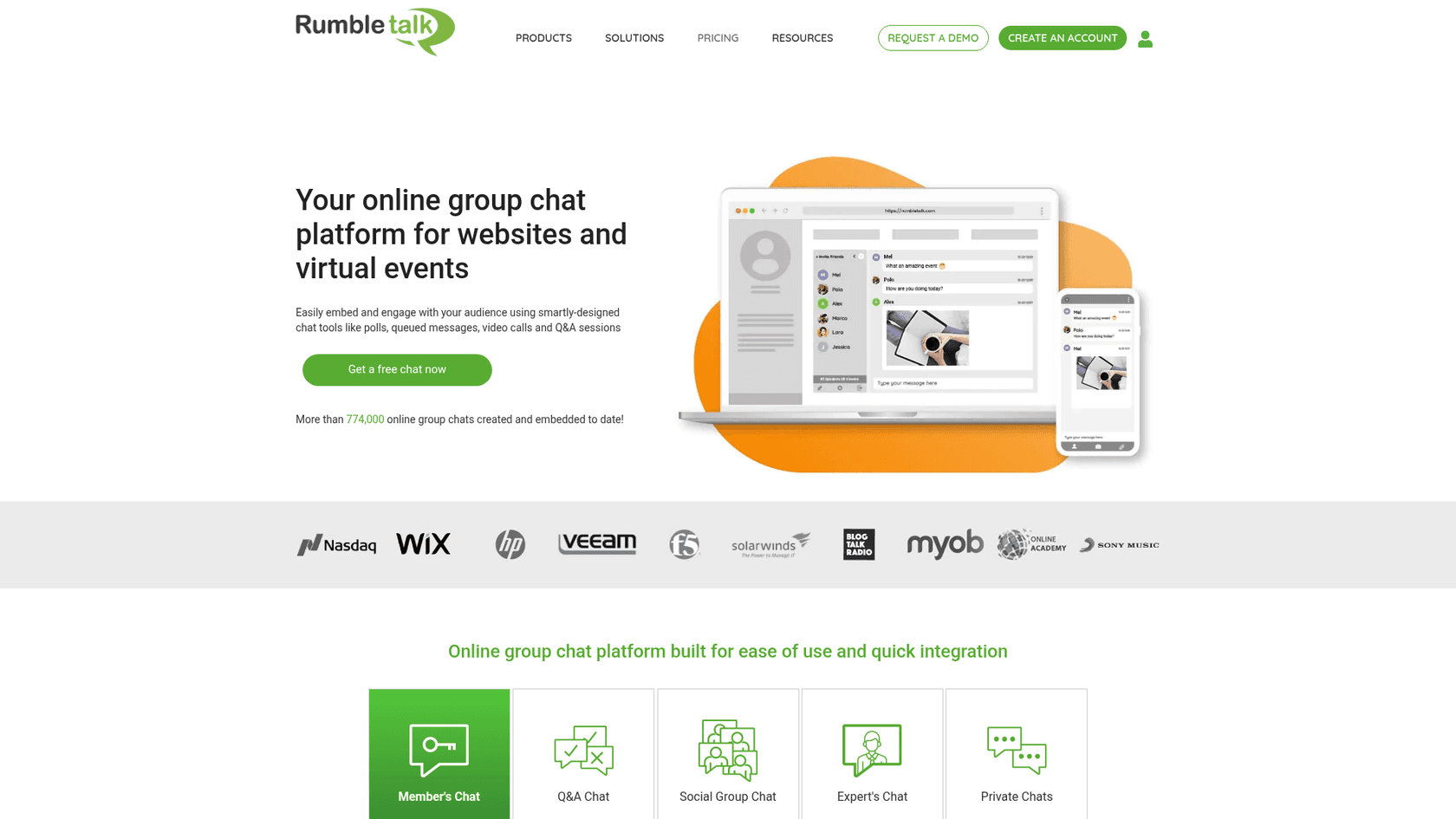
The use cases on its own pages tell you who it is for: live web events, radio shows, stock trading rooms, fan clubs, classes, job fairs and members areas. That is a different job from a live chat widget where a store or SaaS team answers customers. RumbleTalk's room is a shared space, closer to a moderated forum running in real time than to a support inbox.
If you have no website, RumbleTalk gives you a hosted "MiniSite" page with the chat built in, plus a video stream slot and your company details. You can also embed the same room on several sites at once.
How RumbleTalk works
Everything runs on RumbleTalk's servers, so your site only loads the chat in a frame. You set the room's look, login options and rules in the admin panel, then pick a chat type. The type decides who can talk to whom.
The five chat types
RumbleTalk's homepage and WordPress listing describe five ways to run a room, and you can switch between them later:
| Chat type | Who can talk | Built for |
|---|---|---|
| Member's chat | Only logged-in members, via your user base or SSO | Private communities, paid members areas |
| Moderated Q&A chat | Everyone can send, but an admin approves each message first | Webinars, live streams, panel Q&A |
| Social group chat | Anyone, with social or guest login | Open communities, fan chats |
| Expert's chat | Only the admin (expert) can start a one-on-one | Consultants, advisors, job fairs, interviews |
| Private chats | Everyone, but only in one-on-one threads | Networking and mingling |
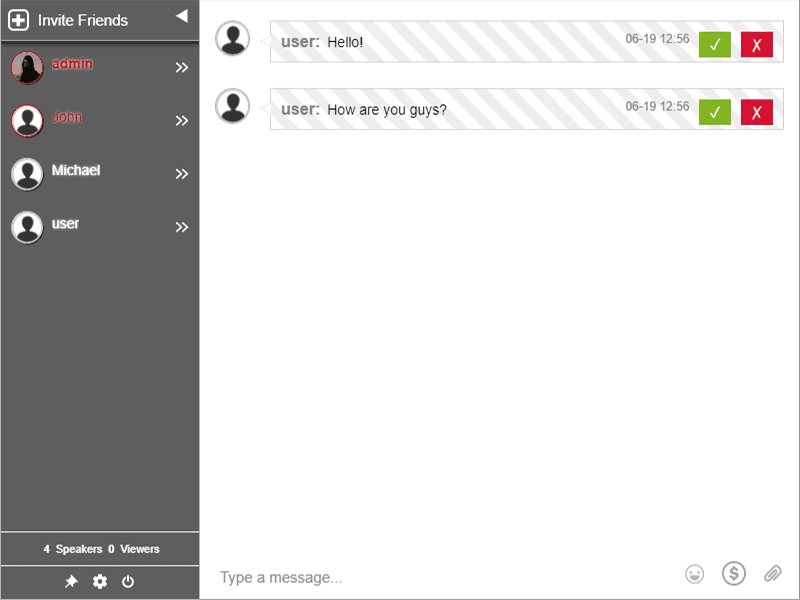
The moderated mode is the one most people mention. Messages land in a queue with an approve and a reject button, and only approved ones go public. Here is that queue from RumbleTalk's WordPress plugin screenshots:
Admin tools do the heavy lifting
The rest of the admin kit is what you'd want for a crowd you don't know. RumbleTalk's pricing table lists banned keywords, banning by IP, disconnecting a user for a few seconds as a warning, admin mode (only admins can type), slowing the chat down, and flood control that kicks out anyone typing too fast. Admins can pin a message, delete one or clear the room, and export the transcript to HTML or CSV.
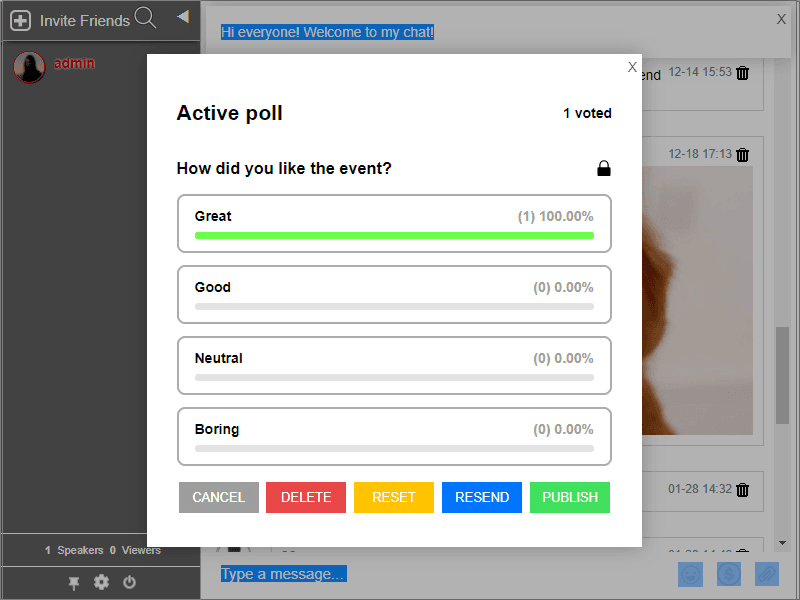
For engagement there are polls with bar, pie or word cloud results, welcome and offline messages, @mentions, custom emoticons, and "InText keywords" that turn chosen words into links. You get one keyword free and can buy up to 100, per RumbleTalk's keywords page. Users can send files up to 20MB, 30-second video and audio messages, and start private video or audio calls over WebRTC, which needs the chat to sit on an HTTPS page.
What RumbleTalk does well
After reading every listing, a pattern shows up: the happy reviewers ran events or member communities, and the unhappy ones tried to make it do something else. Here is what it is good at.
Moderated Q&A for live events
This is RumbleTalk's best feature, and the reason to pick it over a generic chat widget. If you run a webinar with a few hundred strangers, the approve-before-publish queue means nothing reaches the room until a moderator says so. Admin mode and slow-down handle the moments when the room gets loud.
"I really like the unique feature of pre-approved messages (directly approve messages in the chat by admins) + customizing the chat theme/colors. It works perfectly for our members-only community and our once-a-month live streaming discussions."
RumbleTalk's homepage also quotes Agora Financial, whose team had worried about lag and juggling Q&A, and found "there was zero lag" once the event started.
Polls and engagement inside the room
Polls run inside the chat, so the audience answers without leaving the page. The admin can resend, reset or publish results, which is handy when you want to show the room what everyone voted mid-event.
It embeds almost anywhere, and signs your users in
This is the part I looked at hardest. RumbleTalk ships a WordPress plugin, a Wix app, Joomla and Moodle plugins, React and Angular libraries, a login SDK and a REST API, per its integrations page. On WordPress, members auto-login to the chat with their WordPress account and avatar, and it supports BuddyPress, BuddyBoss, Ultimate Member and PeepSo. You place a room with a [rumbletalk-chat] shortcode.
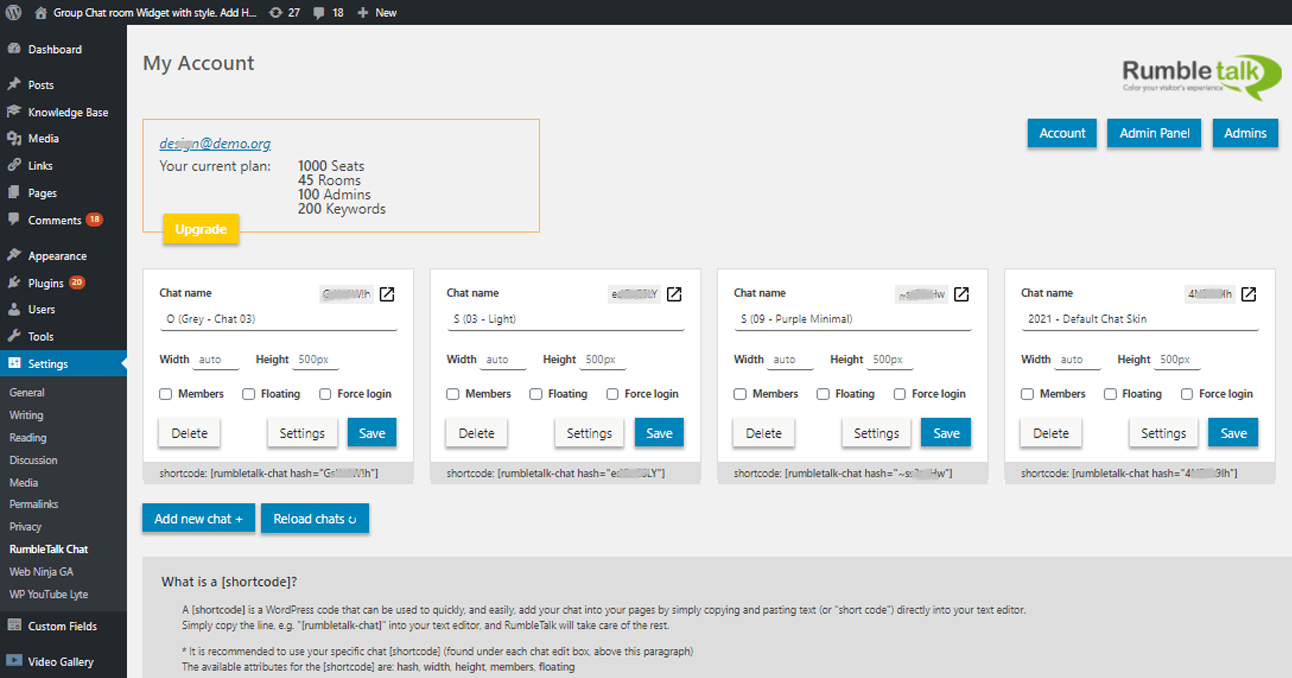
Single sign-on is the feature that makes a members-only room work, and it is where a lot of community support setups fall apart. RumbleTalk handles it without you writing a backend.
Hosted, so your server does no work
Because the chat runs on RumbleTalk's cloud, a traffic spike during a live event doesn't hit your WordPress database. Its listing makes this its headline pitch. One older review pushed back on exactly that ("dont like embeded from remote server"), so if you need chat data on your own servers, this is the wrong tool. For most event hosts it is the right trade.
The chat interface is translated into 30 languages, and it works on phones, tablets and desktops in a browser.
Where RumbleTalk falls short
None of these are bugs. They are what you get from a tool built for group chat, and they matter if you expected something else.
No AI, and no path to a ticket
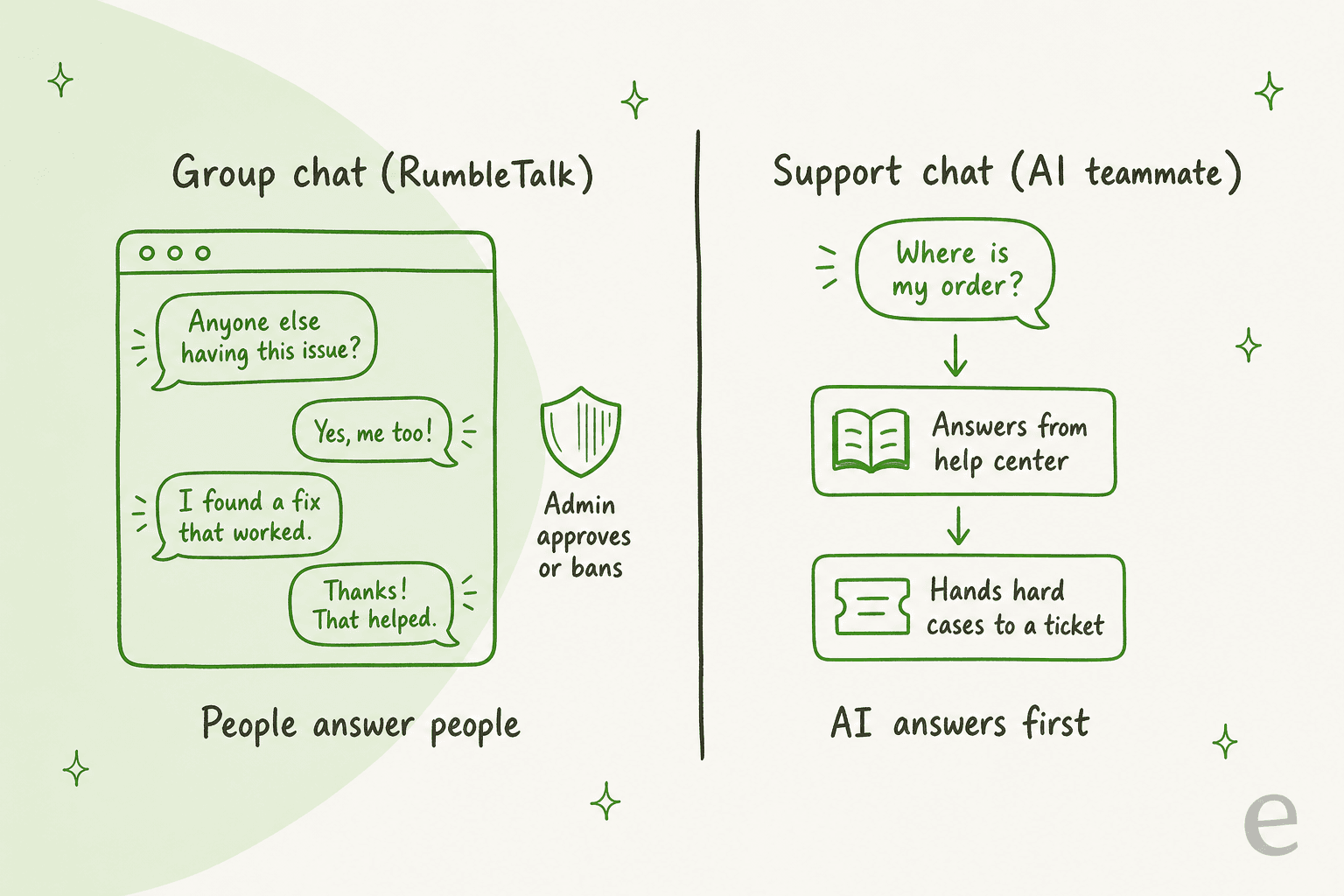
I found no AI assistant, chatbot or auto-reply anywhere on RumbleTalk's site, FAQ, pricing table or listings in October 2026. Every answer in the room comes from a person. That is fine for a community, where members helping members is the point. It is a problem if you hoped the chat would answer "where is my order?" at 2am.
There is also no shared inbox, no ticket and no helpdesk integration. If a visitor asks something that needs follow-up, the conversation stays in the room or in the exported transcript. Compare that with a support chat built to deflect live chat volume, which answers first and passes the rest on.
Seats cap your audience
RumbleTalk prices by seats, and a seat is one person online at the same moment, readers included. Seats are shared across all your rooms. When they run out, the next visitor sees a "Chat is Full" notice, per the pricing FAQ. So a Business plan with 100 seats and two rooms holds 100 people in total, not 100 per room.
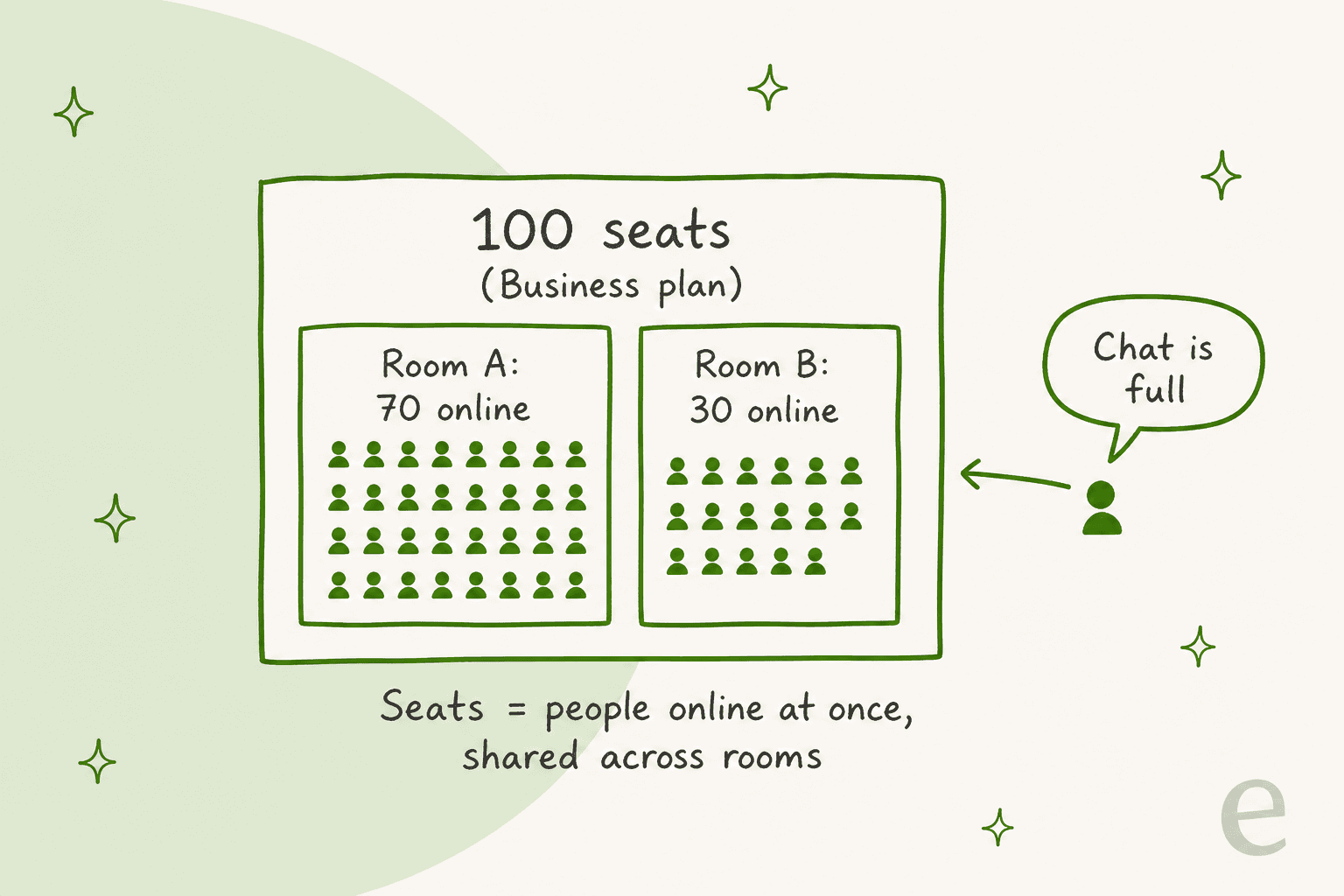
That model is honest for events: you pay for your peak crowd. The catch is planning. If your webinar draws 140 people and you bought 100 seats, 40 people are locked out at the moment that matters, so buy for the peak, not the average.
Reviews are thin and split
For a product that claims hundreds of thousands of chats, there is very little recent public feedback. The Wix App Market shows 2.7 from 111 reviews, with 41 five-star and 29 one-star. WordPress.org shows 3.4 from 21 ratings, and the plugin reports 600+ active installs. Capterra has a single 5.0 review, G2 has none, and Trustpilot has one review from 2022.
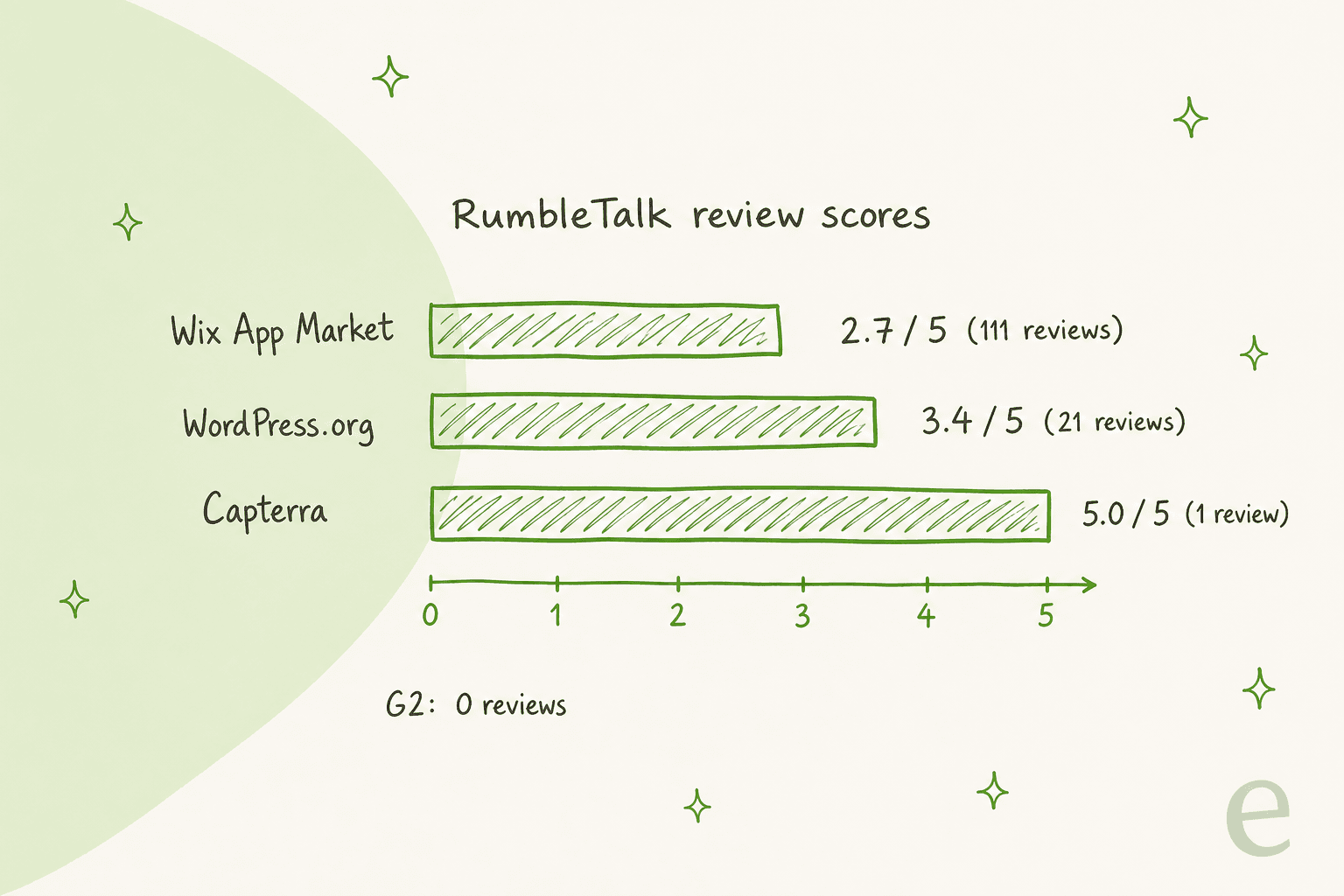
The low Wix reviews cluster around setup. One reviewer in February 2025 wrote that it "works fine with desktop, but it doesn't show up on the site on a mobile device"; RumbleTalk replied that Wix needs the app added in its mobile editor too. Another wanted faster replies while adding more chat pages. On the other side, support gets real praise:
"I've had the most wonderful experience with their support team and would like to mention their flash-fast reply to my inquiry."

My read: the Wix app is the rough edge. WordPress users running events are happier.
Paid chat access is gone
RumbleTalk used to let you charge people to enter a room, sell subscriptions or take donations, with a 90/10 revenue split. Its PayWall page is now marked "Deprecated feature", and the WordPress plugin changelog shows the paywall removed in January 2025 and its billing access removed in February 2026. The Wix listing still advertises "paywall, donations, and payment request", so check with RumbleTalk before you plan an event around paid entry.
No Shopify app
RumbleTalk is often grouped with store chat apps, but I could not find it in the Shopify App Store in October 2026. Its old listing address returns a 404, and a search for RumbleTalk returns nothing. Stores have plenty of Shopify live chat apps built for them instead.
Health data needs Enterprise
RumbleTalk's HIPAA page says it can support protected health information only on the Enterprise plan with a signed business associate agreement, and that you may not use it to talk with patients, plan members or their families. If you are in healthcare, read that list closely, or start from my guide to HIPAA compliant AI.
RumbleTalk pricing
RumbleTalk has four plans on its site. The headline prices on the pricing page are the yearly ones; the monthly prices only show up in the upgrade calculator.
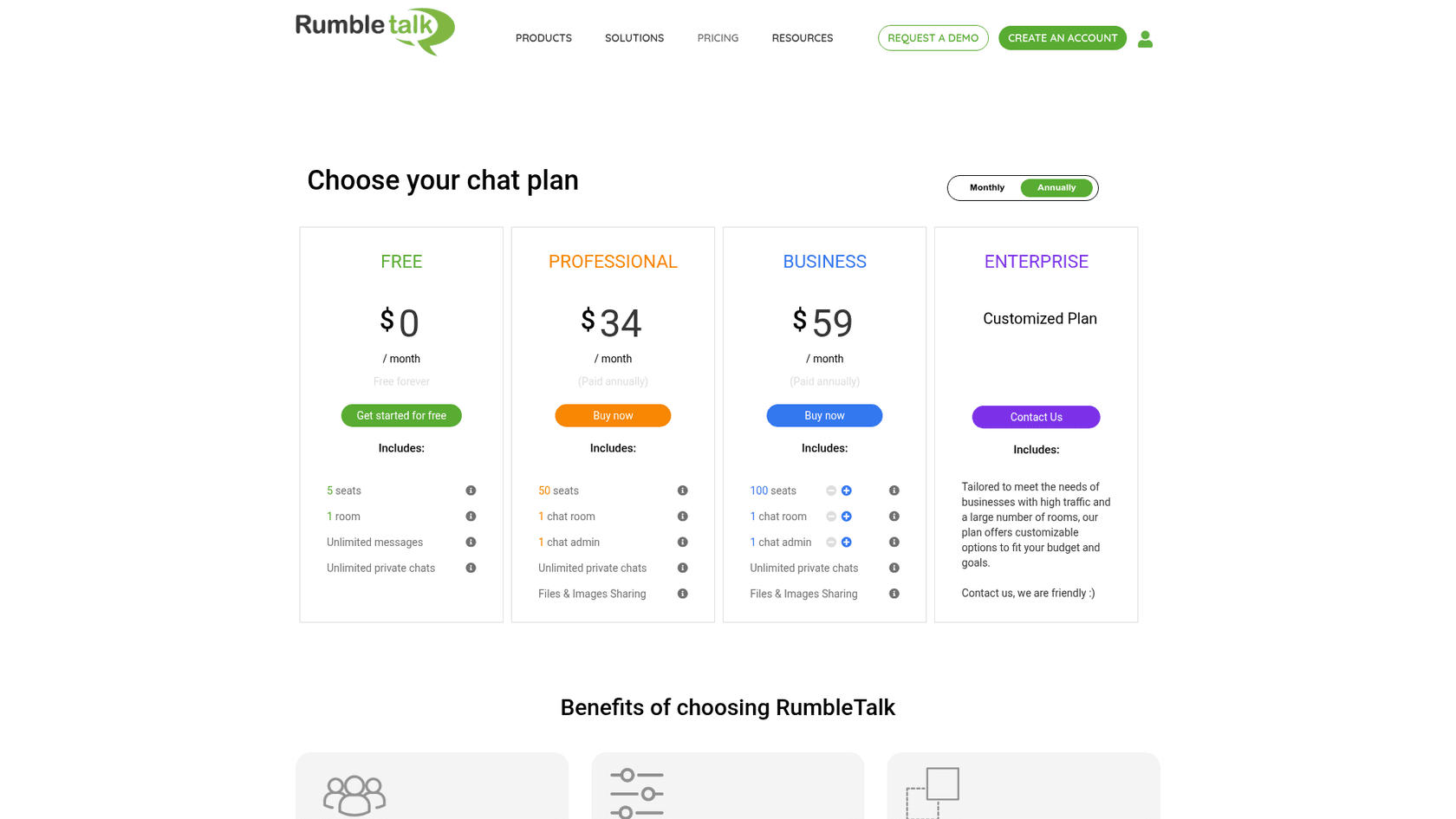
| Plan | Seats online at once | Rooms | Admins | Billed monthly | Billed yearly |
|---|---|---|---|---|---|
| Free | 5 | 1 | n/a | $0 | $0 |
| Professional | 50 (fixed) | 1 (fixed) | 1 (fixed) | $49/mo | $34/mo ($411/yr) |
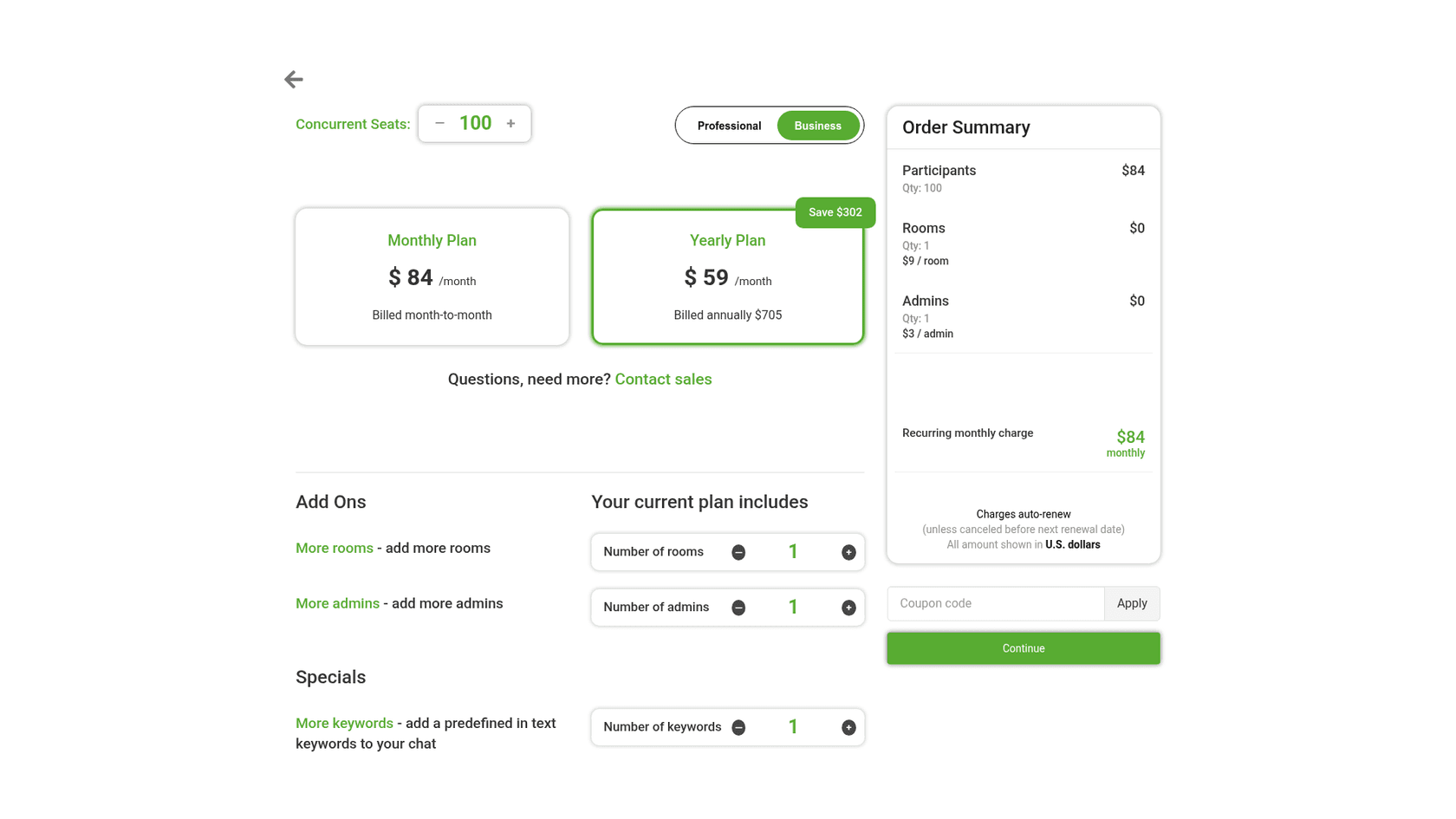
| Business | 100 to 5,000 | 1, add more at $9/mo each | 1, add more at $3/mo each | $84/mo at 100 seats | $59/mo at 100 seats ($705/yr) |
| Enterprise | Custom | Custom | Custom | Quote | Quote |
Business seats come in fixed steps. Here is what each step costs on the upgrade calculator, with one room and one admin:
| Business seats | Monthly | Yearly (per month) | Yearly total |
|---|---|---|---|
| 100 | $84 | $59 | $705 |
| 250 | $161 | $113 | $1,352 |
| 500 | $267 | $187 | $2,242 |
| 1,250 | $448 | $314 | $3,763 |
| 2,500 | $962 | $673 | $8,080 |
| 5,000 | $1,813 | $1,269 | $15,229 |
Rooms and admins stack on top. A 250-seat Business plan with 2 rooms and 2 admins comes to $173 a month, or $121 a month billed yearly ($1,453 a year), per the upgrade calculator.
Pick your peak audience to see which plan covers it:
Which RumbleTalk plan fits your peak crowd?
Count everyone online in the chat at the busiest moment, readers included.
Free
Professional, 50 seats
Business, 100 seats
Business, 250 seats
Business, 500 seats
Business, 1,250 seats
Business, 2,500 seats
Business, 5,000 seats
Enterprise
Prices from RumbleTalk's upgrade calculator on 22 Oct 2026, in USD, with 1 room and 1 admin. Yearly prices are about 30% below monthly.
Pick your peak audience to see the RumbleTalk plan and its monthly and yearly price.
A few pricing details worth knowing:
- Premium support costs extra. Standard support is email, 20 hours a day, 7 days a week. Business Support adds a 5-hour reply time for 6% of your plan cost, with a $250 a month minimum. Enterprise Support adds a 30-minute reply and phone for 20%, with a $750 a month minimum.
- Refunds and trials. You can cancel a paid plan within 7 days for a full refund, and payment runs through PayPal, including cards.
- Three numbers don't line up. The Wix App Market lists a Premium plan at $14.99 a month next to Free, well under the $34 to $49 for Professional on rumbletalk.com, and the Wix listing doesn't say what that tier includes. RumbleTalk's FAQ says yearly plans save "up to 25%", while its calculator takes 30% off. And the Professional and Business cards say "For 1000 MAU and up" even though billing is by seats online at once. If you buy through Wix, confirm what the $14.99 covers first.
My RumbleTalk pricing post goes deeper on the seat math and worked examples by event size.
RumbleTalk pros and cons
| Pros | Cons |
|---|---|
| Moderated Q&A queue built for live events | No AI, chatbot or auto-replies |
| Polls, pinned messages, slow-down and admin mode | No ticketing, shared inbox or helpdesk link |
| WordPress plugin with member auto-login and SSO | Seats cap your audience, shared across rooms |
| REST API, login SDK, React and Angular libraries | Thin, split reviews: 2.7 on Wix, 3.4 on WordPress.org |
| Hosted, so traffic spikes don't touch your server | Paid entry and donations are deprecated |
| Free plan for small rooms, 7-day refund | No Shopify app; HIPAA only on Enterprise |
RumbleTalk or eesel: which one fits?
There is no eesel integration with RumbleTalk, and the two do different jobs, so this is about which job you have.
Pick RumbleTalk if your visitors are there to talk to each other: a webinar Q&A, a members community, a class, a fan chat during a stream. Nobody expects the room to know your refund policy. You need moderation, polls and a login that matches your site, and RumbleTalk has all three.
Pick eesel if the chat on your site is really a support channel. eesel is an AI teammate for support, and its chat bubble answers visitors itself from your help center, docs and past tickets, then hands anything it can't answer to your team as a ticket in Zendesk, Freshdesk or your helpdesk.
If you liked RumbleTalk's MiniSite idea, eesel has a public chat link that opens a full-page chat with no website needed, and an inline embed that sits inside a docs page instead of floating.
The two named examples I'd point at:
- SamCart runs separate eesel agents on its website chat bubble and on Freshdesk tickets. Both answer from about 280 help center articles, the chat asks for a name and email first, and a ticket is tagged for a person the moment a seller asks for one.
- Beautek, a B2B equipment supplier, runs eesel as the chat on its site. In one month it answered 77 visitor chats live in German and turned 20 of them into Zendesk tickets for sales leads and questions that needed a person.
On price, the models are far apart. eesel is one fixed monthly plan: free to try with 100 credits, then $299 a month for 500 credits, where one chat or ticket is 1 credit however long it runs, with no per-seat fee. For a webinar room of 250 people chatting with each other, RumbleTalk at $113 to $161 a month is the cheaper and better tool. eesel earns its price when the same customer questions arrive hundreds of times a month and nobody wants to answer them by hand.
If you'd rather set it up from a terminal, the eesel CLI can create the chat bubble and connect your knowledge sources, and coding agents like Claude Code can run the same commands. As someone who builds integrations, that is the part I'd test first.
RumbleTalk alternatives
If RumbleTalk isn't the right fit, the shortlist depends on why you were looking. My RumbleTalk alternatives post covers them in full; here is the short version.
For a website chat your team answers, my Tidio review covers the popular all-rounder. The Chatra review covers a simple one for small stores.
For a free chat, see my list of tawk.to alternatives. The Chatway review covers a free widget with an AI add-on.
On WordPress or Wix specifically, my WPZOOM Connect review and Wix Smart Chat review cover chat apps on each platform.
For the wider field, start with my roundup of the best AI live chat tools. If you are weighing people against AI, the AI chatbot vs live chat guide lays out the trade.
Verdict: 3.5 out of 5 for events and communities
RumbleTalk earns 3.5 out of 5. For what it is built for, it is a solid pick: a moderated Q&A queue that keeps a live event clean, polls and admin tools for a big room, a WordPress plugin that signs your members in, and hosting that keeps the load off your server. At $34 to $59 a month billed yearly, a community or event host gets a lot of room for the money.
It loses points on the edges. Public reviews are few and split, the Wix app draws the most complaints, paid entry is gone, and the Wix price doesn't match the site. Most of all, it is not a support tool, and nothing on its pages suggests it is becoming one. If your visitors come to talk to each other, RumbleTalk is worth the free plan test. If they come to get an answer from you, pick a chat built for that.
Try eesel on your website
If you looked at RumbleTalk because visitors keep asking the same questions in your site chat, eesel answers them for you: it reads your help center, docs and past tickets, replies in the visitor's language, and passes the tricky ones to your team as a ticket. SamCart runs one agent on its chat bubble and another on Freshdesk, both from the same 280 articles. Try eesel free with 100 credits and test it against last month's real questions before a visitor sees it.
Frequently Asked Questions
Is RumbleTalk free?
Yes. RumbleTalk's Free plan is $0 forever for 1 room and 5 seats, meaning 5 people online in the chat at once, counting viewers. Unlimited messages and private chats are included. Anything bigger needs Professional or Business, which my RumbleTalk pricing breakdown covers seat by seat.
How much does RumbleTalk cost?
On rumbletalk.com, Professional is $49 a month or $34 a month billed yearly for 50 seats, and Business is $84 a month or $59 billed yearly for 100 seats, rising to $1,813 a month at 5,000 seats. Extra rooms are $9 and extra admins $3 a month. The Wix App Market lists a different Premium price of $14.99 a month. For how that compares with other tools, see my chatbot cost guide.
Does RumbleTalk have AI or a chatbot?
No. I found no AI assistant, chatbot or auto-reply feature on RumbleTalk's site, pricing table, FAQ or marketplace listings in October 2026. People answer people, and admins moderate. If you want a chat that answers questions itself, eesel's chat bubble does that from your help content.
Is RumbleTalk good for customer support?
Only for light, community-style support. RumbleTalk has no ticketing, no shared inbox and no helpdesk integration, so a question that needs follow-up has nowhere to go. It is built for group discussion and moderated Q&A. For a support chat, start with my guide to live chat for websites.
What is a seat in RumbleTalk?
A seat is one person online in your chat at the same moment, whether they are typing or just reading. Seats are shared across all your rooms, and once they run out new visitors see a Chat is Full notice. That makes RumbleTalk's price track your peak audience, unlike tools that charge per live chat agent.
Does RumbleTalk work with WordPress, Wix and Shopify?
It has a free WordPress plugin (600+ active installs) and a Wix app, plus Joomla, Moodle, React and Angular options and a REST API. I could not find a RumbleTalk app in the Shopify App Store; its old listing address returns a 404. Shopify stores have other picks in my list of Shopify live chat apps.
Can I charge people to join a RumbleTalk chat?
Not anymore. RumbleTalk's PayWall page is marked as a deprecated feature, and the WordPress plugin changelog shows the paywall removed in 2025 and 2026. If paid access was the reason you looked at RumbleTalk, check before you build around it. My RumbleTalk alternatives list covers other options.
What are the best RumbleTalk alternatives?
It depends on the job. For a website chat run by your team, my Tidio review covers a popular pick. For a free option, see my tawk.to alternatives. For a chat that answers on its own, eesel's AI teammate works inside your helpdesk.