


The skills at a glance
| # | Skill | What's actually different in 2026 |
|---|---|---|
| 1 | Ticket triage by confidence, not category | You're calibrating an AI's confidence threshold, not just writing routing rules |
| 2 | Coaching from AI-scored QA | Every ticket gets scored, so coaching time goes to real outliers instead of a random sample |
| 3 | Owning SLAs your team can hit | Targets have to account for what AI resolves versus what a human still has to touch |
| 4 | Writing docs for customers, not admins | Your knowledge base is now training data, not just a support fallback |
| 5 | Protecting the team from burnout | The lever is removing repetitive volume, not adding wellness perks |
| 6 | Capturing tribal knowledge before it walks out | Senior-agent knowledge has to get written down or trained in before they leave |
| 7 | Running calibration sessions that change behavior | Group QA reviews now compare human judgment against a model, not just each other |
| 8 | Reporting numbers leadership will act on | Real-time dashboards replace the monthly report nobody reads in time |
| 9 | Rolling out new tools without losing trust | Simulating changes against real historical tickets before anything goes live |
The shift already happened, whether your team noticed or not
Here's the objection that comes up in almost every serious conversation about adding AI to a support queue, and it's not really about AI at all - it's about management:
"The AI will never be able to answer 100% of the questions, but if it tries and just answers 'sorry I don't know this,' I cannot go and check all my 7,000 tickets to see if the AI actually made a good answer - then the point is a little bit gone. I need an AI who is only handling the tickets that it's confident to handle and all the other ones, leave them alone."
a CX lead at a DTC e-commerce brand running roughly 7,000 tickets a month on Gorgias
That's not a complaint about a product. That's a manager describing the exact skill this post is about: knowing what to hand off, and building enough visibility that you don't have to personally re-check every decision. Get that right and automation becomes leverage. Get it wrong and you've just added a second job auditing the first one.
1. Ticket triage by confidence, not category
The old version of triage was a routing rule: "billing questions go to Priya, technical questions go to the tier-2 queue." The 2026 version adds a second axis entirely - how confident should the system be before it acts without you.
The failure mode isn't AI answering wrong. It's AI answering wrong confidently, on a ticket that needed a human tone. A support manager at a bus-tracking service put it plainly when scoping their own rollout: they wanted a system that could "handle 60% of the incoming Zendesk tickets and know when to pull a real person in for better analysis and resolution." That "know when" clause is the actual skill. It's not a settings toggle you configure once - it's an ongoing judgment call about which ticket types are safe to fully automate, which need a human-reviewed draft, and which should never touch AI at all.
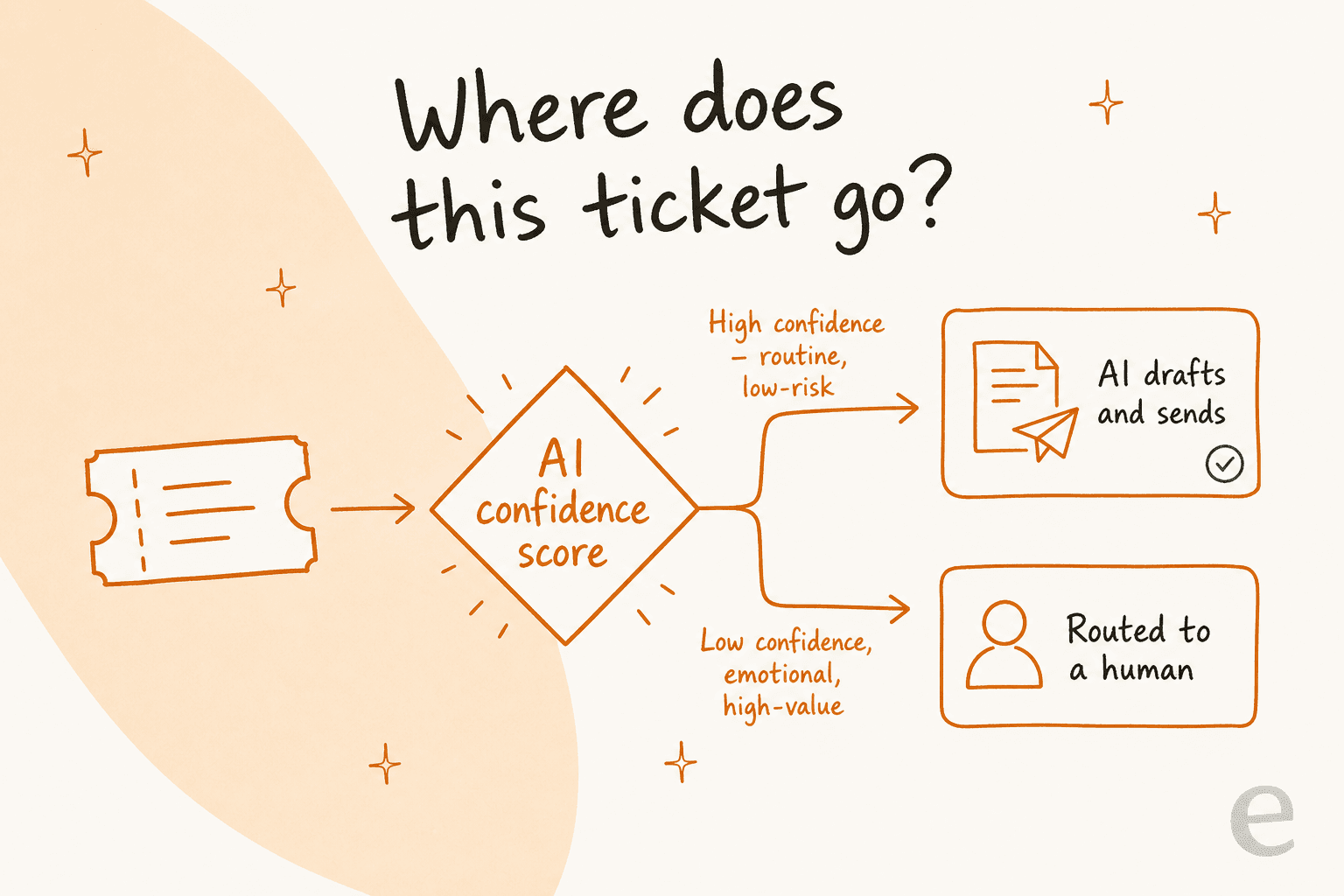
Confidence-based routing, not a fixed category list, is what most managers actually mean when they say they want AI "handled carefully."
In practice, that means reviewing an activity log the way you'd review a new hire's first week: not to catch every mistake, but to spot the pattern before it becomes ten repeated mistakes.

If you're building this skill yourself, this is where eesel's helpdesk agent is designed to help: it can be tuned to answer with full confidence on the tickets it knows well and quietly hand the rest to a queue for your team, so the calibration decision sits with you rather than being all-or-nothing. it's not a replacement for your team - it's the thing that makes the triage skill possible to practice at scale instead of in your head.
2. Coaching from AI-scored QA, not spot-checks
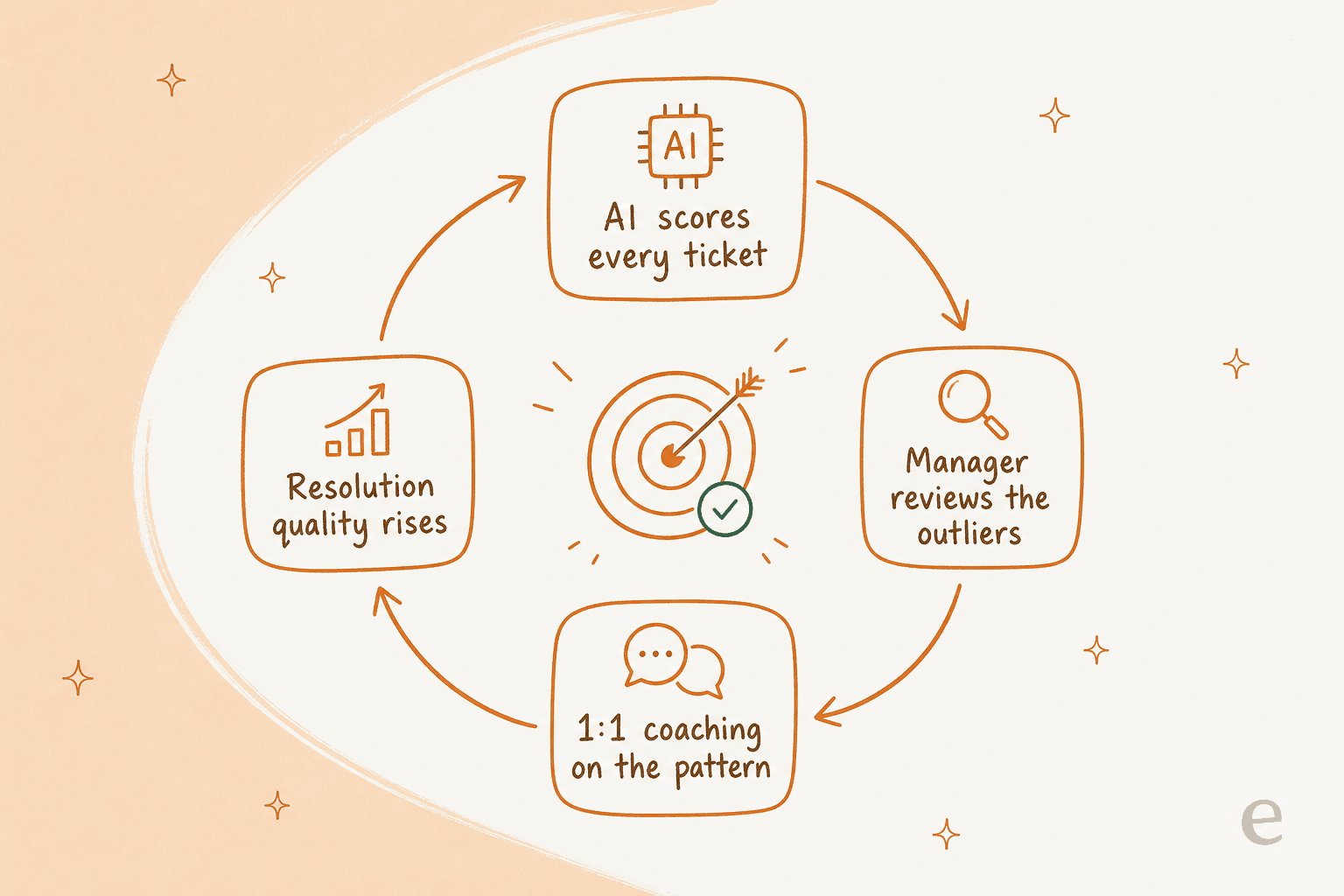
Most support teams still run quality assurance the old-fashioned way: a manager (or a QA specialist) randomly samples a handful of tickets per agent per month, scores them against a rubric, and schedules a coaching chat if something looks off. The math has never really worked - reviewing 5 to 10 conversations per agent per month, which is roughly what teams actually manage, means you're coaching off a tiny, possibly unrepresentative slice of someone's real output.
Buffer's 25-person Customer Advocacy team ran into exactly this before switching their review process, and Ross Parmly, who leads the team, described their sampling approach directly:
"We review 5-10 conversations per advocate per month, with increasing or decreasing quantity depending on time at the company, any current performance concerns, and track record of high reviews."
Buffer cut the time spent on manual review by half after moving to automated scoring, which freed up hours that went straight into actual coaching conversations instead of scanning transcripts. That's the skill: not reviewing more tickets yourself, but building a system that scores all of them so your 1:1 time goes to the outliers that are actually worth a conversation.
3. Owning SLAs your team can actually hit
Setting a first-response SLA is easy. Setting one your team can hit 95% of the time, month after month, without burning everyone out to get there, is the actual skill - and it's harder than it used to be because part of your response volume is now AI-resolved and part still needs a human, which means your old flat SLA math no longer applies cleanly.
The manager-level move here is tiering: different targets for different priority levels, and separate clocks for first response versus full resolution, so an urgent ticket doesn't sit in the same bucket as a routine one. Our own SLA best practices guide walks through how to set those tiers, and this AI SLA guide covers the part that's new: how automated resolutions change what "on time" even means. If you're on Zendesk specifically, SLA tracking and manager ticket views are both worth setting up before you touch the targets themselves - you can't tier what you can't see.
4. Writing a knowledge base for customers, not admins
This one shows up constantly and it's almost never framed as a management skill, but it is. One support manager's entire knowledge base had been written for internal admins, not the end users actually hitting the help center - every article assumed context a real customer didn't have, which meant every AI or human agent pulling from it inherited the same gap.
That's not a documentation problem you hand off to someone else. It's a management call about what "done" means for a help article, and it compounds: a confusing article doesn't just confuse one customer, it becomes the wrong answer every time an agent (or an AI) references it. Treating your knowledge base as active infrastructure, reviewed and rewritten from the customer's vantage point rather than the admin's, is one of the highest-leverage things a manager can own directly instead of delegating.
5. Protecting the team from burnout - by removing volume, not morale perks
Burnout in support is mostly a volume-and-repetition problem wearing a wellbeing costume. HubSpot's own support blog, citing research from Toister Solutions, puts the number at 74% of call center agents at risk of burnout - and if you've managed a queue during a spike, that number doesn't feel exaggerated. (HubSpot's support blog)
The teams that show up in real conversations about this pain point aren't asking for a wellness stipend. A director running a small EdTech support team put it as needing "robust self-service solutions as well as tools to supercharge the efficiency of our client-facing teams" - because customers already outnumbered staff, and no amount of encouragement fixes a structural volume mismatch. Another small e-commerce team on Zendesk described it more bluntly: AI "relieves our small support team from being over ran by questions that can be easily answered" by something simpler. The management skill is recognizing which pain is structural (too many repetitive tickets, not enough hands) versus which is actually a coaching or staffing issue, and fixing the right one. Scaling support without just hiring ahead of every spike is the practical version of this.
6. Capturing tribal knowledge before your best agents walk out the door
A French IT services firm supporting town-hall public-sector clients was about to lose two senior agents with deep ERP troubleshooting knowledge in the same year - and the plan wasn't a farewell card, it was to get that knowledge "into AI" before they left. That instinct is the skill: treating a departing expert's ticket history as a capture window, not just a resignation to manage.
Concretely, this means training whatever system you use on the actual historical tickets your best people have resolved, not a generic FAQ doc someone wrote once and forgot about. It's the difference between a knowledge base that describes the product and one that reflects how your best agent actually thinks through a hard case.
7. Running calibration sessions that actually change behavior
Group QA calibration - where a few reviewers score the same tickets and compare notes - has always existed to keep scoring consistent across a team. In 2026 it has a second job: checking your reviewers' judgment against a model's, and figuring out where the two disagree and why. Evaluating AI agent performance inside your existing QA tool and building a real agent QA feedback loop both matter more now, because a calibration session that only compares humans to humans misses half the picture - the half where your AI's confidence and a reviewer's judgment quietly drift apart.
8. Turning support data into a story leadership will actually act on
The monthly support report has a structural problem: by the time it lands, the spike it's describing is over. "The customer doesn't want to wait for me to do my monthly report" is how one CX lead rejected retrospective analytics outright when asked to accept it as a substitute for live visibility into what was actually happening in the queue.
The manager-level skill is picking the handful of numbers that actually predict a problem - the right customer service KPIs, tracked in something close to real time, not buried in a spreadsheet - and translating them into a decision leadership can make, like adding headcount, adjusting SLA tiers, or greenlighting more automation. This breakdown of AI support metrics is a good starting list if your current dashboard still only tracks tickets closed.
9. Rolling out new tools without losing the team's trust
This is the skill that determines whether every other item on this list is even possible. A rollout that goes badly - an AI that answers confidently and wrong once, in front of a customer, with no warning - burns trust with your team and your customers in a single afternoon, and you spend the next six months rebuilding it.
We've watched this happen enough times ourselves that we now simulate every rollout against a customer's actual historical tickets before anything goes live, precisely because a confident-sounding bot giving a wrong answer is the single fastest way to lose a team's buy-in on automation for good. Red-teaming your support AI before launch is the technical version of the same instinct: find the failure mode in a test environment, not in front of a real customer.
Try eesel
If you manage a support team, the actual leverage in most of the skills above comes down to one thing: getting the repetitive, low-risk tickets off your team's plate so there's time left for the coaching, the SLA tuning, and the knowledge-base work that a manager can't outsource.

eesel plugs into Zendesk, Freshdesk, Gorgias, and the rest of the helpdesks most teams already run, learns from your own historical tickets and help docs on day one, and drafts or auto-resolves the tickets it's confident on while routing everything else straight to a person - the exact confidence-based split covered in skill #1. Every automated action lands in an activity log you can actually review, so coaching and reporting (skills #2 and #8) come from real data instead of a monthly guess. And because every rollout gets simulated against your own ticket history first, you get to practice skill #9 - earning the team's trust - before anything customer-facing goes live. It's free to try, with no credit card required.